Album Cover Size Guide: Spotify, Apple Music, Vinyl, CD
Vincent読了 12 分 ·
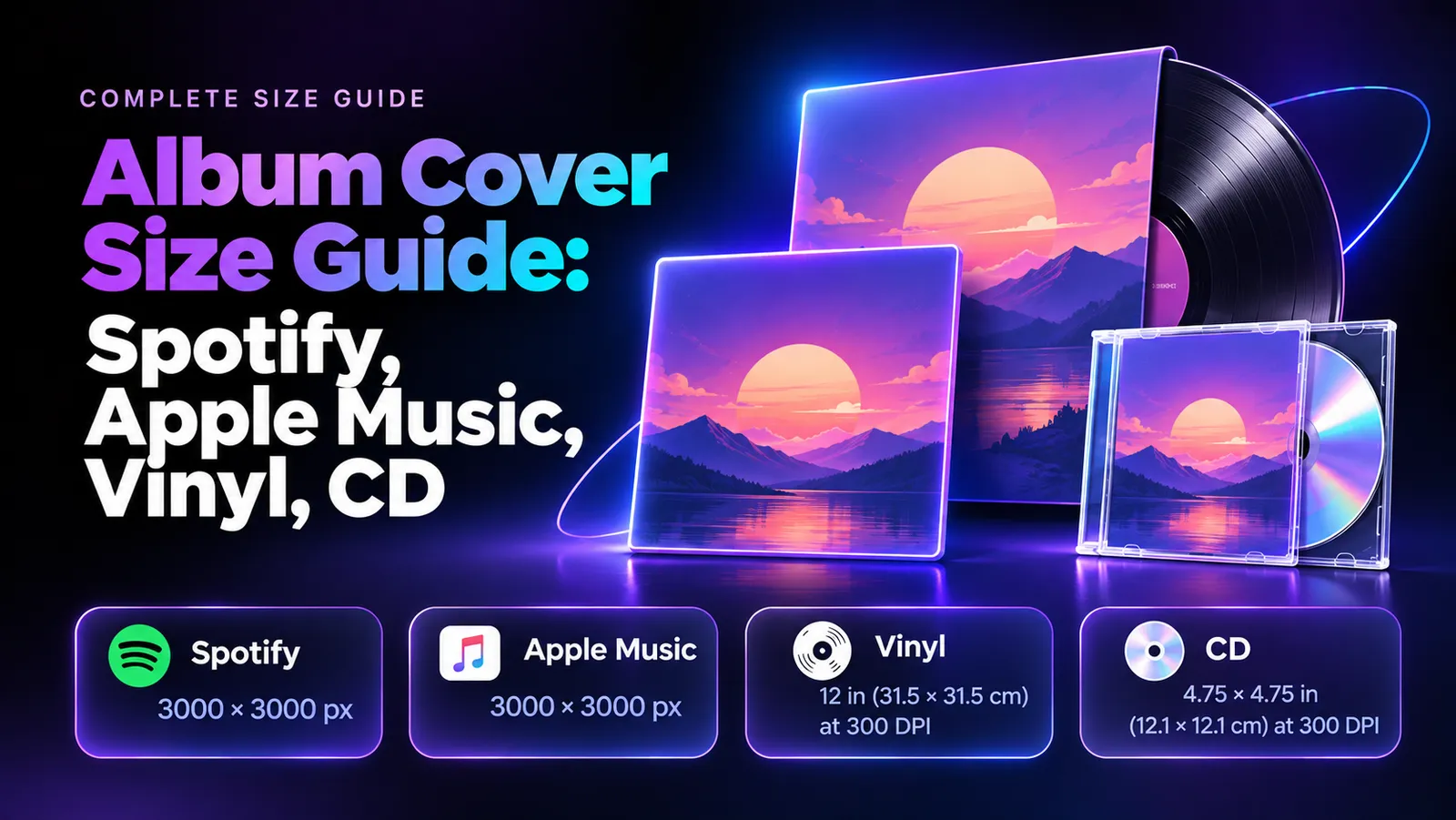
The best album cover size for a flexible digital master is 4,000 × 4,000 pixels. Spotify accepts square artwork from 640 to 10,000 pixels per side, while Apple Music's artist and distributor guidelines specify different minimums. Vinyl and CD covers require separate print-ready layouts, typically prepared at 300 PPI.
But the right pixel count doesn't guarantee acceptance. Distributor rules, image quality, and color settings can still cause upload errors. Physical releases add more challenges: vinyl sleeves need bleed and spines, while CD inserts require precise dimensions. Using the wrong file can mean rejected artwork or costly revisions.
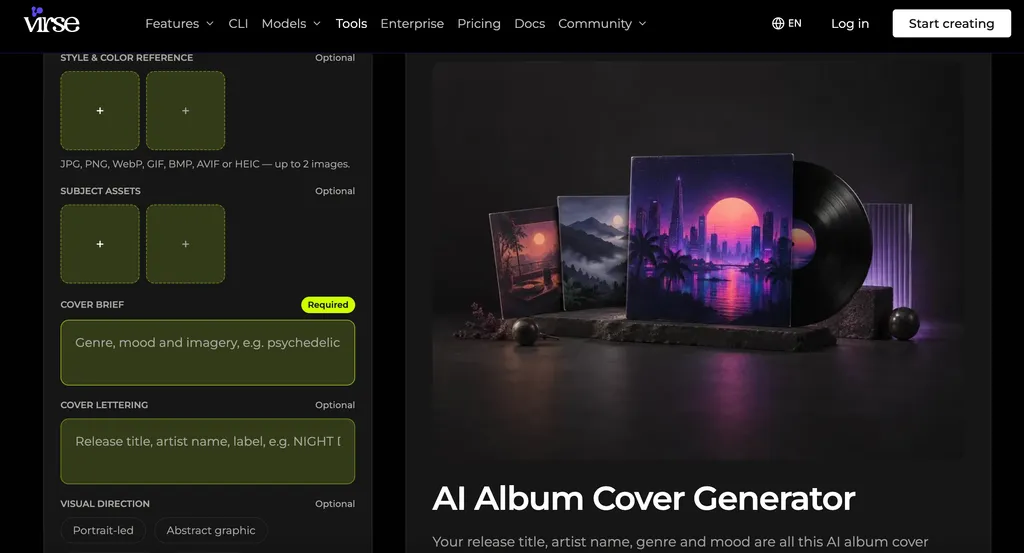
Want album art that stands out before anyone presses play? With Virse, explore multiple AI image models on an Infinite Canvas, compare visual directions, refine compositions, and organize creative assets in one workspace. Develop a distinctive visual identity for your release with the AI Album Cover Generator, then prepare the final artwork for your chosen platforms and formats.
What Is the Best Album Cover Size for Spotify, Apple Music, Vinyl, and CD?
There is no universal album cover size for every release format. Streaming platforms measure artwork in pixels, while physical manufacturers require specific dimensions, bleed, and print layouts.
Album Cover Size Requirements by Platform
Spotify Album Cover Size
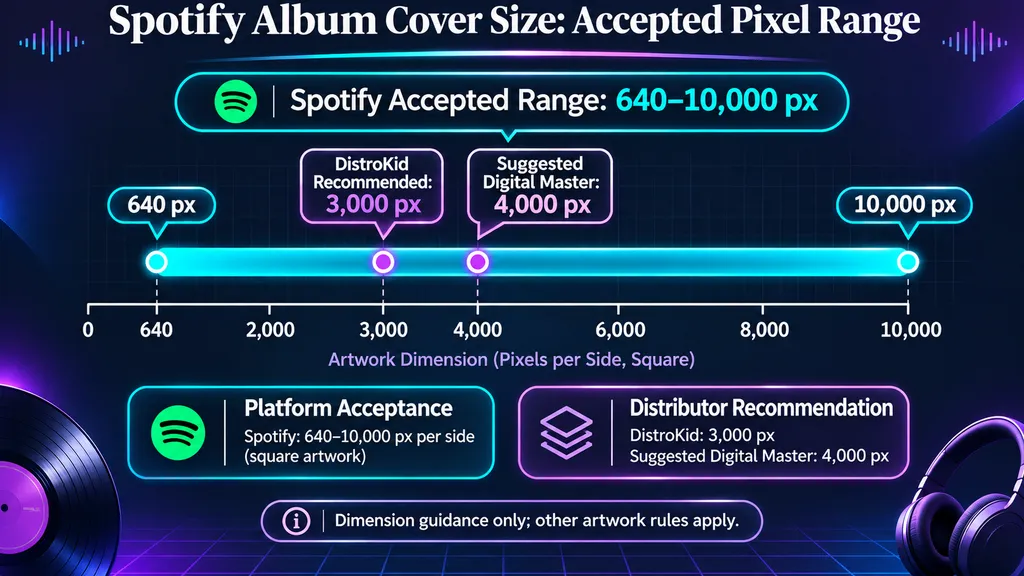
- Dimensions: 640–10,000 pixels per side
- Aspect ratio: 1:1
- Formats: TIFF, PNG, or JPG, subject to Spotify's encoding requirements
- Color: sRGB, 24-bit
Apple Music Album Cover Size
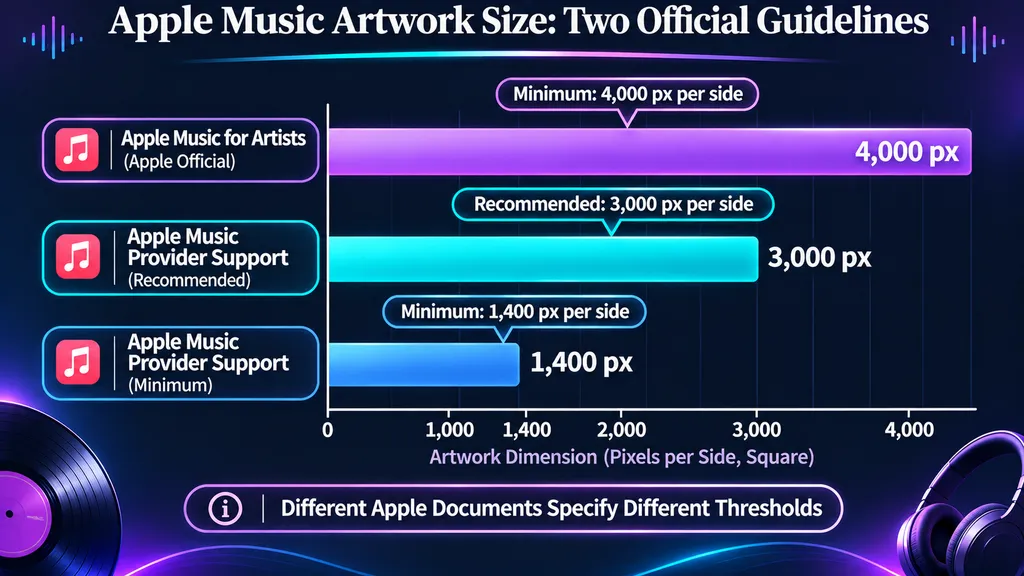
- Apple Music for Artists: At least 4,000 × 4,000 px
- Apple Music Provider Support: Minimum 1,400 × 1,400 px; recommended 3,000 × 3,000 px or larger
- Aspect ratio: 1:1
- Formats: Depend on the applicable Apple delivery guidelines
DistroKid Album Cover Size
- Minimum: 1,000 × 1,000 px
- Recommended: 3,000 × 3,000 px
- Format: JPG
- Color: RGB
12-Inch Vinyl Album Cover Size
- Common jacket dimension: Approximately 12.375 × 12.375 inches
- Resolution: Typically 300 PPI at final print size
- Requirements: Manufacturer template, bleed, spine, and safe zones
CD Album Cover Size
- Standard jewel-case front: 120 × 120 mm
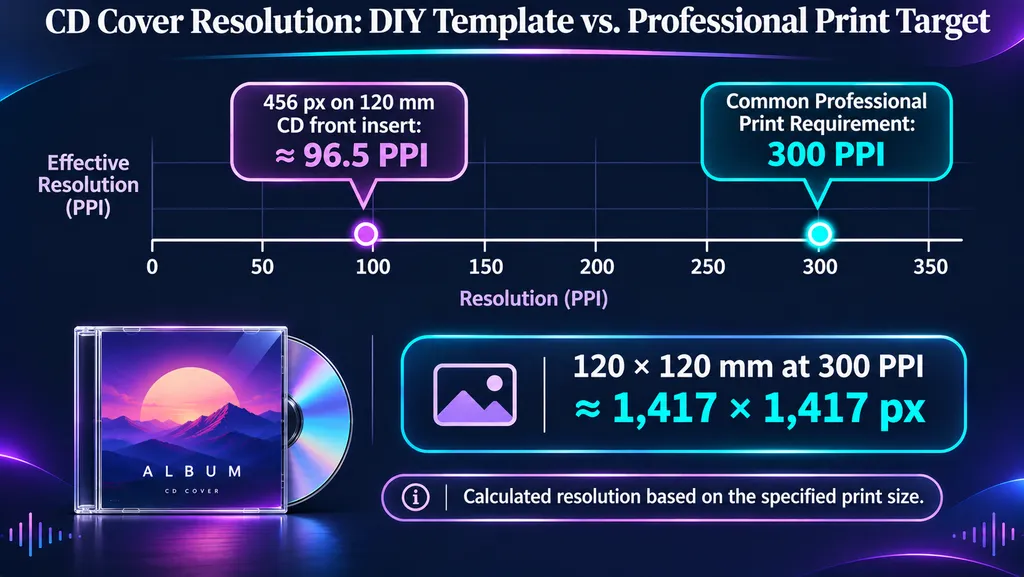
- At 300 PPI: Approximately 1,417 × 1,417 px, before bleed
- Requirements: Front insert, rear tray card, and spine layout
Our recommendation: Keep a native 4,000 × 4,000 px editable master for flexible digital artwork preparation, then export according to your distributor's requirements. Use separate manufacturer templates for vinyl and CD packaging.
Should You Use 3000x3000 or 4000x4000 for Album Art?
Our review of user questions identified a recurring problem: artists often receive conflicting size recommendations when commissioning album artwork.
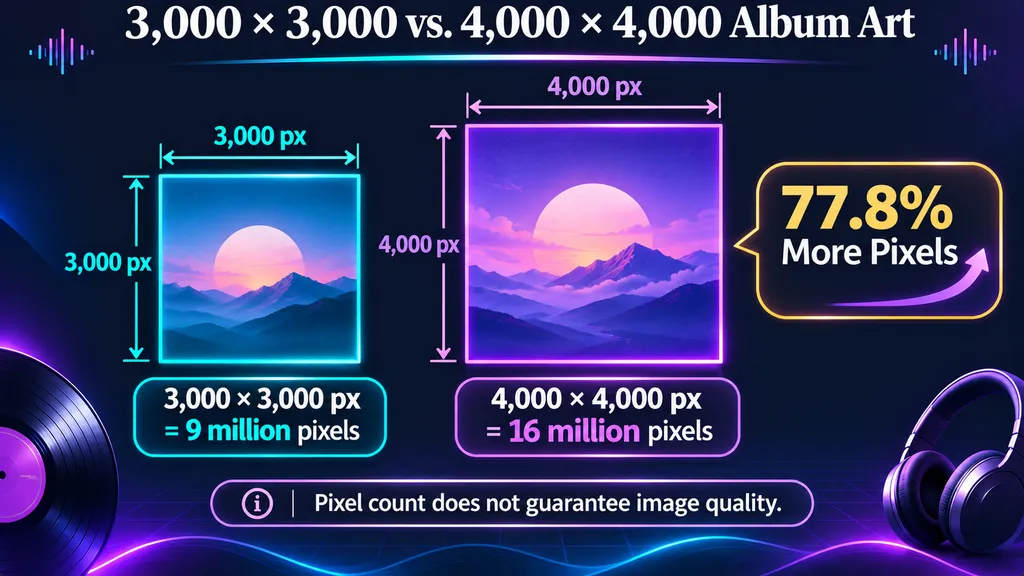
A 3,000 × 3,000 px image contains 9 million pixels, while a 4,000 × 4,000 px image contains 16 million pixels—approximately 77.8% more pixels.
However, more pixels do not automatically mean better image quality.
Choose 3,000 × 3,000 px when your distributor requests it. Choose 4,000 × 4,000 px when preparing a master against Apple Music for Artists' published guideline.
For future vinyl production, preserve original high-resolution images, vector elements, and editable typography. If you are developing the artwork from scratch, AI graphic design workflows can help you explore visual concepts before preparing the final high-resolution master.
What Are the Spotify and Apple Music Album Cover Size Requirements?
Spotify and Apple Music both use square artwork, but their published technical requirements are not identical.
Platform guidelines and distributor upload rules must be checked separately.
Spotify Album Cover Size: Resolution, Format, and Color
Spotify officially accepts artwork between 640 and 10,000 pixels wide and tall, with a 1:1 aspect ratio.
Its requirements include TIFF, PNG, or JPG with the specified encoding, sRGB color space, and 24-bit color.
Spotify also advises against upscaling and does not support embedded color profiles or orientation metadata.
Although 640 × 640 px falls within Spotify's published range, your distributor may enforce a higher upload minimum.
For example, DistroKid recommends 3,000 × 3,000 px artwork.
The practical takeaway: Spotify's minimum dimensions do not automatically determine what your distributor will accept.
Apple Music Album Cover Size: Why Official Guidelines Differ
Apple currently publishes two different sets of cover-art dimensions.
Apple Music for Artists specifies:
- Minimum: 4,000 × 4,000 px
- Aspect ratio: 1:1
- Formats: JPG, PNG, or GIF
Meanwhile, Apple Music Provider Support specifies:
- Minimum: 1,400 × 1,400 px
- Recommended: 3,000 × 3,000 px or larger
- Aspect ratio: 1:1
- Formats: JPEG or PNG
These figures come from separate official Apple documents and should not be presented as one universal requirement.
For a flexible working master, 4,000 × 4,000 px is the safer design target when you want to satisfy the higher published dimension guideline.
However, actual delivery must follow your distributor's current specifications.
Apple also restricts misleading imagery, unauthorized copyrighted material, promotional information, prices, barcodes, and unrelated website addresses.
Why Do Music Distributors Have Different Artwork Requirements?
Distributors establish their own submission and processing rules.
DistroKid, for example, specifies a 1,000 × 1,000 px minimum and recommends 3,000 × 3,000 px RGB JPG artwork.
Our research also identified a RouteNote support case involving repeated resizing attempts.
In that exchange, a provider representative specified an exact 3,000 × 3,000 px JPG with a maximum file size of 25 MB.
That instruction reflected the particular submission requirements at the time. It should not be treated as a permanent universal RouteNote specification.
Always verify your distributor's current rules before exporting the final artwork.
What Is the Correct Vinyl Album Cover Size?
A 12-inch vinyl record does not automatically use a 12 × 12-inch cover file.
The outer jacket must accommodate the record, while different sleeve types require specific folds, spines, and cutting areas.
Vinyl Album Cover Dimensions in Inches and Pixels
A commonly referenced 12-inch LP jacket measures approximately 12.375 × 12.375 inches.
At 300 PPI:
12.375 × 300 = 3,712.5 pixels
That is approximately 3,713 × 3,713 px for this illustrative finished area, before additional bleed.
A common 7-inch single sleeve measures approximately 7.25 × 7.25 inches, equivalent to about 2,175 × 2,175 px at 300 PPI.
These are useful planning dimensions, not universal production requirements.
Our research identified a vinyl-design discussion using a similar 12.375-inch canvas and approximately 3,720 pixels as a starting estimate.
For actual production, the manufacturer's template takes priority over generic dimensions.
Why Vinyl Artwork Needs Bleed, Spine, and Safe Zones
Vinyl packaging requires more than a square front image.
Depending on the product, the design may include a back cover, spine, inner sleeve, record labels, and folding sections.
Bleed extends background artwork beyond the trim line to prevent unwanted white edges.
A safe zone keeps text and important graphics away from cutting and folding areas.
For example, manufacturer Hanaton specifies:
- 300 DPI raster images at final print size
- CMYK color
- 3 mm bleed
- Print-ready PDF
- Embedded or outlined fonts
Its templates also distinguish 3 mm single-jacket spines, 5 mm double-jacket spines, and gatefold packaging.
Other manufacturers may require different dimensions or bleed.
When designing physical album packaging, the same principles used in professional packaging design can help you plan typography, visual hierarchy, bleed, and print-safe areas.
Can You Print a 3000x3000 Album Cover on Vinyl?
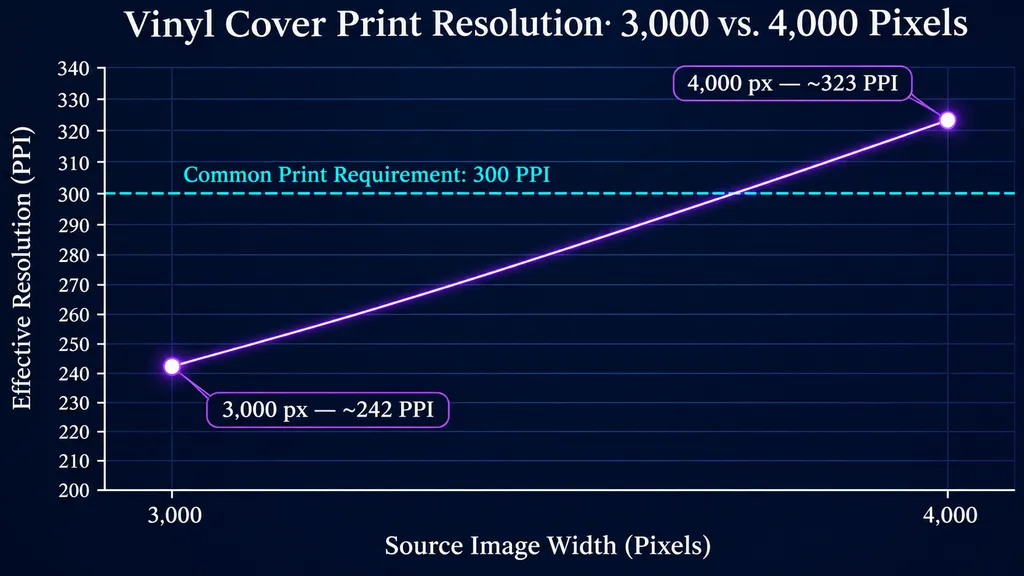
A 3,000 px image printed across 12.375 inches provides approximately 242 PPI.
A 4,000 px image printed at the same width provides approximately 323 PPI.
This explains why a larger original can be helpful for vinyl printing.
However, these calculations exclude bleed and do not guarantee sharpness.
Compression, cropping, typography, and original image quality still matter.
For professional vinyl production, check the effective resolution inside the actual printer template.
What Are the Standard CD Album Cover Dimensions?
A standard CD jewel-case front insert typically measures 120 × 120 mm, approximately 4.72 × 4.72 inches.
The rear tray card is wider because it wraps around the spine sections.
Other CD packaging styles, including Digipaks and wallets, use different dimensions.
CD Front Cover Size in Pixels
For a 120 mm square insert at 300 PPI:
120 ÷ 25.4 × 300 = approximately 1,417 pixels
Therefore, 1,417 × 1,417 px provides approximately 300 PPI across the finished front-cover area, excluding bleed.
A 3,000 × 3,000 px original contains sufficient pixels for this print size, assuming genuine source detail.
Some manufacturers specify slightly different finished dimensions, so the production template remains authoritative.
CD Jewel Case vs. Digipak vs. Wallet Dimensions
Common CD packaging formats include:
- Jewel case: Front insert typically 120 × 120 mm.
- Digipak: One common panel size is approximately 5.492 × 4.941 inches.
- Standard cardboard jacket: One common format measures approximately 5.063 × 4.968 inches.
- Four-panel eco-wallet: Some standard layouts use approximately 5.5 × 5 inches.
These examples reflect manufacturer packaging specifications, not interchangeable templates.
The final dimensions depend on the exact product ordered.
Why Small CD Cover Templates Look Blurry
Our review of user questions identified a DIY CD-cover workflow using a 456 × 456 px front image and a 568 × 442 px rear image.
A related case reported successfully fitting homemade artwork into a jewel case using LibreOffice.
However, physical fit does not prove professional print quality.
A 456 px image printed across 120 mm provides only approximately 96.5 PPI, substantially below the 300 PPI commonly requested by commercial printers.
For professional releases, prioritize actual print resolution rather than whether the image simply fits the case.
How Do You Create One Album Cover for Spotify, Vinyl, and CD?
The most efficient workflow is to maintain one editable creative master and prepare separate delivery files.
That preserves a consistent visual identity without forcing one flattened JPG into incompatible formats.
Step 1: Develop a High-Resolution Album Cover Master
Start with the album's creative direction.
Consider genre, mood, composition, typography, and color palette.
A strong cover should remain recognizable at thumbnail size while retaining sufficient detail for larger displays.
If you need help defining your creative direction, start by understanding what a moodboard is and how to make a moodboard before selecting the final visual approach.
Virse provides a Creative Canvas where designers can organize visual references, explore multiple AI image models, and compare creative directions.
For example, an electronic album might use abstract geometry and luminous gradients, while an indie release might favor textured photography and restrained typography.
You can explore these visual directions with the Virse AI Album Cover Generator and refine the composition before preparing the final release files.
For more control over visual style and composition, learn how to write AI design prompts.
Keep the original assets and editable design elements for final production.
Step 2: Prepare Separate Digital and Print Exports
For streaming: Export square artwork using the dimensions, color settings, and encoding required by your distributor.
For vinyl: Use the manufacturer's template, including front and back panels, spine, folds, and bleed.
For CD: Prepare the front insert, rear tray card, and other required packaging elements.
Do not assume RGB artwork will reproduce identically after conversion to CMYK.
A flattened streaming image may also lack the additional background detail needed for physical packaging.
If you want to preview your cover across multiple formats before printing, learn how to make a mockup and check how the design appears on physical packaging.
Step 3: Inspect Artwork Before Release
Check your artwork at 100% zoom and at thumbnail size.
Look for blurry text, compression artifacts, inconsistent textures, and unwanted AI-generated details.
For physical formats, review the manufacturer's proof and verify that essential elements remain within the safe area.
A visually attractive design is not automatically a technically compliant release file.
Why Does Album Cover Art Get Rejected or Look Blurry?
Correct dimensions do not guarantee that album artwork will pass every upload check.
Our research identified submission problems involving encoding, color mode, image quality, and distributor-specific requirements.
Common Album Cover Problems and Fixes
Artwork rejected despite correct dimensions: Review the exact error and distributor requirements.
JPG rejected: Verify the actual encoding and color mode. Renaming a file extension does not change its underlying format.
Artwork looks blurry: Inspect the original resolution and avoid repeatedly enlarging compressed files.
Colors change after printing: Review the CMYK conversion and printer proof.
Vinyl edges are cropped: Check bleed and safe zones.
CD artwork does not fit: Verify physical dimensions and print at 100% scale.
What Can We Learn From Real Artwork Submission Problems?
Our research identified a DistroKid submission involving a 2,886 × 2,886 px JPG that was rejected. The available account did not establish the exact cause.
A separate RouteNote case involved repeated resizing without a documented successful outcome.
Another independently reported case described a successful upload after online resizing.
These experiences demonstrate that different upload failures can have different causes.
The most reliable approach is to diagnose the error, verify the actual file properties, and re-export from the highest-quality original.
FAQ
Is 3000x3000 Enough for Spotify and Apple Music?
A 3,000 × 3,000 px image falls within Spotify's published range and matches DistroKid's recommended size. Apple Music Provider Support recommends 3,000 × 3,000 px or larger, while Apple Music for Artists specifies at least 4,000 × 4,000 px. Check your distributor's delivery requirements before submitting.
Does Album Cover Art Need 300 DPI?
For streaming, pixel dimensions, aspect ratio, encoding, and image quality matter more than DPI metadata. For vinyl and CD printing, manufacturers commonly require 300 PPI at final print size.
Can I Use the Same Cover for Spotify, Vinyl, and CD?
Yes, you can reuse the same creative design. However, the final files should be different. Streaming requires square digital artwork, while vinyl and CD packaging need separate physical templates, bleed, and print layouts.
Why Is My Album Cover Rejected Even at 3000x3000?
Correct dimensions alone do not guarantee acceptance. Possible causes include unsupported encoding, incorrect color settings, prohibited content, poor image quality, or distributor-specific rules. Check the exact rejection message before resizing again.
Conclusion
The correct album cover size depends on where and how your music will be released. A native 4,000 × 4,000 px master is a flexible starting point for digital artwork, while distributor requirements may call for different export dimensions. Vinyl and CD releases need separate print-ready layouts with accurate physical measurements, resolution, and bleed. By preserving editable high-resolution artwork, developing a consistent visual identity with the Virse AI Album Cover Generator, and validating each export against its destination's specifications, you can prepare professional album artwork for both digital and physical releases while avoiding common submission and printing problems.