MiniMax H3 frente a Wan 3.0: ¿qué modelo de vídeo con IA debería usar realmente?
 Yifan Zhao12 min de lectura ·
MiniMax H3 es la mejor opción para el control local y los flujos de ComfyUI, la iteración rápida y la exploración de escenas guiada por prompts, mientras que Wan 3.0 destaca más en movimiento humano natural, anatomía y vídeo continuo más largo. La elección adecuada depende menos de qué demo parece mejor y más del tipo de planos que necesita producir de forma repetida.
El problema es que los flujos de producción de vídeo con IA cambian cuando entran en producción la velocidad, los artefactos, la coherencia, el hardware, las referencias y las generaciones fallidas. H3 da más control a los creadores mediante un flujo de generación configurable, pero puede exigir más ajustes; Wan 3.0 puede ofrecer movimientos más naturales y secuencias más largas, pero su valor depende de si esas ventajas resuelven sus necesidades de producción reales.
Si quiere usar modelos creativos destacados sin cambiar de herramienta constantemente, Virse reúne más de 40 modelos en un mismo flujo de diseño profesional multimodelo. Los planes de pago incluyen uso ilimitado de modelos como Nano Banana 2 y GPT Image 2 con plazas ilimitadas, mientras que Seedance 2.5, Seedance 2.0 y MiniMax H3 ya están disponibles en la biblioteca de modelos. Los nuevos usuarios también reciben créditos de registro suficientes para unas 10 imágenes Nano Banana 2 o un vídeo Seedance 2.0.

MiniMax H3 frente a Wan 3.0: comparación rápida para producción
La mayor diferencia no es simplemente la calidad visual. H3 está orientado a la iteración controlable, mientras que Wan 3.0 resulta más convincente cuando importan sobre todo el movimiento natural y las secuencias ininterrumpidas más largas.
Requisito de producción | MiniMax H3 | Wan 3.0 |
|---|---|---|
Flujo local | Sólido | La investigación actual se orienta más a API y servicios alojados |
ComfyUI | Muy adecuado | Menos central en las pruebas actuales sobre flujos |
Seguimiento de instrucciones | Suele ser preferido | Bueno, pero menos favorecido en comparaciones directas |
Escenas dinámicas | Suele ser preferido | Más conservador |
Anatomía humana | Resultados dispares | Suele ser preferido |
Movimiento corporal natural | Resultados dispares | Suele ser preferido |
Vídeo continuo largo | Pruebas actuales más débiles | Ejemplos exitosos de unos 30 segundos |
Flujos con referencias | Sólidos, pero imperfectos | Admite creación con muchas referencias |
Ajuste fino | Dificultades comunicadas con H3 destilado | Pruebas actuales insuficientes |
Modelo de coste | Economía de GPU local | Economía del proveedor o la API |
Mejor encaje | Producción iterativa | Planos centrados en movimiento y duración |
Elija MiniMax H3 cuando importe controlar el flujo
H3 destaca cuando el modelo forma parte de un sistema de producción más amplio. Los creadores pueden ajustar referencias, muestreadores, planificadores, cuantización, aceleración y posprocesamiento, en lugar de aceptar una configuración fija de inferencia.
Eso lo hace especialmente útil para storyboards, anuncios, conceptos de vídeos musicales, exploración de planos e iteración de gran volumen.
Elija Wan 3.0 cuando el plano dependa del movimiento o la duración
Wan 3.0 merece prioridad cuando una escena se basa en movimiento de cuerpo entero, actuación sostenida, anatomía o una toma continua más larga. En estos casos, reducir la reparación de movimiento o la unión de clips puede importar más que un control más profundo de la inferencia local.
¿Cuál tiene mejor calidad de vídeo: MiniMax H3 o Wan 3.0?
La «calidad de vídeo» es demasiado amplia para servir como clasificación útil. En producción, debe dividirse en seguimiento de instrucciones, dinámica de cámara, anatomía, movimiento natural, rostros y coherencia temporal.
H3 destaca en la exploración de escenas dinámicas guiada por prompts
Nuestra revisión de comparaciones hace que H3 resulte sistemáticamente más atractivo para movimiento de cámara, cambios de escena, cortes y exploración visual rápida.
Un ejemplo práctico es la preproducción de un plano publicitario. Si quiere probar varias entradas, direcciones de cámara y transiciones antes de elegir una composición, H3 suele ser más productivo porque su flujo favorece la iteración.
El compromiso aparece cuando el movimiento es extremadamente rápido o la anatomía queda muy expuesta. H3 puede diseñar bien planos dinámicos sin ser necesariamente el mejor modelo para cualquier cuerpo humano en movimiento rápido.
Wan 3.0 destaca en anatomía y movimiento humano natural
Wan 3.0 resulta más convincente en planos con caminatas, giros, movimiento de la parte inferior del cuerpo, interacción y actuaciones de cuerpo entero más prolongadas.
Esto importa porque un vídeo con IA puede verse bien fotograma a fotograma y aun así fallar en movimiento. Si la transferencia del peso, las extremidades o el ritmo corporal parecen poco naturales, el plano es inutilizable, por buena que sea la textura.
La conclusión práctica es más precisa que decir que Wan tiene «mejor calidad»: Wan 3.0 destaca en anatomía y movimiento corporal natural, mientras que H3 destaca en seguimiento de instrucciones, diseño de planos dinámicos e iteración creativa.
¿Es MiniMax H3 más rápido que Wan 3.0?
No existe una respuesta universal sobre el tiempo de generación porque el alojamiento, la GPU, la resolución, la duración, el planificador, la precisión y la aceleración pueden cambiar drásticamente el resultado.
MiniMax alojado puede ser mucho más rápido en flujos específicos
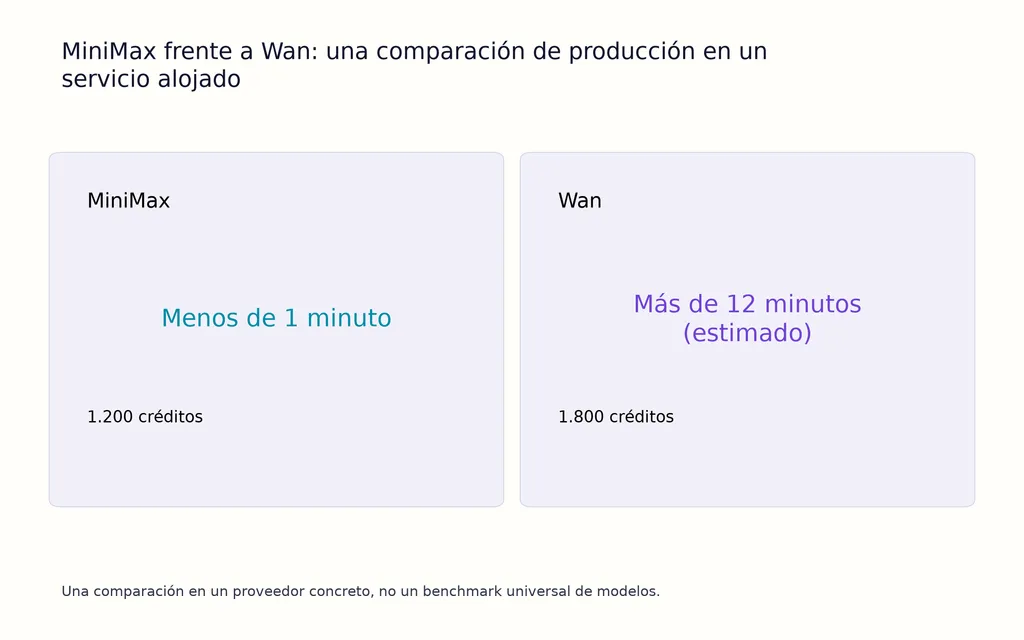
En una comparación alojada con la misma entrada, MiniMax terminó en menos de un minuto por 1.200 créditos, mientras que Wan mostraba una estimación superior a 12 minutos por 1.800 créditos.
Es una prueba útil sobre un entorno de producción, no un benchmark universal de precio o velocidad. La infraestructura del proveedor puede cambiar la experiencia tanto como el propio modelo.
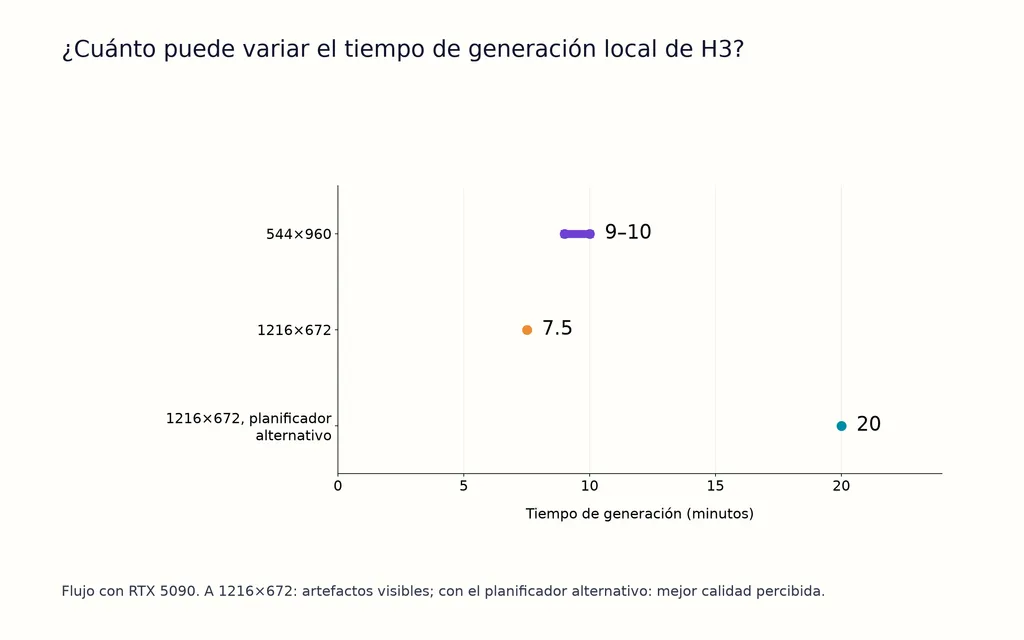
H3 local puede tardar entre 8 y 20 minutos en una RTX 5090
H3 local presenta una situación muy distinta.
Un flujo de RTX 5090 a 544×960 tardó unos 9–10 minutos por generación. Otra prueba a 1216×672 produjo dos resultados muy diferentes:
- unos 8 minutos, con artefactos visibles;
- unos 20 minutos, con una configuración alternativa del planificador que ofrecía mejor calidad percibida.
La lección es importante: menos pasos no significan automáticamente una generación más rápida. La infraestructura completa de inferencia determina la latencia real.
Spectrum redujo el tiempo del muestreador de H3 un 45,29 %
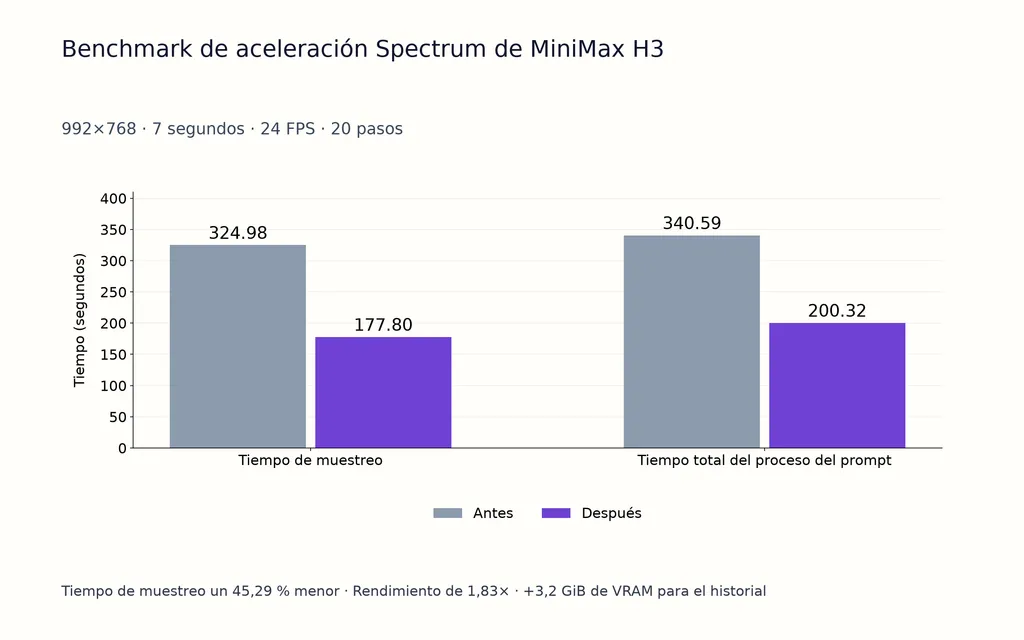
Un caso documentado de aceleración de H3 utilizó:
- resolución de 992×768
- vídeo de 7 segundos
- 24 FPS
- 20 pasos
- H3 BF16 podado
El tiempo del muestreador bajó de 324,98 a 177,80 segundos, una reducción del 45,29 % y aproximadamente 1,83 veces la capacidad de procesamiento. El tiempo de procesamiento completo del prompt cayó de 340,59 a 200,32 segundos, con unos 3,2 GiB adicionales de VRAM para el historial.
Esta es una de las ventajas de producción más importantes de H3: el ecosistema que lo rodea puede cambiar significativamente su perfil de velocidad y coste.
¿Es Wan 3.0 mejor que MiniMax H3 para vídeos largos?
El diferenciador más claro de Wan 3.0 es su capacidad para producir secuencias continuas de unos 30 segundos en ejemplos reales exitosos.
Una generación más larga puede reducir la unión de planos
Esto importa porque la realización con IA suele crear costes de producción ocultos entre clips.
Un flujo de vídeo corto suele exigir generar varios planos, hacer coincidir personajes, reparar entornos y ocultar discontinuidades en la edición. Una generación continua más larga puede reducir esos enlaces.
En planos de seguimiento, microdramas, transiciones de entorno y movimiento sostenido de personajes, menos puntos de edición pueden ser más valiosos que una pequeña mejora en la calidad de un fotograma.
Treinta segundos no equivalen a coherencia garantizada
Una generación exitosa de 30 segundos no demuestra que todos los intentos de 30 segundos se mantendrán estables.
Las pruebas actuales siguen siendo insuficientes para establecer tasas de éxito repetibles en identidad, varios personajes, movimiento o coherencia del entorno al final de la secuencia.
Por tanto, Wan 3.0 debe tratarse como el candidato más sólido para formatos largos, no como una solución que garantice 30 segundos de coherencia.
¿Qué coherencia tienen las referencias y personajes de MiniMax H3?
El control mediante referencias es una gran ventaja de H3, pero más referencias no crean automáticamente un mundo estable.
H3 puede seguir desviándose en flujos con múltiples referencias
Nuestra revisión encontró intentos de producción con:
- referencias desde cuatro ángulos;
- paneles de referencia 2×2;
- referencias de 360 grados;
- entornos panorámicos;
- imágenes separadas de personaje y ubicación.
Incluso con esas entradas, la geometría de las habitaciones, la posición de los objetos y la estructura del entorno podían cambiar entre generaciones.
La lección de producción es sencilla: reconocer referencias no equivale a una comprensión espacial persistente.
Separe referencias de identidad, entorno y plano
Para controlar mejor los flujos de H3, separe las referencias por finalidad:
- Referencias de identidad para rostro, cuerpo y ropa.
- Referencias de entorno para materiales, arquitectura y distribución.
- Referencias de plano para encuadre y posición de cámara.
Después genere un breve clip de validación antes de comprometerse con una pasada más larga o de mayor resolución.
No eliminará la desviación, pero facilita identificar y corregir fallos de coherencia.
¿Por qué MiniMax H3 produce artefactos?
El principal riesgo de producción de H3 no es simplemente que existan artefactos. Es que fallos similares pueden proceder de varias partes del flujo.
Tipos de fallo habituales de H3
Nuestra revisión encontró repetidamente problemas de:
- temblores;
- rostros lejanos;
- anatomía deformada;
- movimiento rápido;
- posición de personajes;
- desviación del entorno;
- aceleración agresiva;
- flujos con muchas referencias.
Una distinción útil es que H3 puede crear bien un concepto de plano dinámico y aun así tener dificultades con la estabilidad anatómica dentro de ese plano.
Un flujo práctico para resolver problemas de H3
Empiece con una referencia limpia y un breve clip de base. Desactive la interpolación y el escalado, retire LoRA de aceleración agresiva y pruebe por separado los cambios de muestreador o planificador. Reincorpore la aceleración solo cuando el resultado de base sea estable.
Eso aísla la pregunta más importante: ¿el fallo procede del propio H3, de las referencias o del conjunto de optimizaciones?
Coste de MiniMax H3 frente a Wan 3.0: ¿cuál es más barato en producción?
Una generación más barata no implica automáticamente un plano utilizable más barato.
La mejor métrica de producción es:
Coste por plano utilizable = coste de generación × intentos necesarios
Si una generación de bajo coste falla repetidamente por anatomía o coherencia, su coste real aumenta. Si una secuencia larga de Wan más cara sustituye varios clips cortos y reparaciones de continuidad, su mayor precio de generación puede seguir teniendo sentido económico.
H3 da a los usuarios locales más influencia sobre esa ecuación porque pueden cambiar resolución, precisión, pasos, aceleración, cuantización y uso de GPU. Wan 3.0 traslada más de esa economía al proveedor.
El modelo con menor precio en créditos no es necesariamente el de menor coste de producción.
¿Se puede ajustar o escalar MiniMax H3 de forma fiable?
El ajuste fino de H3 debe validarse antes de producir
Los casos centrados en entrenamiento de nuestra investigación comunicaron dificultades para enseñar conceptos nuevos a checkpoints de H3 destilado mediante flujos de tipo LoRA.
Eso no significa que H3 no admita ajuste fino. Significa que no hay que confundir pesos abiertos con entrenamiento sencillo.
Si su pipeline depende de personajes propios, productos poco habituales o conceptos nuevos de movimiento, valide pronto la calidad del entrenamiento en lugar de suponer que el ajuste personalizado resolverá la coherencia más adelante.
H3 con LTX 2.3 puede perder detalle visible
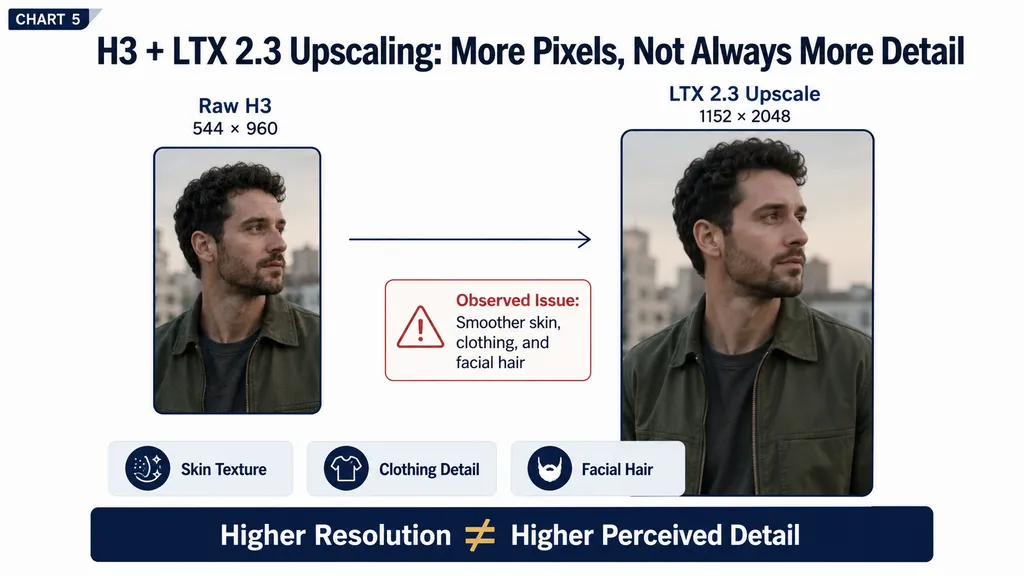
Un flujo de RTX 5090 generó a 544×960 y escaló a 1152×2048 con LTX 2.3.
La salida más grande no se veía automáticamente mejor. El detalle fino de piel, ropa y vello facial parecía más suavizado y daba un resultado más plástico.
Es una advertencia útil para producción: mayor resolución y mayor detalle percibido no son lo mismo. Puede merecer la pena probar alternativas como RTX Super Resolution o SeedVR2, y la generación directa a mayor resolución a veces conserva mejor la textura que un escalado agresivo.
MiniMax H3 frente a Wan 3.0: mejor modelo de vídeo con IA según el uso
Uso | Mejor punto de partida | Motivo |
|---|---|---|
Creación de storyboards | H3 | Exploración visual rápida |
Conceptos publicitarios | H3 | Flujo sólido de iteración |
Experimentos con cámara dinámica | H3 | Mejor diseño de escenas guiado por prompts |
Producción local con ComfyUI | H3 | Más control de la inferencia |
Experimentación de gran volumen | H3 | La optimización local cambia la economía |
Movimiento humano de cuerpo entero | Wan 3.0 | Mejor anatomía y movimiento |
Actuación sostenida del personaje | Wan 3.0 | Animación más natural |
Escenas continuas más largas | Wan 3.0 | Ejemplos de unos 30 segundos |
Reducir la unión de clips | Wan 3.0 | Menos enlaces de continuidad |
Coherencia del entorno | Sin ganador claro | Las pruebas siguen incompletas |
Producción con mucho ajuste fino | Probar primero | Los resultados de entrenamiento de H3 siguen siendo dispares |
Conclusión: ¿debería usar MiniMax H3 o Wan 3.0?
Use MiniMax H3 cuando el vídeo con IA forme parte de un flujo de producción controlable y valore la inferencia local, ComfyUI, la iteración rápida, el diseño de escenas guiado por prompts y la posibilidad de optimizar velocidad y coste. Use Wan 3.0 cuando el plano dependa más de anatomía natural, movimiento humano sostenido o una secuencia continua más larga que reduzca la unión de clips. El mejor modelo no es el de la demo más impresionante; es el que produce más planos utilizables dentro de sus límites aceptables de tiempo, coste, coherencia, revisión y control creativo.
Preguntas frecuentes
¿Es H3 mejor que Wan 3.0 para realizar películas con IA?
H3 es el punto de partida más sólido para storyboards, exploración de escenas dinámicas, flujos locales de ComfyUI e iteración de gran volumen. Wan 3.0 resulta más convincente en movimiento de cuerpo entero, anatomía y secuencias continuas más largas. El mejor modelo depende de si su flujo necesita muchos planos cortos controlables o menos planos, más largos y centrados en el movimiento.
¿Puede H3 funcionar localmente y cuánta VRAM necesita?
La implementación local es una de las mayores ventajas de H3, pero no hay una cifra universal de VRAM para todos los flujos. Los requisitos cambian con el formato del checkpoint, la cuantización, la resolución, la duración, las referencias y la aceleración. Una configuración de Spectrum también necesitó unos 3,2 GiB adicionales de VRAM para el historial a fin de lograr la mejora de velocidad medida.
¿Por qué H3 produce artefactos y problemas de coherencia?
Los fallos de H3 pueden proceder del modelo, las referencias, el muestreador, el planificador, la aceleración, la interpolación o el escalado. Los problemas habituales incluyen rostros, anatomía, temblores, movimiento rápido, posición de personajes y desviación del entorno. Empiece con una generación de base sencilla y reincorpore los componentes de optimización de uno en uno.
¿Es H3 más rápido y barato que Wan 3.0?
No de forma universal. Una comparación alojada favoreció a MiniMax con menos de un minuto y 1.200 créditos, frente a una estimación superior a 12 minutos y 1.800 créditos para Wan, mientras que las pruebas locales de H3 en RTX 5090 oscilaron entre unos 8 y 20 minutos. El coste real depende del proveedor, el hardware, los ajustes y los intentos necesarios para producir un plano utilizable. Para una visión más amplia del coste, consulte los precios de MiniMax H3.