
Cómo sustituir un personaje en vídeo con MiniMax H3 sin deriva de identidad
Vincent13 min de lectura ·

Para sustituir un personaje en vídeo con MiniMax H3 sin deriva de identidad, usa la imagen de referencia como fuente de identidad y el vídeo original como fuente de interpretación. Una regla sencilla es: imagen = identidad, vídeo = interpretación, prompt = restricciones. Esto ayuda a H3 a preservar el rostro y aspecto del nuevo personaje manteniendo movimiento, tiempos, pose y cámara originales.
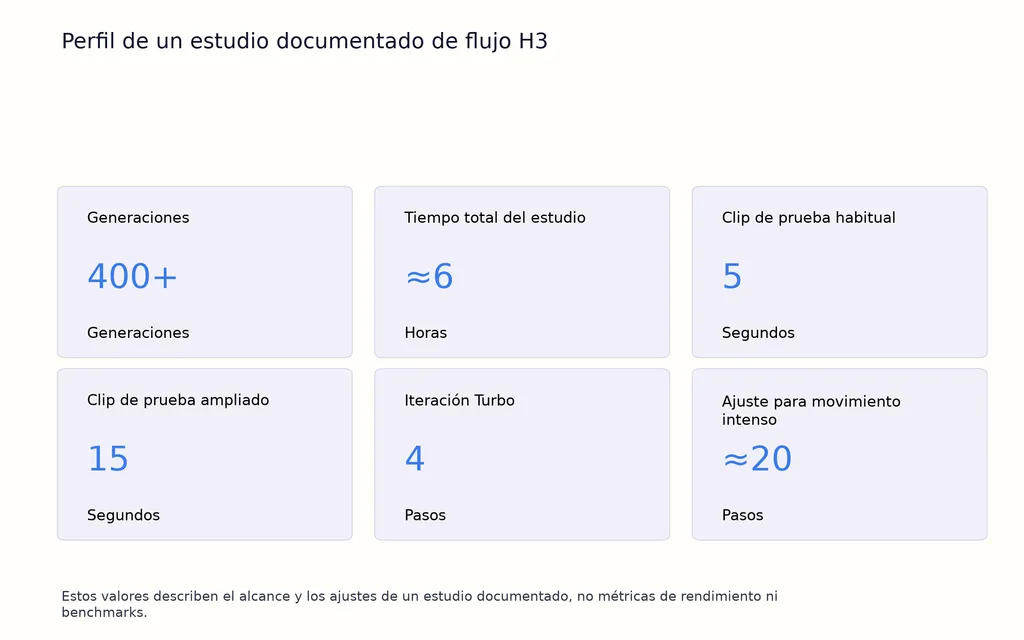
El principal reto es la deriva de identidad. Un personaje puede empezar bien y después volver hacia el intérprete original; el movimiento rápido, las oclusiones, los clips largos o las referencias contradictorias pueden empeorar la coherencia. Nuestra reseña de MiniMax H3 sobre flujos documentados incluye un estudio de seis horas con más de 400 generaciones, además de pruebas con varios personajes, de movimiento intenso, encuadre y ComfyUI local. En todos estos casos, roles claros de referencia, clips de prueba cortos, anclas sólidas de identidad y reglas explícitas de conservación destacan de forma constante como los principios más útiles.
Para los equipos creativos que gestionan flujos de IA con muchas referencias como este, Virse ofrece una forma más estructurada de organizar el proceso. En lugar de forzar cada decisión dentro de un chat, Virse trabaja sobre un lienzo infinito donde referencias, resultados y relaciones creativas permanecen visibles, mientras varios Agents pueden trabajar en el mismo proyecto y compartir contexto. Con memoria a largo plazo de preferencias del equipo, estándares de marca y conocimientos del proyecto, Virse ayuda a los diseñadores profesionales a iterar y ampliar la producción asistida por IA sin renunciar al control creativo. MiniMax H3, Seedance 2.5 y Seedance 2.0 ya están disponibles en Virse, para explorar y comparar varios modelos de vídeo destacados en un mismo flujo creativo.

¿Cómo funciona la sustitución de personajes en MiniMax H3?
Sustituir personajes con H3 es más que cambiar caras
Un cambio de cara tradicional modifica principalmente la apariencia facial. MiniMax H3 puede admitir una generación y edición de imágenes más amplia, en la que cambian rostro, peinado, ropa, colores, silueta e identidad corporal mientras se conservan movimiento y cinematografía originales.
El modelo más útil es sencillo:
Imagen = identidad. Vídeo = interpretación. Prompt = asignación y restricciones.
La imagen indica cómo debe verse el nuevo personaje. El vídeo indica cómo debe moverse, interpretar e interactuar con la escena.
Esta distinción explica fallos frecuentes. En flujos documentados, algunos resultados cambiaron pelo o ropa, pero conservaron demasiado del rostro original. Otros preservaron tanto el vídeo fuente que apenas se produjo la sustitución solicitada.
Las referencias de imagen, vídeo y audio necesitan funciones claras
La calidad de las referencias importa más que la cantidad.
Entrada | Mejor función |
Imagen del personaje | Rostro, pelo, vestuario, proporciones, identidad |
Vídeo fuente | Movimiento, pose, expresión, posición, tiempos |
Vídeo fuente | Cámara, encuadre, iluminación, escena, oclusión |
Referencia de audio | Voz, tono o contexto de audio cuando haga falta |
Prompt | Define sustitución, herencia y conservación |
El objetivo no es llenar todos los espacios de referencia disponibles, sino hacer que cada referencia se responsabilice de un tipo claro de información.
Cómo preparar la mejor referencia de personaje para MiniMax H3
Empieza con un retrato sólido antes de añadir imágenes
Para primeros planos y planos medios, un retrato claro suele ser el mejor punto de partida.
Nuestra revisión encontró flujos en los que reducir las imágenes de referencia mejoró la precisión de identidad. Añadir imágenes puede introducir pequeñas contradicciones en peinado, estructura facial, vestuario, iluminación o proporciones.
Una buena primera referencia debe ofrecer:
- un rostro claramente visible
- un peinado reconocible
- ropa coherente
- mínimas obstrucciones
- detalle facial suficiente para anclar la identidad
Añade otra vista solo si resuelve un problema concreto de información faltante.
Usa una hoja de personaje para movimientos de cuerpo entero y giros
Un solo retrato pierde utilidad cuando el intérprete gira, aparece de perfil o da la espalda a la cámara.
Para esos clips, una hoja de personaje con vista frontal, posterior y primer plano del rostro puede cubrir mejor la información. Es especialmente útil para peinados, chaquetas, calzado o vestuario distintivos que deben mantenerse coherentes durante la transferencia de movimiento y los giros.
Desde el diseño, funciona como una hoja tradicional de vistas de personaje: el modelo recibe la información visual antes de que esa vista aparezca en movimiento.
Adapta el encuadre de referencia al plano objetivo
El encuadre es una variable que suele pasarse por alto.
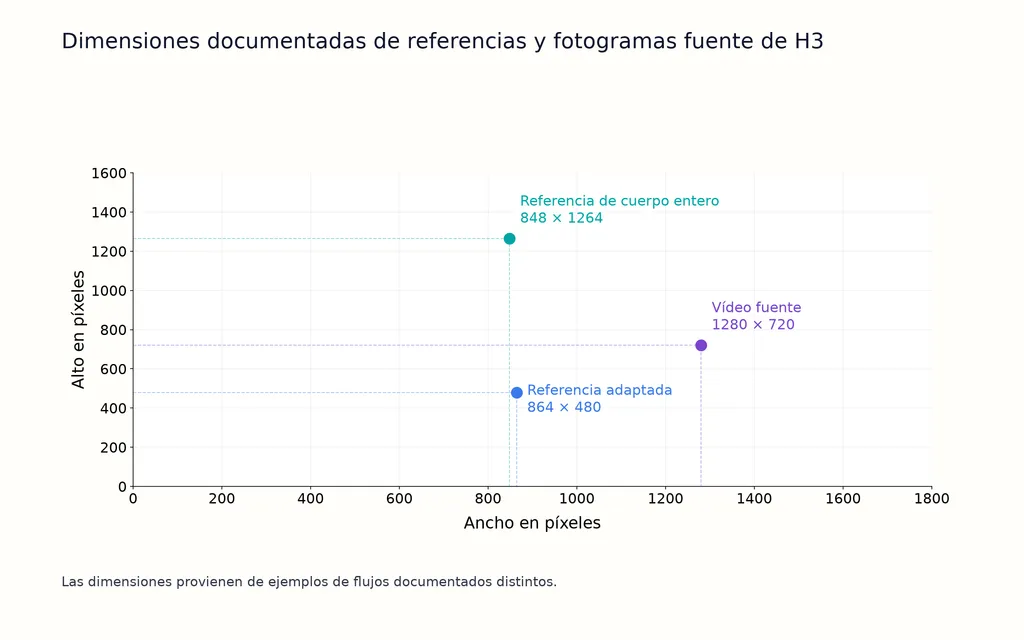
Un flujo documentado mejoró la coherencia tras adaptar la referencia a unos 864 × 480, más cerca de la composición objetivo. En otro caso se usó un PNG de cuerpo entero de 848 × 1264 con un clip fuente de 1280 × 720, 30 fps y 14,4 segundos, pero persistió una deriva de identidad notable.
No son benchmarks controlados, pero respaldan una regla práctica: haz que los rasgos que definen la identidad sean lo bastante grandes y claros para la escala del personaje en el plano final.
Cómo sustituir un personaje en vídeo con MiniMax H3 paso a paso
Paso 1: haz del vídeo fuente la guía de la interpretación
Deja que el vídeo fuente controle movimiento, pose, posición, rotación corporal, actuación facial, velocidad, tiempos y coreografía.
No reescribas cada movimiento si el vídeo fuente ya contiene la interpretación deseada. Volver a describir la acción puede añadir otra capa de interpretación en lugar de mejorar la fidelidad.
Paso 2: asigna la imagen de referencia como fuente de identidad
Indica claramente que el intérprete original debe sustituirse por el personaje de la referencia.
Define los atributos visuales que deben permanecer estables, incluidos rostro, peinado, ropa, colores, proporciones y detalles distintivos.
En un estudio documentado con más de 400 generaciones en unas seis horas, las definiciones débiles del sujeto se asociaron a pérdida de identidad en alrededor de la mitad de algunas tandas de pruebas. No significa que todos los flujos se comporten igual, sino que las etiquetas vagas de identidad son arriesgadas cuando importa la coherencia.
Paso 3: transfiere la interpretación original
El personaje sustituto debe heredar del intérprete original movimiento, pose, posición, expresión, rotación, velocidad y tiempos.
Esta instrucción es esencial porque indica a H3 que el intérprete fuente aporta la interpretación, no la identidad
Paso 4: conserva cámara, iluminación y estructura de escena
Protege todo lo que queda fuera de la edición del personaje prevista.
Conserva fondo, accesorios, recorrido de cámara, encuadre, enfoque, desenfoque de movimiento, iluminación, sombras, composición y tiempos del montaje.
Cuantos menos elementos ajenos deba rediseñar H3, más fácil será concentrar su capacidad en la sustitución.
Paso 5: conserva las oclusiones
Las oclusiones importan cuando manos, pelo, accesorios, armas, ropa u otros personajes pasan por delante del sujeto.
Si una mano cruza el rostro en el original, debe cruzar el rostro sustituto en el mismo instante. Lo mismo se aplica a arcos, equipo, objetos en primer término y personajes superpuestos.
Esto importa especialmente en baile, carrera, boxeo, tiro con arco, giros rápidos y escenas de acción.
¿Cuál es el mejor prompt para sustituir personajes con MiniMax H3?
Usa Sustituir, Igualar, Heredar, Conservar y Evitar
El marco general de prompts más sólido es:
Sustituir: sustituye al intérprete original por el personaje de referencia.
Igualar: iguala rostro, pelo, ropa, colores, proporciones y detalles reconocibles de identidad del personaje.
Heredar: conserva movimiento, pose, expresión, posición, velocidad, rotación y tiempos del intérprete original.
Conservar: mantén cámara, fondo, iluminación, sombras, accesorios, encuadre, enfoque y montaje originales.
Evitar: no introduzcas acciones, objetos, cortes, movimientos de cámara, texto ni accesorios nuevos.
Así, un prompt de producción conciso puede ser:
En el Vídeo 1, sustituye al intérprete original por el personaje de la Imagen 1. Iguala su rostro, peinado, ropa, colores, proporciones corporales y detalles visibles de identidad durante todo el clip. Conserva movimiento, pose, posición, rotación, expresión, velocidad y tiempos del intérprete original. Mantén sin cambios fondo, accesorios, recorrido de cámara, encuadre, enfoque, desenfoque de movimiento, iluminación, sombras, composición y montaje. Conserva las oclusiones originales cuando manos, pelo, ropa u objetos pasen delante del personaje. No añadas acciones, objetos, movimientos de cámara, cortes, texto ni accesorios nuevos.
Los prompts simples pueden superar a los excesivamente estructurados
Los prompts más largos no son automáticamente más controlables.
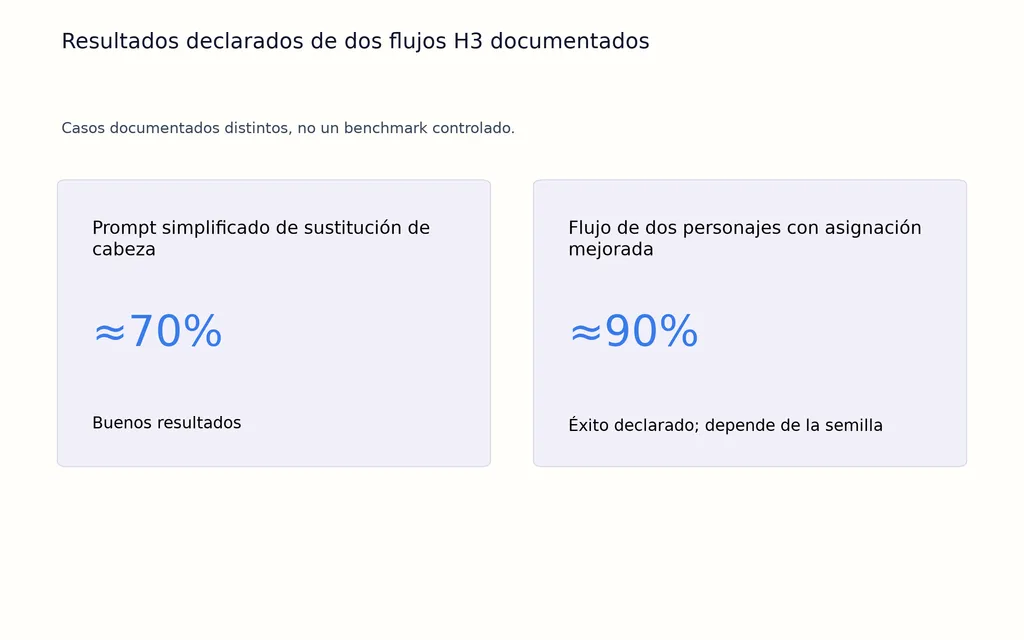
En un flujo documentado de sustitución de cabeza, una instrucción simplificada dio buenos resultados en aproximadamente el 70% de los intentos, mientras una versión más elaborada preservaba a veces tanto del original que apenas había sustitución.
La estructura aporta más valor cuando resuelve un problema concreto, como asignación de varios personajes, deriva persistente de identidad o referencias contradictorias.
Cómo corregir la deriva de identidad de MiniMax H3
Empieza con clips cortos antes de aumentar la duración
La deriva de identidad suele aparecer poco a poco. El personaje puede empezar correctamente, acercarse al intérprete original y después recuperarse parcialmente.
Una prueba de 14,4 segundos, 1280 × 720 y 30 fps con una referencia de cuerpo entero de 848 × 1264 siguió mostrando una deriva importante en un flujo con RTX 5070 Ti de 16GB.
Un orden de diagnóstico más eficiente es:
- Prueba unos cinco segundos.
- Refuerza la referencia facial.
- Ajusta mejor el encuadre.
- Elimina referencias innecesarias.
- Aclara los roles de identidad e interpretación.
- Añade una vista posterior para los giros.
- Prueba otra semilla.
- Sube la calidad para movimientos difíciles.
El movimiento intenso puede requerir ajustes más conservadores
En el flujo de más de 400 generaciones se usaron habitualmente clips de cinco segundos para pruebas, además de experimentos de 15 segundos.
Turbo de cuatro pasos resultó útil para iterar, pero el movimiento difícil a veces perdía coherencia de identidad. Para secuencias más complejas, ese flujo volvió a unos 20 pasos.
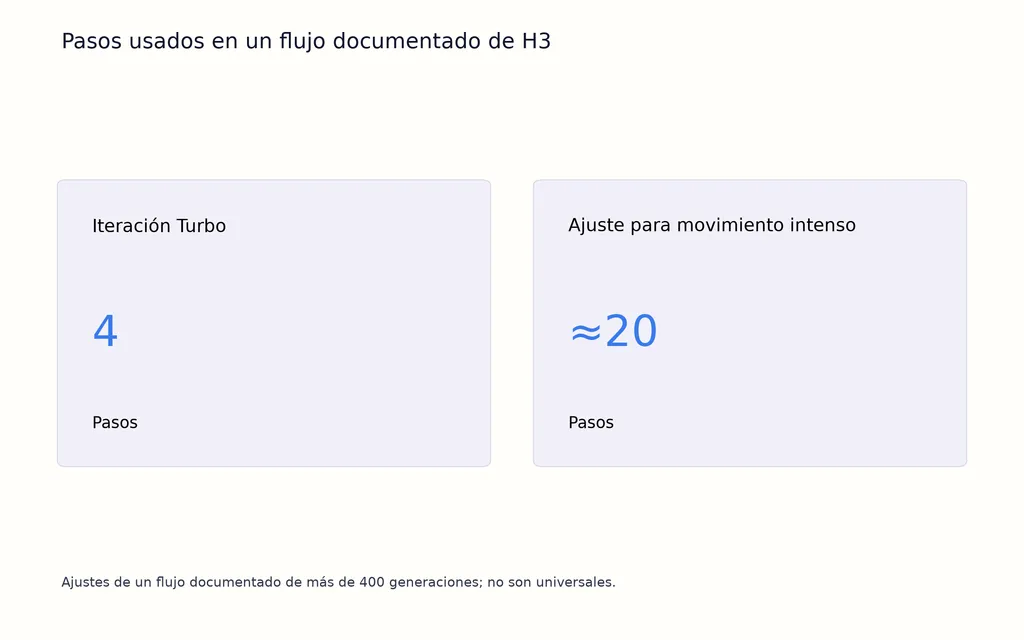
No es un ajuste universal. Ilustra una compensación más amplia: generar más rápido puede ser menos fiable cuando el modelo debe resolver identidad, pose, movimiento, oclusión y continuidad temporal a la vez.
Mantén la identidad del personaje en H3 entre cortes y vídeos largos
Las secuencias largas y los cortes bruscos aumentan las oportunidades de que reaparezca la identidad original o compitan las referencias.
En producción, valida la sustitución en segmentos cortos revisados por separado antes de extender la secuencia. Mantén la misma descripción de identidad y asignación de referencias entre clips, y comprueba la continuidad en cada corte.
No supongas que un personaje bien establecido en el primer plano seguirá dominando automáticamente en los siguientes. La coherencia entre clips debe tratarse como tarea explícita de producción, no como una decisión de prompt única.
Cómo sustituir varios personajes con MiniMax H3
Asigna explícitamente cada personaje
Para sustituir a dos personas, cada identidad necesita una asignación estable.
Una estructura práctica es:
- La Imagen 1 define al Personaje A
- La Imagen 2 define al Personaje B
- El Vídeo 1 aporta ambas interpretaciones
- El Personaje A sustituye al intérprete izquierdo
- El Personaje B sustituye al intérprete derecho
Un flujo documentado de dos personajes alcanzó aproximadamente un 90% de éxito declarado tras mejorar la asignación y retención de sujetos, aunque los resultados seguían dependiendo de la semilla.
Evita mezclar identidades cuando se cruzan
Los momentos más difíciles son cuando los intérpretes cruzan posiciones, se superponen o se tapan.
Asignar claramente Personaje A y Personaje B es más seguro que usar etiquetas vagas como primera y segunda persona.
Con varios personajes, la claridad de funciones de referencia vale más que usar el máximo de referencias.
¿Qué muestran las pruebas de rendimiento de MiniMax H3 en ComfyUI?
12GB de VRAM pueden funcionar con grandes concesiones
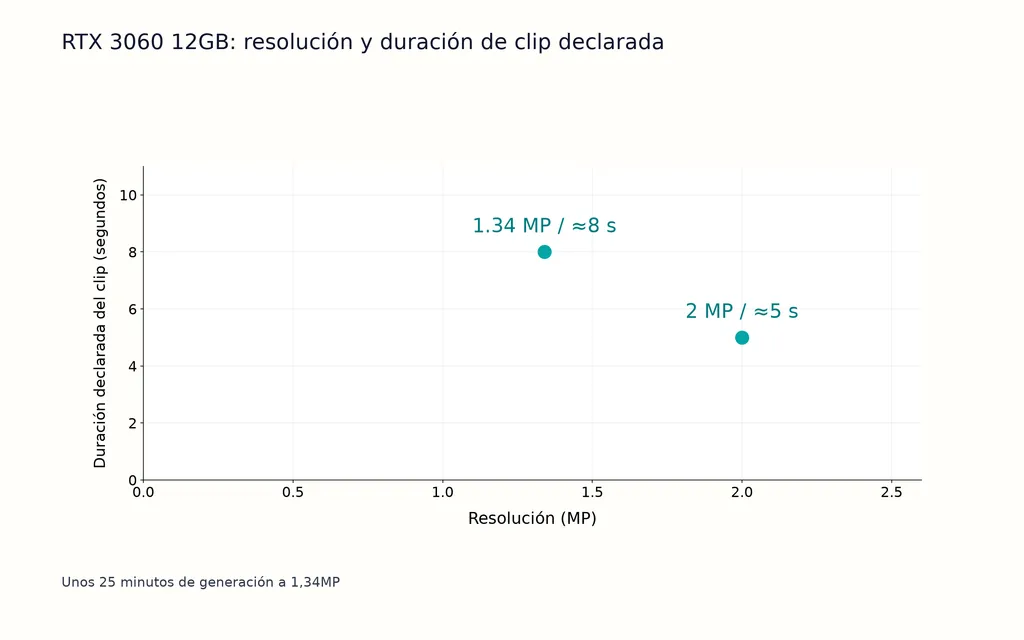
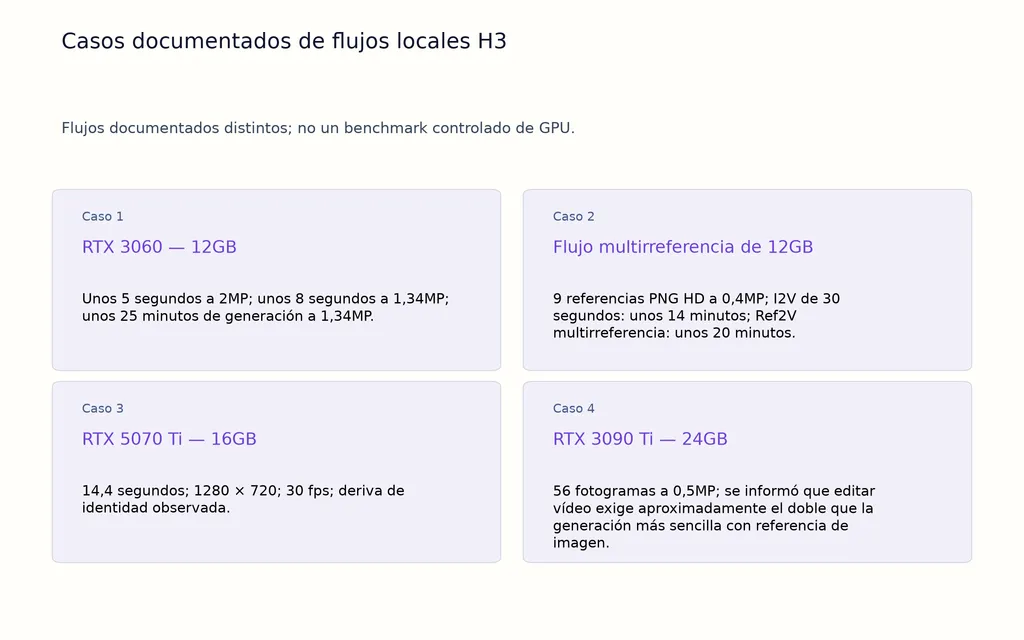
Un flujo con RTX 3060 de 12GB informó aproximadamente de:
- 5 segundos a unos 2MP
- 8 segundos a unos 1,34MP
- unos 25 minutos para la generación de 1,34MP
Otra prueba de 12GB utilizó nueve referencias PNG HD a 0,4MP. Una generación normal de imagen a vídeo de 30 segundos tardó unos 14 minutos, mientras el flujo Ref2V multirreferencia tardó unos 20 minutos.
Son ejemplos de flujos, no benchmarks universales, pero muestran la relación entre duración, resolución, número de referencias y coste de generación.
Más VRAM no corrige automáticamente la deriva de identidad
Un flujo de 16GB siguió teniendo deriva en un clip de sustitución más largo.
Una prueba con RTX 3090 Ti de 24GB y 56 fotogramas a 0,5MP describió la edición de vídeo como aproximadamente el doble de exigente que una generación más sencilla con referencia de imagen.
Un flujo optimizado de gama alta con 5090 informó de más de 10GB de ahorro de VRAM y unos 14GB menos de memoria GPU compartida tras usar componentes más eficientes en memoria, manteniendo una velocidad aproximadamente similar.
La clave es que la capacidad de GPU afecta a los ajustes disponibles, pero la calidad de referencias, duración, complejidad del movimiento y estructura del prompt siguen determinando la estabilidad de identidad.
¿Cuáles son los errores más comunes al sustituir personajes con MiniMax H3?
Añadir referencias antes de diagnosticar el fallo
Más referencias pueden crear más contradicciones.
Empieza con una fuente de identidad sólida. Añade otra vista solo cuando el clip revele información que la primera imagen no aporte.
Probar vídeos largos demasiado pronto
Un clip de acción fallido de 15 segundos puede tener muchas causas.
Una prueba de cinco segundos facilita aislar problemas de identidad, encuadre, movimiento, semilla, resolución u oclusión antes de gastar más cómputo.
Cambiar demasiados elementos a la vez
Si la tarea es sustituir personajes, evita cambiar a la vez fondo, iluminación, cámara, animación y estilo de montaje.
Los flujos profesionales de vídeo con IA son más controlables cuando cada generación tiene un ámbito de transformación limitado.
Preguntas frecuentes
¿Por qué H3 conserva el rostro original?
Las causas más comunes son referencias débiles de identidad, roles ambiguos, encuadre desajustado, exceso de referencias o instrucciones de conservación que anulan la edición. Empieza con un retrato claro, asigna identidad a la imagen e interpretación al vídeo, y valida la sustitución en un clip corto antes de añadir complejidad.
¿Puede H3 sustituir a dos personajes a la vez?
Sí. La sustitución múltiple puede funcionar cuando cada referencia se asigna explícitamente a un intérprete. El principal reto es mezclar identidades cuando se superponen, cruzan posiciones o se tapan. Las asignaciones estables A y B son más fiables que las descripciones vagas de posición.
¿Cuántas imágenes de referencia debo usar con H3?
Empieza con una imagen sólida. Añade otra vista solo si el vídeo revela información que la primera no aporta, como peinado o vestuario por detrás. En varios flujos documentados, menos referencias mejoraron la coherencia al reducir las señales visuales contradictorias que debía reconciliar el modelo.
¿Cuánta VRAM necesita H3?
No hay un requisito fijo único. Hay casos locales documentados que funcionan con GPU de 12GB, 16GB y 24GB, pero resolución, duración, pasos, cuantización, configuración del modelo y referencias afectan a la memoria. Con hardware limitado, reduce primero duración y resolución.
Conclusión
El mejor flujo de sustitución con MiniMax H3 no gira en torno a un «prompt definitivo». Surge de asignar la responsabilidad correcta a cada fuente: la imagen define la identidad, el vídeo fuente define interpretación y cinematografía, y el prompt define qué cambiar, transferir y mantener intacto. En cientos de generaciones documentadas, casos de varios personajes, pruebas de movimiento intenso, experimentos de encuadre y flujos GPU locales, el patrón más sólido se repite: empieza con un clip corto, usa el mínimo de referencias sólidas, separa identidad de interpretación, conserva explícitamente cámara y oclusiones, y añade complejidad solo cuando lo exija un fallo concreto.
Más del blog de Virse
Flujo de trabajo

GPT Image 2.5 Noise and Oversharpening: Why Some Images Still Look AI-Generated
9 de octubre de 2026 by Yifan Zhao
Flujo de trabajo

GPT Image 2.5 Keeps Changing My Image: How to Use a "Keep List" for Reliable Edits
9 de octubre de 2026 by Yifan Zhao
Flujo de trabajo
GPT Image 2.5 Editing Drift: Why Images Get Blurry, Cropped or Worse After Multiple Edits
9 de octubre de 2026 by Yifan Zhao