How to Replace a Character in Video with MiniMax H3 Without Identity Drift
Vincent12 分钟阅读 ·

To replace a character in video with MiniMax H3 without identity drift, use the reference image as the identity source and the source video as the performance source. A simple rule is: image = identity, video = performance, prompt = constraints. This helps H3 preserve the new character’s face and appearance while keeping the original motion, timing, pose, and camera behavior.
The main challenge is identity drift. A character may look correct at first and then shift back toward the original performer, while fast motion, occlusion, long clips, or conflicting references can make consistency worse. Our review of documented H3 workflows includes one six-hour study with more than 400 generations, alongside multi-character, high-motion, framing, and local ComfyUI tests. Across these cases, clear reference roles, short test clips, strong identity anchors, and explicit preservation rules consistently emerge as the most useful workflow principles.
For creative teams managing reference-heavy AI workflows like this, Virse provides a more structured way to organize the process. Instead of forcing every decision into a chat box, Virse works on an infinite canvas where references, outputs, and creative relationships stay visible, while multiple Agents can work across the same project and share context. With long-term memory for team preferences, brand standards, and project knowledge, Virse helps professional designers iterate and scale AI-assisted production without giving up creative control.

How Does MiniMax H3 Character Replacement Work?
H3 Character Replacement Is More Than Face Swap
A traditional face swap mainly changes facial appearance. MiniMax H3 can support broader replacement in which the face, hairstyle, clothing, colors, silhouette, and body identity change while the original movement and cinematography remain.
The most useful model is simple:
Image = identity. Video = performance. Prompt = routing and constraints.
The image answers what the new character should look like. The video answers how that character should move, perform, and interact with the scene.
This distinction explains several common failures. In documented workflows, some outputs changed hair or clothing but kept too much of the original face. Others preserved the source video so aggressively that the requested character replacement barely happened.
Image, Video, and Audio References Need Clear Roles
Reference quality matters more than reference count.
Input | Best Role |
Character image | Face, hair, outfit, proportions, identity |
Source video | Motion, pose, expression, position, timing |
Source video | Camera, framing, lighting, scene, occlusion |
Audio reference | Voice, tone, or audio context when needed |
Prompt | Defines replacement, inheritance, and preservation |
The goal is not to fill every available reference slot. It is to make each reference responsible for one clear type of information.
How to Prepare the Best MiniMax H3 Character Reference
Use One Strong Portrait Before Adding More Images
For close-ups and medium shots, one clear portrait is often the best starting point.
Our review found workflows where reducing the number of reference images improved identity accuracy. Additional images can introduce small contradictions in hairstyle, facial structure, costume, lighting, or proportions.
A strong first reference should provide:
- a clearly visible face
- recognizable hairstyle
- consistent clothing
- minimal obstruction
- enough facial detail to anchor identity
Add another view only when it solves a specific missing-information problem.
Use a Character Board for Full-Body Motion and Turns
A single portrait becomes less useful when the performer rotates, appears in profile, or turns away from the camera.
For these clips, a character board combining front view, rear view, and close-up face can provide better coverage. This is especially useful for distinctive hairstyles, jackets, footwear, or costumes that must remain coherent during turns.
From a design workflow perspective, this works like a traditional character turnaround sheet: the model receives the visual information before that view appears in motion.
Match the Reference Framing to the Target Shot
Framing is an overlooked variable.
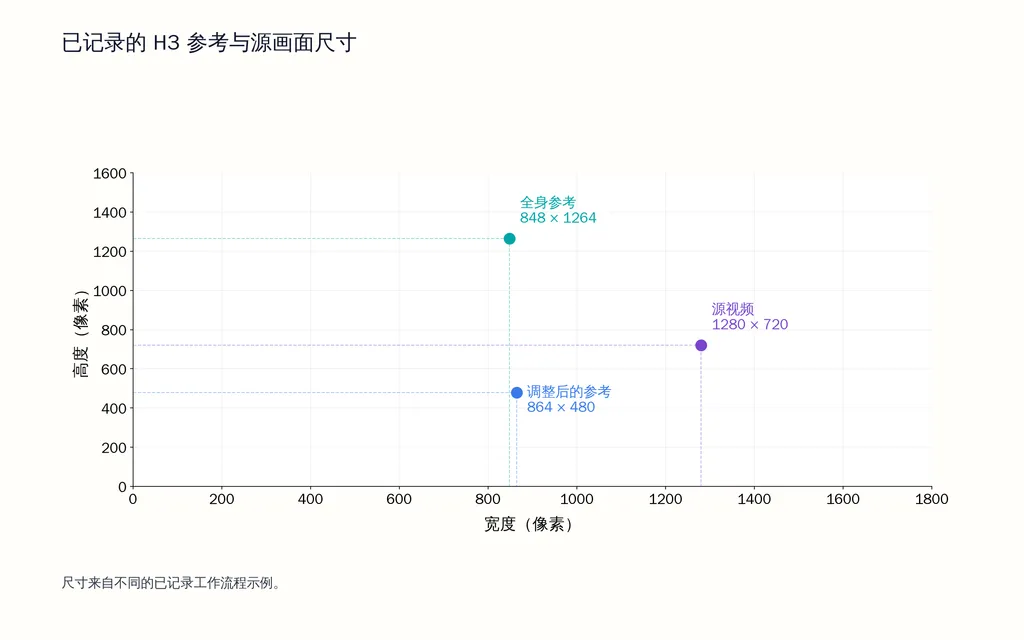
One documented workflow improved consistency after adapting the reference to approximately 864 × 480, closer to the target composition. In another case, an 848 × 1264 full-body PNG was used against a 1280 × 720, 30 fps, 14.4-second source clip, yet noticeable identity drift remained.
These are not controlled benchmarks, but they support a practical rule: make the identity-defining features large and clear enough for the scale at which the character appears in the final shot.

How to Replace a Character in Video with MiniMax H3 Step by Step
Step 1: Make the Source Video the Performance Master
Let the source video control movement, pose, position, body rotation, facial performance, speed, timing, and choreography.
Do not rewrite every movement in text if the source video already contains the performance you want. Re-describing the action can create another interpretation layer rather than improve fidelity.
Step 2: Assign the Reference Image as the Identity Source
State clearly that the original performer should be replaced by the character shown in the reference.
Define the visual attributes that must remain stable, including face, hairstyle, outfit, colors, proportions, and distinctive details.
In one documented study involving more than 400 generations over roughly six hours, weak subject definitions were associated with identity loss in around half of some test runs. The lesson is not that every workflow will behave the same way, but that vague identity labels are risky when consistency matters.
Step 3: Transfer the Original Performance
The replacement character should inherit the original performer’s movement, pose, position, expression, rotation, speed, and timing.
This instruction is critical because it tells H3 that the source performer provides performance, not identity.
Step 4: Preserve Camera, Lighting, and Scene Structure
Protect everything outside the intended character edit.
Preserve the background, props, camera path, framing, focus, motion blur, lighting, shadows, composition, and edit timing.
The fewer unrelated elements H3 must redesign, the easier it is to focus model capacity on the replacement itself.
Step 5: Preserve Occlusion
Occlusion matters whenever hands, hair, props, weapons, clothing, or other characters pass in front of the subject.
If a hand crosses the face in the source, it should cross the replacement face at the same moment. The same applies to bows, equipment, foreground objects, and character overlap.
This is especially important in dance, running, boxing, archery, fast turns, and action scenes.
What Is the Best MiniMax H3 Character Swap Prompt?
Use Replace, Match, Inherit, Preserve, and Prevent
The strongest general prompt framework is:
Replace: Replace the original performer with the reference character.
Match: Match the character’s face, hair, outfit, colors, proportions, and recognizable identity details.
Inherit: Preserve the original performer’s movement, pose, expression, position, speed, rotation, and timing.
Preserve: Keep the original camera, background, lighting, shadows, props, framing, focus, and edit.
Prevent: Do not introduce new actions, objects, cuts, camera movement, text, or accessories.
A concise production prompt can therefore read:
In Video 1, replace the original performer with the character shown in Image 1. Match the reference character’s face, hairstyle, outfit, colors, body proportions, and visible identity details throughout the clip. Preserve the original performer’s movement, pose, position, rotation, expression, speed, and timing. Keep the background, props, camera path, framing, focus, motion blur, lighting, shadows, composition, and editing unchanged. Maintain the original occlusion relationships when hands, hair, clothing, or objects pass in front of the character. Do not add new actions, objects, camera motion, cuts, text, or accessories.
Simple Prompts Can Beat Over-Structured Prompts
Longer prompts are not automatically more controllable.
In one documented head-replacement workflow, a simplified instruction produced strong results in roughly 70% of attempts, while a more elaborate version sometimes preserved so much of the source that little replacement occurred.
Structured prompting becomes more useful when it solves a specific problem such as multi-character mapping, persistent identity drift, or conflicting references.
How to Fix MiniMax H3 Identity Drift
Start with Short Clips Before Increasing Duration
Identity drift often appears gradually. A character may begin correctly, move toward the source performer, and then partially recover.
A 14.4-second, 1280 × 720, 30 fps test using an 848 × 1264 full-body reference still showed substantial drift on a 16GB RTX 5070 Ti workflow.
A more efficient debugging order is:
- Test approximately five seconds.
- Strengthen the face reference.
- Match the framing more closely.
- Remove unnecessary references.
- Clarify identity and performance roles.
- Add a rear view for turning shots.
- Test another seed.
- Increase quality settings for difficult motion.
High Motion May Need More Conservative Settings
In the 400-plus-generation workflow, five-second clips were commonly used for testing, with additional 15-second experiments.
Four-step Turbo settings were useful for iteration, but difficult motion sometimes lost identity consistency. For harder sequences, that workflow returned to approximately 20 steps.

This is not a universal preset. It illustrates a broader tradeoff: faster generation can become less reliable when the model must solve identity, pose, motion, occlusion, and temporal continuity at once.

Keep H3 Character Identity Consistent Across Cuts and Longer Videos
Longer sequences and hard cuts introduce additional opportunities for the source identity to reappear or for references to compete.
For production work, validate the replacement in short, independently reviewed segments before extending the sequence. Keep the same identity description and reference mapping across clips, and check continuity at every cut.
Do not assume that a character established correctly in the first shot will automatically remain dominant in later shots. Consistency across clips should be treated as an explicit production task, not a one-time prompt decision.
How to Replace Multiple Characters with MiniMax H3
Map Every Character Explicitly
For two-person replacement, each identity needs a stable mapping.
A practical structure is:
- Image 1 defines Character A
- Image 2 defines Character B
- Video 1 provides both performances
- Character A replaces the left performer
- Character B replaces the right performer
One documented two-character workflow reached approximately 90% reported success after improving subject mapping and retention, although results remained seed-dependent.

Prevent Identity Mixing During Crossovers
The hardest moments occur when performers cross positions, overlap, or block one another.
Clear Character A and Character B assignments are safer than vague labels such as first person and second person.
For multi-character work, reference role clarity is more valuable than maximum reference count.
What Do MiniMax H3 ComfyUI Performance Tests Show?
12GB VRAM Can Work with Strong Tradeoffs
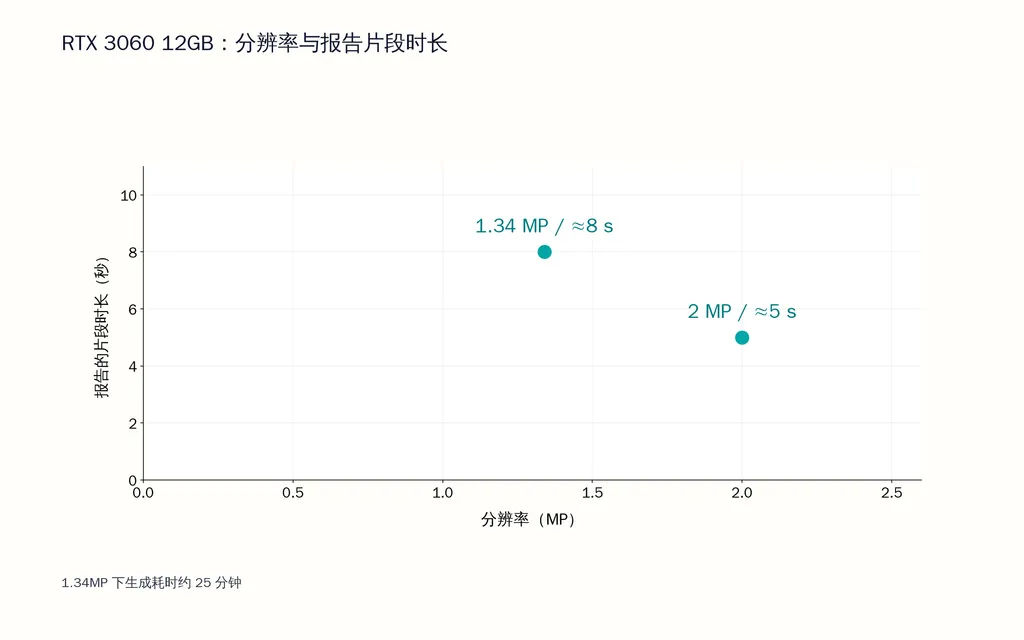
One RTX 3060 12GB workflow reported approximately:
- 5 seconds at around 2MP
- 8 seconds at around 1.34MP
- about 25 minutes for the 1.34MP generation
Another 12GB test used nine HD PNG references at 0.4MP. A normal 30-second image-to-video generation took around 14 minutes, while the multi-reference Ref2V workflow took around 20 minutes.
These results are workflow examples rather than universal benchmarks, but they show the tradeoff between duration, resolution, reference count, and generation cost.

More VRAM Does Not Automatically Fix Identity Drift
A 16GB workflow still experienced drift on a longer replacement clip.
A 24GB RTX 3090 Ti test using 56 frames at 0.5MP described video editing as roughly twice as demanding as simpler image-reference generation.
A higher-end 5090 optimization workflow reported more than 10GB of VRAM savings and roughly 14GB less shared GPU-memory use after switching to more memory-efficient components, while generation speed remained approximately similar.
The key point is that GPU capacity affects what settings you can run, but reference quality, duration, motion complexity, and prompt structure still determine identity stability.

What Are the Most Common MiniMax H3 Character Swap Mistakes?
Adding More References Before Diagnosing the Failure
More references can create more contradictions.
Start with one strong identity source. Add another view only when the target clip exposes information the first image cannot provide.
Testing Long Videos Too Early
A failed 15-second action clip can have many possible causes.
A five-second test makes it easier to isolate identity, framing, motion, seed, resolution, or occlusion problems before spending more compute.
Changing Too Many Elements at Once
If the task is character replacement, avoid simultaneously changing the background, lighting, camera, animation, and edit style.
Professional AI video workflows become more controllable when each generation has a narrow transformation boundary.
FAQ
Why Does H3 Keep the Original Face?
The most common causes are weak identity references, ambiguous reference roles, mismatched framing, excessive references, or preservation instructions that overpower the edit. Start with one clear portrait, assign the image to identity and the video to performance, and validate the replacement on a short clip before increasing complexity.
Can H3 Replace Two Characters at the Same Time?
Yes. Multi-character replacement can work when each reference is mapped explicitly to one performer. The main challenge is identity mixing when characters overlap, cross positions, or occlude one another. Stable Character A and Character B mappings are more reliable than vague positional descriptions.
How Many Reference Images Should I Use with H3?
Start with one strong image. Add another view only when the source video reveals information the first image cannot provide, such as a rear hairstyle or costume view. In several documented workflows, fewer references improved consistency because the model had fewer conflicting visual signals to reconcile.
How Much VRAM Does H3 Need?
There is no single fixed requirement. Documented local workflows include workable cases on 12GB, 16GB, and 24GB GPUs, but resolution, duration, steps, quantization, model configuration, and reference count all affect memory use. For constrained hardware, reduce clip duration and resolution first.
Conclusion
The best MiniMax H3 character replacement workflow is not built around one “ultimate prompt.” It comes from making every information source responsible for the right thing: the reference image defines identity, the source video defines performance and cinematography, and the prompt defines what must change, transfer, and remain untouched. Across hundreds of documented generations, multi-character cases, high-motion tests, framing experiments, and local GPU workflows, the strongest pattern is consistent: start with a short clip, use the minimum number of strong references, separate identity from performance, preserve camera and occlusion explicitly, and add complexity only when a specific failure requires it.