
MiniMax H3 Image Generation and Editing: Why a Video Model Can Also Work Like an Image Model
 Yifan Zhao11 min de lectura ·
MiniMax H3 can generate and edit still images because T2I and I2I editing were already part of its multimodal training, even though H3 is currently known mainly as a video model. MiniMax's H3 launch documentation explicitly includes T2I, T2V, generalized reference and editing, I2I reference and editing, and I2V reference and editing. H3 image generation is therefore more than extracting a lucky frame from a video, and understanding how to use MiniMax H3 helps clarify how these capabilities fit into real workflows.
The challenge is turning that underlying image capability into a production-ready still image. Across the H3 workflows and user questions we reviewed, the model was particularly interesting for composition, character identity, multi-reference control, camera changes, and complex edits, while distant faces, fine textures, and final pixel-level polish remained less reliable. A structured MiniMax H3 prompt workflow can help control those variables more deliberately. The real opportunity is not simply making one image, but preserving creative intent across references, revisions, images, and motion.
Virse is built around that multimodel workflow. Its current product experience brings 50+ models onto one visual canvas, with tools including Nano Banana 2, GPT Image 2, Seedance 2.0, and MiniMax H3 available across its model ecosystem. Instead of moving references and outputs between disconnected prompt windows, designers can keep visual context together, compare directions, and move between image and video models in the same AI design workflow, supported by multi-Agent creative workflows.

Is MiniMax H3 an Image Model or a Video Model?
H3 is best understood as a general-purpose multimodal generation model whose currently released H3 checkpoints are primarily designed to output video and audio.
That distinction between model capability and product output explains why H3 image generation initially looks contradictory.
H3 Was Trained for Both Image and Video Generation
MiniMax did not train H3 only on video prediction. Its published pretraining scope includes image generation and I2I editing alongside video, audio, reference, and cross-modal tasks.
This suggests a different architecture for creative AI: instead of treating T2I, I2I, T2V, and reference control as completely separate problems, H3 learns relationships between multimodal context and the target output.
However, the public H3 model card currently describes H3-Base-FL2VA and H3-Base-Ref2VA as producing video and audio. That means pretrained capability is broader than the main output path exposed by the released H3 checkpoints.
Layer | What H3 Supports |
|---|---|
Pretraining | T2I, T2V, I2I editing and multimodal reference tasks |
Public H3 checkpoints | Primarily video and audio output |
Still-image workflows | Single-frame and minimal-frame generation and editing |
Main opportunity | Better productization of H3's image capabilities |
How Does MiniMax H3 Single-Image Generation Work?
The useful H3 still-image workflows do not treat a normal video as the desired final product. They minimize the temporal generation process so the workflow can produce or extract a controlled still image efficiently.
Some workflows target a single-frame setup, while others generate a minimal frame packet and decode the strongest still. This is more technically accurate than assuming every H3 image workflow works in exactly the same way.
Why Single-Image Workflow Design Matters
A practical H3 still-image pipeline usually involves:
- Supplying text, a source image, or multiple references.
- Defining how those inputs relate to the desired result.
- Minimizing unnecessary temporal generation.
- Decoding the result for still-image use.
- Refining only unresolved textures or faces when needed.
For designers, this turns H3 into a practical tool for concept art, character sheets, storyboards, campaign frames, product scenes, and controlled image editing. These use cases also explain where MiniMax H3 fits best in a broader creative pipeline.
Why H3's Visual VAE Matters for Image Quality
H3-VisualVAE is officially documented as a temporally causal video autoencoder with 16× spatial compression, 4× temporal compression, and 24 latent channels . This is important context when evaluating a static frame.
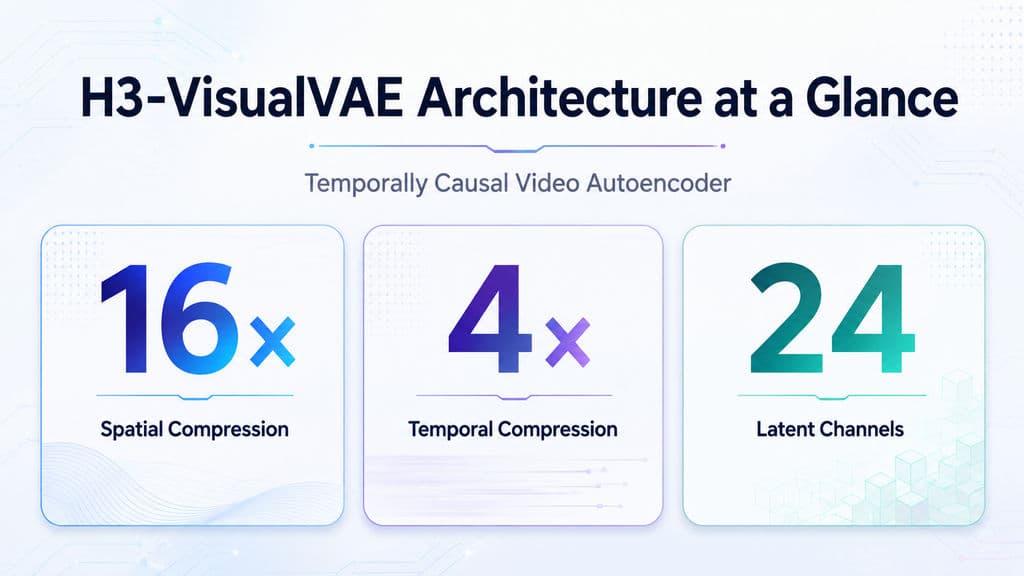
It does not mean the VAE alone causes every quality problem, but it helps explain why frame configuration and decoding strategy matter. A pipeline optimized for temporal representation is not automatically optimized for every still-image requirement, especially hair, skin, fabric, typography, and small faces.
What Can MiniMax H3 Image Editing Do in Real Workflows?
H3 image editing becomes most useful when a task requires changing one meaningful property while preserving several others.
Our research covered workflows involving clothing changes, age changes, body adjustments, location replacement, camera changes, pose control, stylization, depth-guided pose editing, character sheets, and storyboard variations.
Case Study: Local Change With Global Preservation
Consider a fashion visual where the designer wants to change only an outfit.
A successful edit must preserve:
- identity;
- facial expression;
- body position;
- camera angle;
- lighting;
- environment;
- unrelated objects.
That is harder than generating a visually similar replacement image. The model has to understand what is editable and what has already been approved.
This local-change, global-preservation pattern is one of the most useful ways to think about H3 image editing for professional design work.
Case Study: 1920 × 1088 Editing in About Eight Seconds
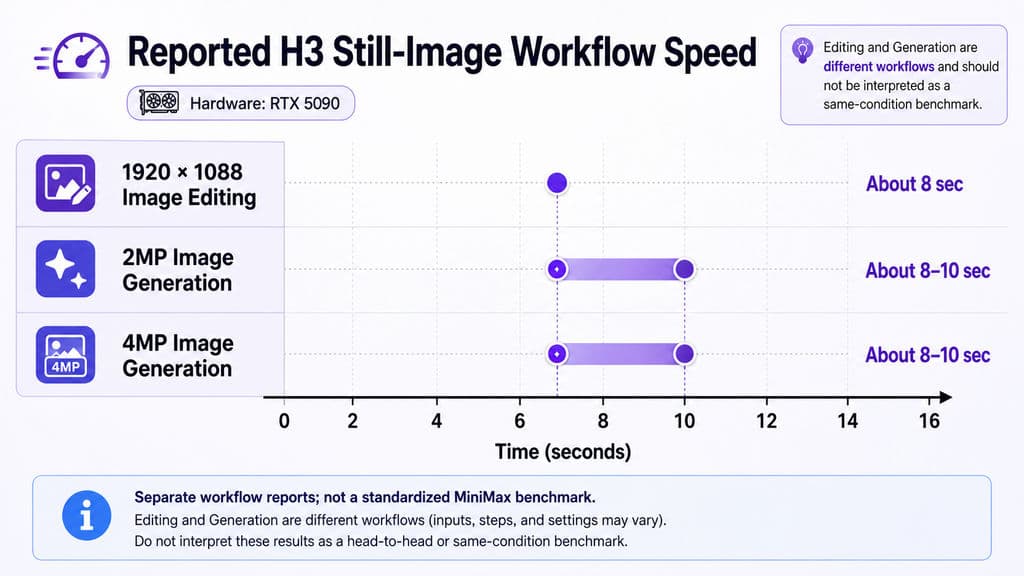
One RTX 5090 workflow included in our research reported roughly eight seconds for many 1920 × 1088 single-image edits, including clothing, age, body, location, camera, and character-sheet tasks.
This is not an official MiniMax benchmark. Hardware, precision, VAE, workflow configuration, and task complexity all affect latency.
What the case does show is that H3 image editing can be fast enough for iterative visual exploration, where a designer may need to compare many controlled variations rather than wait for one final render.
How Good Is H3 Multi-Reference Editing and Character Consistency?
Multi-reference control is one of H3's most important advantages for image and design workflows.
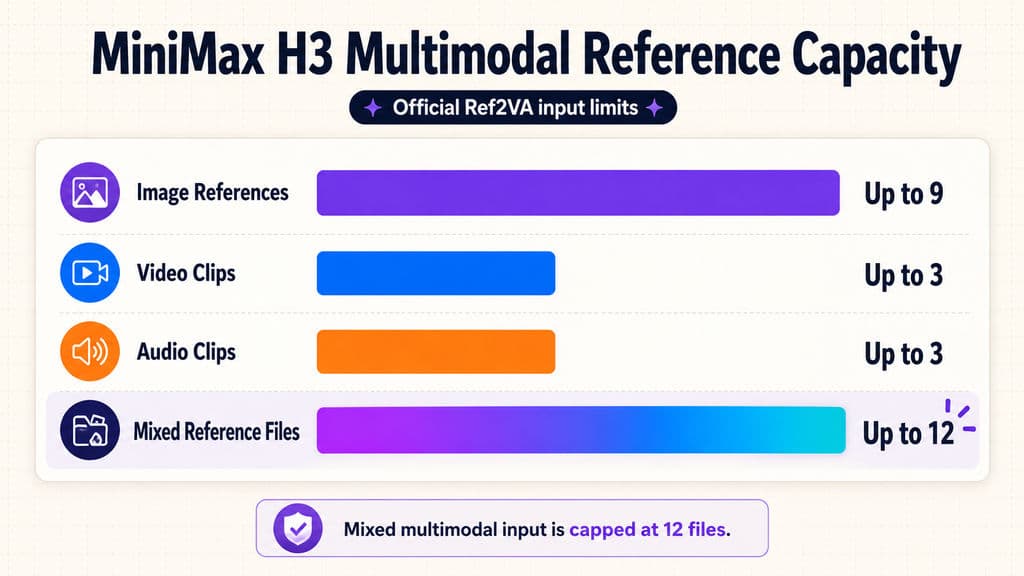
MiniMax's official Ref2VA specification supports up to nine image references, along with up to three video clips and three audio clips. Mixed multimodal reference input is capped at 12 files .
One Reference Can Control Identity While Another Controls Style
The important feature is not simply uploading nine images. It is assigning different creative roles to references.
Reference | Creative Role |
|---|---|
Image 1 | Character identity |
Image 2 | Clothing |
Image 3 | Product |
Image 4 | Lighting |
Image 5 | Style direction |
A prompt or context layer can then describe how these assets should interact. A clear AI design prompt structure becomes especially useful when several references need distinct responsibilities.
For character workflows, this creates an alternative to immediately training a LoRA. Reference conditioning can be faster for storyboards, campaign exploration, character sheets, and short production runs, while LoRA remains useful when a team needs highly repeatable identity behavior over a much larger series.
Where Is H3 Image Generation Strongest?
Our review suggests that H3's strongest image capabilities are semantic rather than purely pixel-level.
The model becomes particularly interesting when several constraints have to work together: identity, camera, spatial relationships, references, lighting, composition, and an explicit creative direction.
Composition, Art Direction, and Spatial Understanding
In comparative workflows we reviewed, H3 frequently stood out for:
- complex composition;
- reference fidelity;
- character positioning;
- camera interpretation;
- spatial relationships;
- art-direction adherence.
Individual comparisons sometimes preferred H3's composition over GPT Image workflows, while other tests preferred Flux-based editing for final output quality.
These are not standardized benchmarks. The practical lesson is more useful: test H3 when understanding the brief is harder than polishing the pixels.
How Does H3 Handle Typography and Graphic Design?
H3 still-image workflows have also been explored for posters, magazine-style layouts, dashboards, infographics, and other structured graphics.
This expands its value beyond cinematic frames. Strong composition and context understanding can help establish hierarchy, placement, and visual direction.
Typography is a different question. Our review also identified text distortion as a recurring failure mode, particularly when the result depends on small or exact copy. H3 is therefore more convincing for layout exploration and visual direction than for automatically approving final typography. Production text should still be checked or rebuilt in an editable design environment.
Why Do H3 Images Look Blurry or Weak on Distant Faces?
The recurring H3 still-image limitations in our research were blur, smudged textures, plastic-looking skin, weak distant faces, malformed small faces, soft backgrounds, and inconsistent text.
These problems reveal an important production distinction:
A composition can be semantically correct without being ready for delivery.
Case Study: 2MP vs 4MP H3 Image Generation
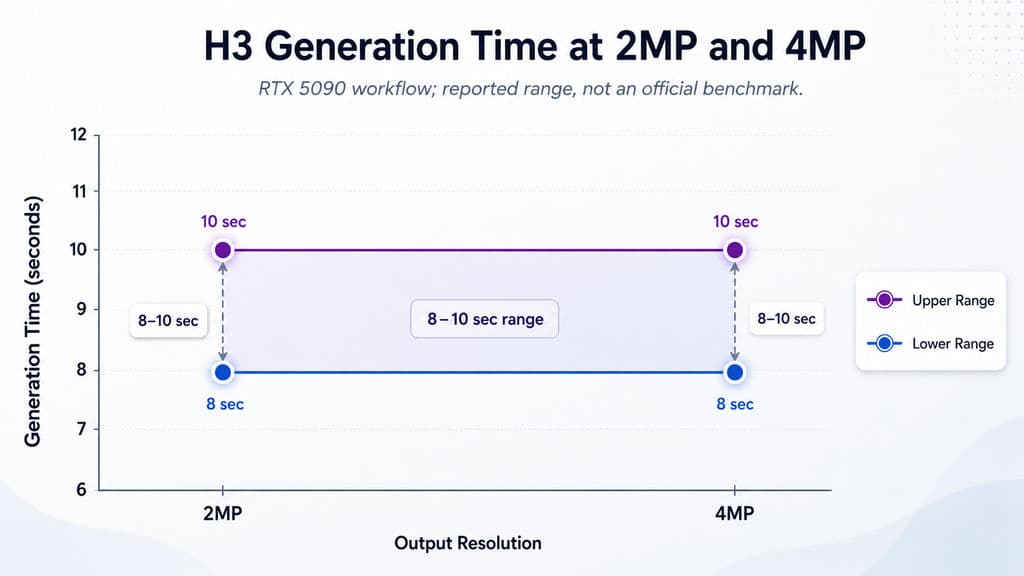
A long-running RTX 5090 workflow in our research had generated thousands of H3 still images and reported roughly 8–10 seconds for 2MP and 4MP generations under its configuration.
Increasing resolution toward 4MP reduced some facial deformation, but distant faces and background softness were not fully resolved.
That result is valuable because it shows why simply asking for more pixels is insufficient. Resolution helps, but VAE behavior, subject scale, decoding, quantization, and the model's handling of fine structure also matter.
Why H3-Regenerate-2K Is More Than Normal Upscaling
MiniMax takes a more interesting approach to high-resolution video output. H3-Regenerate-2K feeds the lower-resolution result back into H3 together with the original multimodal context .
Instead of asking a separate super-resolution system to guess missing information from pixels alone, regeneration can reuse the prompt and references when reconstructing fine detail.
MiniMax specifically identifies small text and fine details as examples where contextual regeneration can recover information that conventional super-resolution would otherwise have to infer.
For future H3 image workflows, this idea may matter more than simple upscaling.
What Is the Best H3 Image Workflow for Production?
For professional design work today, I would treat H3 as a semantic and reference engine first, then use a native image model selectively for final polish.
Stage 1: Use H3 for Creative Structure
H3 is well suited to solving:
- identity;
- composition;
- pose;
- camera;
- reference relationships;
- scene structure;
- complex changes;
- storyboard continuity.
Stage 2: Refine Only the Weak Pixels
Workflows in our research combined H3 outputs with tools such as Flux.2 Klein 9B, Qwen Image Edit, and SeedVR to improve faces, fabric, hair, and fine texture.
The danger is over-refinement. A second model can repair texture while accidentally changing expression, lighting, pose, or identity.
The better production objective is therefore selective detail recovery with semantic preservation, not unrestricted regeneration.
This is also why a multimodel workspace can be more useful than model loyalty. Virse's current product direction centers on keeping many models and visual assets on the same canvas , so a team can route composition, editing, refinement, and motion to different models without losing the surrounding creative context.
FAQ
Is H3 an image model or a video model?
H3 is a general-purpose multimodal generation model, but its currently released H3 checkpoints primarily output video and audio. Image generation is still part of its underlying capability because MiniMax included T2I and I2I reference and editing during pretraining.
Can H3 generate a single image without making a normal video?
Yes. Still-image workflows can minimize temporal generation through single-frame or minimal-frame approaches and decode the result for image use. The exact workflow varies, so H3 image generation should not be described as one universal official single-image pipeline.
Why are H3 images blurry, and does 4MP fix the problem?
Higher resolution can reduce some facial deformation, but our reviewed 4MP case did not fully eliminate distant-face problems or background softness. Resolution, VAE behavior, frame configuration, subject scale, quantization, and decoding all influence final quality.
Can H3 keep a character consistent without a LoRA?
Yes, reference-based workflows can preserve character identity without immediately training a LoRA. H3 officially supports up to nine image references, allowing different references to contribute identity, clothing, products, or visual direction. LoRA can still be useful when very high repeatability is required across a large asset set.
Is H3 better than Flux or GPT Image for image editing?
There is no reliable universal winner. H3 is particularly interesting for composition, references, identity, and spatial control, while native image models may deliver stronger textures or final polish in some workflows. For demanding production, H3 followed by selective image refinement is often a more useful comparison than choosing one model for every task.
Conclusion
MiniMax H3 is not simply a video model that happens to produce usable still frames. Image generation and I2I editing were already part of its multimodal training, and current workflows show real potential for reference-driven image generation, character consistency, complex editing, storyboards, graphic exploration, and multi-reference composition. Its main limitations remain static-image polish, distant faces, fine texture, and exact typography, while tests around 4MP generation show that higher resolution improves some problems without solving all of them. For design teams, the strongest current strategy is to let H3 handle semantic structure, references, and controlled changes, then route only unresolved detail to a native image model. The larger shift is more important than any single benchmark: image generation, image editing, reference understanding, and video generation are increasingly becoming connected operations inside the same multimodal creative workflow.
Más del blog de Virse
Flujo de trabajo
What Does a Graphic Designer Do? Real Tasks, Revisions, Tools & Workflow
23 de septiembre de 2026 by Yifan Zhao
Flujo de trabajo
How to Learn Graphic Design in 2026: A Step-by-Step Roadmap From Fundamentals to Portfolio
23 de septiembre de 2026 by Yifan Zhao
Flujo de trabajo

What Is Graphic Design? Definition, Real Examples, Process & Tools
23 de septiembre de 2026 by Yifan Zhao