MiniMax H3 vs. Kling AI 3.0: ¿cuál es mejor para la producción real de vídeo con IA?
 Yifan Zhao12 min de lectura ·

MiniMax H3 es más adecuado para la generación con abundantes referencias, las instrucciones complejas y los flujos locales, mientras que Kling AI 3.0 ofrece controles más explícitos para la narración multiplano y el diálogo entre varios personajes. Ninguno gana en todo: la elección depende del fallo que más te cueste, ya sea desviación de las referencias, errores de diálogo, incoherencias o reintentos.
El problema de fondo es la fragmentación del flujo de trabajo. Los equipos creativos cambian de modelo según las referencias, el diálogo, el movimiento y los tipos de plano, mientras las instrucciones, los recursos y la colaboración quedan dispersos entre herramientas. Por eso, el mejor flujo multimodelo no siempre es el de la demostración más espectacular, sino el que produce planos utilizables con menos fallos costosos.
Virse reúne este flujo multimodelo en un espacio creativo. Los modelos Seedance 2.5, Seedance 2.0 y MiniMax H3 ya están disponibles en las páginas de modelos de Virse. Los planes de pago incluyen uso ilimitado de más de 40 modelos, como Nano Banana 2 y GPT Image 2, con plazas ilimitadas. Los usuarios nuevos reciben créditos gratuitos para hasta 10 imágenes de Nano Banana 2 o un vídeo de Seedance 2.0. Prueba Virse si quieres que elegir modelos forme parte del proceso creativo y no sea otro problema de gestión de herramientas.

MiniMax H3 vs. Kling AI 3.0: comparación rápida
La forma más útil de comparar H3 y Kling 3.0 es por tarea de producción y riesgo de fallo, no por cantidad de funciones.
Necesidad | Probar primero | Ventaja principal |
|---|---|---|
Referencias complejas | H3 | Control de referencias multimodales |
Seguimiento de instrucciones | H3 | Flujo sólido guiado por instrucciones |
Generación local | H3 | Despliegue con pesos abiertos |
Control del primer y último fotograma | H3 | Anclaje específico de fotogramas |
Diálogo entre varios personajes | Kling 3.0 | Controles explícitos de hablantes |
Narración multiplano | Kling 3.0 | Multiplano personalizado |
Personaje y voz reutilizables | Kling 3.0 | Flujo basado en elementos |
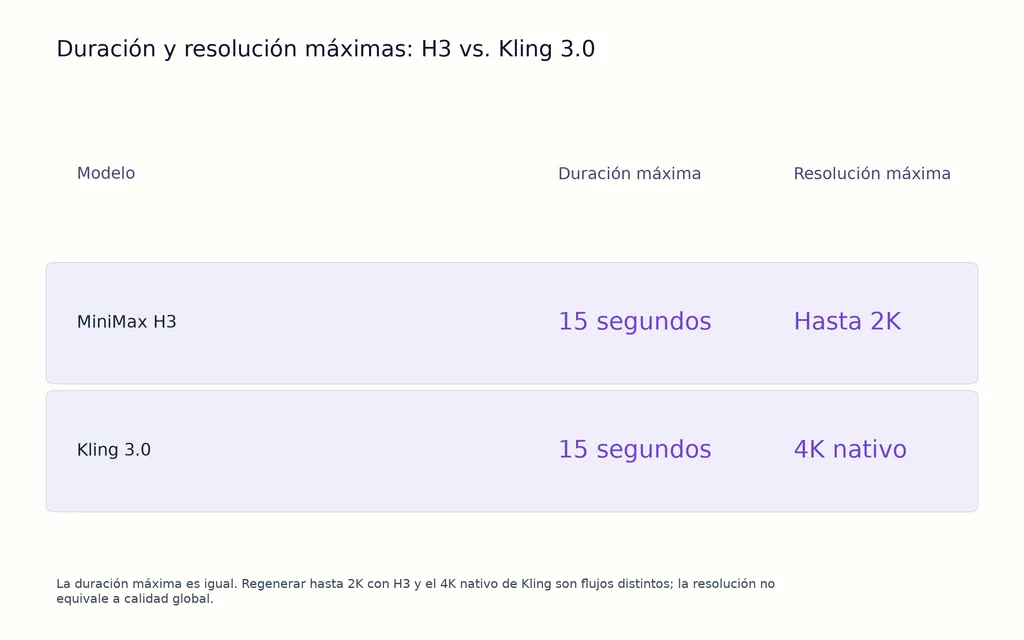
Resolución máxima | Kling 3.0 | 4K nativo disponible |
Personalización local | H3 | ComfyUI y procesos locales |
Mejor movimiento o sincronización labial | Desconocido | Aún no hay un ganador en pruebas controladas |
H3 admite oficialmente vídeo de 4–15 segundos, 24 FPS, audio estéreo nativo de 32 kHz, 11 idiomas de diálogo estables y referencias multimodales de imagen, vídeo y audio. Kling 3.0 admite hasta 15 segundos, audio nativo, multiplano, correferencia de varios personajes, diálogo multilingüe y controles reutilizables de personajes.
MiniMax H3 vs. Kling 3.0 en seguimiento de instrucciones y referencias
Priorizaría H3 cuando ignorar una referencia sea el fallo más caro posible.
Por qué H3 funciona bien en producción guiada por referencias
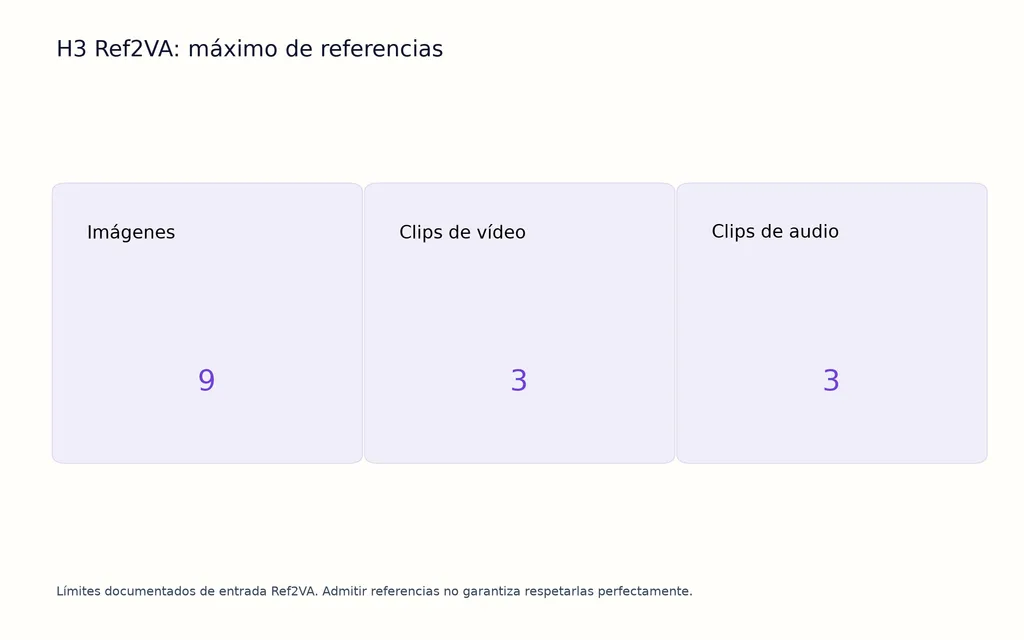
H3 combina texto, imágenes, vídeo y audio en un mismo contexto de generación. Su flujo Ref2VA admite hasta nueve imágenes, tres clips de vídeo y tres clips de audio, ofreciendo más formas de comunicar identidad visual, estructura de producto, movimiento y voz sin expresarlo todo por escrito. Un flujo de referencias de MiniMax H3 específico resulta especialmente útil cuando varias fuentes deben mantenerse coordinadas.
Entre las comparaciones de producción revisadas para este artículo, una prueba usó una hoja de vistas del personaje, una referencia de objeto y la misma dirección creativa en varios modelos. H3 conservó más información específica de las referencias en ese caso, mientras Kling produjo imágenes atractivas, pero pasó por alto más detalles estructurales.
Esto no demuestra que H3 gane todas las pruebas de seguimiento de instrucciones. Sí revela una diferencia importante en producción: admitir referencias no equivale a respetarlas.
En publicidad de producto, moda, diseño industrial, packaging y personajes de propiedad intelectual, un clip visualmente impresionante puede resultar inutilizable si cambia el objeto, el vestuario o la identidad. Los equipos con sujetos recurrentes también pueden beneficiarse de mejores flujos de coherencia de personajes con IA.
Cuándo cobran más valor los controles de referencia de Kling
Kling 3.0 también ofrece flujos sólidos mediante elementos y correferencia de personajes. Su ventaja aparece cuando el equipo debe gestionar personajes recurrentes en varias escenas, no solo maximizar el número y tipo de referencias de entrada.
Para contenido por episodios, personajes virtuales o actores de marca recurrentes, los elementos reutilizables de personaje y voz reducen la necesidad de redefinir la identidad en cada plano.
H3 vs. Kling 3.0 en diálogo, voz y sincronización labial
Kling 3.0 ofrece un flujo más claro para varios hablantes, mientras H3 destaca en generación de diálogo local y guiada por referencias.
Caso de diálogo H3: referencia de voz en una GPU de 16 GB
Un flujo revisado para este artículo empleó dos referencias de identidad, una de voz, diálogo exacto en italiano, resolución de 1344×768, 24 FPS y 5,2 segundos de duración en una RTX 5060 Ti de 16 GB.
El flujo combinó localmente identidad del personaje, voz de referencia, texto guionizado y sincronización labial. Esto coincide con el soporte oficial de H3 para audio estéreo nativo y diálogo estable en 11 idiomas.
El problema recurrente de H3 no es la falta de capacidad de habla: las instrucciones complejas pueden provocar habla inesperada o sonidos incoherentes cuando la intención del audio es ambigua.
En la práctica, las instrucciones deben definir quién habla, quién permanece en silencio, cuándo empieza el diálogo y qué sonidos ambientales deben estar presentes. Una guía estructurada de instrucciones para MiniMax H3 ayuda a reducir la ambigüedad en estas indicaciones complejas.
Por qué Kling facilita el diálogo entre varios personajes
Kling 3.0 admite explícitamente la correferencia de varios personajes y la asignación estructurada del diálogo. Así resulta más fácil definir quién habla, en qué orden y con qué identidad recurrente.
Kling 3.0 Omni también puede asociar una voz a un elemento de personaje reutilizable, útil para episodios, actores virtuales y personajes de marca recurrentes.
Sin embargo, mejores controles de diálogo no demuestran una sincronización labial universalmente superior. Una comparación real requiere pruebas repetidas de exactitud de palabras, sincronización de la boca, hablantes incorrectos, diálogo no deseado y coherencia de voz.
H3 vs. Kling 3.0 en vídeo multiplano y guion gráfico
Kling 3.0 es la opción más sólida para controlar explícitamente el guion gráfico, aunque H3 también genera varios cortes dentro de un vídeo.
El multiplano de Kling reduce el montaje manual de clips
En un flujo revisado durante la investigación, un creador antes generaba tres o cuatro clips independientes y los montaba en Premiere. Kling 3.0 permitió producir el mismo tipo de escena como una secuencia coherente de 10–15 segundos mediante generación multiplano.
El multiplano personalizado añade estructura al permitir definir duración, encuadre, ángulo, acción y movimiento de cámara de cada plano.
Para anuncios, escenas de diálogo y cine guiado por guion gráfico, el modelo se aproxima así a la manera de pensar de los directores: plano a plano, en vez de instrucción a instrucción.
H3 puede generar cortes directos en una sola pasada
No debería describirse H3 como un modelo limitado al plano continuo.
Un flujo H3 revisado generó 15 segundos con varios cortes directos, audio nativo, salida de aproximadamente 1 MP, sin reparación de fotogramas ni remontaje en una sola generación. El renderizado tardó 23 minutos en una RTX PRO 6000 Blackwell de 96 GB.
La diferencia es sencilla: H3 genera secuencias con varios cortes; Kling ofrece un control más explícito de su planificación.
H3 vs. Kling 3.0 en movimiento y coherencia de personajes
Actualmente no hay pruebas fiables de que uno produzca mejor movimiento en todos los casos.
Calidad del movimiento y control del movimiento son métricas distintas
Kling recibe valoraciones positivas de producción sobre actuación sutil: pequeños asentimientos, gestos nerviosos, peso corporal, movimiento de la ropa e interpretaciones contenidas.
H3 aborda el movimiento de otra forma. Condicionar el primer y último fotograma permite controlar mejor dónde empieza y termina una acción.
Una evaluación rigurosa debe separar realismo del movimiento, seguimiento de la acción, deformación corporal, interacción con objetos, movimiento de cámara y precisión del punto final, en vez de reducirlo todo a una puntuación de «calidad del movimiento».
Un flujo coherente mejora la coherencia del personaje
Un caso de producción con Kling abarcó 8–12 planos. Describir al personaje de forma distinta en cada instrucción aumentó las desviaciones de rostro y vestuario. Estandarizar la descripción y reducir variaciones innecesarias mejoró la continuidad.
La lección se aplica a ambos modelos: la coherencia del personaje depende en parte del modelo y en parte del sistema de diseño.
Las descripciones, el vestuario, las referencias, las voces y los atributos visuales recurrentes deben gestionarse como recursos reutilizables, no reescribirse en cada plano.
Resolución de MiniMax H3 vs. Kling 3.0: H3 2K frente a Kling 4K nativo
Kling 3.0 tiene una clara ventaja de resolución máxima cuando la entrega exige 4K nativo. H3 se centra actualmente en referencias, flujos abiertos y regeneración hasta 2K, más que en salida 4K nativa.
Eso no significa que la resolución determine por sí sola la calidad visual.
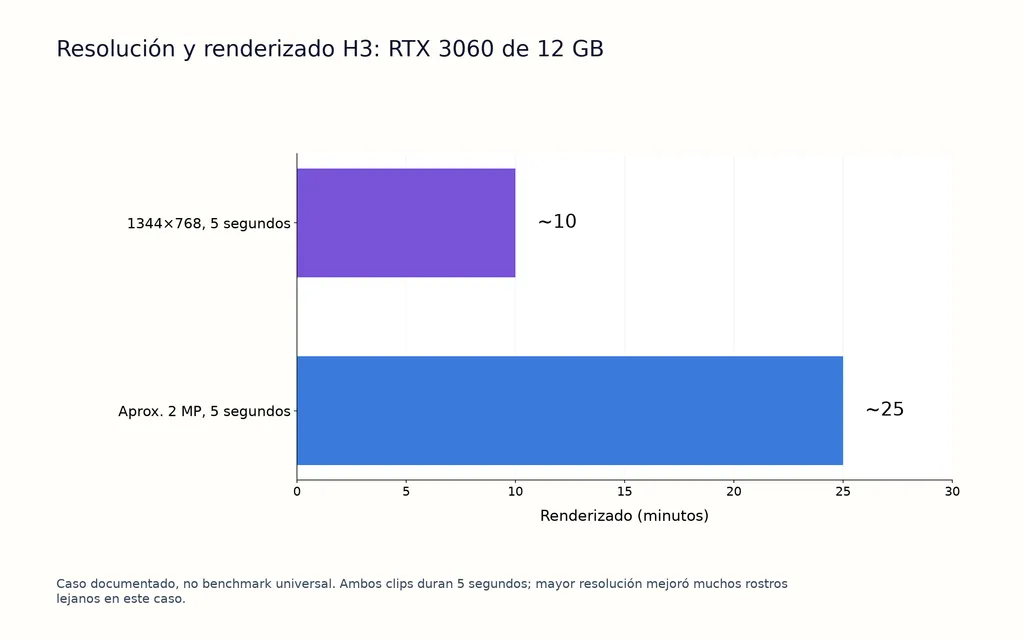
En un flujo H3 con RTX 3060 de 12 GB, generar cinco segundos a 1344×768 tardó unos 10 minutos; acercarse a 2 MP elevó el renderizado a unos 25 minutos. La mayor resolución mejoró muchos problemas de rostros lejanos.
Es una observación útil: algunos fallos aparentes de coherencia del modelo podrían ser fallos de resolución. La baja resolución sirve para explorar composición y movimiento, pero la valoración final de rostros y detalles debe hacerse a una resolución realista de entrega.
Rendimiento local de MiniMax H3: GPU de 6 GB, 12 GB y gama alta
El despliegue local es una de las principales diferencias entre H3 y Kling.
H3 funciona en ComfyUI y otros marcos de inferencia local, lo que interesa para procesos privados, personalización técnica y experimentación intensiva.
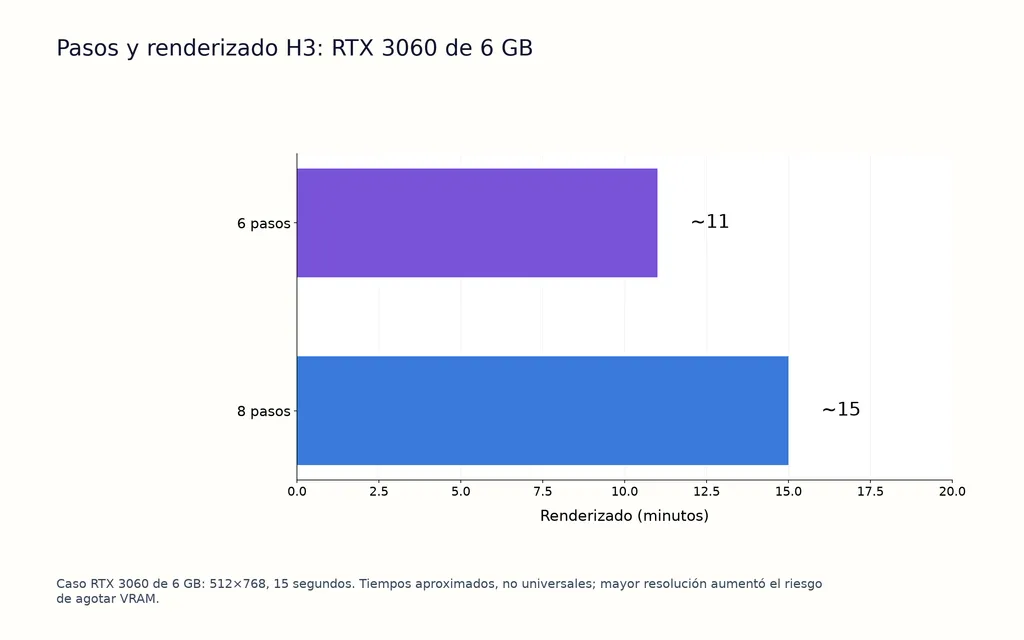
En los flujos revisados, una RTX 3060 de 6 GB generó un clip de 512×768 y 15 segundos en unos 11 minutos con seis pasos y unos 15 minutos con ocho pasos. Aumentar la resolución elevó el riesgo de agotar la VRAM.
Una RTX 3060 de 12 GB ejecutó flujos de 1344×768 y mayor resolución, mientras el ejemplo con RTX PRO 6000 de 96 GB produjo una secuencia de 15 segundos con varios cortes en 23 minutos.
No son resultados universales. Son útiles porque muestran el equilibrio entre VRAM, resolución, tiempo de renderizado y calidad utilizable.
Precios de H3 vs. Kling: compara el coste por clip utilizable
El precio por generación no es la métrica más útil. Lo es el coste por clip utilizable.
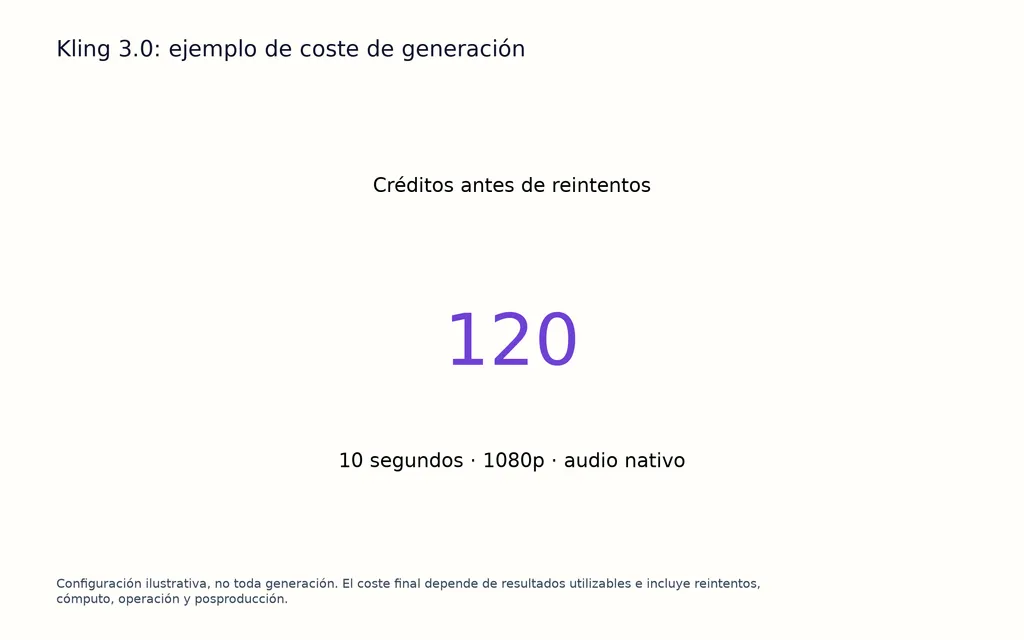
El precio de Kling 3.0 varía actualmente según resolución, audio, duración y controles de voz. Por ejemplo, generar 10 segundos a 1080p con audio nativo puede exigir 120 créditos antes de reintentos.
H3 cambia la economía al permitir generación local. Con hardware adecuado, repetir intentos puede tener un coste marginal en efectivo mucho menor, pero la inferencia local no es gratuita: cuentan GPU, electricidad, almacenamiento, renderizado, configuración y tiempo del operador.
El cálculo más útil es:
Coste por clip utilizable = costes totales de generación, cómputo, reintentos, operación y posproducción divididos entre resultados publicables.
Por eso el modelo más barato de una página de precios puede resultar más caro en producción si exige muchos más intentos fallidos.
MiniMax H3 vs. Kling AI: ¿cuál elegir?
Elige primero H3 si dependes de referencias visuales complejas, fidelidad del producto, control del primer y último fotograma, ComfyUI, generación local, privacidad o muchas variantes experimentales.
Elige primero Kling 3.0 si necesitas guion gráfico multiplano explícito, varios personajes que hablan, personajes reutilizables vinculados a una voz o control narrativo estructurado.
Para muchos equipos profesionales, un flujo híbrido puede ser lo más eficiente. H3 puede explorar referencias e iterar localmente, y Kling resolver escenas seleccionadas donde importen más la asignación de hablantes y la estructura de planos.
La regla más útil es: elige según el fallo que obligue al renderizado más costoso, no según la demostración más cinematográfica.
Preguntas frecuentes
¿Es H3 mejor que Kling 3.0?
H3 encaja mejor con referencias multimodales, generación local, ComfyUI, control del primer y último fotograma y experimentación reiterada. Kling 3.0 ofrece controles más explícitos para narración multiplano y diálogo entre varios personajes. Ninguno dispone aún de suficiente evidencia controlada para declararse ganador universal en movimiento, sincronización labial, calidad visual o coherencia.
¿Es Kling 3.0 mejor que H3 para el diálogo?
Kling 3.0 es un punto de partida más sólido para conversaciones con varios personajes, gracias a controles más explícitos de hablantes e identidades. H3 también admite diálogo nativo, referencias de voz, sincronización labial y 11 idiomas estables, por lo que es muy capaz en escenas habladas guiadas por referencias.
¿Puede H3 funcionar con 6 GB o 12 GB de VRAM?
Sí, según los flujos de producción revisados. Una RTX 3060 de 6 GB generó clips de 512×768 y 15 segundos en unos 11–15 minutos, según los pasos. Una RTX 3060 de 12 GB manejó resoluciones superiores, aunque acercarse a 2 MP elevó el renderizado de cinco segundos a unos 25 minutos.
¿Qué es más barato, H3 o Kling?
Ninguno lo es siempre. Kling tiene costes de créditos en la nube previsibles; H3 local desplaza el coste a hardware, electricidad, configuración y renderizado. Para grandes volúmenes, el menor coste marginal de reintento de H3 puede resultar atractivo. La comparación más precisa es el coste por clip utilizable, no el precio por generación.
Conclusión
MiniMax H3 y Kling AI 3.0 resuelven problemas de producción distintos, en vez de competir por una única puntuación universal. H3 destaca en referencias multimodales, inferencia local, control del primer y último fotograma, referencias de voz e iteración intensiva; Kling 3.0 ofrece herramientas más explícitas para narración multiplano, personajes reutilizables, control de hablantes y producción 4K nativa. La evidencia disponible no permite afirmar que uno tenga siempre mejor movimiento, sincronización labial, coherencia o calidad visual. Para diseñadores y equipos creativos, conviene identificar el fallo más caro de corregir —referencias ignoradas, diálogo incorrecto, desviación de identidad, rostros lejanos deficientes, estructura de planos fallida o reintentos caros— y elegir el flujo que mejor lo reduzca.