MiniMax H3 vs. Kling AI 3.0: qual é melhor para produção real de vídeo com IA?
 Yifan Zhao12 min de leitura ·

MiniMax H3 é mais adequado para geração com muitas referências, instruções complexas e fluxos locais, enquanto Kling AI 3.0 oferece controles mais explícitos para narrativa com vários planos e diálogo entre vários personagens. Nenhum vence em tudo: a escolha depende da falha que custa mais, seja desvio das referências, erros de diálogo, inconsistência ou novas tentativas.
O problema maior é a fragmentação do fluxo de trabalho. Equipes criativas alternam entre modelos para referências, diálogo, movimento e diferentes tipos de plano, enquanto prompts, recursos e colaboração se espalham pelas ferramentas. Assim, o melhor fluxo com vários modelos nem sempre tem a melhor demonstração, mas produz planos utilizáveis com menos falhas caras.
O Virse reúne esse fluxo com vários modelos em um espaço criativo. Os modelos Seedance 2.5, Seedance 2.0 e MiniMax H3 já estão disponíveis nas páginas de modelos do Virse. Os planos pagos incluem uso ilimitado de mais de 40 modelos, como Nano Banana 2 e GPT Image 2, com assentos ilimitados. Novos usuários recebem créditos gratuitos para até 10 imagens do Nano Banana 2 ou um vídeo do Seedance 2.0. Experimente o Virse para integrar a escolha dos modelos ao processo criativo, sem criar mais um problema de gestão de ferramentas.

MiniMax H3 vs. Kling AI 3.0: comparação rápida
A forma mais útil de comparar H3 e Kling 3.0 é por tarefa de produção e risco de falha, não por quantidade de recursos.
Necessidade | Testar primeiro | Principal vantagem |
|---|---|---|
Referências complexas | H3 | Controle de referências multimodais |
Adesão ao prompt | H3 | Fluxo sólido orientado por instruções |
Geração local | H3 | Implantação com pesos abertos |
Controle do primeiro e último quadro | H3 | Ancoragem específica de quadros |
Diálogo entre vários personagens | Kling 3.0 | Controles explícitos de falantes |
Narrativa com vários planos | Kling 3.0 | Vários planos personalizados |
Personagem e voz reutilizáveis | Kling 3.0 | Fluxo baseado em elementos |
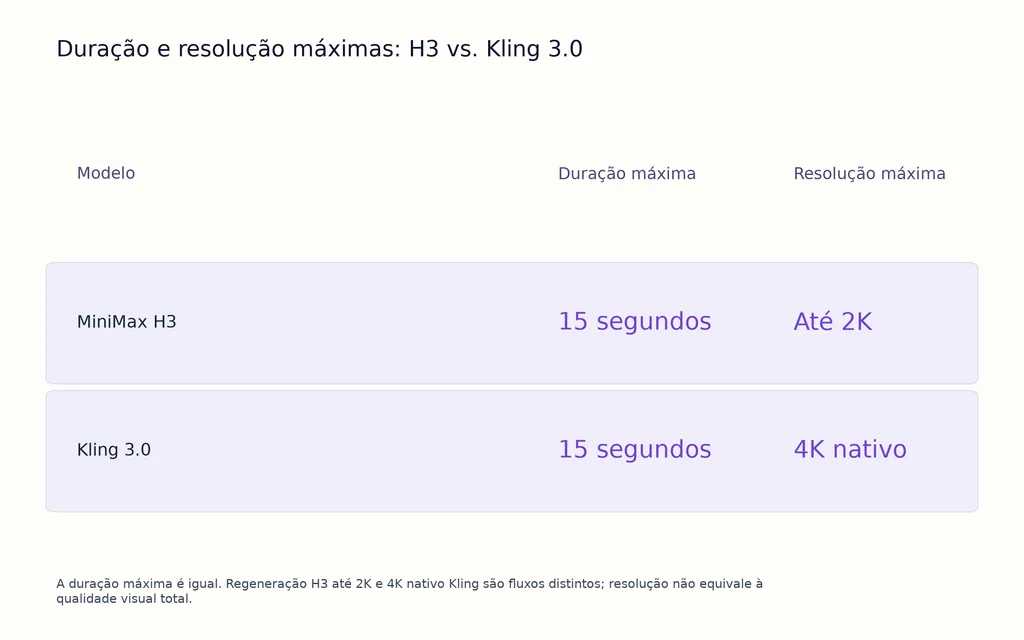
Resolução máxima | Kling 3.0 | 4K nativo disponível |
Personalização local | H3 | ComfyUI e pipelines locais |
Melhor movimento ou sincronização labial | Desconhecido | Ainda sem vencedor em testes controlados |
O H3 oferece oficialmente vídeo de 4–15 segundos, 24 FPS, áudio estéreo nativo de 32 kHz, 11 idiomas estáveis de diálogo e referências multimodais de imagem, vídeo e áudio. O Kling 3.0 oferece até 15 segundos, áudio nativo, vários planos, correferência entre personagens, diálogo multilíngue e controles reutilizáveis de personagens.
MiniMax H3 vs. Kling 3.0: adesão a prompts e referências
Eu priorizaria o H3 quando ignorar uma referência fosse a falha mais cara possível.
Por que o H3 funciona bem em produção guiada por referências
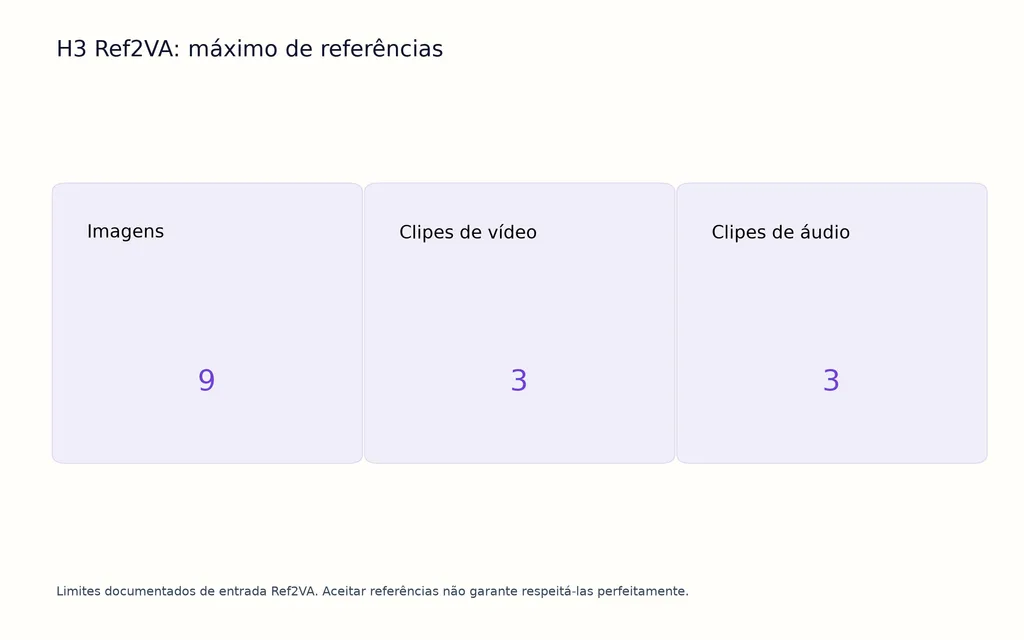
O H3 combina texto, imagens, vídeos e áudio no mesmo contexto de geração. Seu fluxo Ref2VA aceita até nove imagens, três clipes de vídeo e três clipes de áudio, oferecendo mais formas de comunicar identidade visual, estrutura do produto, movimento e voz sem descrever tudo em texto. Um fluxo de referências do MiniMax H3 dedicado é especialmente útil quando vários recursos de origem precisam permanecer coordenados.
Entre as comparações de produção analisadas, um teste usou as mesmas vistas de personagem, referência de objeto e direção criativa em vários modelos. Nesse caso, o H3 preservou mais informações específicas das referências, enquanto o Kling gerou cenas visualmente fortes, mas ignorou mais detalhes estruturais.
Isso não prova que o H3 vença todos os benchmarks de adesão ao prompt. Revela, porém, uma diferença importante: aceitar referências não é o mesmo que respeitá-las.
Em anúncios de produtos, moda, design industrial, embalagens e personagens de propriedade intelectual, um clipe impressionante pode ser inutilizável se o modelo alterar o objeto, a roupa ou a identidade. Equipes com temas recorrentes também podem se beneficiar de melhores fluxos de consistência de personagens com IA.
Quando os controles de referência do Kling ganham valor
O Kling 3.0 também oferece fluxos fortes por meio de elementos e correferência de personagens. A vantagem aparece quando é preciso gerenciar personagens recorrentes em várias cenas, em vez de apenas maximizar a quantidade e os tipos de referências de entrada.
Para conteúdo episódico, personagens virtuais ou atores de marca recorrentes, elementos reutilizáveis de personagem e voz reduzem a necessidade de redefinir a identidade a cada plano.
H3 vs. Kling 3.0: diálogo, voz e sincronização labial
O Kling 3.0 tem um fluxo mais claro para vários falantes, enquanto o H3 se destaca em diálogo local e guiado por referências.
Caso de diálogo H3: referência de voz em uma GPU de 16 GB
Um fluxo analisado usou duas referências de identidade, uma de voz, diálogo exato em italiano, resolução de 1344×768, 24 FPS e duração de 5,2 segundos em uma RTX 5060 Ti de 16 GB.
O fluxo combinou localmente identidade do personagem, voz de referência, fala roteirizada e sincronização labial. Isso corresponde ao suporte oficial do H3 a áudio estéreo nativo e diálogo estável em 11 idiomas.
O problema recorrente do H3 não é falta de capacidade de fala. Prompts complexos podem gerar fala inesperada ou sons sem sentido quando a intenção do áudio é ambígua.
Na prática, defina quem fala, quem permanece em silêncio, quando o diálogo começa e quais sons ambientais devem existir. Um guia estruturado de prompts do MiniMax H3 ajuda a reduzir a ambiguidade nessas instruções mais complexas.
Por que o Kling facilita o diálogo entre vários personagens
O Kling 3.0 oferece explicitamente correferência entre personagens e atribuição estruturada de diálogo. Isso facilita definir quem fala, em qual ordem e com qual identidade recorrente.
O Kling 3.0 Omni também associa uma voz a um elemento reutilizável de personagem, útil para episódios, atores virtuais e personagens de marca recorrentes.
Porém, melhores controles de diálogo não provam sincronização labial universalmente superior. Uma comparação real exige testes repetidos de precisão das palavras, tempo da boca, falantes incorretos, diálogo indesejado e consistência vocal.
H3 vs. Kling 3.0: vídeo com vários planos e storyboard
O Kling 3.0 é mais forte no controle explícito de storyboard, mas o H3 também gera vários cortes em um único vídeo.
O recurso de vários planos do Kling reduz a montagem manual
Em um fluxo analisado durante a pesquisa, um criador antes gerava três ou quatro clipes separados e os montava no Premiere. O Kling 3.0 permitiu produzir esse tipo de cena como uma sequência coerente de 10–15 segundos por meio de geração com vários planos.
O modo personalizado permite definir duração, enquadramento, ângulo, ação e movimento de câmera para cada plano.
Em comerciais, cenas de diálogo e filmes guiados por storyboard, o modelo se aproxima da maneira como diretores pensam: plano a plano, em vez de prompt a prompt.
O H3 pode gerar cortes secos em uma única passagem
O H3 não deve ser descrito como um modelo limitado a planos contínuos.
Um fluxo H3 analisado produziu 15 segundos de vídeo com vários cortes secos, áudio nativo, saída de aproximadamente 1 MP, sem reparo de quadros nem reedição em uma única geração. A renderização levou 23 minutos em uma RTX PRO 6000 Blackwell de 96 GB.
A diferença é simples: o H3 gera sequências com vários cortes; o Kling dá controle mais explícito sobre o planejamento desses planos.
H3 vs. Kling 3.0: movimento e consistência de personagens
Atualmente não há evidência confiável de que um dos modelos produza movimento melhor em todos os casos.
Qualidade e controle de movimento são métricas diferentes
O Kling recebe avaliações positivas de produção sobre atuação sutil, como pequenos acenos de cabeça, gestos nervosos, peso corporal, movimento de roupas e interpretação contida.
O H3 aborda o movimento de outra forma. O condicionamento pelo primeiro e último quadro dá mais controle sobre onde uma ação começa e termina.
Um benchmark sério deve separar realismo do movimento, adesão à ação, deformação corporal, interação com objetos, movimento de câmera e precisão do ponto final, em vez de resumir tudo em uma nota de “qualidade de movimento”.
Um fluxo consistente melhora a consistência do personagem
Um caso de produção com Kling envolveu 8–12 planos. Reescrever o personagem de forma diferente em cada prompt aumentou os desvios de rosto e roupa. Padronizar a descrição e reduzir variações desnecessárias melhorou a continuidade.
A lição vale para os dois modelos: consistência de personagens é, em parte, um problema do modelo e, em parte, do sistema de design.
Descrições, roupas, referências, vozes e atributos visuais recorrentes devem ser recursos reutilizáveis, não reescritos para cada plano.
Resolução do MiniMax H3 vs. Kling 3.0: H3 2K ou Kling 4K nativo
O Kling 3.0 tem vantagem clara de resolução máxima quando a entrega exige 4K nativo. O H3 prioriza atualmente referências, fluxos abertos e regeneração até 2K, em vez de saída 4K nativa.
Isso não significa que a resolução sozinha determine a qualidade visual.
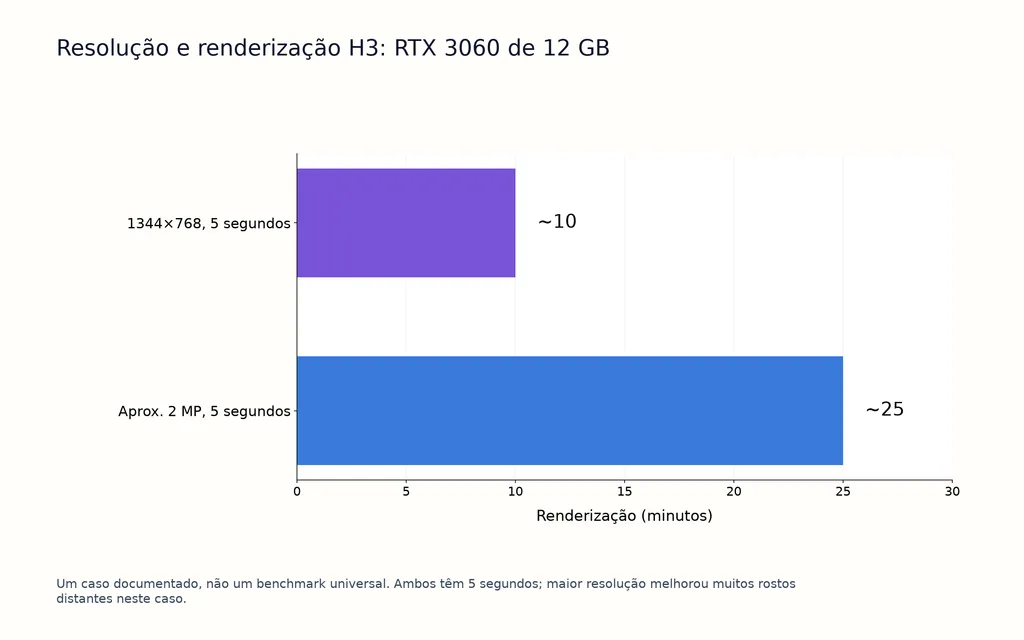
Em um fluxo H3 com RTX 3060 de 12 GB, gerar cinco segundos em 1344×768 levou cerca de 10 minutos; aproximar-se de 2 MP elevou a renderização para cerca de 25 minutos. A resolução maior melhorou muitos problemas de rostos distantes.
É uma observação útil: algumas falhas aparentes de consistência do modelo podem ser falhas de resolução. Testes em baixa resolução ajudam a explorar composição e movimento, mas a avaliação final de rostos e detalhes deve ocorrer em uma resolução realista de entrega.
Desempenho local do MiniMax H3: GPUs de 6 GB, 12 GB e alto desempenho
A implantação local é uma das maiores diferenças entre H3 e Kling.
O H3 funciona em ComfyUI e outros frameworks de inferência local, sendo atraente para pipelines privados, personalização técnica e experimentação em grande volume.
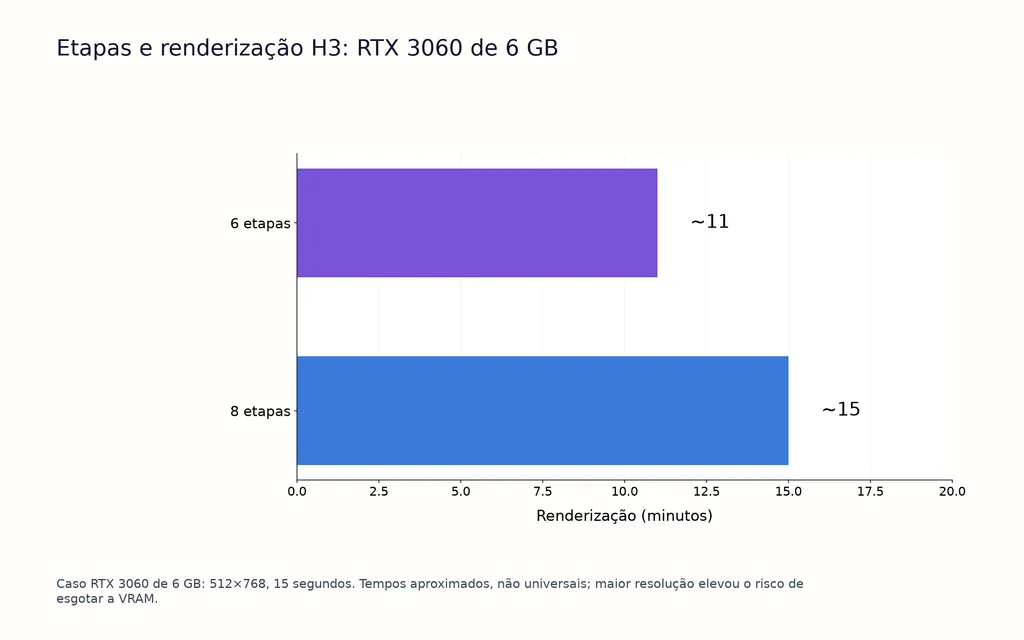
Nos fluxos analisados, uma RTX 3060 de 6 GB gerou um clipe de 512×768 e 15 segundos em cerca de 11 minutos com seis etapas e 15 minutos com oito etapas. Resoluções maiores aumentaram o risco de esgotar a VRAM.
Uma RTX 3060 de 12 GB executou fluxos de 1344×768 e resoluções superiores; o exemplo com RTX PRO 6000 de 96 GB gerou uma sequência de 15 segundos com vários cortes em 23 minutos.
Esses números não são benchmarks universais. São úteis por mostrar a relação entre VRAM, resolução, tempo de renderização e qualidade utilizável.
Preço do H3 vs. Kling: compare o custo por clipe utilizável
Preço por geração não é a métrica mais útil em produção. Custo por clipe utilizável é.
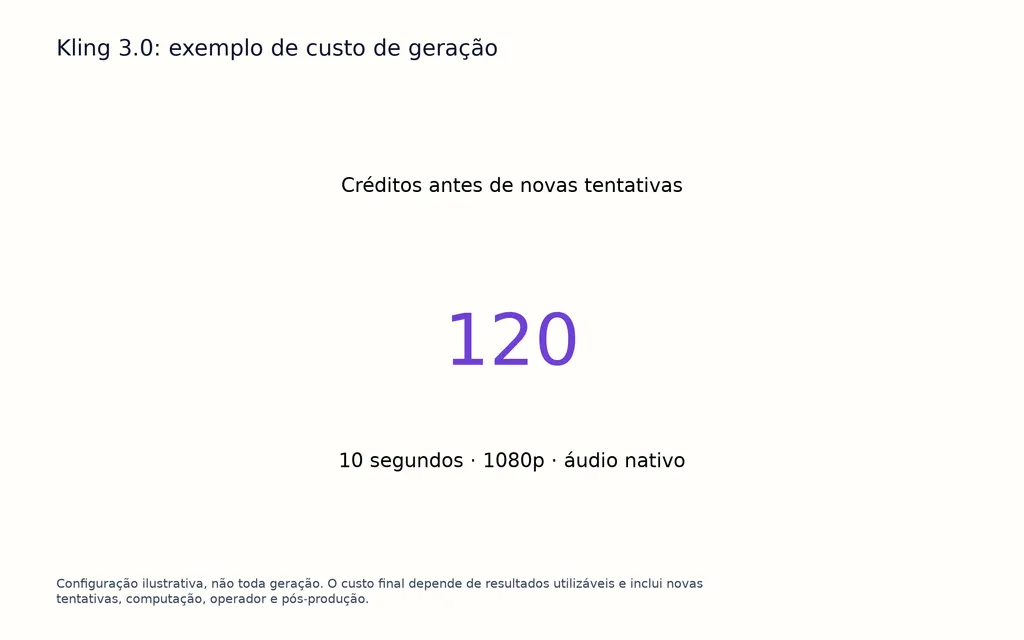
O preço do Kling 3.0 varia atualmente conforme resolução, áudio, duração e controles de voz. Por exemplo, 10 segundos em 1080p com áudio nativo podem exigir 120 créditos antes de novas tentativas.
O H3 muda a economia ao permitir geração local. Com hardware adequado, repetir tentativas pode ter custo marginal em dinheiro muito menor, mas a inferência local não é gratuita: GPU, eletricidade, armazenamento, renderização, configuração e tempo do operador importam.
O cálculo mais útil é:
Custo por clipe utilizável = custos totais de geração, computação, novas tentativas, operador e pós-produção divididos pelos resultados publicáveis.
Por isso, o modelo mais barato na tabela de preços pode sair mais caro em produção se exigir muito mais gerações malsucedidas.
MiniMax H3 ou Kling AI: qual escolher?
Escolha primeiro o H3 se o fluxo depende de referências visuais complexas, fidelidade do produto, controle do primeiro e último quadro, ComfyUI, geração local, privacidade ou muitas variantes experimentais.
Escolha primeiro o Kling 3.0 se precisa de storyboard explícito com vários planos, vários personagens falando, personagens reutilizáveis vinculados a vozes ou controle narrativo estruturado.
Para muitas equipes profissionais, um fluxo híbrido pode ser o mais eficiente. O H3 explora referências e faz iterações locais; o Kling atende cenas selecionadas em que atribuição de falantes e estrutura dos planos pesam mais.
A regra mais útil é: escolha conforme a falha que exige a nova renderização mais cara, não conforme a demonstração mais cinematográfica.
Perguntas frequentes
O H3 é melhor que o Kling 3.0?
O H3 é mais adequado para referências multimodais, geração local, ComfyUI, controle do primeiro e último quadro e experimentação repetida. O Kling 3.0 oferece controles mais explícitos para narrativa com vários planos e diálogo entre personagens. Nenhum tem evidência controlada suficiente para ser declarado vencedor universal em movimento, sincronização labial, qualidade visual ou consistência.
O Kling 3.0 é melhor que o H3 para diálogo?
O Kling 3.0 é um ponto de partida mais forte para conversas entre vários personagens, graças aos controles mais explícitos de falantes e identidades. O H3 ainda oferece diálogo nativo, referências de voz, sincronização labial e 11 idiomas estáveis, sendo bastante capaz em cenas faladas guiadas por referências.
O H3 roda com 6 GB ou 12 GB de VRAM?
Sim, segundo os fluxos analisados. Uma RTX 3060 de 6 GB gerou clipes de 512×768 e 15 segundos em aproximadamente 11–15 minutos, conforme as etapas. Uma RTX 3060 de 12 GB trabalhou com resoluções maiores, mas elevar a saída para perto de 2 MP aumentou a renderização de cinco segundos para cerca de 25 minutos.
Qual é mais barato, H3 ou Kling?
Nenhum é sempre mais barato. O Kling tem custos previsíveis de créditos na nuvem; o H3 local desloca gastos para hardware, eletricidade, configuração e renderização. Em grande volume, o menor custo marginal de novas tentativas do H3 pode ser atraente. A comparação mais precisa é o custo por clipe utilizável, não o preço por geração.
Conclusão
MiniMax H3 e Kling AI 3.0 resolvem problemas diferentes de produção, em vez de disputar uma única nota universal de qualidade. O H3 se destaca em referências multimodais, inferência local, controle do primeiro e último quadro, referências de voz e iteração em grande volume; o Kling 3.0 oferece ferramentas mais explícitas para narrativa com vários planos, personagens reutilizáveis, controle de falantes e produção 4K nativa. A evidência disponível não permite afirmar que um sempre tenha melhor movimento, sincronização labial, consistência ou qualidade visual. Designers e equipes criativas devem identificar a falha mais cara de corrigir —referências ignoradas, diálogo incorreto, desvio de identidade, rostos distantes fracos, estrutura de planos malsucedida ou tentativas caras— e escolher o fluxo que melhor a reduza.