
Guía completa de MiniMax H3 Ref2Video: cómo mantener personajes de IA coherentes entre planos
 Yifan Zhao15 min de lectura ·
MiniMax H3 Ref2Video ayuda a mantener personajes de IA coherentes entre planos combinando recursos de referencia, prompts estructurados y flujos por planos que preservan identidad, movimiento y estilo visual.
Sin embargo, la coherencia de personajes de IA sigue siendo uno de los mayores retos de la generación de vídeo. Rostros, ropa y estilos pueden cambiar entre clips, dificultando la creación de vídeos narrativos profesionales, contenido de marketing y recursos de marca. Combinar flujos estructurados con herramientas modernas de diseño con IA y mejores métodos de gestión de recursos puede mejorar este proceso.
Un flujo de diseño con IA fiable necesita más de un modelo. Virse AI ofrece más de 40 modelos, incluidos Nano Banana 2 y GPT Image 2, con uso ilimitado y plazas de equipo ilimitadas en planes de pago. Los nuevos usuarios pueden empezar con créditos gratuitos para crear hasta 10 imágenes con Nano Banana 2 o un vídeo con Seedance 2.0. Para explorar sistemas creativos más amplios, enfoques como los flujos creativos de IA ayudan a organizar ideas, recursos y pasos de producción con mayor eficiencia.

¿Qué es MiniMax H3 Ref2Video y cómo mejora la coherencia de personajes?
MiniMax H3 Ref2Video es un flujo de vídeo con IA basado en referencias que ayuda a mantener la identidad del personaje entre varios planos combinando referencias visuales y generación controlada.
A diferencia del texto a vídeo tradicional, que recrea al personaje desde una descripción cada vez, Ref2Video aporta orientación visual adicional para reducir cambios de identidad y mejorar la continuidad.
El flujo principal separa las responsabilidades creativas:
- Las referencias definen quién es el personaje.
- Los prompts definen qué hace el personaje.
- La planificación de planos define cómo se desarrolla la historia.
Este enfoque aborda una gran limitación del vídeo con IA: generar un clip impresionante es relativamente fácil, pero mantener el mismo personaje en varias escenas exige un proceso más estructurado.
Para los profesionales, la coherencia importa porque los vídeos de IA rara vez se usan como clips aislados. A menudo sirven para:
- campañas narrativas
- demostraciones de productos
- vídeos de marca
- contenido centrado en personajes
- visualización de diseños
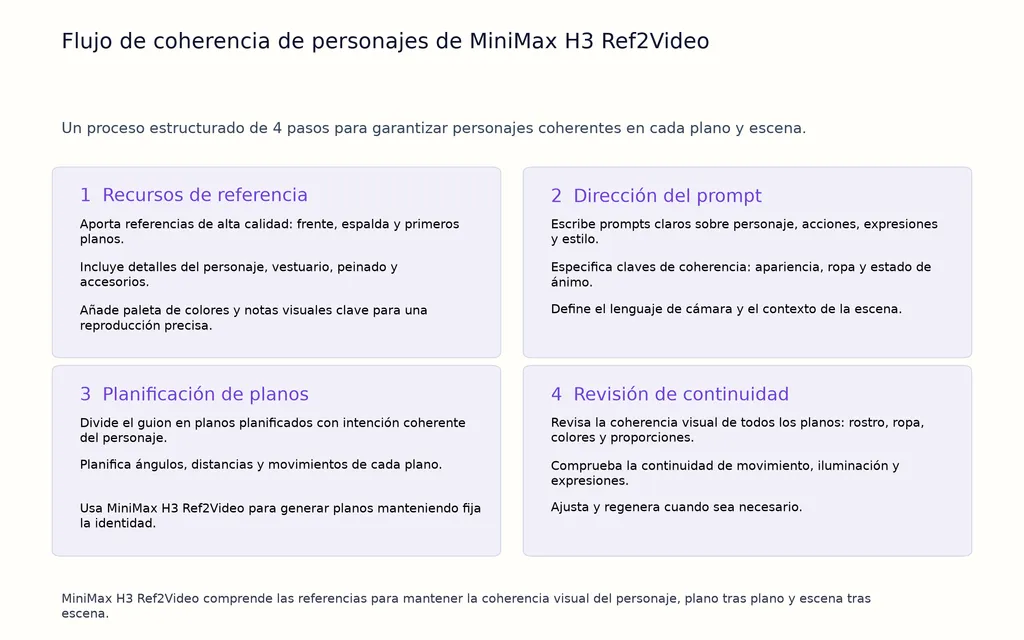
Nuestra investigación sobre flujos de vídeo con IA y preguntas frecuentes de creadores muestra que la coherencia de personajes depende de cuatro elementos conectados:
- control de identidad
- control del movimiento
- estructura del prompt
- gestión de continuidad
Un modelo más potente no crea automáticamente un flujo mejor. La forma de organizar referencias, prompts y pasos de producción determina la coherencia final.
¿Por qué cambian los personajes de IA entre planos?
Los personajes cambian entre planos porque la mayoría de sistemas reconstruyen la información visual en cada generación, en lugar de conservar una memoria permanente del personaje.
Esto crea un problema común llamado deriva de personajes de IA.
La deriva de personajes suele presentarse de varias formas.
Deriva facial: cuando cambia la identidad del personaje
La deriva facial es el problema de coherencia más evidente.
El personaje puede conservar el concepto general, pero cambiar en:
- estructura facial
- forma de los ojos
- peinado
- edad aparente
- estilo de expresión
Un prompt como «una exploradora futurista» describe un concepto, pero no define por completo una identidad concreta.
Para narraciones coherentes, hacen falta anclajes de identidad más fuertes que las descripciones textuales por sí solas.
Deriva de vestuario: cuando cambian los detalles visuales
La coherencia del vestuario es especialmente importante en contenido comercial.
Los personajes generados pueden cambiar inesperadamente:
- diseño de la chaqueta
- colores
- materiales
- accesorios
Estos cambios son problemáticos cuando el mismo personaje debe representar un producto, una marca o una narrativa en varias escenas.
Deriva de estilo: cuando cambia la dirección visual
Aunque el personaje siga siendo reconocible, el lenguaje visual general puede cambiar.
La deriva de estilo puede afectar a:
- iluminación
- gradación de color
- nivel de realismo
- atmósfera cinematográfica
Para contenido de marca, mantener estándares visuales con métodos similares a los flujos de coherencia de marca en creatividades publicitarias con IA puede reducir cambios de estilo no deseados.
Deriva de movimiento: cuando cambia el comportamiento del personaje
La coherencia del personaje no se limita a su apariencia.
El personaje puede parecer similar, pero sentirse distinto si:
- cambia el estilo de movimiento
- los gestos son incoherentes
- cambia el lenguaje de cámara
Nuestra revisión de flujos de producción muestra que muchos creadores se centran primero en la identidad y después descubren que la continuidad del movimiento es igual de importante.
MiniMax H3 Ref2Video frente a la generación tradicional de texto a vídeo
Entender la diferencia entre Ref2Video y el texto a vídeo tradicional explica por qué las referencias son cada vez más importantes para el contenido centrado en personajes.
Método | Control del personaje | Mejor uso | Principal limitación |
|---|---|---|---|
Generación de texto a vídeo | Bajo a medio | Exploración de conceptos y pruebas rápidas | Mayor riesgo de deriva de identidad |
Generación de vídeo guiada por imágenes | Medio a alto | Clips centrados en personajes | Requiere preparar referencias |
Flujo Ref2Video | Alto | Narrativas de varios planos y producción comercial | Requiere preparar recursos y planificar el flujo |
El texto a vídeo tradicional resulta útil cuando se necesita rapidez y exploración.
Las aplicaciones habituales incluyen:
- probar ideas visuales
- crear conceptos de ambiente
- explorar entornos
Pero si el mismo personaje debe aparecer repetidamente, hace falta un sistema más controlado.
Un flujo basado en referencias cambia el enfoque de producción.
En lugar de pedir:
«Crea otra vez un personaje similar».
Los creadores establecen:
- referencias de identidad
- reglas visuales
- estándares de generación
- requisitos de continuidad
Este enfoque se acerca más a los sistemas de diseño profesionales, donde la coherencia se construye con recursos reutilizables y directrices claras.
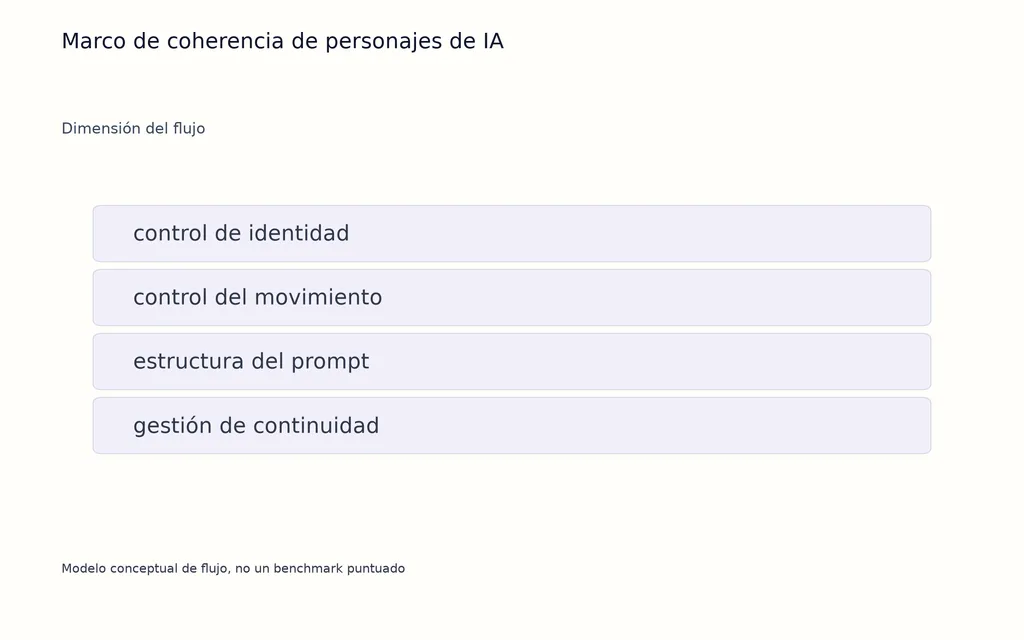
Cómo construir un flujo de coherencia de personajes con MiniMax H3
Un flujo fiable de MiniMax H3 Ref2Video empieza antes de generar el vídeo.
La mayor mejora llega al pasar de escribir prompts a gestionar recursos.
Paso 1: crea un paquete de referencias del personaje
El paquete de referencias define la identidad visual que debe mantenerse estable.
Entre los recursos útiles están:
Recurso | Propósito |
|---|---|
Referencia de retrato | Identidad facial |
Referencia de cuerpo entero | Proporciones corporales y ropa |
Referencias de detalles | Accesorios y materiales |
Referencias de estilo | Dirección visual |
El objetivo no es aportar el mayor número de imágenes.
El objetivo es aportar la información más clara.
Un paquete de referencias bien enfocado reduce la ambigüedad y ayuda al modelo a entender qué elementos deben mantenerse coherentes.
Nuestro análisis muestra que suele haber mejores resultados cuando cada referencia tiene un propósito claro, en lugar de mezclar identidad, estilo y movimiento.
Para crear referencias visuales, métodos similares a elaborar un panel de inspiración ayudan a organizar inspiración, dirección de estilo y conceptos de personajes antes de generar.
Paso 2: crea una guía del personaje antes de generar varios planos
Una guía del personaje transforma un resultado aislado de IA en un recurso creativo reutilizable.
Los equipos profesionales rara vez mantienen la coherencia solo con prompts. Definen reglas visuales que indican qué debe mantenerse y qué puede cambiar.
Una guía práctica del personaje puede incluir:
- apariencia del personaje
- especificaciones del vestuario
- paleta de colores
- orientación de la personalidad
- estilo de movimiento
- elementos que no deben cambiar
Por ejemplo, en una campaña de producto, el rostro, la estructura del vestuario y el estilo visual deben mantenerse, mientras pueden cambiar el entorno, el ángulo de cámara y la acción.
Este enfoque sigue el principio de los sistemas de diseño tradicionales: la coherencia nace de directrices reutilizables, no de decisiones manuales repetidas.
Desde el diseño con IA, una guía del personaje también reduce fricciones de producción porque el equipo comparte la misma referencia creativa al generar nuevas escenas.
Paso 3: planifica los planos antes de generar
Un error muy común es generar varias escenas por separado e intentar combinarlas después.
Es mejor tratar la producción de vídeo con IA como el cine.
El proceso debería ser:
- Definir la identidad del personaje.
- Preparar recursos de referencia.
- Dividir la historia en planos individuales.
- Decidir qué cambia y qué se mantiene fijo.
- Revisar la continuidad entre los clips generados.
Planificar los planos mejora la coherencia porque cada generación tiene un propósito claro.
Por ejemplo:
Un plano caminando debe centrarse en el movimiento.
Un primer plano debe centrarse en la expresión facial.
Un plano de interacción con un producto debe centrarse en las relaciones con objetos.
Intentar controlar todas las variables creativas en una generación suele crear inestabilidad.
La mejor estrategia de referencias para personajes coherentes en MiniMax H3 Ref2Video
Una buena estrategia de referencias es la base de personajes coherentes en vídeos de IA.
Muchos creadores ven las referencias como simples archivos subidos, pero los flujos profesionales las tratan como recursos creativos estructurados con funciones concretas.
Referencia de identidad: conservar quién es el personaje
Las referencias de identidad responden:
«¿Debe seguir pareciendo el mismo personaje?»
Deben centrarse en:
- rasgos faciales
- peinado
- proporciones corporales
- identidad del vestuario
- características visuales únicas
Por ejemplo, un personaje de una campaña de marca puede aparecer en decenas de escenas. La referencia de identidad garantiza que el público reconozca al mismo personaje durante toda la historia.
Referencia de movimiento: conservar cómo se mueve el personaje
La coherencia del movimiento es un reto distinto de la identidad visual.
Las referencias de movimiento ayudan a guiar:
- patrones al caminar
- gestos
- movimiento corporal
- estilo de interacción
Aunque conserve rostro y ropa, el personaje puede resultar incoherente si su movimiento cambia mucho entre planos.
Por eso los flujos eficaces separan el control de identidad del control de movimiento.
Referencia de estilo: conservar el lenguaje visual
Las referencias de estilo ayudan a mantener:
- dirección de iluminación
- sistema de color
- atmósfera cinematográfica
- estilo de renderizado
Esto es especialmente importante para:
- contenido publicitario
- narrativas de marca
- visualización de productos
- campañas creativas
Nuestra investigación indica que la producción estable depende de asignar funciones claras a las referencias, en vez de esperar que una imagen controle todos los aspectos de la generación.
Guía de prompts de MiniMax H3 para personajes de IA coherentes
El diseño de prompts sigue siendo importante en MiniMax H3 Ref2Video, pero cambia su propósito.
El prompt no debe intentar recrear al personaje completo desde cero.
En su lugar, debe guiar:
- acción
- entorno
- cámara
- dirección narrativa
Describe claramente los anclajes del personaje
Las descripciones deben reforzar los elementos clave de identidad.
Los detalles útiles incluyen:
- peinado
- ropa
- accesorios
- estilo visual
Evita cambiar estos elementos innecesariamente entre planos.
Por ejemplo, si siempre lleva una chaqueta plateada futurista, cambiar la descripción entre escenas puede introducir variaciones no deseadas.
Describe una acción principal por plano
Los modelos de vídeo suelen funcionar mejor cuando cada plano tiene un propósito claro.
En lugar de combinar:
- caminar
- hablar
- abrir una puerta
- mirar a la cámara
- cambiar de emoción
en una sola generación, divide la secuencia en acciones más pequeñas y controladas.
Así es más fácil gestionar la continuidad.
Añade dirección de cámara
La producción profesional depende mucho de las decisiones de cámara.
Las descripciones útiles incluyen:
- primer plano
- plano general
- plano de seguimiento
- movimiento cinematográfico
- ángulo de cámara
Las instrucciones de cámara ayudan a pasar de crear imágenes estáticas a contar historias.
Define el estado final
En vídeos de varios planos, el final de un clip influye en el principio del siguiente.
Un estado final claro refuerza la continuidad.
Ejemplos:
- el personaje se detiene cerca de una puerta
- el personaje se gira hacia otra persona
- la cámara se mueve detrás del personaje
Esto crea transiciones más fluidas entre planos.
Casos de coherencia de personajes en MiniMax H3: lecciones prácticas
Caso 1: flujo de sustitución de personajes con IA
Uno de los flujos prácticos analizados en nuestra investigación consistía en sustituir personajes con IA en vídeos cortos.
El reto era conservar el movimiento original mientras cambiaba la identidad.
El flujo se centró en:
- preparar una referencia clara de identidad
- preservar la información del movimiento
- controlar el alcance de la sustitución
- revisar los resultados generados
La prueba descrita utilizó un flujo de vídeo de 10 segundos; el creador informó de aproximadamente un 90% de éxito al mantener el resultado de sustitución deseado.
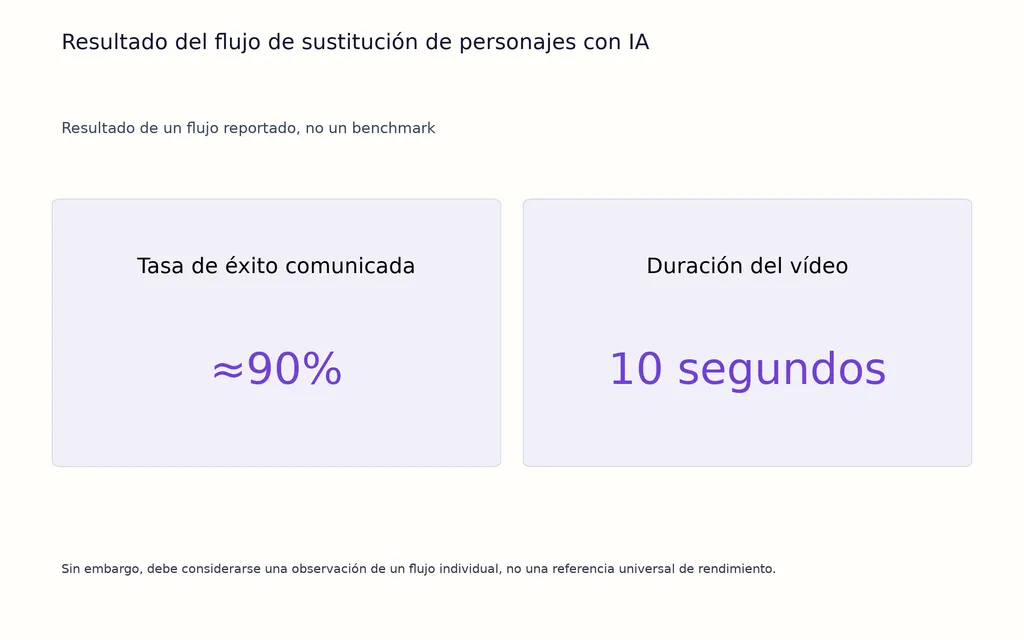
Sin embargo, debe considerarse una observación de un flujo individual, no una referencia universal de rendimiento.
Actualmente no existe un benchmark público estandarizado que mida la coherencia de personajes de MiniMax H3 Ref2Video en distintos escenarios. Los resultados prácticos deben evaluarse como observaciones de flujos, no como rendimiento garantizado.
La lección clave es que la coherencia nace de la preparación.
Los factores más importantes fueron:
- referencias claras
- variables controladas
- cambios limitados entre generaciones
Para los equipos, esto significa que mejores resultados suelen venir de un mejor diseño del flujo, no simplemente de generar más veces.
Caso 2: continuidad en vídeos largos de IA
Crear vídeos de IA más largos introduce otro nivel de dificultad para la coherencia.
Un clip corto puede parecer logrado, pero mantener al mismo personaje en varias escenas exige controlar más variables:
- identidad
- ropa
- entorno
- estilo de cámara
- movimiento
Nuestra revisión de preguntas y flujos de producción muestra que muchos creadores tienen dificultades al generar cada plano por separado e intentar unir los clips después.
El patrón habitual de fallo es:
- recrear al personaje desde texto cada vez
- cambiar varios elementos creativos a la vez
- generar secuencias largas sin revisar resultados intermedios
Un flujo más fiable es una producción basada en planos:
- Establecer la identidad del personaje.
- Crear recursos de referencia.
- Generar clips más cortos y conectados.
- Revisar la continuidad después de cada plano.
- Ajustar solo las variables que deben cambiar.
Este enfoque sigue la lógica cinematográfica tradicional: planificar cada escena en lugar de crear una secuencia única sin control.
La evidencia disponible respalda la generación segmentada como método práctico para mejorar la continuidad, aunque hacen falta más pruebas públicas para comparar de forma estandarizada distintos modelos.
Problemas comunes de coherencia de personajes en MiniMax H3 y soluciones
Entender por qué falla la coherencia ayuda a crear mejores flujos.
Problema | Por qué ocurre | Solución |
|---|---|---|
El rostro cambia entre planos | Identidad poco definida o referencias incoherentes | Usar referencias más claras y mantener anclajes de identidad |
La ropa cambia inesperadamente | Detalles del vestuario poco definidos | Añadir referencias de ropa y mantener descripciones coherentes |
Cambia el estilo visual | Direcciones creativas distintas entre planos | Mantener referencias de estilo y reglas visuales |
El movimiento del personaje parece distinto | No se separan identidad y movimiento | Usar guías de movimiento y definir sus objetivos |
Los vídeos largos parecen inconexos | Se generan clips sin planificar continuidad | Usar producción basada en planos |
La lección clave es que la mayoría de problemas de coherencia no se deben a un solo prompt fallido.
Suelen surgir por falta de estructura en el flujo.
Cómo usan profesionalmente MiniMax H3 Ref2Video los diseñadores y equipos creativos
MiniMax H3 Ref2Video aporta más valor al integrarse en un flujo de diseño con IA más amplio.
Los equipos profesionales no suelen sustituir las decisiones creativas con vídeo de IA. Lo usan para acelerar la exploración, visualización y producción de contenido.
Marketing de productos y narrativas de marca
Los personajes coherentes pueden apoyar:
- conceptos de campaña
- demostraciones de productos
- contenido para redes sociales
- exploración publicitaria
Para las marcas, el valor no está solo en producir más vídeos.
La mayor ventaja es mantener una identidad visual reconocible al ampliar la producción creativa.
Los flujos de vídeo con IA permiten explorar más conceptos manteniendo coherentes los elementos de marca importantes.
Visualización de conceptos de diseño
El vídeo con IA ayuda a explorar ideas en etapas más tempranas del proceso creativo.
Los equipos pueden probar:
- conceptos de personajes
- interacciones con productos
- ideas de movimiento
- narrativa ambiental
antes de invertir recursos en producción tradicional.
Así se aceleran los ciclos de feedback entre ideas creativas y ejecución visual.
Para los diseñadores de productos, el vídeo con IA puede formar parte del desarrollo conceptual, no solo ser una herramienta para generar contenido final.
Colaboración de equipos creativos
Los flujos de IA escalan mejor cuando los equipos comparten:
- referencias de personajes
- directrices visuales
- estrategias de generación
- estándares de revisión
Así se crea un sistema colaborativo en lugar de experimentos aislados con prompts.
Desde el diseño de productos, el futuro de la creatividad con IA avanza hacia sistemas que ayudan a gestionar conocimiento creativo, coherencia visual y flujos de producción repetibles.
Lista de comprobación del flujo MiniMax H3 Ref2Video
Antes de generar un personaje coherente, comprueba:
- ¿Está claramente definida la identidad del personaje?
- ¿Se han preparado referencias con propósitos claros?
- ¿Están separadas las referencias de identidad, movimiento y estilo?
- ¿Se planifican los planos antes de generar?
- ¿Se mantienen los anclajes visuales importantes?
- ¿Se revisa la continuidad entre clips?
Conclusión
MiniMax H3 Ref2Video demuestra que crear vídeos coherentes depende menos de escribir prompts largos y más de construir un flujo estructurado. Los resultados más fiables combinan referencias, guía de movimiento, control de prompts y planificación de planos. Para diseñadores y equipos, el cambio clave es tratar a los personajes de IA como recursos reutilizables, no resultados temporales. A medida que mejoran las herramientas, los equipos con mejores flujos de identidad, estilo y continuidad estarán mejor preparados para escalar su contenido visual.
Preguntas frecuentes
¿Puede MiniMax H3 mantener al mismo personaje en varios vídeos?
MiniMax H3 puede mejorar la coherencia con flujos basados en referencias, pero los resultados dependen de su calidad, de la estructura del prompt y de la planificación. Una referencia de identidad clara y la generación controlada de planos suelen ser más estables que el texto solo.
¿Por qué falla la coherencia de personajes en vídeos de IA?
La coherencia suele fallar porque los modelos reinterpretan la identidad en cada generación. Las causas comunes incluyen referencias débiles, descripciones cambiantes, cambios de escena sin control y varios planos sin un flujo de continuidad.
¿Qué referencias funcionan mejor con MiniMax H3 Ref2Video?
Las mejores referencias definen claramente la identidad y los detalles visuales importantes. Los retratos mantienen rasgos faciales, las imágenes de cuerpo entero conservan proporciones y ropa, y las referencias de estilo mantienen la dirección visual.
Estas referencias pueden organizarse con métodos similares a crear un flujo estructurado de panel de inspiración, que ayuda a definir la dirección visual antes de generar.
¿Es Ref2Video mejor que texto a vídeo para personajes coherentes?
Ref2Video se adapta mejor a narrativas centradas en personajes porque aporta más orientación visual. El texto a vídeo sigue siendo útil para explorar conceptos; las referencias son más adecuadas cuando importan identidad y continuidad.
Más del blog de Virse
Flujo de trabajo
GPT Image 2.5 Noise and Oversharpening: Why Some Images Still Look AI-Generated
9 de octubre de 2026 by Yifan Zhao
Flujo de trabajo
GPT Image 2.5 Keeps Changing My Image: How to Use a "Keep List" for Reliable Edits
9 de octubre de 2026 by Yifan Zhao
Flujo de trabajo
GPT Image 2.5 Editing Drift: Why Images Get Blurry, Cropped or Worse After Multiple Edits
9 de octubre de 2026 by Yifan Zhao