
Best Lovart Alternatives in 2026: Real Tests and Results
 Yifan Zhao19 min de lectura ·
The best Lovart alternative in 2026 depends on the workflow you need to improve: Canva is a strong choice for editable marketing assets, Adobe Firefly with Photoshop suits precise image revision, Photoroom specializes in e-commerce product-image production, and LTX Studio is more relevant to storyboards and narrative video. Teams comparing the broader market can also review the best Lovart alternatives, the best AI design tools, and platforms built around a connected AI design workflow.
The real problem is that many AI design tools perform well on the first generation but become less reliable during production. A narrow revision may alter approved elements, layouts may lose their hierarchy across formats, SKU variants may drift from the brand system, and unpredictable queues, credits, or export limits can increase the cost of every usable asset. This is why brand consistency and repeatable AI design workflows matter as much as first-generation quality.
For professional teams that need AI to work inside the design process rather than replace it, Virse brings references, concepts, variants, and multiple agents into one context-aware infinite canvas while keeping designers in control of direction, editing, review, and final delivery. This approach is closely aligned with AI design agent workflows and professional AI-assisted graphic design.
What Are the Best Lovart Alternatives in 2026?
The leading Lovart alternatives solve different production problems. Canva supports repeatable marketing design, Adobe Firefly and Photoshop provide controlled image editing, Freepik supports broad visual exploration, Photoroom specializes in product-image workflows, and LTX Studio focuses on narrative video production. A wider comparison of AI design tools can help separate direct workflow alternatives from specialized tools.
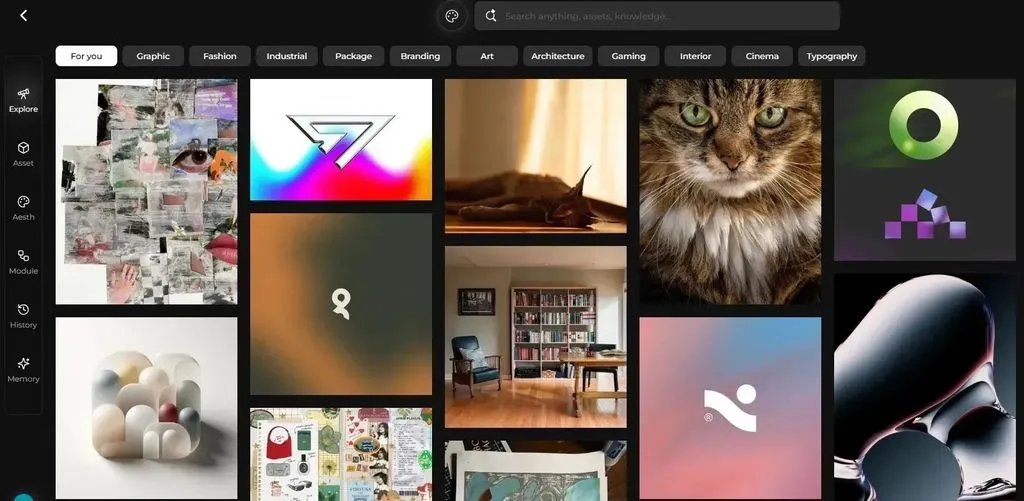
Lovart sets a relatively broad comparison standard. Its official documentation describes an AI design agent that can generate, edit, and organize graphics, advertisements, slides, and videos on one infinite canvas. Its product pages also position the platform around producing connected assets such as logos, packaging, social content, and video advertisements from a brand brief.
A tool that generates an attractive image may therefore replace one Lovart task without replacing the complete workflow.
Lovart alternatives at a glance
Tool | Best fit | Replacement type | Confirmed strength | Critical question to test |
Canva | Social assets, presentations, campaign templates, and team production | Partial replacement | Editable layouts, Brand Kit support, AI-assisted design, and multichannel resizing | Does each adapted layout preserve hierarchy and brand rules? |
Adobe Firefly and Photoshop | Professional image generation and editing | Specialized replacement | Selection-based generative editing, layers, masks, compositing, and model choice | Can the team isolate revisions and verify the selected model’s terms? |
Freepik | Broad model, stock-asset, image, and video exploration | Partial replacement | Wide creative ecosystem for visual exploration | Are queues, credits, exports, and model access predictable at production volume? |
Virse | Iterative professional design projects | Workflow-first alternative | Infinite canvas, wider project context, shared agent context, and designer control | Does the workflow preserve direction across revisions and extensions? |
Photoroom | E-commerce product images and catalog production | Specialized replacement | Product staging, background work, and repeated batch operations | Does product fidelity remain stable across the catalog? |
Figma | UI, product design, and collaborative prototypes | Specialized replacement | Structured interface design and team review | Is the primary deliverable an interface rather than a visual campaign? |
LTX Studio | Storyboards and narrative video | Specialized replacement | Script-oriented, scene-based video workflow | Does it preserve narrative and character continuity? |
Video specialists | Advertising, presenters, cinematic shots, or canvas-based video | Specialized replacements | Focused video-production workflows | Which exact production stage does each platform replace? |
Direct Lovart alternatives vs. specialized tools
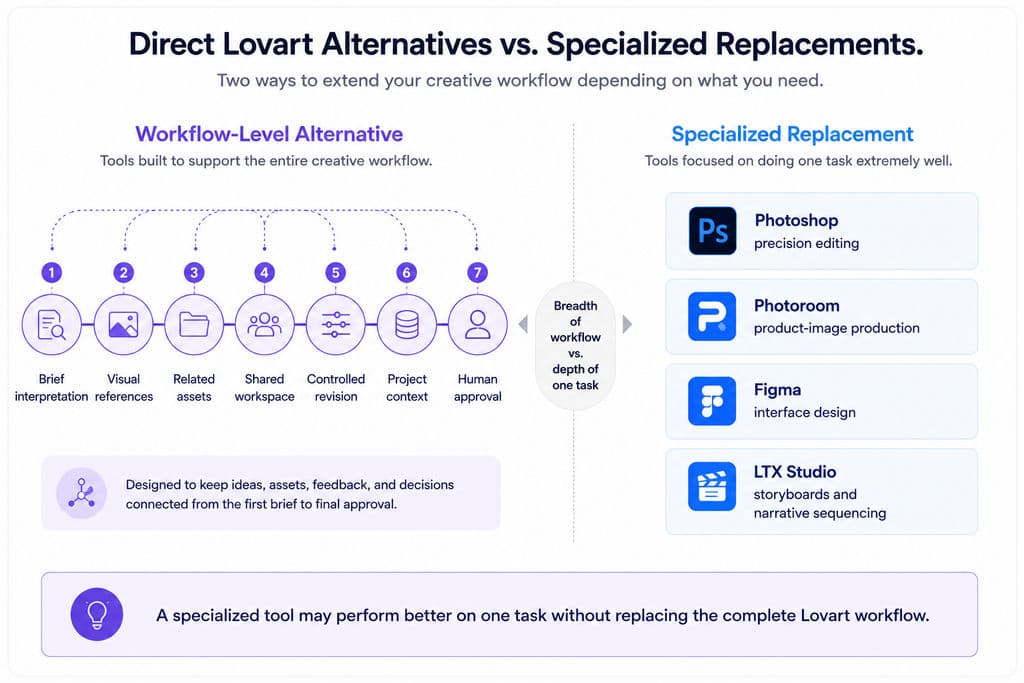
A direct Lovart alternative should support several connected stages:
- Interpret a creative brief.
- Work from text and visual references.
- Generate related assets.
- Organize them in a shared workspace.
- Revise approved work without restarting.
- Preserve useful project context.
- Leave final direction and approval with a human.
Lovart’s ChatCanvas is positioned as an infinite workspace for organizing moodboards, drafts, and visual edits alongside its AI design agent.
A specialized tool solves a narrower job. Photoshop replaces the precision-editing portion of the workflow. Photoroom focuses on product-image production. Figma supports interface design. LTX Studio addresses storyboards and narrative sequencing.
A specialized platform may perform better on one task without replacing the complete Lovart workflow.
Why there is no universal Lovart replacement
Different teams have different bottlenecks:
- Marketing teams need templates, direct editing, and multichannel versions.
- Professional designers need reference control, iteration, and editable handoff.
- E-commerce teams need product fidelity and repeatable batch operations.
- Video teams need storyboards, shot continuity, audio, or timelines.
- Brand teams need consistency across markets, formats, and contributors.
The useful comparison is not the number of AI features each product lists. It is how much manual work the product removes from the user’s actual production process.
How Were These Lovart Alternatives Evaluated?
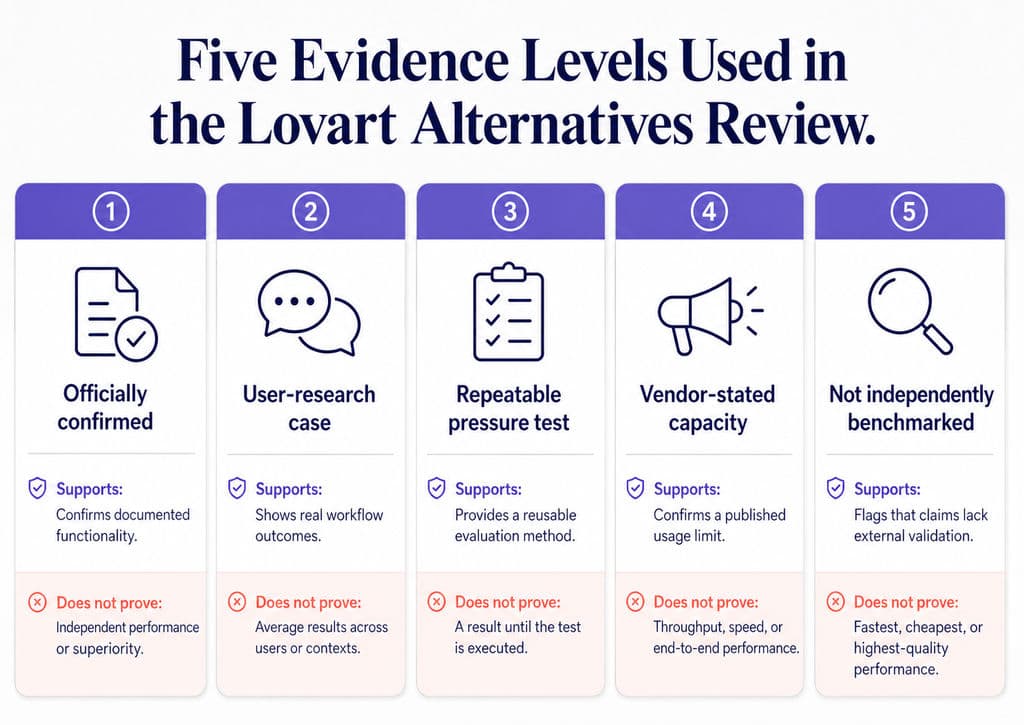
These Lovart alternatives were evaluated through official capability verification, real workflow cases, and repeatable pressure tests. The results are not presented as a controlled laboratory benchmark in which every platform used the same model, account, server queue, and pricing plan.
Evidence levels
Evidence level | What it supports | What it does not prove |
Officially confirmed | Current product positioning and documented functionality | Independent output quality or universal performance |
User-research case | A real workflow result, concern, failure, or purchase decision | Average performance across all users |
Repeatable pressure test | A method readers can run across shortlisted tools | A result until the test is executed |
Vendor-stated capacity | A published feature or limit | Independently verified throughput or reliability |
Not independently benchmarked | A capability that requires direct comparison | Fastest, cheapest, or highest-quality claims |
This distinction prevents two common comparison errors: treating marketing claims as measured results and treating one workflow experience as a permanent platform characteristic.f
Test 1: Generate a connected campaign
Use the same inputs in every platform:
- A concise brand brief;
- A target audience;
- A product image;
- A logo;
- Brand colors and fonts;
- Two visual references;
- A hero visual, social post, banner, and product image.
The test should measure whether the outputs form one campaign rather than four unrelated images.
Review:
- Brief adherence;
- Product accuracy;
- Typography;
- Visual hierarchy;
- Brand colors;
- Reference adherence;
- Consistency among assets;
- Manual repair required.
Because Lovart positions itself around connected asset and campaign production, a competing tool should not be declared superior based on one attractive image alone.
Test 2: Revise one element without breaking the design
Approve the first asset, then request one narrow change:
- Replace the headline.
- Change only the background.
- Move the product.
- Switch one SKU color.
- Preserve the composition, lighting, typography, and other elements.
Revision failure | What it indicates |
Typography changes during a background edit | Weak revision isolation |
Product shape changes | Weak subject fidelity |
Model identity changes | Weak character consistency |
Layout is reinterpreted | Regeneration instead of controlled editing |
Brand colors drift | Weak design-system continuity |
Photoshop is particularly relevant to this test because Generative Fill lets users select the area they want to alter and edit it non-destructively. Photoshop also supports conventional cropping, expansion, object removal, masks, color adjustments, and compositing.
Test 3: Extend one direction across formats and SKUs
Take the approved visual and create:
- A square social asset;
- A vertical story;
- A landscape banner;
- A marketplace image;
- Three product variants;
- One localized market version.
Inspect:
- Safe placement of text and logos;
- Product scale;
- SKU accuracy;
- Layout hierarchy;
- Brand typography and colors;
- Consistency across the product family;
- Localization without brand drift.
Canva’s Brand Kit can centralize fonts, colors, logos, imagery, and templates. Its Magic Switch tools are designed to resize one design for multiple channels. Canva AI can also apply an attached Brand Kit to generated layouts.
These capabilities make Canva relevant to multichannel production, but they do not remove the need to review each adapted layout.
Test 4: Resume the project later
Close the project and return in a new session. Ask the platform to:
- Identify the approved direction;
- Reuse the same references;
- Continue the same product family;
- Create an additional channel asset;
- Preserve earlier decisions.
This test reveals whether the tool retains meaningful project context or only recent prompt history.
Virse’s confirmed product materials describe an infinite canvas, AI understanding based on the wider canvas, multiple agents sharing project context, and learning from team preferences, brand standards, and project experience.
These materials establish the intended workflow architecture. They do not prove that every output will remain perfectly consistent.
Test 5: Export into production
Check:
- Resolution;
- Transparency;
- Editable text;
- Layers or separated elements;
- Vector availability;
- Video clips or timelines;
- File compatibility;
- Commercial-use terms;
- Ability to continue in downstream software.
A polished preview is not a professional deliverable if the team must rebuild it before publishing, printing, or handing it to another department.
Calculate effective asset cost
The subscription price alone does not reflect the cost of failed generations or manual repair.
Effective asset cost = allocated subscription cost + consumed credit cost + labor cost for failed generations and revisions + external editing cost
Every component should be converted into a monetary value before platforms are compared.
A tool with a low monthly price may become expensive if it requires repeated regeneration, substantial Photoshop repair, or another paid platform for final delivery.
How Did the Main Lovart Alternatives Perform in Real Workflows?
The evidence indicates that each leading alternative is strongest in a different production stage. Canva supports editable marketing production, Adobe supports precision revision, Freepik supports broad exploration, Photoroom supports product-image scale, and Virse addresses connected professional workflows.
Canva: a leading option for editable marketing production
Canva is relevant when a team already understands the visual direction and needs to produce social posts, presentations, campaign templates, sales materials, and lightweight video in an editable environment.
Canva officially supports Brand Kit resources, editable AI-generated layouts, brand-aware generation, and resizing across channels.
Workflow case
A marketing team receives an approved campaign concept and needs:
- An Instagram post;
- A story;
- A presentation cover;
- An email banner;
- A local-market variation.
Canva gives the team an editable starting point rather than forcing it to regenerate every asset. Text can be changed, images can be repositioned, and brand assets remain accessible inside the editor.
The result still requires human review. Automated resizing does not guarantee:
- Correct text hierarchy;
- Safe logo placement;
- Appropriate product scale;
- Balanced composition;
- Effective use of each platform’s aspect ratio.
Best fit
Canva is well suited to:
- Marketing teams;
- Mixed-skill brand teams;
- Repeatable template production;
- Social and presentation workflows;
- Projects requiring direct layout control.
Adobe Firefly and Photoshop: suited to precision revision
Adobe is most relevant when AI output must continue into a professional image-editing workflow.
Photoshop’s current Generative Fill workflow supports selected-area editing and multiple model options. Adobe expanded partner-model availability across Firefly, Photoshop, Illustrator, and other applications in 2026, although availability can vary by product, country, and region.
Workflow case
A campaign image is approved, but the team needs to:
- Remove one prop;
- Extend the background;
- Repair a product edge;
- Add space for copy;
- Change one localized element;
- Preserve everything else.
Selection-based editing is more appropriate than full-image regeneration because the user can isolate the target area and continue refining it with Photoshop’s conventional tools.
Best fit
Adobe is well suited to:
- Professional retouching;
- Localized revisions;
- Layered production files;
- Composite imagery;
- Final color and typography work;
- Teams already using Creative Cloud.
Commercial-use considerations
Teams should confirm which model and feature they use. Adobe distinguishes its own Firefly models from partner models, and it prompts users when they select models that were not developed by Adobe. Availability and applicable terms may vary.
Freepik: useful for exploration, but throughput must be tested
Freepik is relevant to teams that want stock assets, image generation, video options, and broad model exploration inside one creative ecosystem.
Its practical value is strongest during:
- Moodboarding;
- Concept development;
- Style comparison;
- Campaign-reference gathering;
- High-volume variation;
- Combining stock and generated assets.
What our user research found
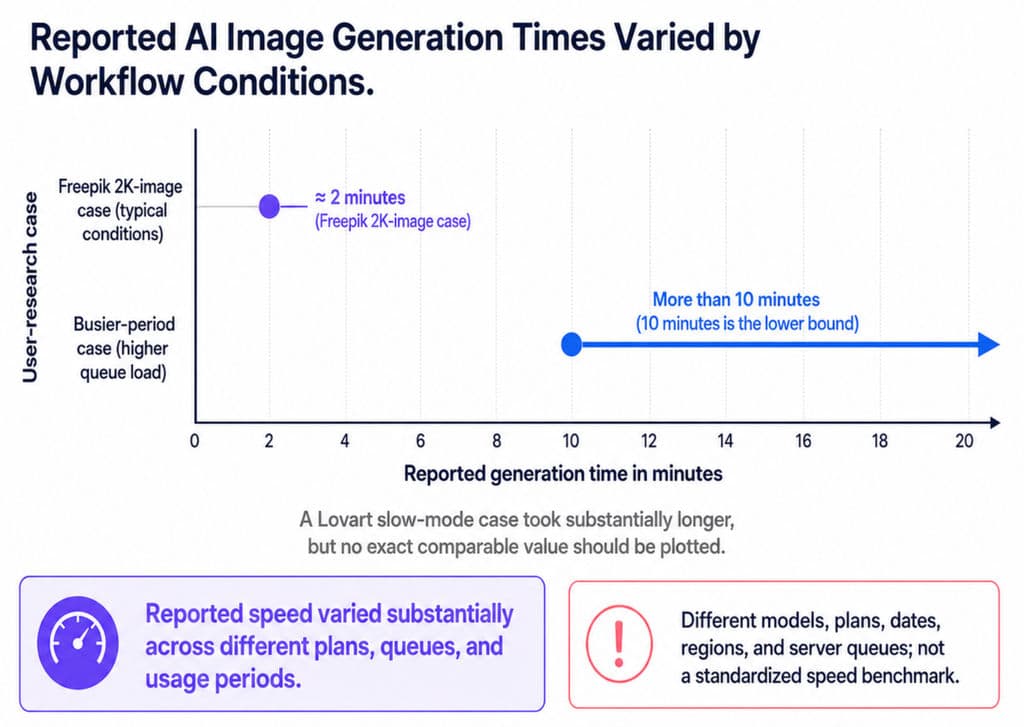
The workflow cases reviewed contained substantially different generation-time reports:
- One 2K image reportedly completed in roughly two minutes during one period.
- Another workflow reported waits longer than ten minutes during a busier period.
- A separate Lovart slow-mode case took substantially longer.
The reports used different dates, plans, models, regions, and queue conditions. They demonstrate variability, not a valid speed ranking.
The production question is therefore not simply “Is Freepik faster than Lovart?”
It is:
Can the platform deliver a predictable number of approved assets during the team’s real working hours and usage volume?
Measure:
- Queue time;
- Generation time;
- Failure rate;
- Retry count;
- Credit refunds;
- Concurrent jobs;
- Usable outputs;
- Manual correction time.
Best fit
Freepik is most relevant when model variety and concept volume matter more than structured project continuity.
Virse: relevant to iterative professional design workflows
Virse is positioned around how AI participates in a professional design process while leaving direction, editing, review, and delivery with the designer.
Its confirmed product materials describe:
- An infinite canvas for organizing, connecting, comparing, and editing assets;
- AI understanding based on wider canvas context;
- Multiple agents sharing project context;
- Learning from team aesthetics, brand standards, and project experience;
- Support for repeated changes and style continuation.
Workflow case
A campaign or packaging project may include:
- A client brief;
- Product photography;
- Competitor references;
- Moodboards;
- Several directions;
- Approved brand rules;
- Packaging explorations;
- Marketing adaptations;
- Revision notes.
In a chat-only workflow, these materials can become fragmented. A canvas-based system is intended to keep their relationships visible and let several AI tasks operate from the same project context.
Virse’s JTBD research identifies campaign adaptation, batch creative production, multi-SKU extension, packaging visualization, product scenes, and market localization as recurring user jobs. These represent user needs and workflow pain points, not proof that every related function has already been implemented.
Best fit
Virse is relevant to teams that need:
- Connected references;
- Several concepts in one workspace;
- Shared context among AI tasks;
- Multiple revision rounds;
- Style and brand continuity;
- Human approval and control.
Photoroom: a specialized option for e-commerce production
Photoroom focuses on product imagery rather than broad campaign generation.
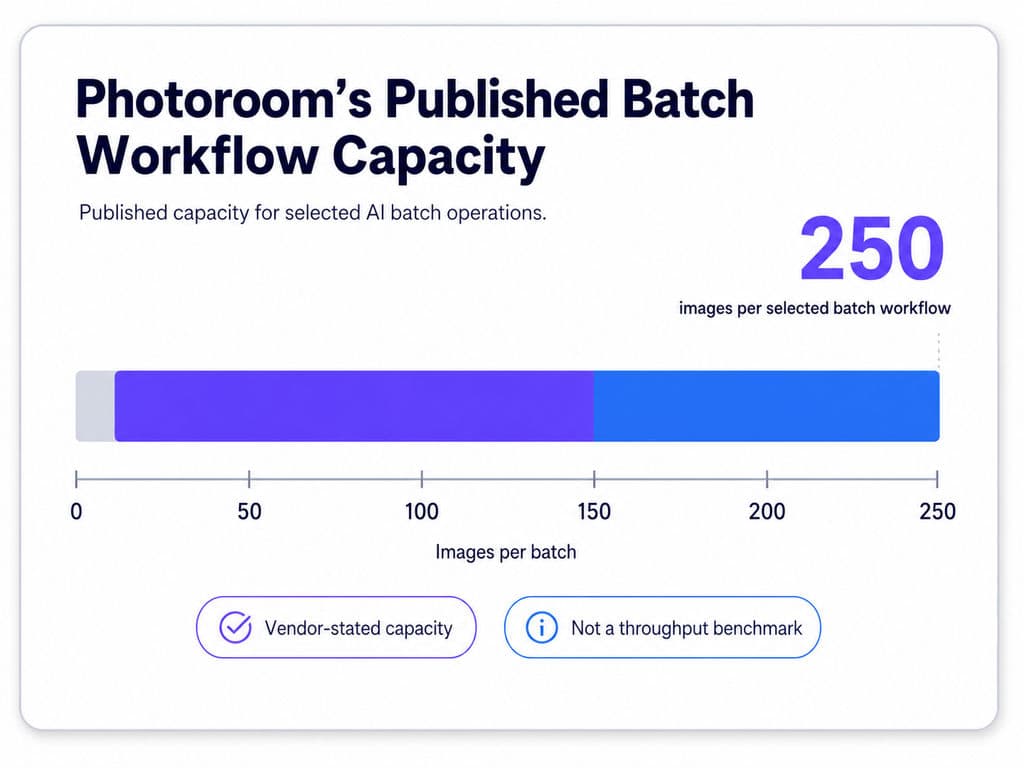
Its official batch tools support background work, product staging, recoloring, virtual models, and other repeated product-image operations. In 2026, Photoroom stated that selected AI tools could be applied to as many as 250 images in one batch. This is a vendor-stated capacity, not an independently verified throughput benchmark.
Workflow case
An e-commerce team receives inconsistent supplier photos for 200 SKUs. It needs to:
- Remove original backgrounds;
- Standardize framing;
- Apply a shared scene;
- Produce marketplace and website versions;
- Preserve product details.
The value of a batch workflow is not how attractive one edited image looks. It is whether product edges, labels, colors, shadows, reflections, and scale remain accurate throughout the catalog.
Best fit
Photoroom is suited to:
- Marketplace sellers;
- E-commerce teams;
- Catalog operations;
- Product-background workflows;
- Repeated image preparation;
- Teams exploring API automation.
Photoroom’s current plans distinguish between free entry, paid batch features, higher AI limits, and API access. Exact plan conditions should be verified immediately before purchase.
LTX Studio and other video-focused alternatives
Video platforms should be selected by the production stage they replace.
- LTX Studio is relevant to scripts, storyboards, scenes, and narrative sequencing.
- Higgsfield is relevant to cinematic shot exploration.
- Creatify AI is oriented toward advertising-video workflows.
- AKOOL is relevant to digital presenters and personalized commercial content.
- Morphic is relevant when a visual canvas and video-specific project structure matter.
Our user research found that professionals comparing AI video tools often struggled to find one product combining realistic presenters, narrative continuity, storyboarding, editing, and final delivery. LTX Studio was considered useful for script-oriented workflows, while Higgsfield was viewed as more specialized around cinematic output.
This supports choosing by production stage rather than naming one universal video winner.
What Do the Workflow Tests and Case Studies Reveal?
The most important weaknesses usually appear after the first output. Recurring problems include revision drift, weak editability, unstable throughput, inconsistent brand execution, and difficulty extending one direction across formats.
Case study 1: Speed is an operating condition
In the cases reviewed, reported Freepik generation times ranged from approximately two minutes to more than ten minutes, while one Lovart slow-mode case took substantially longer. Because the models, plans, dates, regions, and queues differed, the figures show variability rather than a valid speed comparison.
The practical lesson is:
AI generation speed is an operating condition, not a permanent product specification.
Teams should test during realistic working hours and at realistic volume.
A platform that produces ten fast drafts but only two usable assets may have lower effective throughput than a slower platform that produces more stable results.
Case study 2: Unlimited access does not guarantee capacity
High-volume users in the research were more concerned with usable high-resolution output than theoretical access to many models.
An unlimited plan may still include:
- Slow queues;
- Fair-use restrictions;
- Reduced priority;
- Premium-model limits;
- Separate video credits;
- Concurrency restrictions;
- Resolution limits.
The more useful metric is:
Approved assets per working day
This metric captures failed jobs, revision rounds, and manual repair instead of counting every generation as productive output.
Case study 3: Professional workflows expose editability problems
One professional workflow case involved using Lovart for approximately one month with the expectation that it would support:
- Multi-size adaptation;
- Brand consistency;
- Design variants;
- Editing of existing work.
The user reported that these tasks were not reliable enough for that individual workflow and continued using Flora AI for core design work.
This does not prove that Flora is universally better. It supports a broader principle:
Professional designers judge AI tools by whether they preserve a design system, not only whether they generate attractive images.
A professional comparison must therefore include:
- Existing-design edits;
- Layout preservation;
- Brand rules;
- Format extensions;
- Version comparison;
- Editable output;
- Repeated review cycles.
Case study 4: Ratings need sample-size context
One cached G2 snapshot reviewed during the research showed Lovart with a perfect rating based on one review, while Canva had a slightly lower score based on thousands of reviews. The snapshot was incomplete and should not be treated as a current live comparison.
Its methodological value is clear:
- A perfect score from one review is highly uncertain.
- A slightly lower score from thousands of reviews reflects a broader sample.
- Category pages may contain products that are not functional equivalents.
- Sponsored placements and AI summaries are not independent tests.
Ratings can help identify questions to investigate. They should not determine the final purchase.
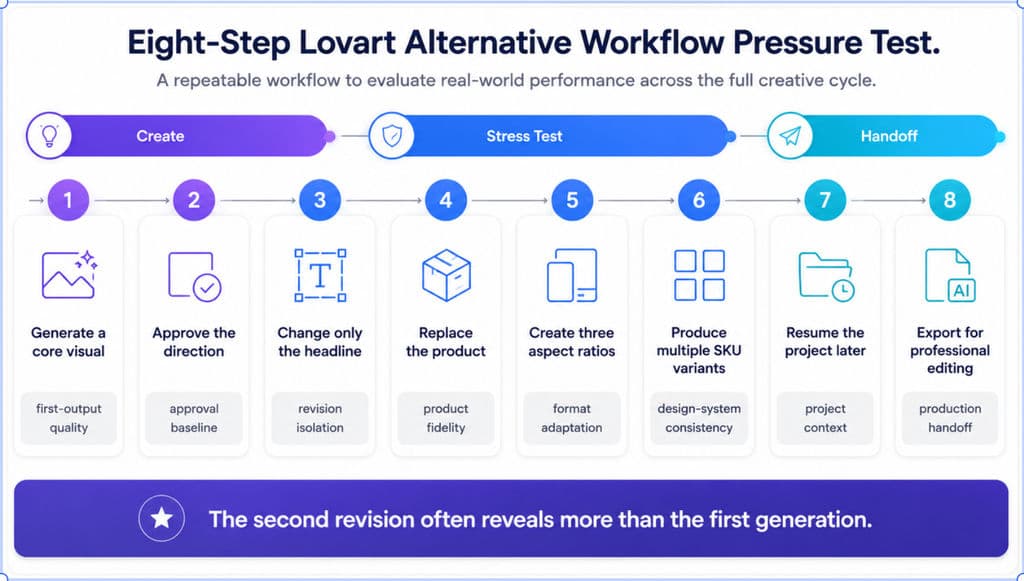
Case study 5: The second revision is the real pressure test
Run this sequence:
- Generate a core visual.
- Approve the direction.
- Change only the headline.
- Replace the product.
- Create three aspect ratios.
- Produce multiple SKU variants.
- Resume the project later.
- Export for professional editing.
Failure | Likely problem |
Other elements change during a headline edit | Weak revision isolation |
Product shape or label changes | Weak product fidelity |
Layout collapses during resizing | Weak format adaptation |
SKU variants drift | Weak design-system consistency |
A later session loses the direction | Weak project context |
Export is flattened or low-resolution | Weak production handoff |
Revisions consume excessive credits | Hidden operating cost |
This test offers more decision value than a gallery of first-generation images because it measures the cost of finishing a real project.
Which Lovart Alternative Should You Choose?
Choose the platform that addresses the most expensive or risky part of your workflow.
For professional designers and brand teams
Consider Virse when the project depends on connected references, shared canvas context, multiple agents, repeated iteration, and designer control.
Consider Adobe Firefly with Photoshop when the priority is local editing, masks, layers, compositing, and final production files.
Consider Figma when the deliverable is an interface, product flow, prototype, or component system.
Consider Canva when marketers and non-designers need to produce controlled assets from templates and shared brand resources.
The deciding factor should be whether the team needs faster asset production, precise editing, structured product design, or continuous project-level context.
For marketing teams
Consider Canva for multichannel templates, presentations, social assets, and editable branded production.
Consider Freepik when the team needs broad visual exploration across stock and generated content.
Consider Lovart itself when conversational campaign generation is valuable and the platform passes the team’s revision, consistency, and export tests.
For e-commerce teams
Consider Photoroom when the core requirement is product staging, background work, batch processing, and repeated catalog preparation.
A broader design platform is more relevant when product imagery must be combined with campaign layouts, art direction, packaging, or long-form branded content.
For AI video
Consider:
- LTX Studio for scripts, storyboards, and narrative sequencing;
- Higgsfield for cinematic shot exploration;
- Creatify AI for advertising-video workflows;
- AKOOL for presenter-led commercial content;
- Morphic for canvas-oriented video projects.
Test continuity, shot control, product fidelity, audio, revisions, aspect ratios, and exports—not only the quality of one generated clip.
Seven checks before paying
- Can the tool change only the requested element?
- Does it preserve products, labels, and proportions?
- Does it adapt layouts rather than merely crop?
- Does the brand system survive multiple outputs?
- Can the project resume later without losing direction?
- Can the output enter professional production?
- What does each approved asset cost after credits, failures, revisions, and external editing?
Also review the current official pricing page, model access, plan restrictions, commercial terms, cancellation process, and failed-generation policy before committing.
Frequently Asked Questions About Lovart Alternatives
What is the best Lovart alternative for professional designers?
There is no universal winner. Virse is relevant to teams that need connected canvas context and repeated design iteration. Adobe Firefly with Photoshop is better suited to precise image editing and production files, while Figma is more appropriate for interface and product-design workflows.
Is Canva a direct replacement for Lovart?
Canva replaces many Lovart tasks involving editable social graphics, presentations, campaign templates, brand assets, and cross-format resizing. It is not a complete one-to-one replacement for Lovart’s agent-led campaign generation and infinite visual workspace. Lovart is positioned around generating and organizing multiple connected creative assets in one canvas, while Canva is strongest as an editable visual production environment.
Is Freepik faster than Lovart?
There is not enough standardized evidence to conclude that Freepik is consistently faster than Lovart. The cases reviewed included relatively fast Freepik generations, waits longer than ten minutes, and one substantially slower Lovart case, but the plans, models, dates, regions, and queues differed.
Test both tools at the same resolution, output volume, model category, and working hours.
Is there a free Lovart alternative?
Several platforms provide free entry points or limited free tools, including Canva, Adobe Firefly, and Photoroom. Limits may apply to credits, premium models, batch editing, resolution, exports, video, or commercial features. Current plan details should always be verified on the official pricing page.
Use a free plan to test revision, resizing, project continuity, and export—not only the first generation.
Which Lovart alternative is best for e-commerce product images?
Photoroom is a relevant specialized option for product backgrounds, product staging, catalog preparation, and repeated batch work. Its official tools are focused on product-image operations rather than broad campaign generation, and selected batch AI tools currently support up to 250 images at once.
Which Lovart alternative is best for AI video?
The answer depends on the production stage. LTX Studio is relevant to scripts and storyboards, Higgsfield to cinematic shots, Creatify AI to video ads, AKOOL to digital presenters, and Morphic to canvas-based video projects.
Compare continuity, revision control, audio, aspect ratios, and export rather than judging the platforms from one highlight clip.
Can an AI design tool replace a professional designer?
No. AI design tools can accelerate ideation, variation, resizing, background work, and repetitive production. They do not replace creative direction, brand judgment, legal review, advertising compliance, packaging validation, engineering review, print proofing, or final human approval.
Conclusion
The right Lovart alternative is the platform that remains useful after the first generation. Canva supports editable marketing production, Adobe Firefly and Photoshop suit precise professional revision, Photoroom focuses on e-commerce product-image workflows, and video platforms should be selected according to whether the project requires advertisements, presenters, cinematic shots, storyboards, or narrative timelines. Before paying, run the same revision, multichannel, multi-SKU, new-session, and export tests in every shortlisted tool, then compare approved outputs, correction time, reliability, and effective asset cost.
Más del blog de Virse
Producto
GPT Image 2.5 Pricing: Flare vs Sunburst & the Real Cost per Image
14 de septiembre de 2026 by Vincent
Producto
GPT Image 2.5 Review: Does It Finally Fix AI Image Editing Drift?
14 de septiembre de 2026 by Vincent
Producto
How Much Is Kling 3.0? 2026 Pricing, Credits, and Real Cost per Video
8 de septiembre de 2026 by Yifan Zhao