MiniMax H3 Pose and Depth Control: What It Does, How It Works, and When to Use It
Vincent読了 10 分 ·

MiniMax H3 Pose and Depth Control gives creators more precise control over motion and spatial structure through Fun ControlNet. Pose constrains body posture and movement, while Depth constrains scene geometry, subject position, and camera-relative structure. This separates identity, motion, geometry, and creative direction instead of forcing H3 to infer everything from one reference.
The problem is that understanding a reference is not the same as reproducing it precisely. In character swaps, dance transfer, and motion retargeting, small errors in timing, body position, scale, or camera distance can cause drift and repeated generations.
Pose and Depth make H3 more directable by giving each input a clearer job: Reference controls appearance and identity, Pose controls movement, Depth controls spatial geometry, and the prompt controls creative direction. For teams that want to manage these references visually, Virse brings AI Agents, connected assets, and project context into an infinite canvas, making it easier to organize and iterate on controlled H3 workflows without treating every generation as an isolated prompt. MiniMax H3, Seedance 2.5 and Seedance 2.0, are now available on Virse, so teams can explore and compare multiple leading video models in the same creative workflow.

What Is MiniMax H3 Pose and Depth Control?
MiniMax H3 Pose Control constrains body posture and motion, while Depth Control constrains spatial geometry and camera-relative structure. These capabilities come from MiniMax-H3-Fun-Controlnet-Union rather than the original H3 launch feature set.
The Fun ControlNet checkpoint is approximately 6.8 GB and adds a control branch to 5 of H3’s 50 transformer blocks. A single union checkpoint can support several structural conditions.
Control | Best For | Main Constraint |
Pose | Dance, action, character swaps | Body motion |
Depth | Scene composition, camera distance | 3D geometry |
Canny | Sketch-driven animation | Edges and layout |
HED | Softer structural guidance | Object boundaries |
MLSD | Architecture, products | Straight lines |
The important design shift is that creators can decide what must remain structurally fixed and what H3 can reinterpret creatively.
MiniMax H3 Reference Video vs Pose Control: What Is the Difference?
The clearest distinction is:
Reference Video provides semantic guidance. Pose and Depth provide structural constraints.
H3’s reference system can work with multiple images, videos, and audio inputs, making it strong at understanding character appearance, actions, scenes, expressions, and camera behavior.
When H3 Reference Video Is Enough
Reference Video is useful when you want to transfer the overall performance or visual intent while leaving some freedom for H3 to reinterpret the result.
Our review of documented H3 workflows shows a recurring limitation: understanding an action is not the same as reproducing its timing and body position precisely.
That is often acceptable for creative exploration. It becomes less acceptable when choreography or subject placement is a hard requirement.
When H3 Pose Control Is Better
Pose is more useful when the movement itself must remain consistent, such as:
- dance transfer;
- actor replacement;
- walking or running cycles;
- animation blocking;
- motion retargeting.
A useful mental model is:
Reference controls who the subject is. Pose controls what the subject does. Depth controls where the subject exists in space.
MiniMax H3 Pose vs Depth: Which Should You Use?
Pose and Depth solve different problems, and subject size can affect how useful each control becomes.
Why Pose Worked Better for a Small Character in One Test
One documented workflow generated at 1280 × 704, producing a latent spatial grid of roughly 40 × 22. The character occupied only around 3 of the 22 vertical latent positions.
In that case, Depth still allowed the figure to drift toward the camera and grow in scale, while Pose maintained subject position more reliably.
This should not be generalized into “Pose is always better than Depth.” It shows that a small subject may provide relatively weak depth information after downsampling.
When Depth Is the Better Choice
Depth is more appropriate for:
- foreground-background relationships;
- movement toward or away from camera;
- rooms and environments;
- large products;
- non-human objects;
- scene geometry.
The correct question is therefore not “Pose or Depth?” but “Do I need to lock articulated movement or spatial geometry?”
How Pose Control Changes H3 Character Swap and Motion Retargeting
Character replacement is one of the strongest use cases because Fun ControlNet helps separate appearance transfer from motion transfer.
Our review of recurring user questions identified three common problems:
- The replacement character does not follow the source performance closely enough.
- Identity becomes less stable during complex motion.
- Visual traits from the original performer leak into the new character.
Pose does not solve identity by itself. Instead, it allows each input to perform a clearer role:
Target character → Reference
Source performance → Pose
Scene geometry → Depth when needed
Creative styling → Prompt
This is closer to a professional design system: if movement is wrong, adjust movement. If appearance is wrong, adjust the reference. You no longer need to change every variable at once.
How to Tune H3 Pose and Depth Without Over-Control
More conditioning does not automatically mean better control.
Treat Pose and Depth as a Shared Control Budget
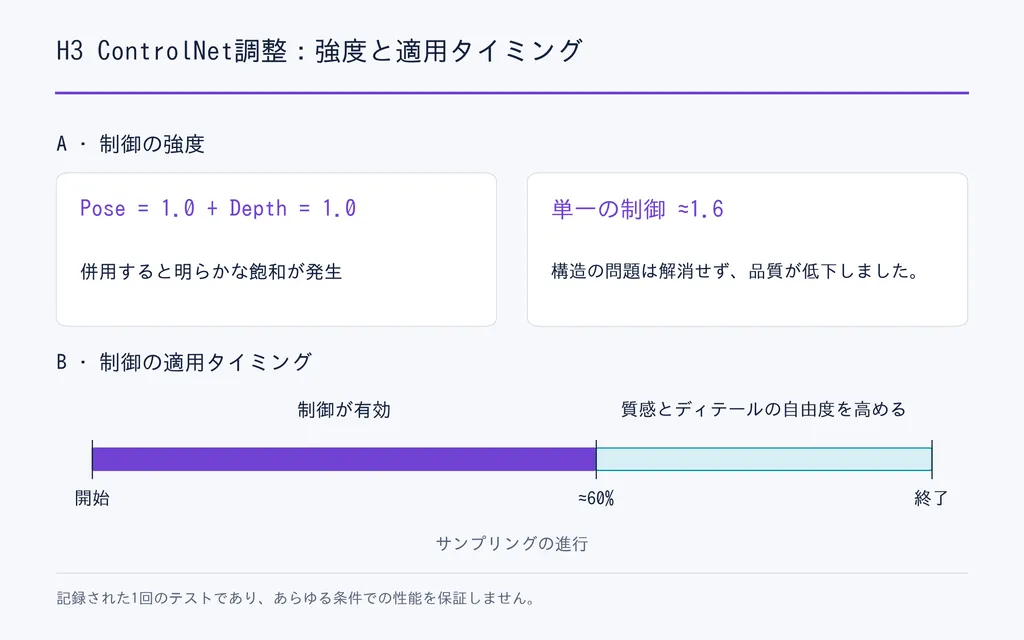
In one multi-control workflow, Pose strength 1.0 plus Depth strength 1.0 produced visible saturation. Increasing a single control to around 1.6 also failed to correct the structural problem while reducing visual quality.
A safer workflow is to choose the most important control first, then introduce the secondary control gradually.
Control Timing Matters as Much as Strength
Structural control can also become counterproductive if it remains too strong late in diffusion.
One documented test found that ending control at roughly 60% of the sampling schedule preserved important structure while giving later steps more freedom to recover texture and surface detail.
The practical principle is simple:
Use early steps to establish structure. Give later steps enough freedom to finish the image.
There is not yet enough standardized testing to recommend one universal strength or end percentage.

MiniMax H3 VRAM Requirements and Reference Video Memory
H3 can run on consumer GPUs, but minimum VRAM and comfortable production VRAM are not the same thing.
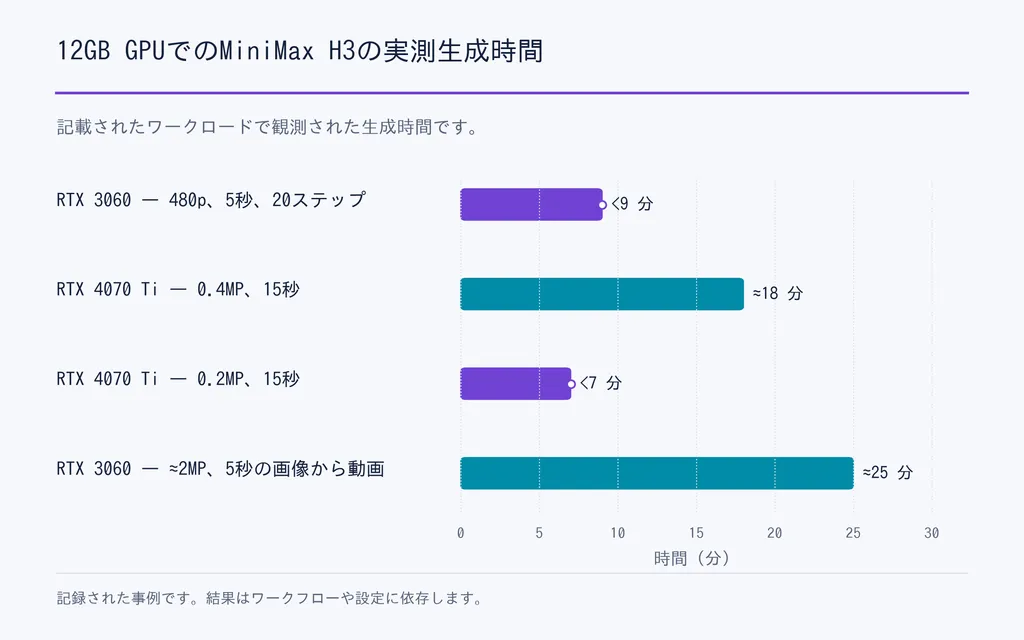
GPU | Workload | Observed Time |
RTX 3060 12GB | 480p, 5 sec, 20 steps | under 9 min |
RTX 4070 Ti 12GB | 0.4MP, 15 sec | about 18 min |
RTX 4070 Ti 12GB | 0.2MP, 15 sec | under 7 min |
RTX 3060 12GB | about 2MP, 5 sec I2V | about 25 min |
Our research also found working 8GB and 6GB workflows, but they rely more heavily on quantization, offloading, staged loading, and system RAM.

Reference Length Can Be a Hidden VRAM Bottleneck
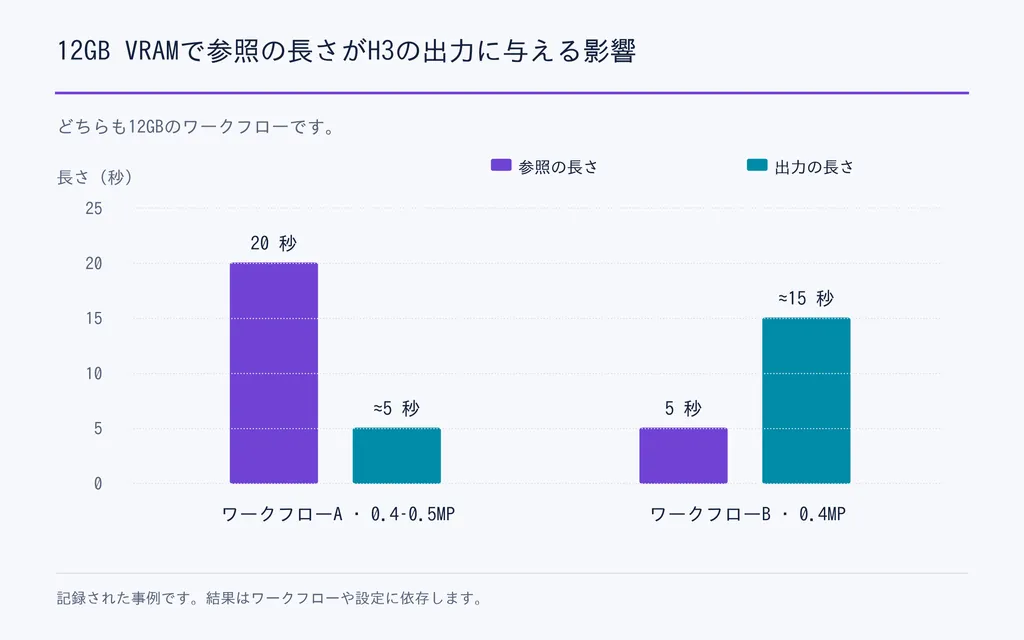
A particularly useful 12GB case showed:
- 20-second reference → roughly 5-second output at 0.4–0.5MP
- 5-second reference → roughly 15-second output at 0.4MP
The longer reference repeatedly pushed the workflow toward OOM.
The lesson is important: conditioning media is part of your memory budget. If H3 is running out of VRAM, trim the reference before automatically sacrificing final output quality.

MiniMax H3 GPU Performance and RunPod Cost
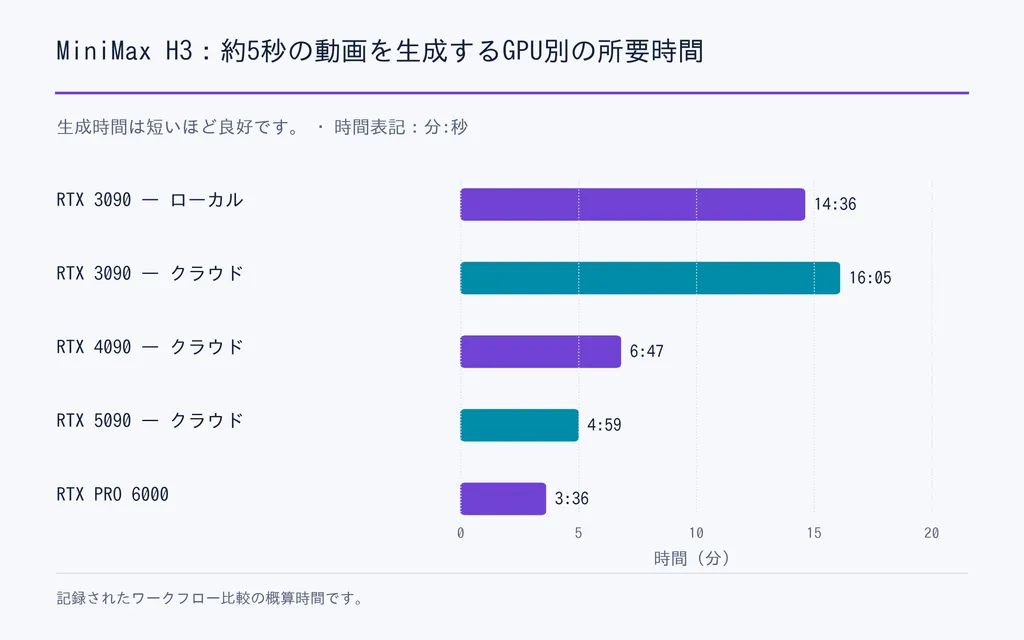
Comparable workflow data also shows that more VRAM does not translate linearly into faster H3 generation.
GPU | VRAM | Approx. 5-sec Time |
RTX 3090 local | 24GB | 14m 36s |
RTX 3090 cloud | 24GB | 16m 05s |
RTX 4090 cloud | 24GB | 6m 47s |
RTX 5090 cloud | 32GB | 4m 59s |
RTX PRO 6000 | 96GB | 3m 36s |
The 4090 was more than twice as fast as the 3090 in this case despite having the same VRAM capacity.
One optimized RTX 4090 workflow using INT8, SageAttention, Turbo LoRA, eight steps, approximately 0.9MP, and 10-second output took about 9–10 minutes, with an estimated compute cost of roughly $0.12 per generation under that specific cloud configuration.
That is not a universal H3 price. The more useful metric is cost per usable clip.
Memory optimization and speed optimization should also be separated. One documented 5090 workflow reduced shared GPU memory by about 14GB with optimized model components but saw little change in raw generation speed. Another 4090 optimization stack involving quantization, CUDA/Triton changes, and attention optimization reported roughly 2.6× overall speed improvement.

What Is the Best Low-Cost H3 Workflow?
The most reliable cost optimization is often previewing before rendering the final shot.
- Generate a 1–2 second low-resolution preview.
- Check framing and subject scale.
- Confirm Pose actually follows the intended movement.
- Evaluate whether Depth helps or over-constrains the shot.
- Check identity and general visual direction.
- Increase duration and resolution only after structure is stable.
In one 12GB workflow, short previews could complete in around one minute or less, versus many minutes for a full sequence.
This follows a basic professional design principle: validate structure before investing in polish.
What Are the Most Common H3 ControlNet Problems?
Fun ControlNet adds precision, but it also introduces new failure modes.
Common issues in our workflow review include:
- dimension mismatches;
- incorrect frame counts;
- shape mismatches;
- checkpoint incompatibility;
- incorrect control batches;
- attention-backend conflicts;
- control signals that silently stop working.
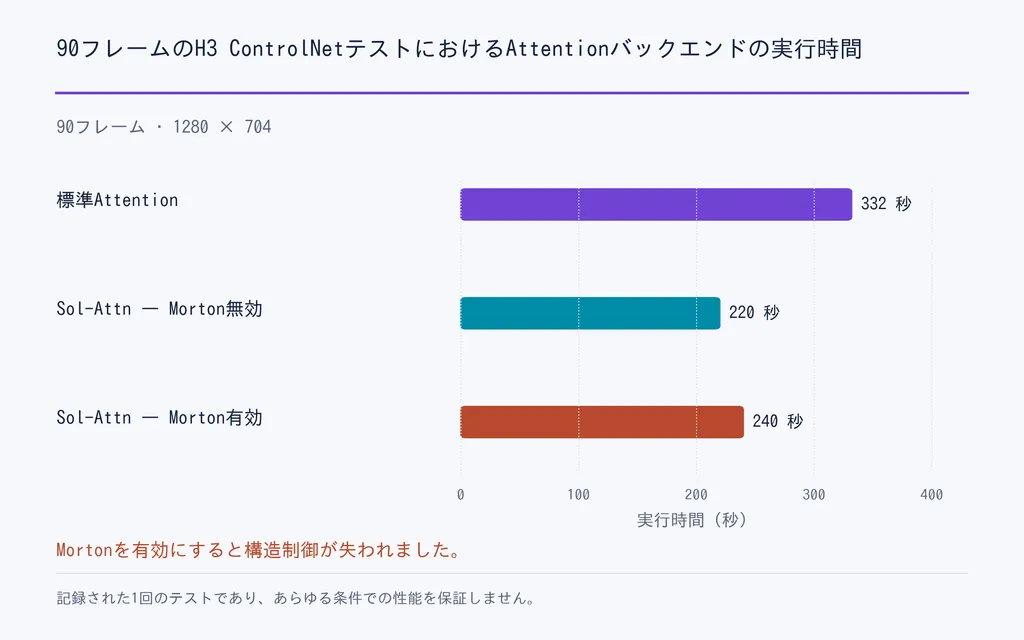
A particularly useful attention test compared the same 90-frame, 1280 × 704 workflow:
- standard attention: 332 seconds
- Sol-Attn without Morton reordering: 220 seconds
- Sol-Attn with Morton reordering: 240 seconds
The final configuration still generated plausible video, but structural control effectively disappeared because token ordering no longer aligned correctly.
This is why every new ControlNet setup should include a simple control-on versus control-off A/B test using the same seed.

What Pose and Depth Control Still Cannot Solve
Pose and Depth improve structural control, but they do not automatically guarantee:
- perfect facial identity;
- clothing consistency;
- long-video color stability;
- perfect hands;
- lower VRAM use;
- faster generation;
- zero rerolls.
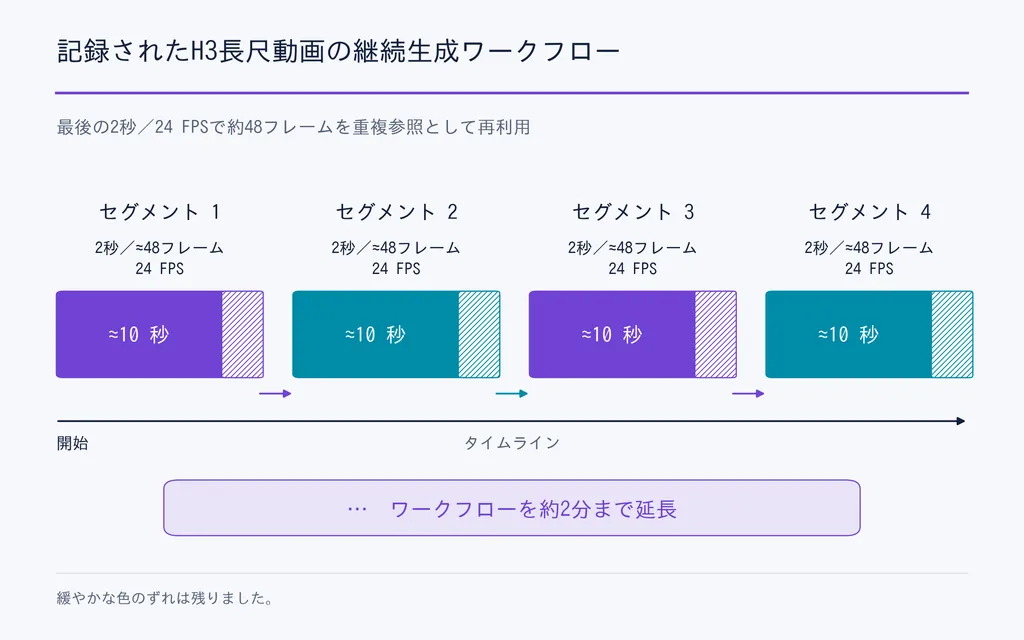
Long-form continuity remains especially difficult. One documented workflow generated approximately 10-second segments, then reused the final 2 seconds, or about 48 frames at 24 FPS, as the reference for the next segment.
The approach was extended to roughly two minutes, but gradual color drift remained visible.
This distinction is important: motion consistency and visual consistency are related, but they are not the same problem.

Conclusion
MiniMax H3 Pose and Depth Control matters because Fun ControlNet turns H3 into a more modular video workflow: Reference can carry identity and appearance, Pose can constrain articulated motion, Depth can constrain spatial geometry, and prompts can define creative direction. The documented cases also show why the system still requires careful production thinking: multi-control can saturate, small subjects may respond differently to Depth, long references can consume significant VRAM, attention optimizations can silently break control, and hardware performance varies dramatically across configurations. The real improvement is therefore not simply “more control.” It is the ability to debug, direct, and iterate on motion, geometry, and appearance as separate creative variables.
FAQs
Does H3 support Pose and Depth natively?
No. Pose and Depth are not part of the original native H3 launch feature set. They are added through the later Fun ControlNet extension, which also supports structural controls such as Canny, HED, and MLSD.
What is the difference between H3 Reference Video and Pose Control?
Reference Video gives H3 rich semantic guidance about a performance, while Pose provides a more explicit body-motion constraint. Use Reference when creative interpretation is acceptable and Pose when choreography or subject movement needs to follow a clearer structure.
Can H3 Pose keep character identity consistent?
Not by itself. Pose controls body structure and movement, not character identity. For character replacement, use Reference for appearance and identity, Pose for movement, and Depth when the shot also needs stronger spatial control.
Can H3 run on 12GB VRAM?
Yes. Documented RTX 3060 and RTX 4070 Ti workflows show that 12GB VRAM can run H3, but resolution, duration, reference length, quantization, and offloading significantly affect performance. Lower-VRAM workflows are practical for experimentation, but they usually require more compromises than higher-VRAM production setups.
Virse ブログの他の記事
ワークフロー

MiniMax H3 Storyboard-to-Video: How to Get Multi-Shot Consistency Without OOM
2026年8月31日 by Vincent
ワークフロー

How to Create Consistent AI Characters with MiniMax H3 — Without a Complex ComfyUI Workflow
2026年8月31日 by Vincent
ワークフロー

The Best H3 Max Workflow: Generate 20 Ideas, Then Render the Winner
2026年8月31日 by Vincent