Wan 3.0 Prompt Guide: Fix Wrong Motion, Character Drift, and Ignored Instructions
 Yifan Zhao読了 10 分 ·
A useful Wan 3.0 prompt specifies the subject, action, setting, camera movement, and sound. Describe the scene for text-to-video, the changes for image-to-video, or each asset’s role for reference-based generation. Set resolution and duration in the generation controls, then inspect whether the output follows the brief.
When a character changes appearance or a chase reverses direction, adding more adjectives rarely identifies the problem. Separate subject motion from camera motion, define what must remain consistent, and revise one failed instruction at a time. This gives each attempt a clear purpose before you spend credits on another variation.
Explore those creative directions with Virse. Sign up to receive credits, then explore paid plans offering unlimited use of a wide selection of included models and unlimited seats. Give your team more room to compare visual approaches across models such as MiniMax H3 and Kling 3 and develop promising ideas together.

How Do You Write a Wan 3.0 Prompt That Matches Your Brief?
Write what viewers should see, how the action develops, and which properties must remain consistent. Add references, shot divisions, dialogue, and sound when they serve the scene.
Build Your Wan 3.0 Prompt Around Observable Actions
“Premium” and “cinematic” leave lighting, framing, movement, and pacing unresolved. Translate those preferences into visible decisions.
Adaptable product prompt:
A frosted glass serum bottle stands upright on pale limestone. Soft side lighting reveals the glass texture. The camera slowly pushes toward the stationary bottle. A narrow reflection travels across its shoulder. Use an ivory and warm gray palette. Finish with the bottle centered and clear space above it. No dialogue. No background music.
This creates concrete acceptance criteria: bottle position, material appearance, movement, and final composition.
Start with one main action and one dominant camera movement. The prompts in this guide are adaptable examples, not tested performance results.
Separate Wan 3.0 Settings from Creative Instructions
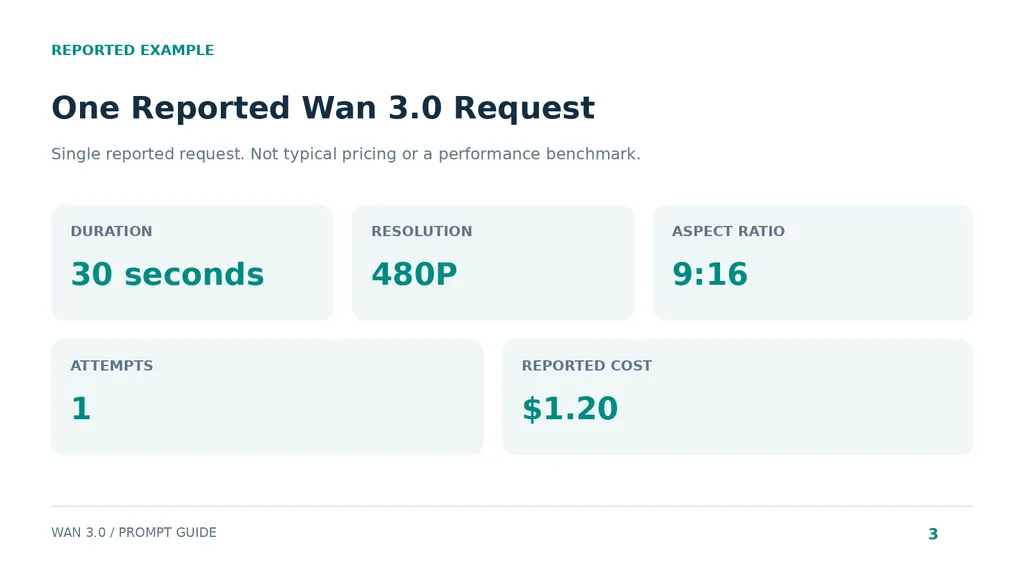
A published cross-model transfer example exposes a useful configuration mistake: its prompt requested 1080p, while the actual request used 480P.
Recorded condition | Reported value |
|---|---|
Model | wan3.0-video |
Duration | 30 seconds |
Resolution | 480P |
Aspect ratio | 9:16 |
Native audio | Enabled |
Attempts | One, without rerolls |
Reported cost | $1.20 |
The creator reported preservation of the Seoul setting, wardrobe, and home-video atmosphere, with weaker facial identity later in the sequence.
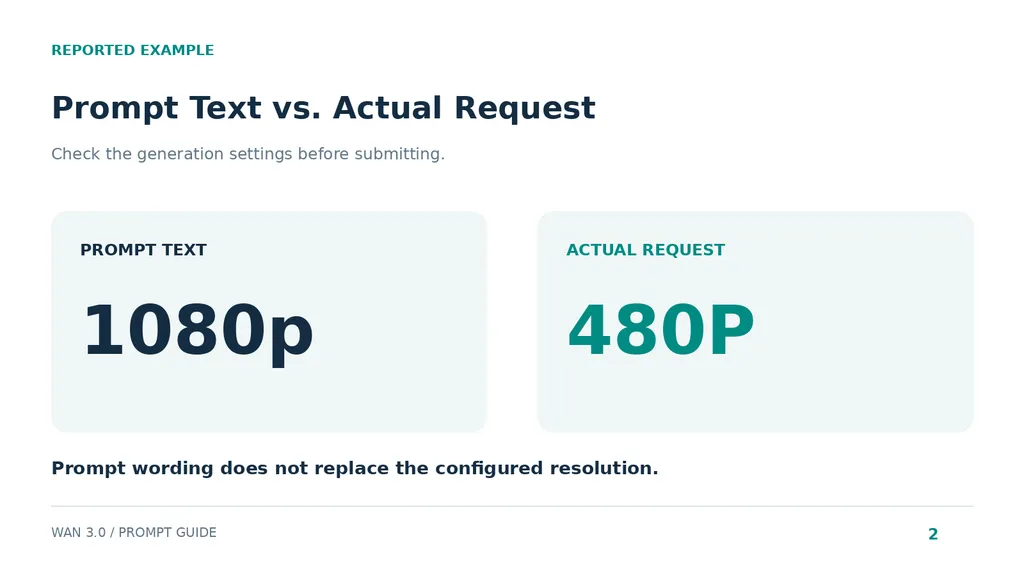
This is one reported generation, not a typical price or comparative benchmark. Check actual duration, resolution, aspect ratio, and audio controls rather than relying on technical wording inside the prompt.
Which Wan 3.0 Prompt Format Should You Use?
Choose the input mode first. Your prompt should supply the information that the input does not already establish.
Input mode | Main prompt responsibility |
|---|---|
Text-to-video | Establish appearance, setting, action, and camera |
Image-to-video | Describe changes and preservation requirements |
Reference-to-video | Assign each asset a specific role |
Video editing | Identify changes and retained properties |
Wan 3.0 Text-to-Video: Establish the Scene and Progression
Without a source image, establish both the scene and its development.
Adaptable prompt:
A delivery robot approaches a closed workshop door along a quiet industrial corridor. Its wheels slow at the threshold. The camera tracks beside it at wheel height, then stops when the robot stops. Cool overhead lighting reflects on the concrete floor. Electric motor noise fades as the robot becomes stationary. No dialogue or music.
The action has a beginning and ending. Camera behavior and sound follow visible events. Review those relationships before judging the aesthetic.
Wan 3.0 Image-to-Video: Describe What Changes
Prioritize motion over repeating the source image, whether it is a photograph or an image created with GPT Image 2. The image already supplies the initial composition and appearance.
Adaptable fashion prompt:
The model slowly turns her head toward the window. Her shoulders remain relaxed, and the coat moves slightly. The camera remains fixed. Preserve the existing face, hairstyle, coat, background, and lighting direction.
Inspect the face during the turn, garment edges, and background stability. For product work, remember that an orbit reveals surfaces absent from a single photograph. Check newly generated sides, labels, and closures.
Wan 3.0 Reference Prompts: Assign Each Asset a Role
Explain whether each reference controls identity, materials, environment, movement, or style.
Adaptable prompt:
Use Image 1 for the handbag’s shape, leather texture, hardware, and color. Use Image 2 for the studio environment and lighting. Use Video 1 only for camera movement. Place the handbag on the studio platform and preserve its proportions. No dialogue or background music.
Match the reference labels and supported combinations in your platform.
Uploading an asset does not clearly assign its purpose. If an unwanted background appears, examine reference responsibilities before rewriting the scene.
How Do You Control Wan 3.0 Camera Movement and Timing?
Separate what moves, where it moves, and when it happens. This makes failures easier to locate.
Distinguish Camera Movement from Subject Movement
Our review of user questions identified two instructive failures: scenery traveling unexpectedly outside a train, and a chase reversing who pursued whom.
A proposed revision makes the relationships explicit:
A runner in a yellow jacket remains ahead of a cyclist wearing black. Both travel from left to right along the street. The cyclist follows behind throughout. A stationary camera observes from the pavement.
This is a diagnostic revision, not a verified correction. For train footage, specify camera position and the intended screen direction of passing scenery. Remove competing camera instructions.
Use Action Beats for Continuous Movement
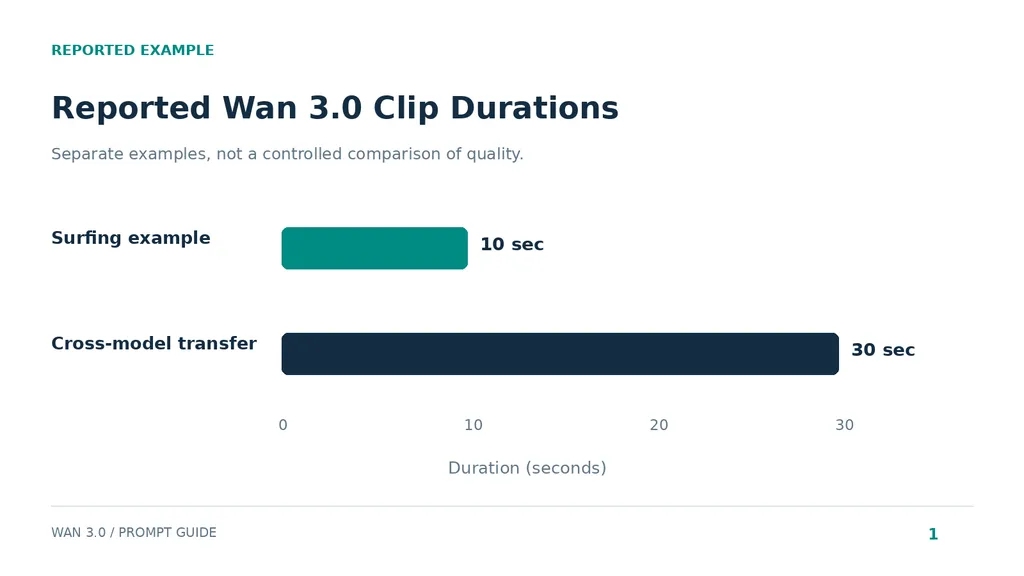
A published 10-second surfing example combined a character-sheet reference, sequential actions, camera direction, and a music restriction. Its creator preferred loose sequencing, but the available record does not establish superiority over timestamps.
A comparable structure is:
The surfer bends her knees as the wave rises, shifts her weight into the turn, then straightens as she exits toward calmer water. The camera follows alongside her.
Use action beats when continuity matters more than exact edit points. Inspect action order, balance, and the ending.
Use Timestamps for Distinct Wan 3.0 Shots
Timestamps express intended structure; they do not guarantee frame-accurate execution.
Illustrative 12-second product sequence:
Use Image 1 as the product reference throughout.
Shot 1, 0–4 seconds: Establish the bottle on pale limestone. The camera slowly pushes closer.
Shot 2, 4–8 seconds: Cut to the bottle shoulder. Side lighting reveals the frosted glass.
Shot 3, 8–12 seconds: Cut to a centered hero composition. Keep the camera stationary and leave space above for a headline added during editing.
Preserve bottle shape, cap, and label placement. No dialogue or music.
These timings are creative instructions. Match the selected duration to the sequence and inspect the actual cuts.
How Do You Improve Wan 3.0 Character Consistency?
Inspect consistency throughout the sequence. A convincing opening frame does not establish continuity during movement or transitions.
Review Case Outcomes Without Overgeneralizing
The research examples identify useful inspection targets, but do not provide controlled before-and-after evidence.
Published example | Available record | Reported observation | Practical check |
|---|---|---|---|
Surfing | 10 seconds; character-sheet reference; sequential actions | Creator favored looser timing | Action order and character appearance |
Hiking | Structured sequence across landscapes and weather | Generally coherent continuity with localized identity drift | Identity at scene changes |
Cross-model transfer | 30 seconds; 480P; one attempt; $1.20 reported | Setting and wardrobe held better than later facial identity | Face throughout the sequence |
These records support troubleshooting questions, not success rates. The surfing and hiking records lack controlled comparisons; the transfer record contains only one attempt.
For every case, distinguish the supplied instructions, reported outcome, and proposed next revision.
Simplify When Identity Matters Most
Review the approved reference against the opening, movement, transitions, and ending. Check facial structure, hair, clothing, and proportions separately from scenery.
For products, inspect geometry, materials, labels, and closures.
If identity weakens, reduce extreme turns, occlusion, transitions, and simultaneous interactions. Generate shorter shots separately when necessary, then assemble matching takes. This makes a weak segment replaceable without rebuilding the complete sequence.
How Do You Prompt Wan 3.0 Dialogue and Sound?
Plan dialogue, event sounds, ambience, and music separately. Give each an explicit relationship to the scene.
Connect Sound to Visible Events
Adaptable prompt:
A ceramic artist places a cup on a wooden table. A soft ceramic-on-wood sound occurs at contact. Quiet workshop ambience continues underneath. The camera remains fixed. No dialogue or background music.
Evaluate whether the sound matches the event, not simply whether audio exists.
For dialogue:
The artist looks toward the camera and says, “Made for everyday rituals,” in a calm, conversational voice.
Read the line aloud against the intended duration. Shorten it if delivery feels rushed.
Check Audio Controls for Silent Videos
“No background music” does not mean complete silence. Dialogue, effects, and ambience remain separate requirements.
Use an audio-off control where available when silence is required. Listen to the exported file: both the instruction and configuration must be verified in the output.
Why Does Wan 3.0 Ignore Parts of a Prompt?
A missed instruction may reflect conflicting text, input choices, settings, or generation variability. Identify the visible failure before expanding the prompt.
Record the Complete Generation Setup
Preserve the model, platform, input mode, assets, prompt, duration, resolution, and audio settings, including when comparing Wan 3.0 with Veo 3.1. Record automatic rewriting and seed settings where exposed.
The effective input includes more than the text you typed. Changing references and rewriting behavior alongside the prompt makes comparisons difficult. A fixed seed should not be treated as a guarantee of complete reproducibility.
Revise One Failure and Compare the Same Moment
Failure | First revision to test |
|---|---|
Unexpected camera movement | Remove competing movement instructions |
Chase roles reverse | State who remains ahead and who follows |
Face changes later | Simplify movement or split the sequence |
Wrong reference background | Clarify each asset’s role |
Rushed dialogue | Shorten the line or adjust duration |
Unusable ending | Specify final framing |
Unwanted audio | Check controls and sound instructions |
Keep the failed output. After revision, compare the same moment against the same acceptance criterion.
For a meaningful before-and-after record, retain the original prompt, changed instruction, settings, both outputs, and observed difference. Do not claim an improvement until the revised output demonstrates it.
Conclusion
Effective Wan 3.0 prompting begins with the appropriate input mode, clear actions, defined reference roles, and verified settings. Published examples show why full-sequence review matters: atmosphere may hold while identity drifts, and detailed text can contradict the actual request. Start with a manageable scene, define what makes it usable, and revise the instruction associated with the visible failure.
FAQ
How long should a Wan 3.0 prompt be?
Use enough detail to define the scene and important constraints. No verified universal word count produces the best result. Image-to-video may need only motion and preservation instructions; a multi-shot narrative needs more structure. Remove repetition and contradictions before adding descriptive language.
Do Wan 3.0 timestamps guarantee exact timing?
No. They communicate intended order and duration, but the output needs inspection. Use action beats for continuous movement and timed shots for distinct edits. When precise timing matters, trim or assemble approved clips in an editor.
Can one reference image prevent character drift?
One image can establish the target appearance without guaranteeing consistency throughout the video. Inspect movement, occlusion, transitions, and the ending. Simplify the action or divide the sequence if identity weakens.
Why does the same Wan 3.0 prompt produce different results?
Generation can vary, while assets, settings, model selection, and automatic rewriting may also affect results. Preserve the complete configuration and compare repeated attempts before attributing a change to one sentence or an assumed model update.
Can I reuse prompts from Seedance or another model?
Yes, as a starting brief. Recheck reference labels, supported controls, settings, and shot complexity when adapting prompts from Seedance 2.5 or another model. The published transfer example illustrates a specific reported outcome; it does not establish a general performance rule about either model.