
Contrôle de pose et de profondeur dans MiniMax H3 : fonctions, fonctionnement et usages
Vincent11 min de lecture ·
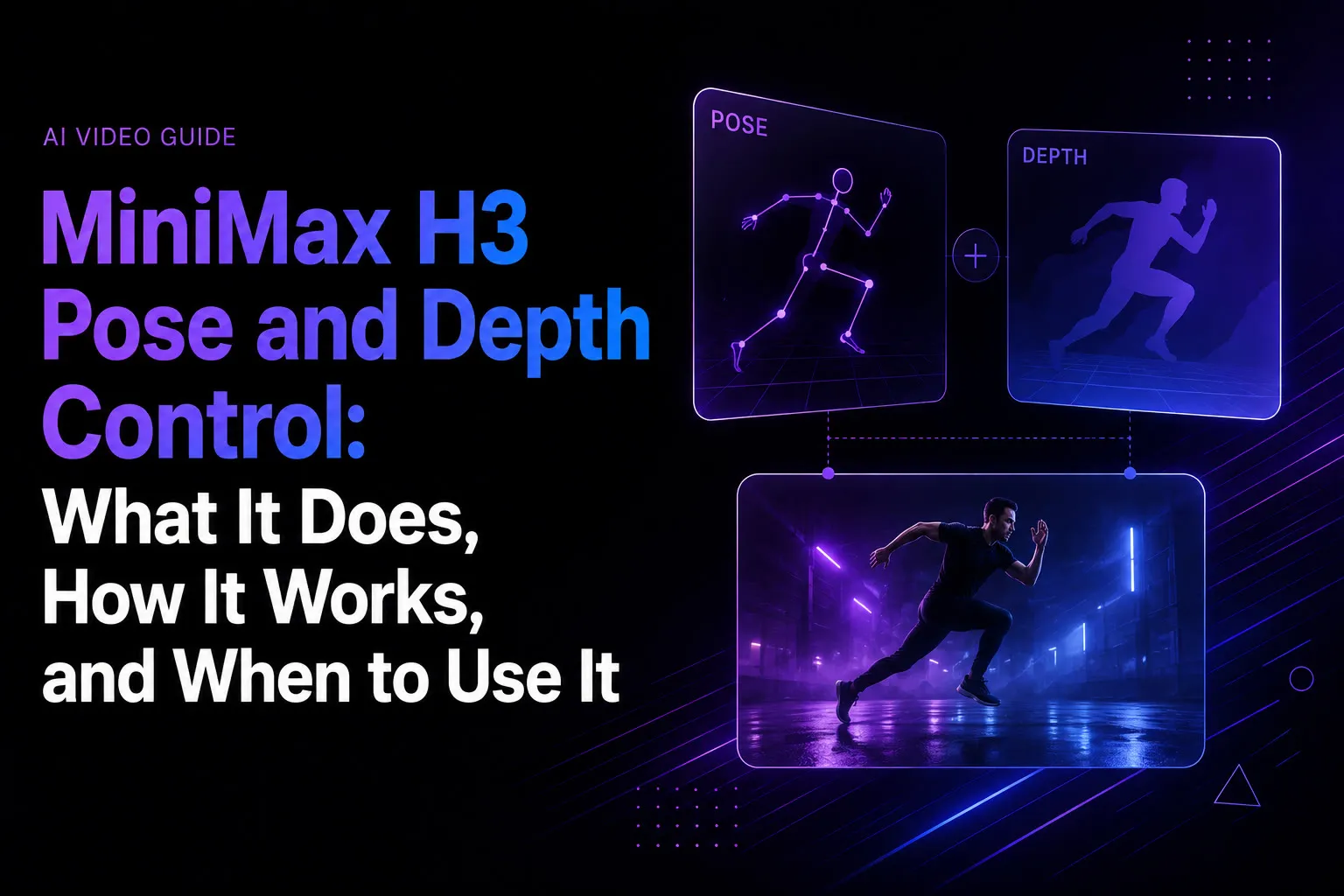
Les contrôles de pose et de profondeur de MiniMax H3 permettent de mieux maîtriser le mouvement et la structure spatiale grâce à Fun ControlNet. Pose contraint la posture et les mouvements du corps, tandis que Depth contraint la géométrie de la scène, la position du sujet et la structure relative à la caméra. Cela sépare identité, mouvement, géométrie et direction créative au lieu de demander à H3 de tout déduire d’une seule référence.
Le problème est que comprendre une référence ne signifie pas la reproduire précisément. Lors du remplacement de personnages, du transfert de danse et du reciblage de mouvement, de petites erreurs de synchronisation, position corporelle, échelle ou distance à la caméra peuvent entraîner des dérives et des générations répétées.
Pose et Depth rendent H3 plus facile à diriger en clarifiant le rôle de chaque entrée : Reference contrôle l’apparence et l’identité, Pose le mouvement, Depth la géométrie spatiale et le prompt la direction créative. Pour les équipes souhaitant gérer ces références visuellement, Virse réunit agents IA, ressources connectées et contexte du projet sur un canevas infini, facilitant l’organisation et l’itération des workflows H3 contrôlés sans traiter chaque génération comme un prompt isolé. MiniMax H3, Seedance 2.5 et Seedance 2.0 sont désormais disponibles dans Virse, pour explorer et comparer plusieurs grands modèles vidéo dans un même workflow créatif.

Que sont les contrôles de pose et de profondeur de MiniMax H3 ?
Pose Control de MiniMax H3 contraint la posture et les mouvements corporels, tandis que Depth Control contraint la géométrie spatiale et la structure relative à la caméra. Ces capacités viennent de MiniMax-H3-Fun-Controlnet-Union, et non des fonctions initiales de H3.
Le checkpoint Fun ControlNet pèse environ 6.8 GB et ajoute une branche de contrôle à 5 des 50 blocs Transformer de H3. Un seul checkpoint unifié peut gérer plusieurs conditions structurelles.
Contrôle | Usage privilégié | Contrainte principale |
Pose | Danse, action, remplacement de personnages | Mouvement corporel |
Depth | Composition de scène, distance à la caméra | Géométrie 3D |
Canny | Animation guidée par croquis | Contours et disposition |
HED | Guidage structurel plus souple | Limites des objets |
MLSD | Architecture, produits | Lignes droites |
Le changement de conception important est que les créateurs choisissent ce qui doit rester structurellement fixe et ce que H3 peut réinterpréter librement.
Reference Video ou Pose Control dans MiniMax H3 : quelle différence ?
La distinction la plus claire est la suivante :
Reference Video fournit un guidage sémantique. Pose et Depth imposent des contraintes structurelles.
Le système de références de H3 accepte plusieurs images, vidéos et pistes audio, ce qui l’aide à comprendre l’apparence des personnages, les actions, scènes, expressions et comportements de caméra.
Quand Reference Video de H3 suffit
Reference Video convient pour transférer l’interprétation globale ou l’intention visuelle tout en laissant à H3 une certaine liberté de réinterprétation.
Notre examen de workflows H3 documentés révèle une limite récurrente : comprendre une action ne signifie pas reproduire précisément son rythme et la position du corps.
Cela convient souvent à l’exploration créative. C’est moins acceptable lorsque chorégraphie ou placement du sujet sont des exigences strictes.
Quand Pose Control de H3 est préférable
Pose est plus utile lorsque le mouvement lui-même doit rester cohérent, notamment pour :
- le transfert de danse ;
- le remplacement d’acteurs ;
- les cycles de marche ou de course ;
- le blocage initial d’animation ;
- le reciblage de mouvement.
On peut le comprendre ainsi :
Reference contrôle qui est le sujet. Pose contrôle ce qu’il fait. Depth contrôle sa place dans l’espace.
Pose ou Depth dans MiniMax H3 : lequel choisir ?
Pose et Depth résolvent des problèmes différents, et la taille du sujet peut influencer l’utilité de chaque contrôle.
Pourquoi Pose a mieux fonctionné pour un petit personnage dans un test
Un workflow documenté générait en 1280 × 704, avec une grille spatiale latente d’environ 40 × 22. Le personnage n’occupait qu’environ 3 des 22 positions latentes verticales.
Dans ce cas, Depth laissait encore la silhouette dériver vers la caméra et grandir, tandis que Pose maintenait sa position plus fidèlement.
Il ne faut pas en conclure que « Pose est toujours meilleur que Depth ». Cela montre qu’un petit sujet peut fournir une information de profondeur relativement faible après sous-échantillonnage.
Quand Depth est préférable
Depth convient davantage aux :
- relations entre premier plan et arrière-plan ;
- mouvements vers la caméra ou s’en éloignant ;
- pièces et environnements ;
- grands produits ;
- objets non humains ;
- géométries de scène.
La bonne question n’est donc pas « Pose ou Depth ? », mais « Dois-je verrouiller le mouvement articulé ou la géométrie spatiale ? »
Comment Pose Control transforme le remplacement de personnages et le reciblage dans H3
Le remplacement de personnages est l’un des usages les plus convaincants, car Fun ControlNet aide à séparer le transfert d’apparence du transfert de mouvement.
Notre examen des questions récurrentes a dégagé trois problèmes fréquents :
- Le personnage de remplacement ne suit pas assez fidèlement la prestation d’origine.
- L’identité devient moins stable pendant les mouvements complexes.
- Des traits visuels de l’interprète initial se retrouvent dans le nouveau personnage.
Pose ne résout pas seul l’identité. Il permet plutôt à chaque entrée d’avoir un rôle plus clair :
Personnage cible → Reference
Prestation source → Pose
Géométrie de scène → Depth si nécessaire
Style créatif → Prompt
Cela se rapproche d’un système de conception professionnel : si le mouvement est faux, ajustez le mouvement. Si l’apparence est fausse, ajustez la référence. Vous n’avez plus à changer toutes les variables en même temps.
Régler Pose et Depth dans H3 sans surcontrôle
Davantage de conditionnement n’améliore pas automatiquement le contrôle.
Traitez Pose et Depth comme un budget de contrôle commun
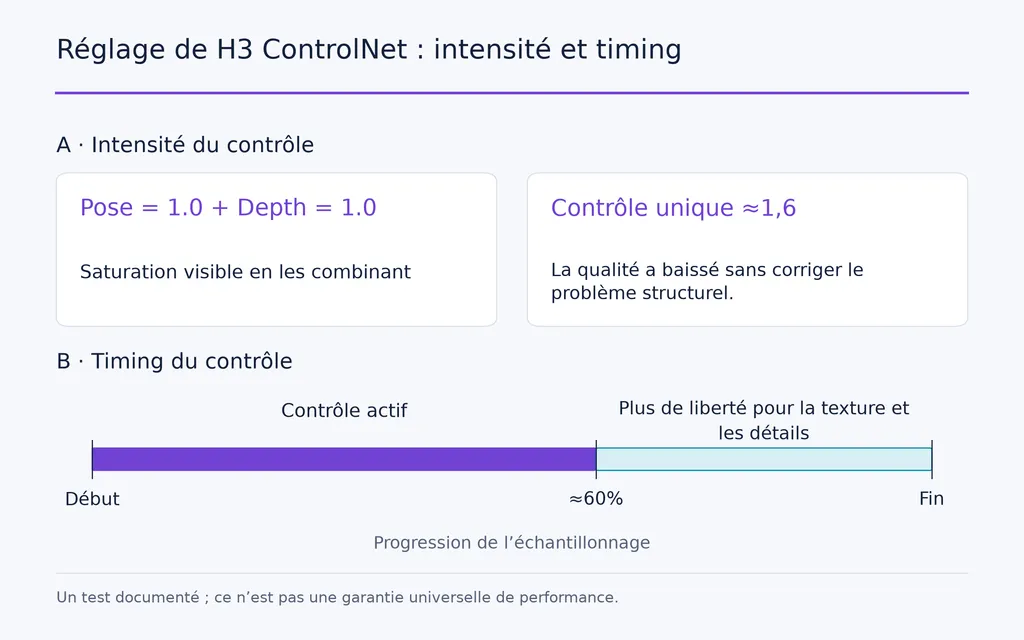
Dans un workflow à plusieurs contrôles, Pose à une intensité de 1.0 plus Depth à 1.0 produisaient une saturation visible. Monter un seul contrôle à environ 1.6 ne corrigeait pas non plus le problème structurel et réduisait la qualité visuelle.
Une méthode plus prudente consiste à choisir d’abord le contrôle principal, puis à introduire progressivement le secondaire.
Le moment du contrôle compte autant que son intensité
Le contrôle structurel peut devenir contre-productif s’il reste trop fort en fin de diffusion.
Un test documenté a montré qu’arrêter le contrôle vers 60% du programme d’échantillonnage préservait la structure importante tout en laissant aux dernières étapes la liberté de restaurer textures et détails de surface.
Le principe pratique est simple :
Établissez la structure dans les premières étapes. Laissez aux dernières assez de liberté pour finir l’image.
Les tests standardisés ne sont pas encore suffisants pour recommander une intensité ou un pourcentage d’arrêt universels.
Besoins en VRAM de MiniMax H3 et mémoire des vidéos de référence
H3 fonctionne sur des GPU grand public, mais VRAM minimale et VRAM confortable pour la production ne sont pas équivalentes.
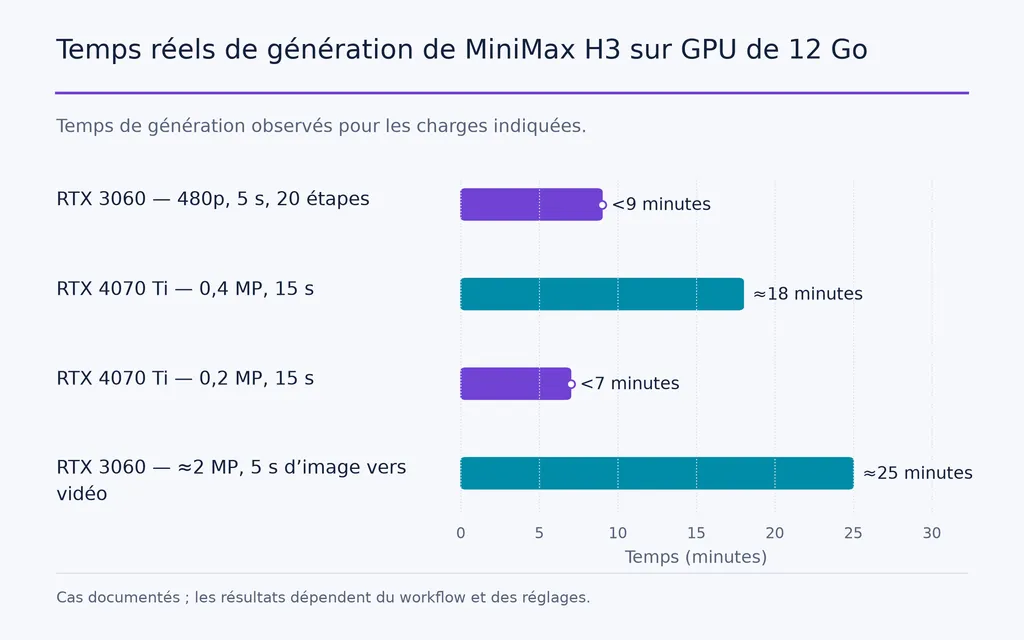
GPU | Charge de travail | Temps observé |
RTX 3060 12GB | 480p, 5 s, 20 étapes | moins de 9 min |
RTX 4070 Ti 12GB | 0.4MP, 15 s | environ 18 min |
RTX 4070 Ti 12GB | 0.2MP, 15 s | moins de 7 min |
RTX 3060 12GB | environ 2MP, 5 s d’image-vers-vidéo | environ 25 min |
Notre recherche a aussi trouvé des workflows fonctionnels avec 8GB et 6GB, mais ils dépendent davantage de la quantification, du déchargement mémoire, du chargement par étapes et de la RAM système.
La durée de référence peut cacher un goulot d’étranglement de VRAM
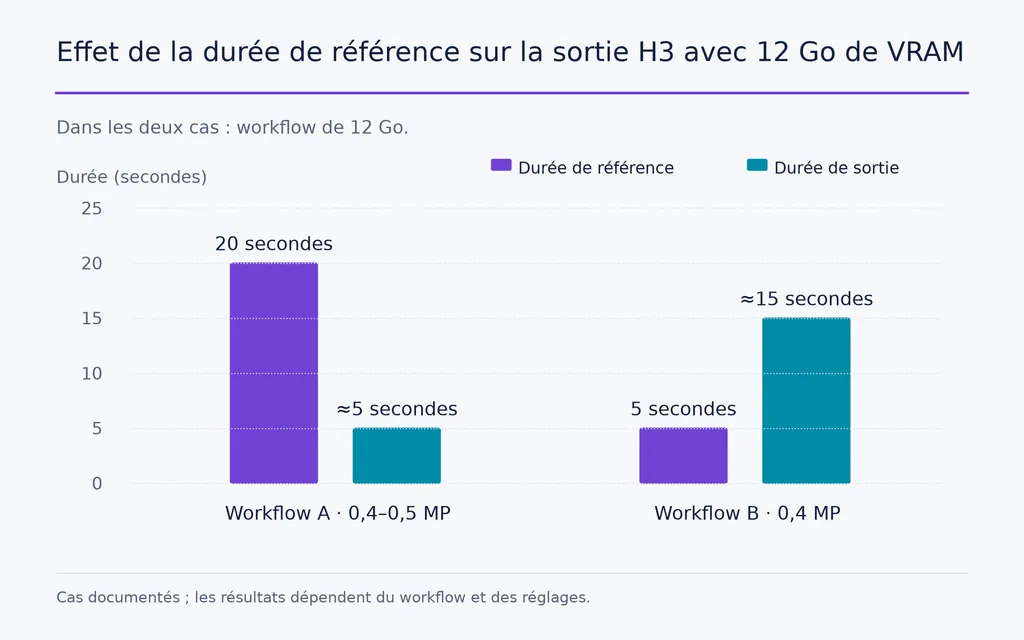
Un cas particulièrement utile avec 12GB montrait :
- Référence de 20 secondes → environ 5 secondes en sortie à 0.4–0.5MP
- Référence de 5 secondes → environ 15 secondes en sortie à 0.4MP
La référence longue rapprochait régulièrement le workflow d’un manque de mémoire (OOM).
La leçon est importante : les médias de conditionnement font partie du budget mémoire. Si H3 manque de VRAM, raccourcissez la référence avant de sacrifier automatiquement la qualité finale.
Performances GPU de MiniMax H3 et coût RunPod
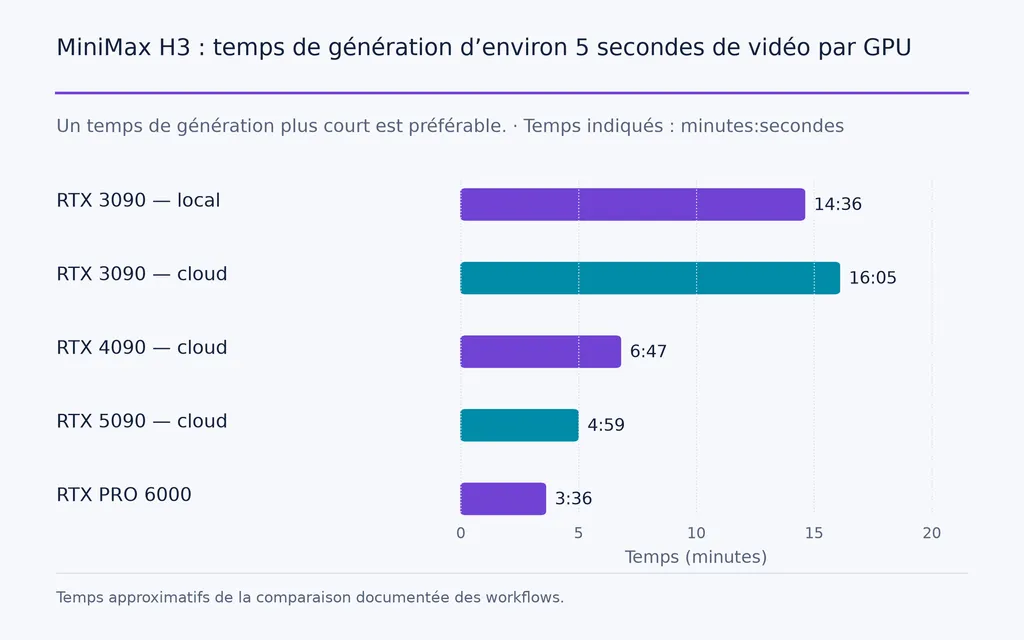
Les données de workflows comparables montrent aussi que plus de VRAM ne signifie pas une accélération linéaire des générations H3.
GPU | VRAM | Temps approximatif pour 5 s |
RTX 3090 locale | 24GB | 14 min 36 s |
RTX 3090 dans le cloud | 24GB | 16 min 05 s |
RTX 4090 dans le cloud | 24GB | 6 min 47 s |
RTX 5090 dans le cloud | 32GB | 4 min 59 s |
RTX PRO 6000 | 96GB | 3 min 36 s |
Dans ce cas, la 4090 était plus de deux fois plus rapide que la 3090 malgré une VRAM identique.
Un workflow H3 optimisé sur RTX 4090, utilisant INT8, SageAttention, Turbo LoRA, huit étapes, environ 0.9MP et une sortie de 10 secondes, prenait environ 9–10 minutes, avec un coût de calcul estimé à $0.12 par génération dans cette configuration cloud précise.
Ce n’est pas un tarif H3 universel. La mesure la plus utile est le coût par clip exploitable.
Il faut aussi distinguer optimisation mémoire et optimisation de vitesse. Un workflow documenté sur 5090 réduisait la mémoire GPU partagée d’environ 14GB grâce à des composants optimisés, sans modifier sensiblement la vitesse brute. Une autre combinaison sur 4090, incluant quantification, changements CUDA/Triton et optimisation d’attention, rapportait un gain global de vitesse d’environ 2.6×.
Quel est le meilleur workflow H3 à faible coût ?
L’optimisation de coût la plus fiable consiste souvent à prévisualiser avant de rendre le plan final.
- Générez un aperçu de 1–2 secondes en basse résolution.
- Vérifiez le cadrage et l’échelle du sujet.
- Confirmez que Pose suit réellement le mouvement voulu.
- Évaluez si Depth aide ou contraint trop le plan.
- Vérifiez l’identité et la direction visuelle générale.
- Augmentez durée et résolution seulement une fois la structure stable.
Dans un workflow à 12GB, les aperçus courts pouvaient finir en environ une minute ou moins, contre de nombreuses minutes pour une séquence complète.
Cela suit un principe professionnel élémentaire : valider la structure avant d’investir dans la finition.
Quels sont les problèmes ControlNet les plus fréquents dans H3 ?
Fun ControlNet ajoute de la précision, mais aussi de nouveaux modes de défaillance.
Notre revue des workflows relève notamment :
- des dimensions incompatibles ;
- des nombres d’images incorrects ;
- des formes de tenseurs incompatibles ;
- des checkpoints incompatibles ;
- des lots de contrôle incorrects ;
- des conflits de moteurs d’attention ;
- des signaux de contrôle qui cessent de fonctionner sans avertissement.
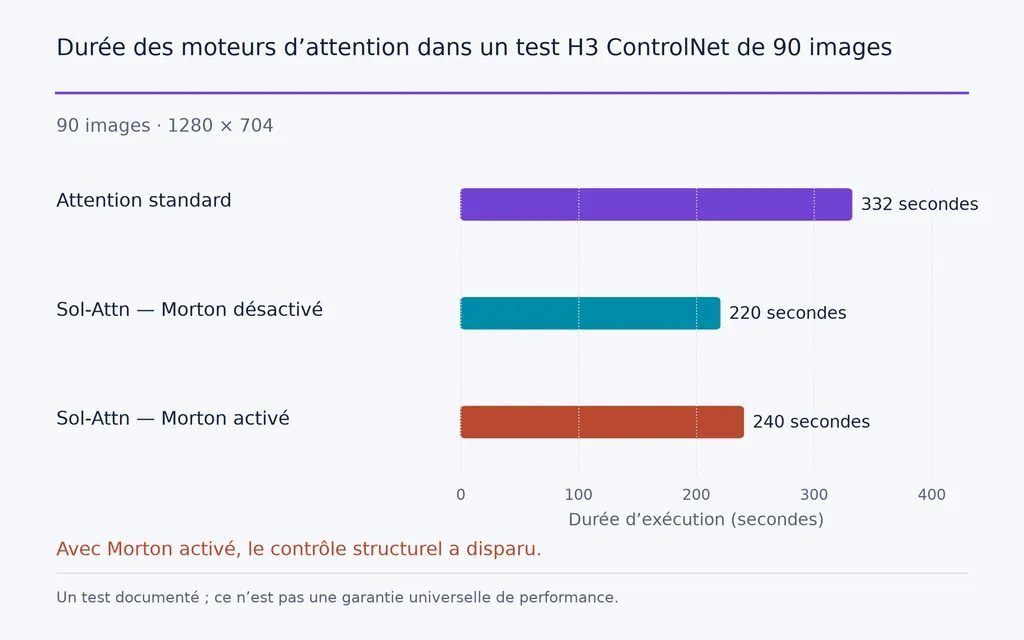
Un test d’attention particulièrement utile comparait le même workflow de 90 images, 1280 × 704 :
- attention standard : 332 secondes
- Sol-Attn sans réordonnancement Morton : 220 secondes
- Sol-Attn avec réordonnancement Morton : 240 secondes
La dernière configuration générait encore une vidéo plausible, mais le contrôle structurel disparaissait pratiquement, car l’ordre des tokens n’était plus correctement aligné.
Chaque nouvelle configuration ControlNet devrait donc inclure un simple test A/B avec contrôle activé puis désactivé, en conservant la même graine.
Ce que Pose et Depth ne résolvent toujours pas
Pose et Depth améliorent le contrôle structurel sans garantir automatiquement :
- une identité faciale parfaite ;
- la cohérence des vêtements ;
- la stabilité des couleurs sur les longues vidéos ;
- des mains parfaites ;
- moins de VRAM utilisée ;
- une génération plus rapide ;
- aucune nouvelle tentative.
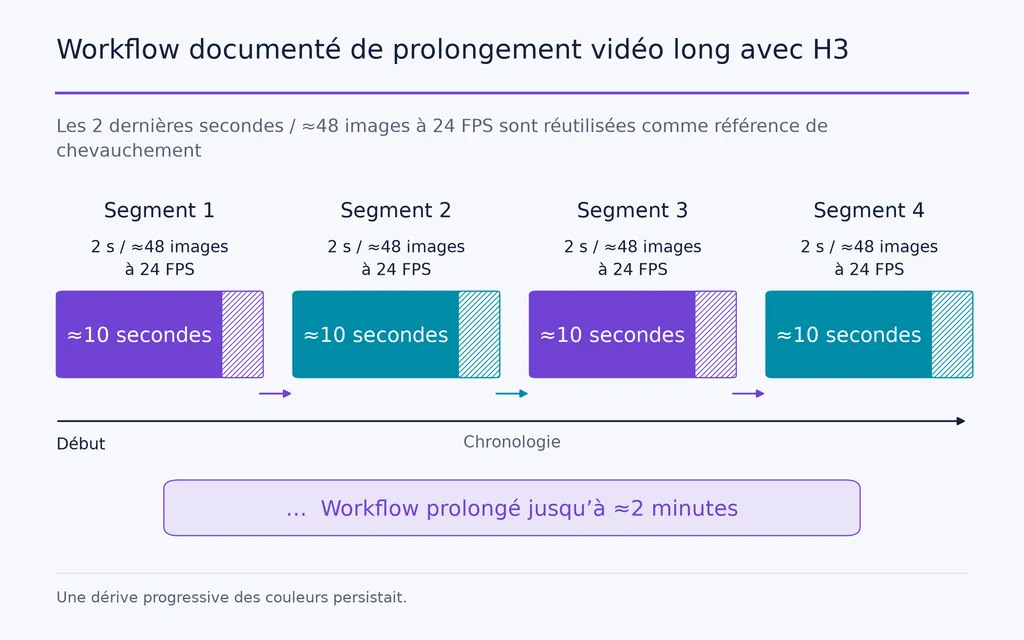
La continuité longue reste particulièrement difficile. Un workflow documenté générait des segments d’environ 10 secondes, puis réutilisait les dernières 2 secondes, soit environ 48 images à 24 FPS, comme référence du segment suivant.
La méthode a été prolongée jusqu’à environ deux minutes, mais une dérive progressive des couleurs restait visible.
La distinction est importante : cohérence du mouvement et cohérence visuelle sont liées, mais ne constituent pas le même problème.
Conclusion
Les contrôles de pose et de profondeur de MiniMax H3 comptent parce que Fun ControlNet rend le workflow vidéo de H3 plus modulaire : Reference porte l’identité et l’apparence, Pose contraint le mouvement articulé, Depth la géométrie spatiale, et les prompts définissent la direction créative. Les cas documentés montrent aussi pourquoi il faut conserver une réflexion de production attentive : les contrôles multiples peuvent saturer, les petits sujets réagissent parfois différemment à Depth, les longues références consomment beaucoup de VRAM, les optimisations d’attention peuvent casser le contrôle silencieusement et les performances matérielles varient fortement selon la configuration. Le progrès réel ne se limite donc pas à « plus de contrôle » : c’est pouvoir diagnostiquer, diriger et itérer le mouvement, la géométrie et l’apparence comme des variables créatives séparées.
Questions fréquentes
H3 prend-il en charge Pose et Depth nativement ?
Non. Pose et Depth ne font pas partie des fonctions natives du lancement initial de H3. Ils sont ajoutés par l’extension Fun ControlNet ultérieure, qui prend aussi en charge Canny, HED et MLSD.
Quelle différence entre Reference Video et Pose Control dans H3 ?
Reference Video donne à H3 un riche guidage sémantique sur une prestation, tandis que Pose impose une contrainte corporelle plus explicite. Utilisez Reference si l’interprétation créative est acceptable, et Pose si la chorégraphie ou le mouvement doivent suivre une structure plus précise.
Pose dans H3 peut-il préserver l’identité du personnage ?
Pas à lui seul. Pose contrôle la structure et le mouvement du corps, pas l’identité. Pour le remplacement de personnages, utilisez Reference pour l’apparence et l’identité, Pose pour le mouvement et Depth si le plan nécessite aussi davantage de contrôle spatial.
H3 peut-il fonctionner avec 12GB de VRAM ?
Oui. Les workflows H3 documentés sur RTX 3060 et RTX 4070 Ti montrent que 12GB de VRAM permettent d’exécuter H3, mais résolution, durée, longueur des références, quantification et déchargement mémoire influencent fortement les performances. Les workflows à faible VRAM conviennent à l’expérimentation, mais exigent généralement plus de compromis que les configurations de production à forte VRAM.
Plus d’articles du blog Virse
Flux de travail
FLUX 3 Image Prompt Guide: 12 Prompts & Editing Fixes
22 octobre 2026 by Vincent
Flux de travail
How to Use FLUX 3 Image: Edit Photos Without Unwanted Changes
21 octobre 2026 by Vincent
Flux de travail
Wan 3.0 Prompt Guide: Fix Wrong Motion, Character Drift, and Ignored Instructions
20 octobre 2026 by Yifan Zhao