
MiniMax H3 Guide: Character Consistency, VRAM, LoRA & Real Workflows
 Yifan Zhao読了 10 分 ·
MiniMax H3 is an open multimodal video model built for reference-driven generation across text, images, video, and audio. For designers, its real advantage is not simply video quality: Ref2VA can turn characters, products, motion, voices, and environments into reusable creative context, while H3 supports native audio, clips up to 15 seconds, and higher-resolution regeneration within a broader H3 production workflow.
The problem is that good H3 output still depends heavily on workflow design. Characters can drift between shots, references can conflict, high resolutions can overwhelm VRAM, and local production often involves ComfyUI, accelerators, LoRAs, and upscalers. In our review of production workflows, the difference between an impressive demo and a repeatable system usually came down to how references, iterations, and approved assets were organized through a disciplined H3 prompting strategy.
Virse reduces that workflow overhead by bringing models, references, and creative tasks into one visual canvas. MiniMax H3, Seedance 2.0, and Seedance 2.5 are available in Virse, while paid plans include unlimited use of 40+ models such as Nano Banana 2 and GPT Image 2, plus unlimited seats. New users also receive free credits, enough to generate up to 10 Nano Banana 2 images or one Seedance 2.0 video. Virse is designed around visual context, multi-Agent collaboration, and reusable project knowledge rather than treating every generation as an isolated chat.
What Is MiniMax H3 and How Does Its Multimodal Video System Work?
MiniMax H3 is best understood as a multimodal production model rather than a basic text-to-video generator. It can combine different reference types so identity, motion, composition, dialogue, and sound do not all have to be compressed into one prompt.
Its workflow separates context interpretation, base generation, and higher-resolution regeneration. That architecture is important for professional creative work because a project contains relationships: which face belongs to which character, which voice belongs to the speaker, which motion should be followed, and which visual details must remain unchanged.
MiniMax H3 FL2VA vs Ref2VA
The two most important H3 modes solve different production problems.
Mode | Best For | Reference Strategy |
|---|---|---|
FL2VA | T2V, I2V, first-frame and first/last-frame control | Simple framing and shot control |
Ref2VA | Characters, products, motion, scenes, voices | Multiple image, video, and audio references |
Ref2VA supports workflows with up to nine images plus video and audio references, with as many as 12 mixed reference files within supported limits. The practical advantage is not merely adding more inputs. It is being able to give different creative assets different jobs.
For example, one image set can define a character, another can establish clothing, a video can supply movement, and audio can provide voice or performance context.
How Does MiniMax H3 Ref2VA Improve Character Consistency?
Ref2VA improves character consistency by letting creators reuse visual identity instead of reconstructing it from text in every shot. However, our research suggests that reference quality matters more than simply maximizing reference count.
Build a Reusable H3 Character Reference System
One of the strongest workflows in our review used H3 to create a controlled 360-degree character sequence, then extracted useful frames and reused those views in later generations. This turns one successful video into a reusable character asset rather than a disposable output.
A practical workflow is:
- Lock the face, hairstyle, body proportions, outfit, and key accessories.
- Prepare front, profile, three-quarter, and full-body views.
- Remove references with conflicting appearance or styling.
- Use only the references relevant to each shot.
- Promote successful generated frames into the project's reference library.
The key principle is consistency through curation, not reference volume.
Why Multiple Characters Can Still Lose Consistency
Our review found that identity problems become more common when two characters appear together, several face references overlap, or environments change across shots.
From a design-workflow perspective, establish each character separately before building interaction shots. When two reference sets are introduced at once, clear role assignment matters more than adding extra descriptive text.
How Much VRAM Does MiniMax H3 Need for Local Generation?
H3 can run on consumer GPUs with optimized workflows, but usable iteration speed depends on much more than whether the model fits into VRAM.
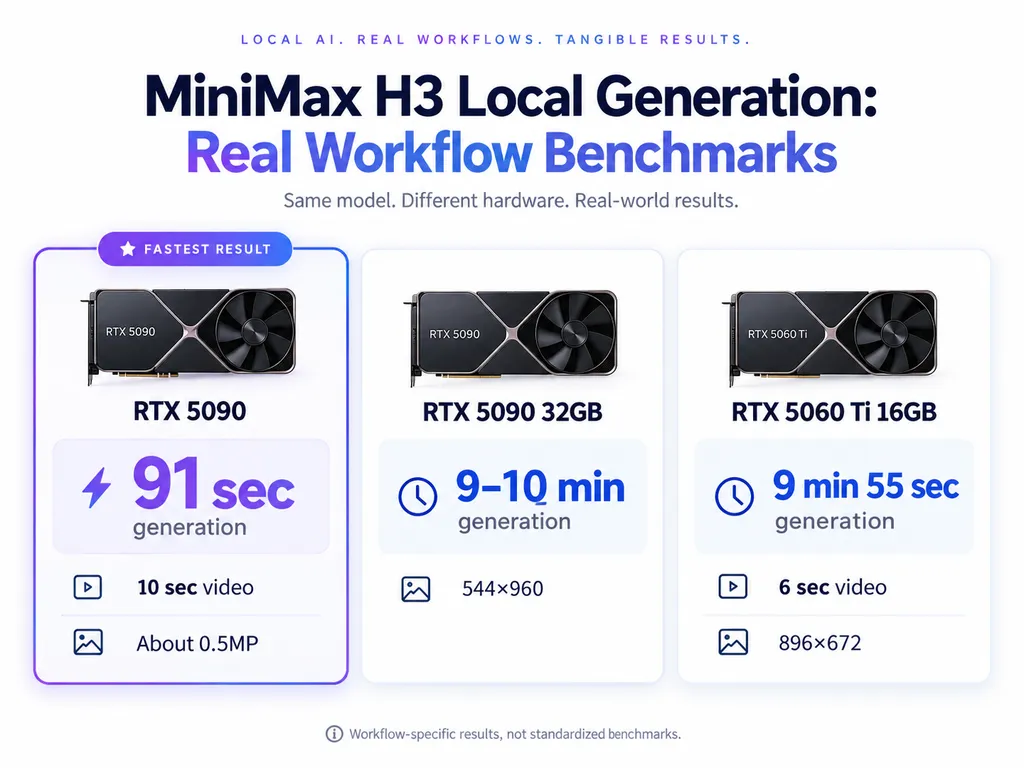
The real-world results in our research show how large that range can become.
GPU and Workflow | Output | Reported Result |
|---|---|---|
RTX 5090 | 10 sec, about 0.5MP | 91 sec |
RTX 5090 32GB | 544×960 | 9–10 min |
RTX 5060 Ti 16GB | 896×672, 6 sec, multi-reference | 9 min 55 sec |
RTX 5090 32GB | About 1MP to 2MP increase | 30 sec/step to 590 sec/step |
These are workflow-specific observations, not standardized benchmarks, so they should not be used as universal performance guarantees. They are still useful because they expose the real production bottleneck: once a workflow exceeds comfortable GPU memory, offloading and memory movement can dominate generation time.
Why Higher Resolution Can Slow H3 Dramatically
The 5090 case where step time increased from roughly 30 seconds to 590 seconds after moving toward 2MP illustrates the risk clearly.
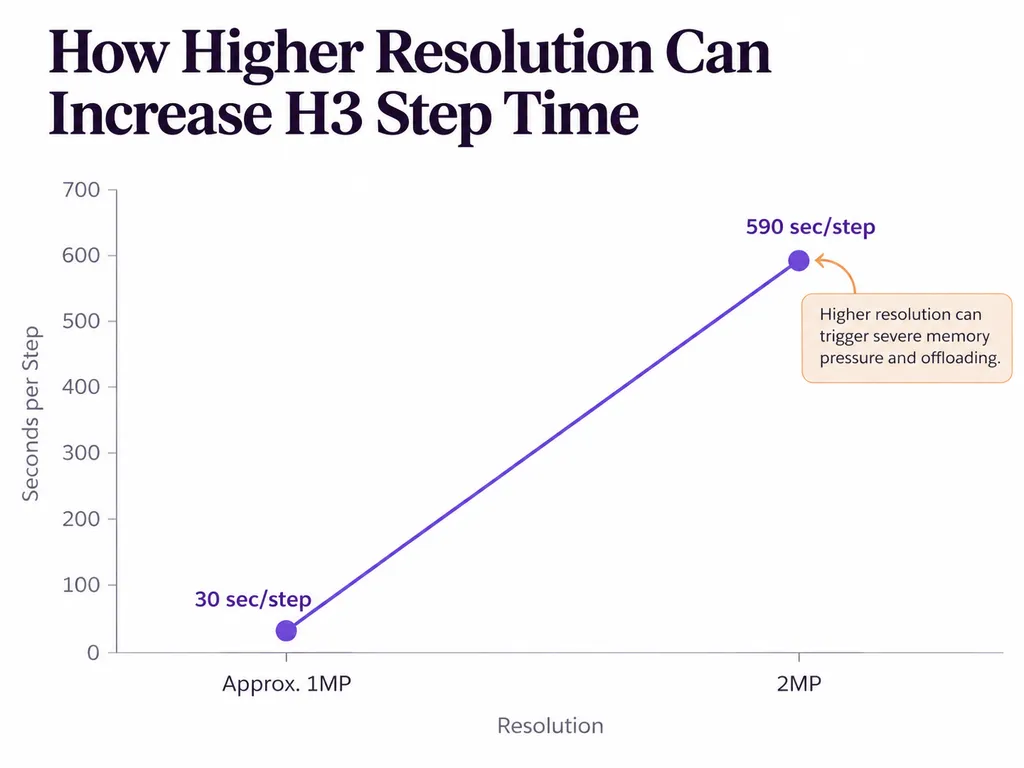
For creative teams, this leads to a simple rule: do not make high-resolution rendering part of early creative exploration. Validate motion, composition, and references first, then spend compute on approved shots.
What Is the Best MiniMax H3 Workflow for AI Video Production?
A practical H3 workflow separates creative context, cheap iteration, final rendering, and finishing.
Organize References Before You Generate
Separate assets by purpose: character identity, clothing, environment, product, composition, motion, voice, and style. This makes failures easier to diagnose and reduces contradictory context.
A large folder of unsorted references is not a stronger prompt. It is often a less predictable one.
Prototype at Lower Cost, Then Upscale Approved Shots
One workflow in our research generated at 544×960 in about 9–10 minutes on an RTX 5090, then used LTX 2.3 to increase the output to 1152×2048.
The broader lesson is useful beyond this exact configuration: generation resolution and delivery resolution do not always need to be solved in the same step.
Structure H3 Prompts Around Subject, Motion, Camera, and Audio
Prompting becomes more reliable when each instruction has a clear role. Define who or what is in the shot, what they do, how the camera behaves, which reference belongs to which subject, and what should be heard.
Our review found practical failures where dialogue existed but was not clearly associated with the visible speaker. Explicit character-to-dialogue relationships improve control. When a scene should contain no background score, that intent should also be stated clearly.
This is more effective than simply making the prompt longer.
Use Accelerators for Iteration, Not Automatically for Final Output
Spectrum, SageAttention, Sol Attention, Turbo LoRA, and similar optimizations are often used to reduce inference time. But our workflow review also found reports of weaker motion, anatomy, prompt adherence, or inpainting under aggressive acceleration.
A better production strategy is fast settings for exploration, higher-fidelity settings for delivery.
MiniMax H3 Case Studies: What Real Production Workflows Reveal
Real workflows explain H3's strengths better than feature lists.
Case Study 1: A 10-Second H3 Video in 91 Seconds
A local RTX 5090 workflow generated a 10-second clip at roughly 0.5MP in 91 seconds.
At that speed, a high-end local workstation can support repeated prompt and reference iteration during an active creative session. The limitation is equally important: this result should not be extrapolated to 1MP or 2MP rendering.
Case Study 2: Ref2V on a 16GB RTX 5060 Ti
A more constrained workflow used two character references, two dialogue audio tracks, and several inference optimizations on an RTX 5060 Ti with 16GB VRAM.
The result was 896×672, six seconds, completed in 9 minutes 55 seconds.
This shows that 16GB hardware can support meaningful H3 work, but iteration becomes expensive enough that better reference preparation directly saves production time.
Case Study 3: Turning H3 Output Into a Reusable Character Asset
Another workflow used H3 to create a slow character rotation, extracted multiple viewpoints, and fed those frames into future generations.
The important result is not one better video. It is the creation of a persistent character reference system. For professional design teams, this is one of H3's most valuable patterns because generated assets can become structured inputs for later work.
When Should You Train a MiniMax H3 LoRA Instead of Using Ref2VA?
Start with Ref2VA when existing references already describe the subject well. Train a LoRA when a recurring style, identity, motion, or voice cannot be reproduced reliably through references alone.
MiniMax H3 Image vs Video LoRA Training Cost
One training benchmark in our research produced these results.
Training Input | VRAM | Time per Step |
|---|---|---|
Images, RTX PRO 4500 | 20.49GB | 0.72 sec |
Video, RTX PRO 4500 | 20.9GB | 3.01 sec |
Images, Tesla T4 | 12.7GB | 16.2 sec |
Video training used similar VRAM in this test but took roughly four times longer per step than image training on the RTX PRO 4500.
A practical conclusion is to use still images for appearance when possible and reserve video training for motion that genuinely needs to be learned.
H3 LoRA Can Combine Appearance, Motion, and Voice
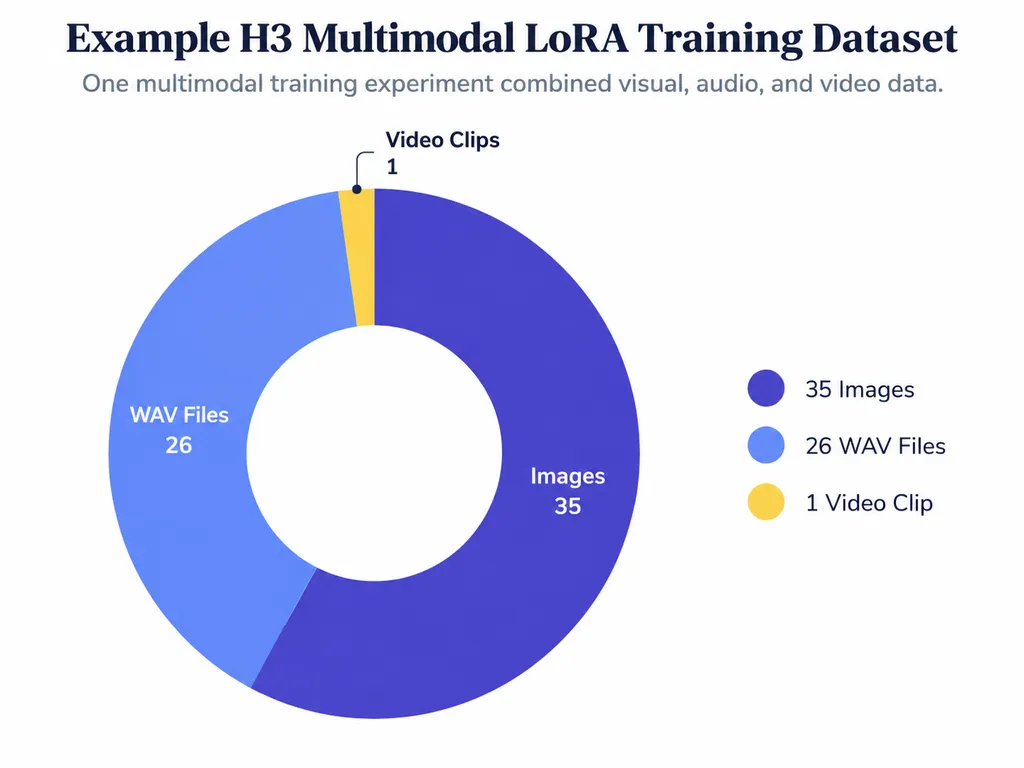
One multimodal experiment in our review used 35 images, 26 WAV files, and one video clip. After epoch 40, the workflow switched toward audio-only training to strengthen voice characteristics while limiting further visual overfitting.
This should be treated as an individual training experiment rather than a universal recipe. But it points toward an important design direction: an AI character can become a reusable combination of appearance, voice, motion, and behavior.
What Are the Biggest MiniMax H3 Limitations?
H3's main limitations are increasingly about production control rather than basic generation quality.
Our review repeatedly surfaced six problems: complex ComfyUI workflows, multi-character consistency, slow high-resolution generation, accelerator quality trade-offs, immature LoRA training, and prompt sensitivity.
This is why the next step in AI video is not only a better model. Designers need systems that preserve approved references, character relationships, scene context, project history, and reusable assets. That is also where visual AI workspaces such as Virse become relevant: the interface needs to understand the project around the model, not just the latest prompt.
MiniMax H3 FAQ
How much VRAM does H3 need: 16GB, 24GB, or 32GB?
16GB can run optimized H3 workflows, but generation may require quantization, offloading, or longer render times. Our review includes a 16GB RTX 5060 Ti completing a six-second 896×672 multi-reference workflow in 9:55. More VRAM gives greater flexibility, but even 32GB hardware can slow dramatically when resolution pushes the workflow beyond comfortable memory limits.
Ref2VA or LoRA: which is better for H3 character consistency?
Start with Ref2VA when you already have strong references. It is faster to iterate and avoids training overhead. Use LoRA when references repeatedly fail to reproduce a required identity, motion, style, or voice across many generations. For many projects, a curated multi-angle reference system offers better production economics than immediately training an adapter.
Why can Turbo and other H3 accelerators reduce quality?
Acceleration changes the inference process, and aggressive settings may trade fidelity for speed. In the workflows we reviewed, motion, anatomy, prompt adherence, and inpainting were among the areas that could degrade. A practical approach is to use faster settings for experiments, compare against a slower baseline, and reserve higher-fidelity configurations for approved final renders.
Why does H3 become less consistent when more references are added?
More references introduce more relationships for the model to resolve. Contradictory faces, clothes, environments, or styles can compete with each other. Use fewer, cleaner reference groups, explicitly assign them to subjects, and establish each character independently before combining multiple identities in a complex shot.
Conclusion
MiniMax H3 is most useful when it is treated as a multimodal production system rather than a one-prompt video generator. Ref2VA can turn characters, products, motion, voices, and scenes into reusable context; local workflows can scale from optimized 16GB setups to high-end GPUs; and emerging LoRA techniques can extend identity beyond appearance into motion and audio. Our research consistently points to the same production principle: organize references first, explore cheaply, preserve successful outputs, and spend high-quality compute only after creative decisions are stable. For designers and creative teams, that shift from isolated generation to persistent creative context is what makes H3 particularly valuable.
Virse ブログの他の記事
ワークフロー
What Does a Graphic Designer Do? Real Tasks, Revisions, Tools & Workflow
2026年9月23日 by Yifan Zhao
ワークフロー

How to Learn Graphic Design in 2026: A Step-by-Step Roadmap From Fundamentals to Portfolio
2026年9月23日 by Yifan Zhao
ワークフロー

What Is Graphic Design? Definition, Real Examples, Process & Tools
2026年9月23日 by Yifan Zhao