Análisis de MiniMax H3 Max: pruebas reales de velocidad, calidad, precios y flujos de vídeo con IA
 Yifan Zhao12 min de lectura ·

MiniMax H3 Max aporta más valor como modelo de iteración de vídeo con IA de alta velocidad, no simplemente como un renderizador final más rápido. Nuestra investigación encontró una generación de cinco segundos a 768p completada en menos de tres segundos en un flujo, mientras que otro caso tardó unos 96 segundos de principio a fin para un clip de cuatro segundos a 768p. La verdadera oportunidad es poder probar más movimientos, composiciones y direcciones visuales antes de decidir el plano final.
Esa diferencia de velocidad también es el principal riesgo de producción. Las colas de la API, la infraestructura, la codificación y los ajustes de generación pueden convertir una prueba casi en tiempo real en un flujo de producción mucho más lento. Para los equipos creativos, la métrica relevante no es la velocidad máxima de inferencia, sino una latencia de principio a fin repetible y cuántas ideas útiles pueden explorarse en cada sesión de trabajo. Esto hace que la estrategia de iteración sea tan importante como la velocidad bruta del modelo.
Virse facilita integrar esa experimentación en el trabajo de diseño profesional. Combina un lienzo infinito, contexto compartido del proyecto, colaboración entre múltiples agentes y conocimiento duradero del equipo, en lugar de reducir el proceso a una sola caja de prompts. MiniMax H3, Seedance 2.0 y Seedance 2.5 ya están disponibles en su página de modelos. Los planes de pago incluyen uso ilimitado de más de 40 modelos, incluidos Nano Banana 2 y GPT Image 2, además de plazas ilimitadas, mientras que los nuevos usuarios reciben créditos de registro que permiten crear hasta 10 imágenes con Nano Banana 2 o un vídeo con Seedance 2.0.

¿Qué es MiniMax H3 Max y para qué resulta más útil?
MiniMax H3 Max es una variante de MiniMax H3 con posentrenamiento de fal Research, optimizada junto con la infraestructura de inferencia de fal para lograr mayor capacidad de procesamiento. Una explicación más amplia de H3 Max ayuda a distinguirlo del flujo de H3 base. Según fal, su posentrenamiento se centra en mejorar el seguimiento de instrucciones y la calidad visual, conservando las capacidades multimodales del modelo H3 base.
Su uso más destacado es la exploración creativa rápida: generar suficientes alternativas para comparar movimiento de cámara y del sujeto, tiempos, encuadre y dirección visual antes de invertir en una producción final más costosa. Por eso resulta especialmente relevante para los flujos de storyboard a vídeo.
Característica de H3 Max | Capacidad actual |
|---|---|
Origen del modelo | Posentrenado a partir de MiniMax H3 por fal Research |
Generación | Texto a vídeo, imagen a vídeo y referencia a vídeo |
Resolución | 480p y 768p |
Audio | Audio sincronizado nativo |
Duración | Hasta 15 segundos en los flujos compatibles |
Ventaja principal | Iteración de alta capacidad y seguimiento de instrucciones |
Por qué H3 Max aporta más valor al iterar que al generar una sola vez
En el trabajo creativo profesional, los equipos rara vez saben cuál es el mejor plano antes de ver alternativas. Necesitan probar diferentes trayectorias de cámara, poses, ritmos, ubicaciones de producto y estructuras de movimiento.
Un caso de nuestra investigación generó un clip de cinco segundos a 768p en menos de tres segundos y permitió explorar aproximadamente 15–20 variaciones de concepto durante el tiempo de espera de un flujo más lento.
Eso cambia la métrica útil de productividad de segundos por renderizado a conceptos útiles explorados por hora.
¿Qué velocidad alcanza H3 Max en pruebas reales?
H3 Max puede operar más rápido que el tiempo real en condiciones optimizadas. fal informa de un vídeo de cinco segundos generado en menos de tres segundos, aproximadamente 35 veces la capacidad de procesamiento del endpoint oficial de MiniMax H3 en su evaluación.
Sin embargo, nuestra investigación más amplia sobre flujos de trabajo encontró una latencia de principio a fin mucho menos constante.
Escenario | Resultado | Tiempo observado o comunicado |
|---|---|---|
Caso de H3 Max optimizado | 5 s, 768p | Menos de 3 segundos |
Caso más lento de principio a fin | 4 s, 768p | Unos 96 segundos |
Prueba de fal | 5 s | Menos de 3 segundos |
Referencia de FastH3 | De 50 a 4 pasos de eliminación de ruido | Aceleración de unas 14 veces |
Por qué la latencia de la API de H3 Max puede diferir de la velocidad de las pruebas
Un creador experimenta algo más que la inferencia. Una solicitud puede pasar por colas, asignación de GPU, generación, codificación y entrega antes de que el vídeo sea utilizable.
Por eso recomiendo probar solicitudes de producción repetidas en lugar de basarse en un único resultado de máxima velocidad. Mida:
- el tiempo mediano de generación
- el tiempo de generación más lento
- el rendimiento a la resolución objetivo
- el comportamiento de solicitudes simultáneas
- el coste por resultado utilizable
La fiabilidad importa más que un récord cuando el vídeo con IA forma parte del trabajo diario. Por tanto, un flujo de producción con H3 Max repetible debe evaluarse tanto por su velocidad como por la utilidad de sus resultados.
Cómo cambia H3 Max el flujo creativo de vídeo con IA
El uso más importante de H3 Max en nuestra investigación es la exploración frecuente de conceptos seguida de un renderizado final selectivo.
Caso práctico: 15–20 conceptos antes de un plano final
Un flujo práctico utilizó H3 Max para explorar aproximadamente 15–20 variaciones antes de elegir la composición y la dirección de movimiento preferidas. Después se podía usar un modelo más lento centrado en la calidad para el plano principal final, si era necesario.
Etapa de producción | Objetivo principal | Prioridad |
|---|---|---|
Generación de conceptos | Explorar direcciones | Capacidad de procesamiento |
Pruebas de movimiento | Comparar movimientos | Baja latencia |
Pruebas de composición | Comparar encuadres | Cantidad de variaciones |
Selección | Reducir la incertidumbre | Comparación rápida |
Renderizado final | Maximizar el acabado | Detalle y coherencia |
Edición | Completar la entrega | Control de producción |
Este enfoque resulta mejor para el vídeo profesional con IA que esperar que un único generador sea óptimo en todas las etapas.
Desde la perspectiva del diseño de producto, la velocidad reduce el coste de equivocarse al principio. Los equipos pueden descartar direcciones débiles antes de dedicar tiempo al renderizado de alta resolución, al perfeccionamiento del sonido, a la composición o a la edición.
¿Sacrifica H3 Max calidad de vídeo por velocidad?
No hay suficientes pruebas independientes y estandarizadas para afirmar que H3 Max elimina el compromiso entre velocidad y calidad o que pierde calidad de forma sistemática.
La evaluación de preferencias de fal situó a H3 Max en posiciones altas en preferencia general, comprensión de instrucciones y estética, pero los equipos de producción deberían comparar prompts y condiciones de movimiento idénticos antes de decidir el renderizado final.
Qué revelan las pruebas de H3 Base con pocos pasos sobre velocidad y artefactos
Un caso útil de H3 Base en nuestra investigación ilustra el riesgo de una aceleración agresiva.
En un flujo con RTX 3060 de 12 GB, unos 4–8 pasos producían problemas como ruido estático, estelas de movimiento y bloques visibles. Aumentar el flujo hasta unos 10–20 pasos duplicaba aproximadamente el tiempo de generación, pero reducía los artefactos de movimiento visibles.
No es una prueba de H3 Max. Resulta útil porque identifica los criterios para evaluar modelos de vídeo más rápidos: estabilidad temporal, conservación del detalle, calidad del movimiento, coherencia del sujeto y coherencia audiovisual, no solo velocidad. En sujetos recurrentes, la coherencia de personajes de MiniMax H3 debe probarse por separado de la velocidad pura de generación.
H3 Max frente a H3 y FastH3: ¿cuál encaja en cada flujo?
Los tres enfoques resuelven problemas diferentes.
H3 Base cuenta con más pruebas para producción local en GPU de consumo
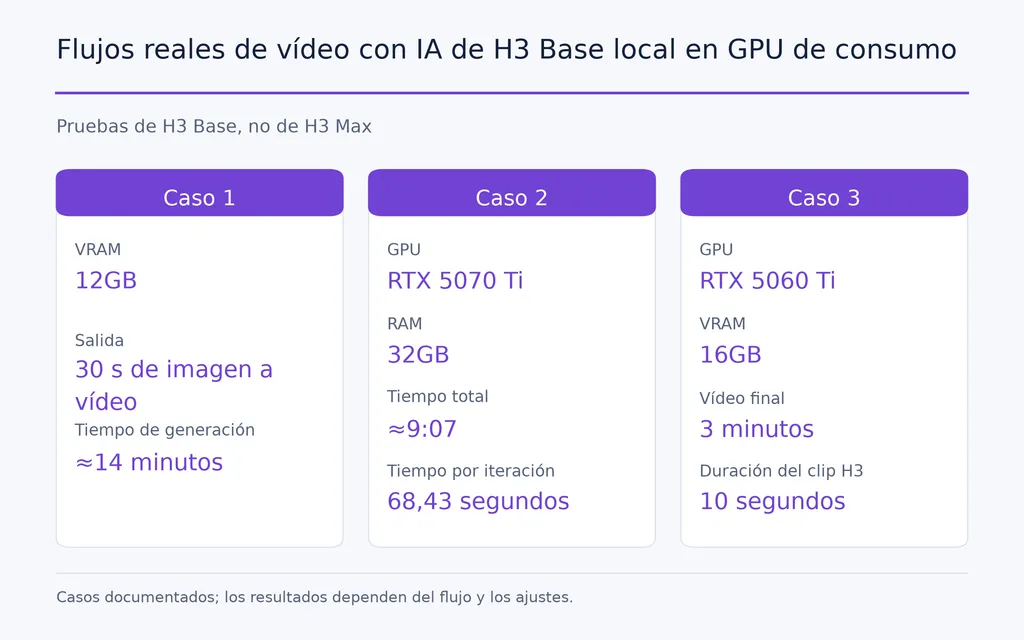
Nuestra investigación incluye varios flujos prácticos de H3 Base:
- 12 GB de VRAM: una generación de imagen a vídeo de 30 segundos en unos 14 minutos
- RTX 5070 Ti con 32 GB de RAM: unos 9:07 en total, con 68,43 segundos por iteración registrados
- RTX 5060 Ti de 16 GB: un vídeo final con IA de tres minutos montado a partir de varios clips de H3 de 10 segundos
H3 Base también es un modelo de pesos abiertos, mientras que fal lo presenta actualmente como una opción multimodal 2K.
FastH3 muestra el potencial de una aceleración extrema
La investigación sobre FastH3 de nuestro conjunto de datos redujo la eliminación de ruido de aproximadamente 50 pasos a 4, con una aceleración comunicada de unas 14 veces. Los experimentos de generación continua también muestran por qué los flujos acelerados de H3 resultan interesantes para las emisiones de IA en directo y los sistemas de vídeo infinito.
Orientación del modelo | Mayor valor actual |
|---|---|
H3 Max | Iteración rápida de alta capacidad |
H3 Base | Control local y flujos probados en GPU de consumo |
FastH3 | Aceleración experimental y generación continua |
No hay un ganador universal útil porque los compromisos implican velocidad, resolución, control local, calidad e infraestructura.
¿Puede H3 Max funcionar localmente en ComfyUI?
El uso local de H3 Max sigue siendo una de las preguntas más importantes sin resolver sobre el flujo de trabajo. Nuestra revisión de preguntas de usuarios reveló repetidamente interés por los pesos de H3 Max, la integración con ComfyUI, los requisitos de VRAM y la posibilidad de reproducir la velocidad de la nube en hardware local.
La investigación actual no ofrece suficientes pruebas verificadas para publicar un requisito mínimo definitivo de VRAM o un procedimiento estándar de instalación local de H3 Max.
Por qué importa H3 Max local a los diseñadores
La implementación local afectaría a más que al coste de la API. Podría mejorar:
- la privacidad
- la repetibilidad
- los flujos con nodos personalizados
- la experimentación con LoRA
- el procesamiento por lotes
- la automatización de pipelines
- la integración con sistemas creativos existentes
Los casos de H3 Base en GPU de consumo muestran por qué existe esta demanda. Los creadores ya saben que H3 local puede sostener una producción seria; queda por saber si la velocidad de H3 Max podrá llegar a ofrecer un control comparable.
¿Puede H3 Max impulsar vídeo con IA en tiempo real?
H3 Max hace más plausible el vídeo con IA en tiempo real, pero una inferencia rápida por sí sola no crea un sistema fiable en tiempo real.
Un flujo completo de nuestra investigación necesitó unos 96 segundos para generar cuatro segundos de vídeo a 768p. Con esa latencia, una arquitectura sencilla de generar y después emitir no puede funcionar continuamente.
Un sistema práctico de televisión con IA o emisión en directo también necesita continuidad de escenas, coherencia de personajes, almacenamiento en búfer, recuperación de fallos, latencia estable y costes predecibles.
Los experimentos de generación continua de FastH3 sugieren hacia dónde puede avanzar esta categoría. El cambio más amplio va de clips aislados a medios interactivos generados continuamente, pero H3 Max todavía necesita una latencia constante a nivel de producción para ese uso.
¿Cuánto cuesta H3 Max?
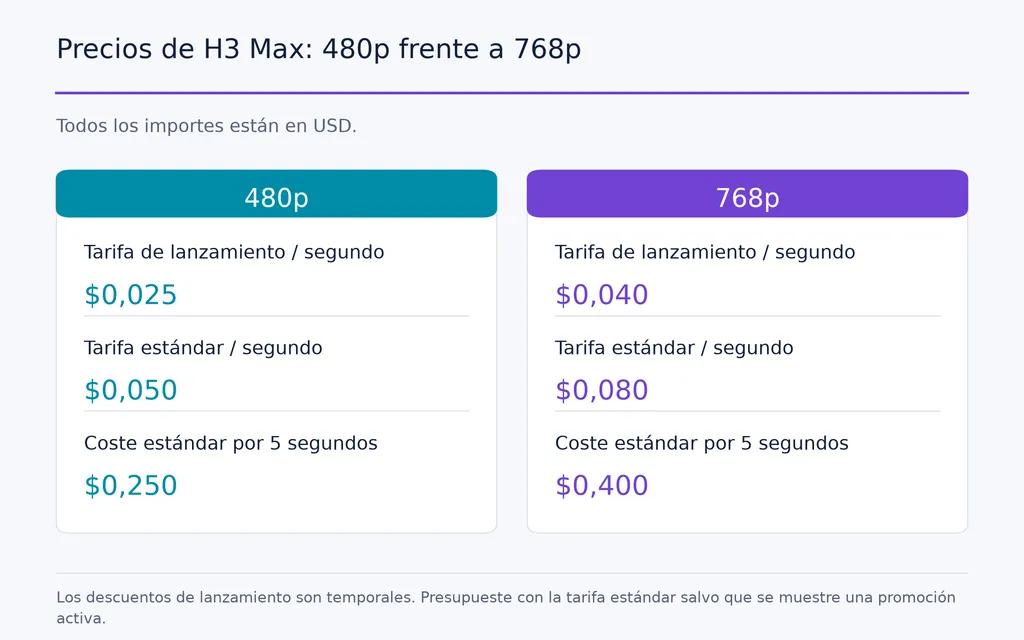
fal publica actualmente tarifas promocionales y estándar por segundo para 480p y 768p. Su endpoint indica que el descuento de lanzamiento es temporal, por lo que los presupuestos de producción deben usar la tarifa estándar salvo que el endpoint muestre actualmente una promoción activa.
Resolución | Tarifa de lanzamiento | Tarifa estándar | Coste estándar por 5 s |
|---|---|---|---|
480p | 0,025 $/s | 0,05 $/s | 0,25 $ |
768p | 0,04 $/s | 0,08 $/s | 0,40 $ |
Con la tarifa estándar de 768p, 20 conceptos de cinco segundos costarían unos 8 $, mientras que 100 generaciones de cinco segundos costarían unos 40 $.
Para los equipos profesionales, la mejor métrica es el coste por concepto aprobado, no por segundo generado. Un modelo rápido adquiere valor económico cuando las variaciones adicionales mejoran de forma significativa la selección creativa.
¿Quién debería usar H3 Max?
Actualmente H3 Max resulta más convincente para equipos en los que esperar las generaciones limita la exploración creativa.
Encaja especialmente bien en conceptos publicitarios, desarrollo de storyboards, previsualización, pruebas de vídeos para redes sociales, exploración del movimiento, variaciones de gran volumen y prototipos de vídeo con IA.
Los equipos centrados principalmente en una implementación local confirmada, un rendimiento fijo en GPU de consumo o la máxima fidelidad del plano final deben evaluar esos requisitos por separado.
La mejor pregunta para decidir no es «¿Es H3 Max el mejor modelo de vídeo?», sino «¿Una iteración más rápida permitiría a mi equipo probar muchas más ideas antes de comprometerse con la producción?».
Conclusión
MiniMax H3 Max importa porque puede llevar el vídeo con IA de esperar resultados individuales a explorar rápidamente un espacio creativo mucho más amplio. Su mayor valor es la iteración de alta capacidad, mientras que su utilidad en producción sigue dependiendo de una latencia repetible, calidad visual, precios predecibles y flexibilidad de implementación. H3 Base ya demuestra flujos locales viables en GPU de consumo, FastH3 muestra cómo la generación acelerada puede sostener experimentos de vídeo continuo y H3 Max impulsa aún más la velocidad en esa evolución. Para diseñadores y equipos creativos, la verdadera oportunidad no es simplemente obtener un vídeo más rápido, sino tomar decisiones creativas mejor fundamentadas porque pueden probarse muchas más posibilidades antes de elegir el plano final.
Preguntas frecuentes
¿H3 Max funciona realmente en tiempo real?
Puede ser más rápido que el tiempo real en condiciones optimizadas, pero eso no garantiza un rendimiento de principio a fin en tiempo real. Nuestra investigación incluye tanto una generación de menos de tres segundos para un clip de cinco segundos como un flujo de API a 768p mucho más lento. Los equipos deberían medir solicitudes reales repetidas en lugar de confiar en la velocidad máxima de inferencia.
¿Puede H3 Max funcionar localmente en ComfyUI y cuánta VRAM necesita?
La investigación actual no ofrece suficientes pruebas verificadas para fijar un requisito mínimo definitivo de VRAM para H3 Max o un procedimiento estándar de instalación en ComfyUI. H3 Base dispone de flujos locales probados en GPU de consumo de la clase de 12 GB y 16 GB, pero esos resultados no deben considerarse especificaciones de H3 Max.
H3 Max frente a H3 y FastH3: ¿cuál debería usar?
Use H3 Max para iteración rápida y capacidad de procesamiento, H3 Base cuando importen el control local y los flujos establecidos en GPU de consumo, y FastH3 al explorar una aceleración agresiva o experimentos de generación continua. La mejor opción depende de los requisitos de velocidad, resolución, control, hardware y calidad final.
¿Cuánto cuesta H3 Max?
fal publica el precio de H3 Max por segundo de vídeo generado. Las tarifas estándar indicadas para presupuestar son 0,05 $/s a 480p y 0,08 $/s a 768p, con promociones temporales disponibles en ocasiones. A la tarifa estándar de 768p, una generación de cinco segundos cuesta unos 0,40 $, por lo que los equipos deben calcular el coste total de exploración según el número de variaciones que esperan generar.