Ulasan MiniMax H3 Max: Uji Kecepatan Nyata, Kualitas, Harga, dan Alur Kerja Video AI
 Yifan Zhao10 menit baca ·
MiniMax H3 Max paling bernilai sebagai model iterasi video AI berkecepatan tinggi, bukan sekadar perender akhir yang lebih cepat. Riset kami menemukan pembuatan video lima detik pada 768p selesai dalam kurang dari tiga detik pada satu alur kerja, sedangkan kasus lain memerlukan sekitar 96 detik dari awal hingga akhir untuk klip empat detik pada 768p. Peluang sebenarnya adalah menguji lebih banyak gerakan, komposisi, dan arah visual sebelum menetapkan pengambilan gambar akhir.
Kesenjangan kecepatan itu juga merupakan risiko produksi utama. Antrean API, infrastruktur, pengodean, dan pengaturan pembuatan dapat mengubah tolok ukur yang hampir waktu nyata menjadi alur kerja produksi yang jauh lebih lambat. Bagi tim kreatif, ukuran yang berarti bukan kecepatan inferensi puncak, melainkan latensi dari awal hingga akhir yang konsisten dan seberapa banyak ide berguna yang dapat dieksplorasi dalam setiap sesi kerja. Karena itu, strategi iterasi sama pentingnya dengan kecepatan mentah model.
Virse memudahkan integrasi eksperimen ini ke dalam pekerjaan desain profesional. Platform ini menggabungkan kanvas tanpa batas, konteks proyek bersama, kolaborasi multiagen, dan pengetahuan tim jangka panjang, alih-alih membatasi proses pada satu kotak prompt. MiniMax H3, Seedance 2.0, dan Seedance 2.5 sudah tersedia di halaman modelnya. Paket berbayar mencakup penggunaan tanpa batas untuk lebih dari 40 model, termasuk Nano Banana 2 dan GPT Image 2, serta kursi pengguna tanpa batas, sedangkan pengguna baru mendapat kredit pendaftaran yang dapat digunakan untuk hingga 10 gambar Nano Banana 2 atau satu video Seedance 2.0.

Apa Itu MiniMax H3 Max dan Paling Cocok untuk Apa?
MiniMax H3 Max adalah varian MiniMax H3 yang dilatih lebih lanjut oleh fal Research dan dioptimalkan bersama tumpukan inferensi fal untuk meningkatkan kapasitas pemrosesan. Penjelasan H3 Max yang lebih menyeluruh membantu membedakannya dari alur kerja H3 dasar. Menurut fal, pelatihan lanjutannya berfokus pada kepatuhan terhadap prompt dan kualitas visual yang lebih baik sambil mempertahankan kemampuan multimodal model H3 dasar.
Penggunaan terkuatnya adalah eksplorasi kreatif cepat: membuat cukup banyak alternatif untuk membandingkan gerakan kamera, gerakan subjek, waktu, pembingkaian, dan arah visual sebelum berinvestasi dalam produksi akhir yang lebih mahal. Karena itu, model ini sangat relevan untuk alur kerja storyboard menjadi video.
Fitur H3 Max | Kemampuan Saat Ini |
|---|---|
Asal model | Dilatih lebih lanjut dari MiniMax H3 oleh fal Research |
Pembuatan | Teks menjadi video, gambar menjadi video, dan referensi menjadi video |
Resolusi | 480p dan 768p |
Audio | Audio tersinkronisasi bawaan |
Durasi | Hingga 15 detik pada alur kerja yang didukung |
Keunggulan utama | Iterasi berkapasitas tinggi dan kepatuhan terhadap prompt |
Mengapa H3 Max Lebih Bernilai untuk Iterasi daripada Pembuatan Sekali Jadi
Dalam pekerjaan kreatif profesional, tim jarang mengetahui pengambilan gambar terbaik sebelum melihat alternatif. Mereka perlu menguji berbagai jalur kamera, pose, tempo, penempatan produk, dan struktur gerakan.
Salah satu kasus dalam riset kami membuat klip lima detik pada 768p dalam kurang dari tiga detik, sehingga memungkinkan eksplorasi sekitar 15–20 variasi konsep selama waktu tunggu alur kerja yang lebih lambat.
Hal ini mengubah ukuran produktivitas yang berguna dari detik per render menjadi konsep berguna yang dieksplorasi per jam.
Seberapa Cepat H3 Max dalam Uji Kecepatan Dunia Nyata?
H3 Max dapat berjalan lebih cepat daripada waktu nyata dalam kondisi yang dioptimalkan. fal melaporkan video lima detik dibuat dalam kurang dari tiga detik, atau sekitar 35× kapasitas pemrosesan endpoint resmi MiniMax H3 dalam evaluasinya.
Namun, riset alur kerja kami yang lebih luas menemukan latensi dari awal hingga akhir yang jauh kurang konsisten.
Skenario | Hasil | Waktu yang Diamati atau Dilaporkan |
|---|---|---|
Kasus H3 Max yang dioptimalkan | 5 detik, 768p | Kurang dari 3 detik |
Kasus dari awal hingga akhir yang lebih lambat | 4 detik, 768p | Sekitar 96 detik |
Tolok ukur fal | 5 detik | Kurang dari 3 detik |
Referensi FastH3 | Dari 50 menjadi 4 langkah penghilangan derau | Percepatan sekitar 14× |
Mengapa Latensi API H3 Max Dapat Berbeda dari Kecepatan Tolok Ukur
Kreator mengalami lebih dari sekadar inferensi. Permintaan dapat melalui antrean, alokasi GPU, pembuatan, pengodean, dan pengiriman sebelum video dapat digunakan.
Karena itu, saya menyarankan pengujian permintaan produksi berulang alih-alih mengandalkan satu hasil tercepat. Ukur:
- waktu pembuatan median
- waktu pembuatan paling lambat
- performa pada resolusi sasaran
- perilaku permintaan bersamaan
- biaya per hasil yang layak digunakan
Keandalan lebih penting daripada satu rekor kecepatan ketika video AI menjadi bagian dari alur kerja harian. Karena itu, alur kerja produksi H3 Max yang dapat diulang secara konsisten harus dievaluasi berdasarkan kecepatan dan kelayakan hasilnya.
Bagaimana H3 Max Mengubah Alur Kerja Kreatif Video AI
Kasus penggunaan H3 Max terpenting dalam riset kami adalah eksplorasi konsep dengan frekuensi tinggi yang diikuti perenderan akhir secara selektif.
Studi Kasus: 15–20 Konsep Sebelum Satu Pengambilan Gambar Akhir
Sebuah alur kerja praktis menggunakan H3 Max untuk mengeksplorasi sekitar 15–20 variasi sebelum memilih komposisi dan arah gerakan yang disukai. Model lebih lambat yang berfokus pada kualitas kemudian dapat digunakan untuk gambar utama akhir jika diperlukan.
Tahap Produksi | Tujuan Utama | Prioritas |
|---|---|---|
Pembuatan konsep | Mengeksplorasi arah | Kapasitas pemrosesan |
Pengujian gerakan | Membandingkan gerakan | Latensi rendah |
Pengujian komposisi | Membandingkan pembingkaian | Jumlah variasi |
Pemilihan | Mengurangi ketidakpastian | Perbandingan cepat |
Render akhir | Memaksimalkan penyempurnaan | Detail dan konsistensi |
Penyuntingan | Menyelesaikan hasil untuk diserahkan | Kendali produksi |
Ini merupakan pendekatan yang lebih baik untuk video AI profesional daripada mengharapkan satu generator optimal pada setiap tahap.
Dari sudut pandang desain produk, kecepatan mengurangi biaya kesalahan pada tahap awal. Tim dapat menolak arah yang lemah sebelum menghabiskan waktu untuk perenderan resolusi tinggi, penyempurnaan suara, komposit, atau penyuntingan.
Apakah H3 Max Mengorbankan Kualitas Video demi Kecepatan?
Belum ada cukup bukti independen yang terstandardisasi untuk menyatakan bahwa H3 Max menghapus kompromi kecepatan-kualitas ataupun selalu menurunkan kualitas.
Evaluasi preferensi milik fal menempatkan H3 Max pada peringkat tinggi dalam preferensi keseluruhan, pemahaman prompt, dan estetika, tetapi tim produksi tetap perlu membandingkan prompt dan kondisi gerakan yang identik sebelum memutuskan render akhir.
Apa yang Diungkap Uji H3 Base dengan Sedikit Langkah tentang Kecepatan dan Artefak
Salah satu kasus H3 Base yang berguna dalam riset kami menggambarkan risiko percepatan agresif.
Pada alur kerja RTX 3060 12GB, sekitar 4–8 langkah menghasilkan masalah seperti derau statis, gerakan berbayang, dan blok-blok kasar. Meningkatkan alur kerja menuju 10–20 langkah membuat waktu pembuatan kira-kira dua kali lipat, tetapi mengurangi artefak gerakan yang terlihat.
Ini bukan tolok ukur H3 Max. Kasus ini berguna karena mengidentifikasi hal-hal yang harus dievaluasi pada model video lebih cepat: stabilitas temporal, pelestarian detail, kualitas gerakan, konsistensi subjek, dan keselarasan audio-video, bukan kecepatan saja. Untuk subjek yang muncul berulang, konsistensi karakter MiniMax H3 perlu diuji terpisah dari kecepatan pembuatan murni.
H3 Max vs H3 vs FastH3: Mana yang Cocok untuk Setiap Alur Kerja?
Ketiga pendekatan ini memecahkan masalah yang berbeda.
H3 Base Memiliki Bukti Lebih Kuat untuk Produksi Lokal dengan GPU Konsumen
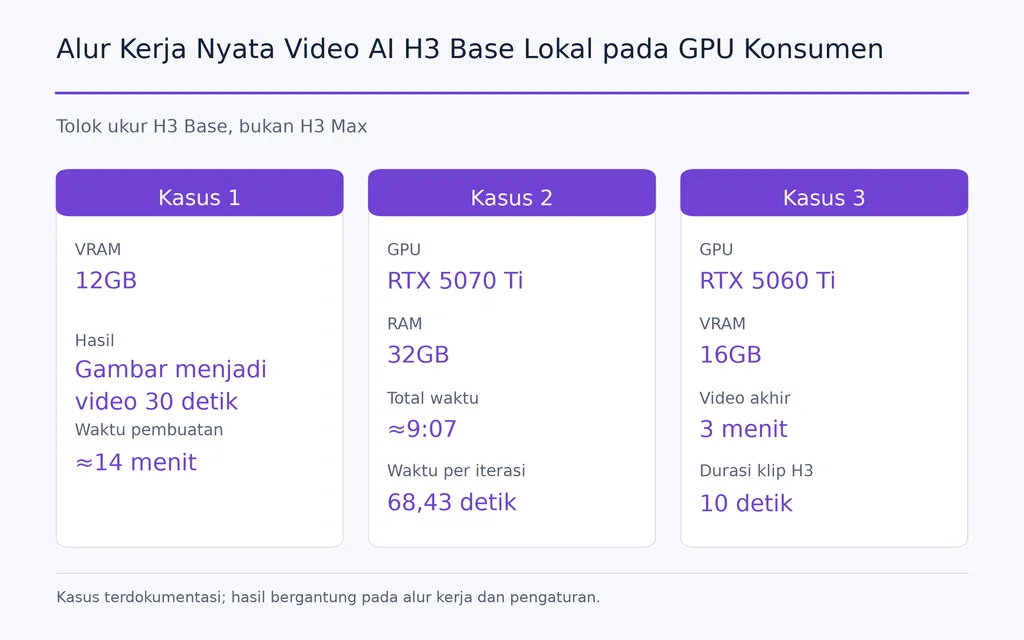
Riset kami mencakup beberapa alur kerja H3 Base praktis:
- VRAM 12GB: pembuatan gambar menjadi video berdurasi 30 detik dalam sekitar 14 menit
- RTX 5070 Ti dengan RAM 32GB: total sekitar 9:07, dengan catatan 68,43 detik per iterasi
- RTX 5060 Ti 16GB: video AI jadi berdurasi tiga menit yang dirangkai dari beberapa klip H3 berdurasi 10 detik
H3 Base juga merupakan model berbobot terbuka, sedangkan fal saat ini menampilkannya sebagai pilihan multimodal 2K.
FastH3 Menunjukkan Potensi Percepatan Ekstrem
Riset FastH3 dalam kumpulan data kami mengurangi penghilangan derau dari sekitar 50 langkah menjadi 4, dengan percepatan yang dilaporkan sekitar 14×. Eksperimen pembuatan berkelanjutan juga menunjukkan mengapa alur kerja H3 yang dipercepat menarik untuk siaran langsung AI dan sistem video tanpa akhir.
Arah Model | Nilai Terkuat Saat Ini |
|---|---|
H3 Max | Iterasi cepat berkapasitas tinggi |
H3 Base | Kendali lokal dan alur kerja GPU konsumen yang telah terbukti |
FastH3 | Percepatan eksperimental dan pembuatan berkelanjutan |
Tidak ada pemenang universal yang berguna karena komprominya melibatkan kecepatan, resolusi, kendali lokal, kualitas, dan infrastruktur.
Bisakah H3 Max Berjalan Secara Lokal di ComfyUI?
H3 Max lokal tetap menjadi salah satu pertanyaan alur kerja terpenting yang belum terjawab. Tinjauan kami atas pertanyaan pengguna berulang kali menemukan minat terhadap bobot H3 Max, integrasi ComfyUI, kebutuhan VRAM, dan apakah perangkat keras lokal dapat menyamai kecepatan cloud.
Riset saat ini belum menyediakan cukup bukti terverifikasi untuk menetapkan kebutuhan VRAM minimum secara pasti atau alur instalasi lokal H3 Max standar.
Mengapa H3 Max Lokal Penting bagi Desainer
Penerapan lokal akan memengaruhi lebih dari sekadar biaya API. Hal ini dapat meningkatkan:
- privasi
- keterulangan
- alur kerja node khusus
- eksperimen LoRA
- pemrosesan batch
- otomatisasi pipeline
- integrasi dengan sistem kreatif yang sudah ada
Kasus H3 Base pada GPU konsumen menunjukkan alasan adanya permintaan ini. Kreator sudah tahu H3 lokal mampu mendukung produksi serius; pertanyaan terbukanya adalah apakah kecepatan setingkat H3 Max kelak dapat hadir dengan kendali yang sebanding.
Bisakah H3 Max Mendukung Video AI Waktu Nyata?
H3 Max membuat video AI waktu nyata lebih masuk akal, tetapi inferensi cepat saja tidak menghasilkan sistem waktu nyata yang andal.
Salah satu alur kerja dari awal hingga akhir dalam riset kami memerlukan sekitar 96 detik untuk membuat empat detik video 768p. Dengan latensi tersebut, arsitektur sederhana buat-lalu-siarkan tidak dapat beroperasi terus-menerus.
Sistem TV AI atau siaran langsung praktis juga memerlukan kesinambungan adegan, konsistensi karakter, penyanggaan, pemulihan kegagalan, latensi stabil, dan biaya yang dapat diprediksi.
Eksperimen pembuatan berkelanjutan FastH3 mengisyaratkan arah perkembangan kategori ini. Pergeseran yang lebih besar adalah dari klip video terpisah menuju media interaktif yang dibuat terus-menerus, tetapi H3 Max masih memerlukan konsistensi latensi tingkat produksi untuk penggunaan tersebut.
Berapa Biaya H3 Max?
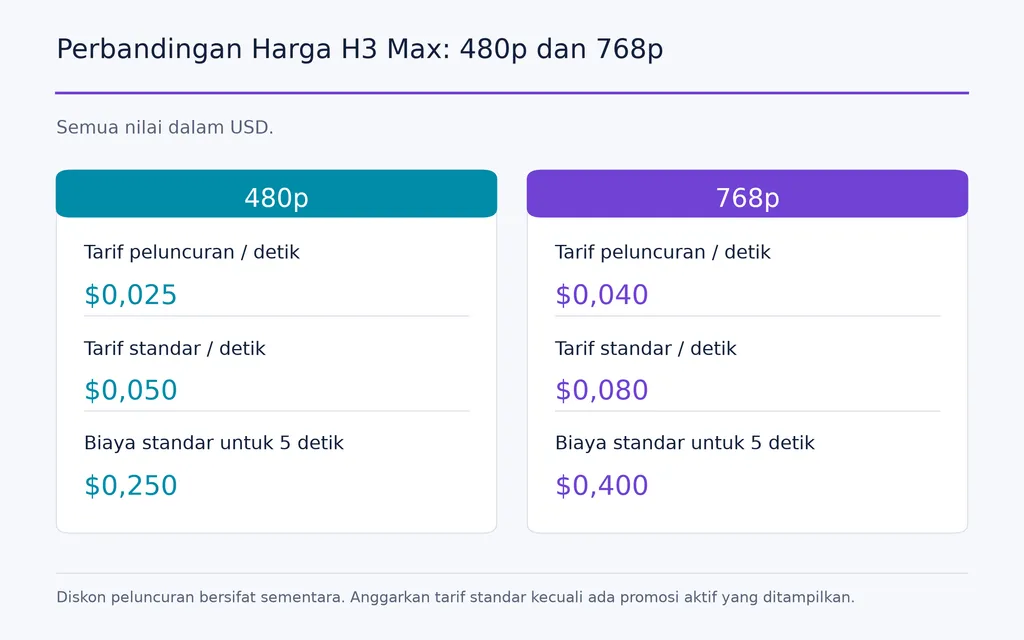
fal saat ini mencantumkan tarif promosi dan standar per detik untuk 480p dan 768p. Endpoint-nya menyatakan bahwa diskon peluncuran bersifat sementara, sehingga anggaran produksi sebaiknya menggunakan tarif standar kecuali endpoint saat ini menampilkan promosi aktif.
Resolusi | Tarif Peluncuran | Tarif Standar | Biaya Standar untuk 5 Detik |
|---|---|---|---|
480p | $0,025/detik | $0,05/detik | $0,25 |
768p | $0,04/detik | $0,08/detik | $0,40 |
Pada tarif standar 768p, 20 konsep berdurasi lima detik akan menelan biaya sekitar $8, sedangkan 100 pembuatan berdurasi lima detik sekitar $40.
Bagi tim profesional, ukuran yang lebih baik adalah biaya per konsep yang disetujui, bukan biaya per detik yang dibuat. Model cepat menjadi bernilai secara ekonomis ketika variasi tambahan meningkatkan pemilihan kreatif secara berarti.
Siapa yang Sebaiknya Menggunakan H3 Max?
H3 Max saat ini paling meyakinkan bagi tim yang eksplorasi kreatifnya dibatasi oleh waktu tunggu pembuatan.
Model ini sangat cocok untuk konsep iklan, pengembangan storyboard, pravisualisasi, pengujian video media sosial, eksplorasi gerakan, variasi dalam jumlah besar, dan prototipe video AI.
Tim yang terutama berfokus pada penerapan lokal yang terkonfirmasi, performa GPU konsumen yang tetap, atau fidelitas pengambilan gambar akhir maksimum perlu mengevaluasi kebutuhan tersebut secara terpisah.
Pertanyaan keputusan terbaik bukanlah “Apakah H3 Max model video terbaik?” melainkan “Apakah iterasi yang lebih cepat memungkinkan tim saya menguji jauh lebih banyak ide sebelum berkomitmen pada produksi?”
Kesimpulan
MiniMax H3 Max penting karena dapat menggeser video AI dari menunggu hasil satu per satu menjadi menjelajahi ruang kreatif yang jauh lebih luas dengan cepat. Nilai terkuatnya adalah iterasi berkapasitas tinggi, sedangkan kegunaannya dalam produksi masih bergantung pada latensi yang konsisten, kualitas visual, harga yang dapat diprediksi, dan fleksibilitas penerapan. H3 Base sudah menunjukkan alur kerja lokal GPU konsumen yang layak, FastH3 menunjukkan bagaimana pembuatan dipercepat dapat mendukung eksperimen video berkelanjutan, dan H3 Max mendorong sisi kecepatan evolusi tersebut lebih jauh. Bagi desainer dan tim kreatif, peluang sebenarnya bukan sekadar memperoleh satu video lebih cepat, melainkan membuat keputusan kreatif yang lebih matang karena jauh lebih banyak kemungkinan dapat diuji sebelum pengambilan gambar akhir dipilih.
FAQ
Apakah H3 Max benar-benar waktu nyata?
Model ini bisa lebih cepat daripada waktu nyata dalam kondisi yang dioptimalkan, tetapi itu tidak menjamin performa waktu nyata dari awal hingga akhir. Riset kami mencakup pembuatan kurang dari tiga detik untuk klip lima detik sekaligus alur kerja API 768p yang jauh lebih lambat. Tim sebaiknya mengukur permintaan nyata berulang alih-alih mengandalkan kecepatan inferensi puncak.
Bisakah H3 Max berjalan secara lokal di ComfyUI, dan berapa VRAM yang dibutuhkan?
Riset saat ini belum menyediakan cukup bukti terverifikasi untuk menentukan kebutuhan VRAM minimum H3 Max secara pasti atau alur instalasi ComfyUI standar. H3 Base memiliki alur kerja lokal yang terbukti pada GPU konsumen kelas 12GB dan 16GB, tetapi hasil tersebut tidak boleh dianggap sebagai spesifikasi H3 Max.
H3 Max vs H3 vs FastH3: mana yang sebaiknya saya gunakan?
Gunakan H3 Max untuk iterasi cepat dan kapasitas pemrosesan, H3 Base ketika kendali lokal dan alur kerja GPU konsumen yang mapan penting, serta FastH3 saat mengeksplorasi percepatan agresif atau eksperimen pembuatan berkelanjutan. Pilihan terbaik bergantung pada kebutuhan kecepatan, resolusi, kendali, perangkat keras, dan kualitas akhir.
Berapa biaya H3 Max?
fal mencantumkan harga H3 Max per detik video yang dibuat. Tarif standar untuk penyusunan anggaran adalah $0,05/detik pada 480p dan $0,08/detik pada 768p, dengan tarif promosi sementara yang terkadang tersedia. Pada tarif standar 768p, satu pembuatan berdurasi lima detik menelan biaya sekitar $0,40, sehingga tim perlu menghitung total biaya eksplorasi berdasarkan jumlah variasi yang diperkirakan akan dibuat.