How to Create Product Mockups With AI Without Product Drift

Vincent11 分钟阅读 ·

How to Create Product Mockups With AI Without Product Drift

To create product mockups with AI without product drift, start with a real product image, use it as the visual reference, and let AI change the scene—not the product. The goal is to preserve logos, text, colors, shape, materials, scale, and other SKU-defining details while generating new backgrounds, lighting, compositions, and campaign variations.

The biggest problem is that photorealistic does not always mean product-accurate. AI can distort logos, rewrite packaging text, shift colors, change proportions, or turn one SKU into another. These errors become harder to control when scaling from one mockup to dozens of ecommerce, POD, social, and ad creatives.

The most reliable workflow is real product reference → AI scene generation → product fidelity QC → local correction → approved asset. Instead of regenerating the whole image, keep what works and fix only the incorrect areas. For larger workflows, Virse keeps product references, brand context, visual direction, AI Agents, and revisions connected on one infinite canvas, helping teams scale AI mockups while maintaining product accuracy and creative control.

virse workforce

What Is an AI Product Mockup?

An AI product mockup is a generated or AI-edited visualization that places a product into a new commercial context while preserving the product as accurately as possible.

Unlike a fixed PSD mockup, AI can generate new environments, surfaces, models, lighting, framing, and campaign directions around an existing product.

AI Product Mockups vs Traditional Mockups

Traditional mockups are more predictable. A Smart Object can change the artwork while leaving the garment or package unchanged.

AI provides greater visual variety but may reinterpret the product itself. A bottle shape can shift, a shirt collar can change, or a label can become unreadable.

Traditional mockups are stronger for repeatability. AI mockups are stronger for creative exploration and variation.

AI Product Mockups vs AI Product Photography

AI product photography is the broader workflow of creating commercial imagery with generative tools. An AI mockup is one possible output.

In practice, many reliable workflows combine both generated and real assets:

Real packshot → AI environment → product check → local edit → campaign image

This hybrid approach is especially useful when the environment can change but the product cannot.

What Are AI Product Mockups Best Used For?

AI works best when the product already exists and the team needs more ways to present it.

Lifestyle and Campaign Images

A single packshot can be explored across bathrooms, kitchens, offices, outdoor environments, luxury interiors, seasonal campaigns, and editorial compositions.

For design teams, this makes AI useful during concept development because multiple lighting, framing, color, model, and art-direction options can be compared before committing to physical production.

Social Media and Ad Variations

Social and paid-media teams often need far more variations than a PDP.

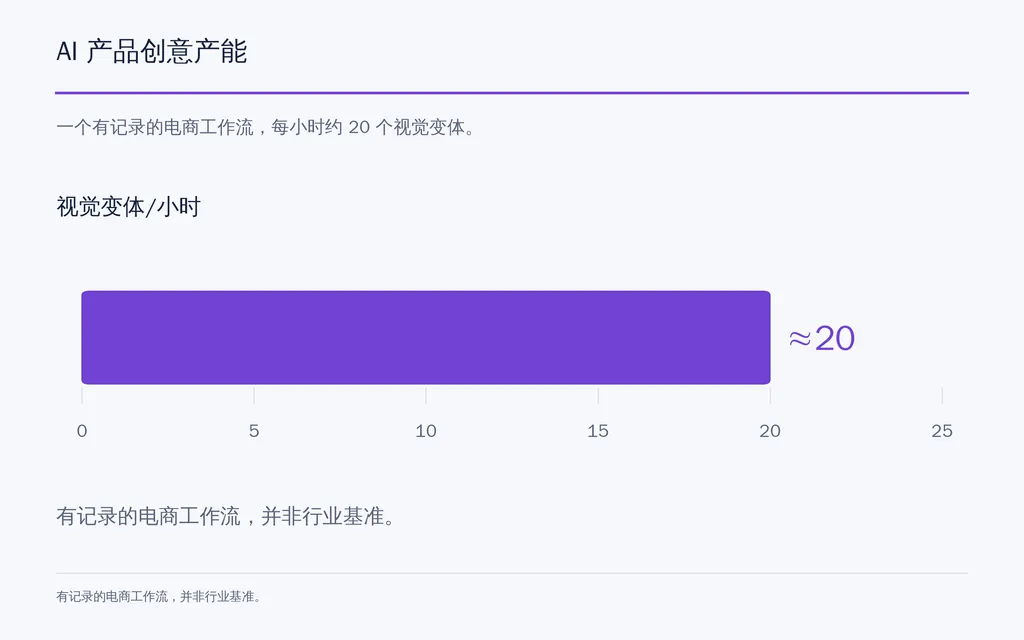
One documented ecommerce workflow in our research reported producing approximately 20 visual variations per hour after using Midjourney and Runway for about six months. The same workflow still preferred real photography for primary product-page imagery.

That distinction matters: AI can dramatically expand creative inventory without replacing the master product photograph.

AI Product Creative Throughput chart showing approximately 20 visual variations per hour in one documented ecommerce workflow

How to Create Product Mockups With AI in 7 Steps

The strongest AI mockup workflow separates what must remain fixed from what AI is allowed to change.

The product’s shape, logo, label, approved color, material, and key proportions should remain fixed. The background, surface, lighting, framing, props, and campaign mood can change.

Step 1: Start With an Accurate Product Image

Use the cleanest, highest-resolution product asset available.

It should clearly preserve:

  • product geometry
  • real color
  • branding
  • material
  • packaging details
  • recognizable proportions

A simple packshot generally gives the model less ambiguous information than a complex lifestyle photograph.

Step 2: Use the Product as a Visual Reference

For a real SKU, a reference image is usually more valuable than a longer text description.

A prompt can describe a gold pendant, but it cannot reliably communicate the exact geometry, chain thickness, finish, clasp, or proportions of one specific product.

If the product already exists, show it to the model instead of asking the model to reconstruct it from words.

Step 3: Define the Scene, Not the Product

Direct the AI toward what should change:

  • environment
  • surface material
  • lighting direction
  • camera framing
  • model
  • background
  • mood
  • marketing channel

From an AI product design perspective, this creates a clearer division between product identity and creative presentation.

Step 4: Generate Multiple Candidates

AI is more useful as a candidate-generation system than as a one-click finishing system.

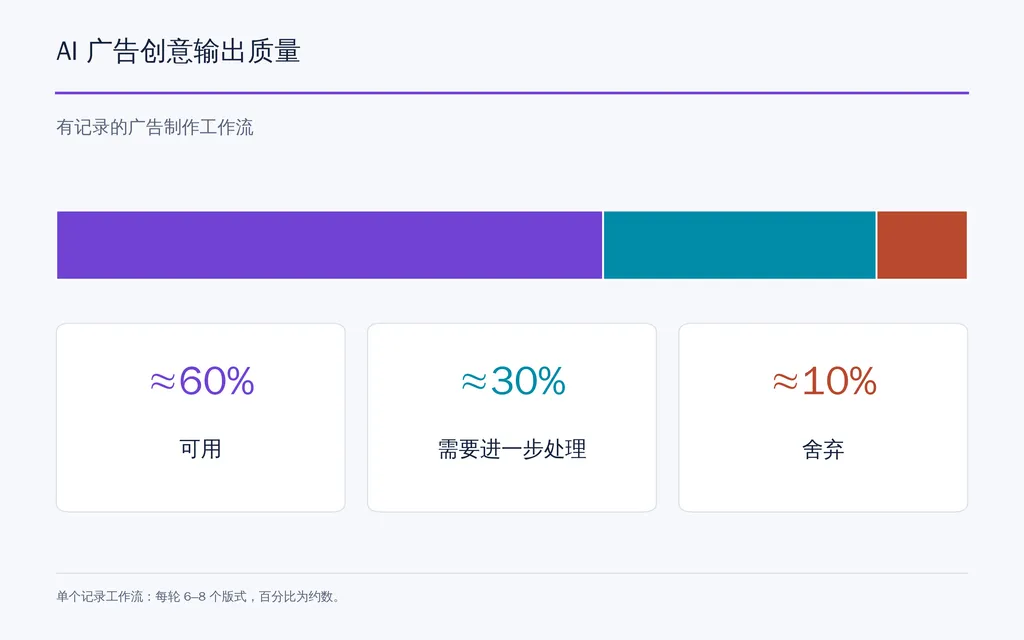
One ad-production workflow in our research generated 6–8 layouts per cycle. About 60% were considered usable, 30% needed further work, and 10% were discarded.

The practical lesson is to generate broadly, select aggressively, and spend editing time only on the strongest compositions.

Radar chart showing an AI ad workflow with 60% usable outputs, 30% needing further work, and 10% discarded.

Step 5: Run Product Fidelity QC

Compare every selected mockup directly with the real product.

Check:

  1. silhouette
  2. logo
  3. packaging text
  4. color
  5. scale
  6. material
  7. print placement
  8. hardware
  9. shadows
  10. reflections

Photorealism is not the same as product accuracy.

Step 6: Repair Local Errors

If 90% of the image works, preserve it and fix the failed 10%.

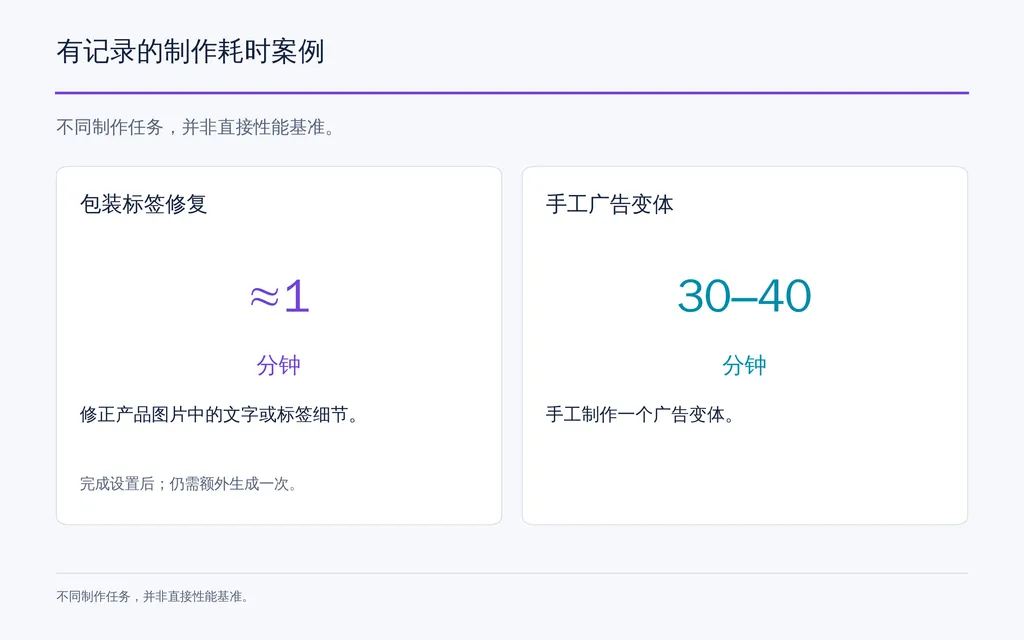
One packaging workflow in our research isolated an incorrect label, paired that region with an accurate reference, corrected it separately, and placed it back into the approved composition.

Once standardized, the practitioner estimated the final correction at about one minute, although it required an additional generation.

Step 7: Export for the Final Channel

A PDP hero, Instagram ad, Etsy thumbnail, marketplace gallery image, and vertical social creative need different crops and visual hierarchy.

The most useful production metric is therefore time to approved asset, not time to first generation.

Why Do AI Product Mockups Change Logos, Text, Color, and Scale?

Generative models may rebuild visible details instead of treating the product as an immutable design asset.

Logo and Packaging Text Errors

Small text and branding contain dense visual information. During regeneration, letters can become distorted, replaced, or rearranged.

For packaging-heavy products, preserve the original branding whenever possible or repair the affected area locally after generation.

Product Scale and Proportion Errors

Exact measurements in a prompt do not guarantee visual accuracy.

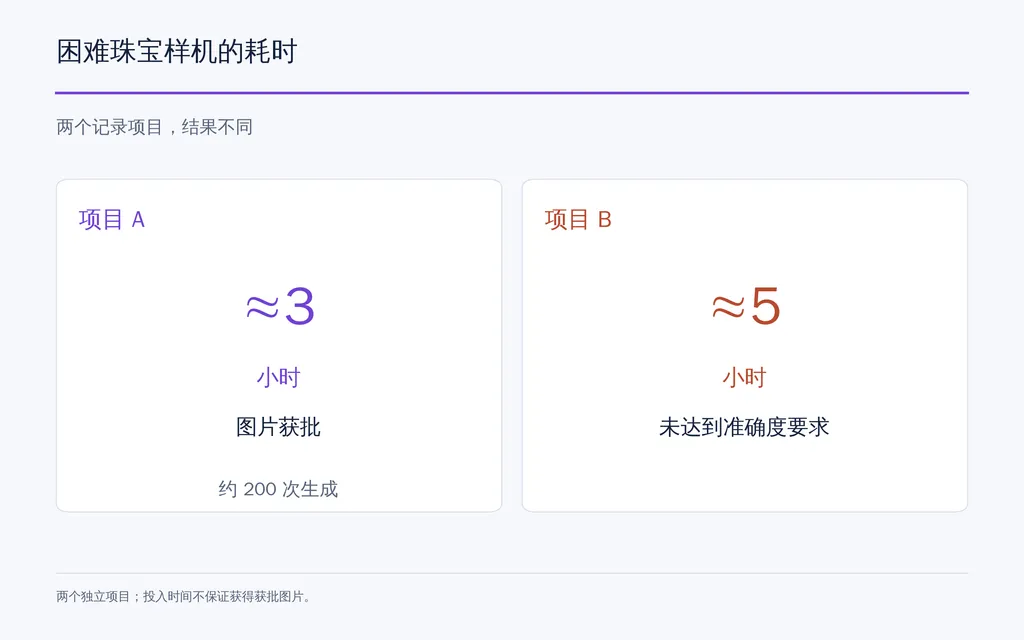
One jewelry case in our research involved a pendant around 2 cm on a 50–80 cm chain. Even with dimensions supplied, scale remained difficult to control.

One successful image reportedly required roughly three hours and around 200 generations. Another project consumed about five hours before the workflow was judged unable to meet the required accuracy.

This reveals an important production reality: generation may be fast while validation remains expensive.

Line chart comparing two difficult jewelry mockup projects: about 3 hours for an approved image with roughly 200 generations and about 5

Product Color Drift

AI may reinterpret color through scene lighting, reflections, surrounding colors, and assumed material properties.

For SKU-sensitive products, compare the final result with an approved color reference rather than judging the image only by how attractive it looks.

When Is AI Plus Photoshop Better Than Pure AI?

A hybrid workflow is often the strongest option when product accuracy is non-negotiable.

AI Background Plus Real Product

A reliable process is:

Generate environment → preserve real product → match perspective → rebuild shadow → match lighting → color grade → QC

This works particularly well for packaging, glass, jewelry, watches, electronics, and reflective products.

Shoot a Real Product to Match an AI Scene

Another professional workflow starts with AI art direction.

The desired scene is generated first. The real product is then photographed from the required angle and lighting direction before being composited into the environment.

This lets AI accelerate creative exploration while preserving the actual SKU.

When Real Photography Still Matters

For a PDP hero, packaging image, jewelry product, or expensive item, a small visual error can directly affect customer expectations.

A useful decision rule is:

Use Case

Best-Fit Workflow

Social creative

AI or hybrid

Paid ads

AI or hybrid

Seasonal campaigns

AI

Concept testing

AI

PDP hero

Real or high-fidelity hybrid

Packaging

Hybrid

Jewelry

Real or tightly controlled hybrid

Reflective products

Hybrid

Large POD catalog

Automated mockup workflow

Use AI where visual variety creates value. Use real product assets where exact representation creates trust.

How Do AI Product Mockups Scale for POD and Ecommerce?

At small scale, the problem is image generation. At larger scale, the problem becomes creative operations.

A POD workflow quickly expands into:

Design × Product × Color × Size × Mockup × Listing

Why Batch Operations Matter

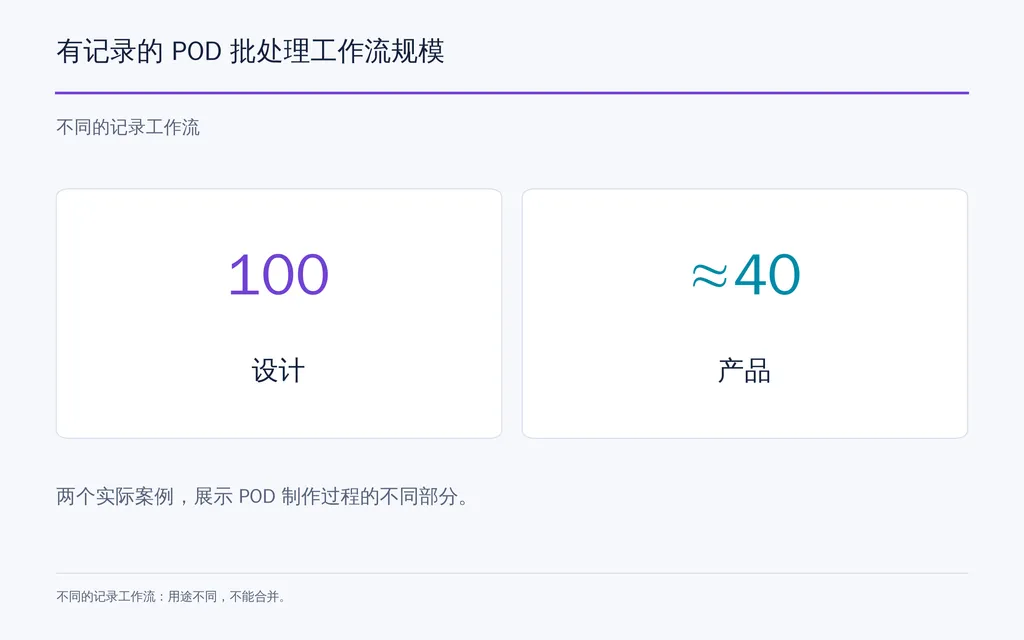
Our research includes one workflow involving 100 designs and another covering approximately 40 products.

A listing with 4 products × 10 colors × 8 sizes already creates 320 SKU combinations.

At that scale, manually creating individual mockups is no longer the main design challenge. The challenge is keeping assets, variants, pricing, listings, and publishing organized.

Horizontal bar chart showing separate documented POD workflows involving 100 designs and approximately 40 products.

What Should Be Automated?

A scalable system should help manage:

  • reusable product templates
  • design placement
  • color variants
  • mockup generation
  • naming
  • pricing
  • sizes
  • fulfillment information
  • listing content
  • publishing
  • final QA

This is why POD platforms such as MyDesigns are better evaluated as workflow systems, not only image generators.

Technical teams can also build their own pipelines with Photoshop Smart Objects, batch scripts, and APIs. SaaS reduces setup and maintenance, while DIY systems offer more control.

For professional creative teams, tools such as Virse extend this idea beyond catalog automation by keeping references, outputs, visual direction, multiple Agents, and accumulated project context inside the same design workspace.

How Much Time and Cost Can AI Product Mockups Save?

AI can lower the marginal cost of producing additional visual variations, but there is no reliable universal saving percentage.

Case

Reported Result

Practical Meaning

Ecommerce creative

About 20 variations/hour

Strong for creative expansion

Manual ad variation

30–40 minutes each

Manual scaling is expensive

AI ad generation

6–8 layouts, about 60% usable

Strong candidate-generation efficiency

Packaging repair

About 1 minute after setup

Local repair can be efficient

Difficult jewelry image

About 3 hours, around 200 generations

Fidelity can erase speed gains

POD batch workflow

100 designs

Automation matters at scale

Range comparison chart showing about one minute for a documented packaging label repair workflow and 30–40 minutes for a manual ad variation, with a note that they are different production tasks.

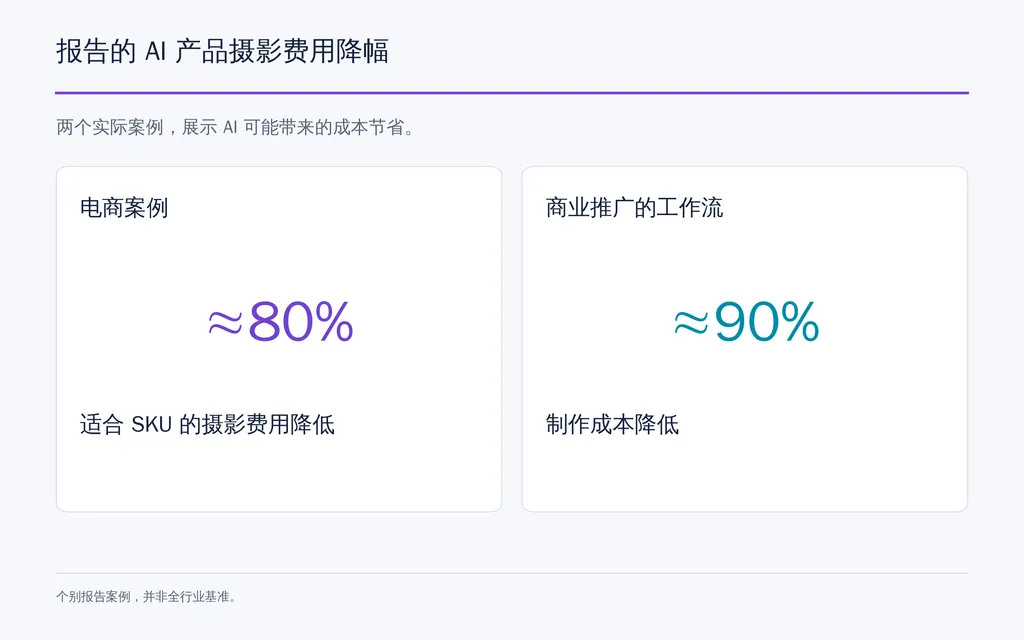
One ecommerce case estimated around 80% lower photography costs for suitable SKUs. A commercially promoted workflow claimed roughly 90% lower production cost, but our review does not treat either figure as an industry-wide benchmark.

The stronger conclusion is that AI reduces the cost of creating more creative options, but QC, correction, and human judgment remain part of production.

Comparison chart showing an ecommerce case reporting about 80% lower photography costs and a commercially promoted workflow claiming about 90% lower production costs, with both identified as individual cases rather than industry benchmarks.

Do AI Product Mockups Increase Conversion?

There is not enough controlled evidence to claim that AI mockups increase CVR by a predictable percentage.

Our research found stronger evidence for:

  • faster production
  • lower cost per variation
  • more creative options
  • larger batch capacity

It did not find equally strong evidence for consistent conversion uplift across products or stores.

Ecommerce teams should test AI creative against existing assets using CTR, PDP engagement, add-to-cart rate, CVR, ROAS, and return behavior.

A mockup is commercially useful only when it is both efficient to produce and accurate enough to support customer trust.

What Are the Most Common AI Product Mockup Mistakes?

Using Only Text Prompts for a Specific SKU

If an accurate product image exists, use it. Rebuilding a real SKU from text prompts introduces unnecessary uncertainty.

Publishing Without Product QC

Inspect every approved image at full resolution. Small errors in logos, labels, stitching, hardware, print placement, or geometry can be easy to miss at thumbnail size.

Creating Generic AI Scenes

Photorealistic does not mean distinctive.

Strong mockups need a consistent visual system covering lighting, framing, color, materials, model direction, and composition rather than relying on generic luxury backgrounds.

Ignoring the Exact POD Blank

A generic shirt can misrepresent neckline, fit, sleeve length, fabric weight, or print position. The mockup should remain close to the real product customers receive.

Treating AI Video Like a Moving Mockup

Video adds temporal drift, motion control, human interaction, and scene continuity. For commercial work, generate shorter controlled shots, validate each one, and assemble them during editing.

FAQ

Can AI create accurate product mockups?

Yes. Accuracy is highest when the real product is used as a reference and AI mainly changes the environment. Products with detailed labels, logos, exact colors, jewelry proportions, transparent materials, or reflective surfaces usually require additional QC or hybrid editing.

How do I stop AI from changing my logo or text?

Keep the original logo or label as the source of truth. If AI modifies it, preserve the approved composition and repair only the affected region using masking, local editing, or Photoshop. This is usually more reliable than regenerating the entire image.

Can AI replace product photography?

AI can replace some photography tasks, especially concept exploration, social creatives, ads, and lifestyle variations. Real photography or hybrid production remains valuable for PDP heroes, packaging, jewelry, reflective products, and any SKU where exact representation affects customer expectations.

What is the best AI workflow for POD mockups?

For POD, prioritize batch production rather than one-image generation. Use reusable templates, automate design placement and color variants, connect mockups with SKU and listing data, and add final QA. Once catalogs reach dozens or hundreds of designs, workflow automation usually matters more than single-image generation speed.

Conclusion

The best way to create product mockups with AI is to keep the real product as the visual source of truth and use AI to transform everything around it. Start with an accurate reference, generate multiple scene candidates, check every winner for product fidelity, repair local errors, and automate the workflow only after the quality standard is stable. Our research shows why this matters: one ecommerce workflow can produce around 20 variations per hour, while a difficult jewelry image can require roughly 200 generations. AI product mockups create the most value when they help designers explore more ideas, produce more variations, and scale creative output without sacrificing product accuracy, brand consistency, or design control.

更多 Virse 博客文章