How to Build an AI Design Workflow From Brief to Delivery
 Yifan Zhao21 分钟阅读 ·
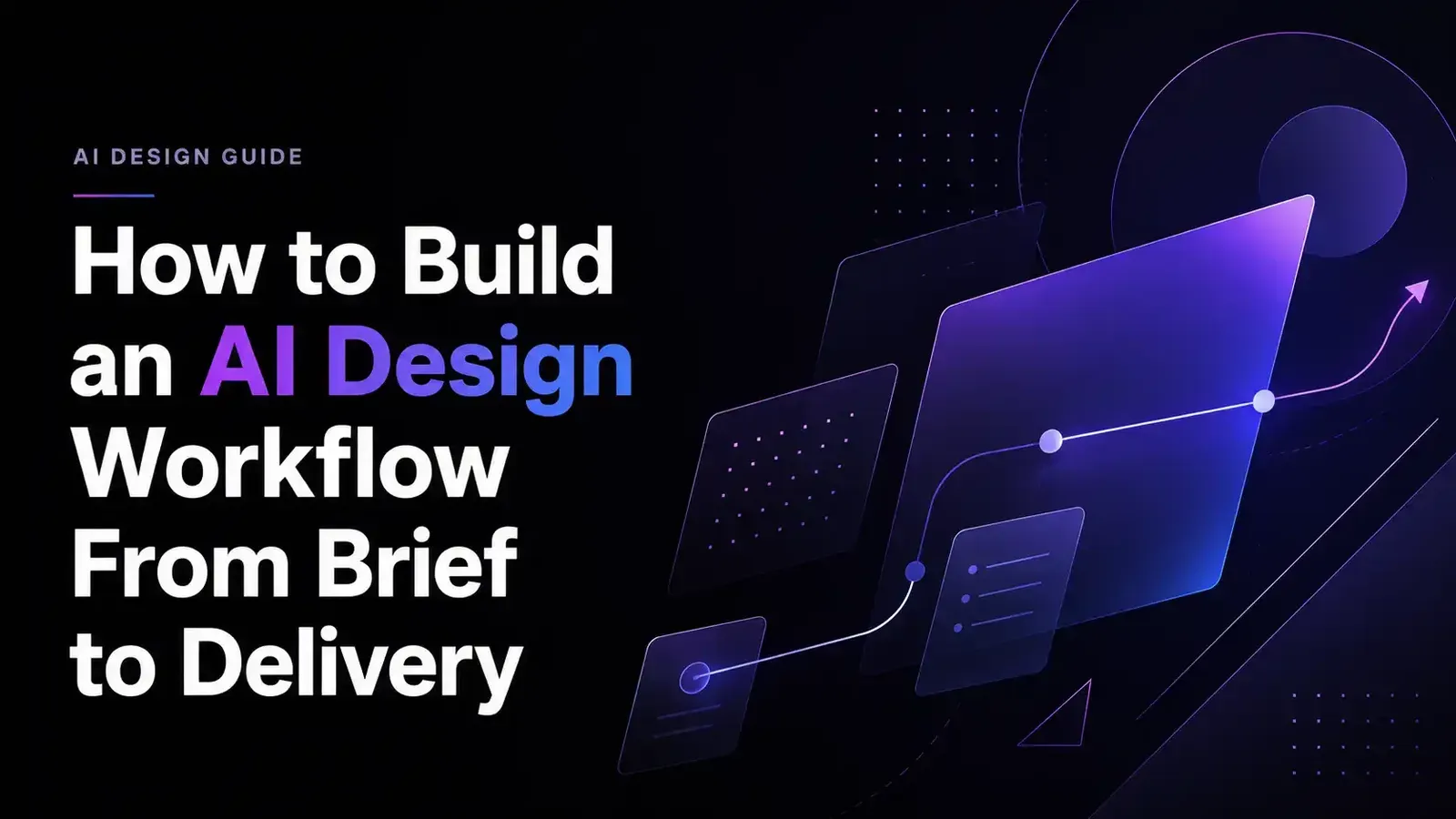
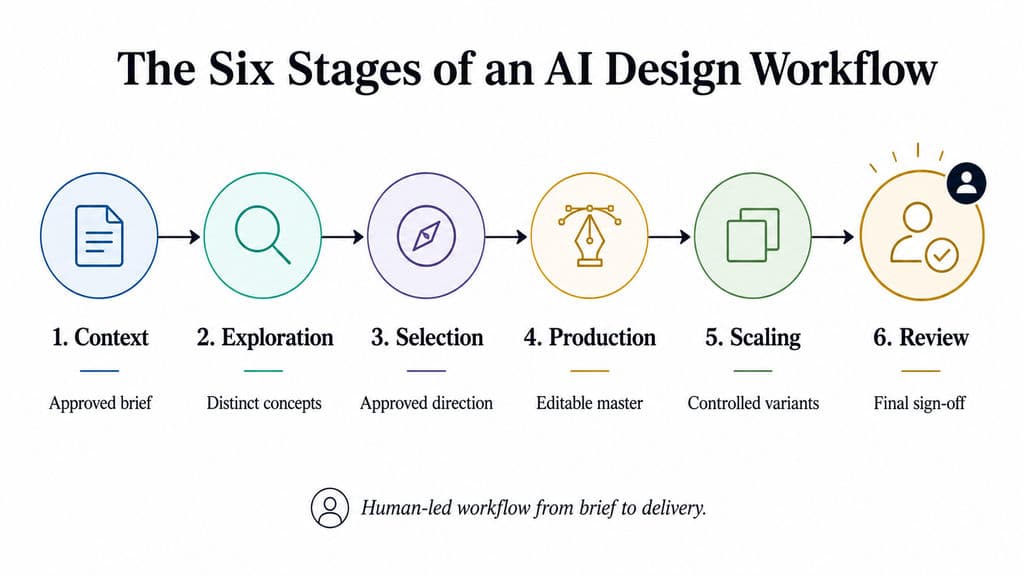
An effective AI design workflow turns a project brief into editable, reviewable, and scalable design assets through a controlled sequence: prepare the context, explore directions, select one, build an editable master, adapt approved assets, and complete human review. AI can accelerate analysis, generation, organization, and repeated execution, but designers must still control the brief, creative direction, quality standards, approval, and final delivery. The right AI design tools should support that process rather than replace it.
The problem is that many teams still use AI as a series of disconnected prompts. Briefs live in documents, references sit in folders, feedback disappears into chats, and generated concepts lose brand or project context between tools. The result may be a faster first draft but more cleanup, repeated explanation, inconsistent variations, and additional review work before anything becomes production-ready. A structured AI design system and clearer brand consistency controls can reduce that fragmentation.
Virse brings the creative workflow into one shared infinite canvas, where designers can organize references, compare directions, preserve project context, coordinate multiple Agents, continue approved styles, and produce controlled asset variations—while keeping human designers in charge of editing, review, and delivery. This approach aligns closely with AI design agent creative workflows and broader AI-assisted graphic design.
What Is an AI Design Workflow, and How Do You Build One?
An AI design workflow is a repeatable, human-led process that uses AI for selected design tasks while preserving project context, editable production, review gates, and clear accountability.
A weak workflow is:
Prompt → Generate → Download
A professional workflow is:
Brief → Context → Explore → Select → Produce → Scale → Review → Deliver
The difference is not simply the number of tools involved. A workflow defines how information, design decisions, assets, and responsibility move from one stage to the next.
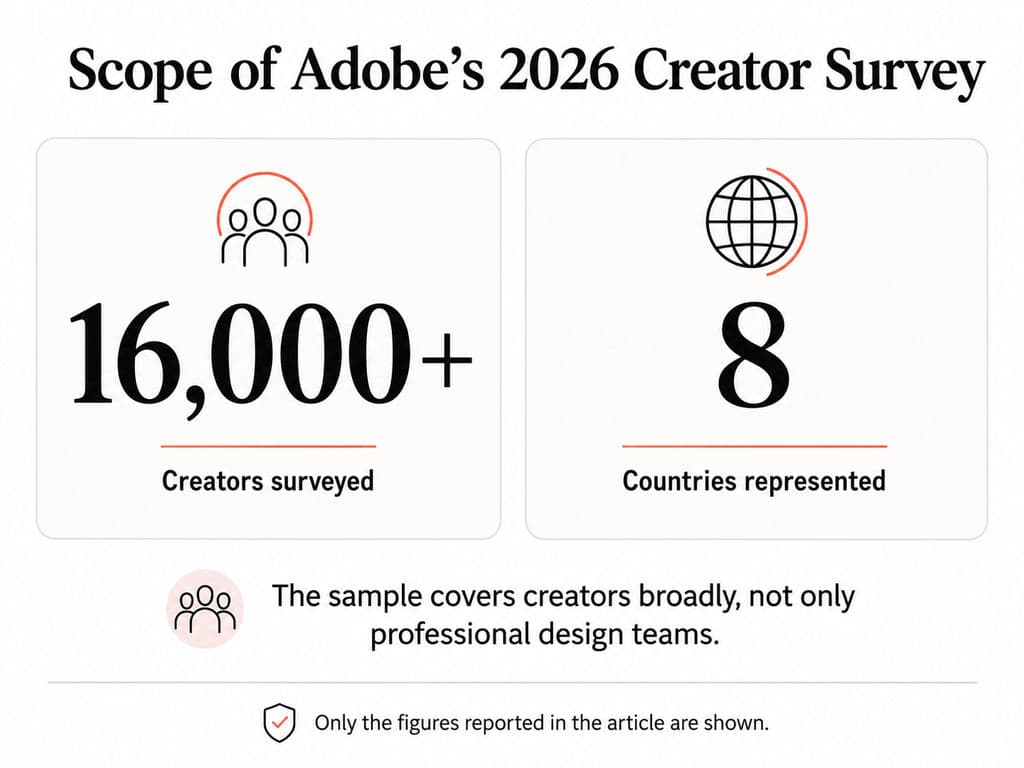
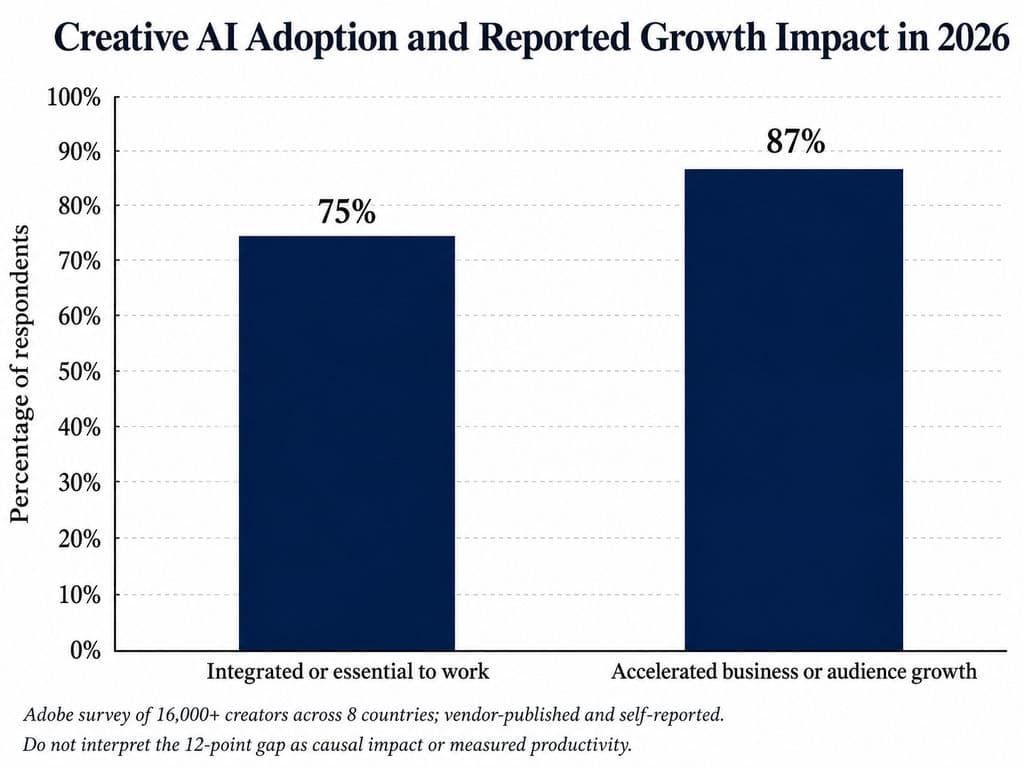
ofessionalAdobe’s 2026 Creators’ Toolkit Report surveyed more than 16,000 creators across eight countries. Among respondents using creative AI, 75% described it as integrated or essential to how they work, while 87% said it had accelerated the growth of their business or audience. These are vendor-published, self-reported findings from a broad creator population rather than a controlled benchmark of professional design teams. They show why workflow design matters, but they do not prove that every AI-enabled design process produces measurable productivity or ROI gains.
Stage | Core question | Required output | Primary human owner |
Context | What must the design accomplish? | Approved brief and reference package | Designer or creative lead |
Exploration | Which meaningful directions are available? | Limited set of distinct concepts | Designer |
Selection | Which direction best solves the brief? | Approved direction and decision record | Creative lead or stakeholder |
Production | Can the direction become editable work? | Structured master asset | Designer |
Scaling | How can it adapt without losing its system? | Controlled asset variations | Design team |
Review | Is it accurate, compliant, and ready to deliver? | Approved files and sign-off | Relevant specialists |
AI-Assisted Workflow vs. One-Prompt Design
A one-prompt approach treats the generated output as the answer. An AI-assisted workflow treats it as one artifact in a wider design process.
Consider this request:
Design a modern analytics dashboard.
The prompt does not explain:
- Who uses the dashboard
- Which decision it supports
- What information matters most
- Which actions must be available
- Which component library applies
- What happens in empty, loading, and error states
- Which accessibility requirements apply
- How the work will be reviewed or delivered
The output may look polished while remaining strategically arbitrary.
A context-first workflow separates project requirements into two groups.
Fixed requirements
- Business or communication objective
- Target audience
- Primary user task
- Mandatory content
- Brand identity
- Approved product proportions
- Accessibility or platform requirements
- Legal or regulatory text
- Review ownership
Explorable variables
- Composition
- Layout direction
- Visual metaphor
- Image treatment
- Background
- Supporting graphic language
- Approved color emphasis
- Alternative content hierarchy
This distinction prevents AI from repeatedly changing decisions the team has already made.
What AI Can Support—and What Designers Still Own
AI is most useful for repeatable tasks involving synthesis, exploration, organization, or variation.
It can assist with:
- Structuring notes into an initial brief
- Summarizing research materials
- Analyzing references
- Producing early wireframes or visual territories
- Drafting content alternatives
- Exploring image, layout, or CMF directions
- Adapting approved assets to controlled formats
- Checking work against a supplied checklist
- Organizing assets and revision context
Designers and specialists must still own:
- Problem definition
- Audience and business priorities
- Creative direction
- Concept selection
- Brand interpretation
- Usability and accessibility judgment
- Factual and legal verification
- Print, engineering, or development validation
- Final approval and delivery
Our review of publicly shared design workflows and user questions identified recurring uses such as converting meeting notes into design briefs, producing early wireframe drafts, organizing research, and obtaining a second-pass critique of design screenshots. These accounts were used to identify recurring tasks and obstacles, not to calculate performance benchmarks. They rarely report consistent project scope, quality criteria, cleanup time, or final production outcomes.
Step 1: How Do You Build an AI-Ready Context Package?
The first step in an AI design workflow is to create a reusable context package. This gives designers, AI systems, and reviewers the same source of truth.
Without shared context, teams repeatedly explain the project, different tools receive inconsistent instructions, and later outputs drift away from the original objective.
Define the Goal, Audience, Deliverables, and Approval Criteria
Start with a design brief that turns assumptions into explicit requirements.
Brief field | What to document |
Project objective | The business, user, or communication result |
Audience | Who will see, use, or approve the design |
Primary task | What the audience should understand or do |
Deliverables | Required pages, assets, formats, markets, or SKUs |
Mandatory content | Copy, claims, imagery, logos, data, or product details |
Brand requirements | Type, color, tone, imagery, and prohibited treatments |
Technical constraints | Platform, size, resolution, interaction, print, or material limits |
Approval criteria | Conditions the design must satisfy |
Review owners | People responsible for design, brand, content, legal, and production |
Avoid subjective instructions with no observable meaning.
Weak requirement:
Make the campaign look premium.
More useful requirement:
Use the approved serif display typeface, restrained product photography, generous negative space, and the existing black-and-cream palette. Avoid neon colors, cartoon illustration, distorted product proportions, and unapproved luxury claims.
The second version gives both the AI and the review team something concrete to follow. This same principle improves AI design prompts because specific constraints are easier to evaluate than vague adjectives.
Organize References by Function
A large collection of unexplained images is not a reliable context package. Organize references according to the role each one plays.
- Brand references: approved work that defines the identity
- Category references: examples of market conventions
- Directional references: materials that express the desired visual territory
- Negative references: styles or structures the team has rejected
- Structural references: layouts, flows, information hierarchies, or packaging systems
- Production references: dimensions, dielines, platform specifications, or export rules
Annotate why each reference matters.
Instead of uploading an image without explanation, add notes such as:
- Use this degree of contrast
- Follow this level of information density
- Preserve this product angle
- Reference the material quality, not the composition
- Do not use this illustration style
- This layout is approved only for desktop
The same principle applies to design systems. AI produces more relevant outputs when it can access approved components, tokens, layout rules, and previous design decisions rather than only a standalone prompt.
Store the Context in a Reusable Workspace
The context package should remain visible and editable throughout the project. Do not leave the brief in one document, brand rules in another folder, references in a chat, and feedback inside meeting transcripts.
A connected workspace should make it possible to see:
- The current brief
- Approved and rejected references
- Generated directions
- Relationships between assets
- Feedback and approval status
- Current master design
- Variant rules
- Production constraints
Virse is relevant at this stage because its confirmed interaction model is based on an infinite canvas rather than an isolated chat box. Designers can arrange, connect, compare, and edit materials, while Agents interpret tasks using the wider canvas context. Multiple Agents can share project context and work on different modules of the same project.
This does not mean Virse should define the business objective or decide which reference is correct. The team remains responsible for building and approving the context package.
Workflow Example: Meeting Notes to Design Brief
Situation: A designer receives a transcript containing stakeholder requests, background information, contradictory preferences, and unresolved questions.
AI task: Extract the objective, audience, required deliverables, constraints, open questions, and named reviewers.
Human intervention: Check whether the AI invented priorities, removed uncertainty, or treated stakeholder preferences as final requirements.
Case result: A structured draft brief with unresolved questions clearly marked.
Evidence limitation: Publicly shared examples suggest that teams use LLMs for this task, but the available accounts do not provide a reliable accuracy rate or complete time comparison.
Output: An approved context package containing the brief, annotated references, brand rules, production constraints, and review ownership.
Proceed when: The team can explain what success means, what is fixed, what may change, and who has authority to approve the next stage.
Step 2: How Do You Explore and Select Design Directions?
Use AI exploration to make meaningful alternatives visible—not to create the largest possible pile of images.
The goal is to produce a small number of distinct, explainable directions and select one against the same project criteria.
Analyze References Before Generating
Ask the AI to interpret the context package before requesting concepts.
For brand or campaign work, analyze:
- Composition
- Visual hierarchy
- Color relationships
- Typography
- Image style
- Brand signals
- Repeated motifs
- Differences between approved and rejected examples
For UX or UI work, analyze:
- User flow
- Primary and secondary actions
- Information density
- Component patterns
- Interaction states
- Accessibility risks
- Empty, loading, and error states
For packaging or product visualization, analyze:
- Form and proportion
- Surface hierarchy
- Product visibility
- Range architecture
- CMF direction
- Shelf or marketplace context
- Structural constraints
- Elements requiring later print or engineering validation
This analysis creates an early correction point. It is cheaper to correct a misunderstood reference before the system generates 20 directions from it.
Generate Strategically Different Directions
Avoid requests such as:
Generate five more versions.
This usually creates surface-level changes rather than meaningful alternatives.
Instead, define creative territories that make different strategic choices.
For a product campaign, these might be:
- Product-first
Large product image, minimal supporting graphics, direct benefit hierarchy. - Editorial
Strong typography, restrained imagery, and narrative pacing. - Technical
Diagrams, structured information, and functional clarity. - Lifestyle
Human context, emotional storytelling, and product-in-use imagery.
Each direction should include:
- The central idea
- Intended audience response
- Visual rules
- Fixed elements
- Variable elements
- Main risk
- Deliverables it can support
This turns the review from “Which picture do you like?” into “Which direction best solves the brief?”
Our review of user questions found that generic AI-generated UI is often linked to missing product goals, user flows, brand rules, component constraints, and interaction requirements. Visual sameness is a symptom; the deeper problem is that the system has not been given a reason for its design decisions.
Limit Variations Before They Create Decision Debt
AI makes generation cheap, but it does not make reviewing free.
Every additional option must still be:
- Inspected
- Compared
- Explained
- Revised
- Approved or rejected
- Stored or removed
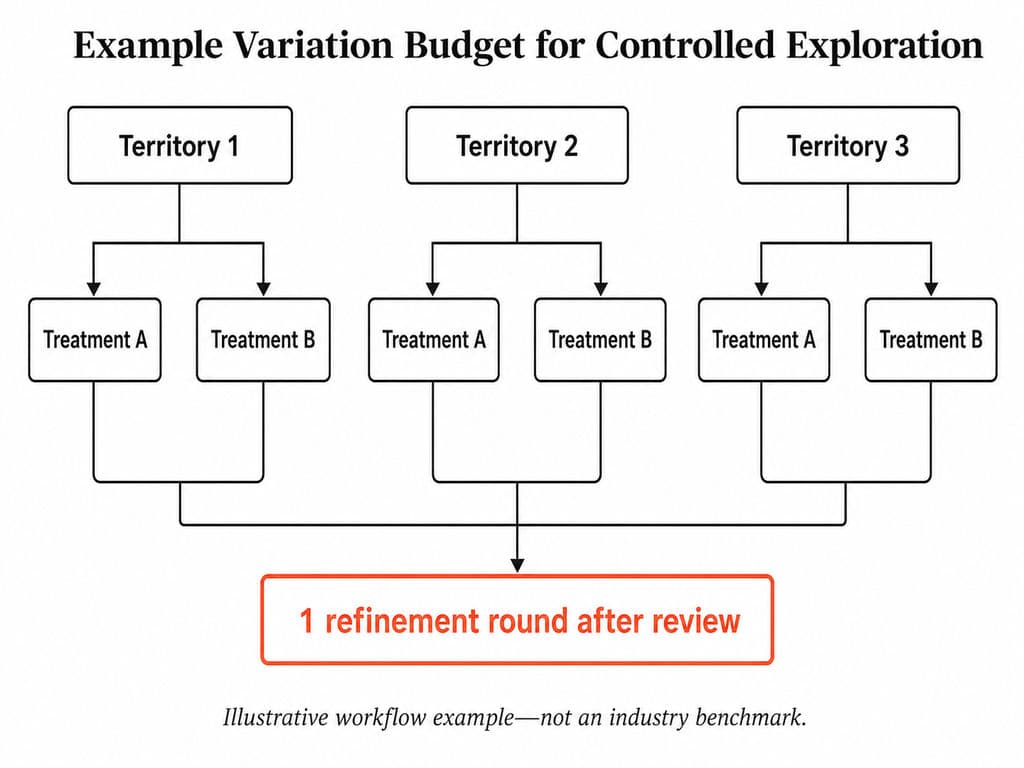
Set a variation budget before generation starts. For example:
- Three strategic territories
- Two treatments within each territory
- One refinement round after review
This is a practical workflow example, not a universal benchmark. A high-risk packaging project may require a different process from a social asset experiment.
Also define stop conditions:
- At least one direction satisfies every mandatory constraint
- Reviewers can explain why it is stronger than the alternatives
- Further generation would change style rather than strategy
- Remaining uncertainty requires research or specialist validation
- The selected direction can support the required formats
Compare Directions Against Written Criteria
Use the same evaluation framework for every concept.
Criterion | Review question |
Task fit | Does it help the audience understand or complete the intended task? |
Message hierarchy | Is the most important information visible first? |
Brand fit | Does it follow the identity without becoming interchangeable? |
Editability | Can it be revised without rebuilding everything? |
Scalability | Can it adapt to the required channels, markets, or SKUs? |
Production fit | Can it meet technical, accessibility, print, or platform requirements? |
Risk | What still requires human or specialist validation? |
Do not manufacture numerical ratings unless the organization has defined a real scoring method. Written evidence is often more useful than an unsupported score.
Weak feedback:
Direction B feels more premium.
Stronger feedback:
Direction B creates the clearest product hierarchy and remains legible in the smallest required format. However, its lifestyle imagery still needs rights verification and local-market review.
Preserve Approved, Rejected, and Unresolved Decisions
Keep a decision record containing:
- Approved direction
- Elements that are approved
- Elements that remain editable
- Rejected alternatives
- Reasons for rejection
- Open questions
- Required reviewers
- Approval date and version
Rejected directions are valuable context. Without them, an AI system, external agency, or new team member may reintroduce the same unwanted approach later.
Output: One approved design direction with documented reasoning, frozen elements, editable elements, rejected alternatives, and open risks.
Proceed when: Reviewers can explain why the direction satisfies the brief and what must still be resolved during production.
Step 3: How Do You Turn an AI Concept Into an Editable Master Design?
An AI concept becomes useful only when the team can edit, verify, and deliver it. A visually finished image is not automatically a production asset.
Separate Conceptual, Editable, and Production-Ready Outputs
These three levels should not be confused.
Output level | Purpose | Typical characteristics |
Conceptual | Explore and communicate an idea | May be flattened, incomplete, or inconsistent |
Editable | Support structured revision | Text, layout, objects, components, or layers can be changed |
Production-ready | Meet final delivery requirements | Content, formats, states, exports, and approvals are verified |
An output can look highly polished while still containing:
- Fake or distorted text
- Incorrect product details
- Inconsistent typography
- Missing interaction states
- Unlicensed imagery
- Impossible packaging structures
- Incorrect dimensions
- No usable layers or components
Move the Direction Into the Right Production Environment
The appropriate production tool depends on the design discipline.
Design discipline | Editable production may require | Production validation still required |
UI/UX | Components, layout systems, states, prototypes | Accessibility, usability, developer handoff |
Graphic design | Editable type, layout, image layers, vectors | Resolution, color, export specifications |
Packaging | Artwork, dieline alignment, legal copy | Materials, print proofing, regulatory review |
Product design | Controlled concept renders and CMF studies | CAD, engineering, ergonomics, manufacturing |
Campaign design | Master visual, channel templates, asset rules | Brand, content, rights, and format review |
Professional design systems are increasingly moving toward editable canvas outputs and structured design context rather than static generations. However, this does not mean every AI tool offers equivalent control, editability, or production quality.
Fix Structure Before Surface Detail
Once a concept is selected, refine it in this order:
- Primary task or message
- Information hierarchy
- Layout and composition
- Components or repeated structures
- Typography
- Content accuracy
- Images, materials, and surface treatment
- Edge cases and alternative formats
- Export and handoff requirements
This prevents the team from polishing a composition that still has a structural problem.
Check questions should include:
- Is all text real and editable?
- Does the hierarchy survive longer copy?
- Are components and spacing consistent?
- Are interaction states included?
- Are products shown accurately?
- Can localization fit without breaking the layout?
- Are images licensed and sufficiently detailed?
- Are print, platform, or accessibility requirements satisfied?
When the direction is approved, do not keep regenerating the entire composition to make a small change. Direct editing is usually more controllable than asking the model to reinterpret the whole design.
Workflow Example: AI Wireframe to Figma Refinement
Situation: A web-design team needs an early page structure that stakeholders can discuss.
AI task: Generate a first-pass wireframe from a brief containing user goals, content hierarchy, required sections, and business constraints.
Human intervention: A designer moves the useful structure into Figma, corrects hierarchy, applies the real component library, adds interaction states, and removes unsupported assumptions.
Case result: An editable version suitable for a design review—not necessarily final UI.
Evidence limitation: Public workflow accounts describe reaching a discussable first version sooner, but they do not consistently report the full time spent on correction, component work, stakeholder revisions, or final delivery. The case supports the workflow pattern rather than a quantified productivity claim.
Output: An editable master asset that reflects the approved direction and identifies remaining production risks.
Proceed when: The master can be revised without full regeneration and has passed the relevant structural, content, and technical checks.
Step 4: How Do You Scale and Review Approved Design Assets?
Scale only after the master design is stable. Otherwise, the workflow multiplies unresolved problems across every format, channel, market, and SKU.
Define Fixed Elements and Controlled Variables
Create a variation specification before batch production.
Fixed elements may include:
- Logo treatment
- Core typography
- Brand colors
- Product proportions
- Main composition
- Required claims
- Legal copy
- Image tone
- Approved visual motifs
Controlled variables may include:
- Format
- Copy length
- Background
- Language
- Product color
- Flavor or SKU
- Seasonal treatment
- Market-specific imagery
- Channel-specific CTA
Fixed does not always mean pixel-identical. A logo may move in a vertical format, but its color, clear space, scale, and visual priority still need to follow defined rules.
Produce Variants in Reviewable Batches
Do not request every possible combination at once.
A campaign batch might contain:
- One approved master visual
- Three social formats
- Two e-commerce formats
- Two approved copy lengths
- One market or language per review batch
Small batches make it easier to identify whether an error came from:
- The master design
- The variation rules
- The copy
- The localization
- The generation process
- The export process
Virse’s internal JTBD material identifies recurring needs such as campaign extension, multi-SKU work, packaging-series exploration, e-commerce assets, and market adaptation across several design audiences. These are useful workflow scenarios and pain-point hypotheses, not independent evidence that every task is fully automated or that a specific result has been achieved.
Where Virse Fits in a Scalable AI Design Workflow
Virse is most relevant to the connected creative portion of the workflow:
- Organizing references and assets on an infinite canvas
- Using wider canvas context instead of isolated prompts
- Running multiple Agents that share project context
- Supporting reference analysis and creative exploration
- Continuing an approved visual style
- Producing asset variations and batches
- Organizing assets
- Supporting multiple rounds of modification
Its confirmed positioning is that AI collaborates with professional designers rather than replacing them. Designers retain control over direction, editing, review, and delivery.
Relevant applications can include campaign adaptation, packaging exploration, marketing-material production, and SKU-related variations. These applications should not be interpreted as proof that Virse replaces specialist production systems or guarantees brand consistency.
Virse should not be described as a substitute for:
- User or business research
- Final brand approval
- Legal or regulatory review
- Print proofing
- Packaging engineering
- CAD or manufacturing validation
- Accessibility sign-off
- Final client approval
Run Four Types of Human Review
Use review categories rather than one general “looks good” check.
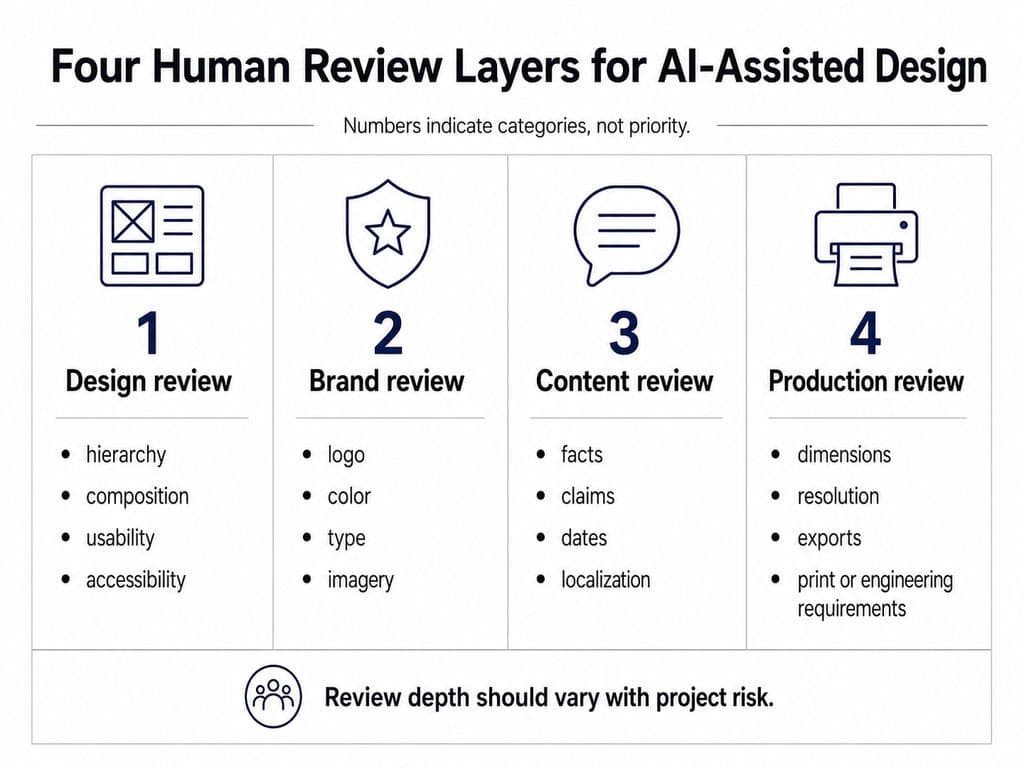
Design review
Check hierarchy, composition, typography, usability, accessibility, interaction states, image quality, and consistency.
Brand review
Check logo use, colors, type rules, imagery, tone, brand distinctiveness, and prohibited treatments.
Content review
Check spelling, product facts, claims, dates, prices, localization, legal copy, and cultural appropriateness.
Production review
Check file structure, dimensions, resolution, color mode, export settings, accessibility implementation, print requirements, platform specifications, and engineering dependencies.
A risk-based review process is more practical than applying the same approval standard to every asset. A low-risk moodboard should not require the same controls as a regulated package label, safety instruction, or unreleased product design.
Assign Human Owners to High-Risk Decisions
A practical division of responsibility is:
Role | Primary responsibility |
Designer | Direction, execution, editing, and visual quality |
Creative lead | Concept selection and brand interpretation |
Product owner or marketer | Business goal, audience, content, and deliverables |
Brand owner | Identity compliance and distinctiveness |
Legal or compliance specialist | Claims, rights, disclosures, and regulated content |
Production specialist | Print, development, engineering, or manufacturing checks |
AI system | Analysis, generation, organization, and controlled execution |
Human approval is especially important for:
- Confidential or unreleased products
- Health, finance, or legal claims
- Packaging labels
- Sensitive cultural representation
- Copyrighted and trademarked material
- Accessibility requirements
- Safety information
- Print production
- Engineering decisions
The U.S. Copyright Office has concluded that generative-AI output may receive copyright protection only where there is sufficient human authorship. This is a U.S. legal context, not a universal rule for every jurisdiction, and teams should obtain appropriate legal guidance for high-risk commercial use.
Preserve Versions, Sources, and Final Sign-Off
The delivery package should include:
- Approved master files
- Final exports
- Version history
- Source and license records
- Model or tool records where required
- Approval status
- Reviewer roles
- Localization status
- Known limitations
- Rules for future variants
This turns one project into reusable team knowledge rather than forcing the next workflow to begin with an empty prompt.
Workflow Example: One Campaign Master to Controlled Variants
Situation: A brand has approved one hero visual and needs versions for social, e-commerce, email, and several product variants.
Input: Approved master, brand rules, fixed elements, variable fields, format specifications, copy options, and review ownership.
AI-supported task: Generate a limited batch of adaptations while retaining the approved visual direction.
Human intervention: Review every batch for hierarchy, cropping, product accuracy, brand consistency, copy, rights, and production requirements.
Case result: Approved variants linked to the original master and variation specification.
Evidence limitation: This is a reusable workflow example supported by confirmed Virse capabilities and documented JTBD scenarios, not a claimed customer result or efficiency benchmark.
Output: A controlled set of approved variants, documented reviews, final files, and reusable project context.
Proceed when: Each batch passes its required design, brand, content, and production reviews before further scaling.
How Do You Choose, Test, and Improve an AI Design Workflow?
Choose tools according to the role they perform in the workflow, then test the complete process—not just the quality or speed of the first generation.
Match Tools to Workflow Roles
A professional AI design stack may contain several tool categories.
Workflow role | Typical tasks | Tool category |
Research and briefing | Summaries, requirements, notes, content drafts | General-purpose LLM |
Visual exploration | Moodboards, concepts, images, style directions | Image-generation system |
UI and prototyping | Draft pages, flows, interactive concepts | UI or code-generation system |
Shared visual context | References, comparison, connected tasks, iterations | Canvas-based AI workspace |
Production | Components, typography, vectors, retouching, layout | Professional design software |
Handoff | Specifications, exports, code, production files | Design and development platform |
Do not choose a tool because it ranks first in a generic list. Ask whether it can receive the required context, produce the required output, and hand work to the next stage without unnecessary reconstruction.
ChatGPT and Claude can both support research, briefing, critique, and ideation. Public workflow discussions associate them with different tasks, but the available evidence is not a controlled comparison. Test them on representative project inputs instead of making a universal performance claim.
Evaluate Six Practical Criteria
Before adopting a tool, evaluate:
- Context support
Can it use briefs, images, systems, files, code, or connected canvas relationships? - Editability
Can designers modify text, layers, layout, objects, or components? - Control
Can it preserve approved elements during local changes? - Collaboration
Can people and Agents work from shared project information? - Scalability
Can it produce controlled variations without losing the approved direction? - Risk and exit path
Are privacy, rights, provenance, export, and handoff requirements clear?
The right stack is usually the smallest set of tools that preserves context and produces work the next stage can actually use.
Pilot One Repeated, Low-Risk Task
Start with a task that:
- Happens regularly
- Has stable inputs
- Has clear acceptance criteria
- Currently requires repeated manual work
- Can be reviewed without unacceptable risk
Suitable pilots include:
- Turning one approved hero asset into social formats
- Organizing references into an annotated board
- Producing three visual territories from a fixed brief
- Generating controlled background variants
- Adapting one approved packaging direction across a small SKU group
- Converting structured notes into a draft brief
Run the workflow several times before expanding it. One successful demo does not prove that the system is reliable.
Measure Net Time Saved, Not Generation Speed
An AI design workflow saves time only when it reduces total effort.
A simple evaluation is:
Net time saved = previous total workflow time − new total workflow time
Include:
- Brief preparation
- Context entry
- Generation
- Selection
- Manual editing
- Review
- Rework
- Export
- Handoff
Track metrics such as:
Metric | What it reveals |
Time to first reviewable draft | Speed to a version worth discussing |
Manual cleanup time | Hidden production effort |
Revision rounds | Alignment and decision quality |
Usable variant rate | How much generated work survives review |
Brand-rule violations | Consistency problems |
Missing states or assets | Completeness problems |
Context re-entry time | Cost of fragmented tools |
Rework after approval | Weaknesses in review gates |
Review time per batch | Whether scaling increases human burden |
Public workflow accounts describe faster creation of early drafts in some situations, but most do not report enough information to calculate net time saved after cleanup, validation, and revision. These observations support testing the workflow—not promising a performance percentage.
Decide Whether to Scale, Change, or Stop
Scale the workflow only when:
- Outputs consistently pass review
- Cleanup does not erase the initial time benefit
- Context can be reused
- Human responsibility remains clear
- Errors are detectable
- Assets can move into production
- Privacy and rights requirements are acceptable
Change or stop the workflow when:
- Outputs repeatedly ignore fixed rules
- The team must rebuild most of the work
- Review time grows faster than output volume
- Confidential data cannot be handled safely
- The task requires legal, engineering, or specialist judgment
- The workflow produces more options but weaker decisions
Frequently Asked Questions About AI Design Workflows
What is the best AI design workflow for beginners?
Start with a six-stage loop: prepare a brief, organize references, generate three distinct directions, select one against written criteria, refine it in an editable tool, and complete human review. Use one repeated, low-risk task first. Do not begin by trying to automate an entire design process or team.
Can AI design tools replace Figma or professional design software?
Not across the full workflow. AI can accelerate briefing, concepts, draft layouts, images, feedback, and variations. Professional tools are still commonly needed for structured editing, components, typography, interaction states, retouching, vectors, accessibility implementation, production settings, collaboration, and final delivery.
How do you stop AI-generated designs from looking generic?
Provide product and audience context, a clear user task, message hierarchy, brand rules, approved and rejected references, design-system constraints, and production requirements. Generate a limited number of strategically different directions, select one, and edit it directly rather than continuing to request unrelated variations.
Can AI maintain brand consistency across multiple assets?
AI can help carry an approved direction across formats, markets, and SKUs, but consistency is not automatic. Teams need fixed brand rules, controlled variables, shared context, batch-level review, and human approval. Canvas-based systems can help keep references, decisions, and variations connected, but brand owners must still validate the outputs.
Conclusion
A reliable AI design workflow is built by controlling how context and decisions move from the brief to final delivery. Prepare a reusable context package, analyze references before generating, limit exploration, document why a direction was selected, convert it into an editable master, scale only approved elements, and assign human reviewers according to risk. Virse can support the connected visual workspace, shared Agent context, creative exploration, asset organization, repeated modification, and controlled variation stages, while designers and specialists remain responsible for strategy, professional production, validation, and final approval.