FLUX 3 Image Prompt Guide: 12 Prompts & Editing Fixes
Vincent13 分钟阅读 ·
The best FLUX 3 Image prompts describe the intended result, specify exactly what should change, and identify which details must remain untouched. For image generation, define the subject, composition, lighting, materials, and style. For editing, use a Change + Preserve structure to protect faces, backgrounds, proportions, and approved visual elements.
The challenge is maintaining consistency across revisions. Replacing an object can alter reflections, changing clothes can distort body proportions, and correcting poster text can disrupt the original layout. Our review of documented editing cases and user questions identifies three important priorities: background preservation, character consistency, and correct workflow settings.
Want more control over your image revisions? Virse provides a visual canvas where you can select object layers, define editing regions, use reference images, and manage local changes without starting every revision from scratch. Its editing workflow keeps the original image available while generating revised results, making it useful for product visuals, marketing assets, and creative iteration.

How to Write Better FLUX 3 Image Prompts
An effective FLUX 3 prompt combines subject, action, composition, visual details, and preservation constraints. Generation prompts describe the finished scene, while editing prompts distinguish requested changes from protected elements.
The Change + Preserve Prompt Formula
Element | Purpose | Example |
Target | Identify the object | Red handbag |
Change | Define the modification | Replace with black leather |
Appearance | Specify the result | Same dimensions |
Preserve | Protect existing details | Lighting, reflections, background |
Boundary | Limit unrelated changes | Modify only the handbag |
Prompt 1 — Product Replacement
"Replace only the red leather handbag with a black leather handbag of identical dimensions. Preserve the tabletop, camera angle, lighting, shadows, reflections, surrounding products, and original composition."
The important distinction is between edit accuracy and preservation accuracy. A successful replacement must satisfy both. The requested object may change correctly while surrounding textures or lighting change unintentionally.
Are Longer FLUX 3 Prompts Better?
Longer prompts help when they clarify visual relationships and constraints. Excessive descriptions or conflicting requirements can make the intended result less clear.
FLUX 3 Klein benefits from prompt upsampling, which transforms short instructions into detailed scene captions. The objective is a complete description, not maximum word count.
For consistent comparisons, change one prompt element at a time while keeping the source image and other available generation settings fixed.
FLUX 3 Text-to-Image Prompts for Realistic and Creative Images
Text-to-image prompts work best when they describe a coherent final composition. Camera framing, material properties, lighting direction, and visual hierarchy provide more actionable direction than vague quality adjectives.
Prompt 2 — Photorealistic Portrait
"A photorealistic editorial portrait of a woman wearing a charcoal wool blazer, natural skin texture, realistic facial asymmetry, individual hair strands, soft window lighting from camera left, neutral gray background, 85mm portrait framing, shallow depth of field, and restrained color grading."
Best for: Professional portraits, personal branding, and editorial photography.
Quality check: Examine skin texture, facial proportions, hair boundaries, and natural shadows. Realistic portraits require plausible physical details rather than excessive smoothing.
Prompt 3 — Luxury Product Photography
"A transparent glass perfume bottle with a brushed silver cap, centered on a cream limestone pedestal. Warm diffused studio lighting, physically plausible glass reflections, soft contact shadows, realistic material textures, minimalist commercial styling, and a neutral background."
Best for: Ecommerce product concepts, product campaigns, and advertising visuals.
Quality check: Inspect material consistency, transparency, reflections, and label geometry. Reflective and transparent products require particular attention to visual coherence.
Prompt 4 — Editorial Illustration
"A contemporary editorial illustration showing a designer collaborating with abstract AI interfaces. Geometric composition, muted navy and terracotta palette, subtle paper texture, precise linework, balanced negative space, and sophisticated magazine illustration styling."
Best for: Blog illustrations, presentation visuals, and creative storytelling.
Quality check: Review composition, subject clarity, color consistency, and negative space.
Prompt 5 — Marketing Poster
"A premium skincare advertising poster featuring a white cosmetic jar, warm beige background, subtle botanical elements, soft shadows, centered product composition, and generous negative space. Display the exact headline 'PURE SKIN' in large uppercase sans-serif lettering."
Best for: Campaign concepts, promotional graphics, and branded visual assets.
Quality check: Verify typography, spelling, text placement, and product visibility. Exact lettering should always be inspected before publication.
FLUX 3 Image Editing Prompts: Preserve Backgrounds and Objects
Precise image editing requires evaluating the requested change and unrelated image regions independently.
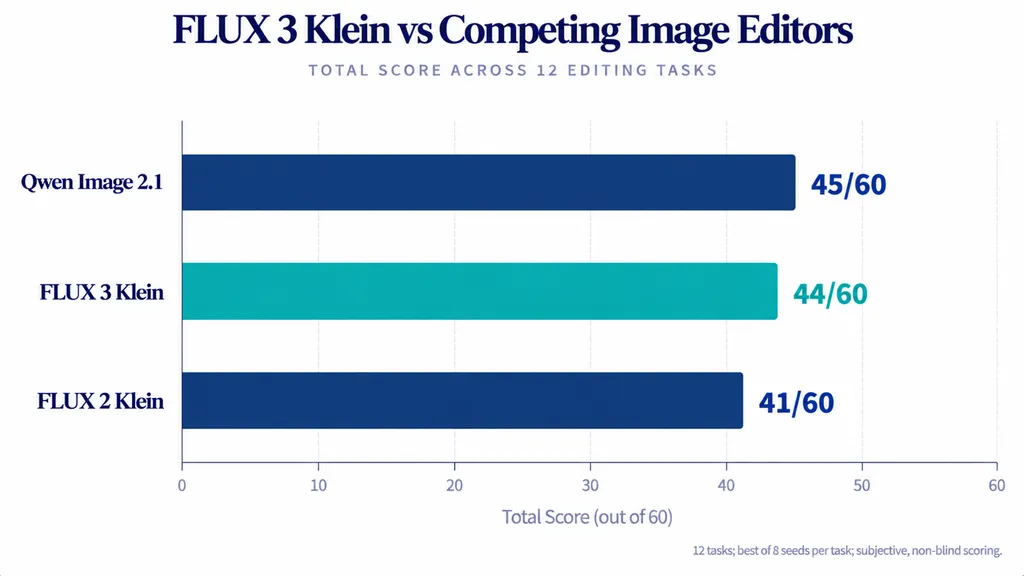
A documented 12-task image-editing comparison evaluated FLUX 3 Klein alongside competing models. Each task involved eight generated seeds, with the best output selected for subjective assessment.
Model | Reported editing score |
Qwen Image 2.1 | 45/60 |
FLUX 3 Klein | 44/60 |
FLUX 2 Klein | 41/60 |
FLUX 3 Klein scored one point below Qwen Image 2.1 in this particular comparison. However, the non-blind, best-seed evaluation cannot establish universal success rates or overall model superiority.
The practical lesson is to evaluate models against the specific editing task rather than relying exclusively on a single overall score.
Prompt 6 — Replace One Object Without Changing the Background
"Replace the white ceramic coffee cup with a transparent glass cup containing black coffee. Maintain its original position and approximate scale. Preserve the wooden table, surrounding objects, background, camera perspective, shadows, and lighting. Do not modify unrelated areas."
Production check: Compare background textures, object boundaries, shadows, and reflections.
An apparently correct replacement can still damage approved visual elements outside the target region. Background preservation should be evaluated separately from object replacement accuracy.
For commercial product imagery, a useful acceptance check is to compare the original and revised images at the same scale, paying particular attention to areas that were not supposed to change.
Prompt 7 — Change Clothes Without Changing Body Shape
"Replace the subject's red sweater with a tailored navy blazer. Preserve facial identity, hairstyle, shoulder width, body proportions, original pose, hands, lighting, and background. Keep the blazer naturally fitted to the existing body."
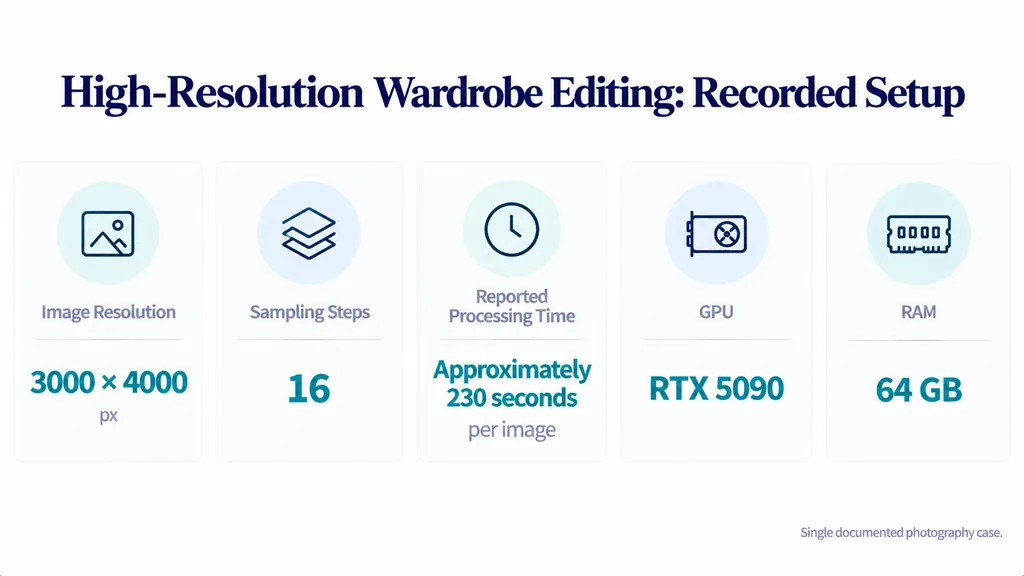
A documented high-resolution photography case provides useful operating conditions:
Test condition | Reported result |
GPU | RTX 5090 |
RAM | 64 GB |
Resolution | 3000 × 4000 |
Sampling steps | 16 |
Processing time | Approximately 230 seconds/image |
Body-shape preservation | 3 of 4 attempts |
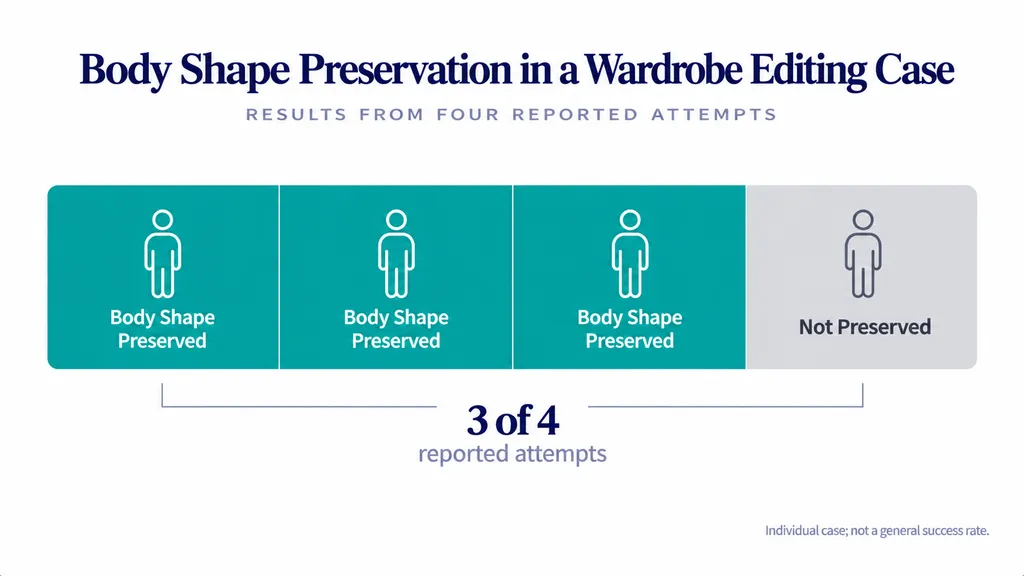
This individual case illustrates the potential for high-resolution wardrobe editing, but 3 of 4 attempts is not a general success rate. Runtime also depends on hardware, resolution, and workflow configuration.
For wardrobe edits, assess three elements independently: clothing accuracy, facial identity, and body proportions. A successful clothing replacement should not be considered complete if the subject's recognizable appearance has changed.
Prompt 8 — Change Product Color While Preserving Lighting
"Change the product packaging from matte white to deep forest green. Preserve packaging dimensions, label placement, camera angle, background, shadows, and composition. Adjust only the packaging color and physically necessary reflections."
Changing a material may legitimately affect reflections. The objective is to preserve the original scene while allowing physically consistent changes to the edited object.
This distinction is especially important when preparing multiple color variants of an existing product photograph.
FLUX 3 Character Consistency Prompts: Faces, Poses, and Anatomy
Character consistency involves facial identity, body proportions, hairstyle, distinctive features, and plausible anatomy.
Our review of documented editing cases highlights an important distinction: successful clothing replacement does not guarantee successful face replacement or pose transformation. These tasks require different levels of image reconstruction.
Prompt 9 — Preserve Facial Identity
"Use the supplied portrait as the identity reference. Show the same person seated in a cafe under warm afternoon lighting. Preserve facial structure, eye shape, nose, mouth, hairstyle, natural skin texture, and recognizable proportions. Avoid facial redesign and excessive beauty retouching."
Acceptance check: Compare the eyes, jawline, nose, hairline, and proportions at similar viewing scales.
A character may retain the same clothing and hairstyle while developing different facial features. Therefore, visual similarity is not equivalent to reliable identity preservation.
Prompt 10 — Change Character Pose
"Change the subject from standing to sitting naturally in the existing chair. Preserve identity, hairstyle, clothing design, body proportions, and background. Maintain natural limb connections, hand placement, body balance, and perspective."
Pose changes require more extensive reconstruction than simple color adjustments.
If anatomy becomes distorted, simplify the requested pose, improve the reference image, or divide the transformation into smaller edits.
Additional prompt length alone cannot guarantee anatomical accuracy. Complex hands, limb positions, and occluded body regions still require visual inspection.
How to Use Reference Images and Bounding Boxes in FLUX 3
Reference images help define product identity, characters, environments, and visual style. Each supplied image should have a clear purpose.
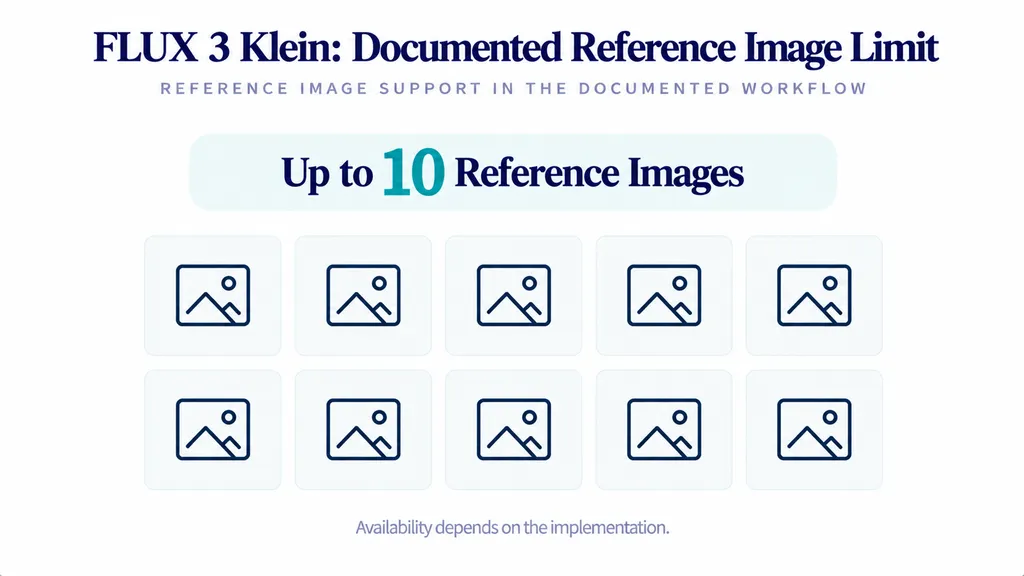
Documented FLUX 3 Klein workflows support up to 10 reference images, although available controls and limits depend on the implementation.
Prompt 11 — Multi-Reference Product Composition
"Use the first reference image as the product identity source and the second as the environment reference. Place the original product on the marble pedestal. Preserve product shape, proportions, material appearance, and label design. Adapt lighting and reflections naturally to the new environment."
A documented supplier demonstration covered 12 editing tasks, including reference-guided transformations and product mockups.
These examples illustrate workflow possibilities rather than independently established reliability rates.
For multi-reference scenes, assign one clear responsibility to each image. Product references should define the product, while environment references should guide background and scene composition.
How to Control Editing Regions
Bounding boxes provide spatial guidance for placing or modifying objects. The documented layout format uses coordinates on a 0–1000 grid.
A practical editing sequence is:
- Assign a role to each reference image.
- Identify the object or region to modify.
- Specify the exact visual change.
- Define which surrounding details must remain.
- Inspect the output for unintended modifications.
Bounding boxes are not hard pixel masks. They guide object placement and edits but cannot guarantee that every surrounding pixel remains unchanged.
For a visual editing alternative, Virse allows users to select detected object layers or manually define regions, attach editing instructions, and generate revised images while retaining the original canvas node.
This makes it easier to organize localized changes and compare creative revisions without treating every edit as an entirely new composition.
FLUX 3 Typography and Photo Restoration Prompts
Typography and restoration require different quality standards. Text editing prioritizes exact wording and layout, while restoration prioritizes fidelity to the original photograph.
Prompt 12 — Replace Poster Text
"Replace the existing poster headline with the exact text 'NEW COLLECTION'. Maintain its original placement, approximate font weight, size, alignment, visual hierarchy, and color. Preserve product images, decorative elements, and background details."
Typography check: Inspect capitalization, spelling, letter spacing, alignment, and unchanged text.
Successful text replacement does not guarantee that every font, language, or complex layout will render accurately.
For brand-critical materials, final typography may still require manual verification or conventional design editing.
How to Restore Photos Without Changing Identity
For restoration, use a preservation-focused instruction:
"Repair visible scratches and paper stains while preserving facial identity, original composition, photographic grain, and historical appearance. Avoid inventing facial details, excessive smoothing, or unnecessary color changes."
Reported high-resolution processing concerns include color drift and noise.
Compare the restored output against the original before approving the image. No universal prompt-only solution for these problems has been established.
FLUX 3 ComfyUI Settings: Base, Distilled, and Prompt Upsampler
Poor FLUX 3 results may originate from workflow configuration rather than prompt wording.
On October 18, 2026, the ComfyUI team explained that some launch-day examples contained suboptimal defaults. Updated workflows in ComfyUI v0.41.3 corrected settings and added prompt upsampling where it had been missing.
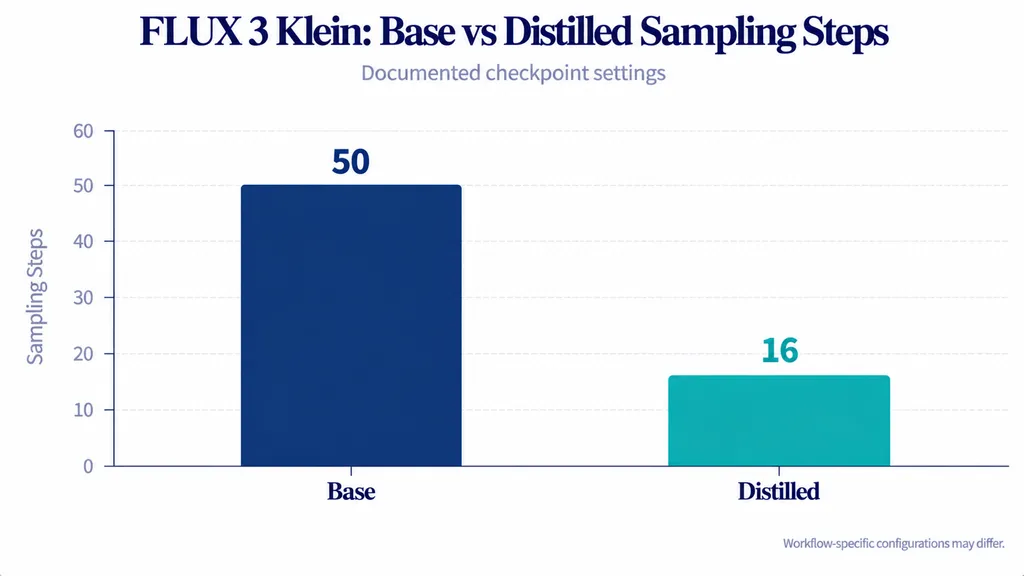
FLUX 3 Base vs Distilled Settings
Configuration | Base | Distilled |
Recommended steps | 50 | 16 |
Checkpoint guidance | CFG 3.5 | CFG 1 |
Primary purpose | Research and fine-tuning | Faster inference |
Prompt upsampling | Recommended | Recommended |
Specific editing templates may configure guidance differently from checkpoint defaults.
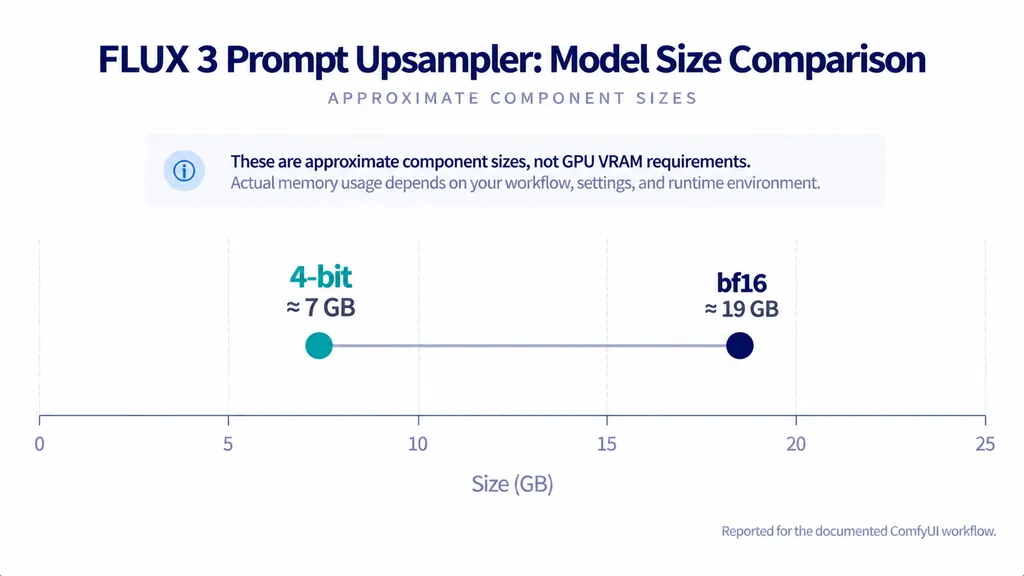
The revised workflows also documented:
Upsampler format | Approximate size |
4-bit | 7 GB |
bf16 | 19 GB |
The ComfyUI team's tests reported negligible quality differences between these upsampler variants.
These figures describe the relevant model components, not universal GPU memory requirements.
How to Fix Poor FLUX 3 ComfyUI Results
- Confirm the checkpoint: Identify whether the workflow uses Base or Distilled.
- Update the workflow: Use a compatible ComfyUI template.
- Check the upsampler: Verify that prompt upsampling is enabled.
- Control test conditions: Keep input images and available settings consistent.
- Evaluate separately: Review identity, background preservation, typography, and processing time.
This diagnostic process prevents unnecessary prompt rewrites when the underlying problem is configuration.
For production workflows, record the model version, step count, source image, prompt, and relevant settings so that results can be compared meaningfully.
Common FLUX 3 Prompt Problems and Practical Fixes
Problem | What to inspect | Practical fix |
Background changes | Editing scope | Define protected regions |
Face drift | Identity reference | Specify facial attributes |
Body distortion | Pose reconstruction | Preserve proportions |
Incorrect anatomy | Complex transformations | Simplify the pose |
Text errors | Character rendering | Quote and proofread text |
Generic results | Scene description | Use prompt upsampling |
Color drift | Editing or upscaling | Compare with source |
Weak ComfyUI results | Workflow settings | Verify checkpoint and template |
For commercial image production, evaluate target accuracy, preservation quality, and visual usability independently.
A visually attractive output may still fail if it modifies approved brand elements or introduces unexpected changes.
The strongest editing workflow is not the one that produces the most dramatic transformation, but the one that completes the requested task while preserving everything that matters.
FAQs
How do I write better FLUX 3 prompts?
Describe the subject, intended result, composition, lighting, and materials. For editing, specify one clear change and identify which faces, objects, backgrounds, and visual properties must remain unchanged. Use prompt upsampling where supported and review both the modified area and surrounding image. Clear change instructions and preservation constraints are the foundation of effective editing prompts.
Why does FLUX 3 change faces or backgrounds?
Image editing may reconstruct details beyond the intended target. Explicit preservation instructions, suitable reference images, and region controls can reduce ambiguity. Complex pose changes and reflective materials may still introduce unexpected modifications requiring another editing pass. Identity and background preservation should always be checked separately from the intended edit.
Should I enable the FLUX 3 prompt upsampler?
Yes, for the documented FLUX 3 Klein workflows. Prompt upsampling converts brief instructions into detailed scene captions. Updated ComfyUI templates corrected earlier configurations where it was missing. It improves prompt preparation but cannot guarantee perfect preservation or eliminate every editing error. Confirm that the upsampler matches the selected model and workflow.
Can FLUX 3 edit text and use multiple references?
FLUX 3 Klein supports text-editing and reference-guided workflows. Quote exact replacement wording and give each reference image a defined role. Available controls depend on the interface. Always inspect typography, product identity, composition, and unintended changes before approving the result. Multiple references improve the clarity of instructions but do not guarantee exact preservation.
Conclusion
Effective FLUX 3 Image prompting combines precise visual direction, explicit preservation constraints, and correctly configured workflows. Generation prompts should describe coherent scenes, while editing prompts must separate requested changes from protected elements. Documented benchmarks demonstrate FLUX 3 Klein's potential, but facial consistency, typography, anatomy, and background preservation still require verification. Prompt upsampling, appropriate ComfyUI settings, and clearly assigned reference images provide a more dependable foundation for iteration. For commercial design teams, the goal is not simply an attractive image but an accurate revision that respects the original creative intent. Virse's canvas-based editing workflow provides a practical way to organize object-level changes, reference images, and successive visual revisions.