
Como criar mockups de produto com IA sem alterar o produto
Vincent13 min de leitura ·
Para criar mockups de produto com IA sem alterar o produto, comece com uma imagem real, use-a como referência visual e deixe a IA mudar a cena, não o produto. O objetivo é preservar logotipos, textos, cores, forma, materiais, escala e outros detalhes que definem o SKU ao gerar novos fundos, iluminação, composições e variações de campanha.
O maior problema é que fotorrealismo nem sempre significa fidelidade ao produto. A IA pode distorcer logotipos, reescrever textos de embalagens, desviar cores, mudar proporções ou transformar um SKU em outro. Esses erros ficam mais difíceis de controlar ao passar de um mockup para dezenas de imagens de ecommerce, POD, redes sociais e criativos de anúncios.
O fluxo mais confiável é referência real do produto → geração de cena com IA → controle de fidelidade do produto → correção local → recurso aprovado. Em vez de gerar toda a imagem novamente, preserve o que funciona e corrija apenas as áreas erradas. Para fluxos maiores, Virse mantém referências, contexto da marca, direção visual, agentes de IA e revisões conectados em uma tela infinita, ajudando a ampliar os mockups com IA sem perder precisão do produto e controle criativo.

O que é um mockup de produto com IA?
Um mockup de produto com IA é uma visualização gerada ou editada por IA que insere um produto em um novo contexto comercial, preservando-o com a maior precisão possível.
Diferentemente de um mockup PSD fixo, a IA pode gerar novos ambientes, superfícies, modelos, iluminação, enquadramentos e direções de campanha ao redor de um produto existente.
Mockups de produto com IA versus mockups tradicionais
Mockups tradicionais são mais previsíveis. Um objeto inteligente pode mudar a arte sem alterar a roupa ou a embalagem.
A IA oferece maior variedade visual, mas pode reinterpretar o próprio produto. O formato de uma garrafa pode mudar, a gola de uma camisa se alterar ou um rótulo ficar ilegível.
Mockups tradicionais são melhores para repetibilidade. Mockups com IA são melhores para exploração criativa e variação.
Mockups de produto com IA versus fotografia de produto com IA
Fotografia de produto com IA é o fluxo mais amplo de criar imagens comerciais com ferramentas generativas. Um mockup com IA é um dos resultados possíveis.
Na prática, muitos fluxos confiáveis combinam recursos gerados e reais:
Foto real do produto → ambiente com IA → verificação do produto → edição local → imagem de campanha
Essa abordagem híbrida é especialmente útil quando o ambiente pode mudar, mas o produto não.
Para que os mockups de produto com IA são mais indicados?
A IA funciona melhor quando o produto já existe e a equipe precisa de mais formas de apresentá-lo.
Imagens de uso cotidiano e de campanha
Uma única foto de produto pode ser explorada em banheiros, cozinhas, escritórios, ambientes externos, interiores luxuosos, campanhas sazonais e composições editoriais.
Para equipes de design, isso torna a IA útil no desenvolvimento de conceitos, pois várias opções de iluminação, enquadramento, cor, modelo e direção de arte podem ser comparadas antes de assumir uma produção física.
Variações para redes sociais e anúncios
Equipes de redes sociais e mídia paga costumam precisar de muito mais variações do que uma página de produto.
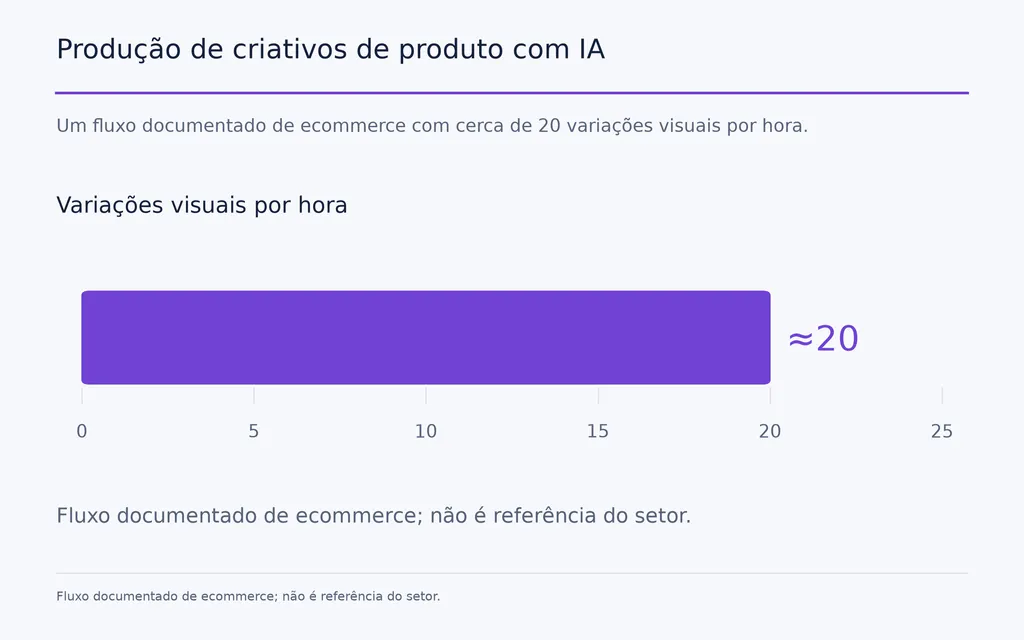
Um fluxo documentado de ecommerce em nossa pesquisa relatou aproximadamente 20 variações visuais por hora após cerca de seis meses de uso do Midjourney e Runway. O mesmo fluxo ainda preferia fotografia real para as imagens principais das páginas de produto.
Essa distinção importa: a IA pode ampliar muito o acervo criativo sem substituir a fotografia principal do produto.
Como criar mockups de produto com IA em 7 etapas
O melhor fluxo de mockups com IA separa o que deve permanecer fixo do que a IA pode mudar.
Forma, logotipo, rótulo, cor aprovada, material e proporções principais do produto devem permanecer fixos. Fundo, superfície, iluminação, enquadramento, adereços e atmosfera da campanha podem mudar.
Etapa 1: comece com uma imagem precisa do produto
Use o recurso de produto mais claro e de maior resolução disponível.
Ele deve preservar claramente:
- geometria do produto
- cor real
- identidade da marca
- material
- detalhes da embalagem
- proporções reconhecíveis
Uma foto simples de produto costuma fornecer ao modelo informações menos ambíguas do que uma foto complexa de uso cotidiano.
Etapa 2: use o produto como referência visual
Para um SKU real, uma imagem de referência costuma valer mais do que uma descrição textual mais longa.
Um prompt pode descrever um pingente dourado, mas não transmitir com segurança a geometria exata, espessura da corrente, acabamento, fecho ou proporções de um produto específico.
Se o produto já existe, mostre-o ao modelo em vez de pedir que o reconstrua a partir de palavras.
Etapa 3: defina a cena, não o produto
Direcione a IA para o que deve mudar:
- ambiente
- material da superfície
- direção da luz
- enquadramento da câmera
- modelo
- fundo
- atmosfera
- canal de marketing
Do ponto de vista do design de produto com IA, isso separa com mais clareza a identidade do produto da apresentação criativa.
Etapa 4: gere vários candidatos
A IA é mais útil como sistema de geração de candidatos do que como sistema de finalização em um clique.
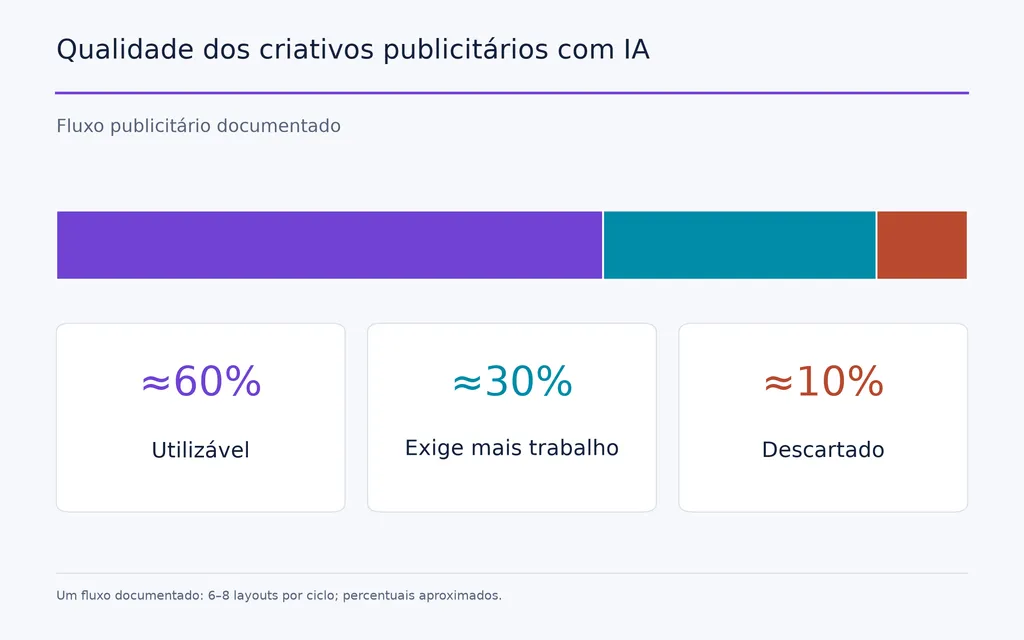
Um fluxo publicitário de nossa pesquisa gerava 6–8 layouts por ciclo. Aproximadamente 60% eram considerados utilizáveis, 30% precisavam de mais trabalho e 10% eram descartados.
A lição prática é gerar muitas opções, selecionar rigorosamente e dedicar tempo de edição somente às composições mais fortes.
Etapa 5: faça o controle de fidelidade ao produto
Compare cada mockup selecionado diretamente com o produto real.
Confira:
- silhueta
- logotipo
- texto da embalagem
- cor
- escala
- material
- posicionamento da estampa
- ferragens
- sombras
- reflexos
Fotorrealismo não é o mesmo que precisão do produto.
Etapa 6: repare os erros locais
Se 90% da imagem funciona, preserve essa parte e corrija os 10% que falharam.
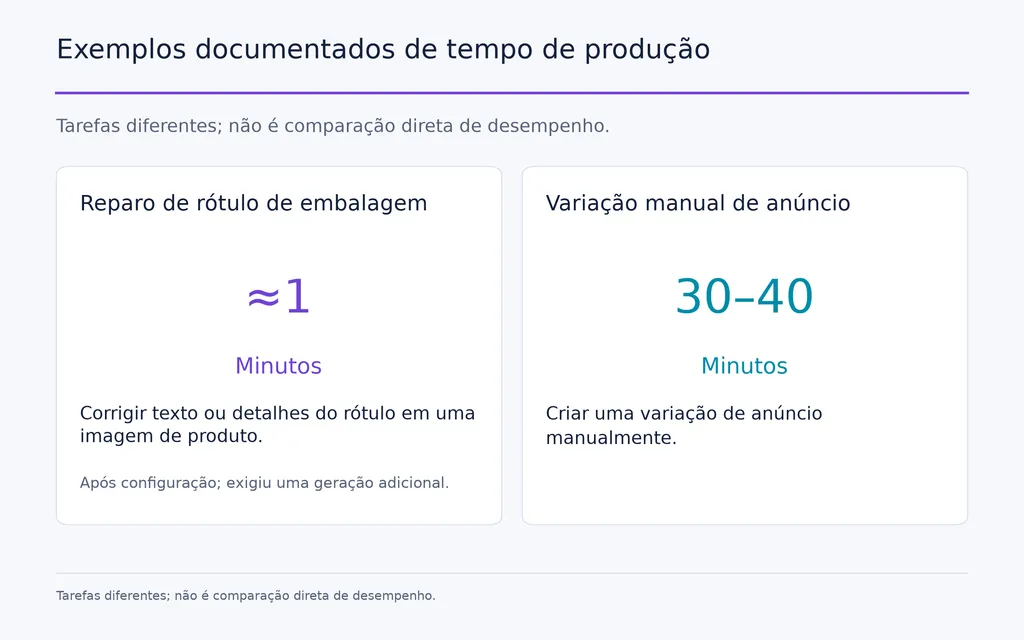
Um fluxo de embalagem pesquisado isolou um rótulo incorreto, associou essa região a uma referência precisa, corrigiu-a separadamente e a recolocou na composição aprovada.
Após a padronização, o profissional estimou a correção final em cerca de um minuto, embora exigisse uma geração adicional.
Etapa 7: exporte para o canal final
Uma imagem principal de página de produto, anúncio do Instagram, miniatura do Etsy, imagem de galeria de marketplace e criativo social vertical precisam de recortes e hierarquias visuais diferentes.
Portanto, a métrica de produção mais útil é o tempo até o recurso aprovado, não o tempo até a primeira geração.
Por que mockups com IA alteram logotipos, textos, cores e escala?
Modelos generativos podem reconstruir detalhes visíveis em vez de tratar o produto como um recurso de design imutável.
Erros em logotipos e textos de embalagens
Textos pequenos e elementos de marca contêm informação visual densa. Durante a regeneração, letras podem ser distorcidas, substituídas ou reorganizadas.
Para produtos com embalagens detalhadas, preserve a identidade original sempre que possível ou repare localmente a área afetada após a geração.
Erros de escala e proporção do produto
Medidas exatas em um prompt não garantem precisão visual.
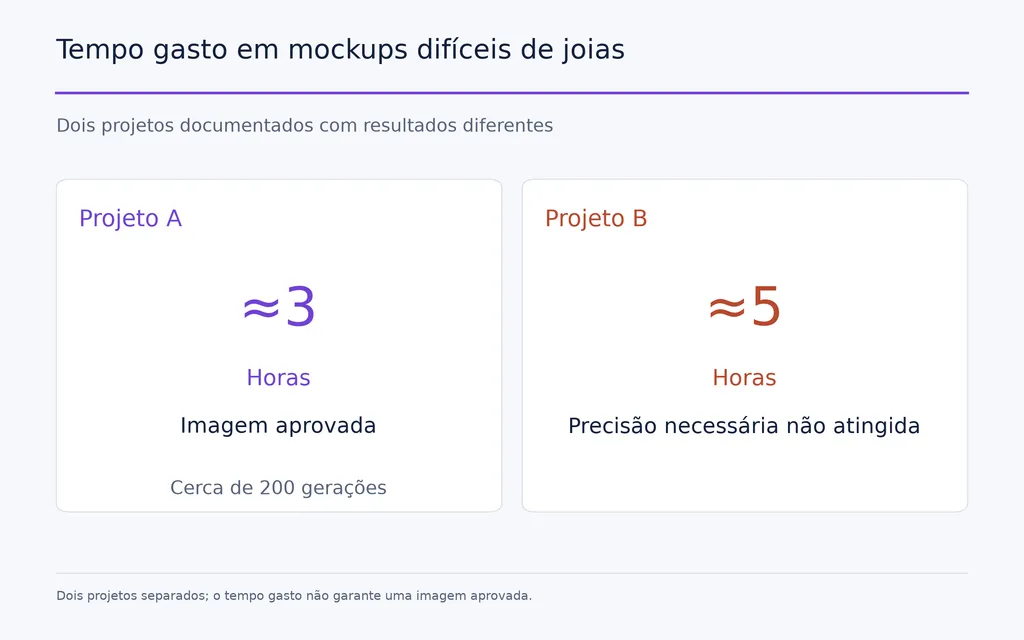
Um caso de joalheria pesquisado envolvia um pingente de cerca de 2 cm em uma corrente de 50–80 cm. Mesmo com as dimensões fornecidas, a escala continuava difícil de controlar.
Uma imagem bem-sucedida teria exigido aproximadamente três horas e cerca de 200 gerações. Outro projeto consumiu cerca de cinco horas antes de o fluxo ser considerado incapaz de atingir a precisão necessária.
Isso revela uma realidade importante da produção: a geração pode ser rápida enquanto a validação continua cara.
Desvio de cor do produto
A IA pode reinterpretar a cor pela iluminação da cena, reflexos, cores ao redor e propriedades presumidas do material.
Para produtos sensíveis às diferenças de SKU, compare o resultado com uma referência de cor aprovada, em vez de julgar apenas seu apelo visual.
Quando IA com Photoshop é melhor do que somente IA?
Um fluxo híbrido costuma ser a melhor opção quando a precisão do produto é inegociável.
Fundo com IA e produto real
Um processo confiável é:
Gerar ambiente → preservar produto real → ajustar perspectiva → reconstruir sombra → ajustar luz → tratar cores → controlar qualidade
Isso funciona especialmente bem para embalagens, vidro, joias, relógios, eletrônicos e produtos reflexivos.
Fotografe um produto real para combinar com uma cena de IA
Outro fluxo profissional começa com a direção de arte com IA.
Primeiro é gerada a cena desejada. Depois, o produto real é fotografado no ângulo e na direção de luz necessários, antes de ser integrado ao ambiente.
Assim, a IA acelera a exploração criativa e preserva o SKU real.
Quando a fotografia real ainda importa
Para a imagem principal de uma página, uma embalagem, joia ou item caro, um pequeno erro visual pode afetar diretamente as expectativas do cliente.
Uma regra útil para decidir:
Uso | Fluxo mais adequado |
Criativo social | IA ou híbrido |
Anúncios pagos | IA ou híbrido |
Campanhas sazonais | IA |
Teste de conceito | IA |
Imagem principal da página de produto | Real ou híbrido de alta fidelidade |
Embalagem | Híbrido |
Joias | Real ou híbrido com controle rigoroso |
Produtos reflexivos | Híbrido |
Catálogo POD grande | Fluxo automatizado de mockups |
Use IA onde a variedade visual cria valor. Use recursos reais do produto onde a representação exata cria confiança.
Como ampliar os mockups de produto com IA para POD e ecommerce?
Em pequena escala, o problema é gerar imagens. Em escala maior, o problema passa a ser operações criativas.
Um fluxo POD rapidamente se expande para:
Design × Produto × Cor × Tamanho × Mockup × Anúncio
Por que operações em lote importam
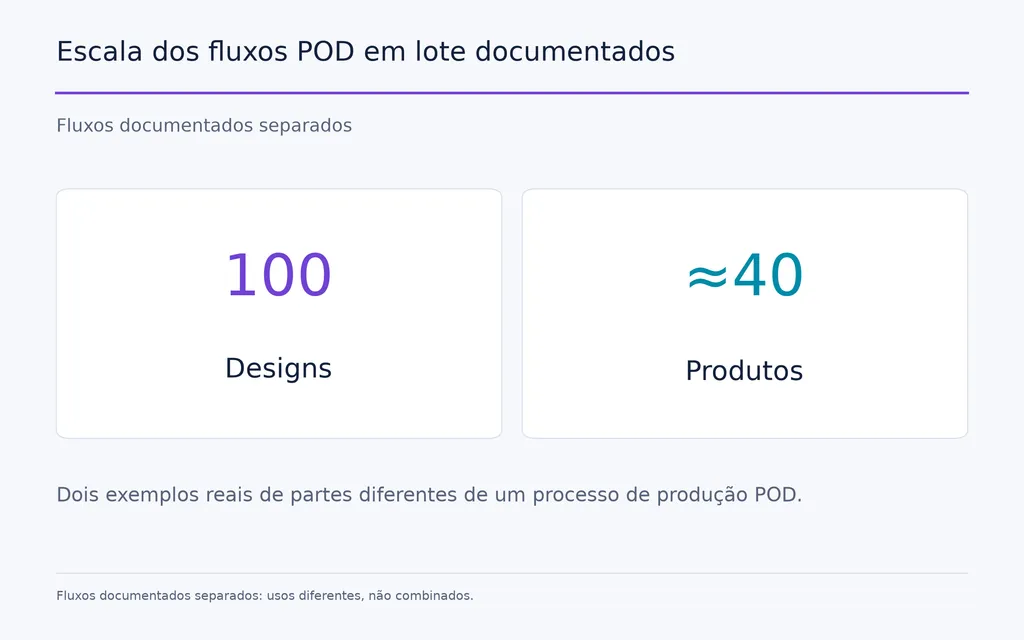
Nossa pesquisa inclui um fluxo com 100 designs e outro abrangendo aproximadamente 40 produtos.
Um anúncio com 4 produtos × 10 cores × 8 tamanhos já cria 320 combinações de SKU.
Nessa escala, criar manualmente mockups individuais deixa de ser o principal desafio de design. O desafio é organizar recursos, variantes, preços, anúncios e publicação.
O que deve ser automatizado?
Um sistema escalável deve ajudar a gerenciar:
- templates reutilizáveis de produto
- posicionamento do design
- variantes de cor
- geração de mockups
- nomes
- preços
- tamanhos
- informações de atendimento e envio dos pedidos
- conteúdo dos anúncios
- publicação
- controle de qualidade final
Por isso, plataformas POD como MyDesigns são melhor avaliadas como sistemas de fluxo de trabalho, não apenas geradores de imagens.
Equipes técnicas também podem construir seus próprios pipelines com objetos inteligentes do Photoshop, scripts em lote e APIs. O SaaS reduz configuração e manutenção, enquanto sistemas próprios oferecem mais controle.
Para equipes criativas profissionais, ferramentas como Virse ampliam essa ideia além da automação do catálogo ao manter referências, resultados, direção visual, vários agentes e contexto acumulado do projeto no mesmo espaço de trabalho de design.
Quanto tempo e dinheiro os mockups de produto com IA podem economizar?
A IA pode reduzir o custo marginal de produzir variações adicionais, mas não existe um percentual universal confiável de economia.
Caso | Resultado relatado | Significado prático |
Criativo de ecommerce | Cerca de 20 variações/hora | Útil para expansão criativa |
Variação manual de anúncio | 30–40 minutos cada | Ampliar manualmente custa caro |
Geração de anúncio com IA | 6–8 layouts, cerca de 60% utilizáveis | Geração eficiente de candidatos |
Reparo de embalagem | Cerca de 1 minuto após configuração | O reparo local pode ser eficiente |
Imagem difícil de joia | Cerca de 3 horas e 200 gerações | A fidelidade pode anular o ganho de velocidade |
Fluxo POD em lote | 100 designs | A automação importa em escala |
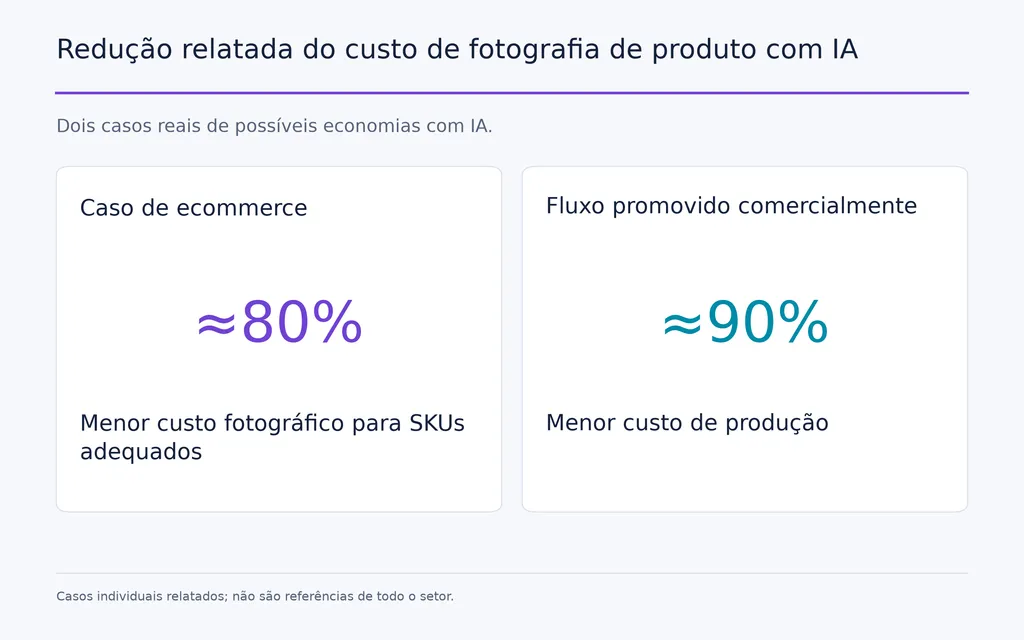
Um caso de ecommerce estimou aproximadamente 80% menos custos fotográficos para SKUs adequados. Um fluxo promovido comercialmente alegou cerca de 90% menos custo de produção, mas nossa análise não trata nenhum desses números como referência de todo o setor.
A conclusão mais sólida é que a IA reduz o custo de criar mais opções, mas controle de qualidade, correções e julgamento humano continuam fazendo parte da produção.
Mockups de produto com IA aumentam a conversão?
Não há evidências controladas suficientes para afirmar que mockups com IA aumentam a CVR em um percentual previsível.
Nossa pesquisa encontrou evidências mais fortes de:
- produção mais rápida
- menor custo por variação
- mais opções criativas
- maior capacidade em lote
Não encontrou evidências igualmente fortes de aumento consistente da conversão entre produtos ou lojas.
Equipes de ecommerce devem testar os criativos de IA contra os recursos atuais com CTR, engajamento na página de produto, taxa de adição ao carrinho, CVR, ROAS e comportamento de devoluções.
Um mockup só é comercialmente útil quando é, ao mesmo tempo, eficiente de produzir e preciso o suficiente para sustentar a confiança do cliente.
Quais são os erros mais comuns em mockups de produto com IA?
Usar apenas prompts de texto para um SKU específico
Se existe uma imagem precisa do produto, use-a. Reconstruir um SKU real com prompts de texto introduz incerteza desnecessária.
Publicar sem controle de qualidade do produto
Inspecione cada imagem aprovada em resolução completa. Pequenos erros de logotipos, rótulos, costuras, ferragens, posição de impressão ou geometria são fáceis de ignorar em uma miniatura.
Criar cenas genéricas com IA
Fotorrealista não significa distinto.
Bons mockups precisam de um sistema visual consistente que cubra iluminação, enquadramento, cor, materiais, direção de modelos e composição, em vez de depender de fundos luxuosos genéricos.
Ignorar a peça-base POD exata
Uma camisa genérica pode representar incorretamente o decote, caimento, comprimento das mangas, gramatura do tecido ou posição da estampa. O mockup deve continuar próximo do produto real que o cliente recebe.
Tratar vídeo com IA como um mockup em movimento
O vídeo acrescenta alterações ao longo do tempo, controle de movimento, interação humana e continuidade de cena. Para trabalho comercial, gere planos curtos e controlados, valide cada um e monte-os na edição.
Perguntas frequentes
A IA pode criar mockups de produto precisos?
Sim. A precisão é maior quando o produto real serve de referência e a IA muda principalmente o ambiente. Produtos com rótulos detalhados, logotipos, cores exatas, proporções de joias, materiais transparentes ou superfícies reflexivas normalmente exigem controle adicional ou edição híbrida.
Como impedir a IA de alterar meu logotipo ou texto?
Mantenha o logotipo ou rótulo original como referência correta. Se a IA o modificar, preserve a composição aprovada e repare apenas a região afetada com máscara, edição local ou Photoshop. Isso costuma ser mais confiável do que gerar toda a imagem novamente.
A IA pode substituir a fotografia de produto?
A IA pode substituir algumas tarefas, principalmente exploração de conceitos, criativos sociais, anúncios e variações de uso cotidiano. A fotografia real ou produção híbrida continuam valiosas para imagens principais de páginas, embalagens, joias, produtos reflexivos e qualquer SKU cuja representação exata afete as expectativas do cliente.
Qual é o melhor fluxo de IA para mockups POD?
Para POD, priorize produção em lote em vez de uma imagem por vez. Use templates reutilizáveis, automatize posicionamento e variantes de cor, conecte mockups aos dados de SKU e anúncios e acrescente controle final. Quando o catálogo chega a dezenas ou centenas de designs, a automação do fluxo costuma importar mais do que a velocidade de gerar uma única imagem.
Conclusão
A melhor forma de criar mockups de produto com IA é manter o produto real como referência visual correta e usar IA para transformar tudo ao redor. Comece com uma referência precisa, gere várias cenas candidatas, confira a fidelidade de cada selecionada, repare erros locais e só automatize quando o padrão de qualidade estiver estável. Nossa pesquisa mostra por que isso importa: um fluxo de ecommerce pode produzir cerca de 20 variações por hora, enquanto uma imagem difícil de joia pode exigir aproximadamente 200 gerações. Mockups com IA criam mais valor quando ajudam designers a explorar mais ideias, produzir mais variações e ampliar a produção criativa sem sacrificar a precisão do produto, a consistência da marca ou o controle do design.
Mais do blogue da Virse
Fluxo de trabalho
FLUX 3 Image Prompt Guide: 12 Prompts & Editing Fixes
22 de outubro de 2026 by Vincent
Fluxo de trabalho
How to Use FLUX 3 Image: Edit Photos Without Unwanted Changes
21 de outubro de 2026 by Vincent
Fluxo de trabalho
Wan 3.0 Prompt Guide: Fix Wrong Motion, Character Drift, and Ignored Instructions
20 de outubro de 2026 by Yifan Zhao