GPT Image 2.5 Flare vs Sunburst: Is Sunburst Actually Better?

Vincent9 分钟阅读 ·

GPT Image 2.5 Flare vs Sunburst: Is Sunburst Actually Better?

Is Sunburst actually better than Flare? Not for every task. GPT Image 2.5 Flare is the better default for most workflows, while Sunburst is stronger for precision-heavy generation, complex references, identity consistency, and difficult edits. Since both use the same published API token rates, the real difference comes down to speed, rerolls, editing stability, and cost per approved asset.

The problem is that image generation rarely ends with one result. Teams need to test concepts, preserve approved details, maintain consistency, and make repeated edits. Using Sunburst everywhere can slow production, while pushing Flare beyond its limits can increase rerolls, rejected outputs, and rework.

The most efficient strategy is Flare → Quality Gate → Sunburst when needed. Start with Flare for fast exploration, keep outputs that already meet the brief, and upgrade only when precision becomes the bottleneck. Virse supports this AI design workflow with an infinite canvas, shared project context, multi-Agent collaboration, and long-term memory, helping teams manage references and iterations more consistently.

ChatGPT Images 2.5

GPT Image 2.5 Flare vs Sunburst: What Is the Real Difference?

OpenAI positions Flare as the default choice for most applications, with an emphasis on lower latency, high-quality everyday generation, rapid prototyping, creator content, product experiences, and high-volume workflows.

Sunburst is positioned for higher-precision image generation and editing, especially when tighter control across edits, polished product imagery, or more demanding visual constraints justify longer generation time.

Flare Is a Production Model, Not Just a Draft Model

A common mistake is treating Flare as a temporary preview model.

Our review of reported production workflows suggests that Flare can already be the final model when an output passes the required quality threshold. This matters for social creative, UI exploration, ecommerce variations, and campaign concepts, where iteration speed often creates more value than maximizing fidelity on every request.

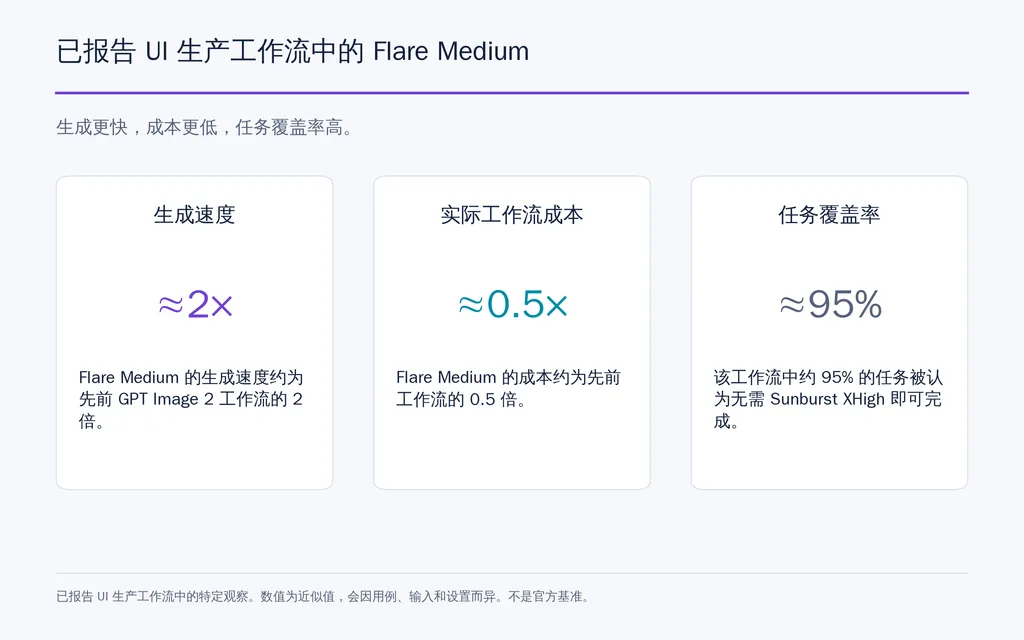
One UI workflow moved its main generation process to Flare Medium, reporting about 2× faster generation and roughly half the practical workflow cost compared with its previous GPT Image 2 setup. In the same workflow, around 95% of tasks were considered achievable without moving to Sunburst XHigh.

These figures are not universal benchmarks, but they show why higher capability does not automatically mean better production efficiency.

Sunburst Works Best as a Precision Escalation

Sunburst becomes more valuable when small errors create expensive downstream work.

Typical escalation cases include identity-sensitive edits, dense text, difficult product materials, fine fabric detail, complex lighting, multiple references, and high-value campaign assets.

Workflow

Start With

Upgrade When

Rapid ideation

Flare

Usually unnecessary

UI concepts

Flare

Precision becomes limiting

Product imagery

Flare

Fine detail or editing fails

Character workflows

Flare

Identity consistency fails

Campaign assets

Flare

Final precision requires it

GPT Image 2.5 Flare vs Sunburst Pricing: What Does One Image Really Cost?

Flare and Sunburst currently use the same GPT Image 2.5 pricing token rates.

Token Type

Flare

Sunburst

Text input / 1M

$5

$5

Cached text input / 1M

$1.25

$1.25

Image input / 1M

$8

$8

Cached image input / 1M

$2

$2

Image output / 1M

$30

$30

The important distinction is:

Same unit price does not mean the same workflow cost.

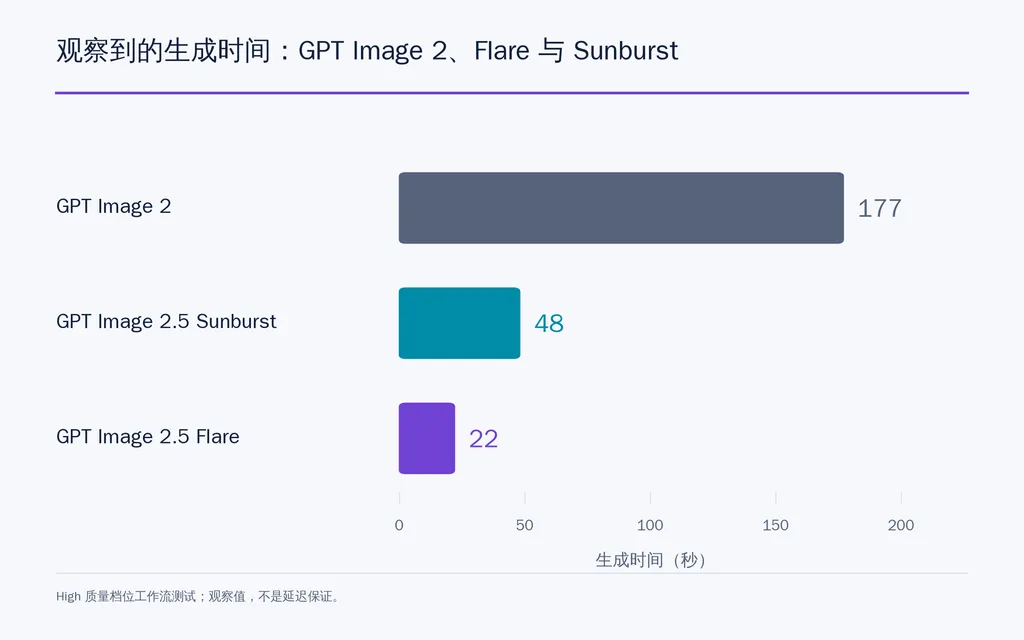
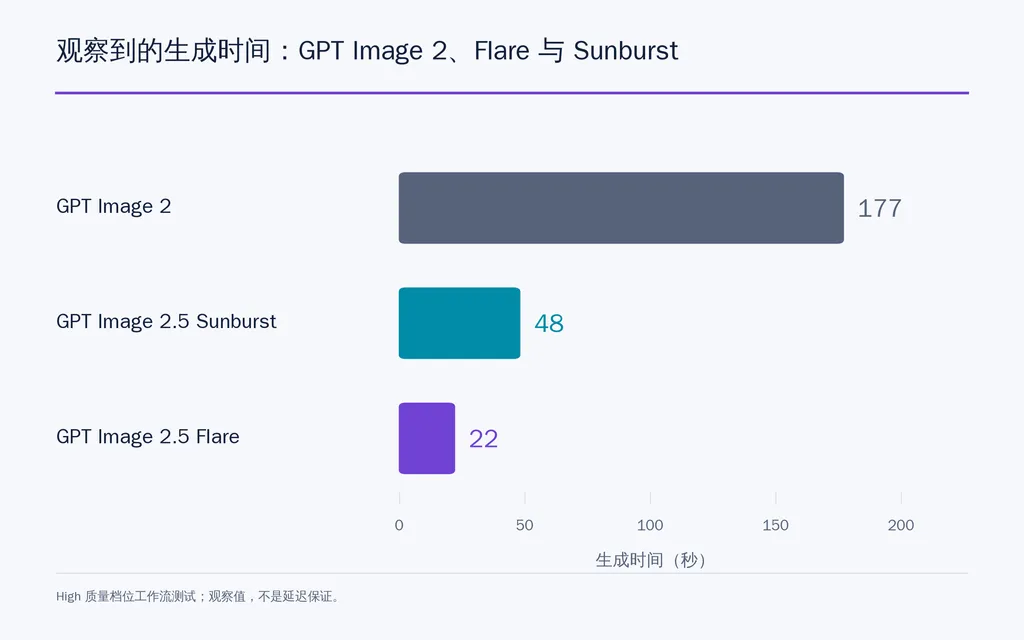
Horizontal bar chart showing observed generation times of 177 seconds for GPT Image 2, 22 seconds for Flare, and 48 seconds for Sunburst in a High-quality workflow test.

Why Real Image Cost Can Still Differ

Total production cost also includes reference inputs, quality settings, rerolls, failed edits, rejected images, and additional generation rounds.

Our research review found one high-volume Sunburst workflow where approximately $7 generated 150 images, equal to about $0.0467 per image under that specific setup. Another reported workflow recorded a Sunburst request at approximately $0.049.

These are workflow examples, not fixed API prices.

For professional teams, the better metric is:

Cost per approved asset = total workflow cost divided by accepted outputs.

A request that looks cheap can become expensive if it requires three rerolls.

Does Quality Setting Matter as Much as Flare vs Sunburst?

Yes. Both models support low, medium, high, xhigh, max, and auto quality levels.

That means a fair Flare vs Sunburst benchmark should hold quality constant. Comparing Flare Medium with Sunburst High and attributing the entire difference to the GPT Image 2.5 model can produce misleading conclusions.

In practice, model choice and quality level should be treated as separate variables.

Flare vs Sunburst Speed: Which Model Is Faster in Real Workflows?

Flare is designed around lower latency, while Sunburst trades additional generation time for tighter precision.

In one reported High-quality comparison:

Model

Observed Generation Time

GPT Image 2

177 seconds

Flare

22 seconds

Sunburst

48 seconds

Another Sunburst Max portrait took approximately 115 seconds.

These are specific workflow results rather than guaranteed latency, but they highlight why speed matters beyond convenience.

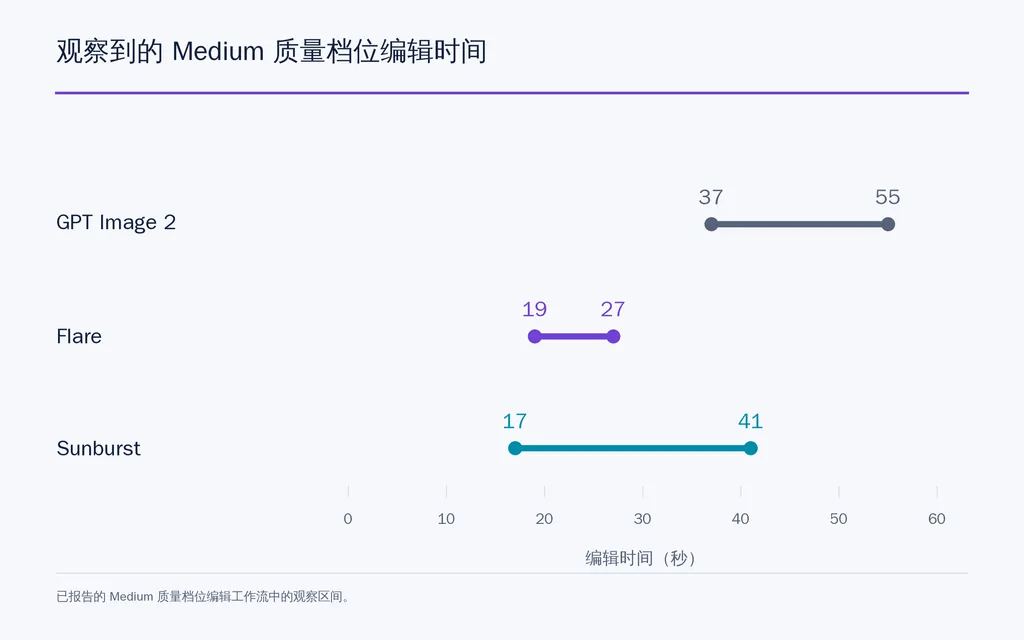
Range chart showing observed Medium-quality editing times of 37–55 seconds for GPT Image 2, 19–27 seconds for Flare, and 17–41 seconds for Sunburst.

Faster Generation Expands the Creative Search Space

Lower latency lets designers test more compositions, compare more directions, reroll more freely, and respond to feedback faster.

From a design workflow perspective, exploration capacity should be treated as part of image quality. A slightly better isolated image may be less valuable than several strong alternatives generated within the same creative window.

Flare vs Sunburst Editing: Which Model Preserves the Original Image Better?

Editing consistency is one of the most important production questions.

The common failure is simple: change the clothing, and the face, pose, lighting, or background also changes.

Our research review found a five-round editing study where approximate pixel movement reached:

  • GPT Image 2: 60%
  • Flare: 18%
  • Sunburst: 18%

The same workflow recorded Medium-quality editing times of roughly 37–55 seconds for GPT Image 2, 19–27 seconds for Flare, and 17–41 seconds for Sunburst.

Pixel movement is not an official quality metric, but it illustrates the production goal clearly:

Change only what the designer asked to change.

Bar chart comparing pixel movement after five editing rounds: 60% for GPT Image 2 and 18% for both Flare and Sunburst.

The Better Multi-Round Editing Workflow

Start from an approved master image, then change one major variable per round.

Explicitly preserve:

  • identity;
  • pose;
  • camera framing;
  • background;
  • lighting;
  • layout;
  • product geometry.

If Flare maintains those locked elements, keep using it. If repeated edits continue to affect unrelated areas, Sunburst becomes the logical escalation.

Our review also found recurring visual issues such as noise, warm color casts, unusual textures, pseudo-HDR processing, and imperfect shadows, especially in realistic commercial imagery. These remain areas where human review is necessary.

Flare vs Sunburst for Character Consistency and Multiple References

Character consistency depends as much on the reference system as on the model.

A 16-View Reference Sheet Can Reduce Identity Drift

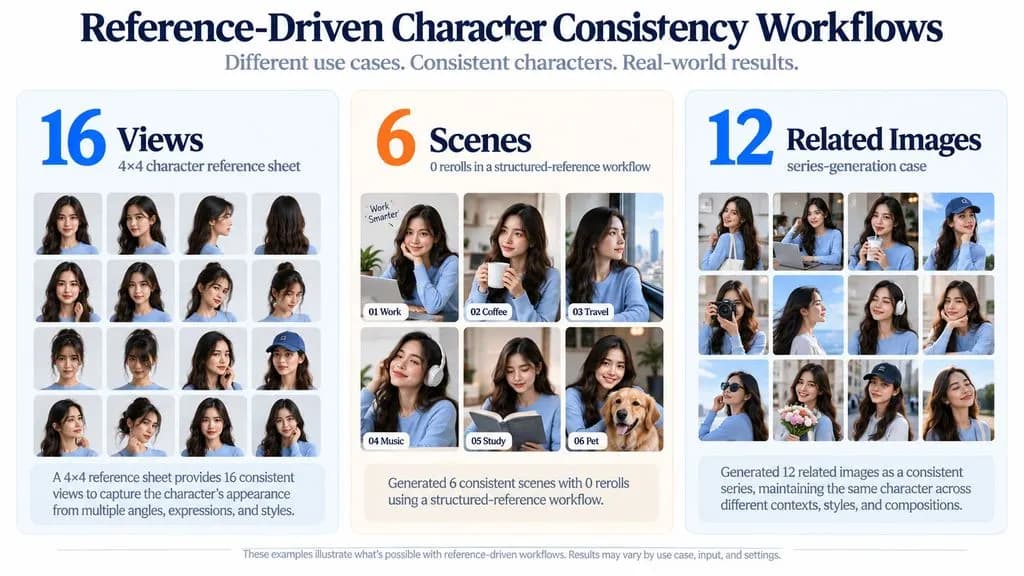
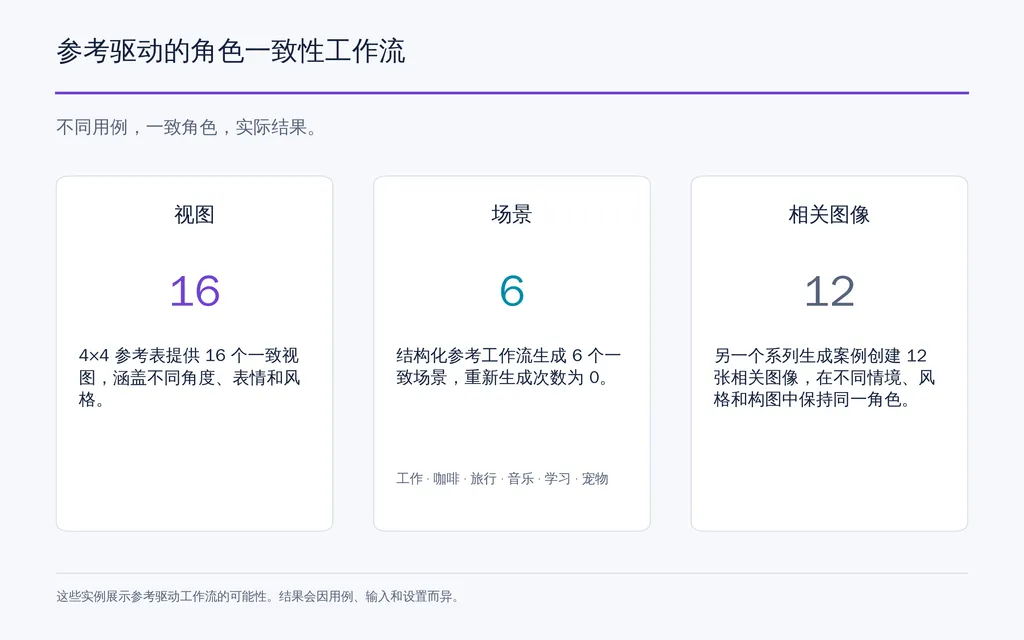
One effective workflow uses a 4×4 character sheet with 16 views, covering front, rear, side angles, expressions, poses, and defining details.

A related structured-reference workflow produced six scenes without rerolls, while another series-generation case created 12 related images.

The key lesson is not the exact model combination. It is that stable visual references reduce dependence on text-only reconstruction.

Three-panel chart showing a 16-view character reference sheet, a structured workflow that produced 6 scenes with 0 rerolls, and a separate series-generation case with 12 related images.

Separate Identity, Outfit, and Pose References

When several references are involved, define a clear role for each one:

Reference 1: identity
Reference 2: outfit or product
Reference 3: pose or environment

This reduces identity blending, where facial or body characteristics from one reference unintentionally transfer to another.

For high-frequency character content, Flare is an efficient starting point. Sunburst becomes more useful when identity, fabric realism, lighting, or small defining features repeatedly fail the quality gate.

Flare vs Sunburst for UI Design, Ecommerce, and Production Assets

Different design categories require different acceptance criteria.

Flare Is Especially Strong for UI Exploration

UI workflows benefit from breadth. Faster generation lets designers compare multiple information architectures, layouts, styles, and interface states before committing to implementation.

The production case discussed earlier is useful here: Flare Medium delivered roughly 2× faster generation, while most tasks reportedly did not require Sunburst XHigh.

However, a visually convincing UI image does not guarantee equally accurate implementation. Image generation, image-to-code conversion, visual comparison, and implementation validation remain separate stages.

Comparison infographic showing a reported UI workflow where Flare Medium was about 2× faster, cost about 0.5× as much in practice, and around 95% of tasks did not require Sunburst XHigh.

Ecommerce Requires a Stricter Quality Gate

Product imagery is less forgiving.

Teams should inspect material texture, product geometry, reflections, shadows, logos, typography, identity, and lighting consistency.

Flare works well for exploring compositions and variations quickly. Sunburst becomes more valuable when the winning concept needs higher precision rather than broader exploration.

Current research does not support claims that Sunburst automatically improves CTR, conversion rate, or revenue. Those outcomes require separate commercial testing.

When Should You Upgrade from Flare to Sunburst?

The strongest model-routing framework is:

Flare → Quality Gate → Sunburst when precision is required

Use This Four-Step GPT Image 2.5 Workflow

  1. Start with Flare. Generate enough options to evaluate the creative direction.
  2. Apply a quality gate. Check identity, composition, text, materials, lighting, references, geometry, and unintended changes.
  3. Approve successful outputs immediately. Do not regenerate an image simply because Sunburst exists.
  4. Escalate specific failures. Move to Sunburst when the problem is precision rather than creative direction.

Benchmark Prompt-to-Approved-Asset, Not Prompt-to-Image

For a useful internal benchmark, keep prompt, references, resolution, quality, task, and success criteria consistent.

Then compare:

  • latency;
  • total workflow cost;
  • rerolls;
  • accepted-output rate;
  • edit drift;
  • text accuracy;
  • identity consistency;
  • reference fidelity.

The best model is the one that reaches an approved asset with the strongest combination of speed, precision, and cost.

Is ChatGPT Images 2.5 Flare or Sunburst?

OpenAI distinguishes the ChatGPT Images 2.5 product experience from the separately selectable Flare and Sunburst API models.

Current public information does not confirm a simple rule such as “ChatGPT Images 2.5 always uses Flare” or “ChatGPT always routes to Sunburst.”

For teams that require explicit and reproducible model selection, the API is the clearer environment because Flare and Sunburst are exposed as separate choices.

FAQ

Is Sunburst actually better than Flare?

Sunburst is more capable for precision-sensitive generation and editing, but that does not make it the better choice for every workflow. Flare is stronger for fast exploration, UI concepts, social creative, and high-volume production, while Sunburst is more valuable when a specific precision problem survives the Flare quality gate.

Why can Flare and Sunburst have different workflow costs if pricing is the same?

Their published token rates are the same, but total cost also depends on quality settings, reference inputs, rerolls, failed edits, and rejected outputs. The more useful metric is cost per approved asset, not simply cost per request.

Should I use Flare Medium or Sunburst High?

Start with Flare Medium when iteration speed and output volume matter. Move to Sunburst High when identity, fine materials, text, complex edits, or reference fidelity remain unreliable. Always separate model choice from quality level when comparing results.

Is ChatGPT Images 2.5 using Flare or Sunburst?

Current public information does not confirm a fixed one-to-one mapping. Flare and Sunburst are exposed as separate API models, while ChatGPT Images 2.5 is a product experience. If deterministic model selection matters, use the API.

Conclusion

For most professional workflows, GPT Image 2.5 Flare should be the default starting point, while Sunburst should be treated as a precision escalation rather than an automatic final step. Flare provides the speed needed for exploration, UI generation, social content, product variations, and high-volume production; Sunburst earns its additional latency when identity, fine detail, difficult editing, product fidelity, or complex references fail a clear quality gate. The most efficient strategy is therefore Flare first, measure the result, approve what already works, and upgrade only when Sunburst materially improves the probability of reaching an approved asset.

更多 Virse 博客文章