GPT Image 2.5 Pricing: Flare vs Sunburst & the Real Cost per Image

Vincent10 分钟阅读 ·

GPT Image 2.5 Pricing: Flare vs Sunburst & the Real Cost per Image

GPT Image 2.5 pricing is token-based, so there is no single fixed cost per image. Flare and Sunburst use the same API rates—$5 per million text-input tokens, $8/M image-input tokens, and $30/M image-output tokens. For a 1024×1024 image, output cost can range from about $0.00588 at Low quality to $0.21072 at Max, before prompt input, reference images, edits, or retries are added.

But the cheapest generation is not always the cheapest final image. Repeated prompts, failed edits, regeneration, and manual review can quickly increase production costs. That is why comparing Flare vs Sunburst by API price alone is misleading: Flare is better suited to fast, high-volume iteration, while Sunburst is designed for workflows where editing precision and consistency matter more.

For creative teams, the better metric is cost per accepted final asset. A practical AI design workflow is to use Flare for rapid exploration and higher-quality settings or Sunburst for precision-sensitive final assets. Virse supports this workflow by keeping references, assets, creative decisions, and AI Agents together on an infinite canvas, reducing repeated setup and unnecessary rework.

ChatGPT Images 2.5

How Much Does GPT Image 2.5 Cost?

OpenAI offers two GPT Image 2.5 API models. Flare is the faster default for most applications, while Sunburst is designed for workflows where editing precision matters more. Despite those different roles, both use the same published token rates.

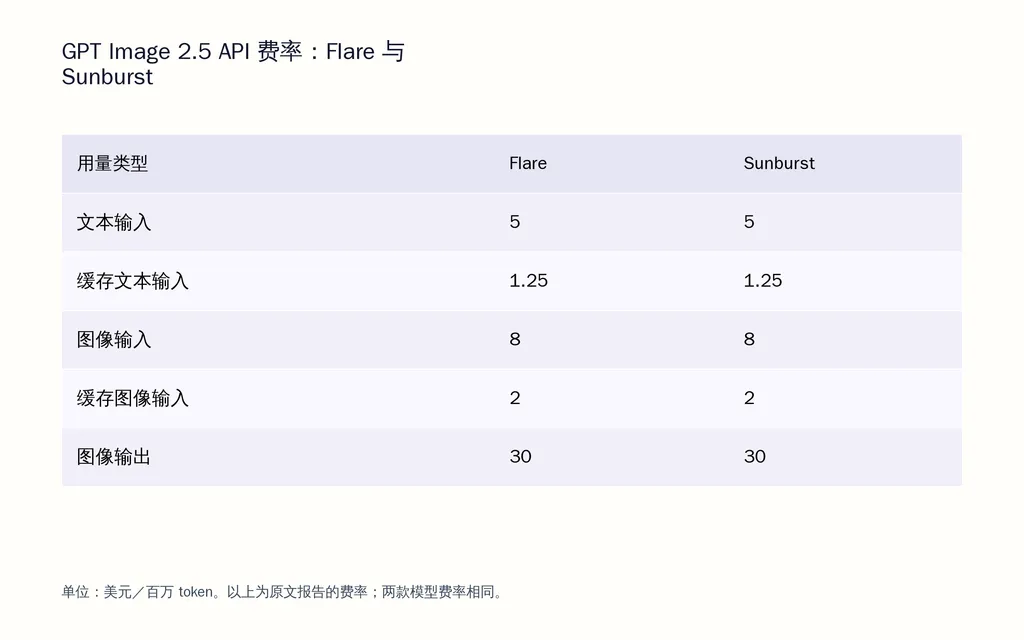
Flare and Sunburst pricing: text input is $5 per million tokens, cached text input is $1.25/M, image input is $8/M, cached image input is $2/M, and image output is $30/M.

This means Flare is not a discounted version of Sunburst, and Sunburst does not carry a higher published token rate. Their economics emerge from how GPT Image 2.5 performs in practice and how much work each model needs to reach an acceptable result.

Grouped bar chart showing identical GPT Image 2.5 Flare and Sunburst API rates: $5/M text input, $1.25/M cached text, $8/M image input, $2/M cached image input, and $30/M image output.

Why Flare and Sunburst Have the Same GPT Image 2.5 Pricing

OpenAI positions Flare for everyday image generation, rapid prototyping, social and creator content, visual search, and high-volume work. Sunburst is positioned for premium visual production where tighter control across edits is valuable. OpenAI also says Flare delivers higher-quality images than GPT-Image-2 at 50% lower latency. That is a latency claim, not a 50% price discount.

For design teams, this produces a useful rule: use Flare when throughput drives value; test Sunburst when precision can reduce expensive rework.

GPT Image 2.5 vs GPT Image 2 Pricing

A key correction is that GPT Image 2.5 uses the same published token rates as GPT Image 2. The important pricing change is not simply the rate card; it is how the new quality ladder allocates image output tokens.

That distinction explains why comparing “High vs High” or “Medium vs Medium” across generations can produce misleading conclusions.

What Is the GPT Image 2.5 Cost per Image by Quality?

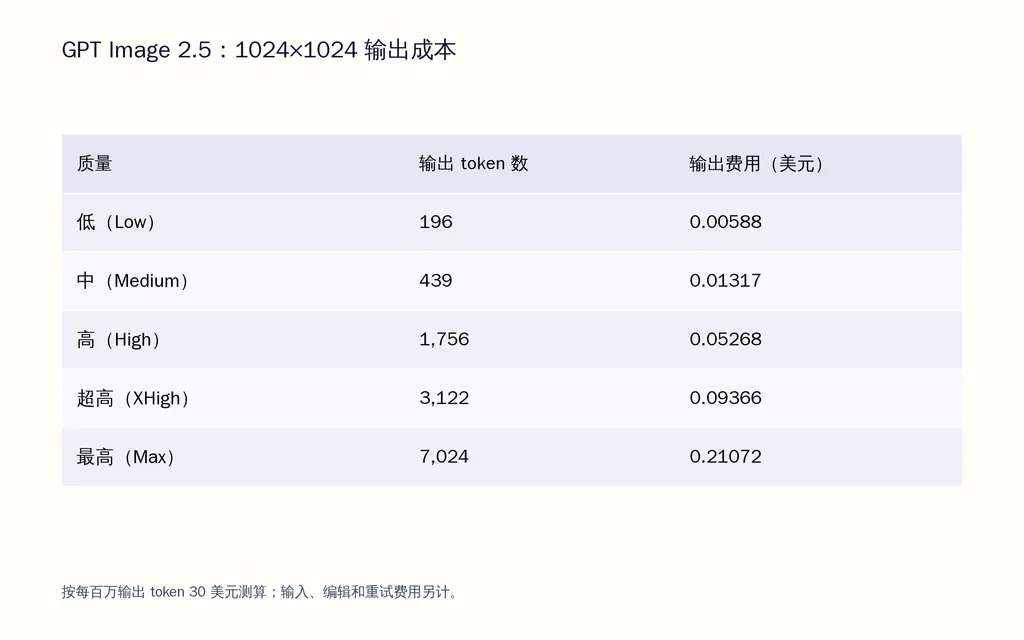
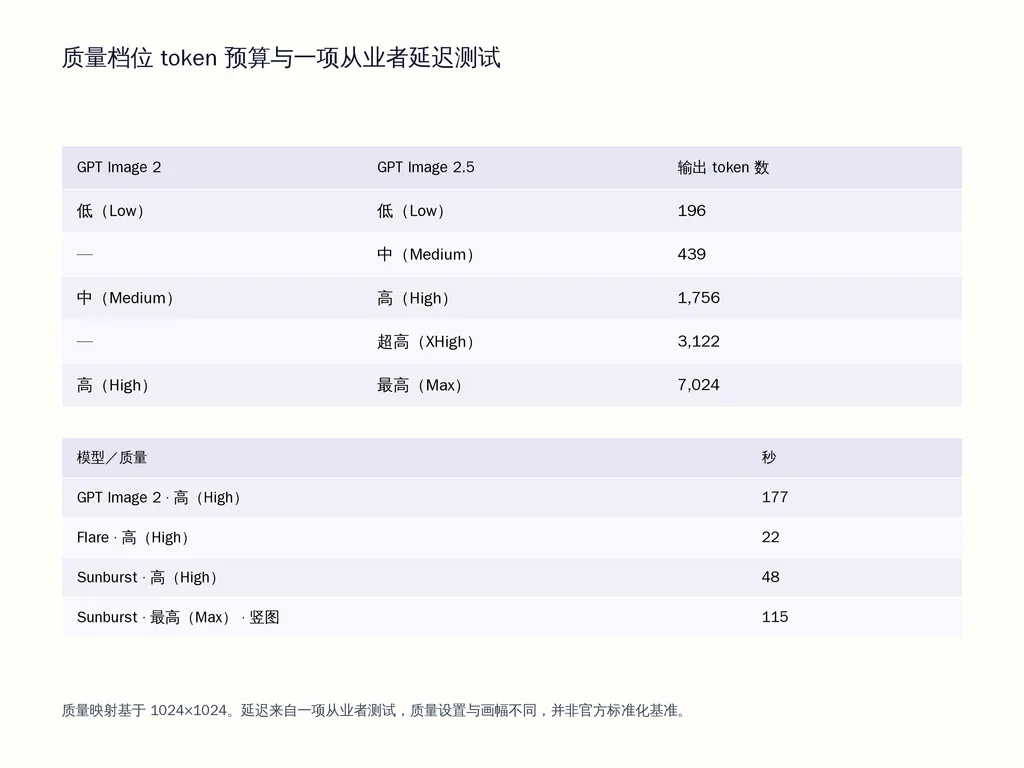
A September 2026 calculator-based benchmark reviewed in our research gives a useful 1024×1024 cost reference. At the $30/M image-output rate, Low uses 196 output tokens, Medium 439, High 1,756, XHigh 3,122, and Max 7,024. That translates to approximately $0.00588, $0.01317, $0.05268, $0.09366, and $0.21072 in image-output cost respectively.

These figures are output-cost estimates, not all-inclusive fixed prices. Prompt input, reference-image input, editing calls, retries, and other usage can add to the final bill.

Combo chart showing GPT Image 2.5 output tokens and output cost by quality at 1024×1024, rising from 196 tokens and $0.00588 at Low to 7,024 tokens and $0.21072 at Max.

Why Quality Has Such a Large Impact on GPT Image 2.5 Cost

At 1024×1024, Max in this benchmark uses almost 36 times as many output tokens as Low. Moving directly to maximum quality for every exploration can therefore spend most of the budget on concepts that will never reach final production.

In professional AI design workflows, a better approach is to explore broadly at Low or Medium, shortlist promising directions, then invest in High, XHigh, or Max only when added detail has production value.

This is particularly useful for moodboards, UI concepts, campaign directions, ecommerce experiments, and other workflows where many early outputs are intentionally disposable.

Why GPT Image 2.5 Quality Labels Changed the GPT Image 2 Comparison

This is one of the most important pricing details.

At 1024×1024, GPT Image 2 used approximately 196 tokens at Low, 1,756 at Medium, and 7,024 at High. GPT Image 2.5 uses those same budgets at Low, High, and Max respectively. It also adds a new 439-token Medium tier and a 3,122-token XHigh tier.

So GPT Image 2.5 High has roughly the output-token budget of GPT Image 2 Medium, while GPT Image 2.5 Max matches the old High budget.

This is why a same-label comparison can be deceptive. A workflow that moves from GPT Image 2 High to GPT Image 2.5 High is not keeping the same output-token budget.

Why GPT Image 2.5 Quality Labels Changed the GPT Image 2 Comparison

Flare vs Sunburst: Which GPT Image 2.5 Model Is More Cost-Effective?

Flare is the stronger starting point for rapid iteration and volume. Sunburst is the stronger candidate when precision across generation and editing is worth additional time.

The right choice depends on where a team loses money: waiting for generations, rejecting outputs, or repairing unwanted changes.

Flare for UI Ideation and High-Volume Generation

One production UI workflow reviewed in our research moved draft generation to Flare Medium and reported approximately 2× faster generation and around half the effective cost compared with its previous GPT Image 2 Medium workflow. The same workflow described Flare Medium as the practical sweet spot for most draft work.

There is an important caveat: part of that apparent saving can come from the revised quality-token ladder. GPT Image 2.5 Medium and GPT Image 2 Medium do not use equivalent output-token budgets, so the case should not be interpreted as proof that Flare is inherently half-price.

Its real value is that faster, lower-budget drafts can make broad design exploration cheaper.

Sunburst for Precision-Sensitive Final Assets

Sunburst becomes more attractive when unwanted variation is costly—for example, polished product imagery, campaign assets, reference-based compositions, brand-controlled visuals, and iterative editing.

A higher-value generation can be economically preferable if it avoids several repair cycles. For these jobs, teams should compare accepted outputs per dollar, not only generations per dollar.

How Fast Is GPT Image 2.5 Flare vs Sunburst?

Latency becomes an economic factor once image generation moves into daily creative production.

In one practitioner benchmark reviewed for this article, GPT Image 2 High took 177 seconds, Flare High 22 seconds, Sunburst High 48 seconds, and Sunburst Max portrait 115 seconds. These are individual test results rather than an official standardized benchmark, so they should be treated as directional evidence rather than guaranteed performance.

Why Flare’s Speed Matters Beyond Waiting Time

The biggest benefit of lower latency is not simply getting an image sooner. It changes the creative loop.

When generations return quickly, designers can compare more directions, reject weak concepts earlier, test reference combinations, and refine AI design prompts while the design problem is still active in their working memory.

For large-scale ideation, that can matter as much as the API bill itself.

Does GPT Image 2.5 Reduce Editing and Rework Costs?

OpenAI says Images 2.5 is better at preserving subjects from reference images and following editing instructions across multiple turns. Our review of editing-focused practitioner tests points in the same direction.

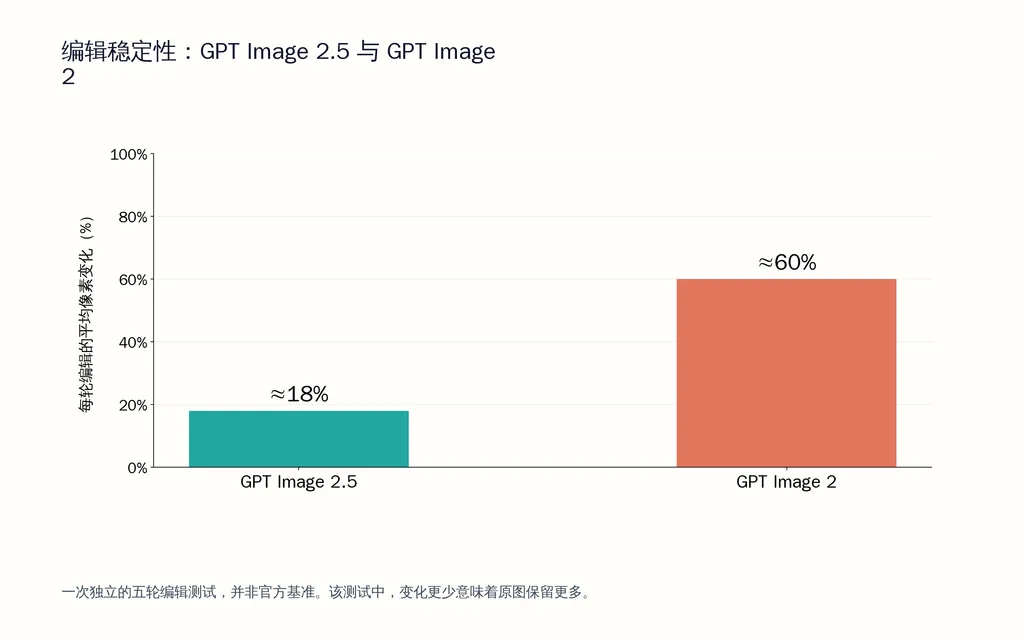
One five-round editing test measured approximately 18% pixel change per edit with GPT Image 2.5 versus GPT Image 2. This was a single independent test, not an official benchmark, but it illustrates a production problem that matters to designers: an edit can be technically successful while still damaging previously approved parts of the image.

Bar chart comparing pixel changes in a five-round editing test, with GPT Image 2.5 at about 18% change per edit and GPT Image 2 at about 60%

Why Editing Stability Changes the Real Price

Consider an ecommerce image where the composition, model, product position, lighting, and background are already approved. If the only requested change is product color, unnecessary changes elsewhere create additional QA and regeneration cycles.

The API charges for generation, but the business also pays for review, correction, approval, and lost consistency.

That is why editing stability belongs in any serious GPT Image 2.5 cost comparison.

How Should Designers Use GPT Image 2.5 in a Production Workflow?

From a product design perspective, GPT Image 2.5 is most valuable as an exploration and visual-production layer, not as a substitute for the entire design process.

A practical pattern is Flare for broad exploration, human selection for direction, and higher-precision generation or Sunburst for assets where control matters most. This pushes expensive refinement later in the funnel, after weak concepts have already been removed.

The UI case in our research also exposed an important limitation: generating an impressive interface image does not automatically solve the image-to-product gap. Component architecture, responsive behavior, accessibility, states, content structure, and design-system logic still need structured design and engineering work.

This is also why workflow context matters. A system such as Virse focuses on keeping references, creative decisions, assets, and collaborating Agents connected on the same canvas rather than treating every generation as an isolated prompt.

How Much Would 1,000 GPT Image 2.5 Images Cost?

Using the 1024×1024 output-token benchmark above, 1,000 generations would represent about $5.88 at Low, $13.17 at Medium, $52.68 at High, $93.66 at XHigh, or $210.72 at Max in image-output cost alone.

Those numbers should not be used as complete project quotes. Text input, reference images, edits, retries, and human review can all increase the final production cost.

Why Cost per Accepted Asset Is the Better KPI

Suppose one workflow spends $50 to generate 1,000 images but only 400 pass review. Its generation cost is $0.125 per accepted image.

Another spends $80 but produces 800 accepted images. Its effective generation cost is $0.10 per accepted image.

The second workflow looks more expensive on the API bill but is cheaper for the design team.

For production planning, cost per accepted asset combines price, quality, retry rate, editing stability, and workflow efficiency into one useful metric.

FAQ

How much does GPT Image 2.5 cost per image?

There is no universal fixed price per image. Flare and Sunburst use the same token rates. In one 1024×1024 calculator-based benchmark, image-output cost ranged from about $0.00588 at Low to $0.21072 at Max. Inputs, reference images, edits, and retries can increase total cost.

Is Flare cheaper than Sunburst?

Their published token rates are identical. Flare can still be more cost-effective when lower latency improves throughput, while Sunburst may be more economical for precision-sensitive work if it reduces failed edits and rework. The better comparison is cost per accepted asset.

Is GPT Image 2.5 cheaper than GPT Image 2?

The models use the same published token rates, but GPT Image 2.5 changed the quality ladder. At 1024×1024, 2.5 High uses the output-token budget associated with GPT Image 2 Medium, while 2.5 Max aligns with the old High budget. Compare equivalent token budgets, not quality labels alone.

How much do 1,000 GPT Image 2.5 images cost?

For 1024×1024 image output alone, one benchmark estimates approximately $5.88 at Low, $13.17 at Medium, $52.68 at High, $93.66 at XHigh, and $210.72 at Max per 1,000 generations. Actual production spending will be higher when input images, editing, retries, and review are included.

Conclusion

GPT Image 2.5 pricing is best understood as workflow economics rather than a single price per image. Flare and Sunburst share the same token rates, but Flare prioritizes lower-latency, high-volume iteration while Sunburst targets precision-sensitive creative work. The revised quality ladder also means that same-label comparisons with GPT Image 2 can be misleading: 2.5 High roughly matches the old Medium output-token budget, while 2.5 Max matches the old High budget. For designers and creative teams, the strongest purchasing and model-selection metric is therefore cost per accepted final asset, because it captures the variables that actually determine production efficiency: generation cost, speed, retries, editing stability, and human review.

更多 Virse 博客文章