
Guía de vídeos largos de Seedance 2.5: cómo corregir las deformaciones finales y mantener la coherencia
 Yifan Zhao16 min de lectura ·
Las deformaciones finales de Seedance 2.5 ocurren cuando un vídeo de IA pierde coherencia temporal al final de la generación y los personajes, entornos o movimientos cambian de repente. La solución más eficaz es controlar tres factores antes de renderizar: coherencia de referencias, prompts basados en una línea temporal y diseño del estado final de la escena. Para mejorar la calidad de generación de vídeo con IA, comprender una guía completa de referencias de Seedance 2.5 ayuda a construir un flujo de producción más sólido.
Para quienes crean películas de IA, anuncios, vídeos de productos y contenido narrativo, este problema puede convertir una generación por lo demás lograda en un clip inutilizable. Un personaje puede mantenerse coherente durante casi todo el vídeo y cambiar de repente en los últimos segundos, perjudicando la continuidad visual, la coherencia de marca y la calidad profesional. Los enfoques estructurados, como las técnicas de la guía de prompts de Seedance 2.5 y una mejor planificación del flujo, pueden mejorar considerablemente la coherencia.
Virse ayuda a crear flujos creativos de IA más fiables reuniendo modelos avanzados en un solo espacio, incluidos Nano Banana 2, GPT Image 2, Seedance y más de 40 modelos de IA adicionales. Los planes de pago ofrecen uso ilimitado de modelos y plazas de equipo ilimitadas, y los nuevos usuarios pueden empezar con créditos gratuitos para crear hasta 10 imágenes con Nano Banana 2 o generar un vídeo con Seedance 2.0. Así pueden explorar ideas, generar recursos y construir flujos visuales coherentes con mayor eficiencia. Para crear sistemas de producción de IA repetibles, combinar las herramientas generativas con un flujo estructurado de diseño con IA desde el briefing hasta la entrega puede hacer más eficiente todo el proceso.

Respuesta rápida: ¿cómo evitar las deformaciones finales de Seedance 2.5?
Para reducir las deformaciones finales de Seedance 2.5, hay que controlar tres aspectos:
- Vinculación de referencias para mantener la identidad del personaje y la identidad visual
- Prompts con marcas de tiempo para controlar cómo evolucionan las escenas
- Diseño del estado final para impedir que el modelo invente fotogramas finales inestables
La idea clave es sencilla: los vídeos largos de IA requieren gestionar la continuidad, no solo mejorar los prompts.
¿Por qué Seedance 2.5 produce deformaciones al final de los vídeos largos?
Las deformaciones de Seedance 2.5 suelen aparecer cuando el modelo llega a la fase final de una generación larga sin suficiente orientación sobre cómo concluir la escena. Para crear sistemas de vídeo con IA, comprender el flujo completo de Seedance 2.5 puede reducir la inestabilidad en generaciones más largas.
El vídeo puede parecer correcto durante casi toda su duración, pero los últimos segundos introducen cambios inesperados:
- Cambia el rostro del personaje
- Los detalles de la ropa pierden coherencia
- El fondo cambia
- Aparecen o desaparecen objetos
- El movimiento de cámara pierde continuidad
El reto no consiste solo en generar fotogramas realistas, sino en mantener el mismo mundo visual a lo largo del tiempo.
En los vídeos largos de IA, la coherencia depende de conservar:
- Identidad del personaje
- Estructura de la escena
- Relaciones entre objetos
- Condiciones de iluminación
- Lógica de cámara
- Dirección del movimiento
Un fotograma visualmente impresionante no basta. Toda la secuencia debe parecer parte del mismo momento, lugar e historia. Se puede mejorar este proceso combinando métodos estructurados de generación de vídeo con estrategias más amplias de diseño con IA desde el briefing hasta la entrega.
Marco de diagnóstico de deformaciones de Seedance 2.5
Antes de corregir una deformación, identifica qué tipo de incoherencia se está produciendo.
Tipo de deformación | Qué ocurre | Causa principal | Mejor solución |
|---|---|---|---|
Deformación del personaje | Cambios de rostro, peinado, cuerpo o ropa | Control débil de la identidad | Reforzar la vinculación de referencias |
Deformación del entorno | Cambios de fondo o ubicación | Deriva del estado de la escena | Fijar los detalles del entorno |
Deformación del movimiento | El movimiento se vuelve poco natural | Cronología de acciones poco clara | Usar prompts con marcas de tiempo |
Deformación del final | Cambios repentinos en los últimos segundos | Falta una definición del estado final | Diseñar primero el final |
Este marco ayuda a evitar ajustes aleatorios de los prompts.
Un problema de identidad del personaje requiere anclajes visuales más sólidos. Un problema de movimiento exige mejor control temporal. Un problema del final necesita instrucciones más claras sobre el estado final.
El primer paso siempre es identificar qué cambió y por qué.
Deriva temporal: por qué los vídeos largos de Seedance 2.5 pierden coherencia
Generar vídeos largos es muy distinto de crear una sola imagen.
El modelo debe mantener varias relaciones a la vez:
- Quién es el personaje
- Qué lleva puesto el personaje
- Dónde está el personaje
- Cómo se mueve la cámara
- Cómo interactúan los objetos
- Cómo se mantiene estable el entorno
Al aumentar la duración, pueden acumularse pequeñas incoherencias.
Un clip de cinco segundos solo necesita una continuidad limitada. Un vídeo de 30 o 90 segundos exige conservar una cadena mucho mayor de decisiones visuales.
Desde la perspectiva del diseño con IA, la generación de vídeos largos debe tratarse como un problema de gestión del sistema creativo, no simplemente como una extensión temporal de la generación de imágenes.
Los flujos más sólidos no dependen de añadir más palabras descriptivas. Establecen relaciones más claras entre:
- Identidad
- Acción
- Tiempo
- Entorno
- Estado final
Estados finales sin definir: la causa oculta de los cambios finales
Una de las causas más frecuentes de las deformaciones de Seedance 2.5 es un final sin definir.
Muchos prompts solo describen la escena inicial:
Una mujer camina por una ciudad antigua al atardecer.
Esto establece el principio, pero el modelo aún debe decidir:
- Dónde termina el personaje
- Qué acción concluye la escena
- Cómo termina la cámara
- Qué elementos visuales permanecen iguales
Cuando el final no está claro, el modelo tiene más libertad para reinterpretar la escena.
Un flujo más sólido define el estado final antes de generar:
El personaje termina en un lugar concreto, mantiene su apariencia, conserva estable el entorno y finaliza con un movimiento de cámara controlado.
En producción profesional de vídeo con IA, los últimos cinco segundos deben diseñarse con el mismo cuidado que el plano inicial.
Cómo corregir los problemas de coherencia de personajes de Seedance 2.5
La coherencia del personaje es uno de los mayores retos del vídeo con IA porque el público detecta de inmediato los cambios de identidad.
Pequeñas diferencias en:
- Estructura facial
- Peinado
- Ropa
- Accesorios
- Proporciones corporales
pueden hacer que parezca otra persona.
La solución no es añadir adjetivos al prompt, sino crear anclajes de identidad más sólidos.
Usa vinculación de referencias en lugar de imágenes de referencia aleatorias
Las referencias funcionan mejor cuando cada imagen tiene un propósito claro.
Un flujo profesional separa las referencias en distintas capas de control:
Tipo de referencia | Qué controla |
|---|---|
Referencia de personaje | Rostro, identidad, estructura corporal |
Referencia de ropa | Vestuario, materiales, accesorios |
Referencia de entorno | Ubicación, ambiente, estilo visual |
Asignar funciones claras a las referencias aporta más coherencia que simplemente añadir imágenes.
Demasiadas referencias sin estructura pueden generar conflictos:
- Varios rostros pueden confundir la identidad
- Distintos conjuntos pueden cambiar la apariencia
- Entornos similares pueden provocar deriva de ubicación
El objetivo no es maximizar la cantidad de entradas, sino su claridad.
Estabiliza al personaje antes de añadir acciones complejas
Un error habitual es probar demasiado pronto al personaje en una escena de acción complicada.
Un proceso más fiable es:
- Establecer la identidad del personaje.
- Confirmar la coherencia visual.
- Introducir movimiento.
- Añadir complejidad al entorno.
- Extender la secuencia.
Así se reduce el número de variables que cambian a la vez.
Los flujos profesionales suelen separar la validación de identidad de la generación de acciones, porque corregir la deriva del personaje tras crear una escena compleja suele ser más difícil que prevenirla.
Cómo los prompts con marcas de tiempo evitan la deriva en vídeos de Seedance 2.5
Los prompts con marcas de tiempo son una de las formas más eficaces de mejorar el control de vídeos largos de Seedance 2.5, porque describen la evolución temporal de la escena.
Un prompt normal describe una idea visual.
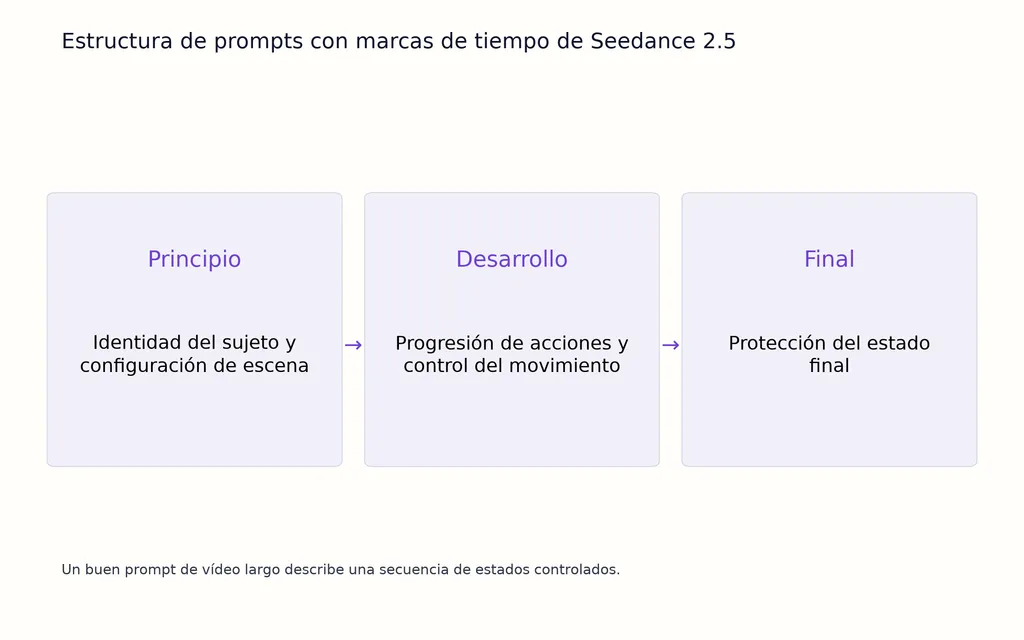
Un buen prompt de vídeo largo describe una secuencia de estados controlados.
La estructura más fiable incluye:
1. Identidad del sujeto
Define quién o qué aparece y qué características deben mantenerse iguales.
2. Estado de la escena
Describe el entorno, la iluminación y los objetos importantes.
3. Progresión temporal
Explica qué ocurre primero, qué cambia y qué permanece estable.
4. Comportamiento de la cámara
Define el punto de vista, la velocidad de movimiento y la posición final de la cámara.
5. Condición final
Especifica cómo termina la escena.
Esta estructura proporciona al modelo un plan de producción más claro, en vez de una única descripción visual.
Por qué los prompts más largos de Seedance 2.5 no siempre evitan deformaciones
Un error común es creer que más palabras producen automáticamente mejores vídeos de IA.
En la práctica, la estructura de la información importa más que su volumen.
Un buen prompt debe responder:
- ¿Qué existe?
- ¿Qué cambia?
- ¿Qué se mantiene coherente?
- ¿Cuándo ocurre cada evento?
Un prompt más corto y estructurado suele superar a otro mucho más largo sin prioridades claras.
En la generación de vídeos largos, la claridad supera a la complejidad.
Cómo diseñar los últimos 5 segundos de vídeos de Seedance 2.5
Muchas generaciones de Seedance 2.5 fallan en los últimos cinco segundos. Un vídeo puede mantener una coherencia excelente durante casi toda la secuencia y cambiar de repente al final porque el modelo debe decidir cómo concluye la historia.
La solución es tratar el final como un elemento de producción diseñado.
No dejes que el modelo invente el estado final. Defínelo antes de generar.
Un diseño fiable del final incluye tres principios:
Define el estado visual final antes de generar
Antes de crear un vídeo largo de Seedance 2.5, decide:
- Dónde termina el personaje
- Qué está haciendo el personaje
- Qué detalles deben permanecer iguales
- Cómo termina la cámara
El modelo no debería tener que tomar decisiones creativas importantes en los últimos segundos.
Un estado final sólido responde:
¿Quién aparece?
Debe mantenerse la misma identidad del personaje.
¿Qué está ocurriendo?
La acción final debe completar de forma natural el movimiento anterior.
¿Qué permanece estable?
La ropa, el entorno, la iluminación y el estilo visual deben seguir siendo coherentes.
Este enfoque reduce la probabilidad de que el modelo reinterprete la escena al final.
Evita introducir elementos nuevos cerca del final
Una de las causas más comunes de las deformaciones finales es introducir información nueva demasiado tarde.
Enfoque menos estable:
Un personaje camina por un bosque y en los últimos segundos aparece una criatura completamente nueva.
Enfoque más estable:
El personaje sigue caminando por el mismo bosque mientras la cámara muestra más del entorno existente.
El final debe completar el mundo visual establecido, no crear uno nuevo.
Estabiliza el movimiento de cámara
El movimiento de cámara influye mucho en la coherencia del vídeo con IA.
Movimientos más fiables:
- Zoom lento
- Seguimiento controlado
- Paneo suave
- Punto de vista estable
Movimientos de mayor riesgo:
- Cambios bruscos de perspectiva
- Rotación rápida de cámara
- Transiciones de escena complejas
Una cámara estable reduce las variables visuales que el modelo debe reinterpretar en los fotogramas finales.
Flujo de vídeos largos de Seedance 2.5: generación única frente a producción por segmentos
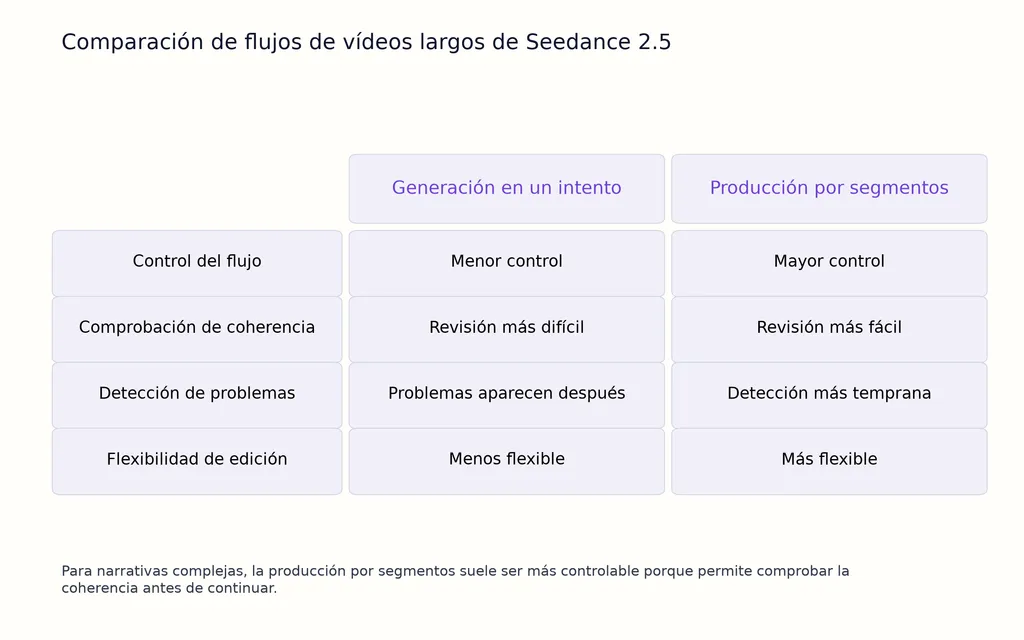
Una cuestión clave es si Seedance 2.5 debería generar un vídeo largo completo en un intento o mediante un flujo segmentado.
Para narrativas complejas, la producción por segmentos suele ser más controlable porque permite comprobar la coherencia antes de continuar.
El flujo recomendado es:
Planificar → Generar → Revisar → Extender → Editar
Cada etapa reduce el riesgo de descubrir problemas después de haber creado todo el vídeo.
Ejemplo de flujo: por qué es difícil generar 90 segundos de una vez
Un ejemplo documentado de producción con IA mostró la dificultad de crear una generación continua de 90 segundos.
Los resultados fueron:
- Duración objetivo: 90 segundos
- Intentos de generación: 32
- Clips utilizables: 7
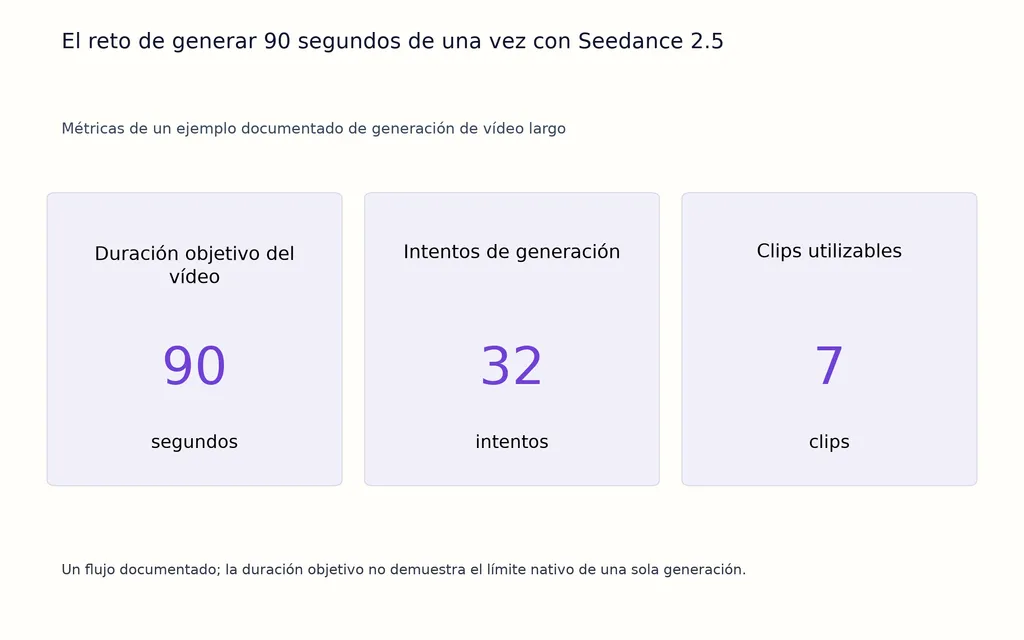
La lección no está solo en el número de intentos. El problema de fondo es que una generación larga de una vez crea demasiadas variables simultáneas:
- Identidad del personaje
- Continuidad del movimiento
- Estabilidad del entorno
- Calidad del final
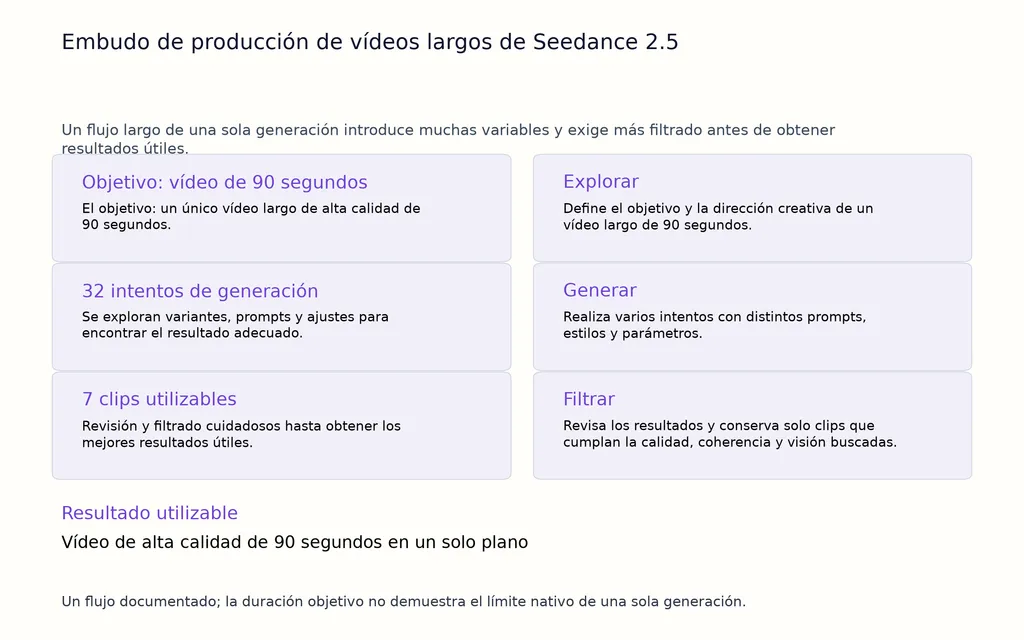
Cuando todos los elementos deben seguir siendo coherentes durante mucho tiempo, incluso los errores pequeños pueden acumularse hasta convertirse en cambios visibles.
Un flujo más fiable es:
- Generar escenas más cortas
- Confirmar la coherencia del personaje
- Continuar solo desde resultados estables
- Montar la historia final mediante edición
La producción de vídeos largos suele ser un problema de gestión de coherencia, no solo de duración de generación.
Ejemplo de flujo: escena de acción compleja de 30 segundos
Los vídeos más cortos también pueden deformarse si la escena contiene movimientos complicados.
Las acciones complejas plantean retos como:
- Movimiento corporal rápido
- Interacción con objetos
- Perspectiva de cámara cambiante
- Orden de acciones poco claro
La solución no es añadir más descripciones visuales.
Un flujo mejor es:
- Simplificar la secuencia de acciones
- Definir el orden de movimientos
- Mantener predecible el comportamiento de la cámara
- Mantener las referencias del personaje
La lección clave es que los modelos de vídeo con IA funcionan mejor cuando la complejidad creativa está estructurada.
Una secuencia clara con menos cambios sin controlar suele ser más fiable que un prompt muy detallado pero ambiguo.
Ejemplo de flujo: vídeo de acción exterior de 60 segundos
Las escenas exteriores plantean otro reto de coherencia porque contienen muchas variables cambiantes.
Los problemas habituales incluyen:
- Cambios de iluminación
- Deriva del fondo
- Entorno inconsistente
- Problemas de continuidad de cámara
La mejora consiste en tratar el entorno como parte del sistema de diseño.
En vez de tratar el fondo como decoración, define:
- Identidad del lugar
- Condiciones de iluminación
- Objetos importantes
- Elementos que deben permanecer iguales
Un entorno coherente ayuda al modelo a mantener un mundo visual creíble durante toda la secuencia.
Extender o generar de nuevo en Seedance 2.5: ¿qué flujo es más fiable?
Una decisión habitual es extender un clip existente o generar una escena completamente nueva.
Ambos métodos tienen ventajas, pero resuelven problemas distintos.
Flujo | Ideal para | Ventajas | Limitaciones |
|---|---|---|---|
Extender un vídeo existente | Continuar escenas estables | Mantiene el estado visual anterior | Puede heredar problemas existentes |
Generar un clip nuevo | Crear planos nuevos | Mayor flexibilidad creativa | Exige mayor control de coherencia |
Usa la extensión cuando:
- La identidad del personaje ya es estable
- El entorno es correcto
- La dirección del movimiento es coherente
Genera un clip nuevo cuando:
- El metraje anterior ya presenta deriva
- La apariencia del personaje es incorrecta
- El entorno necesita grandes cambios
Un error habitual es extender metraje inestable.
Si la base es incorrecta, la extensión puede conservar y amplificar los problemas existentes.
El flujo más adecuado es:
Corrige primero la coherencia y después extiende.
Errores comunes de prompts de Seedance 2.5 que provocan deformaciones
Error 1: describir solo el principio
Muchos creadores se centran en la imagen inicial e ignoran el estado final.
Un prompt completo de vídeo largo debe definir:
- Principio
- Desarrollo
- Final
El modelo necesita un destino, no solo un punto de partida.
Error 2: usar demasiadas referencias sin estructura
Más referencias no siempre mejoran los resultados.
Sin prioridades claras, las referencias pueden entrar en conflicto.
Es mejor asignar un propósito a cada referencia:
- Identidad del personaje
- Detalles de la ropa
- Estilo del entorno
Error 3: combinar demasiados eventos en una escena
Un único prompt con varios lugares, personajes y acciones aumenta la incertidumbre.
Los flujos profesionales dividen las ideas complejas en escenas más pequeñas y controlables.
Error 4: ignorar la lógica de cámara
Muchos prompts describen lo que ocurre, pero no cómo lo observa la cámara.
El movimiento de cámara afecta a:
- Continuidad
- Perspectiva
- Interpretación del movimiento
Un buen prompt trata la dirección de cámara como parte de la narración.
Cómo crean los profesionales un flujo fiable de vídeo con IA en Seedance 2.5
Desde mi perspectiva como estratega de flujos de diseño con IA, el mayor error de la producción de vídeo con IA es tratar la generación como un reto de un único prompt.
Los flujos creativos profesionales se construyen en torno a sistemas.
Los creadores humanos definen:
- Dirección creativa
- Estándares visuales
- Estructura narrativa
- Requisitos de marca
Los sistemas de IA apoyan:
- Exploración
- Generación de recursos
- Iteración
- Aceleración de la producción
Este enfoque refleja la evolución de los flujos modernos de diseño con IA. Las mejores herramientas no se limitan a sustituir a los creadores: ayudan a mantener el contexto, organizar decisiones creativas y escalar la producción con mayor eficiencia.
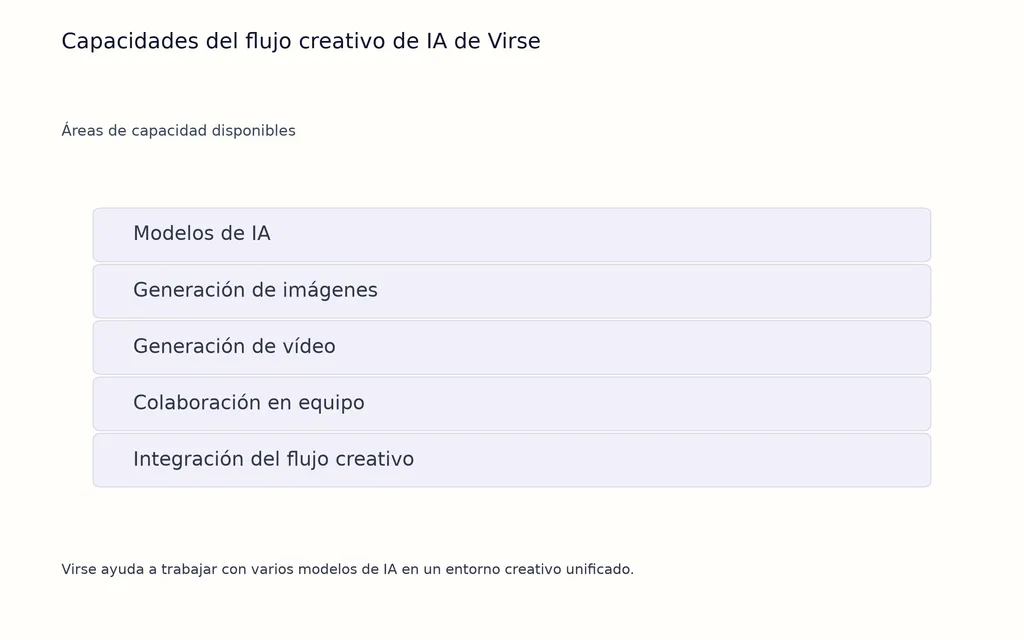
Virse sigue esta filosofía al permitir trabajar con varios modelos de IA en un entorno creativo unificado. Con acceso a Nano Banana 2, GPT Image 2, Seedance y más de 40 modelos adicionales, los creadores pasan más rápido de explorar conceptos a producir imágenes. Los planes de pago ofrecen uso ilimitado de modelos y plazas ilimitadas, y los usuarios gratuitos pueden empezar con créditos para generar imágenes con Nano Banana 2 o crear vídeos con Seedance 2.0.
Para quienes construyen flujos visuales con IA, el futuro no consiste solo en generar más contenido, sino en crear un sistema repetible que mantenga la coherencia creativa.
Preguntas frecuentes
¿Por qué Seedance 2.5 cambia los rostros al final del vídeo?
Seedance 2.5 puede cambiar rostros al final si la identidad no se controla bien durante toda la secuencia. Referencias débiles, prompts ambiguos y falta de instrucciones del estado final pueden llevar al modelo a reinterpretar al personaje en los últimos segundos. Seguir los enfoques estructurados de cómo usar Seedance 2.5 y aplicar un control visual más sólido puede mejorar la coherencia.
¿Cómo corrijo la deriva de personajes de Seedance 2.5?
Usa una vinculación clara de referencias, define el papel de cada imagen y mantén descripciones coherentes del personaje en todo el prompt. Generar escenas más cortas y revisar la coherencia antes de extender también puede reducir la deriva. Comprender a fondo la optimización del flujo de Seedance 2.5 ayuda a construir un proceso de producción más fiable.
¿Debo extender o regenerar los vídeos de Seedance 2.5?
Extiende los vídeos existentes cuando el personaje, el entorno y el movimiento ya sean estables. Genera un clip nuevo si el material presenta deriva de identidad, estilo incorrecto o condiciones inestables. En proyectos complejos, comparar enfoques mediante Seedance 2.5 frente a Seedance 2.0 ayuda a elegir la estrategia de generación adecuada.
¿Qué estructura de prompt mantiene la coherencia de los vídeos de Seedance 2.5?
Un buen prompt de Seedance 2.5 debe incluir identidad del sujeto, prioridades de referencias, progresión temporal, movimiento de cámara e instrucciones del estado final. Debe describir no solo el aspecto del vídeo, sino su evolución en el tiempo. Una guía de prompts de Seedance 2.5 específica ayuda a mejorar la estructura y reducir deformaciones no deseadas.
Conclusión
Las deformaciones finales de Seedance 2.5 son principalmente un reto de gestión de continuidad, no un simple problema de generación. Los resultados fiables en vídeos largos requieren controlar conjuntamente identidad, progresión temporal, referencias, movimiento de cámara y estados finales. Al combinar vinculación de referencias, prompts con marcas de tiempo, diseño del final y producción por segmentos, se pueden crear procesos de vídeo con IA más estables que preserven el mismo mundo visual del primer fotograma al último.
Más del blog de Virse
Flujo de trabajo
What Does a Graphic Designer Do? Real Tasks, Revisions, Tools & Workflow
23 de septiembre de 2026 by Yifan Zhao
Flujo de trabajo

How to Learn Graphic Design in 2026: A Step-by-Step Roadmap From Fundamentals to Portfolio
23 de septiembre de 2026 by Yifan Zhao
Flujo de trabajo

What Is Graphic Design? Definition, Real Examples, Process & Tools
23 de septiembre de 2026 by Yifan Zhao