
Guía de control de fotogramas clave en MiniMax H3: añade referencias de imagen y audio en cualquier fotograma
 Yifan Zhao12 min de lectura ·
MiniMax H3 permite controlar los fotogramas clave colocando referencias de imagen, vídeo y audio en puntos concretos del vídeo generado, sin depender solo del primer o último fotograma. Con los flujos de trabajo de MiniMax H3 en ComfyUI, los creadores pueden anclar momentos del guion gráfico importantes, construir secuencias con varios fotogramas clave y trasladar el contexto audiovisual a los flujos de continuación.
La dificultad es que un anclaje no garantiza una temporización exacta al fotograma. A medida que las secuencias se alargan o complican, aún pueden aparecer desfases temporales, cambios de identidad, menor continuidad del movimiento y pérdida de calidad. Por eso, los flujos fiables de H3 combinan guías temporales con indicaciones temporales en el prompt, referencias visuales persistentes y contexto de varios fotogramas.
Para equipos que buscan un entorno de producción más sencillo, Virse reúne MiniMax H3, Seedance 2.0, Seedance 2.5 y otros modelos destacados en un único lienzo de diseño colaborativo. Los planes de pago incluyen uso ilimitado de más de 40 modelos, como Nano Banana 2 y GPT Image 2, además de puestos ilimitados. Los nuevos usuarios también reciben créditos de registro suficientes para unas 10 imágenes de Nano Banana 2 o un vídeo de Seedance 2.0.

¿Qué es el control de fotogramas clave de MiniMax H3 y cómo funciona AddGuide?
El control de fotogramas clave de MiniMax H3 incorpora condicionamiento vinculado a la línea de tiempo a la generación de vídeo con IA. En vez de pedir al modelo que deduzca todos los estados intermedios entre el fotograma inicial y el final, AddGuide permite colocar orientación visual o sonora en un punto elegido de la secuencia. Esto encaja de forma natural en un flujo de producción de MiniMax H3 más amplio.
Una forma útil de entender este flujo es la siguiente:
Los prompts definen la acción. Las referencias definen la apariencia. Las guías de fotogramas clave definen cuándo deben influir en el vídeo los estados importantes.
AddGuide puede trabajar con una imagen fija, una secuencia de varios fotogramas compatible, audio o contexto combinado de imagen y audio. También se pueden encadenar varias guías cuando distintos momentos requieren más control.
MiniMax H3 AddGuide frente al control del primer y último fotograma
Método de control | Ideal para | Principal ventaja | Principal limitación |
|---|---|---|---|
Primer fotograma | Establecer el plano inicial | Composición inicial sólida | Control posterior limitado |
Primer + último fotograma | Transiciones dirigidas | Control sólido de los extremos | Los estados intermedios siguen siendo flexibles |
AddGuide | Objetivos visuales a mitad del vídeo | Sitúa la guía en el momento elegido | Puede seguir habiendo desfases |
Varios AddGuide | Secuencias del guion gráfico | Controla varios momentos principales | Las restricciones pueden competir |
Guía de varios fotogramas | Continuación de vídeo | Conserva el contexto del movimiento | Requiere cantidades de fotogramas compatibles |
Guía de imagen + audio | Continuidad audiovisual | Transmite imagen y sonido juntos | El audio sigue siendo menos predecible |
Desde el punto de vista de la producción, AddGuide resulta especialmente útil cuando un momento intermedio concreto tiene importancia creativa o comercial: la presentación de un producto, la pose de un personaje, la composición de cámara, un momento de diálogo o una transición de escena.
¿Cómo se añaden referencias de imagen y audio en cualquier fotograma de MiniMax H3?
Un buen flujo de fotogramas clave de MiniMax H3 empieza por identificar solo los momentos que necesitan control adicional. Un flujo de referencias de MiniMax H3 estructurado ayuda a separar las funciones de identidad, movimiento, encuadre y audio antes de generar.
- Elige una referencia significativa. Usa un fotograma del guion gráfico, un ángulo del producto, la pose de un personaje, una composición de cámara o un momento audiovisual.
- Coloca la imagen, el clip, el audio o la guía combinada en la posición prevista.
- Describe en el prompt qué ocurre alrededor de ese momento. Incluye la acción anterior y posterior al anclaje.
- Mantén activas las referencias de identidad cuando la consistencia sea importante.
- Genera y revisa la temporización. No des por hecho que el objetivo aparecerá exactamente en el fotograma solicitado.
Para las guías de varios fotogramas, las longitudes de clip compatibles siguen una secuencia estructurada, como 5, 22 y 39 fotogramas, seguida de incrementos adicionales de 17 fotogramas. Esto hace que un breve contexto de movimiento sea especialmente útil para continuar vídeos.
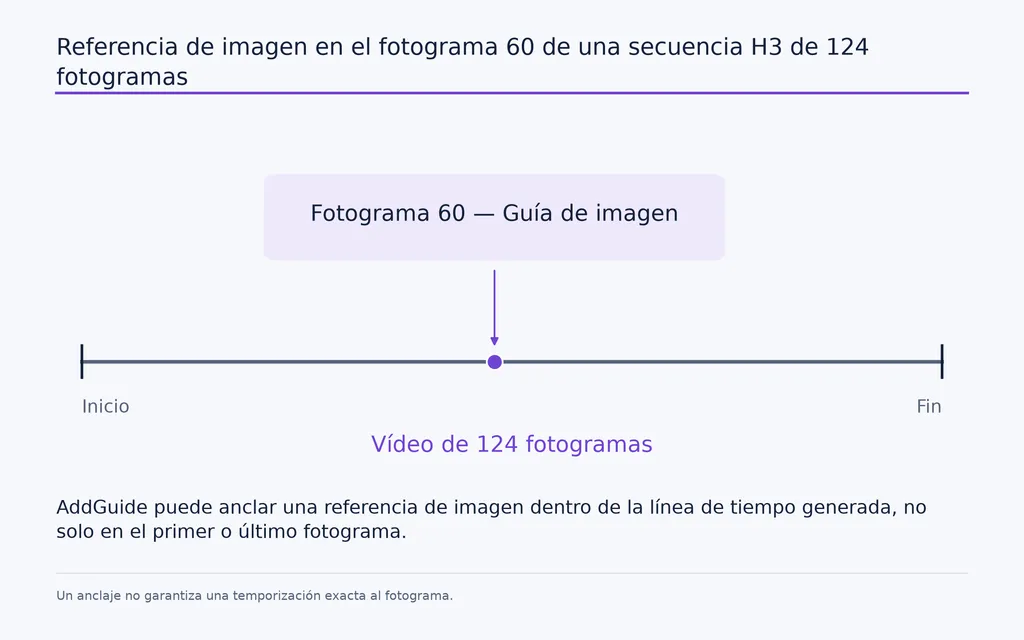
Caso práctico: anclar una imagen del guion gráfico en el fotograma 60 de 124
Un flujo documentado de H3 colocó una imagen fija cerca del fotograma 60 de un vídeo de 124 fotogramas.
Imagina un vídeo de producto en el que una modelo empieza caminando, adopta a mitad del plano una pose clara de tres cuartos para mostrar el producto y termina en un primer plano. Una referencia inicial puede definir la apertura, pero no controlar con fuerza la composición protagonista a mitad del plano.
Añadir una guía alrededor del fotograma 60 convierte esa composición en un objetivo explícito.
La lección práctica es usar los fotogramas clave para las decisiones visuales importantes, no para cada pequeño cambio de movimiento. Demasiados anclajes poco diferenciados pueden añadir complejidad sin mejorar el control.
¿Cómo mejoran varios fotogramas clave de MiniMax H3 el control del guion gráfico?
Varios fotogramas clave de H3 permiten incluir distintos estados visuales planificados en una sola generación, en lugar de una única transición de principio a fin.
Al revisar flujos documentados, encontramos configuraciones que pasaban de dos fotogramas clave a cuatro o más anclajes. Esto mejora mucho el control del guion gráfico, pero también revela la principal limitación actual de H3: el cumplimiento temporal.
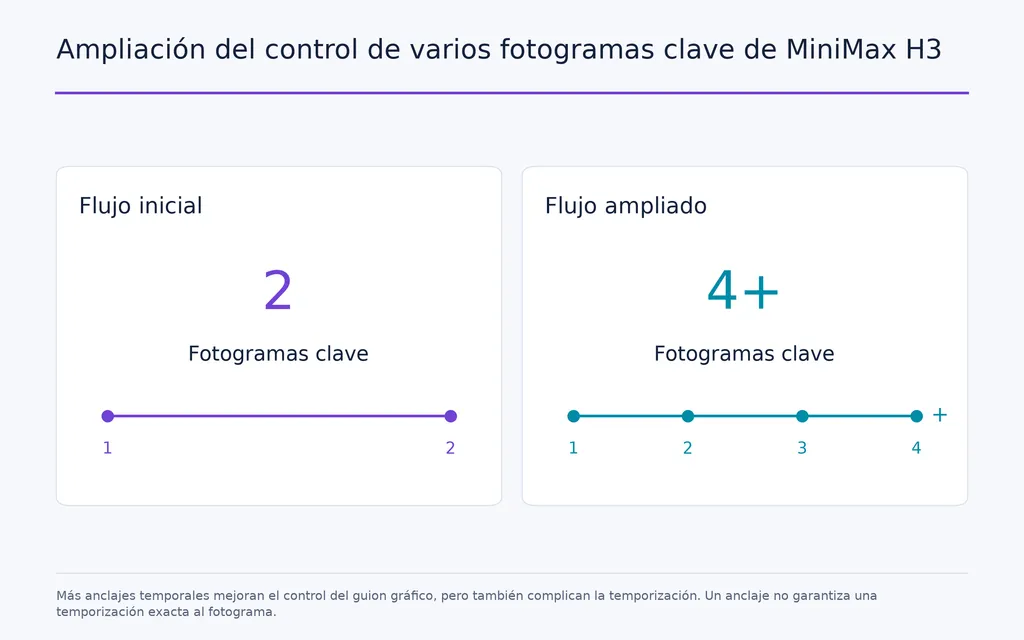
Caso práctico: pasar de dos a cuatro o más fotogramas clave de H3
En las pruebas de consistencia con varios fotogramas clave, añadir anclajes visuales no hacía que cada referencia apareciera automáticamente en el momento previsto. Un estado podía llegar antes, otro más tarde, o el modelo podía mezclar dos estados a lo largo de fotogramas cercanos.
Un patrón más fiable combinaba tres controles:
AddGuide para la ubicación temporal, indicaciones temporales en el prompt para el orden de los acontecimientos y referencias persistentes para la identidad y el estilo.
Un flujo reforzó un objetivo alrededor del fotograma 124 mediante la guía y un lenguaje temporal explícito, reutilizando además la referencia visual para preservar identidad, iluminación y estilo.
Esta separación es importante. No cabe esperar que un único método de condicionamiento resuelva a la vez la temporización, la apariencia, la identidad y el movimiento.
Por qué los fotogramas clave de H3 se desvían del fotograma objetivo
Los desfases son más probables cuando:
- varios fotogramas clave tienen un aspecto similar;
- ocurren demasiados acontecimientos en un clip;
- varios personajes se mueven o hablan;
- el diálogo debe sincronizarse con las acciones visuales;
- los clips largos incluyen varios cambios de escena;
- las condiciones visuales y sonoras compiten por la atención.
En planos donde el guion gráfico sea crítico, trata el fotograma objetivo como una restricción temporal fuerte y no como un fotograma clave de edición determinista.
¿Cómo puede MiniMax H3 usar guías de imagen y audio para continuar vídeos?
Para continuar un vídeo de H3, una ventana breve de contexto audiovisual suele ser más útil que un único fotograma final.
Una imagen fija indica a H3 cómo se veía el plano anterior. Varios fotogramas también comunican cómo se movían el sujeto y la cámara. Añadir audio conserva otra parte del estado de la escena.
Caso práctico: continuar H3 con los últimos 22 fotogramas y su audio
Un flujo práctico de continuación traslada los últimos 22 fotogramas del clip anterior junto con el audio correspondiente a la siguiente generación.
El proceso es sencillo:
- Conserva los 22 fotogramas finales del clip existente.
- Conserva el audio correspondiente.
- Usa ambos como contexto inicial de continuación.
- Genera el siguiente segmento.
- Recorta la superposición repetida.
- Une los clips.
La ventana de 22 fotogramas es especialmente útil porque coincide con una de las longitudes de guía de varios fotogramas compatibles con H3.
La conclusión general para la producción es que la continuidad depende de una ventana de contexto, no solo del último fotograma. Una imagen conserva la apariencia; el contexto audiovisual de varios fotogramas también puede conservar la dirección del movimiento, la progresión de los gestos, el comportamiento de la cámara y el sonido en curso.
¿Cómo se mantiene la consistencia de los fotogramas clave de H3 en vídeos largos?
Los vídeos largos de H3 introducen errores acumulativos que un único fotograma clave no puede resolver. La identidad puede variar, la nitidez disminuir, la dirección del movimiento cambiar y la continuidad del audio debilitarse con generaciones sucesivas.
La estrategia más sólida consiste en separar tres objetivos:
- usar contexto de varios fotogramas para la continuidad del movimiento;
- reutilizar referencias de identidad y escena para mantener la consistencia del sujeto;
- introducir anclajes visuales de alta calidad cuando un segmento necesite restablecer la calidad.
Caso práctico: siete clips de H3 a 736 × 1280
Un flujo de H3 para vídeos largos reunió siete clips independientes en una secuencia más larga. Los segmentos se generaron a 736 × 1280 de resolución, con 15 pasos y sin Turbo LoRA, y luego se unieron automáticamente.
El flujo se apoyó en anclajes sólidos de primer y último fotograma para que cada segmento nuevo comenzara y terminara en un estado visual deliberado.
Esto sugiere una estrategia práctica: tratar el vídeo largo con IA como una generación controlada por segmentos, no como una generación única e ilimitada.
En vídeos de producto, personajes de marca y escenas por entregas, los flujos segmentados son más fáciles de revisar, corregir y restablecer cuando la calidad empieza a desviarse.
¿Cómo puede MiniMax H3 mejorar el audio sin cambiar un buen vídeo?
El audio y el vídeo no siempre necesitan el mismo presupuesto de muestreo. Si la imagen ya es buena pero el sonido es débil, seguir modificando ambos puede estropear un resultado visual logrado.
Por ello, algunos flujos experimentales de H3 han explorado congelar el latente de vídeo y dedicar pasos de refinamiento adicionales al audio.
Caso práctico: cuatro pasos de vídeo más seis pasos de refinamiento de audio
Una prueba documentada utilizó un vídeo de H3 de 10 segundos y 1 MP en una RTX 5090.
Flujo de trabajo | Tiempo aproximado |
|---|---|
Generación estándar de 4 pasos | 136,5 segundos |
4 pasos + 6 pasos de refinamiento de audio sin caché adicional | 265 segundos |
4 pasos + 6 pasos de refinamiento de audio con caché de vídeo congelado | 186 segundos |
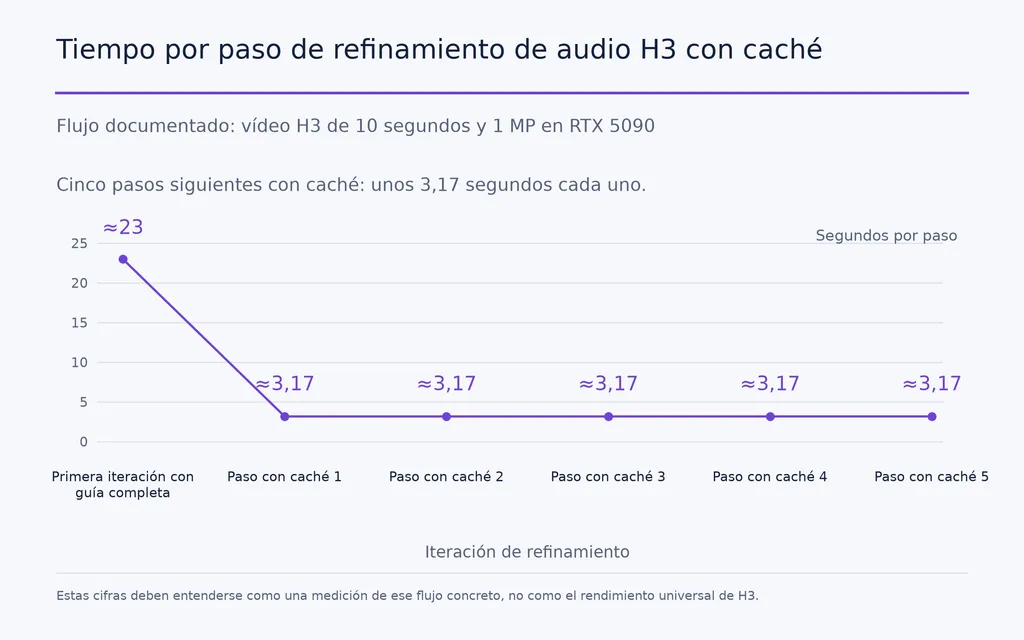
La versión con caché usó aproximadamente 14,9–15 GB de RAM. Su primera iteración con guía completa tardó unos 23 segundos, mientras que los cinco pasos siguientes con caché funcionaron a unos 3,17 segundos por paso. La generación adicional de audio más limpio añadió unos 45 segundos.
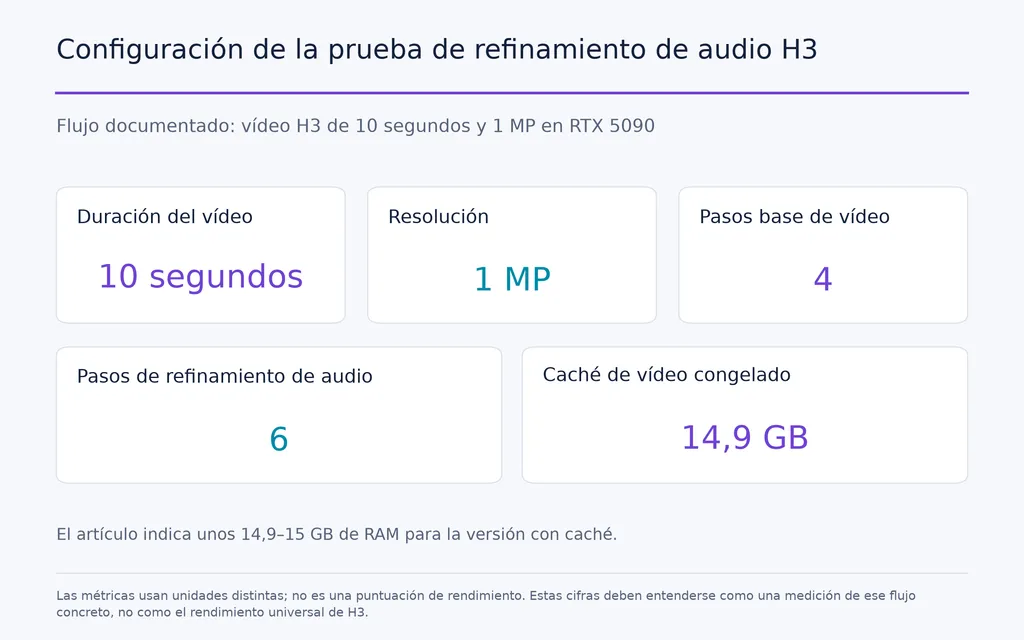
Estas cifras deben entenderse como una medición de ese flujo concreto, no como el rendimiento universal de H3.
La lección general es más valiosa: el audio y el vídeo pueden beneficiarse de presupuestos de optimización separados. Si el resultado visual ya es aceptable, dedicar cálculo adicional solo al audio puede ser más eficiente que volver a muestrear todo el clip.
¿Cuáles son las mayores limitaciones del control de fotogramas clave de MiniMax H3?
MiniMax H3 ya resuelve el problema básico de colocar guías de imagen y audio dentro de una línea de tiempo de vídeo, pero cuatro limitaciones siguen siendo relevantes para la producción.
La temporización no es determinista
Una guía puede apuntar a un lugar preciso, pero la transición visible puede ocurrir un poco antes o después. Siempre conviene revisar los momentos importantes del guion gráfico tras generar.
La influencia de cada fotograma clave necesita un control más preciso
Cuando se pueden añadir varias referencias, el siguiente reto es decidir con qué intensidad debe restringir el modelo cada una. Un fotograma protagonista del producto puede exigir mayor fidelidad que una pose de movimiento intermedia.
El control del audio está menos maduro que el de la imagen
El audio puede compartir la misma lógica temporal, pero la sincronización, la calidad con pocos pasos y la estabilidad del flujo siguen siendo menos predecibles que la guía visual.
Las continuaciones largas acumulan errores
Las generaciones repetidas pueden cambiar gradualmente la identidad, la iluminación, la nitidez o el movimiento. Las referencias persistentes y los anclajes periódicos de calidad son más fiables que esperar una continuidad estable indefinidamente.
Preguntas frecuentes
¿Puede H3 AddGuide usar varias imágenes y referencias de audio en un vídeo?
Sí. Se pueden encadenar varias etapas de H3 AddGuide y las guías pueden incluir imágenes fijas, secuencias de fotogramas compatibles, audio o contexto audiovisual combinado. Hay flujos documentados que han pasado de dos fotogramas clave a cuatro o más. El principal reto es mantener la precisión temporal cuando interactúan restricciones adicionales.
¿Es H3 AddGuide mejor que el último fotograma para continuar un vídeo?
Suele aportar más información cuando importa la continuidad del movimiento o del audio. El último fotograma conserva la apariencia; una guía de varios fotogramas aporta contexto del movimiento reciente. Un flujo práctico usa los últimos 22 fotogramas junto con el audio correspondiente y después recorta la superposición antes de unir el siguiente segmento.
¿Por qué se desvían los fotogramas clave de H3 del fotograma solicitado?
Las guías de H3 son anclajes generativos, no fotogramas clave de animación deterministas. El modelo puede iniciar una transición pronto o alcanzar tarde el estado visual previsto. El desfase es más probable en clips largos, escenas con varios personajes, secuencias de diálogo y flujos con varias guías que compiten.
¿Funciona H3 con Turbo LoRA y cómo puede mejorarse el audio?
Los flujos Turbo reducen los pasos de muestreo, pero la calidad del audio y del vídeo puede no mejorar al mismo ritmo. En un flujo de 10 segundos y 1 MP, a cuatro pasos normales les siguieron seis pasos de refinamiento exclusivos del audio. Congelar el vídeo y almacenar la guía en caché redujo el tiempo total de unos 265 segundos a unos 186 segundos.
Conclusión
MiniMax H3 ofrece un control de fotogramas clave especialmente útil como sistema de condicionamiento temporal para imagen, movimiento y audio, más que como animación convencional fotograma a fotograma. AddGuide permite anclar referencias dentro del vídeo; las longitudes compatibles de 5, 22 y 39 fotogramas facilitan continuaciones que tienen en cuenta el movimiento; y varias guías pueden convertir los momentos del guion gráfico en secuencias generativas estructuradas. Los flujos actuales más sólidos combinan anclajes temporales con indicaciones temporales en el prompt, referencias persistentes de identidad, ventanas breves de contexto audiovisual y restablecimientos periódicos de calidad. Los desfases, la influencia de las guías, el refinamiento del audio y la degradación acumulativa en vídeos largos aún limitan la precisión, pero H3 está llevando claramente el vídeo con IA de la generación aislada mediante un prompt a una línea de tiempo creativa más controlable.
Más del blog de Virse
Flujo de trabajo
FLUX 3 Image Prompt Guide: 12 Prompts & Editing Fixes
22 de octubre de 2026 by Vincent
Flujo de trabajo
How to Use FLUX 3 Image: Edit Photos Without Unwanted Changes
21 de octubre de 2026 by Vincent
Flujo de trabajo
Wan 3.0 Prompt Guide: Fix Wrong Motion, Character Drift, and Ignored Instructions
20 de octubre de 2026 by Yifan Zhao