GPT Image 2.5 vs GPT Image 2: Does It Finally Fix Editing Drift?
Vincent10 分钟阅读 ·
Yes—GPT Image 2.5 significantly reduces editing drift compared with GPT Image 2, especially in multi-turn workflows. Its biggest improvement is not simply better first-generation image quality, but stronger editing consistency, reference fidelity, and visual-state preservation. When you ask it to change one element, GPT Image 2.5 is more likely to preserve the approved character, product, camera angle, UI layout, reference image, or composition around it.
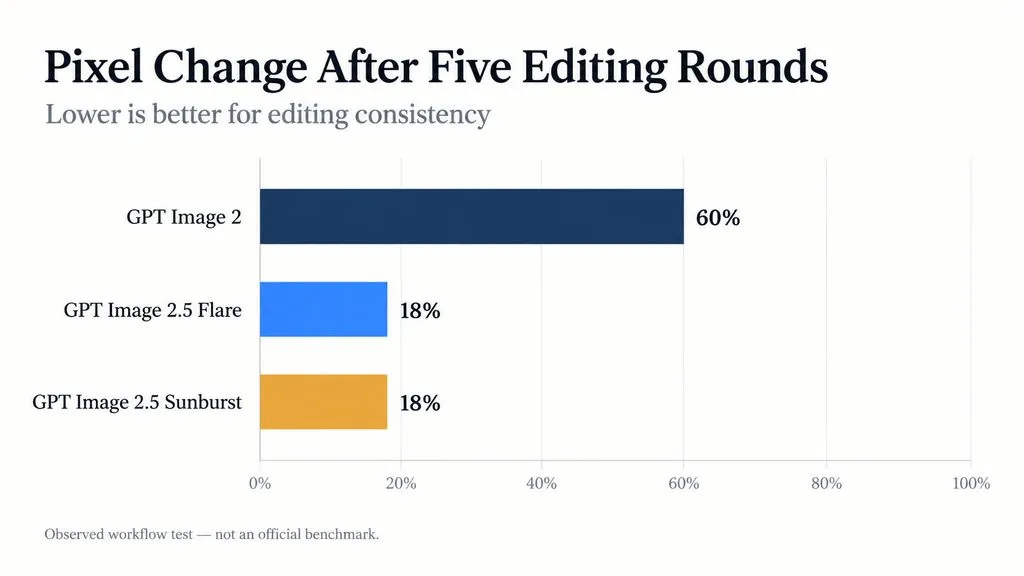
That matters because editing drift can quickly break an otherwise good AI image. In our five-round test, GPT Image 2 changed about 60% of the final image pixels, versus roughly 18% for both GPT Image 2.5 variants. The result is fewer unwanted changes, fewer regenerations, and less time rebuilding approved work.
GPT Image 2.5 addresses this problem by making targeted edits more stable across repeated revisions. Flare is designed for faster iteration and high-volume exploration, while Sunburst prioritizes tighter control when preserving an approved visual state matters more than speed. Virse extends this workflow with an infinite canvas, shared visual context, collaborating Agents, and long-term design memory for more structured multi-step creative work.
GPT Image 2.5 vs GPT Image 2: What Are the Biggest Differences?
The strongest upgrade is control rather than universal image-quality superiority. OpenAI officially describes Images 2.5 as better at reference fidelity, targeted editing, multi-turn consistency, complex layouts, and visual-style adherence. It also reports generation latency reduced by up to 50% versus Images 2.0. These official claims closely match the strongest patterns in our workflow research.
Area | GPT Image 2 | GPT Image 2.5 | Practical Impact |
Multi-turn editing | More visible drift | Stronger preservation | Fewer unrelated changes |
Reference fidelity | Strong | Improved | Better continuity across variations |
One-shot image quality | Already strong | Task-dependent improvement | Not always dramatic |
UI and structured graphics | Capable | Stronger complex-layout handling | Better for design briefs |
Speed | Baseline | Flare significantly faster | More iterations per session |
Precision editing | More regeneration | Better targeted changes | Less rework |
Photorealism | Competitive | Mixed in our research | Test by use case |
Sequential consistency | Limited | More practical | Useful for comics and frames |
For designers, the more decisions an image needs to preserve, the more valuable the 2.5 upgrade becomes.
Is GPT Image 2.5 Better for Multi-Turn Editing?
The Five-Round Editing Test: About 60% vs 18% Pixel Change
The clearest quantitative case in our research followed one image through five consecutive revisions using GPT Image 2 and GPT Image 2.5.
By the final round, GPT Image 2 had changed approximately 60% of the image pixels, while Flare and Sunburst each changed about 18%. This is a documented workflow test rather than an official benchmark, so the exact percentages should not be generalized.
The result nevertheless illustrates the key workflow improvement: 2.5 is more likely to change the requested element without rebuilding everything around it.
“Change Only” and “Keep Exactly” Make Editing More Reliable
For iterative design, our strongest workflow pattern is to separate what may change from what must remain stable.
Use “Change only” for the packaging color, expression, headline, background, or other intended revision. Then define “Keep exactly” constraints for identity, camera angle, framing, lighting, product geometry, typography, or approved layout.
This aligns with OpenAI’s stated focus on changing a single product, background, or piece of copy while preserving the surrounding subject, composition, and brand treatment. It still is not layer-based editing, but the behavior is much closer to how professional revision cycles actually work.
Long Edit Chains Can Still Degrade
Our comic and iterative-image cases still found crop drift, blur, softer linework, and lower perceived resolution after long chains of edits.
The practical approach is to create checkpoints. Once a composition is approved, preserve a clean version and branch new revisions from that state instead of extending one edit chain indefinitely.
GPT Image 2.5 Flare vs Sunburst: Which Is Better?
Flare Is Better for Speed and High-Volume Exploration
OpenAI positions Flare as the default API choice for most applications, reporting higher-quality output than GPT Image 2 at 50% lower latency. Our independent workflow research points in the same direction.
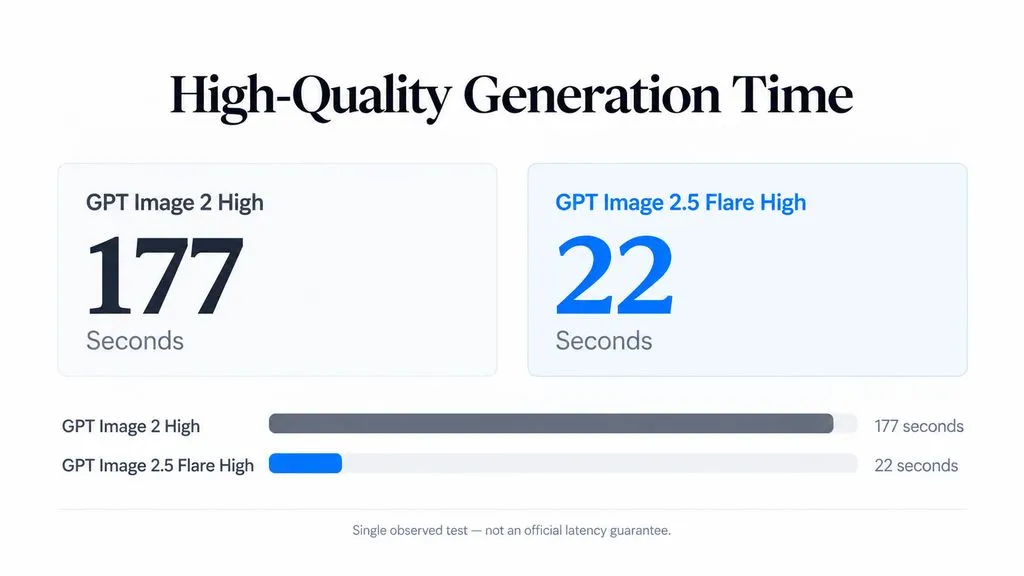
One UI production case reported Flare Medium at approximately 2× the speed and half the workflow cost of its previous Image 2 Medium process. Another isolated High-quality test measured 177 seconds for Image 2 versus 22 seconds for Flare.
The cost result needs context: official API documentation shows GPT Image 2.5 token rates matching GPT Image 2, so the reported half-cost outcome reflects that specific workflow and token consumption rather than a universal 50% list-price reduction. For a fuller breakdown, see GPT Image 2.5 pricing.
Sunburst Prioritizes Precision Over Latency
OpenAI describes Sunburst as the model for premium visual workflows requiring tighter control across edits, including polished product imagery and campaign creative. This also matches our product-image tests.
In one quality-escalation workflow, Flare was more likely to recompose the image, while Sunburst better preserved the product, camera angle, and reflection relationship.
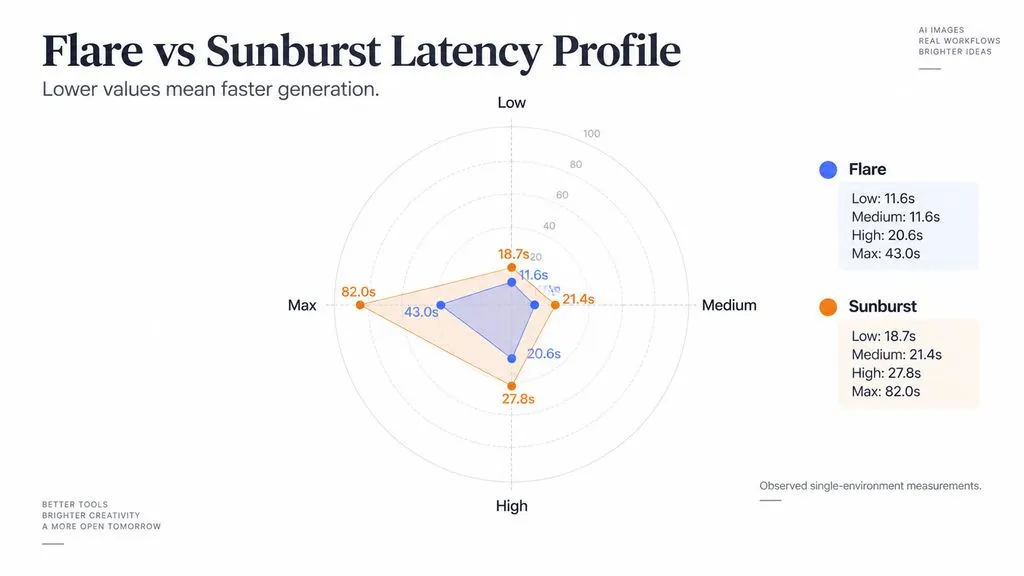
Quality | Flare | Sunburst |
Low | 11.6s | 18.7s |
Medium | 11.6s | 21.4s |
High | 20.6s | 27.8s |
Max | ~43.0s | 82.0s |
These are single-environment measurements, not official latency guarantees. The useful workflow split is simpler: Flare for exploration; Sunburst when preserving an approved visual state matters more than speed.
Is GPT Image 2.5 Better for UI, Text, and Structured Graphics?
UI Generation Benefits From Better Complex-Layout Control
UI is one of the strongest 2.5 use cases because the model must handle many simultaneous constraints: hierarchy, spacing, labels, typography, components, imagery, visual style, and reference fidelity.
Our research includes a production 12ui draft-generation workflow, where faster generation increased the number of interface directions that could be explored. OpenAI also specifically highlights UI concepts that preserve hierarchy, presentation visuals with defined structures, and more accurate infographic layouts.
For design teams, this is more valuable than a simple aesthetic upgrade. Better structural understanding means more usable concepts survive beyond the first draft.
Transparent Backgrounds and More Complex Layouts Expand Production Use
The 2.5 API supports transparent and opaque backgrounds, while transparent-background support for GPT Image 2 remains documented as preview.
That is particularly useful for product cutouts, brand assets, presentation graphics, UI elements, and compositing workflows where the generated image must move into another design system rather than remain a finished standalone picture.
Is GPT Image 2.5 Better for Photorealism and Product Images?
Photorealism Is Still More Mixed Than Editing
Photorealistic output produced the most divided results in our research.
We found improvements in expression, perspective, reference fidelity, and instruction following, but also cases of heavy contrast, oversaturation, repeated facial characteristics, unnatural microtexture, and an identifiable AI-rendered look.
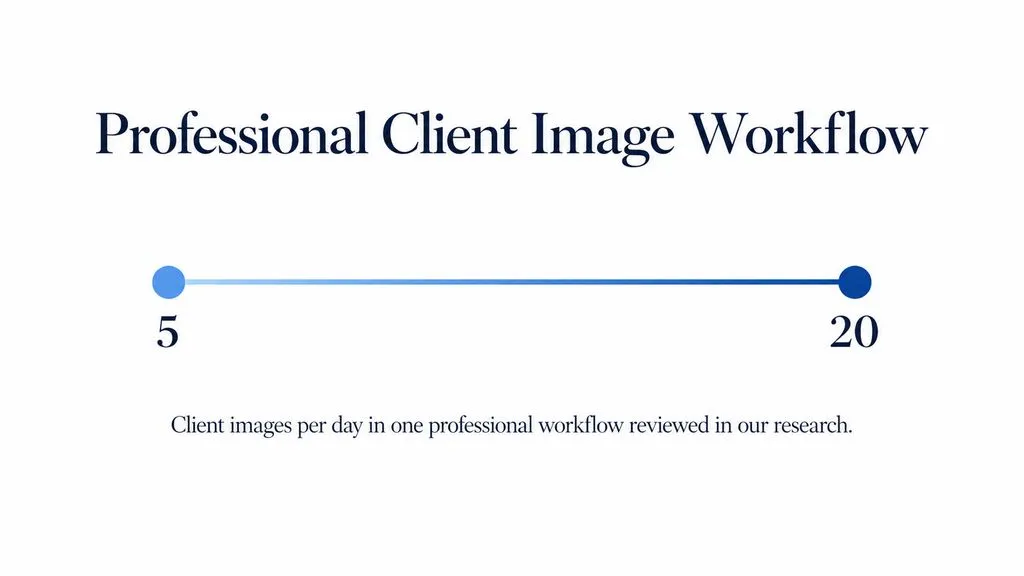
One experienced creator producing roughly 5–20 client images per day still preferred specialized alternatives for some professional photographic work, even when testing Sunburst Max. That does not contradict OpenAI’s improvements in lighting and texture; it shows that technical fidelity and subjective photographic aesthetics are different evaluation criteria.
Product Photography Requires Accuracy, Not Just Realism
A convincing product image can still fail commercially if the model changes packaging geometry, proportions, logo position, materials, or reflections.
Our research indicates that 2.5 improves composition preservation, especially in precision-oriented editing, but product teams should still compare final outputs against the source SKU. For commercial imagery, visual fidelity should be evaluated at the product-detail level, not only by whether the image looks realistic.
Does GPT Image 2.5 Still Have Swirl and Texture Artifacts?
Swirls, Checkerboards, and Repeating Patterns Have Not Disappeared
Our research repeatedly identified swirl-like marks, checkerboard structures, tiling, and unnatural high-frequency textures in areas such as skin, foliage, and detailed backgrounds. Some cases found these artifacts becoming more noticeable across repeated edits.
This creates an important distinction: better composition preservation does not guarantee artifact-free local detail. Final production assets still need close visual QA.
Invisible Watermarking Does Not Explain the Visible Artifacts
OpenAI confirms that Images 2.5 uses C2PA metadata and invisible watermarking through SynthID. However, our research found no verified evidence that the visible swirls, checkerboards, or tiling patterns are caused by that watermarking system.
The artifact is observable. Its technical cause should not be inferred without evidence.
What Else Is New in GPT Image 2.5?
Sketch, Templates, and Comment-Based Editing Add More Control
Several important 2.5 changes happen at the ChatGPT product layer, not only inside the image model.
ChatGPT now includes Sketch, which lets users draw a rough visual reference; creative templates for formats such as posters and merchandise; and comments placed directly on images for more focused edits.
These features reduce dependence on text-only prompting. From a design perspective, that is significant because spatial intent is often easier to communicate visually than through increasingly complicated prompt language.
GPT Image 2.5 Supports Custom Resolutions Up to 4K
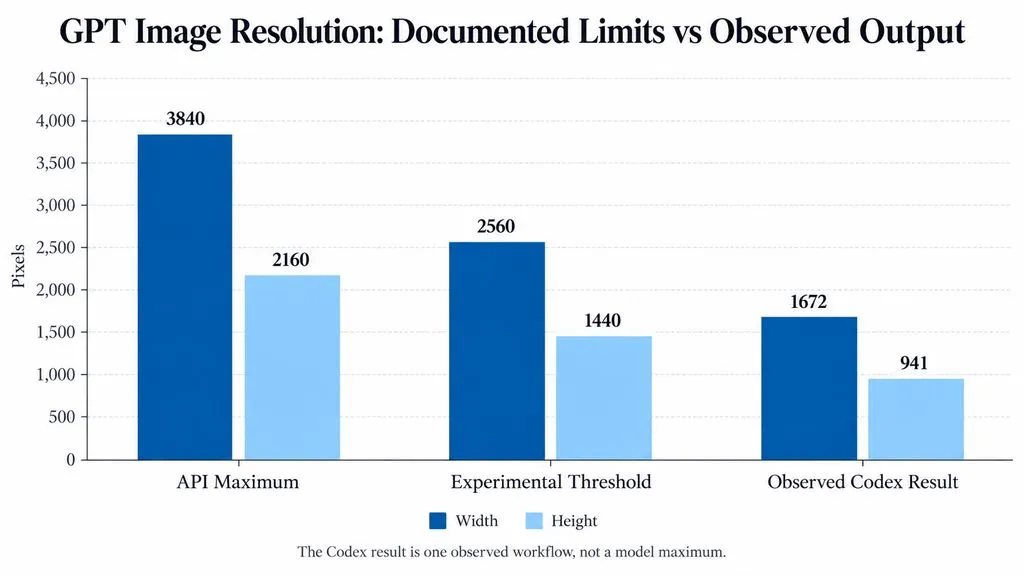
The API supports custom dimensions up to 3840 × 2160, with both dimensions divisible by 16 and aspect ratios between 1:3 and 3:1. Resolutions above 2560 × 1440 are currently experimental.
Importantly, 4K itself is not exclusive to 2.5; GPT Image 2 also supports custom high-resolution output under documented constraints. In one earlier Codex workflow from our research, a 3840 × 2160 request returned approximately 1672 × 941. That case is best understood as a product-entry or workflow discrepancy, not proof of the model’s maximum capability.
Flare and Sunburst are now separately available in the API, while Images 2.5 is available across ChatGPT, ChatGPT Work, and Codex.
Can GPT Image 2.5 Maintain Character Consistency for Animation and Comics?
One Sequential Workflow Produced About 10 Seconds of Animation
A particularly useful experiment generated a multi-frame sequence while locking the background, camera position, and character design, then separated and manually timed the frames into approximately 10 seconds of fight animation.
The workflow is valuable because it shows where consistency creates new possibilities: storyboard development, action blocking, comic panels, and experimental animation.
Comics Show Both the Strength and the Limit
Comic workflows similarly benefited from improved preservation of characters and page structure. But long sequences still accumulated blur, crop changes, and line softness.
GPT Image 2.5 should therefore be treated as a stateful visual collaborator with checkpoints, not an infinitely editable source file.
GPT Image 2 vs GPT Image 2.5: Which Should You Choose?
Workflow | Best Fit |
Simple one-shot generation | GPT Image 2 may already be sufficient |
Fast UI and concept exploration | Flare |
High-volume creative generation | Flare |
Multi-turn targeted editing | GPT Image 2.5 |
Approved product composition | Sunburst |
Detailed campaign refinement | Sunburst |
Photorealistic creative | Test both against your aesthetic |
Comics and sequential frames | GPT Image 2.5 with checkpoints |
The decision should be based on how much visual state must survive between iterations. That is where GPT Image 2.5 creates its strongest advantage.
FAQ
Is GPT Image 2.5 Better Than GPT Image 2?
Yes for editing consistency, reference preservation, speed, and complex multi-step workflows; not necessarily for every one-shot aesthetic task. In our five-round research case, Image 2 changed about 60% of pixels versus roughly 18% for both 2.5 variants. Photorealistic preferences remain more task-dependent.
Flare vs Sunburst: Which Should I Use?
Choose Flare for speed, rapid prototyping, UI drafts, social content, and high-volume generation. Choose Sunburst when precise editing and preservation of an approved product or composition justify longer generation times. OpenAI’s own positioning follows the same workflow distinction.
Why Does GPT Image Change Things I Did Not Ask It to Change?
Generative editing does not lock unaffected regions like traditional layers. Use explicit “Change only” and “Keep exactly” constraints and preserve clean checkpoints between major revisions. GPT Image 2.5 reduces edit drift and character inconsistency, but long editing chains can still introduce unwanted changes or degradation.
Does GPT Image 2.5 Support 4K?
Yes. The API supports custom resolutions up to 3840 × 2160, although output above 2560 × 1440 is currently experimental. 4K support is not unique to 2.5; GPT Image 2 also supports high-resolution custom dimensions under documented constraints.
Conclusion
GPT Image 2.5 is most important as a better creative workflow model, not simply as a better first-image generator. Its strongest gains are more precise editing, stronger reference and composition preservation, faster exploration with Flare, and more controlled refinement with Sunburst, while UI, structured graphics, Sketch, templates, transparent backgrounds, and sequential workflows expand how it can fit into professional design workflows. Photorealism remains task-dependent, artifacts still require quality control, and long edit chains benefit from checkpoints. For designers and creative teams, the real upgrade is the ability to preserve more of the decisions that matter as an image moves from exploration toward production.