Kling 4.0 Reddit Reviews: Great Motion, Frustrating Results?
 Yifan Zhao11 分钟阅读 ·
Kling 4.0 delivers excellent motion and strong prompt understanding, but our review of user questions shows a clear trade-off: it can create impressive action clips while still producing inconsistent characters, unwanted objects, added music, and costly failed generations. It is best for short, carefully controlled AI video shots rather than as a fully predictable production system.
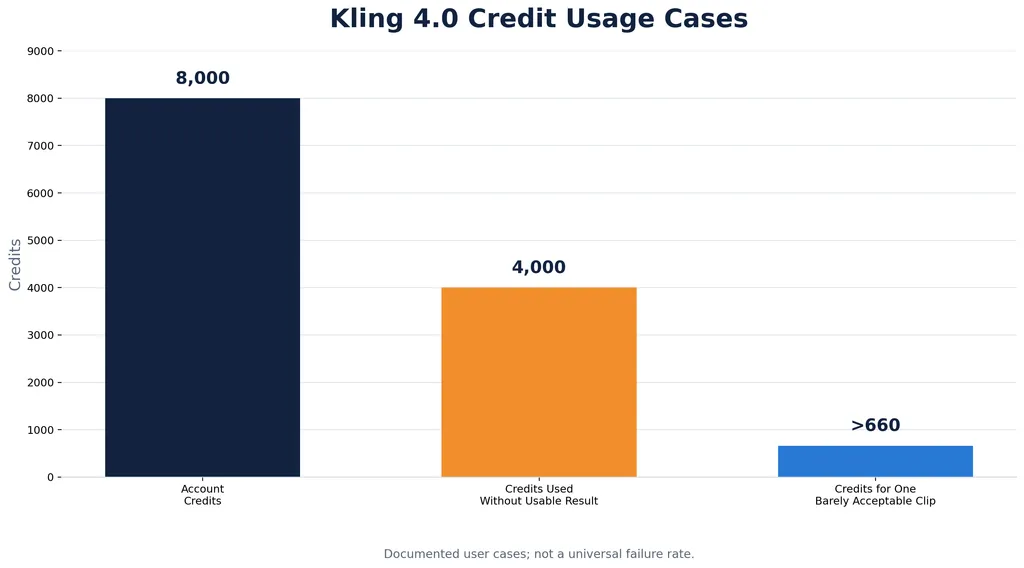
That distinction matters when every retry consumes credits. Documented user cases include 4,000 of 8,000 credits spent without producing a usable result, while another required more than 660 credits for one barely acceptable five-second clip. For ads, connected story scenes, and branded videos, motion quality alone is not enough; you also need repeatable results, identity control, reliable transitions, and a manageable cost per approved clip.
Virse gives you a more flexible way to build that workflow through a unified workspace for multiple AI models. You can organize reference images and iterations, protect important visual areas, and move from experimentation to production without forcing an entire project through one model. Paid plans provide unlimited use across many models and unlimited seats, while new users receive free signup credits to test the workflow before committing.
Is Kling 4.0 Good? Our Review of Motion Quality and Prompt Following
Kling 4.0 is strongest when the creative brief depends on movement. It can generate convincing body motion, energetic camera work, physical interaction, animal movement, and cinematic action. Kling 4.0 Flash is also useful for fast experimentation because it can turn a short text or image prompt into a visual concept quickly.
Our review of user questions identified three areas where Kling 4.0 creates strong expectations:
- Natural movement in short clips
- Good understanding of subject and action relationships
- Strong results for combat, pursuit, sports, product demonstrations, and advertising concepts
Multilingual voice output has also received positive attention in early usage discussions. For creators developing social videos or international marketing content, this can reduce the number of separate tools required during the concept stage.
The main issue is that motion quality does not always translate into production reliability. A character may perform the requested action naturally while still changing clothing, gaining an extra person, altering its face, or interacting with an object that was never requested. The result can be visually impressive but unusable for a brand campaign.
Why Strong Motion Does Not Guarantee a Usable Clip
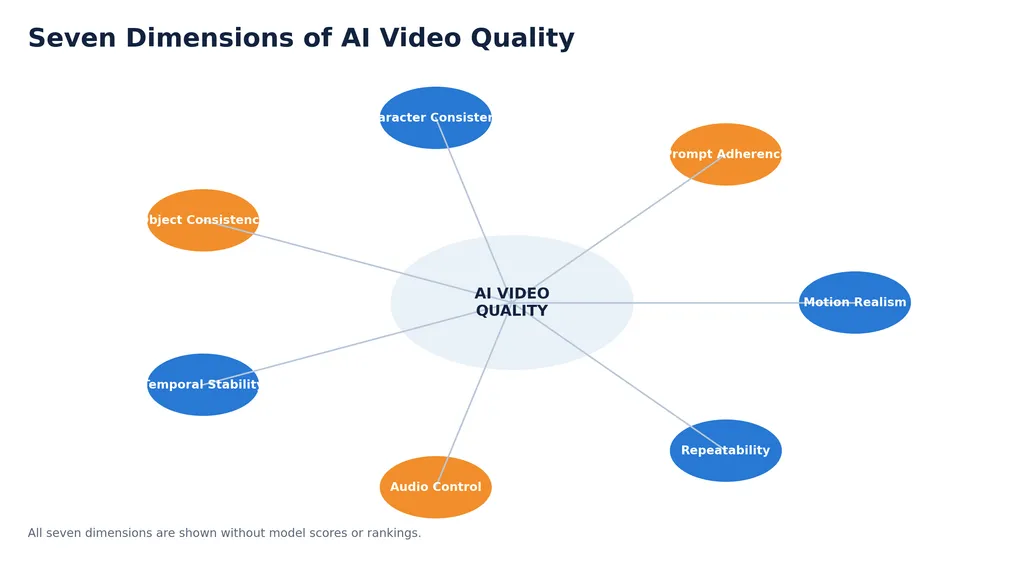
AI video quality has several separate dimensions:
- Motion realism
- Prompt adherence
- Character consistency
- Object consistency
- Temporal stability
- Audio control
- Repeatability
Kling 4.0 can perform well on the first dimension while failing on the others. This explains why the model may appear excellent in a single showcase but frustrating during repeated production.
For design teams, the correct review process is to score several generations against the same acceptance criteria. A clip should pass only when the subject, action, camera, identity, audio, and ending pose all meet the brief.
How Reliable Is Kling 4.0 for Professional Video Production?
Kling 4.0 is more dependable as a short-clip ideation and generation tool than as a complete production system. Our research shows that users value the visual quality but repeatedly encounter inconsistent results when they attempt batch generation, long clips, or connected scenes.
A documented Premium workflow involved an account with 8,000 credits. Approximately 4,000 credits were consumed without producing a usable result for a specific task. Another documented case used more than 660 credits and produced only one barely acceptable five-second clip. The failed outputs included extra people, gender changes, incorrect movements, and unrelated objects.
These cases do not establish a universal failure rate. They show why teams should measure production efficiency before committing to a large project.
The Most Important Metric Is Usable Clips per 1,000 Credits
The advertised price of a generation does not show the real cost of production. A more useful calculation is:
Usable output rate = approved clips ÷ total credits consumed
If a creator spends 660 credits and keeps one marginally usable clip, the effective cost is 660 credits per approved result. That may be acceptable for exploration, but it is difficult to justify for high-volume commercial work.
Before producing a campaign, run a controlled test:
- Use the same prompt for several generations.
- Record the credits used by every attempt.
- Count clips that pass visual review.
- Track identity, motion, audio, and continuity failures.
- Compare the result with another model or interface.
This approach turns a subjective impression into a production decision.
Why Does Kling 4.0 Drift in Longer Videos?
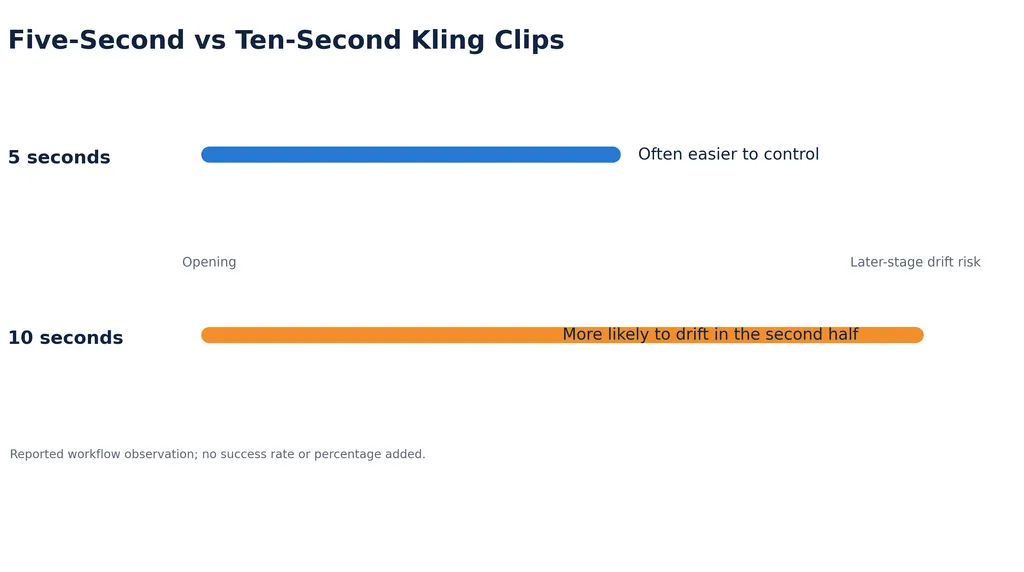
Kling 4.0 often performs better during the opening seconds than during the later part of a longer clip. Earlier user questions describe five-second videos as relatively manageable, while ten-second generations are more likely to introduce unnatural movements or depart from the original instruction in the second half.
Longer clips create more opportunities for the model to reinterpret the scene. The subject may begin walking toward a specified object, then change direction. A camera movement may become exaggerated. A character may perform an additional gesture that was never requested.
How to Write Kling 4.0 Prompts for Better Temporal Control
A practical prompt structure is:
- Subject
- Environment
- Camera
- Primary action
- Lighting
- Audio
- Ending pose
Keep one major action and one primary camera movement in each shot. A prompt asking a character to run, turn, speak, pick up a product, look toward another person, and end in a precise pose contains too many competing priorities.
For longer narratives, divide the sequence into short shots and assemble them in editing software. This provides more control than asking one generation to contain a complete scene.
How Can You Reduce Character Drift and Wrong Objects in Kling 4.0?
Character and object changes are among the most damaging Kling 4.0 problems because they break continuity. This is especially serious for product videos, branded characters, fashion content, and story sequences.
Our review of user questions found repeated concerns about:
- Extra people appearing in the frame
- A subject changing gender or age
- Clothing changing between generations
- Faces becoming inconsistent
- Products gaining or losing components
- Objects appearing without a prompt instruction
- Incorrect interactions between subjects and props
Use Reference Images as Identity Anchors
A clean reference image should show the subject clearly, with visible clothing, simple lighting, and limited background clutter. Prioritize details that must remain stable:
- Hair shape and color
- Clothing silhouette
- Facial structure
- Age range
- Product proportions
- Logo or label placement
- Subject position in the frame
Avoid describing every decorative detail. Excessive instructions can compete with the identity information that matters most.
Separate Identity, Motion, and Camera Instructions
A useful prompt hierarchy is:
- Preserve the subject’s identity and clothing.
- Place the subject in the specified environment.
- Perform one clear action.
- Use one camera movement.
- End in a defined pose.
This structure helps the model distinguish what must remain fixed from what is allowed to change.
Review Important Clips Frame by Frame
A clip may look acceptable during playback while containing a distorted hand, changing logo, altered face, or inconsistent garment. Commercial footage should be inspected frame by frame before it enters the editing timeline.
Virse can help organize reference images, iterations, and protected visual areas before generation. This is useful when the workflow requires repeated changes while preserving a character, product silhouette, or composition anchor.
Does Kling 4.0 Support Keyframes and Start-End Frames?
Keyframe control is one of the most important workflow questions for Kling 4.0. During early Kling 4.0 Flash discussions, users reported that complete start-and-end-frame control was not available for every workflow.
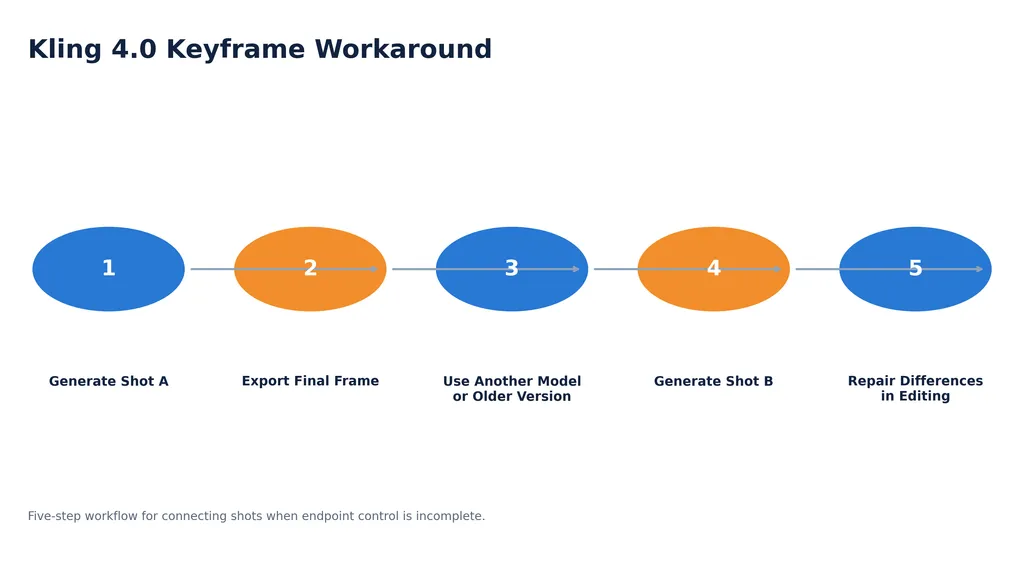
This matters when the final frame of one shot must match the first frame of the next. Without reliable endpoint control, creators may need to use multiple versions or different models:
- Generate the first shot in Kling 4.0.
- Export its final frame.
- Use an older Kling version or another model to create the transition.
- Generate the next shot separately.
- Repair differences during editing.
This process increases production time and makes continuity problems harder to diagnose.
When Keyframe Limitations Matter Most
Keyframe control is especially important for:
- Multi-shot stories
- Music videos
- Product demonstrations
- Character entrances and exits
- Camera transitions
- Before-and-after transformations
- Scenes that require an exact final pose
For standalone social clips, incomplete keyframe support may be acceptable. For structured narratives, endpoint control should be evaluated before selecting Kling as the primary model.
Why Does Kling 4.0 Add Music When the Prompt Says No Music?
Some documented workflows indicate that Kling may add background music even when the prompt clearly requests no music. This creates problems for advertisements, educational videos, voice-over content, and projects with an approved soundtrack.
Treat generated audio as provisional:
- Request no music and clean production audio.
- Separate dialogue, sound effects, and music when possible.
- Review the audio track before approving a clip.
- Replace unwanted music during editing.
- Avoid assuming that negative instructions will always be followed.
This is a broader AI video lesson: a prompt is not a guaranteed production specification. Critical requirements still need a review stage.
Is Kling 4.0 Too Expensive When Results Fail?
Kling 4.0 becomes expensive when multiple failed attempts consume credits. The real cost includes retries, selection time, editing, audio replacement, and continuity repair.
Our research suggests that creators are less concerned with the price of one generation than with the uncertainty of repeated attempts. A lower-cost generation mode can still become expensive if only one clip out of many is usable.
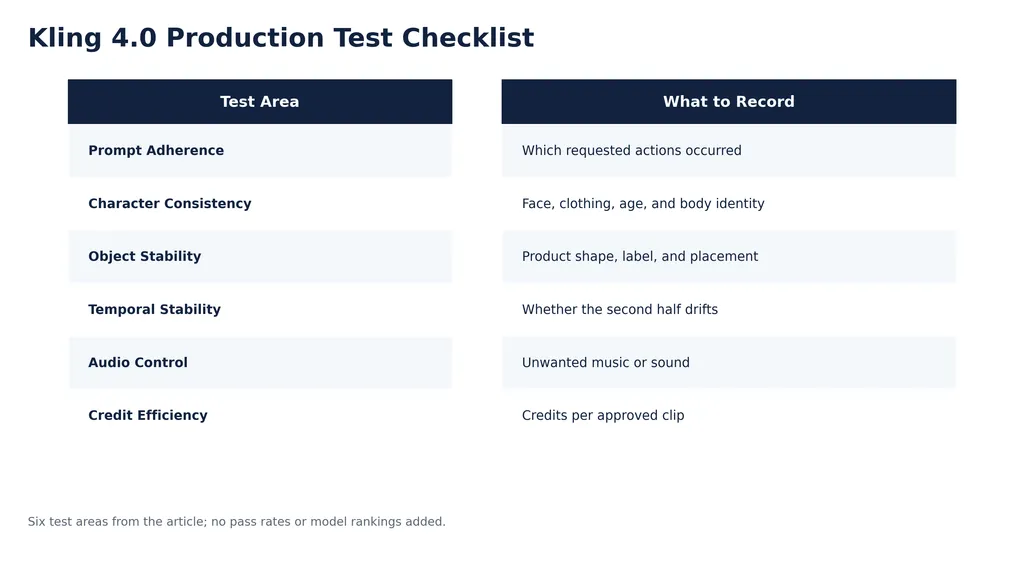
A Practical Kling 4.0 Credit Test
Run a small benchmark before starting a campaign:
Test Area | What to Record |
|---|---|
Prompt adherence | Which requested actions occurred |
Character consistency | Face, clothing, age, and body identity |
Object stability | Product shape, label, and placement |
Temporal stability | Whether the second half drifts |
Audio control | Unwanted music or sound |
Credit efficiency | Credits per approved clip |
One documented case also reported different outcomes when using the same image and prompt through Kling’s native interface and a third-party interface such as OpenArt. This does not prove that one platform is always better, but it suggests that parameters, preprocessing, queue behavior, or interface defaults may influence results.
Is Kling 4.0 Better Than Seedance 2.5?
Kling 4.0 and Seedance 2.5 appear to serve different strengths. Kling is often selected for physical movement, cinematic action, and realistic motion. Some creators prefer Seedance 2.5 for transitions, prompt precision, or connected shots.
Production Requirement | Kling 4.0 | Seedance 2.5 |
|---|---|---|
Complex physical movement | Strong candidate | Competitive |
Short visual concepts | Strong | Strong |
Connected start-end shots | May require workarounds | Often preferred by some users |
Character continuity | Requires testing | Requires testing |
Advertising concepts | Strong for motion-led ideas | Strong for controlled instructions |
Batch production | Credit benchmark required | Credit benchmark required |
The fairest comparison uses the same prompt, reference image, duration, resolution, and acceptance criteria. A first-generation winner should not determine the entire workflow.
What Is Kling 4.0 Best Used For?
Kling 4.0 is well suited to:
- Short action sequences
- Product motion concepts
- Social media clips
- Animal and character movement
- Cinematic advertising ideas
- Storyboarding and previsualization
- Early motion tests before final production
It requires more caution for:
- Long continuous narratives
- Strict brand identity work
- High-volume batch generation
- Exact start-and-end-frame transitions
- Audio-sensitive campaigns
- Projects with very limited retry budgets
The most practical setup is a hybrid workflow. Use Kling for motion generation, an editor for sequencing and audio, reference tools for identity control, and Virse for organizing iterations and protecting important visual areas.
Conclusion
Kling 4.0 offers genuinely strong motion quality and can produce compelling action, product, and cinematic clips. Its main weakness is predictability: repeated generations may change characters, add objects, introduce music, drift from the prompt, or consume substantial credits before producing an approved result. The model is most effective when used for short, carefully scoped shots inside a broader workflow. Teams should benchmark usable clips per credit, test character continuity, verify audio, and confirm keyframe requirements before using Kling 4.0 for commercial production.
FAQ
Is Kling 4.0 good for commercial video?
Kling 4.0 can work well for short advertising concepts, product motion, and social videos. It needs human review, editing, audio cleanup, and a credit benchmark before it is used for repeatable commercial delivery.
Why does Kling 4.0 change characters or add people?
Ambiguous identity, action, and camera instructions can cause the model to reinterpret the scene. Clean references, shorter clips, fewer actions, and explicit identity details can reduce drift.
Does Kling 4.0 Flash support start and end frames?
Support may vary by version and interface. Early Kling 4.0 Flash workflows did not provide complete start-and-end-frame control for every use case, so some creators used older versions or other models for transitions.
Can Kling 4.0 generate videos without music?
You can request no music, but unwanted background audio may still appear. Review the audio track and plan to remove or replace it during editing.
Is Kling 4.0 ready for professional production?
It is suitable for selected production tasks, especially short motion clips and previsualization. It should not be treated as a fully predictable end-to-end production system without testing continuity, audio, and credit efficiency.