
Como fazer um mockup: PSD, IA e fluxos de trabalho realistas
Vincent12 min de leitura ·
Para fazer um mockup, coloque seu design ou captura de tela no contexto correto de produto, dispositivo ou interface e ajuste escala, perspectiva, iluminação, sombras e textura para que pareça parte do produto final. Use um gerador online para ganhar velocidade, um mockup PSD para mais realismo e controle, IA para criar cenas e variações, ou um fluxo em lote reutilizável ao produzir muitas versões.
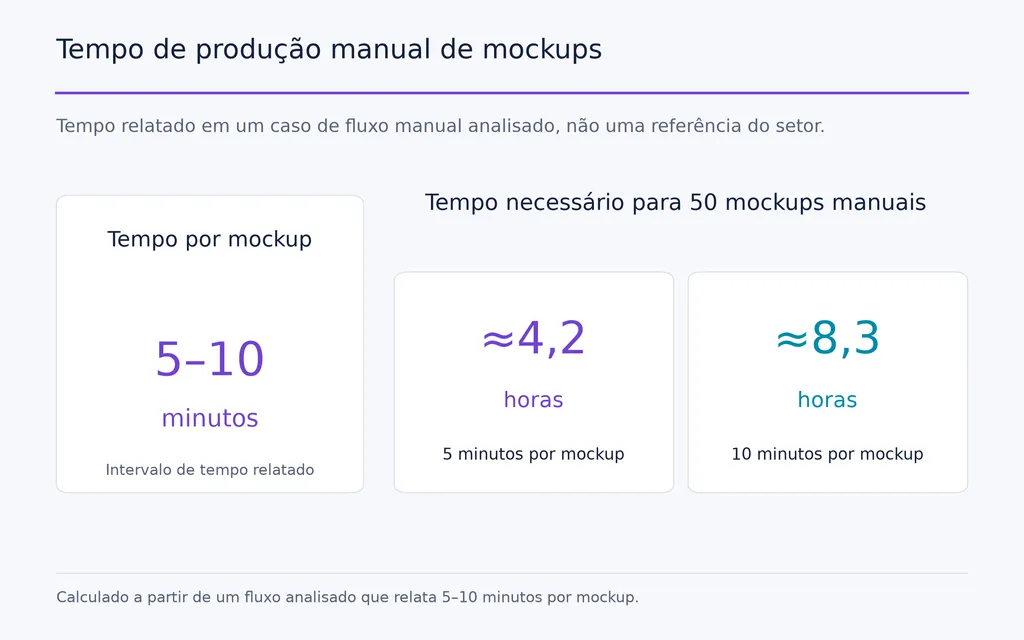
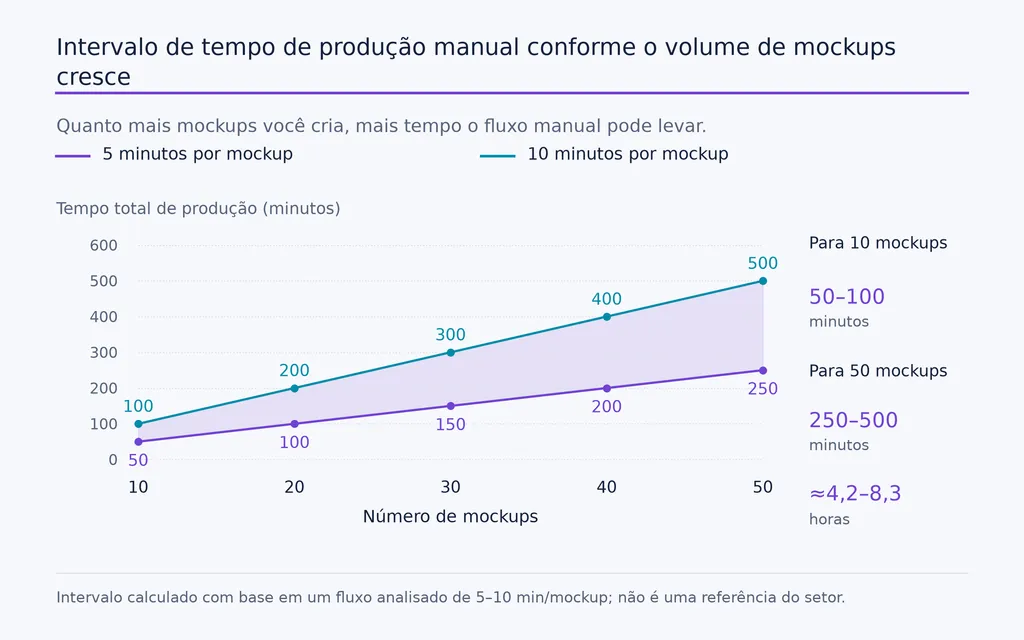
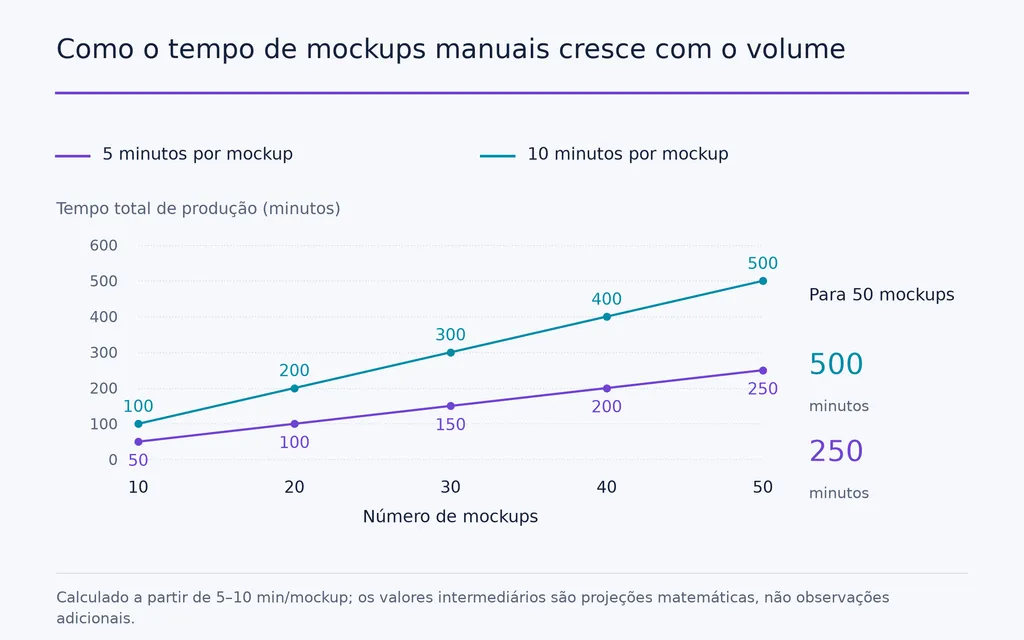
O problema é que muitos mockups ainda parecem planos, falsos, imprecisos ou genéricos. A IA também pode introduzir detalhes convincentes, mas incorretos, enquanto a produção manual fica lenta em grande escala. Os fluxos de design analisados envolviam 10–50 variações de design, e um processo manual levava cerca de 5–10 minutos por mockup, o que significa que 50 resultados poderiam exigir aproximadamente 4,2–8,3 horas.
A melhor abordagem é tratar a criação de mockups como um processo repetível de design, e não como um efeito de um clique: preservar primeiro a precisão do produto, escolher o método PSD, IA ou web adequado e automatizar etapas repetidas quando o volume aumentar. Virse apoia esse fluxo em uma tela infinita, mantendo referências, recursos, contexto da marca e tarefas criativas relacionadas conectados, para criar mockups realistas, fiéis ao produto e consistentes sem sacrificar o controle criativo.

O que é um mockup e para que serve?
Um mockup é uma representação visual de como um design aparecerá no contexto físico ou digital pretendido antes de o produto final estar totalmente produzido.
Um logotipo em uma embalagem é um mockup. Uma arte em uma camiseta é um mockup. Um painel SaaS em uma moldura de navegador é um mockup. O objetivo não é decorar, mas ajudar as pessoas a avaliar aparência, contexto e apresentação antes de se comprometerem com a produção final.
Mockup, wireframe e protótipo
Formato | Pergunta principal | Melhor uso |
Wireframe | Como deve ser estruturado? | Decisões iniciais de layout |
Mockup | Qual deve ser a aparência? | Revisão visual e apresentação |
Protótipo | Como deve se comportar? | Testes de interação |
Mockup de produto | Como aparecerá no item real? | E-commerce e marketing |
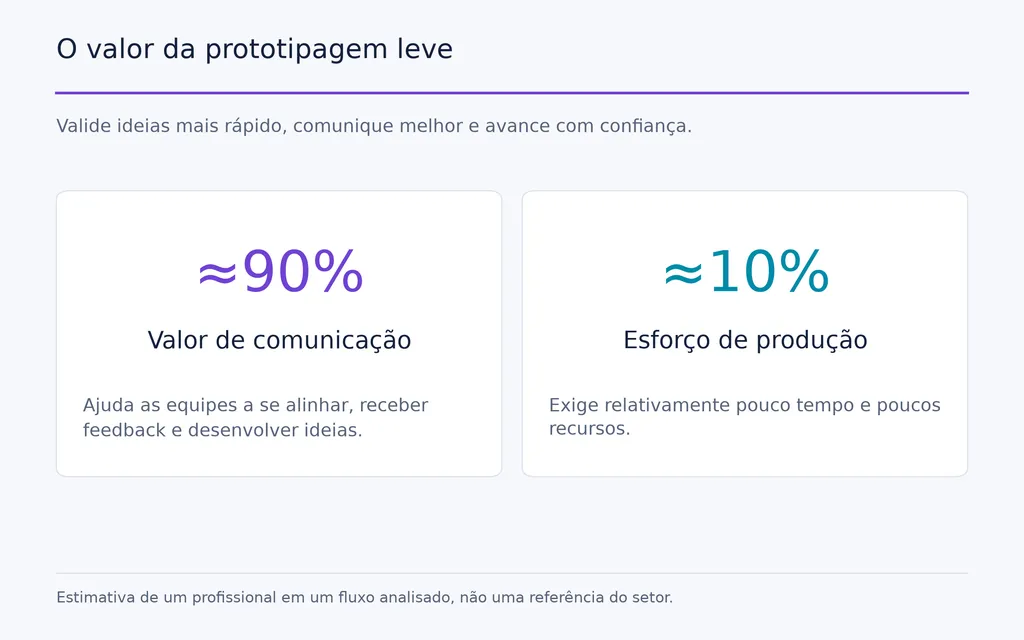
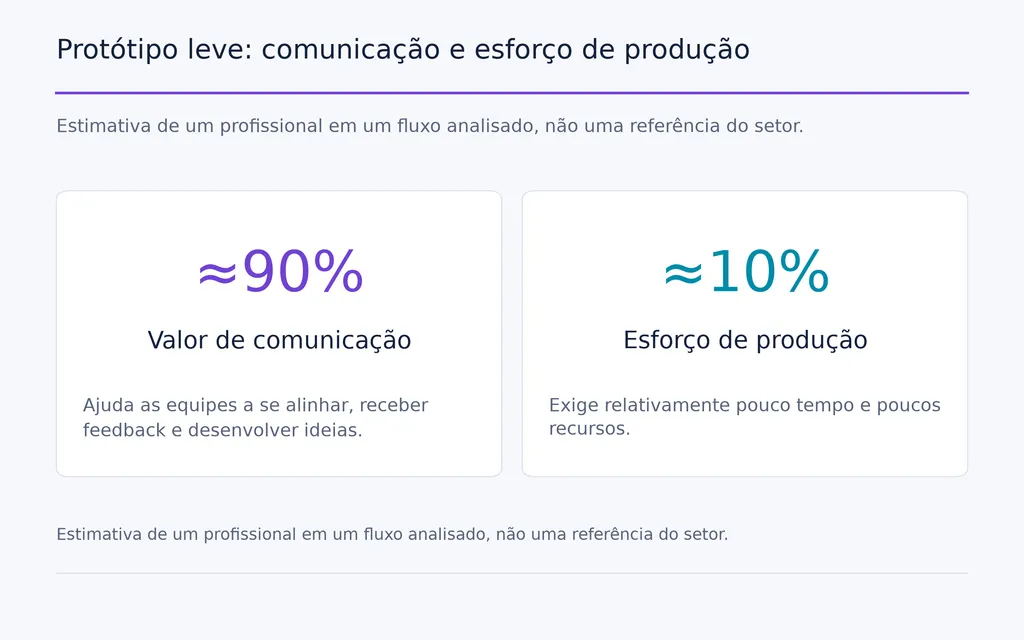
Para interfaces, nossa análise de fluxos de trabalho mostrou um padrão comum de eficiência: explorar várias direções de baixa fidelidade, escolher uma e depois investir em alta fidelidade. Um profissional estimou que um protótipo leve poderia comunicar cerca de 90% da ideia com aproximadamente 10% do esforço de produção. É uma estimativa individual, não uma referência do setor, mas o princípio é útil: usar apenas a fidelidade necessária para a decisão atual.
Como fazer um mockup: três métodos práticos
A maioria dos mockups é criada com um de três fluxos. Escolha com base em velocidade, realismo, precisão e escala.
Use um gerador online de mockups para ganhar velocidade
O fluxo mais rápido é:
- Preparar a arte ou captura de tela.
- Escolher a cena correta de produto ou dispositivo.
- Enviar e posicionar o design.
- Ajustar a escala e o fundo.
- Verificar o realismo e a precisão do produto.
- Exportar a imagem final.
Isso é eficaz para materiais de redes sociais, imagens simples de e-commerce, capturas SaaS e apresentações iniciais, especialmente ao usar ferramentas de design com IA para acelerar a produção visual.
A limitação é o controle. Nos fluxos analisados, designers frequentemente encontravam o produto certo no ambiente errado, ou uma cena atraente que não correspondia ao SKU real. Um gerador pode reduzir o tempo de edição e aumentar o tempo de busca por modelos.
Use um mockup PSD para ter mais controle
Modelos PSD são melhores quando a arte precisa interagir com tecido, papel, embalagem, telas ou outras superfícies.
Um processo típico é:
Abrir modelo → substituir Objeto Inteligente → salvar → revisar perspectiva e textura → refinar → exportar
Objetos Inteligentes tornam a substituição repetida eficiente, mas não garantem realismo. Se o modelo tiver máscaras, transformações de perspectiva ou efeitos de superfície ruins, substituir a arte corretamente ainda pode gerar um resultado ruim.
Um bom modelo automatiza a qualidade. Um modelo ruim automatiza os erros.
Crie um mockup personalizado para diferenciar a marca
Modelos públicos economizam tempo, mas podem gerar uniformidade visual. Para campanhas em que a identidade da marca importa, use fotografia original, cenas 3D personalizadas, ambientes específicos da marca ou composições com direção de arte deliberada.
Um fluxo híbrido costuma funcionar melhor: modelos para a produção rotineira e recursos personalizados para imagens principais ou campanhas de alto valor.
Como fazer um mockup de produto que pareça real
Um mockup de produto realista deve fazer a arte parecer fisicamente integrada ao objeto.
Comece com a imagem correta do produto
Escolha uma imagem com resolução suficiente, textura visível, iluminação convincente e um ângulo de visão útil.
No e-commerce, a precisão importa tanto quanto a estética. Nossa análise encontrou repetidamente mockups convincentes que usavam o produto-base sem estampa, o caimento, as alças, o decote, as proporções ou o material errados.
Um mockup pode parecer realista e representar o produto errado.
Combine a perspectiva com a forma da superfície
Não basta redimensionar a arte.
Se a superfície estiver inclinada, o design deve seguir essa perspectiva. Se o tecido tiver dobras, a arte deve acompanhá-las. Se a embalagem for curva, o design deve refletir essa curvatura.
Um gráfico perfeitamente plano sobre um objeto tridimensional é uma das maneiras mais rápidas de deixar um mockup com aparência falsa.
Preserve iluminação, sombras e textura
A superfície sob o design deve continuar visível.
O tecido deve preservar as dobras. O papel, a granulação. O vidro, os reflexos. A embalagem metálica, os realces.
Na prática, o realismo costuma vir da preservação das informações físicas que o objeto já tem, e não da adição de mais efeitos à arte.
Como fazer um mockup fiel ao produto
A precisão do produto é especialmente importante para impressão sob demanda (POD) e e-commerce, pois os clientes usam mockups como informação sobre o produto.
Verifique o SKU exato
Antes de publicar, confira:
- silhueta e proporções
- caimento e corte
- decote ou alças
- costuras e construção
- material e textura
- cor
- área de impressão
- ferragens pertinentes
Se o item real for diferente do mockup, sombras melhores não resolverão o problema.
Separe realismo visual de verdade do produto
Realismo visual diz respeito a iluminação, profundidade, textura e perspectiva convincentes.
Precisão do produto indica se a imagem representa o item que os clientes realmente receberão.
A revisão profissional de mockups deve tratar esses pontos como duas verificações de qualidade separadas.
Como usar IA em mockups sem representar o produto incorretamente
IA para design gráfico é útil na produção de mockups, mas pode criar imprecisões muito convincentes.
Use a IA com mais liberdade ao redor do produto
A IA é eficaz para fundos, ambientes, direção de arte, objetos de cena, conceitos de modelos e exploração visual.
Para um produto comercial real, aplique controles mais rigorosos.
Um princípio prático é:
fixar primeiro a verdade do produto e depois gerar ao redor dele.
Comece com uma fotografia de produto verificada, uma renderização controlada ou um mockup-base preciso e use a IA para expandir a cena ao redor.
Procure detalhes inventados do produto
A IA pode alterar sutilmente:
- alças
- decote
- mangas
- costuras
- tecido
- proporções
- dimensões do produto
Essas alterações podem ser mais difíceis de detectar do que um erro de edição tradicional, porque ainda podem parecer fotorrealistas.
O realismo da IA nunca deve ser tratado como prova de precisão do produto.
Como fazer um mockup sem Photoshop
O Photoshop é útil, mas não é necessário para a maioria dos fluxos de mockup.
Use um editor no navegador para ter controle semelhante ao PSD
Editores no navegador podem trabalhar com muitos mockups PSD e fluxos de design básicos. Porém, teste cada modelo com cuidado.
Verifique se Objetos Inteligentes e fluxos do Photoshop, máscaras, efeitos, perspectiva e exportações continuam corretos após a importação.
A questão importante não é se o PSD abre, mas se sua lógica visual é preservada.
Use um gerador para materiais simples de marketing
Para imagens simples de produto, gráficos para redes sociais e apresentações de dispositivos, uma ferramenta de design com IA costuma ser mais rápida do que a edição manual.
A contrapartida é ter menos controle sobre precisão do produto, composição e diferenciação da marca.
Use edição manual apenas enquanto ela ainda funcionar na escala necessária
Um fluxo analisado exigia aproximadamente 5–10 minutos por mockup criado manualmente. Isso pode ser razoável para cinco imagens. Com 50, vira várias horas de produção repetitiva.
A principal lição é simples:
em volumes maiores, criar mockups se torna um problema de fluxo de trabalho, não de edição.
Como fazer um mockup de aplicativo ou SaaS
Mockups de aplicativos e SaaS geralmente começam com uma captura existente. O objetivo é apresentar a interface com clareza, sem deixar que a apresentação a ofusque.
Use o dispositivo e a proporção corretos
Adapte a moldura à experiência:
- navegador para produtos web
- notebook para SaaS voltado principalmente ao desktop
- celular para aplicativos móveis
- vários dispositivos apenas quando o comportamento responsivo importar
Não force a mesma captura em todos os dispositivos.
Mantenha a apresentação em segundo plano
Um fluxo limpo é:
Captura de tela → moldura do dispositivo → fundo → espaçamento interno → sombra → rotação → exportação
Use sombras, gradientes e rotação com moderação. Se o tratamento visual chamar mais atenção que a interface, simplifique.
A moldura deve explicar o produto, não se tornar o produto.
Como fazer um mockup de site com eficiência
Mockups de sites só devem ganhar detalhes à medida que a incerteza diminui.
Explore primeiro direções de baixa fidelidade
Se o layout e a hierarquia ainda forem incertos, apresente alternativas aproximadas primeiro.
Uma sequência prática é:
várias direções de baixa fidelidade → escolher uma → criar componentes reutilizáveis → desenvolver uma direção de alta fidelidade
Isso reduz o tempo gasto refinando conceitos que podem ser rejeitados.
Prototipe apenas o que precisa de validação
Crie protótipos interativos quando houver incerteza sobre navegação, mudanças de estado ou padrões de interação.
Para fluxos simples, telas vinculadas e especificações claras podem comunicar o suficiente sem criar interações desnecessárias.
Esse é um princípio E-E-A-T importante para o design: a eficiência profissional vem de adequar o esforço de produção à decisão que está sendo tomada.
Como fazer mockups em lote
O fluxo correto para 50 mockups não é o fluxo de um mockup repetido 50 vezes.
Separe elementos fixos e variáveis
Em casos de produção com 10–50 variações de design, a abordagem escalável é separar o que muda do que permanece fixo.
As variáveis podem incluir:
- arte
- cor
- SKU
- texto
- idioma e região
As constantes podem incluir:
- modelo
- composição
- efeitos
- dimensões de saída
- configurações de exportação
- regras de nomeação
Crie um fluxo de substituição em lote
Um processo escalável é:
Pasta de designs → modelo reutilizável → mapeamento de Objetos Inteligentes → substituição em lote → renderização → exportação organizada
Nossa análise também incluiu um fluxo voltado a produzir centenas de mockups por substituição automatizada de Objetos Inteligentes. Esse número vem do criador do fluxo, não de um teste independente, mas mostra como a produção muda quando a escala se torna a principal restrição.
Nessa etapa, a automação passa a fazer parte do sistema de design.
Como evitar mockups com aparência genérica
Modelos geram eficiência, mas também podem fazer as marcas parecerem intercambiáveis.
Personalize mais do que a arte
Altere variáveis visuais significativas, como:
- paleta do fundo
- tipografia
- recorte
- ângulo da câmera
- objetos de apoio
- iluminação
- espaçamento
O objetivo não é deixar cada recurso diferente, mas fazer todos parecerem pertencer à mesma marca.
Transforme mockups bem-sucedidos em um sistema reutilizável
Documente as preferências de:
- ângulos do produto
- tratamentos de dispositivos
- fundos
- espaçamento
- sombras
- proporções de exportação
- convenções de nomeação
Essa é a diferença entre criar mockups e construir um sistema de design.
Qual fluxo de mockup você deve escolher?
Caso de uso | Melhor fluxo inicial | Principal contrapartida |
Um mockup rápido | Gerador online | Controle limitado |
Sem Photoshop | Editor no navegador ou gerador | Efeitos avançados podem variar |
Vestuário realista | PSD + Objetos Inteligentes | Mais habilidade manual |
SKU exato de e-commerce | Foto verificada do produto | Recursos originais mais difíceis de obter |
10–50 designs ou mais | Fluxo em lote | Configuração inicial |
Marketing de SaaS | Captura de tela + moldura do dispositivo | Pode parecer genérico |
Campanha de marca | Cena personalizada ou fotografia | Maior esforço de produção |
Revisão inicial de site | Baixa fidelidade → uma direção de alta fidelidade | Exige aprovação por etapas |
Equipe criativa | Sistemas compartilhados + IA contextual | Configuração e governança |
O melhor fluxo é a opção mais rápida que não comprometa a verdade que o mockup precisa comunicar.
Para um material de rede social, a velocidade pode importar mais. No e-commerce, a precisão do produto domina. Com 50 variações, a escalabilidade passa a fazer parte da qualidade. Para equipes de design, consistência e contexto compartilhado se tornam tão importantes quanto a própria criação de imagens.
Perguntas frequentes
Posso fazer um mockup sem PS?
Sim. Você pode usar editores no navegador, geradores, ferramentas semelhantes ao Canva ou GIMP. Geradores são mais rápidos para recursos simples, enquanto editores baseados em camadas oferecem mais controle sobre máscaras, perspectiva, textura e modelos PSD reutilizáveis.
Por que meu mockup PSD fica errado depois que substituo o Objeto Inteligente?
O problema talvez não seja a arte. Confira perspectiva, máscaras, modos de mesclagem, deslocamento, sombras e camadas de textura do modelo. Um Objeto Inteligente apenas substitui conteúdo no sistema visual existente; se esse sistema estiver mal construído, o resultado final ainda pode parecer irreal.
Devo usar IA para mockups de POD?
Sim, mas de forma seletiva. A IA é útil para fundos, cenas de estilo de vida, exploração visual e direção de arte, e conteúdo de apoio. Para anúncios de produtos reais, verifique separadamente SKU exato, caimento, alças, decote, material e proporções, pois a IA pode gerar detalhes convincentes, mas imprecisos.
Como fazer 10–50 mockups mais rápido?
Use um modelo reutilizável, organize as artes variáveis em uma pasta de origem, associe cada design à camada substituível e automatize renderização e exportação. Quando a produção manual leva vários minutos por imagem, a substituição em lote pode eliminar horas de trabalho repetitivo e reduzir inconsistências de execução.
Conclusão
Aprender a fazer um mockup é, em essência, estabelecer o nível certo de realismo, precisão, consistência da marca e eficiência de produção para o trabalho. Geradores online favorecem a velocidade, fluxos PSD oferecem mais controle, imagens verificadas protegem a precisão do e-commerce e a automação em lote se torna essencial à medida que o volume cresce. A IA pode ampliar as possibilidades criativas, mas deve apoiar a verdade do produto, não escondê-la. Portanto, o melhor fluxo não é o que tem mais efeitos ou a ferramenta mais nova, mas o que transforma um design em um recurso visual confiável, repetível e pronto para apoiar decisões.
Mais do blogue da Virse
Fluxo de trabalho
FLUX 3 Image Prompt Guide: 12 Prompts & Editing Fixes
22 de outubro de 2026 by Vincent
Fluxo de trabalho
How to Use FLUX 3 Image: Edit Photos Without Unwanted Changes
21 de outubro de 2026 by Vincent
Fluxo de trabalho
Wan 3.0 Prompt Guide: Fix Wrong Motion, Character Drift, and Ignored Instructions
20 de outubro de 2026 by Yifan Zhao