Análise do GPT Image 2.5: ele finalmente resolve os desvios na edição de imagens com IA?
Vincent15 min de leitura ·
Será que GPT Image 2.5 finalmente resolve os desvios da edição de imagens com IA? Em grande parte, mas não completamente. Comparado ao GPT Image 2, ele preserva muito melhor rostos, referências, composição e detalhes visuais aprovados durante edições repetidas. Sua maior evolução não é a qualidade bruta, mas edição mais precisa, maior fidelidade às referências e melhor consistência entre rodadas. Flare prioriza velocidade, enquanto Sunburst foi feito para trabalho criativo de maior precisão.
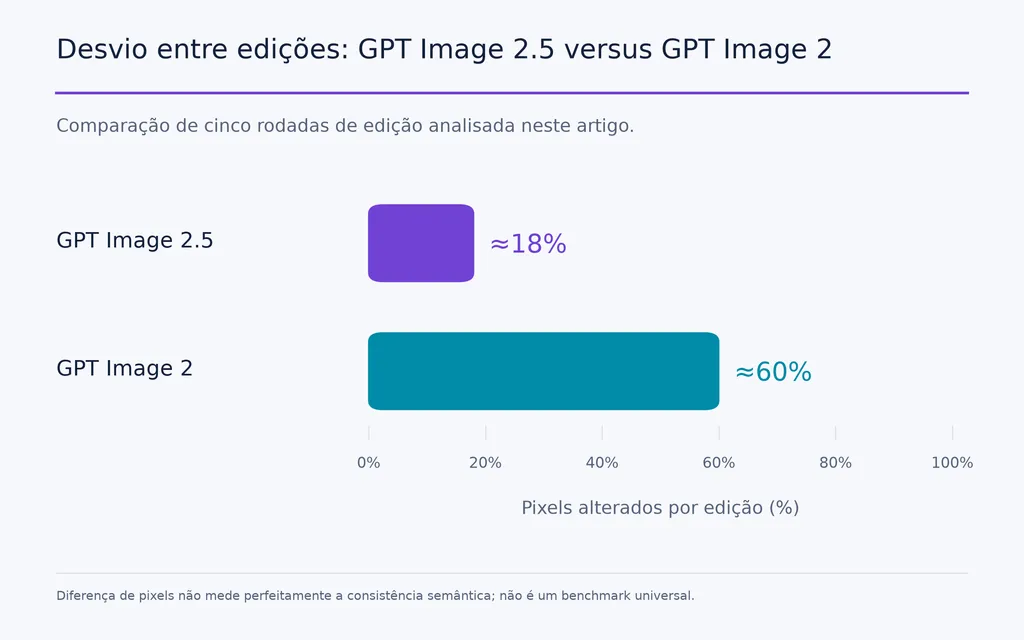
Isso importa porque a edição de imagens com IA costuma falhar depois do primeiro bom resultado. Alterar um detalhe pode mudar acidentalmente rosto, composição, fundo ou textura. Em uma comparação de cinco rodadas analisada aqui, GPT Image 2.5 alterou cerca de 18% dos pixels por edição, contra aproximadamente 60% no GPT Image 2. Um fluxo de UI também relatou geração cerca de 2× mais rápida por aproximadamente metade do custo com Flare Medium. A questão real não é qual modelo cria a melhor primeira imagem, mas qual exige menos retrabalho para chegar a um recurso final utilizável.
Em fluxos profissionais, GPT Image 2.5 funciona melhor dentro de um sistema criativo mais amplo. Virse conecta referências, recursos, decisões e variações geradas por IA no mesmo espaço, com tela infinita, colaboração entre vários agentes, contexto compartilhado de projeto e memória de design de longo prazo. Isso facilita explorar mais rápido, preservar direções aprovadas e gerenciar revisões sem recomeçar a partir de prompts isolados.
O que mudou no GPT Image 2.5 em relação ao GPT Image 2?
GPT Image 2.5 melhora a geração de imagens e o processo ao redor dela. As principais mudanças são detalhes mais nítidos, iluminação mais natural, texturas mais ricas, maior fidelidade às referências, edição mais precisa e melhor consistência em edições repetidas.
Para designers, as três últimas são as mais importantes, pois determinam se uma imagem promissora sobrevive a um ciclo real de revisão em um fluxo de design com IA.
A qualidade da imagem melhorou, mas não é a principal evolução
GPT Image 2.5 pode produzir detalhes mais nítidos e iluminação e texturas mais naturais que a geração anterior. Também lida melhor com instruções visuais e layouts mais complexos.
Nossa análise, porém, não sustenta tratar a qualidade bruta da imagem como a melhoria definidora.
Em fluxos profissionais, uma primeira imagem excelente tem valor limitado se trocar uma jaqueta também muda o rosto, ou se substituir um produto exige regenerar toda a composição. Preservar uma direção aprovada vale mais que um pequeno ganho visual em uma única geração.
GPT Image 2.5 reduz mudanças indesejadas durante a edição
Um dos casos quantitativos mais fortes da pesquisa envolveu cinco edições consecutivas.
GPT Image 2.5 alterou aproximadamente 18% dos pixels por edição, contra cerca de 60% no GPT Image 2 no mesmo teste relatado.
A diferença de pixels não mede perfeitamente a consistência semântica, então não deve ser um benchmark universal. Mas captura uma melhoria importante de produção: edições direcionadas têm menos chance de reconstruir partes não relacionadas da imagem.
Isso importa ao trocar roupas preservando o rosto, substituir o fundo sem alterar o sujeito, recolorir uma ilustração mantendo os traços ou trocar um produto mantendo a composição.
Desvio de conteúdo e desvio de qualidade são problemas diferentes
A consistência entre rodadas ainda tem limites.
Desvio de conteúdo ocorre quando uma edição muda inesperadamente rosto, pose, objeto, composição ou cor que deveria ficar fixa.
Desvio de qualidade ocorre quando o conteúdo correto permanece, mas edições repetidas introduzem nitidez excessiva, textura sintética, padrões repetitivos ou microdetalhes demais.
Nos casos analisados, GPT Image 2.5 parece melhorar o desvio de conteúdo de forma mais convincente que o de qualidade. Em sessões longas, mantenha pontos de controle limpos e crie uma ramificação de uma imagem aprovada anterior quando a textura começar a se deteriorar.
Esboços, comentários de imagem e modelos melhoram o ciclo de edição
GPT Image 2.5 também tem recursos de fluxo que reduzem a dependência de prompts exclusivamente textuais.
Esboços permitem comunicar composição ou forma visualmente. Comentários de imagem facilitam apontar uma área específica a alterar. Modelos oferecem estruturas iniciais para formatos criativos comuns, como cartazes, produtos promocionais, folhetos e imagens de produtos.
No design, isso importa porque a intenção criativa costuma ser mais fácil de expressar espacialmente que verbalmente. Esses recursos aproximam a interação da colaboração visual e a afastam de reescrever prompts repetidamente.
GPT Image 2.5 Flare versus Sunburst: qual usar?
Flare prioriza velocidade, volume e iteração. Sunburst prioriza precisão, fidelidade às referências e controle criativo detalhado.
Devem ser tratados como estratégias diferentes de produção, não simples modos de baixa e alta qualidade.
GPT Image 2.5 Flare é melhor para produção rápida
Flare faz mais sentido em exploração de UI, variações de campanhas, recursos sociais, brainstorming visual, painéis de inspiração e testes A/B rápidos.
A OpenAI informa que Images 2.5 pode reduzir a latência de geração em até 50% em relação a Images 2.0, enquanto Flare é apresentado como a opção de API mais rápida, voltada à produção.
Os dados de fluxos também são úteis. Em um caso de produção de UI, Flare Medium foi relatado como cerca de 2× mais rápido e com metade do custo do fluxo anterior com GPT Image 2 Medium.
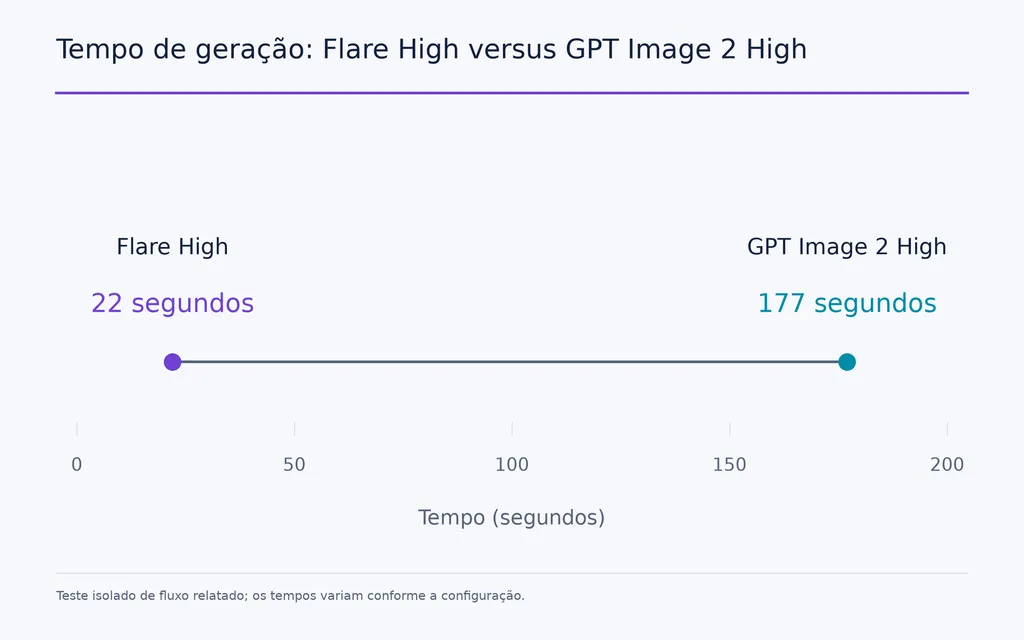
Outro teste isolado registrou 22 segundos no Flare High contra 177 segundos no GPT Image 2 High.
Esses números não devem ser generalizados para todo ambiente, mas mostram por que Flare muda a economia da exploração: designers podem avaliar mais direções antes de escolher uma.
GPT Image 2.5 Sunburst é melhor para precisão
Sunburst troca intencionalmente tempo adicional de geração por controle criativo mais preciso.
É mais indicado para referências de personagens, restrições complexas de imagem, tarefas com múltiplas referências, recursos importantes de campanha e edições nas quais identidade ou fidelidade do produto importam mais que retorno imediato.
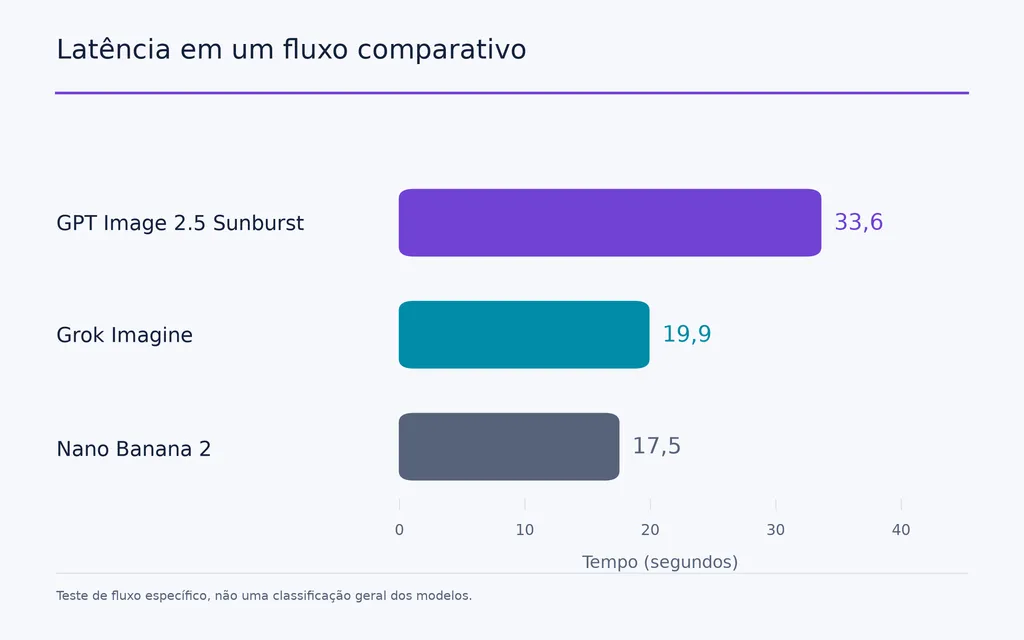
Um fluxo comparativo analisado registrou 33.6 segundos no Sunburst, contra 19.9 segundos no Grok Imagine e 17.5 segundos no Nano Banana 2 naquela configuração específica.
Sunburst foi mais lento, mas velocidade não era o objetivo do teste. A tarefa era levar uma referência fraca de personagem a outro ambiente preservando o sujeito.
O melhor fluxo combina Flare e Sunburst
Para design profissional, eu não usaria uma variante em todas as etapas.
Um fluxo mais forte seria:
- Explorar amplamente com Flare.
- Escolher a melhor direção antes de aumentar o custo de geração.
- Adicionar referências mais fortes e requisitos de preservação.
- Usar Sunburst para refinamentos sensíveis a referências ou de alto valor.
- Levar correções persistentes no nível do pixel a uma ferramenta específica de edição.
Isso separa a exploração criativa rápida do trabalho caro de precisão.
Quão boas são a consistência de personagens e a fidelidade às referências do GPT Image 2.5?
Fidelidade às referências é uma das maiores vantagens produtivas do GPT Image 2.5, pois uma referência aprovada pode se tornar a base de vários recursos relacionados.
Uma referência de personagem pode virar um pequeno sistema de recursos
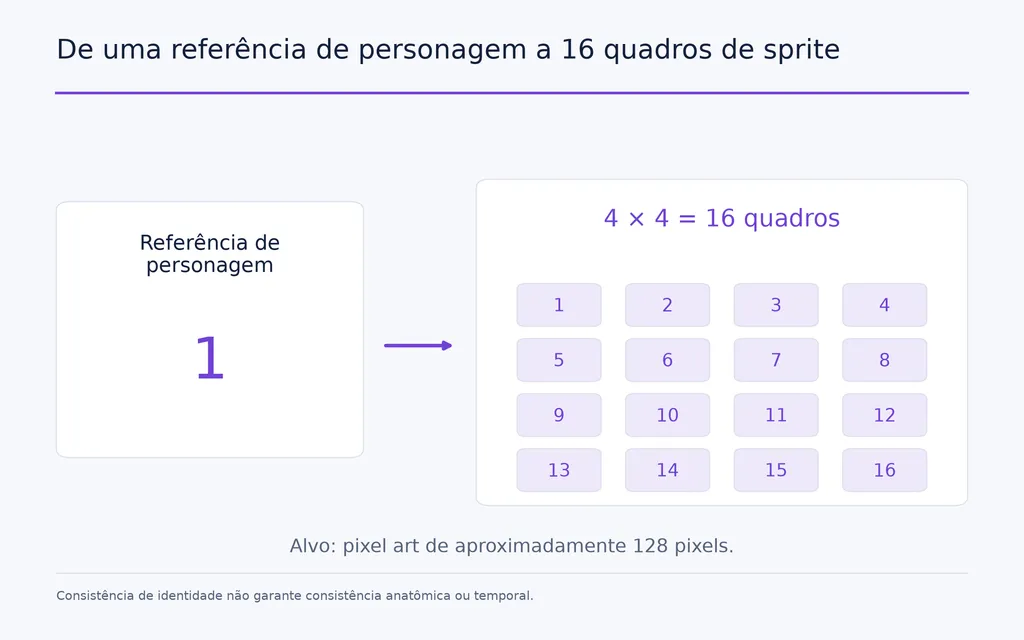
Um caso de desenvolvimento de jogos da pesquisa começou com uma imagem de personagem de corpo inteiro e a expandiu para uma folha de sprites 4×4 com 16 quadros, visando aproximadamente pixel art de 128 pixels.
O personagem manteve consistência visual suficiente em várias ações para prototipagem rápida.
Alguns quadros, porém, introduziram erros entre pernas esquerda e direita e outras inconsistências de movimento. Isso revela uma diferença importante: consistência de identidade não garante consistência anatômica ou temporal.

Folhas de personagens podem melhorar a consistência de storyboards com IA
O mesmo princípio é útil no cinema com IA.
Um problema recorrente do fluxo é o desvio de personagem entre planos: o rosto muda, a roupa se altera ou características distintas desaparecem.
Um processo mais forte é:
folha de personagens → quadros do storyboard → referências visuais aprovadas → geração de vídeo
A folha funciona como âncora reutilizável de identidade. GPT Image 2.5 não precisa substituir toda a cadeia cinematográfica para criar valor; pode estabilizar o sistema visual anterior à geração de movimento.
GPT Image 2.5 é bom para design de UI?
GPT Image 2.5 é especialmente útil para gerar conceitos de UI e explorar direções visuais, sobretudo quando Flare torna econômico testar vários layouts.
Flare torna a exploração de UI mais prática
A velocidade 2× maior e o custo aproximadamente 50% menor relatados em um fluxo de UI importam porque o design de produto se beneficia de amplitude no início do processo.
Em vez de gastar tempo demais refinando a primeira interface plausível, designers podem comparar composições, hierarquias e sistemas visuais antes de escolher uma direção.
Na perspectiva de produto, é aí que a geração rápida cria valor real: ela aumenta o número de ideias que a equipe pode se permitir descartar.
A lacuna entre imagem e interface continua importante
Uma boa imagem de UI gerada ainda é um visual plano.
Ela não contém automaticamente componentes reutilizáveis, comportamento responsivo, estados de interação, decisões de acessibilidade, tokens de design ou estrutura de aplicação.
Nossa análise de perguntas recorrentes mostra que converter imagem em interface continua sendo um grande gargalo. GPT Image 2.5 acelera conceitos, mas a implementação em produção ainda exige design estruturado e ferramentas de front-end.
GPT Image 2.5 para slides, recursos de jogos e cinema com IA
Alguns dos melhores usos surgem quando GPT Image 2.5 vira uma etapa de um fluxo criativo maior.
Design de apresentações com IA pode ser extremamente rápido
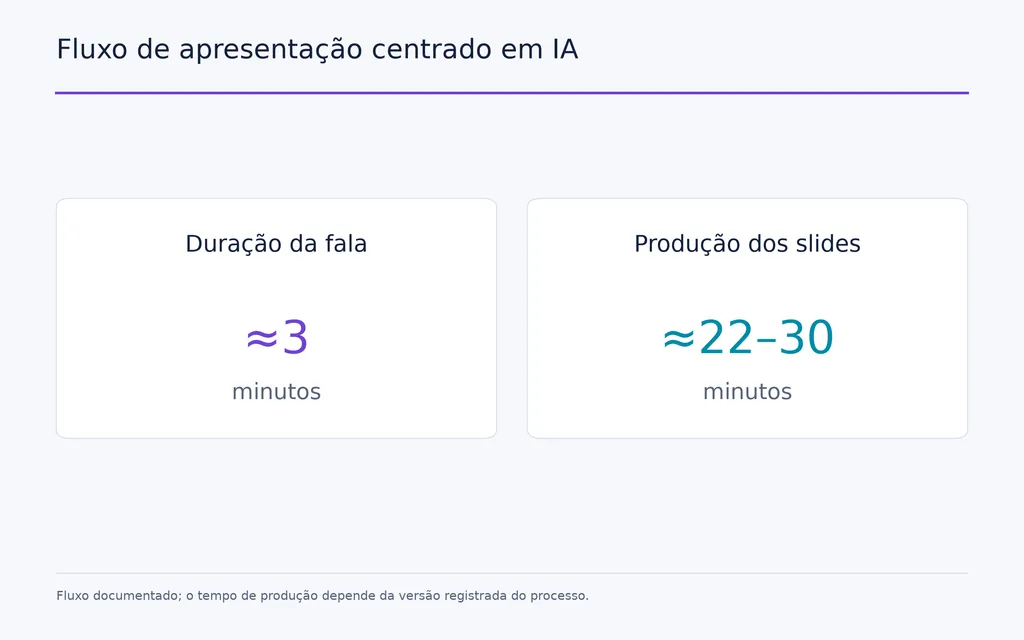
Um fluxo documentado produziu uma apresentação em aproximadamente 22–30 minutos, conforme a versão do processo registrada durante a pesquisa.
A apresentação foi criada para cerca de três minutos de fala.
O fluxo usou materiais existentes de marca ou site como contexto e gerou slides visualmente coerentes, em vez de montar manualmente cada página.
A limitação é a editabilidade. Uma imagem plana de slide não oferece caixas de texto, gráficos, ícones ou camadas de layout independentes. Assim, criar rápido pode virar revisar devagar quando as partes interessadas pedem muitas pequenas mudanças.
Recursos de jogos se beneficiam da geração orientada por referências
O exemplo do sprite de 16 quadros mostra como um personagem aprovado rapidamente vira uma família de recursos de protótipo.
Isso é útil no desenvolvimento inicial de jogos, quando basta consistência visual suficiente para testar a ideia antes de investir em animação refinada.
O resultado ainda precisa de controle de qualidade de mãos, poses, direção dos membros e lógica entre quadros.
Cinema com IA se beneficia de âncoras visuais consistentes
Para cinema, GPT Image 2.5 é mais útil como camada de consistência visual antes da geração de vídeo.
Uma folha estável de personagem pode ancorar quadros do storyboard, que seguem para ferramentas de vídeo como Seedance.
O valor não é ‘a IA faz o filme inteiro’, mas reduzir a reconstrução de identidade toda vez que o plano muda.
GPT Image 2.5 versus Nano Banana Pro: qual é melhor?
Não existe vencedor universal confiável para todas as tarefas visuais.
Nossa análise encontrou evidências mais fortes para GPT Image 2.5 em edição entre rodadas, controle de referências, obediência a instruções complexas e preservação de decisões visuais aprovadas.
Alguns fluxos comparativos favoreceram Nano Banana Pro para pele natural, textura fotográfica ou tarefas específicas de imagens de produtos.
GPT Image 2.5 é mais forte quando o controle das revisões importa
Um modelo pode vencer uma comparação de realismo em uma geração e ainda criar um fluxo de produção pior.
Se mudar a roupa altera o rosto, ou trocar o fundo exige recriar toda a imagem, cada revisão fica cara.
No trabalho profissional, eu avaliaria o custo do recurso final utilizável: tempo de geração, novas tentativas, desvios, limpeza e troca de ferramentas, não apenas a estética inicial.
O fotorrealismo ainda não tem um vencedor claro
As evidências não sustentam chamar GPT Image 2.5 de líder universal em fotorrealismo.
As limitações relatadas incluem nitidez excessiva, microtextura sintética, padrões em excesso e degradação de textura após edições repetidas.
Isso reforça o achado central: a vantagem mais clara de GPT Image 2.5 é controlar um recurso visual em evolução, não apenas alcançar realismo máximo em uma geração.
Quais são os maiores problemas do GPT Image 2.5?
GPT Image 2.5 melhora a parte intermediária do fluxo criativo, mas a etapa final ainda exige controle de qualidade cuidadoso.
Mãos, anatomia e reparos locais ainda falham
Mãos, pulsos, direção dos membros, personagens pequenos e interação com objetos continuam pouco confiáveis.
Em um caso analisado, um pulso problemático foi editado várias vezes sem correção satisfatória e acabou sendo reparado no Photoshop.
Isso mostra por que edição semântica ainda não equivale a retoque no nível do pixel.
Edições repetidas podem danificar a textura
Mesmo com o sujeito estável, a edição repetida pode acumular detalhes artificiais.
Grama, pele, tecido, árvores e outras regiões texturizadas podem ficar nítidas demais ou desenvolver padrões repetitivos.
Em sessões longas, trate imagens aprovadas como pontos de controle, em vez de presumir que o resultado mais recente sempre deve ser o arquivo mestre.
A transparência ainda precisa ser verificada
A transparência também pode ser inconsistente.
Um fluxo documentado de logotipo produziu aproximadamente 85% de transparência utilizável, enquanto outro teste de objeto deixou transparente só cerca da metade da área esperada. Em alguns casos, pedir transparência apenas por texto gerou um padrão xadrez visível, não transparência real.
Sempre verifique o canal alfa exportado, em vez de julgar a transparência pela aparência.
Tipografia e editabilidade estruturada continuam problemas distintos
GPT Image 2.5 pode gerar cartazes, slides e visuais de UI convincentes, mas aparência visual não equivale a editabilidade estruturada.
O texto ainda exige revisão e os designs gerados não fornecem automaticamente vetores, camadas, componentes ou objetos de apresentação editáveis.
Ferramentas dedicadas de design continuam importantes sempre que a entrega final precisa ser editada com precisão.
GPT Image 2.5 entrega 4K nativo com confiabilidade?
Não de forma consistente nos fluxos analisados neste artigo.
É importante distinguir pedir 4K, receber um arquivo nativo em alta resolução e usar aprimoramento de terceiros para chegar a 4K.
Pedir 4K não garante um arquivo 4K
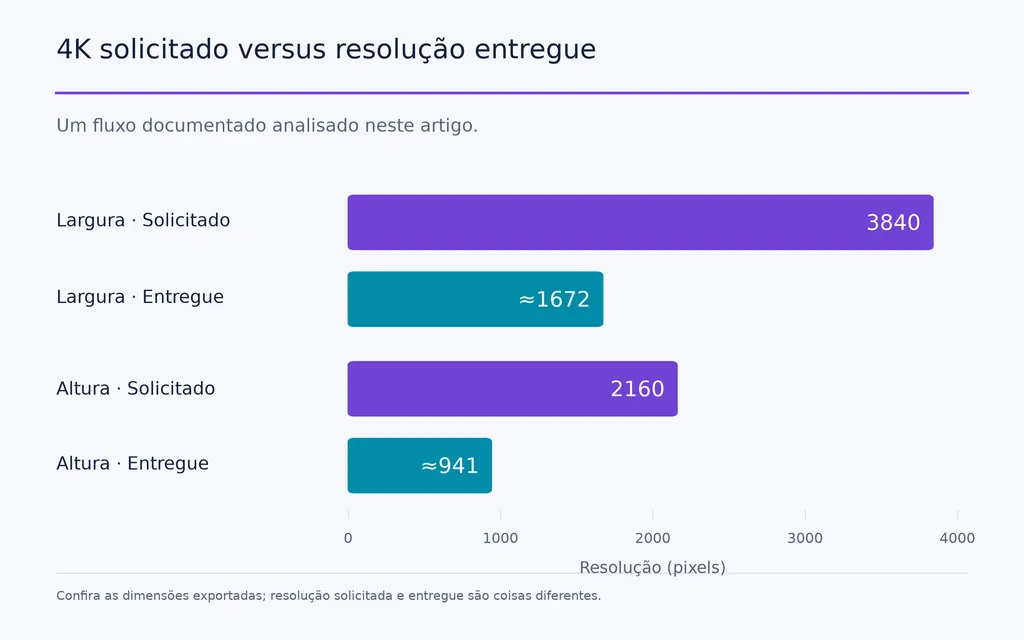
Um fluxo documentado pediu 3840×2160 mas recebeu uma imagem de cerca de 1672×941 pixels.
Um pedido posterior de ampliação pareceu melhorar a nitidez percebida sem mudar as dimensões reais.
Isso não prova que GPT Image 2.5 não consiga gerar resoluções maiores. Mostra que resolução solicitada e resolução entregue não devem ser tratadas como iguais.
Fluxos 4K de terceiros diferem da saída nativa
Outro fluxo usou Magnific para produzir 4K a um custo relatado de aproximadamente $1 por imagem.
Esse fluxo pode incluir aprimoramento ou ampliação próprios, portanto não prova que a mesma resolução tenha sido gerada nativamente por GPT Image 2.5.
Para entregas profissionais, sempre inspecione as dimensões em pixels exportadas.
Quem deve usar GPT Image 2.5?
GPT Image 2.5 tem mais valor quando o projeto depende de iteração, consistência e reutilização de recursos.
Equipes de UI e produto podem usar Flare para explorar mais direções. Equipes de marca podem manter referências mais fortes entre variações. Desenvolvedores de jogos podem transformar personagens em famílias de protótipos. Cineastas com IA podem estabilizar storyboards antes do vídeo. Marketing pode revisar imagens de campanhas sem recriar cada elemento aprovado.
Ele é menos decisivo em fluxos que só precisam de uma imagem atraente, dependem de retoques perfeitos por pixel ou exigem recursos estruturados totalmente editáveis desde o começo.
Quanto mais ciclos de revisão houver, mais valioso se torna GPT Image 2.5.
Conclusão
GPT Image 2.5 importa porque leva a criação de imagens com IA de gerações isoladas a recursos visuais que suportam um fluxo criativo real. Suas maiores vantagens são menos desvios de edição, mais fidelidade às referências, produção Flare mais rápida e fluxos mais práticos para personagens, UI, storyboards, slides e jogos, não um salto universal em fotorrealismo. Mãos, anatomia, degradação de textura, correções locais exatas, entrega irregular em alta resolução, exceções de transparência e editabilidade estruturada limitada ainda exigem ferramentas especializadas. Para equipes profissionais, a melhor abordagem é híbrida: usar GPT Image 2.5 para explorar mais rápido, preservar decisões visuais aprovadas e acelerar revisões, depois levar o trabalho crítico de precisão às ferramentas mais adequadas à entrega final.
Perguntas frequentes
GPT Image 2.5 é melhor que GPT Image 2?
Para fluxos com muita edição, sim, a melhoria é significativa. Uma comparação de cinco rodadas analisada mediu cerca de 18% de alteração de pixels por edição no GPT Image 2.5, contra aproximadamente 60% no GPT Image 2. A maior melhoria é estabilidade nas revisões e preservação de referências, não um salto universal na qualidade da primeira imagem.
Devo usar Flare ou Sunburst?
Use Flare para velocidade, volume, exploração de UI e iteração criativa inicial. Use Sunburst quando fidelidade às referências, identidade de personagem, restrições complexas ou precisão importarem mais que latência. Em fluxos profissionais, explorar com Flare e refinar seletivamente com Sunburst costuma ser mais eficiente que usar uma variante do início ao fim.
GPT Image 2.5 é melhor que Nano Banana Pro?
Não em toda tarefa. GPT Image 2.5 tem evidências mais fortes em edição entre rodadas, controle de referências e obediência a instruções complexas, enquanto alguns fluxos favorecem Nano Banana Pro para textura fotográfica natural ou imagens de produtos específicas. A escolha depende de priorizar realismo, estabilidade nas revisões, fidelidade às referências ou precisão do produto.
GPT Image 2.5 gera 4K verdadeiro?
A entrega de 4K nativo não é demonstrada consistentemente nos fluxos analisados aqui. Um pedido de 3840×2160 gerou uma imagem de cerca de 1672×941 pixels, enquanto fluxos de terceiros chegaram a 4K com processamento adicional. Em produção, verifique as dimensões exportadas em vez de presumir que pedir 4K garante um arquivo 4K nativo.