
Como usar o ChatGPT Image 2: corrija edições ruins, erros de texto e inconsistências de personagens
Vincent12 min de leitura ·
ChatGPT Image 2 funciona melhor como ferramenta de edição iterativa do que como gerador de imagens de uma só tentativa. Defina primeiro formato, layout, sujeito, texto e restrições, gere uma versão estrutural e refine elementos específicos dizendo ao ChatGPT o que deve permanecer inalterado. O fluxo mais confiável é Definir → Gerar → Revisar → Editar → Validar. A OpenAI apresentou o ChatGPT Images 2.0 em 21 de abril de 2026, e ele está disponível em todos os planos do ChatGPT.
O problema mais difícil não é gerar uma imagem atraente. Equipes profissionais precisam de fidelidade do produto, consistência de marca, controle de layout, texto preciso e direção criativa reproduzível em muitos recursos. Nossa análise dos materiais de pesquisa e das perguntas recorrentes mostra que a geração de imagens com IA se torna mais útil quando o primeiro prompt estabelece a estrutura e as interações seguintes funcionam como direção de arte controlada, em vez de regenerações completas repetidas.
É aí que o Virse amplia o fluxo para além de uma conversa isolada. O Virse foi projetado como ambiente de colaboração com IA para equipes profissionais de design, combinando tela infinita, vários Agents colaborativos, contexto compartilhado do projeto e memória de longo prazo para preferências estéticas, regras de marca e conhecimento do projeto. Em vez de pedir à IA que substitua o designer com um prompt, o Virse ajuda a manter a intenção criativa conectada entre referências, iterações e tarefas de produção. ChatGPT Image 2, Nano Banana 2 e Seedance 2.5 já estão disponíveis no Virse, permitindo explorar e comparar vários modelos de vídeo de destaque no mesmo fluxo criativo.

Como usar o ChatGPT Image 2 em cinco etapas
Você pode criar uma imagem pedindo ao ChatGPT em uma conversa ou abrindo a experiência Images. Também pode enviar uma imagem existente e descrever o que deseja mudar. A OpenAI atualmente confirma criação e edição na web, no iOS e no Android.
Etapa 1: defina o recurso antes do estilo
Comece pelo entregável: anúncio, imagem de ecommerce, conceito de embalagem, infográfico, miniatura, peça para redes sociais ou visual educativo. Depois especifique formato, composição, sujeito, texto, fundo e elementos protegidos.
Por exemplo:
Crie um anúncio de ecommerce em 4:5. Coloque o produto nos 45% à esquerda da composição, reserve o lado direito para um título de duas linhas, use um fundo de estúdio escuro e neutro e preserve a forma do produto, a posição do logo, o material e as proporções.
Isso é mais controlável que pedir um “anúncio futurista premium”, pois transforma a intenção em decisões espaciais.
Etapa 2: trate a primeira imagem como um rascunho estrutural
Revise posição do sujeito, escala, espaço negativo, hierarquia, ângulo de câmera e área de texto antes de aprimorar iluminação ou textura. Em fluxos de design, corrigir a estrutura cedo costuma ser mais eficiente que aperfeiçoar uma composição atraente, mas fundamentalmente errada.
Etapa 3: separe o que deve mudar do que deve permanecer
Use três categorias de revisão:
Categoria | Exemplo |
Deve preservar | Forma do produto, logo, pose, ângulo de câmera |
Deve mudar | Fundo, posição do título |
Pode variar | Objetos de cena, pequenas sombras, detalhes do ambiente |
Etapa 4: edite uma variável importante por vez
Um padrão útil de instrução é “Mantenha X inalterado; modifique apenas Y.”
Por exemplo:
Mantenha produto, logo, proporções, ângulo de câmera e direção da iluminação inalterados. Substitua apenas o fundo por um ambiente de estúdio de concreto acolhedor.
Isso facilita a avaliação de cada iteração e ajuda a identificar onde começam os desvios visuais.
Etapa 5: valide antes de publicar
Verifique texto, logos, geometria do produto, rótulos, mãos, rostos, números, gráficos, códigos QR, preços e alegações. A geração de imagens pode acelerar a produção, mas a precisão essencial ao negócio ainda exige controle de qualidade humano.
Como escrever prompts melhores para o ChatGPT Image 2
Para trabalho profissional, um bom prompt do ChatGPT Image 2 segue esta ordem:
Formato → Layout → Sujeito → Texto exato → Ambiente → Iluminação → Estilo → Restrições
Essa estrutura que prioriza o layout é um dos padrões mais claros dos materiais de pesquisa, pois a composição costuma importar mais que adjetivos decorativos na primeira geração.
Priorize o layout antes do estilo visual
Um prompt fraco diz:
Crie um anúncio de caixa de som sem fio moderno e cheio de energia.
Uma versão melhor diz:
Crie um anúncio horizontal 16:9. Coloque a caixa de som na metade esquerda, reserve a direita para o título “Sound Without Limits”, use fonte grande branca sem serifa, fundo em cinza-carvão e iluminação de contorno azul sutil. Preserve a geometria e os controles da caixa de som.
A diferença está na informação de design: posicionamento, hierarquia, texto, direção visual e restrições são explícitos.
Especifique o texto exato e a hierarquia
A OpenAI descreve o Images 2.0 como uma melhoria no seguimento de instruções, detalhe, complexidade e geração de texto denso. Isso torna cartazes, rótulos, diagramas, anúncios, conceitos de embalagem e gráficos ricos em informações mais viáveis.
Para textos importantes, defina a redação exata, a posição, a relação de tamanhos e o número de linhas. Títulos e rótulos curtos continuam mais adequados que textos jurídicos ou técnicos longos, que sempre devem ser conferidos manualmente.
Proteja os detalhes do produto e da marca
Prompts comerciais devem indicar o que a IA não pode redesenhar: proporções, posição do logo, materiais, botões, rótulos da embalagem, detalhes funcionais ou ângulo de câmera.
Uma imagem bonita que altera o produto real continua sendo uma imagem de produto inutilizável.
Como editar com o ChatGPT Image 2 sem mudar o sujeito
O segredo da edição controlada é uma orientação que priorize a preservação. A OpenAI oferece suporte oficial à edição de imagens enviadas, incluindo alteração de detalhes visuais, adição de texto e modificação de fundos.
Defina a identidade antes de mudar a cena
Para um produto:
Preserve geometria, material, marca, controles, proporções, escala e ângulo de câmera do produto. Altere apenas o ambiente.
Para uma pessoa:
Preserve identidade facial, penteado, roupa, pose, posição corporal e enquadramento. Altere apenas o fundo e a atmosfera da iluminação.
Dê um papel a cada imagem de referência
Ao usar várias referências, defina a Referência A como sujeito e a Referência B como referência de estilo ou iluminação. Depois preserve a estrutura de A aproveitando características visuais selecionadas de B.
Uma distinção importante da nossa pesquisa é que a capacidade de múltiplas imagens não garante consistência dos personagens. Imagens relacionadas ainda podem variar na estrutura facial, roupa, proporções ou pequenos detalhes; por isso, campanhas sequenciais exigem verificações manuais de continuidade.
Melhores usos do ChatGPT Image 2 no design profissional
O ChatGPT Image 2 é mais útil quando a tarefa exige geração com composição estruturada, texto, edição e variações rápidas.
Uso | Valor principal | Prioridade de revisão |
Publicidade | Variações criativas rápidas | Alegações e consistência de marca |
Ecommerce | Cenas de estilo de vida e campanhas | Fidelidade do produto |
Embalagem | Exploração rápida de conceitos | Texto e especificações |
Infográficos | Texto e hierarquia visual | Precisão dos dados |
Conteúdo social | Variações em vários formatos | Consistência de marca |
Miniaturas | Testes rápidos de hierarquia | Legibilidade |
Visuais educativos | Explicação estruturada | Precisão factual |
Publicidade e ecommerce se beneficiam das variações
A maior vantagem de produção não é obter mais rápido uma imagem final. É poder explorar mais hipóteses criativas: composições, fundos, títulos, tratamentos sazonais, contextos de público e proporções diferentes antes de escolher uma direção.
Para ecommerce, use o fluxo produto de referência → definição da cena → variação gerada → revisão de fidelidade → refinamento. Inspecione cuidadosamente costuras, materiais, botões, embalagem, proporções e logos.
Textos melhores beneficiam embalagens e infográficos
A melhora na geração de texto denso amplia a utilidade dos modelos de imagem com IA para embalagens e design da informação, mas as responsabilidades devem continuar claras: a IA pode gerar o sistema visual; humanos devem verificar o sistema de informação.
Caso ChatGPT Image 2: o que os dados de ROI realmente mostram
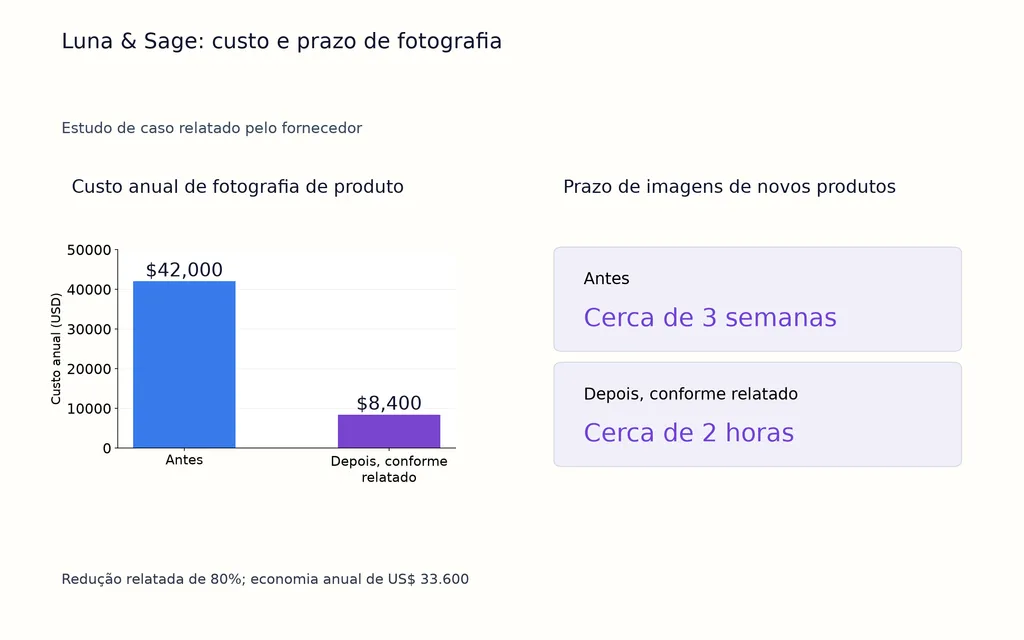
Um estudo de caso do MindStudio publicado pelo fornecedor sobre a marca D2C Luna & Sage fornece um dos conjuntos de dados mais detalhados dos materiais de pesquisa. Ele relata as seguintes mudanças:
Métrica | Antes | Depois, conforme relatado |
Custo anual de fotografia de produto | US$ 42.000 | US$ 8.400 |
Redução de custos | — | 80% |
Prazo de produção de imagens | Cerca de 3 semanas | Cerca de 2 horas |
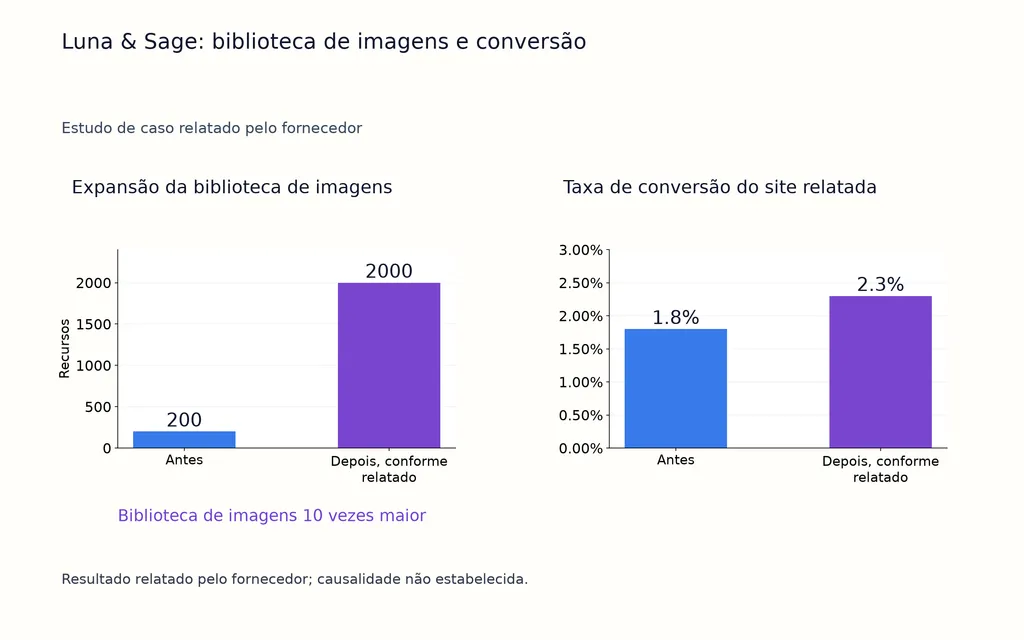
Biblioteca de imagens | 200 | 2.000 |
Tempo interno economizado | — | 20 horas/semana |
Taxa de conversão | 1,80% | 2,30% |
Taxa de devoluções | — | 15% menor |
A economia relatada em fotografia é de US$ 33.600 por ano, enquanto a biblioteca de recursos cresceu 10 vezes. Estrategicamente, reduzir o prazo de cerca de três semanas para duas horas muda quando a exploração visual pode ocorrer: equipes podem testar conceitos antes, sem esperar um ciclo de produção completo.
Porém, o aumento da conversão de 1,8% para 2,3% e a redução relatada de 15% nas devoluções não devem ser tratados como benchmarks universais do GPT Image 2. O caso não fornece estudo controlado independente nem metodologia completa de atribuição. A evidência mais forte é sobre custo de produção, velocidade e capacidade de conteúdo, enquanto o impacto posterior nos negócios precisa ser medido separadamente.
O que é Images with Thinking?
Images with thinking adiciona raciocínio e uso de ferramentas antes da geração de imagens. A OpenAI afirma que ele pode planejar e refinar resultados, incorporar informações de buscas na web em tempo real e gerar várias imagens a partir de um pedido.
Use-o para diagramas informados por pesquisa, visuais educativos complexos, conceitos com várias imagens ou tarefas cuja estrutura factual precise ser planejada antes da renderização. Para uma simples mudança de cor ou fundo, a edição de imagem comum costuma bastar.
Em agosto de 2026, a OpenAI lista o ChatGPT Images 2.0 em todos os planos. Images with thinking está disponível em Plus, Pro e Business, com Enterprise e Edu indicados como em breve. Para informações sobre planos, consulte os preços do ChatGPT Image 2.
Quais são as principais limitações do ChatGPT Image 2?
Os materiais de pesquisa identificam áreas recorrentes que ainda exigem revisão: textos longos, consistência de personagens entre imagens, mãos, rostos, detalhes finos e prompts abstratos.
Texto e consistência dos personagens ainda exigem controle de qualidade
Rótulos e títulos curtos estão cada vez mais viáveis, mas especificações longas, preços, avisos legais e textos de embalagem devem ser conferidos caractere por caractere.
Para personagens recorrentes, use referências fortes e edições menores, mas não presuma que a consistência dos personagens permanecerá perfeitamente estável em uma sequência longa.
Instruções visuais concretas são mais fáceis de controlar
“Mostre um designer comparando três conceitos de embalagem sobre uma mesa” define relações observáveis. “Visualize a incerteza criativa” deixa muito mais espaço para interpretação.
Em produção, descreva o que deve estar visível, não apenas a sensação que a imagem deve transmitir.
Como usar a API do GPT Image 2 em escala
A OpenAI atualmente oferece o modelo para desenvolvedores gpt-image-2, com o snapshot fixo gpt-image-2-2026-04-21. Ele suporta geração e edição de imagens, tamanhos flexíveis e entradas de imagem de alta fidelidade.
Escolha tamanho e qualidade conforme a etapa do fluxo
O GPT Image 2 suporta resoluções flexíveis com lado máximo de 3.840 pixels, incluindo opções populares de 1024×1024, 1536×1024, 1024×1536 e formatos 2K e 4K de maior resolução. A qualidade pode ser low, medium, high ou auto. A OpenAI recomenda low para rascunhos e iterações rápidas, depois medium ou high para recursos finais.
Isso se encaixa naturalmente em um fluxo de design com IA: exploração em baixa qualidade → direção escolhida → produção de maior qualidade → controle humano.
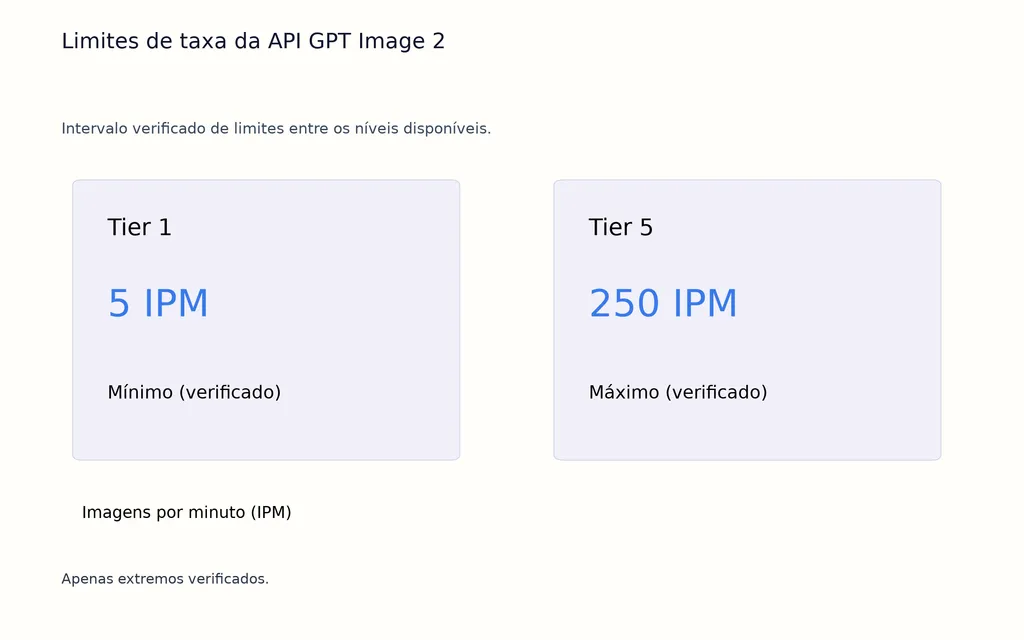
Para automação, a API permite conectar dados estruturados de produto, sistemas reutilizáveis de prompts, nomenclatura de recursos, geração, revisão e aprovação. Os limites oficiais atuais vão de 5 IPM no Tier 1 a 250 IPM no Tier 5, tornando a API relevante quando a geração de imagens vira infraestrutura criativa, em vez de tarefa isolada.
Perguntas frequentes
O ChatGPT Image 2 é gratuito?
O ChatGPT Images 2.0 está disponível em todos os planos do ChatGPT, embora os limites de uso possam variar. Images with thinking tem disponibilidade separada e está listado para Plus, Pro e Business.
Como impedir que o GPT Image 2 altere meu produto?
Liste explicitamente tudo o que deve ficar fixo, como geometria, material, logo, controles, rótulos, proporções, ângulo de câmera e escala, depois descreva apenas a mudança pedida. Um padrão confiável é “mantenha X inalterado; modifique apenas Y”.
O GPT Image 2 pode gerar texto e infográficos precisos?
Ele melhorou em texto denso e layouts complexos, tornando anúncios, rótulos, diagramas, conceitos de embalagem e infográficos mais viáveis. Porém, ortografia, números, dados factuais, textos jurídicos, preços e funcionamento de códigos QR ainda devem ser verificados antes da publicação.
O GPT Image 2 é bom para personagens consistentes?
Ele pode criar imagens relacionadas e usar referências visuais, mas a identidade persistente ainda pode variar em uma sequência longa. Use uma referência forte, preserve explicitamente os traços distintivos, faça mudanças iterativas menores e revise toda a série quanto à continuidade.
Conclusão
A melhor forma de usar o ChatGPT Image 2 é criar um fluxo criativo controlado em vez de perseguir o prompt perfeito: defina formato e layout, estabeleça sujeito e texto, proteja o que não pode mudar, gere uma primeira versão estrutural, refine uma variável por vez e valide detalhes essenciais antes de publicar. O caso Luna & Sage sugere que fluxos de imagens com IA podem mudar significativamente a economia da produção e a capacidade de conteúdo, mas suas alegações de resultados comerciais devem permanecer claramente separadas de evidências independentes.
Para equipes profissionais, a maior oportunidade é combinar a velocidade de geração da IA com direção de arte humana, conhecimento de marca, controle de qualidade e sistemas reutilizáveis — e plataformas como Virse ampliam esse modelo ao manter contexto de design, colaboração e conhecimento criativo acumulado conectados ao longo do fluxo.
Mais do blogue da Virse
Fluxo de trabalho
GPT Image 2.5 Noise and Oversharpening: Why Some Images Still Look AI-Generated
9 de outubro de 2026 by Yifan Zhao
Fluxo de trabalho
GPT Image 2.5 Keeps Changing My Image: How to Use a "Keep List" for Reliable Edits
9 de outubro de 2026 by Yifan Zhao
Fluxo de trabalho
GPT Image 2.5 Editing Drift: Why Images Get Blurry, Cropped or Worse After Multiple Edits
9 de outubro de 2026 by Yifan Zhao