Seedance 2.5 vs Seedance 2.0: Which Model Is Better for AI Video Production?
 Yifan Zhao読了 17 分 ·
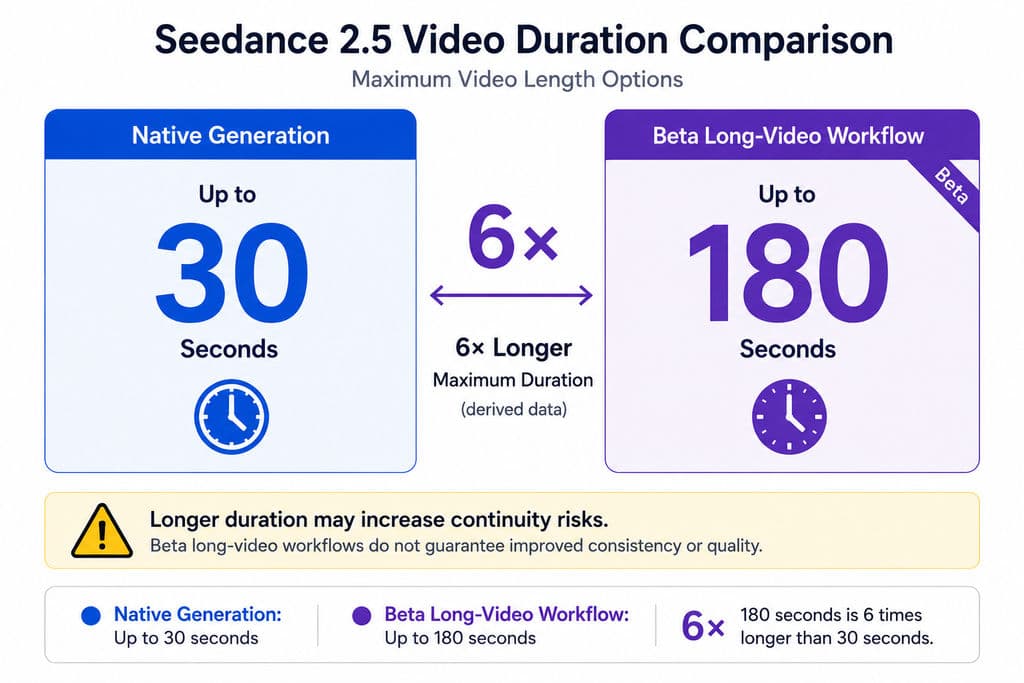
Seedance 2.5 is better than Seedance 2.0 for longer narratives, reference-intensive productions, timestamp-based direction, and targeted video editing. Seedance 2.0 remains the more economical option for short clips, rapid concept testing, and established API workflows. The upgrade doubles the maximum native duration from 15 to 30 seconds and expands the documented reference capacity from 15 assets to 50, but its unit cost is also approximately 86% higher based on the JiMeng pricing data reviewed for this comparison.
The practical decision is therefore not simply whether Seedance 2.5 can generate a more ambitious video. Creative teams need to evaluate usable output rate, revision cost, continuity, reference control, and the number of complete regenerations required before delivery. Understanding how much Seedance 2.5 costs and how those retries fit into a broader Seedance 2.5 workflow is more useful than comparing one generation price in isolation.
Virse helps creative teams turn those model capabilities into a more controllable production workflow. Instead of relying on a single prompt or disconnected chat sessions, designers can organize references on an infinite canvas, coordinate multiple AI design agents, preserve project context, and build on team preferences and brand standards over time—making Seedance-based production easier to direct, revise, and scale without removing the designer from the creative workflow.
Methodology: This comparison is based on official ByteDance documentation, published technical research, platform-specific pricing information, and an analysis of recurring creator workflow questions.
Seedance 2.5 vs Seedance 2.0: What Are the Main Differences?
The main difference between Seedance 2.5 and Seedance 2.0 is that Seedance 2.5 provides more control over longer, asset-driven video sequences, while Seedance 2.0 is primarily optimized for shorter multimodal generations.
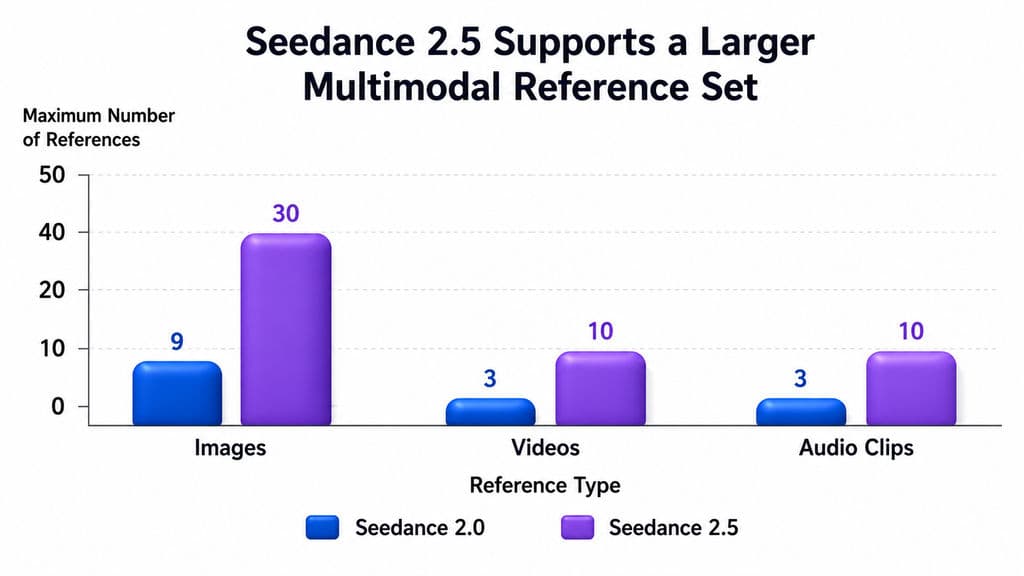
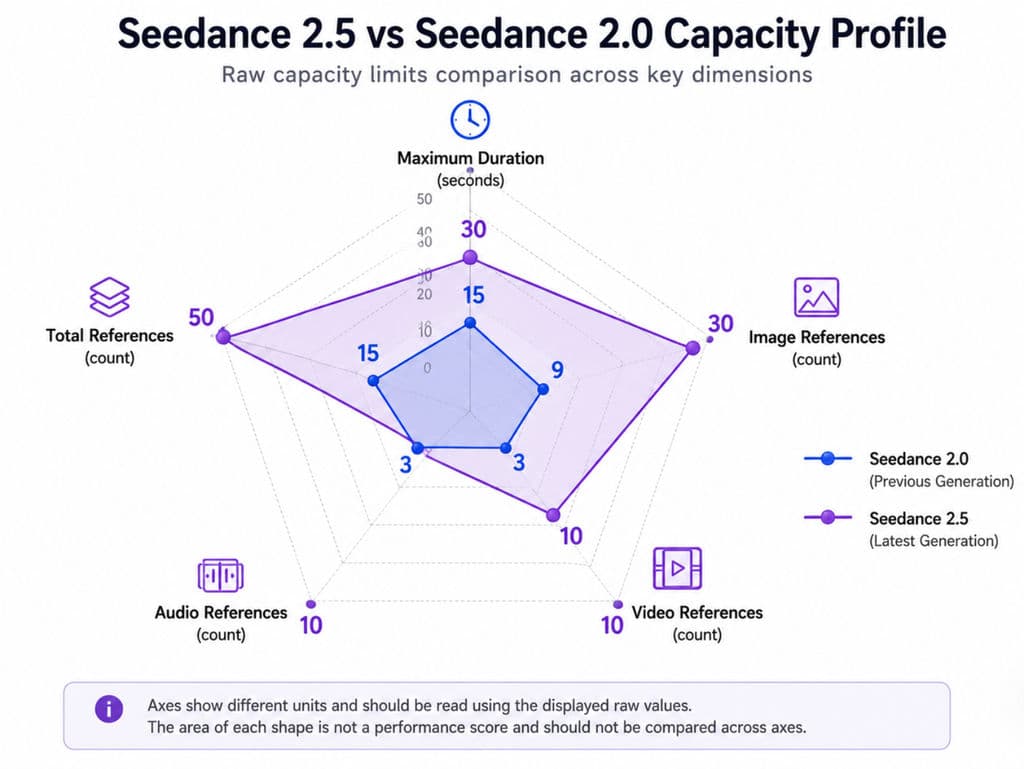
Seedance 2.0 can generate four-to-15-second audio-video clips at native 480p or 720p. Its documented open-platform configuration accepts up to nine images, three videos, and three audio clips, giving creators a maximum of 15 reference assets.
Seedance 2.5 increases the maximum duration to 30 seconds and accepts up to 30 images, 10 videos, and 10 audio clips in one generation. It also adds or strengthens continuation, timestamp direction, clay-render reference, green-screen editing, viewpoint changes, motion reference, and localized video modification. Teams planning complex multimodal input can use a Seedance 2.5 reference guide to structure those assets more deliberately.
Comparison | Seedance 2.0 | Seedance 2.5 |
Maximum native duration | 15 seconds | 30 seconds |
Image references | Up to 9 | Up to 30 |
Video references | Up to 3 | Up to 10 |
Audio references | Up to 3 | Up to 10 |
Total documented references | 15 | 50 |
Native audio-video generation | Yes | Yes |
Timestamp direction | Limited public documentation | Officially emphasized |
Multi-round continuation | Not a core documented feature | Supported |
Clay-render control | Not documented in reviewed materials | Supported |
Green-screen and viewpoint editing | General editing capabilities | Expanded editing workflow |
Best use case | Short clips and rapid testing | Longer commercial sequences |
This makes Seedance 2.5 more than a duration upgrade. The model is designed to interpret a broader production package: characters, products, environments, camera references, movement, dialogue, music, and editing instructions.
Why the increase from 15 to 50 references matters
In professional video workflows, prompts are often the least reliable way to communicate exact visual intent. A sentence such as “create a luxury product film” does not define the product geometry, lighting system, camera movement, actor appearance, soundtrack, or brand color palette.
The larger reference budget allows teams to separate these requirements into assets:
- Product and character images establish identity.
- Location images define the environment.
- Style frames establish lighting and color.
- Video references communicate camera and body movement.
- Audio files establish speech, rhythm, music, and sound effects.
Across the creator questions and workflow discussions reviewed for this comparison, one recurring mistake was treating the 50-asset limit as a target. Using 50 references is not automatically more controllable than using 12 well-organized references. Conflicting style, identity, or movement inputs can reduce consistency.
Seedance 2.5 vs Seedance 2.0 Pricing on JiMeng
Based on the JiMeng pricing screen reviewed for this comparison, Seedance 2.5 costs 780 credits for a 30-second 720p generation, while Seedance 2.0 VIP costs 210 credits for a 15-second 720p generation.
Cost Metric | Seedance 2.0 VIP | Seedance 2.5 |
Duration | 15 seconds | 30 seconds |
Credits per generation | 210 | 780 |
Credits per second | 14 | 26 |
Estimated RMB per second | ¥1.10 | ¥2.05 |
Estimated generation cost | ¥16.54 | ¥61.42 |
Unit-cost change | Baseline | Approximately 86% higher |
These estimates use the supplied conversion of approximately 127 credits per ¥10. The precise price can vary by subscription, promotion, region, resolution, and platform, so the current pricing screen should be verified before purchase or publication.
These figures are specific to the JiMeng pricing configuration reviewed here and should not be treated as universal Seedance API pricing.
Teams focused on minimizing model spend can also compare options in the guide to the cheapest Seedance 2.5 access in 2026.
Why the real Seedance 2.5 production cost can be higher
The calculated generation price is only the attempt cost. A more useful production metric is:
Effective deliverable cost = total generation and editing spend ÷ seconds of approved footage
Consider a 30-second commercial sequence that requires three complete generations before one version is usable:
- One generation: approximately ¥61.42
- Three generations: approximately ¥184.26
- Approved footage: 30 seconds
- Effective cost: approximately ¥6.14 per usable second
This scenario does not imply that every Seedance 2.5 project requires three attempts. It demonstrates why success rate matters more than the price of one model call. The reviewed public materials do not provide an average 30-second approval rate, localized-edit success rate, or typical number of retries.
Pricing scenario: when included credits do not cover one generation
The reviewed JiMeng pricing data listed 725 included credits with a basic membership, while one 30-second Seedance 2.5 generation required 780 credits. That creates a 55-credit gap before the user can make one full 30-second generation.
This matters for individual creators evaluating the practical value of a subscription. A plan may include other benefits, but its included monthly credits may not cover one flagship 30-second attempt under this pricing configuration.
Commercial teams may be more willing to purchase additional credits when a generated sequence can reduce costs associated with filming, 3D rendering, reshoots, or manual compositing. The value still depends on how much of the output survives the review and revision process.
Seedance 2.5 vs Seedance 2.0 for 30-Second Storytelling
Seedance 2.5 is better for 30-second storytelling because it provides enough temporal space for a sequence to contain setup, development, transition, and resolution rather than one continuous action. A dedicated guide to creating a 30-second Seedance 2.5 video can help structure these longer sequences.
ByteDance positions Seedance 2.5 as capable of organizing connected shots within a complete narrative. Seedance 2.0 can already create multi-shot 15-second videos, but the shorter duration forces creators to compress actions or divide a story into separately generated clips.
The following examples are workflow analyses based on documented model capabilities rather than controlled head-to-head tests.
Production scenario: a backstage-to-stage performance sequence
A 30-second performance story might include:
- 0–6 seconds: a performer prepares backstage.
- 6–12 seconds: the performer walks through a corridor.
- 12–18 seconds: crew members interact with the performer.
- 18–24 seconds: the performer enters the venue.
- 24–30 seconds: the performance begins.
With Seedance 2.0, this structure would normally require at least two 15-second generations or several shorter clips. Every split introduces possible changes in face, wardrobe, lighting, screen direction, and environmental continuity.
Seedance 2.5 can attempt the complete sequence in one generation. The value is not merely avoiding an edit. The model can interpret the opening, transition, and ending as parts of one narrative request.
For advertising and branded storytelling, that broader context can help align the first shot with the final reveal. A product introduced in the final five seconds, for example, can influence the pacing and visual emphasis of the earlier sequence.
Why 30 seconds does not guarantee 30 seconds of stable footage
Longer duration also creates more opportunities for failure. Identity can drift in later shots, object geometry can change, audio transitions can become unnatural, and multi-character blocking may lose coherence.
An independent physics benchmark gave Seedance 2.0 the highest overall pass rate among seven evaluated proprietary and open models, at 0.660. However, the research also found that all evaluated systems remained weak on event transitions, environmental transitions, and deliberately contradictory physical instructions.
Seedance 2.5’s public launch material similarly acknowledges that complex actions and interactions among multiple subjects remain areas for improvement. A longer generation should therefore be evaluated by section, not approved based only on its strongest opening frames.
For a 30-second deliverable, review at least four dimensions:
- Identity and product consistency
- Action and camera continuity
- Audio and dialogue transitions
- Narrative clarity in the final third
Seedance 2.5 Reference Control vs Seedance 2.0 Multimodal Input
Both models accept text, image, video, and audio inputs, but Seedance 2.5 is better suited to asset-driven production because it can process a much larger reference package.
This is valuable for ecommerce, advertising, animation, music videos, and serialized content, where creators are rarely starting from an empty prompt. They may already have product photographs, character sheets, campaign key visuals, location references, scripts, storyboards, motion tests, and brand audio.
Production scenario: a reference-heavy concert scene
A large concert sequence may require:
- Multiple performer references
- Instrument references
- Stage and venue images
- Wardrobe references
- Audience references
- Lighting frames
- Camera-movement videos
- A music track
- Crowd and environmental audio
Before Seedance 2.5, creators would need to describe more of these relationships in a long prompt or generate subjects separately. With up to 50 assets, the workflow becomes closer to assembling a production board.
The practical insight is that Seedance 2.5 competes through asset orchestration, not only text-to-video quality. A professional setup should number and classify every reference, then state which asset controls identity, setting, movement, style, or sound.
A large reference package is particularly useful when a project includes several requirements that cannot be reliably compressed into text. Camera rhythm is easier to communicate through video, for example, while product shape and material are better established through clean visual references.
A practical reference hierarchy for Seedance 2.5
For a controlled commercial project, I recommend this order:
- Lock the main character or product identity.
- Add only the essential environment references.
- Add one primary visual-style direction.
- Use video references for movement that is difficult to describe.
- Add audio after the visual sequence is structurally clear.
- Remove any asset that contradicts a higher-priority reference.
This method follows the broader principle that AI should support the designer’s decisions rather than replace the entire creative process with one prompt. A canvas- and asset-based workflow also makes creative intent easier to inspect, revise, and share across a team.
The larger the reference package becomes, the more important asset naming and prioritization become. Files such as image1, image2, and video3 provide less production clarity than names such as product-front, lighting-reference, or camera-orbit.
Seedance 2.5 Timestamp Control vs Seedance 2.0 Prompting
Seedance 2.5 timestamp control changes prompting from describing what should appear to directing when each shot or action should happen.
A practical timestamp structure might be:
- 0–4 seconds: FPV movement toward the subject.
- 4–7 seconds: lateral tracking shot.
- 7–11 seconds: camera rises into an overhead view.
- 11–15 seconds: handheld follow shot.
- 15–22 seconds: subject interaction and dialogue.
- 22–30 seconds: product reveal and closing frame.
This is especially useful for advertisements, music-driven edits, dialogue, action sequences, and storyboard-based production. More structured timing instructions can be developed with a Seedance 2.5 prompt guide.
For creative teams, timestamps can also make internal reviews more precise. Instead of asking for “a stronger middle section,” a creative director can define the required change between seconds 12 and 18.
Timestamp control is directional, not frame-accurate editing
Recurring creator questions reviewed for this article show that timestamps are often interpreted as hard editing boundaries. Public documentation does not establish frame-level timing accuracy or a guaranteed error range.
A timestamp prompt should therefore be treated as temporal guidance rather than deterministic timeline control. Assign one main event to each interval and avoid changing the actor, camera, setting, lighting, and sound simultaneously.
A useful sequence-building approach is:
- Test the core action in a shorter duration.
- Confirm that the model understands the subject and movement.
- Expand the prompt into a 30-second structure.
- Add timestamps only after the narrative beats are clear.
- Review whether the transition occurs near the requested interval.
- Use editing or regeneration for intervals that fail.
This staged workflow can reduce the risk of spending a full 30-second generation on an unproven prompt structure.
Seedance 2.5 Editing vs Seedance 2.0 Regeneration
Seedance 2.5 may create its greatest production advantage after the first generation. Its editing functions are designed to change a selected element, interval, environment, or viewpoint without rebuilding everything from zero.
The documented workflow includes examples such as changing a background, modifying a person or action, adjusting camera movement, using green-screen subjects in new environments, and adapting clothing, hair, and lighting to the replacement scene.
Production scenario: changing a product without losing the camera move
Consider a product advertisement in which the movement, lighting, and actor performance are approved, but the client requests a different product color.
A full regeneration risks changing:
- The actor’s face
- Hand placement
- Camera speed
- Product proportions
- Reflections
- Audio timing
- The final composition
A successful localized edit would preserve the approved sequence and replace only the product appearance. This is closer to a real client revision workflow than repeatedly generating complete videos.
The economic value is still uncertain because public data does not specify editing prices, content-preservation rates, or the likelihood that a localized edit alters surrounding frames. Teams should test editing before assuming it will always be cheaper than regeneration.
From a design operations perspective, the important metric is not whether a model supports editing in principle. It is whether the edit preserves enough approved content to avoid reopening the entire review cycle.
Production scenario: green-screen environment reconstruction
Traditional green-screen compositing replaces the background while preserving the photographed foreground. Seedance 2.5 aims to go further by generating an environment and adapting the subject’s light, hair, clothing, and movement to that environment.
For example, a performer filmed on green could be moved into a windy outdoor setting. A useful result would require more than a new background:
- Hair and fabric should respond to the wind.
- Environmental light should affect the subject.
- Contact shadows should match the new ground.
- Camera perspective should remain coherent.
- The subject should not appear visually detached from the scene.
This can reduce manual compositing work when it succeeds, but it should not yet be treated as a full replacement for high-precision VFX pipelines. Product edges, hair detail, reflective materials, and complex contact interactions still require close review.
Seedance 2.5 vs Seedance 2.0 for Ads, Ecommerce, and Short Drama
Seedance 2.5 is most valuable when continuity and revision cost matter more than the lowest generation price. Seedance 2.0 remains appropriate when the creative unit is already short and independent.
Workflow | Better Choice | Reason |
Five-to-15-second social clip | Seedance 2.0 | Lower cost and sufficient duration |
Rapid concept exploration | Seedance 2.0 | More affordable iteration |
Thirty-second product story | Seedance 2.5 | Longer narrative and richer references |
Multi-character short drama | Seedance 2.5, with testing | Better scheduling, but interaction remains difficult |
Ecommerce product variations | Seedance 2.5 | Localized changes may reduce complete reruns |
Automated API production | Seedance 2.0 | More established API documentation |
Animation or camera previs | Seedance 2.5 | Clay-render and movement references improve spatial control |
Seedance 2.5 for advertising production
Advertising workflows often require a clear narrative arc, a controlled product reveal, fixed brand assets, and multiple rounds of client revision. Seedance 2.5 aligns better with these needs because it supports longer scenes and more reference types.
A 30-second advertisement might combine:
- Six product images
- Three character references
- Four environment frames
- Two camera references
- One music track
- One voice track
- A timestamped narrative structure
The model’s value is highest when these inputs help preserve an approved creative direction across multiple shots.
Seedance 2.5 for ecommerce content
Ecommerce teams often need to create many versions of the same core asset for different markets, colors, products, or seasonal campaigns.
Seedance 2.5 may be useful when the approved camera movement and structure should remain consistent while the following elements change:
- Product color
- Packaging
- Background
- Model styling
- Language-specific audio
- Seasonal decoration
Seedance 2.0 may still be more efficient for short product loops, simple motion demonstrations, or early concept selection.
Seedance 2.5 for short drama and character content
Thirty seconds provides more room for dialogue, reaction, movement, and scene changes, but multi-character content remains one of the most demanding use cases.
A convincing dramatic sequence requires:
- Stable character identity
- Correct speaker assignment
- Lip synchronization
- Natural gaze direction
- Consistent wardrobe
- Coherent blocking
- Emotional progression
- Controlled audio transitions
Seedance 2.5 offers more temporal and reference control, but the workflow should still begin with short tests of character identity and dialogue before expanding into a complete sequence.
Seedance 2.5 Limitations That Still Affect Production Quality
Seedance 2.5 should not be evaluated only through official showcase videos. Selected launch examples demonstrate capability, but they do not reveal average success rates, failed generations, generation time, or the number of attempts behind each final clip.
Complex actions and physical interaction
Hands, tools, products, collisions, and cause-and-effect motion remain difficult for current audio-video models. Independent research on Seedance 2.0 confirms that strong visual plausibility does not necessarily equal reliable physical understanding.
A product assembly scene may look realistic at first glance while containing incorrect hand contact, changing component shapes, or impossible motion between cuts. These errors are especially important in ecommerce, training, and industrial content, where visual accuracy affects trust.
Multiple characters and dialogue
Scenes with several speakers require stable identity, voice assignment, gaze, timing, blocking, lip synchronization, and narrative performance.
A cinematic benchmark published in 2026 created more than 10,000 evaluation instances around acting, narrative, atmosphere, and audiovisual language. This illustrates how much broader multi-character video quality is than basic lip-sync accuracy.
For production review, each speaker should be checked separately for:
- Identity consistency
- Voice consistency
- Dialogue timing
- Gaze direction
- Reaction timing
- Position within the scene
Stability in the second half of a 30-second video
Longer outputs increase the chance of identity drift, disappearing props, changing environments, or weaker narrative focus.
Creators should inspect the final 10–15 seconds as carefully as the opening. AI video examples are often judged from their strongest frame, but commercial deliverables are approved across the complete timeline.
A useful review process is to divide a 30-second video into five- or six-second intervals and score each interval for identity, motion, audio, composition, and narrative continuity.
Unknown editing and retry economics
The current public evidence does not establish the price of continuation, the cost of localized editing, average generation time, or the number of retries required for a deliverable.
These missing figures prevent a complete commercial ROI comparison. The model may reduce production cost when localized edits preserve approved content, but it may become expensive when every revision triggers a full regeneration.
Conclusion: Is Seedance 2.5 Better Than Seedance 2.0?
Seedance 2.5 is the better production model for 30-second narratives, complex reference packages, timestamp-directed shots, continuation, and targeted revisions, while Seedance 2.0 remains the better-value model for short clips, rapid iteration, and existing API pipelines. The upgrade is meaningful, but its value depends on whether expanded control reduces full regenerations enough to offset an approximately 86% increase in unit-duration cost under the JiMeng pricing reviewed here. For commercial teams working with established characters, products, storyboards, and client revisions, Seedance 2.5 offers a more complete workflow; for individual creators testing ideas or publishing short independent clips, Seedance 2.0 may still provide the stronger cost-to-output ratio.
FAQ
How much does a 30-second Seedance 2.5 video cost?
On the JiMeng pricing screen reviewed for this article, a 30-second 720p Seedance 2.5 generation required 780 credits, or approximately ¥61.42 using a conversion of 127 credits per ¥10. This is a platform-specific attempt cost, not universal API pricing or a guaranteed deliverable cost. Three complete attempts would cost approximately ¥184.26 before editing or continuation fees.
Is Seedance 2.5 only a longer version of Seedance 2.0?
No. Seedance 2.5 increases the maximum duration from 15 to 30 seconds, but it also raises the documented reference limit to 50 assets and adds stronger continuation, timestamp, clay-render, green-screen, viewpoint, motion-reference, and localized-editing capabilities. Its main upgrade is a broader production workflow rather than duration alone.
Is Seedance 2.0 still worth using?
Yes. Seedance 2.0 remains suitable for clips under 15 seconds, concept testing, social content, and automated workflows that need a more established API. It is also materially less expensive under the JiMeng pricing reviewed here, costing approximately 14 credits per second compared with 26 credits per second for Seedance 2.5.
Can Seedance 2.5 generate a usable 30-second video in one attempt?
Seedance 2.5 can generate up to 30 seconds in one attempt, but that does not guarantee every second will be production-ready. Complex actions, multiple characters, physical interaction, identity continuity, and later-shot stability still require review. Public materials do not provide an average success rate, so teams should budget for testing, editing, and possible regeneration.