Best Vizcom Alternatives in 2026: More Control, Less Rework
 Yifan Zhao読了 22 分 ·
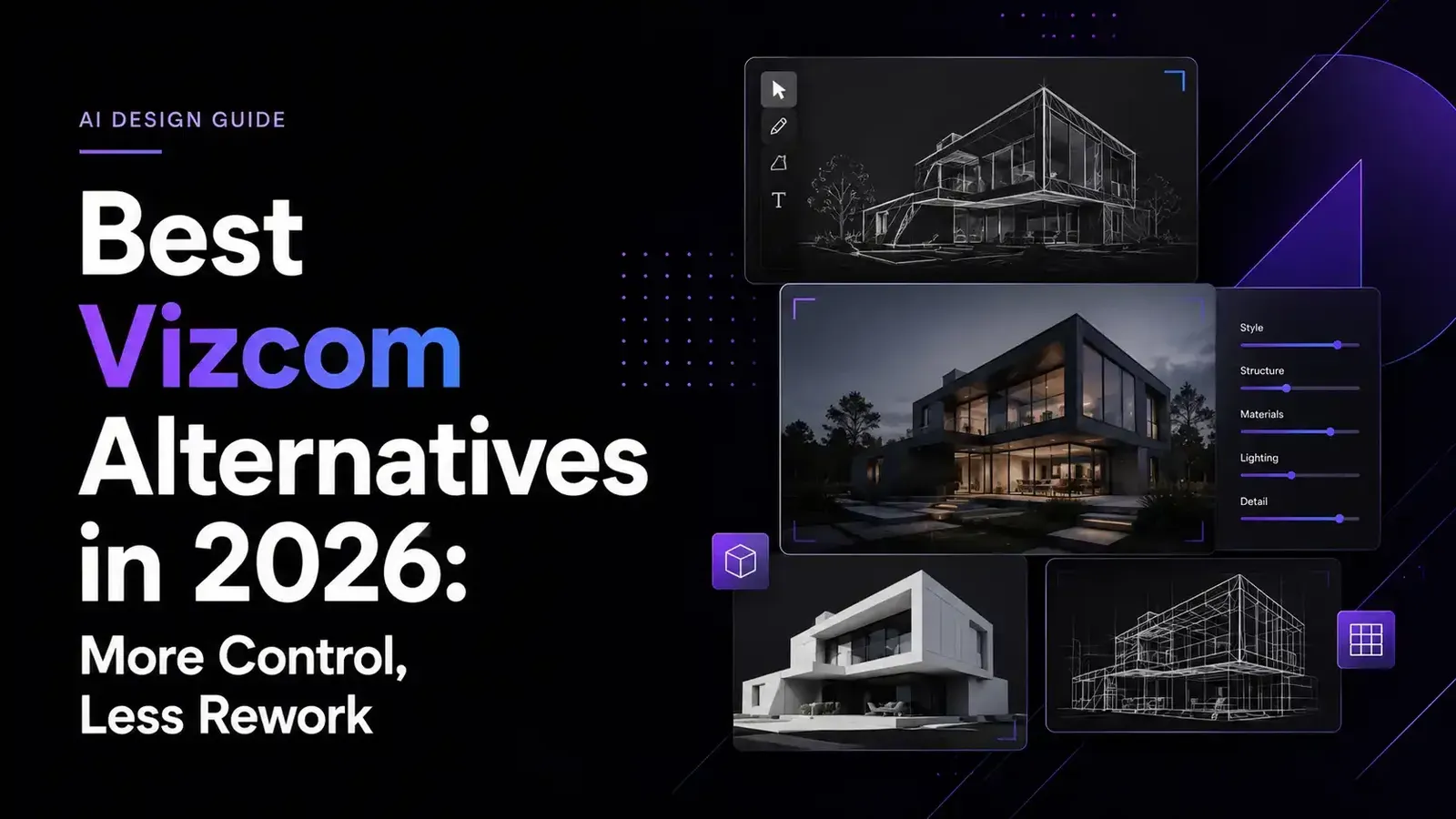
Finding the best Vizcom alternatives in 2026 is not just about locating another AI sketch renderer. The real challenge is choosing a platform that preserves design intent, supports controlled revisions, and fits the way your team actually works. Virse, Krea, Udin, NewArc, and PromeAI each address a different need, from multi-stage project continuity and real-time exploration to automotive sketch interpretation, fashion-specific visualization, and broad regional editing. Teams comparing these options can also review the best AI tools for product design and broader AI design tools to understand where sketch rendering fits into a larger creative stack.
A fast first render can still create expensive rework if the AI changes proportions, surfaces, product details, or an approved visual direction. The wrong tool may also scatter references, feedback, and versions across disconnected applications, making every revision slower and harder to review. That is why designers should compare sketch fidelity, editing control, project continuity, privacy, collaboration, and total correction time—not image quality or subscription price alone. These criteria become even more important in an end-to-end AI design workflow and when maintaining consistent art direction.
Virse is built for professional teams that need more than isolated generations: its infinite canvas keeps references, concepts, variants, and feedback connected, while multiple agents share the same project context so designers can explore, refine, and extend approved directions with less need to reconstruct the brief at every stage. This approach aligns closely with AI design Agent creative workflows.
What Are the Best Vizcom Alternatives in 2026?
Five relevant Vizcom alternatives to evaluate in 2026 are Virse, Krea, Udin, NewArc, and PromeAI.
- Virse is suited to teams that prioritize connected project context across multiple design stages.
- Krea focuses on fast, real-time visual exploration.
- Udin targets design-led visualization through its Optic model, agent, and canvas environment.
- NewArc specializes in footwear, apparel, and fashion-accessory workflows.
- PromeAI provides broad sketch-rendering, consistency, regional-editing, and image-variation tools.
The right option depends on the type of rework you are trying to reduce. Some designers need better control over sketch proportions and surfaces. Others need faster local edits, fewer disconnected assets, stronger team continuity, or category-specific controls for materials, patterns, and colorways.
This comparison evaluates which platforms may reduce rework in particular workflows. It is not a standardized hands-on benchmark, and it does not assume that every alternative requires fewer corrections than Vizcom.
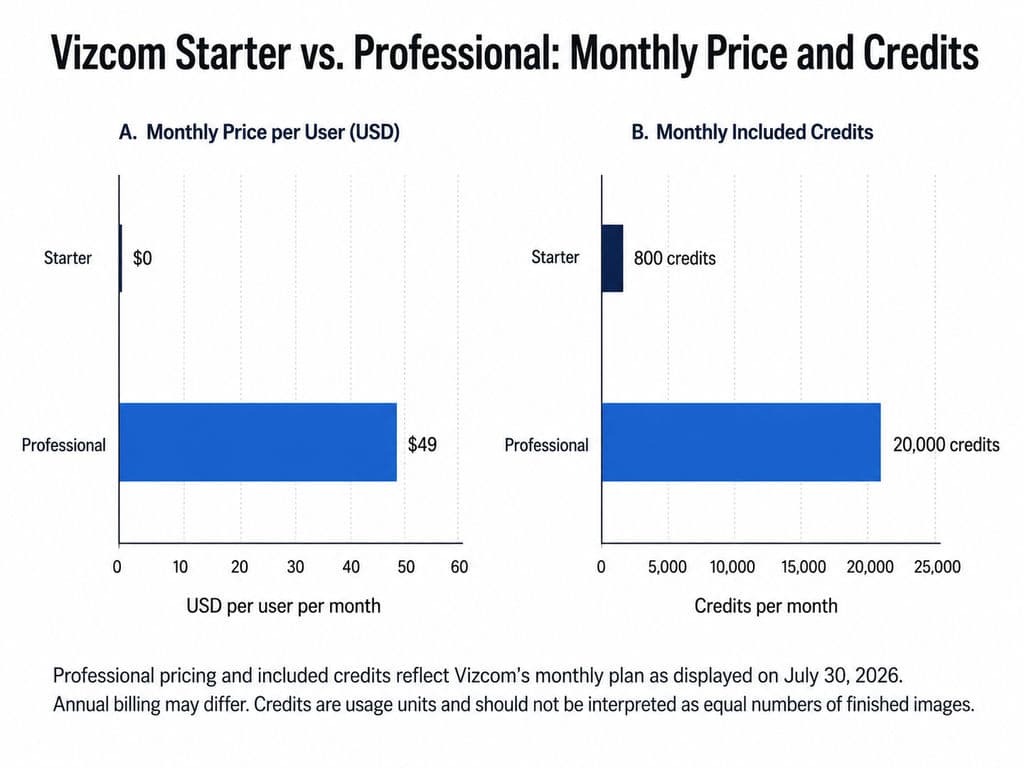
Vizcom remains the reference point for this category. Its current Professional plan is listed at $49 per user per month with 20,000 credits, while its Starter plan is free. Vizcom also positions the product around sketch-to-render workflows, Live Render, multi-image generation, and product-design visualization.
Key Takeaways for Designers and Creative Teams
Choose Virse when fragmented project context—not only image generation—is the main problem.
Choose Krea when immediate visual feedback and a broad image, video, editing, and 3D toolkit matter most. Krea supports free access alongside paid plans and currently presents itself as a suite for generating, enhancing, and editing images, videos, and 3D meshes.
Evaluate Udin when industrial or automotive concept interpretation is central, but test it carefully because its publicly available documentation is less detailed than that of larger platforms. Its official site currently highlights Optic’s model, agent, canvas, pricing, and gallery.
Choose NewArc for footwear, apparel, and fashion accessories. NewArc positions its platform around fashion-specific visual development for freelancers and brand teams.
Choose PromeAI when you need broad sketch rendering, consistency rendering, region rendering, creative fusion, erase-and-replace, and image variations.
Stay with Vizcom when its focused product-design workflow already fits your team and the cost of switching would exceed the likely benefit.
Vizcom Alternatives Comparison Table
Platform | Best For | Main Control Advantage | Project Continuity | Access | Main Limitation |
Virse | Context-aware, multi-stage professional workflows | Canvas-based organization, comparison, editing, and shared context | Strong emphasis on connected assets and multi-agent collaboration | Public pricing not confirmed | No verified benchmark proving better rendering or fewer image corrections than Vizcom |
Krea | Real-time visual exploration | Live generation, editing, references, model choice, and upscaling | Broad creative workspace rather than a dedicated product-design process | Free access and paid plans | Product-geometry fidelity requires direct testing |
Udin | Industrial and automotive concept visualization | Design-oriented model, agent, and canvas environment | Public workflow details remain limited | Pricing is listed but should be confirmed directly | Limited standardized or independent evidence |
NewArc | Footwear, apparel, and fashion accessories | Materials, patterns, colorways, sketch visualization, and fashion presentation | Built around fashion exploration and presentation | Commercial plans plus free education access | Less suitable for unrelated hard-surface product categories |
PromeAI | Broad sketch rendering and visual variations | Sketch, consistency, region rendering, and local replacement tools | Workspace and canvas available | Free and paid access | Breadth does not guarantee category-specific design fidelity |
Vizcom | Focused product-design sketch-to-render | Drawing influence, Live Render, multi-image generation, and 3D visualization | Projects, teams, and product-design workflow | Free Starter; Professional at $49 per user monthly | May be difficult to justify for low-frequency use |
Vizcom’s legal terms distinguish free Starter content from paid Premium content. The current terms state that Vizcom retains title to designs created under Starter accounts and may use Starter content to operate, improve, and train its services, while Premium users retain ownership and Premium content is not used to train Vizcom’s AI models.
Which Option Is Best for Each Design Workflow?
For teams coordinating references, concepts, variants, packaging, and later creative work: Virse is the most relevant candidate because its differentiation lies in shared canvas context and multiple agents working within the same project.
For rapid visual feedback while drawing or experimenting: Krea is the stronger fit. Its recent product updates emphasize real-time editing, region changes, perspective adjustments, lighting, and color control.
For industrial and automotive concept visualization: Udin is worth testing with internal sketches. Its official site confirms Optic’s design-oriented model, agent, and canvas structure, but publicly indexed information is not detailed enough to support broad claims about accuracy or workflow superiority.
For footwear, apparel, and fashion accessories: NewArc offers the clearest specialization. It is designed around fashion concepts and currently provides different generation modes for balancing speed, quality, material rendering, and credit use.
For broad sketch rendering and local image changes: PromeAI offers the widest collection of adjacent visualization tools in this shortlist.
Why Look for an Alternative to Vizcom?
Designers usually search for a Vizcom alternative because a specific part of the workflow creates friction. The issue may be subscription cost, credit use, repeated geometry correction, limited category-specific controls, disconnected project materials, or the need for a different collaboration and privacy model.
The goal should not be to replace Vizcom merely because another platform can generate an attractive image. A useful alternative must improve the work that happens before, during, and after the first render.
Common Reasons Designers Consider Switching
The cost is difficult to justify at low usage. Vizcom’s Professional plan is currently listed at $49 per user per month. That may be reasonable for frequent professional use, but it can be harder to justify for a freelancer who only needs occasional concept renders.
The first output changes the design. AI-generated visuals can alter proportions, feature lines, part boundaries, openings, controls, or surface transitions. In that situation, a fast render can still produce a long correction cycle.
The team needs continuity beyond a single rendering task. Professional projects often include references, sketch rounds, material exploration, internal feedback, campaign adaptation, and asset organization. Reconstructing that context across separate tools creates its own form of rework.
The design category requires specialized controls. Fashion teams think in materials, patterns, colorways, and presentation. Automotive designers focus on stance, surfacing, proportion, and character lines. A general-purpose platform may not serve both equally well.
Privacy and commercial rights differ by plan. Ownership, model-training use, commercial permissions, and confidentiality should be checked before teams upload unreleased concepts. Vizcom’s own Starter and Premium terms demonstrate why plan-level distinctions matter.
What a True Vizcom Alternative Needs to Replace
A genuine Vizcom alternative should replace a meaningful part of the sketch-to-concept workflow, not one isolated feature.
It should help a designer:
- Start from a sketch, technical drawing, reference image, or existing asset.
- Generate several credible concept directions.
- Preserve the recognizable design intent.
- Modify selected areas without restarting the entire process.
- Compare versions and maintain a clear project direction.
- Keep human control over selection, editing, review, and delivery.
This definition also clarifies why some products commonly listed as Vizcom competitors are actually adjacent tools. Meshy primarily addresses image-to-3D generation. KeyShot focuses on product visualization from existing 3D geometry. Blender provides a complete 3D content pipeline. They may belong in the same workflow without replacing Vizcom’s early-stage role.
Virse: Best for Context-Aware, Multi-Stage Design Workflows
Virse is best suited to teams whose main difficulty is fragmented context across references, concepts, revisions, and downstream creative work.
Compared with Vizcom, its clearest distinction is not a verified advantage in single-image rendering. It is the way project materials, decisions, and AI agents remain connected inside one shared workspace.
Virse should therefore be evaluated as a workflow-level alternative, not as a proven one-to-one replacement for every Vizcom rendering or 3D feature.
Key Features of Virse
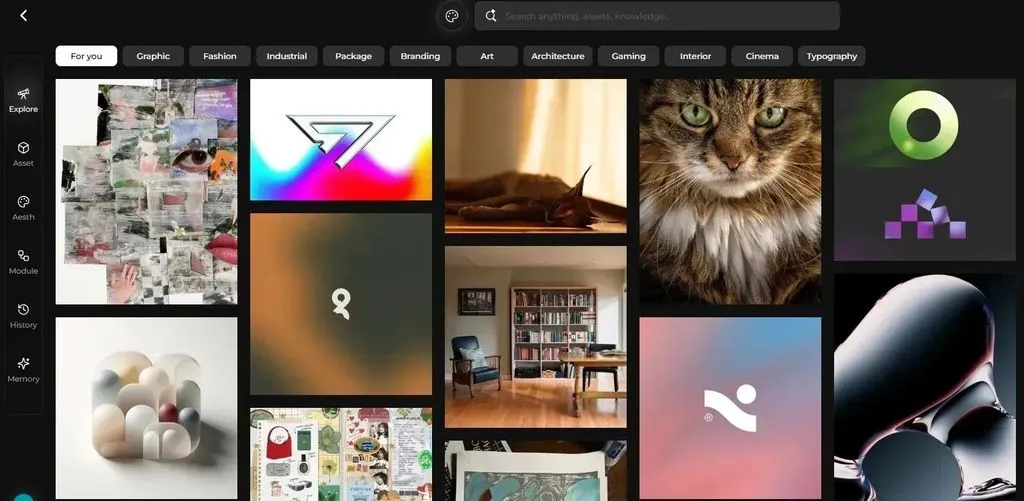
Virse uses an infinite canvas where designers can organize, connect, compare, and edit project materials. Its agents interpret tasks using the broader canvas context rather than relying only on an isolated prompt.
Multiple agents can share the same project context while handling different parts of the work. Confirmed examples include reference analysis, concept exploration, packaging-design tasks, and marketing-material generation. Virse is also positioned to learn from team preferences, brand guidelines, and previous project experience while preserving designer control over direction, editing, review, and delivery.
This approach is relevant when a project involves repeated variations, asset organization, multiple feedback rounds, or several related creative outputs. It does not mean Virse replaces professional judgment, CAD development, engineering validation, brand approval, or production testing.
Advantages and Disadvantages
Advantages
- References, concepts, variations, and related assets can remain visible in a shared canvas.
- Multiple agents can work with the same project context rather than isolated chat histories.
- The workspace is designed for multi-round projects and parallel creative tasks.
- The product treats AI as a professional collaborator rather than a one-prompt substitute for the designer.
- Team preferences, brand rules, and prior project knowledge can inform later work.
Disadvantages
- Public pricing, plan limits, supported models, and export specifications are not confirmed for comparison.
- There is no standardized evidence that Virse produces more accurate renders than Vizcom.
- It is not a substitute for parametric CAD, engineering analysis, manufacturability review, or physical prototyping.
- Solo users who only need occasional sketch rendering may not need its added project-context layer.
Potential rework reduction: Virse may reduce time lost to rebuilding references, explaining previous decisions, locating versions, and transferring context between disconnected tools or agents.
Potential new rework: Teams still need to establish a clear canvas structure, review AI outputs, verify image fidelity, and move technically unresolved concepts into CAD and validation workflows.
Overall Verdict: Who Should Choose Virse?
Choose Virse when the main problem is workflow fragmentation rather than only render generation.
It is most relevant to design studios, brand teams, product teams, packaging teams, and e-commerce creative teams working across several connected stages. A designer who only wants a fast, isolated sketch render should compare Virse’s actual rendering workflow directly with Vizcom before switching.
The most useful question is not whether Virse creates a better single image. It is whether keeping more of the project’s context and decisions connected produces a better overall design process.
Krea: Best for Real-Time Visual Exploration
Krea is best suited to designers who value immediate visual feedback and access to a broad creative AI suite.
Compared with Vizcom, Krea is less focused on a dedicated industrial-design process but more flexible across image generation, editing, video, enhancement, and 3D experimentation.
Key Features of Krea
Krea supports generating, enhancing, and editing images, videos, and 3D meshes. Its real-time tools update the output as users change drawings, shapes, prompts, references, or live inputs. Krea’s 2026 product updates also introduced more fine-grained region editing, perspective changes, lighting adjustments, and palette application.
The platform offers free access and paid plans based on compute units. Because prices, allowances, and model access can change, teams should verify the live pricing page before making a purchasing decision.
Advantages and Disadvantages
Advantages
- Real-time feedback supports fast visual experimentation.
- The platform covers images, video, editing, enhancement, and 3D-related generation.
- Designers can work with references and multiple generation models.
- Free access makes initial workflow testing practical.
- Krea is useful beyond product design, including campaign, concept-art, and general visual work.
Disadvantages
- The platform is not organized solely around industrial design.
- Real-time output does not prove reliable preservation of product geometry.
- Switching between models can introduce visual inconsistency.
- Compute consumption varies by model and operation.
- Teams may require separate systems for project structure, formal review, and engineering handoff.
Potential rework reduction: Krea can shorten the loop between drawing, prompting, editing, and seeing a visual response.
Potential new rework: Rapid exploration may create many directions without resolving structure. Designers may spend more time filtering outputs, correcting proportions, or reconciling inconsistent variations.
Overall Verdict: Who Should Choose Krea?
Krea is a strong candidate for independent designers, concept artists, architects, and creative teams that prioritize a fast visual sandbox.
It is particularly useful when immediate iteration matters more than a tightly prescribed product-design workflow. Vizcom remains the more focused choice when the team specifically wants a product-design-oriented sketch-to-render environment.
Udin: Best for Industrial and Automotive Sketch Rendering
Udin is worth investigating when industrial or automotive sketch interpretation is the primary need.
This category is based on Udin’s design positioning and limited public comparisons—not on a standardized benchmark. Its Optic product is officially presented through model, agent, canvas, pricing, and gallery sections.
Key Features of Udin
Udin presents Optic as a creative-design environment built around a model, agent, and canvas.
That positioning is relevant to designers who want to develop visual concepts from sketches rather than rely on a general text-to-image interface. However, publicly indexed information does not yet provide enough detail to verify the full range of local editing controls, collaboration features, export options, privacy handling, or multi-view consistency.
Advantages and Disadvantages
Advantages
- Its positioning is directly connected to design visualization.
- It is relevant to industrial and automotive concept workflows.
- A model-agent-canvas structure suggests more design context than a basic prompt field.
- Public examples and community comparisons indicate interest among designers concerned with proportion and surface interpretation.
Disadvantages
- Public product documentation remains limited.
- Current pricing, commercial terms, and usage allowances require direct confirmation.
- There is no broad standardized comparison with Vizcom.
- Complex surfaces and distinctive components may still be reinterpreted.
- Individual community ratings cannot be treated as objective performance scores.
One public automotive-sketch comparison rated Udin, Vizcom, and ChatGPT differently for surface, proportion, and sketch-character preservation. That comparison is useful as an example of what designers notice, but its inputs, prompts, scoring method, and repeatability were not controlled.
Potential rework reduction: A tool that preserves stance, surfaces, and feature relationships more closely for a particular sketch style may reduce repainting and structural correction.
Potential new rework: Limited public documentation and uncertain consistency mean teams may need more internal testing and fallback tools before using it for client work.
Overall Verdict: Who Should Choose Udin?
Udin is worth piloting for automotive and industrial-design teams that place fidelity to the sketch ahead of stylistic spectacle.
Test it with difficult internal examples rather than polished gallery images. Include oblique views, unusual geometry, subtle surface transitions, repeated details, and several views of the same concept.
A visually impressive image is not necessarily the most useful result. In industrial design, the more valuable render may be the one that preserves the original stance, proportions, part relationships, and design character.
NewArc: Best for Footwear, Apparel, and Fashion Accessories
NewArc is the most fashion-specialized option in this shortlist.
It is designed for footwear, apparel, fashion accessories, and related fashion-design workflows rather than general hard-surface product design. Compared with Vizcom, its main advantage is that its controls reflect category-specific decisions around materials, patterns, colorways, and fashion presentation.
Key Features of NewArc
NewArc positions its platform for creative professionals and brand teams working on fashion concepts. Its current workflow includes different generation modes designed to balance speed, material quality, prompt following, resolution, and credit cost.
NewArc also provides free education access for qualifying schools, students, and educators, currently including 8,000 credits per month for participating users.
Advantages and Disadvantages
Advantages
- Its workflow aligns with footwear, apparel, and fashion-accessory decisions.
- Fashion-specific controls reduce the need to adapt a general product-design platform.
- Different quality modes help teams balance exploration speed and material detail.
- It supports individual creators and larger brand teams.
- Qualifying education users receive a dedicated free-access program.
Disadvantages
- Fashion specialization limits its relevance for many automotive, electronics, furniture, and hard-surface products.
- A realistic fashion image does not validate construction, fit, durability, grading, or production feasibility.
- Commercial pricing and plan limits should be confirmed on the live product page.
- Visual outputs should not be assumed to replace production-ready technical documentation.
- Multidisciplinary studios may still need a broader platform.
Potential rework reduction: NewArc may reduce tool switching when designers move from sketch exploration into material, pattern, colorway, and fashion-presentation decisions.
Potential new rework: Production teams still need to verify construction details, fit, sizing, material behavior, and technical documentation.
Overall Verdict: Who Should Choose NewArc?
NewArc is the most relevant choice for footwear, apparel, and fashion-accessory teams.
Its specialization is an advantage when the design decisions match its controls. It is less suitable as a universal replacement for studios that work across consumer electronics, furniture, packaging, automotive design, and fashion.
PromeAI: Best for Broad Sketch Rendering and Visual Variations
PromeAI is best suited to users who want a wide collection of sketch-rendering, editing, consistency, and variation tools in one platform.
Compared with Vizcom, it offers broader visual coverage across architecture, interiors, product visualization, image generation, and video, but it is less narrowly organized around professional industrial-design development.
Key Features of PromeAI
PromeAI currently lists tools including:
- Sketch Rendering
- Consistency Rendering
- Region Rendering
- Creative Fusion
- Erase and Replace
- Image Variation
- Relight
- Background generation
- Image-to-video
- Upscaling
The platform offers free and paid access. Commercial rights vary by plan, so professional users should confirm the applicable commercial-use terms before using generated assets in paid client work.
Advantages and Disadvantages
Advantages
- Sketch, consistency, texture, and region tools provide several ways to control visual changes.
- Erase-and-replace workflows can address local problems without discarding an entire image.
- The platform supports a wide range of visual categories.
- Image and video tools can extend concept presentation beyond still renders.
- Free access makes initial testing possible.
Disadvantages
- Broad coverage does not guarantee industrial-design fidelity.
- A large style library can create visual variety without preserving one coherent design system.
- Consistency across views and revisions requires direct testing.
- Usage cost depends on the plan, model, and output settings.
- Commercial permissions vary by plan.
- A workspace or canvas does not automatically prove long-term project-context continuity.
Potential rework reduction: Region Rendering, Consistency Rendering, and Erase and Replace may reduce the need to regenerate an entire image after a local problem.
Potential new rework: Teams may need additional effort to maintain stable geometry, repeated-view consistency, brand-specific styling, and version clarity across many tools.
Overall Verdict: Who Should Choose PromeAI?
PromeAI is useful for freelancers and multidisciplinary teams that need broad sketch rendering and visual editing rather than a narrowly specialized industrial-design workflow.
Before adopting it, test whether the same design remains recognizable across local edits, viewpoints, materials, colors, and repeated generations. Variety is useful during exploration; consistency becomes more important after a direction is approved.
Other Tools Worth Considering Alongside Vizcom Alternatives
The following tools can strengthen a design workflow, but they should not automatically be presented as complete Vizcom replacements.
ComfyUI and ControlNet for Local, Customizable Workflows
ComfyUI combined with Stable Diffusion models and ControlNet can support:
- Local processing
- Structural guidance
- Reusable node graphs
- Batch generation
- Custom models
- Technical workflow control
This flexibility comes with hardware, configuration, troubleshooting, model-management, and maintenance costs.
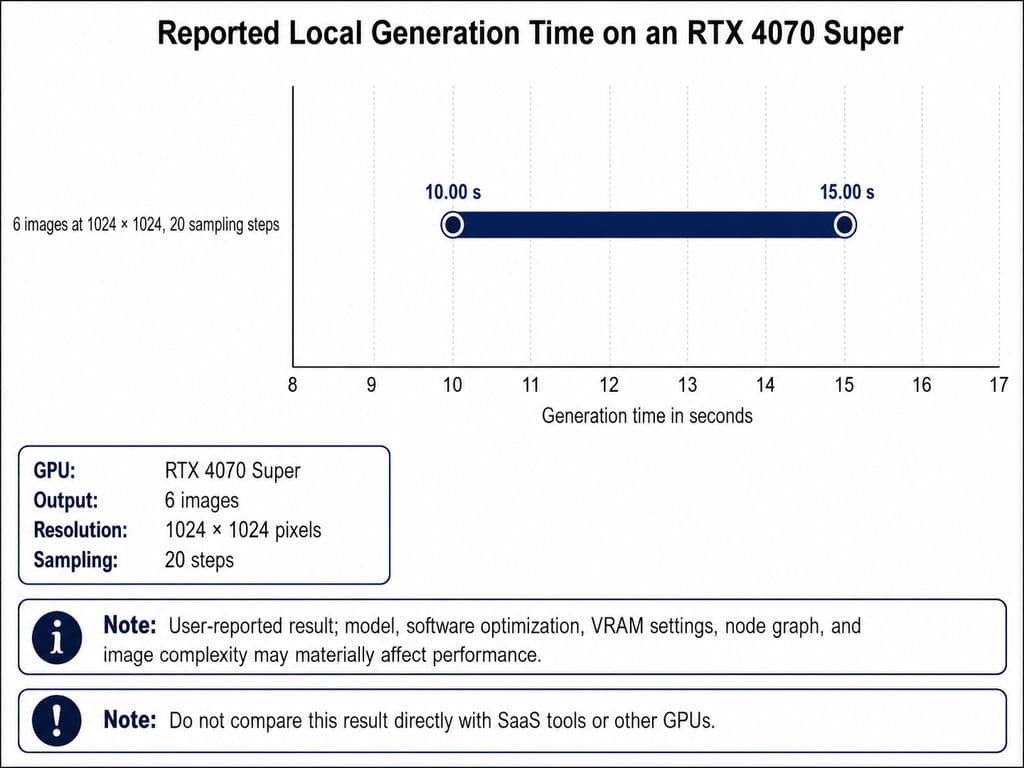
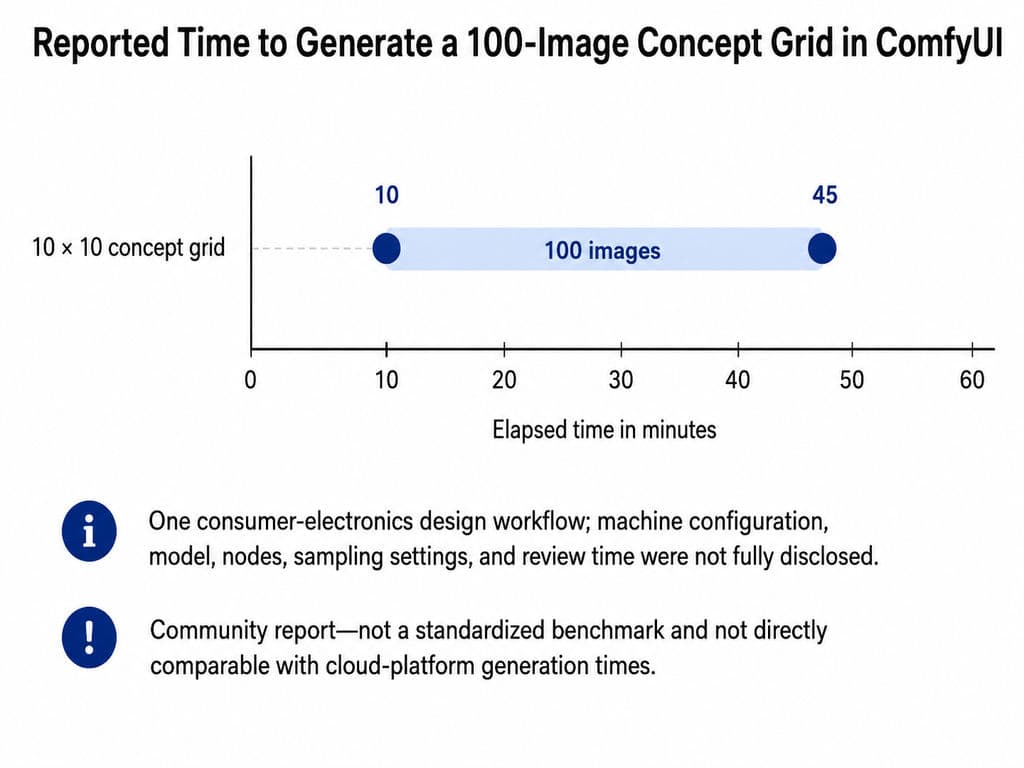
Community reports illustrate the range of possible performance. One consumer-electronics design user reported generating a 10-by-10 concept grid in approximately 10–45 minutes. Another reported producing six 1024×1024 images at 20 sampling steps in approximately 10–15 seconds on an RTX 4070 Super. These are hardware- and workflow-specific reports, not comparable industry benchmarks.
Use this route when local control, privacy, customization, and repeatable batch workflows outweigh the need for an immediately accessible professional-design interface.
Meshy for Generating 3D Assets From Images
Meshy belongs in the workflow when the required output is a generated 3D asset rather than only a two-dimensional concept render.
Its official Image-to-3D tool supports exporting formats including GLB, OBJ, and USDZ, while Meshy’s documentation covers additional export formats for different downstream uses.
However:
An AI-generated mesh is not the same as an editable parametric CAD model.
A mesh may be useful for visualization, animation, spatial review, or further digital work. It does not automatically contain dimensional constraints, construction history, assembly relationships, manufacturing logic, or engineering intent.
KeyShot and Blender for Downstream Visualization
KeyShot and Blender operate more naturally after geometry already exists.
KeyShot is built around importing 3D or CAD models, applying materials, setting up lighting and cameras, and creating product visualizations.
Blender supports the broader 3D pipeline, including modeling, rigging, animation, simulation, rendering, compositing, motion tracking, and video editing.
Their explicit geometry can provide greater final-stage control than early AI concept rendering. However, neither reproduces the same low-friction experience of turning a rough sketch into an initial concept direction.
How Should You Choose a Vizcom Alternative?
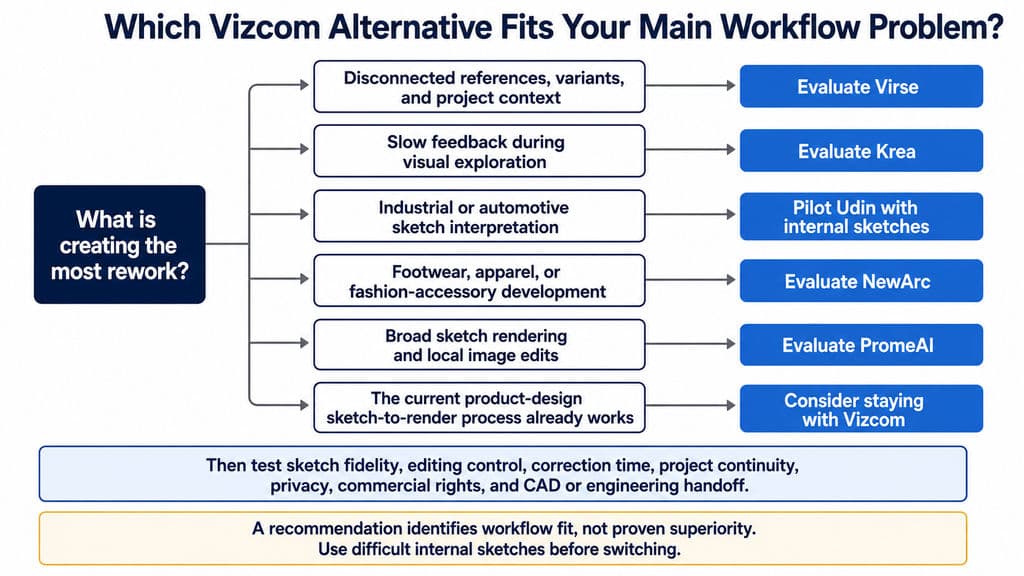
Choose the platform that reduces friction across the complete project, not the one that produces the fastest first image.
Compare Sketch Fidelity, Editing Control, and Project Continuity
Use three separate evaluation categories.
- Sketch fidelity
Check whether the tool preserves:
- Overall proportions
- Stance and silhouette
- Surface transitions
- Part boundaries
- Openings and controls
- Character lines
- Repeated components
- Distinctive brand or product features
Run the same test with a clean presentation sketch and a difficult exploratory sketch. A tool may succeed on a flat side view but fail on oblique perspective, asymmetry, unfamiliar geometry, or subtle surfacing.
- Editing control
Test whether the platform supports:
- Local selections or masking
- Reference images
- Influence or strength adjustment
- Material and color changes
- Repeated local revisions
- View consistency
- Reuse of an approved direction
The relevant measure is not time to first output. It is time to a result the designer can approve.
- Project continuity
Check whether:
- References remain connected to outputs
- Variants can be compared clearly
- Previous decisions remain understandable
- Collaborators can see the project context
- Multiple creative tasks can share an approved direction
- The designer can review and approve each stage
Project continuity becomes especially important when a concept later informs packaging, campaign assets, SKU extensions, or market-specific creative work.
Evaluate Total Workflow Cost, Privacy, and Collaboration
Subscription price is only one part of the cost.
Evaluate:
Platform cost
- Monthly or annual subscription
- Credits or compute allowances
- Additional usage purchases
- Seat requirements
- Viewer access
Setup cost
- Hardware
- Installation and configuration
- Model or workflow maintenance
- Training and onboarding
- Asset organization
Correction burden
- Repeated prompting
- Repairing altered geometry
- Restoring details
- Photoshop cleanup
- Rebuilding geometry in CAD
- Recreating inconsistent views
Collaboration and governance
- Version tracking
- Comments and approvals
- Shared project context
- Brand consistency
- Confidentiality
- Ownership and model-training terms
- Commercial-use rights
Vizcom’s Starter and Premium terms illustrate why legal and privacy conditions must be compared at the plan level rather than inferred from a product’s general marketing claims.
Decide Whether to Switch Tools, Combine Tools, or Stay With Vizcom
Switch tools when another platform better supports the dominant workflow. A fashion team may benefit from NewArc’s specialization. A team struggling with fragmented context may find Virse more relevant. A designer prioritizing immediate experimentation may prefer Krea.
Combine tools when different stages require different forms of control. A realistic workflow may use one platform for early concepts, Photoshop for image correction, CAD for technical development, and KeyShot or Blender for controlled final visualization.
Stay with Vizcom when its product-design focus, Live Render, editing, visualization, and established team workflow already solve the main problem. Its current free and Professional plans also make it possible to evaluate the platform before committing to a larger rollout.
Every choice should also account for the visual maturity gap:
An AI render can look more resolved than the underlying design.
A polished image may imply that geometry, ergonomics, materials, dimensions, assembly, manufacturing, and cost have already been resolved. They may not have been.
A practical review protocol is to:
- Label AI outputs as concept visualizations.
- Show the source sketch beside the generated image.
- Identify areas the AI altered or invented.
- List assumptions that remain unverified.
- Separate visual approval from engineering approval.
- Move approved concepts into CAD, prototyping, and human review before production decisions.
Frequently Asked Questions About Vizcom Alternatives
What Is the Closest Alternative to Vizcom?
There is no single closest alternative.
Virse is closest for project continuity and shared context, Krea for real-time visual exploration, Udin for design-led industrial and automotive concepts, NewArc for fashion workflows, and PromeAI for broad sketch rendering and local edits.
The closest choice depends on what you need to replace: sketch fidelity, specialist controls, live feedback, editing, or project continuity.
Is Virse a Direct Vizcom Alternative?
Virse is a workflow-level Vizcom alternative for professional design teams, but it is not a verified one-to-one replacement for every Vizcom feature.
Its main distinction is the infinite canvas, full-project context, multiple agents sharing that context, and continuity across connected design tasks. Its rendering quality, pricing, and exact feature parity with Vizcom should not be assumed without direct comparison.
Is There a Free Vizcom Alternative?
Several platforms offer free access, but the restrictions differ.
Vizcom has a free Starter plan. Krea offers free access to parts of its creative suite. PromeAI provides free entry-level use, while NewArc offers 8,000 monthly credits to qualifying students and educators.
Local ComfyUI workflows avoid a recurring platform subscription but require suitable hardware, setup, maintenance, and technical knowledge.
Which Vizcom Alternative Is Best for Industrial Design Teams?
Industrial-design teams should shortlist Virse, Udin, Krea, and Vizcom itself, then test them with internal sketches.
- Choose Virse for connected project context and multi-stage collaboration.
- Evaluate Udin for industrial and automotive sketch interpretation.
- Choose Krea for rapid visual exploration.
- Stay with Vizcom when its focused sketch-to-render workflow already matches the team’s process.
The final decision should measure fidelity, correction time, iteration consistency, collaboration, privacy, and CAD or engineering handoff—not only image attractiveness.
Conclusion
The right Vizcom alternative is the platform that gives your team the required control while reducing the specific rework already slowing the project. Virse is relevant to context-heavy, multi-stage workflows; Krea to real-time exploration; Udin to industrial and automotive concept interpretation; NewArc to footwear and fashion; and PromeAI to broad sketch rendering and local visual edits. Test each candidate with difficult internal sketches, count correction and handoff time as part of the cost, and treat every polished AI render as a concept visualization until geometry, materials, engineering, and manufacturability have been independently validated.