
What Is Industrial Design? Beyond Sketching, CAD and Pretty Renders
Vincent13 分钟阅读 ·
Industrial design turns user needs and product ideas into physical products that balance form, function, usability, and manufacturability. Industrial designers work across research, sketching, CAD, prototyping, CMF, testing, engineering, and production—far beyond simply creating sketches, CAD models, or pretty renders.
The real challenge starts after a concept looks good. As it moves through engineering constraints, material changes, prototypes, supplier feedback, and manufacturing, the original design intent can easily be lost. Strong industrial design means keeping form, function, cost, usability, and production reality aligned from concept to final product.
Virse helps design teams keep this process connected. With an infinite canvas, shared project context, multiple AI Agents, and long-term team memory, designers can organize references, explore variations, and maintain visual consistency while spending more time on creative direction and product decisions.

What Is Industrial Design and Why Is It More Than Styling?
Industrial design primarily deals with physical product design and the experiences people have while using those products. It can apply to consumer electronics, furniture, appliances, tools, medical devices, sports equipment, home products, transportation, toys, and industrial equipment.
The product category changes, but the underlying task remains similar: turn human needs, technical constraints, and business requirements into a coherent product that can realistically exist.
Industrial Design Balances Form, Function, Usability, and Manufacturability
Four questions sit behind most product design decisions:
- Does the product solve the right user problem?
- Does its form communicate the intended experience?
- Does it function appropriately?
- Can it realistically be manufactured?
This is why industrial design is not simply product styling.
A handle can look elegant but fail ergonomically. A thin enclosure can communicate precision while leaving insufficient room for components. A dramatic surface transition may strengthen the visual identity while creating unnecessary manufacturing complexity.
In professional design workflows, visual decisions quickly become technical decisions. Form, usability, materials, engineering, and manufacturing cannot be treated as separate problems.
Industrial Design Connects Users, Business, and Engineering
Industrial designers often work between disciplines.
They may collaborate with:
- Mechanical engineers
- UX/UI designers
- User researchers
- Project managers
- Brand teams
- Suppliers
- Manufacturers
- Marketing teams
The designer does not replace these specialists. The role is often to connect their constraints into one coherent product experience while protecting the original design intent.
What Does an Industrial Designer Actually Do?
A common misconception is that industrial designers spend most of their time sketching attractive products or building 3D models.
Real professional work is considerably broader.
Real Industrial Design Work Extends Far Beyond CAD
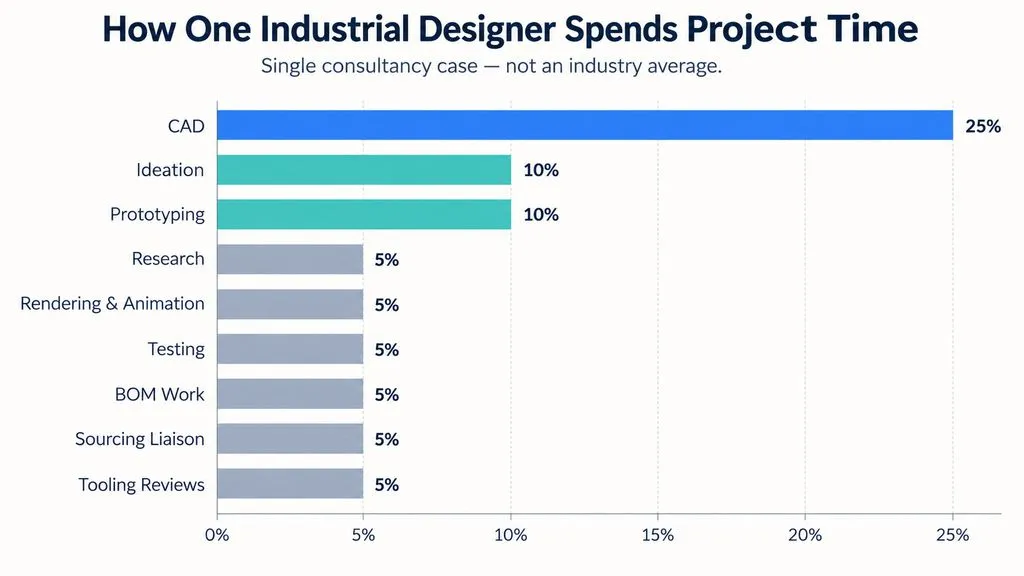
One detailed design consultancy case in our research review reported approximately:
- CAD: 25%
- Ideation: 10%
- Prototyping: 10%
- Research: 5%
- Rendering and animation: 5%
- Testing: 5%
- BOM work: 5%
- Sourcing liaison: 5%
- Tooling reviews: 5%
The remaining time involved activities such as drawings, specifications, client meetings, and design reviews.
This is a single practitioner case rather than an industry average, so the exact percentages should not be generalized. Its value is in showing how professional ID work is distributed.
Even when CAD is the largest individual task, most of the product-development process can happen outside CAD.
Industrial Designers Move Between Creative and Technical Decisions
A designer might research a use case, sketch several possible directions, refine two concepts in 3D, evaluate a prototype, respond to engineering feedback, adjust part geometry, compare materials, and prepare presentation images within the same project.
The hardest part is rarely generating the first attractive concept.
The harder challenge is keeping that concept strong while cost, engineering, manufacturing, supplier, and usability constraints accumulate.
That is why professional judgment matters as much as software skill.
What Is the Industrial Design Process From Idea to Manufacturing?
Industrial design is not a perfectly linear process. Teams frequently move backward and forward between research, CAD, prototypes, testing, engineering feedback, and revision.
However, most projects follow several recognizable stages.
Research and Ideation Define the Right Product
Early industrial design typically involves:
- Researching users and context
- Identifying problems and constraints
- Defining product requirements
- Generating multiple concepts
- Exploring form and interaction
- Selecting directions for development
The purpose of ideation is not to make the first idea look finished.
It is to create enough alternatives to understand the design space before detailed development becomes expensive.
In practice, exploring several rough solutions early can reveal different proportions, product architectures, interactions, and visual directions before a team becomes attached to one concept.
CAD and Prototyping Turn Concepts Into Evidence
Once a direction becomes promising, the workflow moves toward:
CAD → Prototype → Test → Revise
CAD helps resolve surfaces, dimensions, components, interfaces, and assembly relationships.
Prototypes answer another class of questions.
A grip may look ergonomic on screen but feel uncomfortable in the hand. A device can appear compact in a render but feel oversized physically. A control may look easy to reach but become awkward in the real operating position.
From a product design perspective, a prototype is a design question made physical.
Drawings, BOM, Sourcing, and Tooling Connect Design to Production
Later-stage industrial design can include:
- Technical drawings
- Product specifications
- BOM development
- Supplier communication
- Sourcing
- Tooling reviews
- Manufacturing revisions
This stage receives less attention in visually driven portfolios, but it is often where the difference between a concept and a product becomes clear.
Materials change. Part boundaries move. Radii increase. Assemblies become simpler. Cost targets force revisions.
Professional industrial design therefore requires more than generating concepts. Designers need to understand which qualities are essential and how to preserve them through production development.
What Industrial Design Skills Matter Most?
Industrial design requires a combination of creative thinking, technical understanding, communication, research, prototyping, and manufacturing awareness.
Learning one software package is not the same as learning industrial design.
Manufacturable CAD Is Different From Visual 3D Modeling
One professional transition case reviewed during our research involved someone with a robotics and mechatronics background entering an ID role where both ideation and manufacturable CAD were expected.
The challenge revealed an important distinction.
Visual 3D modeling asks whether a form looks right. Manufacturable CAD also asks how the product will be built, assembled, modified, and transferred into engineering development.
A technical background does not automatically create industrial design judgment.
Likewise, strong rendering or modeling skills do not automatically create production-ready CAD capability.
Prototyping and Manufacturing Knowledge Improve Design Decisions
Industrial designers do not need to replace engineers, but understanding materials, assemblies, tooling, mechanical relationships, suppliers, and manufacturing constraints makes design decisions stronger.
This knowledge changes how a designer evaluates concepts.
Instead of asking only:
Does this look good?
The designer begins asking:
Can this be assembled?
Can this material produce the intended finish?
Where should the product split into parts?
What happens when engineering needs to modify the geometry?
That shift from visual judgment to product-system thinking is one of the biggest differences between beginner and professional ID work.
What Industrial Design Software Do Professionals Use?
There is no single universal industrial design software stack.
The more useful question is: what design problem does each tool solve?
Rhino and SolidWorks Support Different CAD Workflows
Rhino commonly appears in workflows involving freeform geometry, surface exploration, and concept development.
SolidWorks is more closely associated with parametric CAD, assemblies, engineering collaboration, and manufacturing development.
Fusion, Creo, and NX may also appear depending on the organization, product category, and engineering environment.
Rather than searching for one best application, designers should select tools around the development stage.
Early form exploration and production CAD are different problems, so they do not always require the same software.
Blender Can Support Rapid Industrial Design Ideation
Blender is often categorized as a visualization tool, but it can also become an effective form-exploration environment.
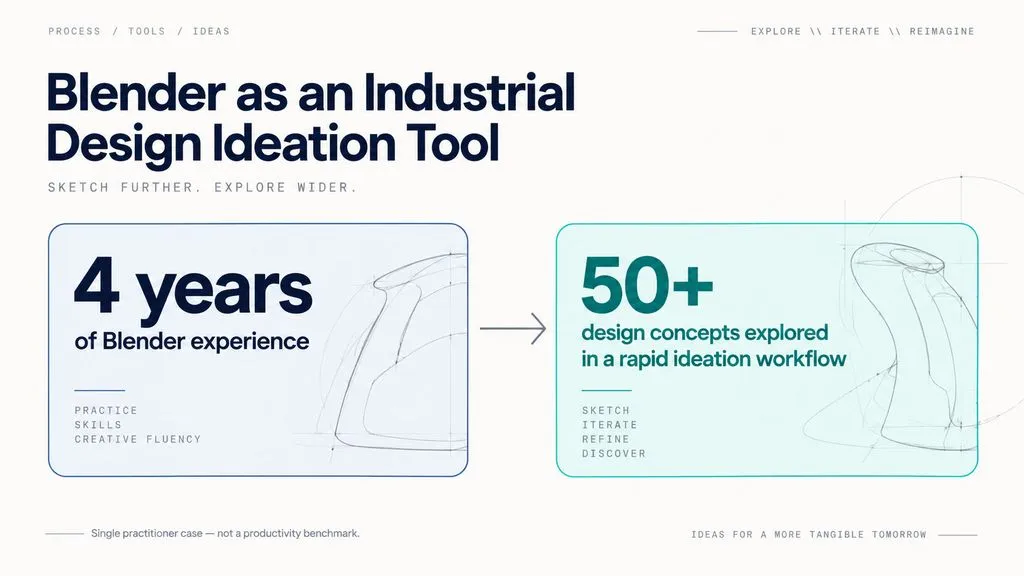
One practitioner with four years of Blender experience reported using subdivision modeling to explore more than 50 design concepts during rapid ideation.
This is an individual workflow result, not a benchmark for every designer. The important insight is the method: 3D modeling can become part of ideation instead of beginning only after sketches are complete.
The limitations become clearer when manufacturing CAD is required. Moving CAD geometry into Blender can also introduce triangulation, shading, and topology-cleanup problems.
Blender is therefore valuable for concept exploration, visualization, and animation, but that does not make it a universal replacement for production-oriented CAD.
KeyShot Fits Fast Product Rendering and CMF Exploration
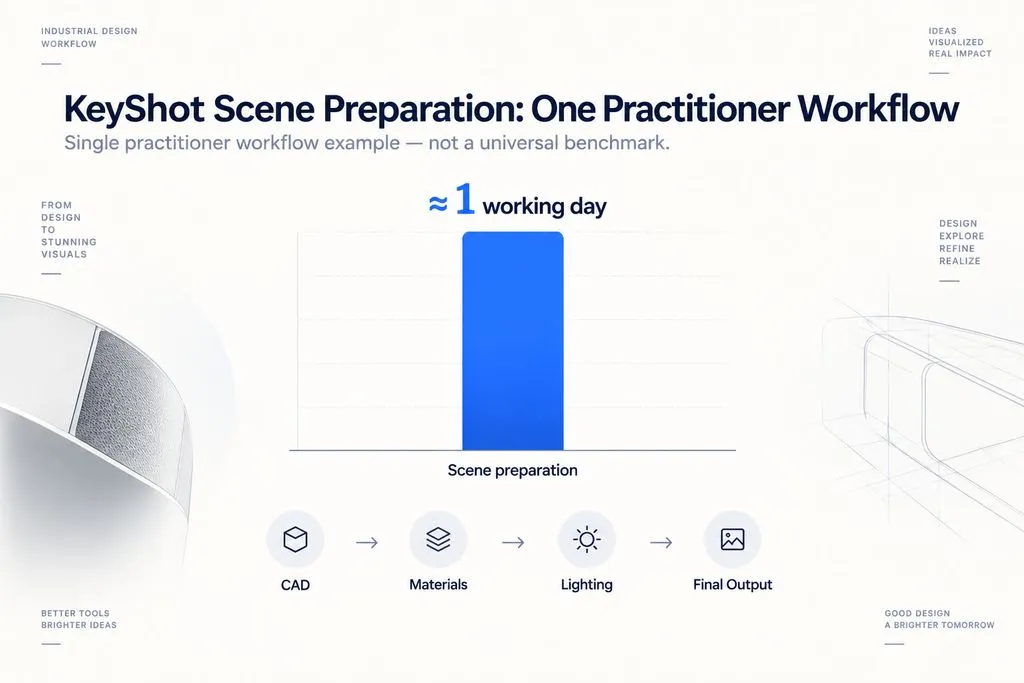
KeyShot is frequently used when designers need to move quickly from CAD into materials, lighting, CMF alternatives, and product presentation.
One practitioner workflow reviewed during our research described approximately one working day of scene preparation, followed by queued rendering for final outputs.
This should not be interpreted as a universal production benchmark.
The useful lesson is that visualization software becomes valuable when it reduces friction between an evolving CAD model and the imagery required for design reviews, CMF decisions, stakeholder communication, and presentations.
Substance 3D Fits Material and Surface Development
Substance 3D solves a different problem from CAD.
Its role in the workflows we reviewed centers on:
- Material creation
- Texturing
- Surface detail
- Visual realism
One practical visualization pipeline used:
Plasticity 3D → Substance 3D Painter → Blender Cycles
The broader workflow lesson is more important than the individual software names.
Modern industrial design increasingly uses specialized tools connected into a pipeline, rather than expecting one application to handle modeling, materials, engineering, rendering, and production equally well.
Why Do Industrial Design Renders Look Fake?
One of the most repeated problems in our review of user questions was designers assuming that unrealistic product renders were primarily a rendering-software problem.
Often, they are not.
Product Rendering Realism Starts With Manufacturing Logic
Common problems include:
- Unrealistically sharp edges
- Missing or implausible parting lines
- Weak assembly relationships
- Incorrect proportions
- Unrealistic material thickness
- Poor scale cues
- Weak material definition
- Lighting that does not describe the form
Changing render engines cannot automatically repair these issues.
A convincing product render starts with a product that looks as though it could physically exist.
Better Materials Cannot Rescue Weak Geometry
Material realism can actually expose modeling problems.
Glossy plastics reveal weak surface transitions. Metallic materials emphasize incorrect edge behavior. Detailed textures make scale mistakes easier to notice.
A stronger visualization workflow therefore develops geometry, manufacturing detail, CMF, materials, and lighting together.
Rendering should communicate a believable product, not hide an unresolved one.
Industrial Design vs Product Design, UX/UI, and Engineering
These disciplines overlap, and their job titles are not always used consistently.
For that reason, responsibilities are usually more useful than titles when evaluating a role.
Industrial Design vs Product Design
Industrial design is strongly associated with:
- Physical products
- Physical interaction
- CAD
- Materials
- Prototyping
- Manufacturing
- CMF
- Production development
Product design can also describe physical product development, but the title is now widely used for digital product and UX/UI positions.
Our review of recurring job-search questions found that this naming overlap creates significant confusion.
For someone seeking physical-product work, terms such as CAD, prototyping, CMF, materials, tooling, manufacturing, and engineering collaboration are more useful signals than the title Product Designer alone.
Industrial Design vs UX/UI
ID and UX/UI both care about users, research, interaction, and usability, but their outputs differ.
One career-transition case in the research involved a professional with six years of UX/UI experience who became increasingly interested in ID after collaborating with industrial designers on physical-product projects.
The transferable capability was user-centered thinking.
The new skill requirements included:
- Physical form
- CAD
- Ergonomics
- Materials
- Prototyping
- Manufacturing
This makes ID and UX/UI related disciplines, but not interchangeable ones.
Industrial Design vs Engineering
Industrial design typically places more emphasis on:
- User experience
- Ergonomics
- Form
- CMF
- Concept exploration
- Product expression
Engineering typically goes deeper into:
- Mechanisms
- Technical performance
- Structures
- Tolerances
- Calculations
- Verification
Successful products need both perspectives.
In smaller teams, these boundaries may blur considerably, which is why manufacturing literacy and engineering communication are valuable skills for industrial designers.
Is Industrial Design a Good Career?
Industrial design can be a strong career fit for people who enjoy working at the intersection of creativity, physical products, technology, human behavior, and manufacturing.
It is also a specialized field where portfolio quality and multidisciplinary skills matter.
What Does the Current Industrial Design Job Market Look Like?
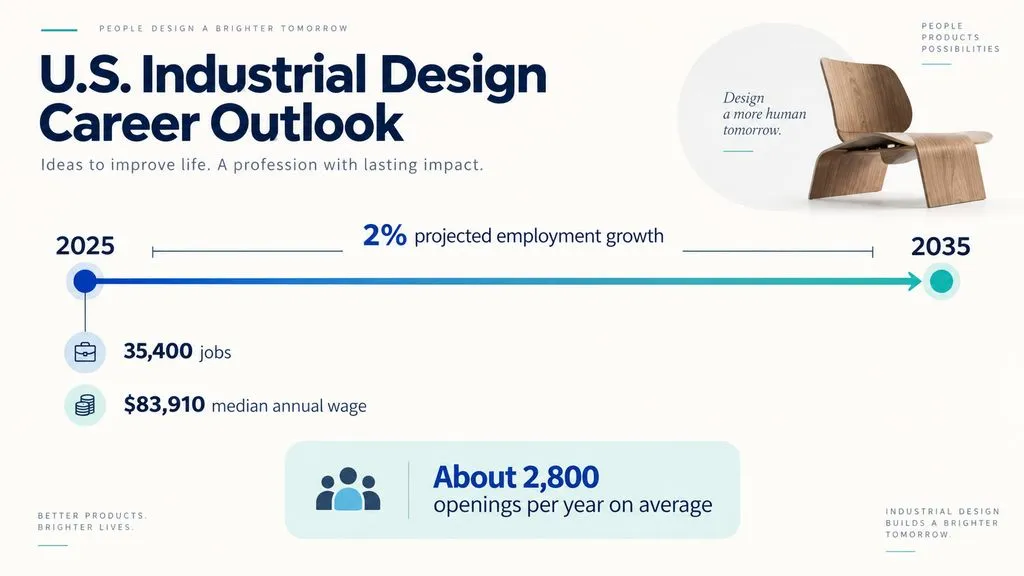
Current U.S. occupational data places the median annual wage for industrial designers at $83,910 as of May 2025, with approximately 35,400 jobs in 2025.
Employment is projected to grow 2% from 2025 to 2035, with approximately 2,800 openings per year on average over the decade.
These figures describe the U.S. occupational market and should not be interpreted as global salary or employment benchmarks.
The broader career lesson is that industrial design remains a specialized profession. Designers often compete not only on visual talent, but on their ability to demonstrate research, CAD, prototyping, product thinking, manufacturing awareness, and communication.
Strong Industrial Design Portfolios Show Decisions, Not Just Final Renders
One career case reviewed during our research involved a designer with four years of professional experience, split between furniture ID and mechanical design, who still experienced difficulty moving back into a dedicated ID role.
That individual experience should not be generalized to the entire employment market, but it highlights the importance of positioning.
A strong industrial design case study should communicate:
- The problem
- Research and constraints
- Concept alternatives
- CAD development
- Prototypes
- Testing
- Iteration
- Production thinking
- Final communication
A polished render demonstrates visualization ability. A documented decision process demonstrates industrial design ability.
FAQ
Is ID Just Sketching and Styling?
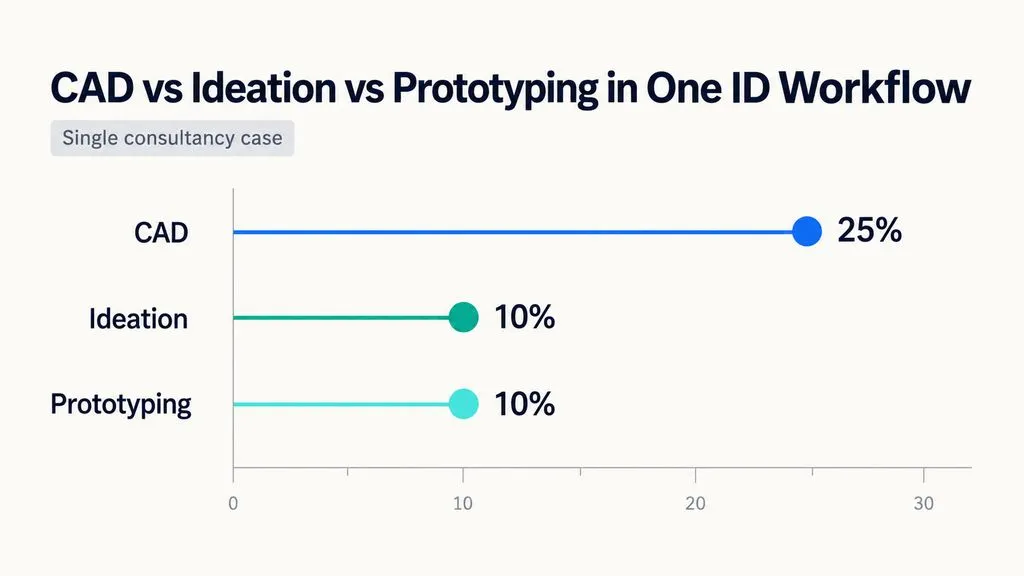
No. ID includes much more than drawing product concepts. Depending on the project, industrial designers may work on research, ideation, CAD, prototyping, testing, CMF, drawings, BOM development, sourcing, tooling reviews, visualization, and manufacturing collaboration. In one consultancy case reviewed for this article, ideation represented about 10% of project time and CAD about 25%.
How Much CAD Does an ID Role Require?
The amount depends on the company, product, and development stage. In one detailed consultancy case, CAD represented approximately 25% of project time, while the remaining work included prototyping, research, testing, sourcing, BOM development, tooling, visualization, drawings, specifications, and meetings. CAD is important in many ID roles, but it is not the entire industrial design workflow.
Can Blender Replace CAD for ID?
Blender can be highly effective for rapid form exploration, subdivision modeling, visualization, and animation. One experienced workflow reviewed during our research generated more than 50 concept variations. However, this does not make Blender a universal replacement for manufacturing-oriented CAD when precise dimensions, engineering revisions, assemblies, and production handoff become essential.
What Is the Difference Between ID and UX/UI?
ID primarily deals with physical products, while UX/UI primarily deals with digital experiences and interfaces. Both disciplines use user research and interaction thinking, but ID also requires knowledge of physical form, ergonomics, materials, CAD, prototyping, CMF, and manufacturing.
Conclusion
Industrial design connects human needs, creative exploration, physical form, business requirements, engineering constraints, and manufacturing reality. Strong industrial designers are not defined by one sketching style, CAD package, or rendering engine. They understand how research becomes concepts, how concepts become testable geometry, how prototypes expose problems, how CMF shapes product perception, and how design intent survives engineering and production. That end-to-end ability to turn an unresolved problem into a usable, believable, and manufacturable product is what makes industrial design a distinct and valuable discipline.
更多 Virse 博客文章
工作流
What Is Human-Centered Design? HCD Process, Real Examples & Why Most Teams Get It Wrong
2026年9月21日 by Vincent
工作流
What Is Design Thinking? 5 Stages, Real Examples & Why Most Teams Get It Wrong
2026年9月21日 by Vincent
工作流
How to Turn a Design Into a Real Product: What to Do After the Prototype
2026年9月21日 by Vincent