
How to Make a 30-Second Seedance 2.5 Video Without Character Drift
 Yifan Zhao11 分钟阅读 ·
To make a consistent 30-second video with Seedance 2.5, lock the subject with clear references, divide the video into timecoded beats, give each beat one primary action, and preserve character, product, lighting, space, and camera continuity from second 1 to second 30. A structured Seedance 2.5 prompt and a repeatable Seedance 2.5 workflow can make those continuity rules much easier to maintain. The challenge is not generating a longer clip. It is stopping visual drift from accumulating across those 30 seconds.
As the sequence becomes more complex, small errors compound quickly: faces shift, outfits change, products lose their proportions, objects move, and camera paths break spatial logic. In our review of documented creator tests and recurring user questions, the most reliable workflows consistently use reference control, timeline structure, physical camera logic, explicit continuity rules, and focused iteration. Understanding how to use Seedance 2.5 and how it differs from Seedance 2.0 helps clarify why these controls matter in longer generations.
For teams managing this process at scale, Virse turns AI generation into a visual design workflow rather than a series of isolated prompts. Its infinite canvas, shared project context, multi-Agent creative workflows, and long-term team memory are designed around professional creative work, while a structured AI design workflow from brief to delivery helps keep generation and iteration connected. Paid plans include unlimited seats and unlimited use of 40+ models, including Nano Banana 2 and GPT Image 2. New users also receive free credits, enough to try about 10 Nano Banana 2 images or one Seedance 2.0 video.
Why Is Consistency the Hardest Part of a 30-Second Seedance 2.5 Video?
In Seedance 2.5, consistency means preserving the same visual and spatial rules across the entire timeline, not simply keeping a face recognizable.
A production-ready 30-second video may need to preserve:
- character identity and facial structure;
- hairstyle, clothing, accessories, and body proportions;
- product shape, color, materials, and label placement;
- room layout and background objects;
- lighting direction and color temperature;
- left-right relationships between subjects;
- camera position and movement;
- physical continuity between actions.
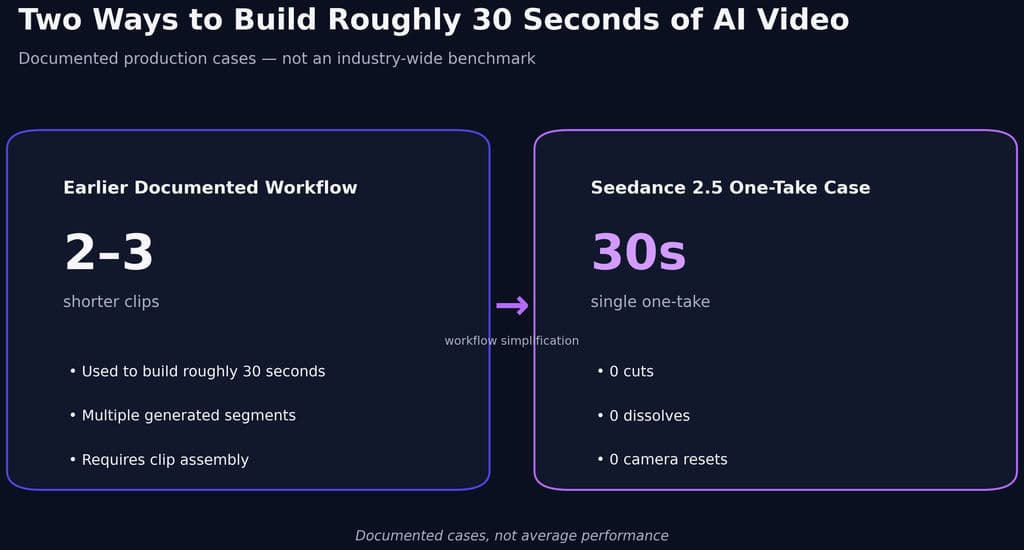
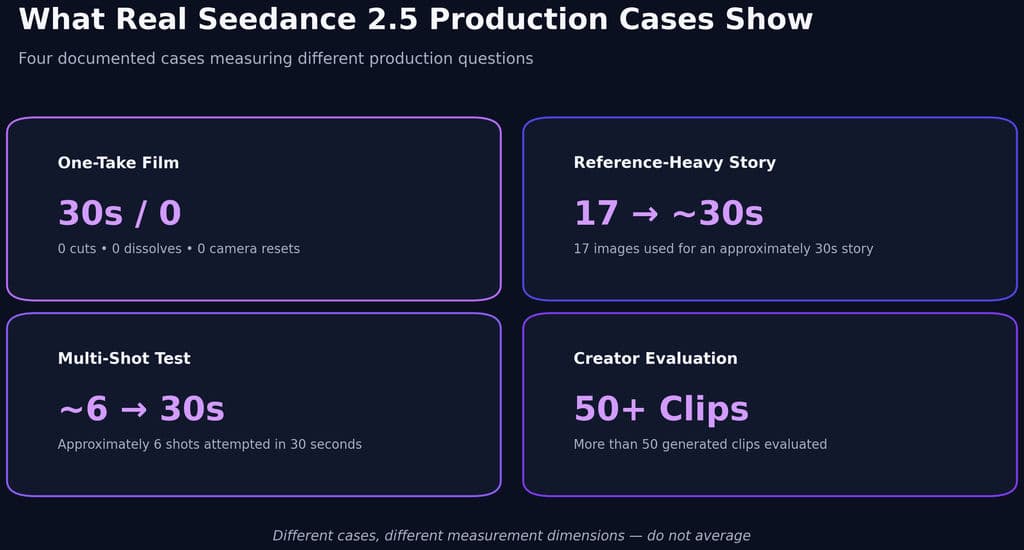
This matters because longer generations expose errors that short clips can hide. In one documented earlier workflow, roughly 30 seconds of footage required two or three shorter clips, creating additional stitching and matching work. By contrast, one Seedance 2.5 production completed a 30-second one-take video with 0 cuts, 0 dissolves, and 0 camera resets.
The Six Layers of Seedance 2.5 Visual Consistency
I find it useful to think about consistency as six connected layers:
Identity → Appearance → Space → Motion → Camera → Time
Identity controls who or what the subject is.
Appearance controls clothing, materials, color, and styling.
Space controls where people and objects are positioned.
Motion controls how one physical state becomes the next.
Camera controls framing, direction, and movement.
Time connects every state across the full sequence.
When a generation fails, identifying which layer broke is far more useful than simply calling the output “inconsistent.”
Should You Generate One 30-Second Seedance 2.5 Video or Separate Shots?
The first decision is whether your idea depends more on continuous motion or precise shot control. Where you choose to use Seedance 2.5 should depend on this same tradeoff between continuity and shot-level precision.
Workflow | Best For | Main Advantage | Main Risk |
|---|---|---|---|
One 30-second take | Cinematic movement, POV, product reveals | Strong spatial continuity | Errors can accumulate |
Timecoded multi-shot video | UGC, dialogue, mini stories | Full narrative in one generation | Later shots may drift |
Separate shots plus editing | Ads, many angles, multiple locations | Maximum shot-level control | More editing and matching |
When a Single 30-Second Take Works Best
Use one continuous generation when the audience should experience one uninterrupted moment.
Good examples include:
- a character moving through one environment;
- a product reveal with one controlled camera path;
- a slow fashion or lifestyle scene;
- a POV sequence;
- a cinematic push-in, orbit, or tracking shot.
The successful 30-second one-take case in our research combined a fixed scene, controlled props, a defined camera path, timestamped actions, and explicit continuity rules. That combination is more important than duration alone.
When Separate Shots Are More Reliable
A different production test attempted approximately six distinct shots across 30 seconds. Instruction adherence became less reliable in the later part of the sequence, and the workflow was changed to generating individual shots and assembling them in editing.
This does not establish an official 15-second failure threshold. It suggests a more practical rule:
If continuity is the creative priority, try one generation. If individual shot accuracy is the priority, generate separately.
How Should You Structure a Seedance 2.5 30-Second Timeline Prompt?
The strongest pattern across the research is timestamp-based prompting. Instead of writing one long descriptive paragraph, divide the video into clear temporal blocks. A dedicated Seedance 2.5 prompt guide is especially useful when building this kind of timed structure.
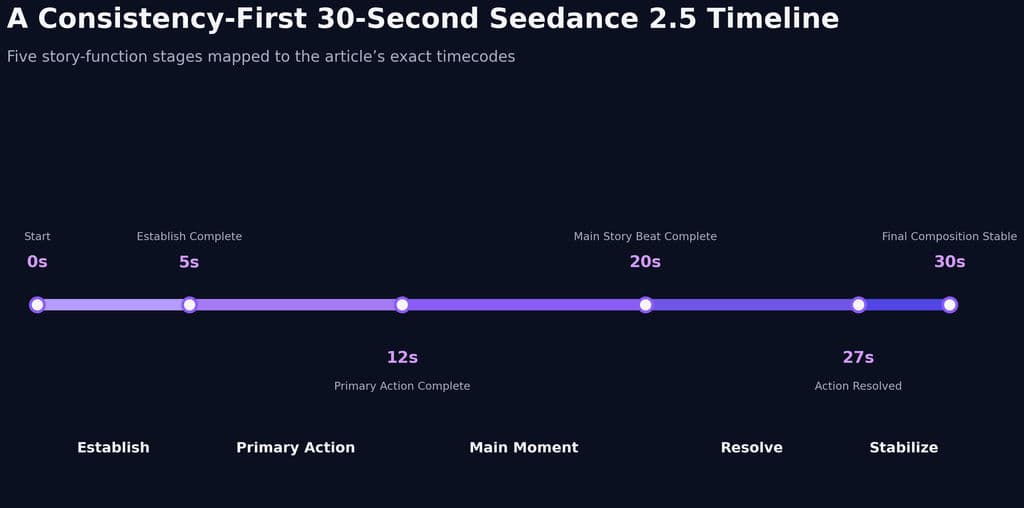
A practical 30-second structure is:
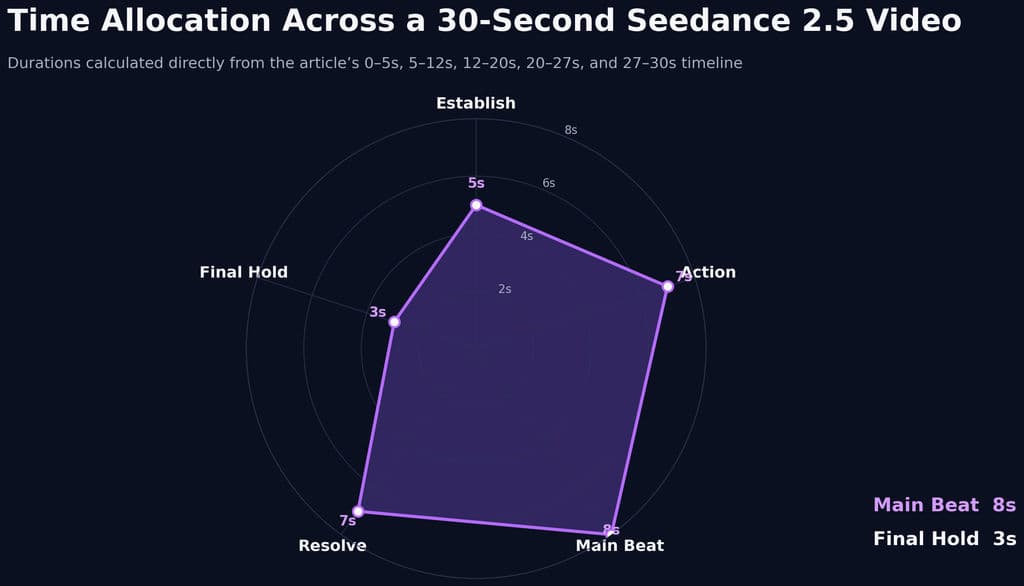
- 0–5 seconds: establish the subject, environment, pose, and camera.
- 5–12 seconds: introduce one primary action.
- 12–20 seconds: develop the main story or product moment.
- 20–27 seconds: resolve the action.
- 27–30 seconds: stabilize the final composition.
The exact timestamps can change. The logic should not.
Give Every Time Block One Main Action
Overloaded time blocks create unnecessary failure points.
Instead of asking a character to turn, walk, pick up a product, speak, smile, and change position in a few seconds, structure each beat around:
Starting state → primary action → camera behavior → ending state
This gives Seedance fewer transitions to invent and makes failures easier to isolate.
Define the Ending State Before the Next Beat Begins
Ending states are one of the most useful continuity controls.
A weak instruction jumps from “she walks to the table” to “she sits and drinks coffee.”
A stronger instruction explains that she stops beside the chair with her hand on the chair back, then begins the next beat from that exact position.
The end of one beat should become the beginning of the next. This simple rule reduces unexplained body movement, object relocation, and camera discontinuity.
How Do References Improve Seedance 2.5 Character and Product Consistency?
References work best when every asset has a specific responsibility.
A clean reference map might assign:
- one image to face and hairstyle;
- one image to clothing and accessories;
- one image to the product;
- one image to the environment;
- one video to camera motion;
- one audio reference to pacing.
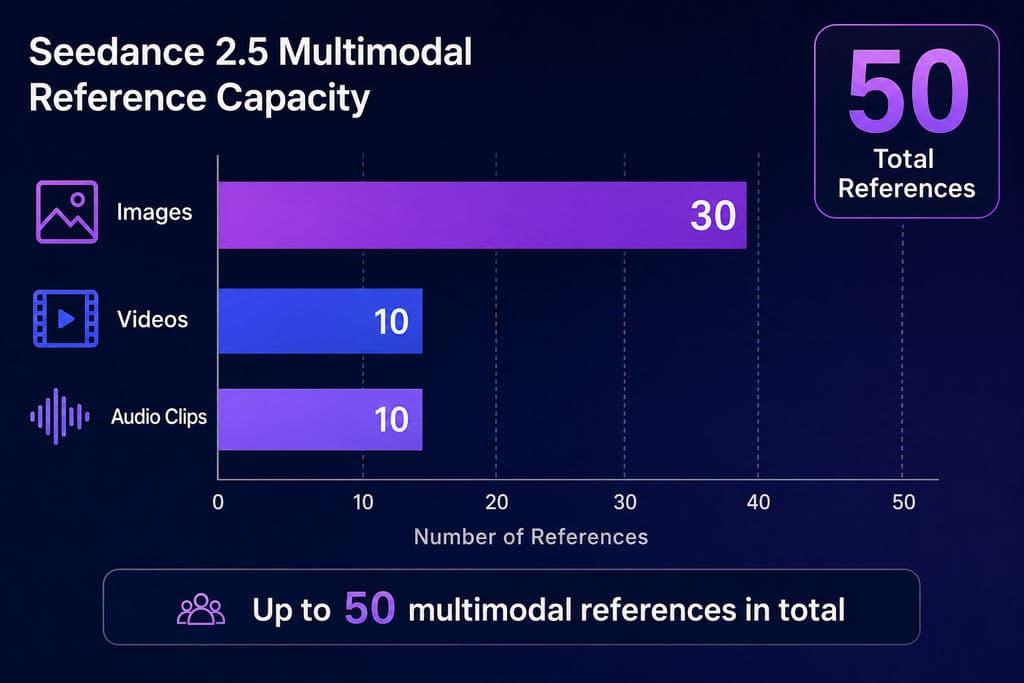
The research materials document support for up to 30 images, 10 videos, and 10 audio clips, for a maximum of 50 multimodal references.
Why More References Can Make Consistency Worse
More references are useful only when they agree.
If one image shows a different hairstyle, another changes the clothing, and a third presents a different product configuration, the model has to reconcile conflicting signals across the sequence.
A smaller set of compatible references can be more useful than a larger set of conflicting ones.
From a design workflow perspective, treat a reference as a constraint, not simply as inspiration.
How Do You Keep Camera Continuity Stable in Seedance 2.5?
Camera inconsistency often looks like character inconsistency.
If the camera jumps from a front-facing medium shot to a rear close-up without a believable path, the model must reconstruct body orientation, face, lighting, and background geometry simultaneously.
A better approach is to describe a camera path that could physically happen: begin at eye level, dolly forward, arc gradually to one side as the subject moves, then settle into a closer composition without a cut or reset.
Use One Major Camera Move per Story Beat
Avoid stacking several major camera behaviors into the same short segment.
A push-in, orbit, crane move, rapid reframing, and complex character action happening together create far more variables to preserve.
The research also identifies complex motion and multi-subject interaction as higher-risk scenarios, which is why simpler physical choreography usually produces more stable long-form results.
What Do Real Seedance 2.5 Case Studies Reveal About 30-Second Videos?
The most valuable evidence comes from production cases because they reveal where consistency holds and where it starts to break.
Case Study 1: 30 Seconds, 0 Cuts, 0 Dissolves, 0 Camera Resets
One documented short-film workflow produced:
- 30 seconds
- 0 cuts
- 0 dissolves
- 0 camera resets
The project used fixed characters and props, a controlled camera path, timeline instructions, and explicit continuity rules.
The lesson is clear: one coherent cinematographic event is easier to preserve than several unrelated visual setups compressed into one generation.
Case Study 2: 17 Images Into a 30-Second Story
Another experiment used 17 reference images to create approximately 30 seconds of connected video with minimal formal prompting.
The result was only loosely coherent.
This is an important counterexample to the assumption that more references automatically create stronger control. Seedance can infer relationships between assets, but inferred storytelling is not the same as intentional storytelling.
Case Study 3: Approximately Six Shots Across 30 Seconds
A multi-shot experiment attempted approximately six shots in one 30-second generation.
The later part became less reliable in following precise shot instructions, so the production workflow shifted toward generating shots independently and assembling them in post-production.
For commercial work, this creates a useful decision rule:
Use one generation when continuity is the creative goal. Use separate generations when shot accuracy is the business requirement.
Case Study 4: More Than 50 Generated Clips for UGC and Product Ads
A separate creator evaluation covered 50+ clips, including UGC-style talking-head content and product advertising.
The qualitative findings suggest that longer generation can be useful when the same character or product needs to remain present across an extended scene.
However, the published test did not provide success rate, regeneration rate, CPA, ROAS, or conversion data.
That distinction matters for E-E-A-T: the evidence supports a production workflow advantage, not a guaranteed advertising-performance advantage.
How Do You Fix Seedance 2.5 Consistency Problems?
The most effective debugging principle is simple:
Do not rewrite the entire prompt after every failure. Diagnose the largest failure first.
Common categories include:
Identity failure: face, clothing, hairstyle, or product design changes.
Timing failure: actions happen too early or too late.
Camera failure: framing jumps, resets, or changes direction unexpectedly.
Spatial failure: people or objects move without explanation.
Transition failure: one timeline block does not continue naturally from the previous state.
Ending failure: the final composition never stabilizes.
Once the failure is identified, change only that variable and compare the result. This makes iteration much more informative than continually adding more prompt detail.
Fix the Failed Region Before Regenerating the Whole Video
If most of the video is already correct, avoid restarting the entire 30-second generation unless necessary.
When only one section has a camera, action, or continuity problem, target that failed region first. Preserving the successful parts reduces the risk of fixing one issue while introducing new identity, lighting, or spatial drift elsewhere.
This is the same consistency-first principle applied to editing: change the smallest variable that can solve the problem.
What Is the Best Seedance 2.5 30-Second Consistency Workflow?
For a production-oriented workflow, use this order:
Purpose → reference mapping → identity lock → timeline → camera path → action → ending state → continuity rules → negative constraints → final hold
This sequence is easier to apply consistently when it becomes part of a repeatable Seedance 2.5 workflow.
The final hold is especially important.
For the last few seconds, avoid introducing a new action. Let the camera slow down, allow the subject to settle, keep the product visible, and preserve a stable composition.
That creates cleaner material for thumbnails, product hero frames, end cards, transitions, and post-production text.
FAQ
How do I keep characters consistent in Seedance 2.5?
Use a clean character reference, define exactly what it controls, and lock face, hairstyle, clothing, accessories, and overall appearance across the timeline. Break the sequence into time blocks and make each block begin from the previous block’s ending state. Avoid conflicting references and unnecessary camera resets.
Why does my Seedance 2.5 video drift after 15 seconds?
There is no confirmed official 15-second failure threshold. In our review, one approximately six-shot 30-second case became less accurate later in the sequence. The more useful explanation is complexity accumulation: every new action, angle, interaction, and scene change creates another opportunity for visual continuity to drift.
Should I generate one 30-second Seedance video or separate clips?
Use one 30-second generation when continuous space, camera movement, or performance is central to the idea. Generate separate clips when you need several precise shots, locations, interactions, or product setups. Continuity-critical work favors one take; shot-critical work favors separate generation.
How many references should I use in Seedance 2.5?
Seedance 2.5 can support up to 50 multimodal references, but maximum capacity is not the goal. Use only references with a clear function. A smaller set of compatible character, product, environment, and motion references is generally easier to control than a larger collection containing conflicting visual information.
Conclusion
The best way to make a 30-second Seedance 2.5 video is to treat consistency as a production system rather than a prompt-writing trick. Lock identity with clean references, structure the sequence with timestamps, give every beat one primary action and a clear ending state, keep camera movement physically believable, and repair the smallest failed region instead of constantly rebuilding the entire generation. The case data shows that a well-designed one-take workflow can preserve continuity across a full 30 seconds, while complex multi-shot sequences may still benefit from separate generation and traditional editing. The real advantage of Seedance 2.5 is therefore not simply longer video generation, but the ability to preserve more of the original creative intent across a longer continuous sequence.
更多 Virse 博客文章
工作流
What Does a Graphic Designer Do? Real Tasks, Revisions, Tools & Workflow
2026年9月23日 by Yifan Zhao
工作流

How to Learn Graphic Design in 2026: A Step-by-Step Roadmap From Fundamentals to Portfolio
2026年9月23日 by Yifan Zhao
工作流

What Is Graphic Design? Definition, Real Examples, Process & Tools
2026年9月23日 by Yifan Zhao