Where to Use Seedance 2.5: Official Platforms and Best Use Cases
 Yifan Zhao11 分钟阅读 ·
You can use Seedance 2.5 through Dreamina for browser-based video creation and evaluate enterprise access through BytePlus ModelArk or Volcano Engine ModelArk, depending on regional, account, and rollout availability. Dreamina is the most direct option for creators and design teams, while ModelArk is better suited to API evaluation, automation, and higher-volume production workflows. For a broader platform overview, see where to use Seedance 2.5 and the Seedance 2.5 reference guide.
The challenge is that access alone does not guarantee a production-ready workflow. Teams still need to verify duration, reference limits, resolution, editing controls, commercial terms, failed-generation billing, and the real cost of Seedance 2.5 for producing one usable video. Without a structured Seedance 2.5 workflow, references, revisions, and generated assets can quickly become fragmented across tools and chat-based workflows. A broader AI design workflow can help organize those production stages.
Virse helps design teams turn Seedance 2.5 into a more organized creative process. Instead of relying on a single chat box, Virse works through an infinite canvas where designers can arrange references, connect assets, coordinate multiple agents, and preserve project context. It is designed to support professional teams with repetitive production, style continuity, asset organization, and multi-round revisions—while keeping creative direction and final decisions in the hands of designers. This approach aligns with AI design agent creative workflows and repeatable Seedance 2.5 production workflows.
Where to Use Seedance 2.5 on Official Platforms
The best place to use Seedance 2.5 depends on whether you need a visual creation interface, enterprise deployment, or an API-based production pipeline.
Use Seedance 2.5 in Dreamina for Visual Creation
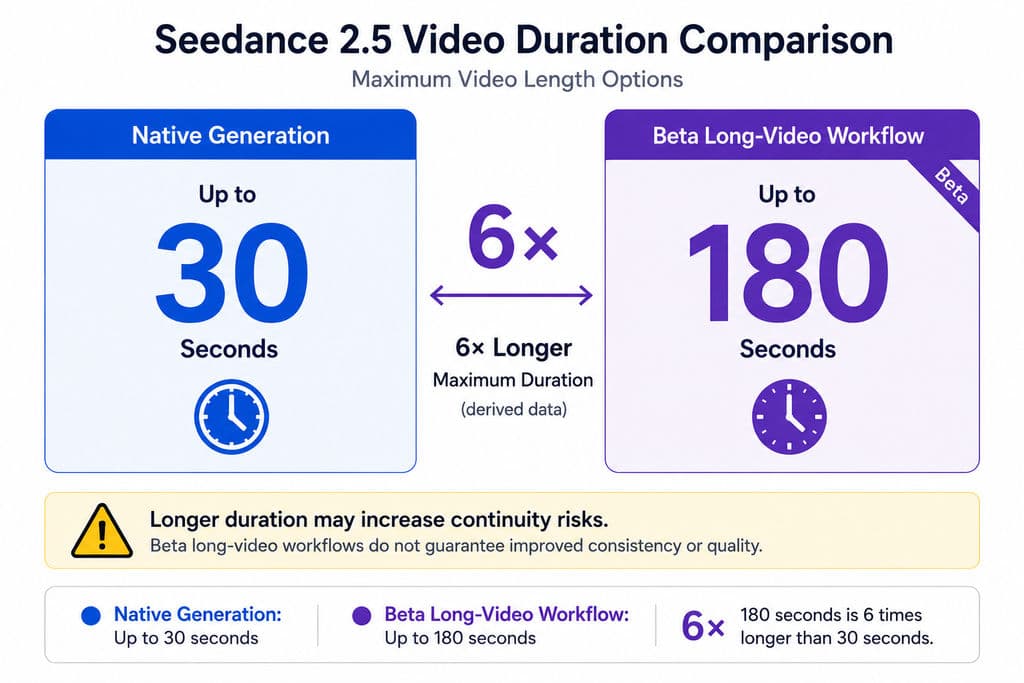
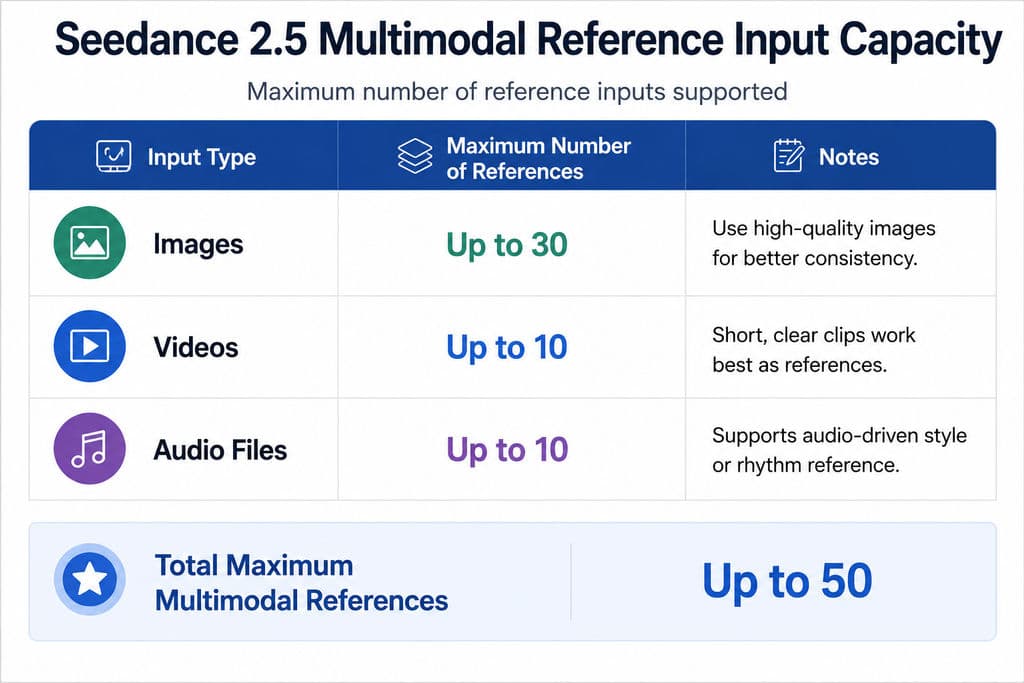
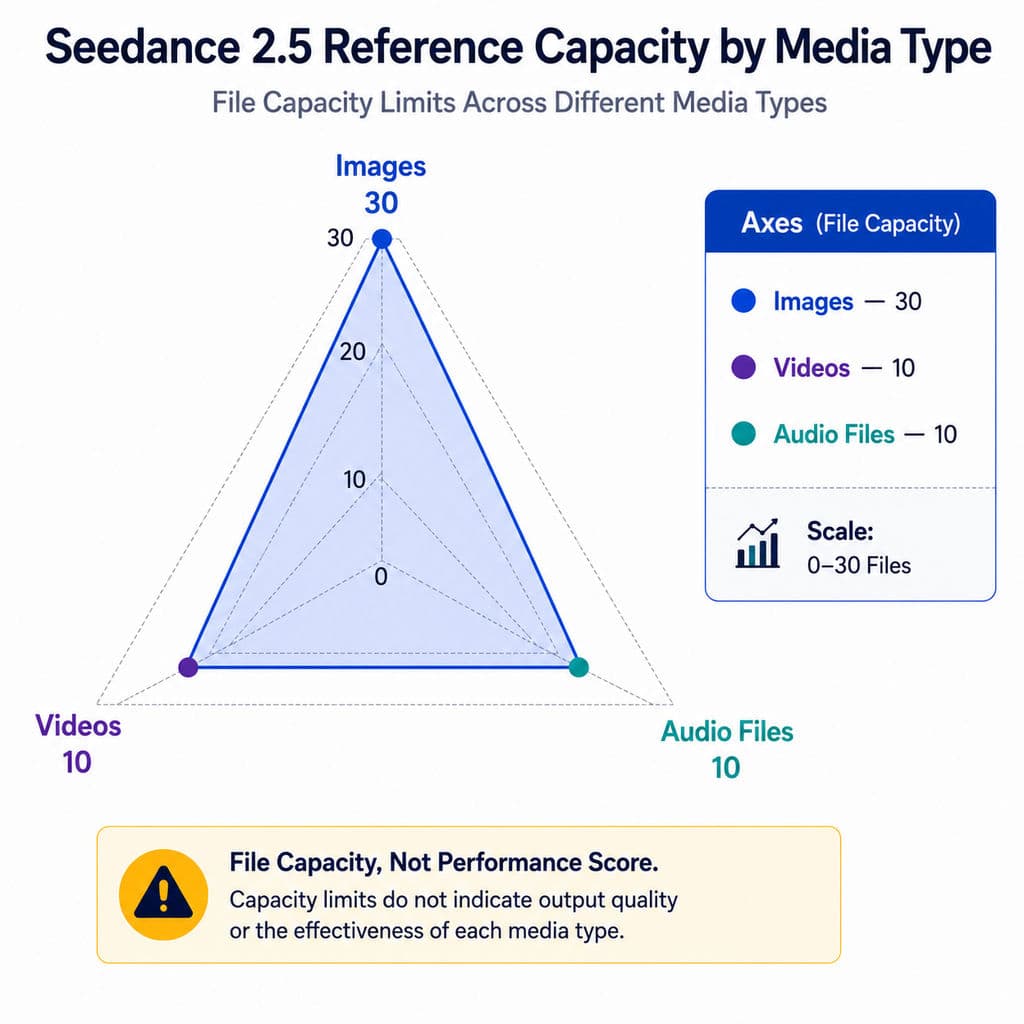
Dreamina is the most accessible official environment for creators who want to work through a browser-based interface. Its Seedance 2.5 pages describe 30-second video generation, up to 50 multimodal references, R2V control, localized editing, and workflows for advertising, ecommerce, social media, and storytelling. These capabilities are also central to the broader Seedance 2.5 reference workflow.
Dreamina is best for:
- Designers testing storyboards and visual directions
- Marketing teams developing product campaigns
- Ecommerce teams creating product demonstrations
- Filmmakers producing previsualization
- Creators who do not need to build an API integration
A useful access test is to sign in, open the video model selector, and confirm that Seedance 2.5, rather than Seedance 2.0 or a mini model, is available. A public product page does not guarantee that every account receives the same feature set at the same time.
Use Seedance 2.5 in ModelArk for Enterprise Workflows
BytePlus and Volcano Engine both maintain ModelArk product environments that reference Seedance 2.5 and its 30-second narrative and expanded multimodal-reference capabilities.
ModelArk is the more relevant option for:
- Batch video generation
- Creative automation
- Internal AI video tools
- SaaS integrations
- Usage monitoring
- Enterprise security review
- Large campaign versioning
However, teams should verify the exact endpoint available to their account. At the time of review, detailed public API documentation and transparent pricing were easier to find for Seedance 2.0 than for Seedance 2.5. BytePlus documentation, for example, publishes resolution-based Seedance 2.0 pricing from 480p through 4K, but that pricing should not be presented as Seedance 2.5 pricing.
Use Third-Party Seedance 2.5 Platforms Only After Verification
Third-party platforms may offer faster onboarding or regional access, but displaying the Seedance 2.5 name does not prove that the complete model is available.
Our review of user questions identified repeated uncertainty around whether third-party services support:
- The full 30-second duration
- All 50 reference inputs
- Audio references
- R2V workflows
- Localized editing
- 1080p or 4K export
- Commercial use
- Watermark-free output
- Refunds for failed tasks
Before uploading confidential products or unreleased campaign assets, verify the provider’s identity, privacy policy, model version, billing rules, and commercial terms. The uploaded research also identifies platform authenticity, incomplete features, unclear regional availability, and failed-task billing as central user concerns.
Where to Use Seedance 2.5 for Advertising and Product Videos
Seedance 2.5 is particularly suitable for product-led videos because its reference system can separate product identity, movement, environment, audio, and camera direction.
Case Study: A 30-Second Product Advertisement
Consider a beverage campaign requiring a single 30-second sequence:
- The first five seconds establish the bottle on a reflective surface.
- The next seven seconds show condensation and a slow camera push.
- The middle sequence introduces a pouring action.
- The final eight seconds reveal the campaign environment and closing composition.
A short-video model might require three to six separate generations that must later be matched in editing. Seedance 2.5 can attempt the complete sequence in one continuous generation, reducing the number of transitions where the bottle shape, label, lighting, or camera direction may change.
The strongest input package would include:
- Front, side, and three-quarter product images
- A packaging close-up
- A motion reference for the pour
- A lighting reference
- A camera-movement reference
- An audio or music reference
- A timestamped shot plan
Official product-video guidance describes this combination of 30-second generation, multimodal references, localized corrections, and product-focused camera control as a core Seedance 2.5 workflow.
The production lesson is that reference responsibilities matter more than reference quantity. Uploading 50 assets without explaining their roles creates conflicting instructions. Our workflow review recommends beginning with five to eight essential references, evaluating the first result, and adding new inputs only to address a specific failure.
Case Study: Ecommerce Campaign Versioning
An ecommerce team may need the same product video in multiple settings:
- Minimal studio
- Summer outdoor scene
- Holiday campaign
- Luxury interior
- Vertical social format
- Marketplace product page
The efficient approach is to lock the product references and action sequence while changing only the environment, lighting, or final composition. This converts one approved creative structure into several campaign variations.
Seedance 2.5 is useful here because localized editing may allow a team to change a background or object without rebuilding the entire video. However, product labels, dimensions, materials, logos, and written claims still require frame-by-frame review. The model should accelerate campaign exploration, not replace product-accuracy approval.
Where to Use Seedance 2.5 for Storytelling and Social Video
Native 30-second generation is most valuable when a video requires a complete narrative beat rather than a collection of unrelated visual shots.
Use a Timeline-Based Prompt for 30-Second Videos
A practical Seedance 2.5 prompt should specify what happens at each stage:
- 0–5 seconds: Establish the character, product, and location.
- 5–12 seconds: Introduce the main action.
- 12–20 seconds: Develop the movement or conflict.
- 20–26 seconds: Deliver the visual climax.
- 26–30 seconds: Hold the final shot or campaign message.
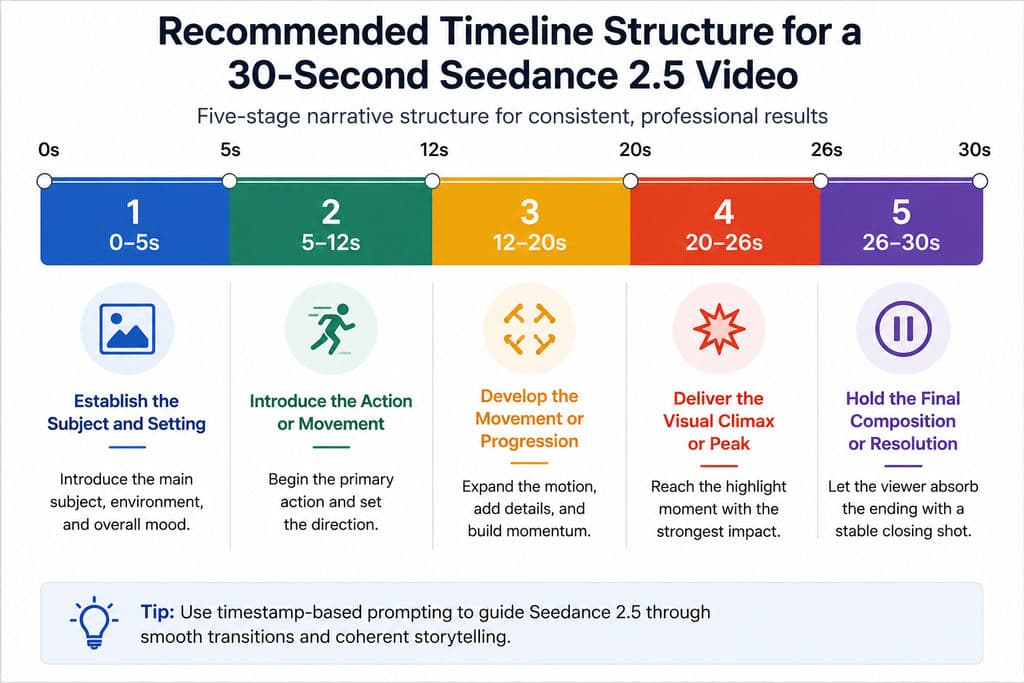
Official examples and the research knowledge base both describe second-level control as a central workflow, including sequences divided into ranges such as 0–4, 4–7, 7–11, and 11–15 seconds.
In professional workflows, I recommend limiting each time block to one major action and one camera instruction. A prompt that requests several characters, complex choreography, a location change, a product transformation, and multiple camera moves within the same five-second interval is more likely to produce drift.
Case Study: Short Narrative Content
For a fashion film, the team could use:
- Character images to preserve clothing and identity
- A reference video to define walking speed
- A storyboard to establish composition
- Music to control pacing
- A white-model video to define the camera path
The model can then generate a continuous sequence instead of forcing the editor to assemble several disconnected clips. The value is not simply “longer video.” It is the ability to communicate character, movement, framing, and rhythm through separate reference channels.
Our review also found that users remain concerned about character deformation, multi-person interaction, continuation failure, and scene drift over longer durations. These risks mean a 30-second generation should still be reviewed at the level of individual shots rather than accepted as a finished film.
Where to Use Seedance 2.5 for Previs, Animation, and VFX
Seedance 2.5 becomes more relevant to professional production when video or 3D references are used to communicate spatial intent.
Case Study: White-Model Previsualization
A previs artist can create a simple 3D scene containing:
- Character positions
- Movement paths
- Camera height
- Lens direction
- Scene depth
- Object placement
The artist then exports the white-model animation and combines it with character, environment, costume, and lighting references.
Before this workflow, the model must infer complex spatial relationships from text. After adding a white-model reference, the production team can communicate the intended blocking through visible motion and geometry.
The research materials identify white-model control as especially relevant to directors, animators, previs teams, and VFX artists. No independent success-rate data is currently available, so teams should evaluate camera-path adherence, body motion, contact points, and scene depth through controlled tests.
Case Study: Green-Screen Environment Reconstruction
A green-screen workflow begins with a recorded performance and uses Seedance 2.5 to reconstruct the surrounding environment.
A practical test includes:
- Uploading clean green-screen footage.
- Defining which actions and timing must remain unchanged.
- Providing references for the new environment.
- Specifying lighting, lens style, and background movement.
- Dividing environmental events by timestamp.
- Inspecting hair, hands, shadows, reflections, and contact points.
- Finishing the result in compositing software.
Official motion-reference guidance positions green-screen and white-model inputs as part of Seedance 2.5’s R2V workflow.
This method is most useful for concept shots, environmental redesign, stylized advertising, and previs. It should not be assumed to replace precise chroma keying, rotoscoping, relighting, or final VFX compositing.
How to Evaluate Seedance 2.5 Pricing and Production Cost
There is not enough verified evidence to publish one universal Seedance 2.5 price. Platform, region, duration, resolution, input type, audio, subscriptions, and failed-generation policies may all affect the final cost. For current pricing considerations, see how much Seedance 2.5 costs.
One user-discussion example referenced 660 credits for a 30-second task, but the platform, resolution, region, and billing conditions were not documented. It should therefore be treated as an isolated observation, not an official price.
The more useful metric is:
Cost per usable video = total generation spend + retry costs + editing time + post-production costs
For example, a low-cost generation that requires six retries and extensive product correction may be more expensive than a higher-priced generation that succeeds after two attempts.
During our workflow review, the most important cost variables were:
Cost Variable | What to Record |
Generation | Credits or currency per task |
Duration | Total seconds generated |
Resolution | Preview and export resolution |
Retries | Average attempts per approved result |
Failures | Whether failed tasks are charged |
Editing | Time spent correcting AI output |
Post-production | Compositing, sound, text, and color work |
Rights | Watermark and commercial-use restrictions |
How to Choose Where to Use Seedance 2.5
Choose Dreamina when you need a visual interface for advertisements, product videos, storytelling, or creative testing. Choose ModelArk when you need API access, batch processing, internal tooling, or enterprise governance. Consider a third-party platform only when it provides clear proof of model access, complete features, secure asset handling, and acceptable commercial terms.
Before starting production, run the same 10- to 15-second test across every candidate platform. Use identical prompts, references, resolution, and acceptance criteria. Compare product consistency, character stability, camera adherence, audio quality, retries, editing effort, and total cost per approved output.
For a fuller decision framework, see where to use Seedance 2.5.
FAQ
Where can I use Seedance 2.5 right now?
Dreamina provides the clearest creator-facing Seedance 2.5 environment, while BytePlus ModelArk and Volcano Engine ModelArk provide enterprise-oriented product pages. Actual access may vary by account and region, so confirm that Seedance 2.5 appears in your model selector before purchasing credits or designing a production pipeline.
Why can’t I see Seedance 2.5 in my account?
A model announcement does not always mean simultaneous global availability. Access may be released by region, platform, subscription, or account type. Confirm that you are using the correct official product, refresh the model list, check plan restrictions, and verify whether the interface offers Seedance 2.5 rather than Seedance 2.0.
Should I upload all 50 references at once?
Usually not. Start with the smallest useful set: one or two subject references, a product or character detail image, one motion reference, one camera reference, and one style or audio reference. Add more only when a specific feature is missing. Too many references can introduce conflicting instructions and make failures harder to diagnose.
Does Seedance 2.5 replace editing or VFX software?
No. It can reduce regeneration by supporting longer scenes, reference-driven control, and localized changes, but final work still requires human review. Professional projects often need editing, compositing, sound mixing, typography, color correction, product validation, and legal approval after generation.
Conclusion
The best place to use Seedance 2.5 is Dreamina for direct creative production and ModelArk for enterprise or API-based workflows, but the right platform is the one that exposes the features your project actually needs. Seedance 2.5 is most valuable for 15- to 30-second video workflows in advertising, ecommerce, narrative, previs, animation, and VFX where multimodal references and localized revision can reduce repeated generation. Its production advantage is not simply longer output or higher resolution; it is the ability to assign separate references to character identity, product details, action, camera movement, environment, and audio. Teams should still test continuity, accuracy, pricing, rights, and failed-task policies before using it in commercial production.