Kling 4.0 Review: Better Motion, but Worse Video Quality?
Vincent13 分钟阅读 ·
Kling 4.0 is a major upgrade over Kling 3.0, offering native 30-second video generation, up to 10 keyframes, 4K output, and 15 combined reference assets. However, better motion controls do not always produce more realistic or usable videos. Our research found mixed results in human movement, prompt accuracy, and shot continuity, making Kling 4.0 a promising but not universally better choice.
The real question is whether Kling 4.0 is worth the credits. One documented 30-second generation consumed 300 credits without completing the requested actions. Our review also identified CGI-like movement, unwanted camera cuts, facial inconsistencies, and unexpected music. For creators, these failures mean more retries, additional editing, and higher production costs compared with established Kling 3.0 pricing and workflows.
Want more creative flexibility without managing every AI tool separately? Virse brings 40+ AI models into an infinite-canvas workspace where you can organize references, explore variations, and keep creative assets connected. Paid plans include unlimited model usage and unlimited team seats under applicable plan terms, while new users receive free credits to get started. Explore your next creative workflow with Virse.

Kling 4.0 Review: What's New and Is It Worth Upgrading?
Kling 4.0's most important improvements are longer native videos, expanded keyframe controls, multimodal references, and more flexible editing. These upgrades make it better equipped for complex storytelling and commercial production, although they do not guarantee consistently better results.
Kling 4.0 Features and Specifications
Feature | Kling 4.0 |
Native video length | 3–30 seconds |
Maximum resolution | 4K |
Dynamic range | 10-bit HDR at 1080p/4K |
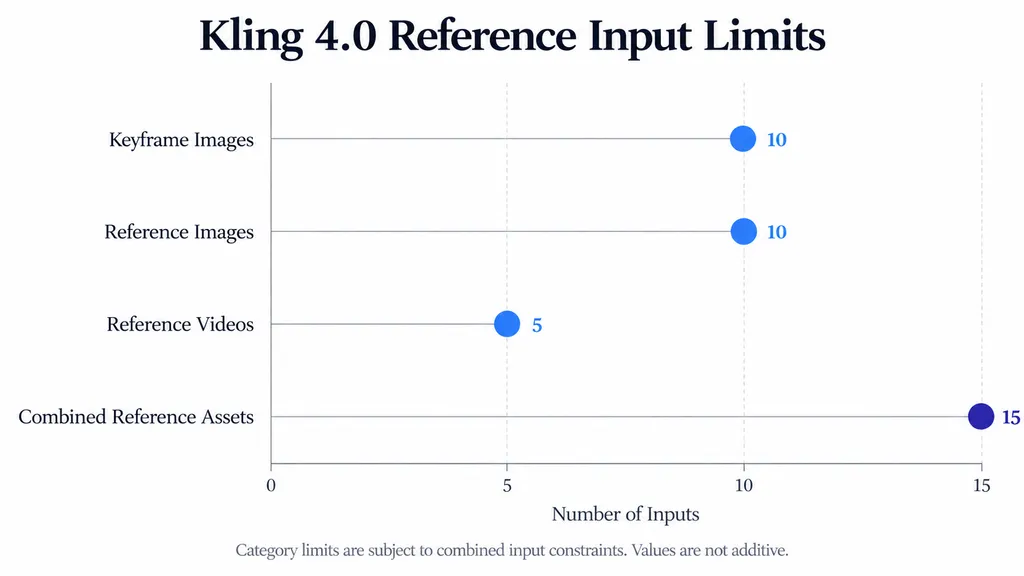
Keyframes | Up to 10 |
Combined references | Up to 15 |
Reference images | Up to 10 |
Reference videos | Up to 5 |
Native audio | Two-channel stereo |
Prompt length | Up to 8,000 tokens |
These capabilities are documented in Kling AI's official release materials.
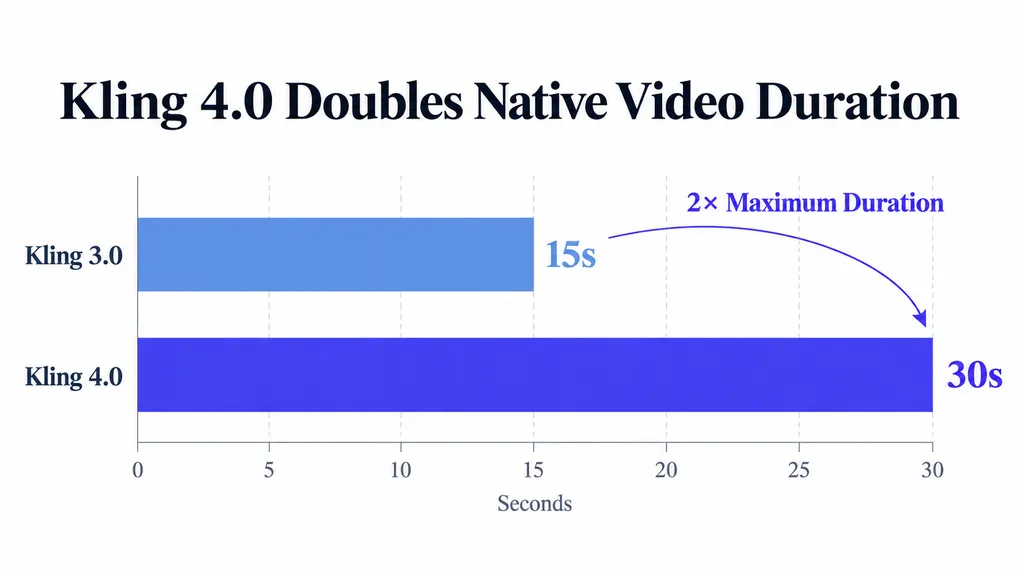
The increase from Kling 3.0's 15-second limit to 30 seconds changes how creators can structure a scene.
A product advertisement can establish its setting, introduce a character, demonstrate a product, and finish with a hero composition in one generation.
Meanwhile, multiple keyframes allow creators to define important moments instead of relying entirely on text instructions.
The key improvement is greater directing flexibility—not a guaranteed increase in successful generations.
Kling 4.0 Flash vs Full Kling 4.0
Kling 4.0 Flash entered limited early access on September 28, ahead of the full model's October 15 launch.
Our review of early production experiences identified Flash-specific concerns, including unwanted camera changes and difficulties controlling clip endpoints.
However, the full Kling 4.0 model officially supports first-and-last-frame generation and multiple keyframes.
This distinction matters because Flash limitations should not automatically be attributed to the full model.
For reliable comparisons, document the model variant, interface, generation settings, and date.
How Realistic Is Kling 4.0 Motion and Video Quality?
Kling 4.0 can produce sophisticated cinematic motion, but natural human movement remains inconsistent across documented creative scenarios.
Our review found conflicting experiences: some praised complex actions and camera movement, while others considered Kling 3.0 more natural for ordinary character animation.
Case Study: Cinematic Martial Arts in a Bamboo Forest
One documented creative project involved a martial-arts sequence set in a bamboo forest.
The workflow combined a reference image with Kling 4.0 Flash and successive prompt refinements to establish the intended choreography and atmosphere.
This demonstrates a practical use for reference-driven action generation.
However, the case did not provide total generation count, rendering time, or accepted-output rate.
The finished example therefore demonstrates creative potential rather than measurable reliability.
Our research suggests evaluating three distinct qualities:
- Motion complexity: Can the model depict demanding movement?
- Motion realism: Does movement follow believable physical behavior?
- Action accuracy: Does the requested action actually occur?
A dramatic fight sequence can look impressive while still containing unnatural acceleration, incorrect body balance, or inconsistent physical interactions.
Why Does Kling 4.0 Sometimes Look CGI?
Our review also identified reports of softened facial details and noisy textures, including cases involving clean reference images.
These problems are especially important for realistic character videos and commercial advertising.
Consider a beauty advertisement featuring a camera orbiting around a model.
The generated sequence must preserve facial identity, skin texture, hair structure, and lighting throughout the camera movement.
A convincing opening frame does not guarantee consistency across the entire shot.
4K resolution and HDR improve output capabilities, but neither guarantees photorealistic geometry or stable textures.
For professional evaluation, inspect faces, hands, clothing, and background details throughout the video.
Why Do Kling 4.0 Realism Reviews Disagree?
Different production tasks place different demands on the model.
Fast-action scenes, subtle expressions, and slow product demonstrations challenge separate aspects of video generation.
The reviewed materials do not establish a universal realism advantage over Kling 3.0 because they lack standardized prompts and repeated controlled tests.
A useful comparison should examine body mechanics, facial stability, camera movement, and action completion independently.
Repeatable production performance matters more than the visual quality of one successful showcase.
Can Kling 4.0 Reliably Generate 30-Second Videos?
Kling 4.0 supports native 30-second video generation, but a completed 30-second output is not necessarily a successful 30-second scene. Similar long-form generation considerations apply to Seedance 2.5 30-second video workflows.
Longer videos introduce more opportunities for missed actions, unexpected cuts, character drift, and audio problems.
Case Study: A 300-Credit Generation Failure
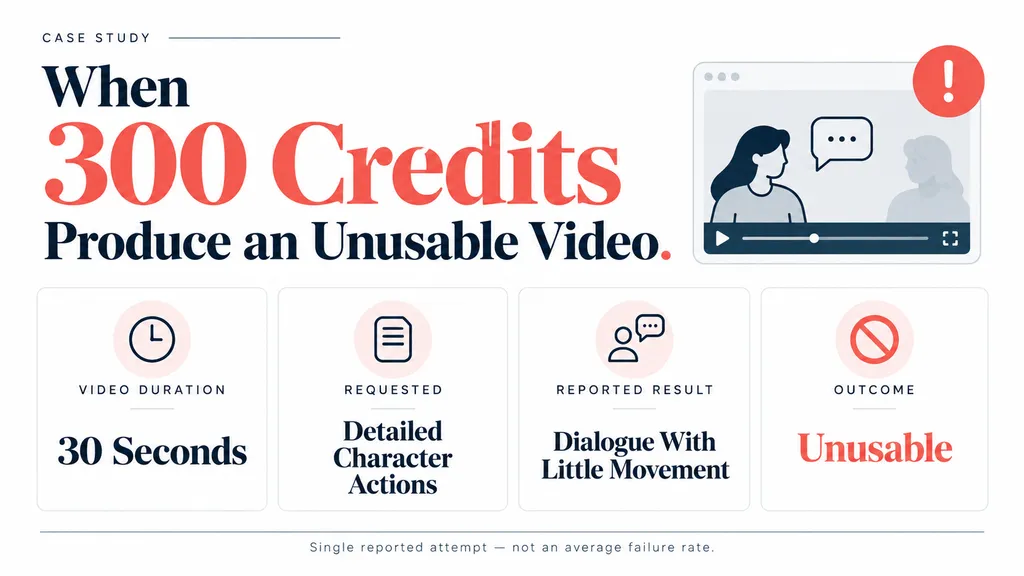
Our research documented a generation attempt involving a detailed action prompt and a 30-second video.
The generation consumed 300 credits, but the character reportedly spent much of the sequence speaking instead of performing the requested movements.
Metric | Reported Result |
Duration | 30 seconds |
Credits consumed | 300 |
Requested output | Detailed character actions |
Reported result | Dialogue with little movement |
Production outcome | Unusable for the intended scene |
This was a single reported attempt, not a measured failure rate.
Nevertheless, it illustrates three different production outcomes:
- The model successfully generates a video file.
- The video performs the requested actions.
- The result meets the final creative brief.
Only the third outcome determines whether footage is commercially usable.
For example, a product demonstration fails its purpose if the character never performs the main product interaction.
Unexpected Camera Cuts and Shot Continuity
Another recurring issue involves Kling 4.0 Flash introducing camera cuts into scenes intended to remain continuous.
This creates problems for product demonstrations, tracking shots, and uninterrupted character performances.
Imagine a character approaching a table, picking up a bottle, rotating it, and placing it down.
If the camera unexpectedly switches angles, the result may violate the creative brief even if individual frames look attractive.
A practical prompt should specify one environment, a clear sequence of actions, and one consistent camera movement.
Explicit continuous-shot instructions can reduce ambiguity, but they cannot guarantee that unwanted cuts will disappear.
Native Audio, Lip Sync, and Unwanted Music
Our review identified positive experiences with multilingual voice performance alongside reports of unwanted background music.
In one Flash workflow, music reportedly appeared despite instructions requesting otherwise.
This highlights an important distinction between audio quality and audio controllability.
For dialogue-driven projects, evaluate:
- Voice naturalness and consistency.
- Lip synchronization.
- Environmental sound accuracy.
- Unexpected music.
- Audio continuity.
Projects requiring precise sound design may still need separate audio editing.
How Can You Get Better Results with Kling 4.0?
Better Kling 4.0 results begin with clear action sequences, consistent references, and controlled generation requirements.
The following approaches are informed by documented creative workflows. Their effectiveness has not been established through a controlled success-rate study.
Write Prompts Around Sequential Actions
A useful prompt separates the subject, environment, actions, camera movement, and preservation requirements.
For example:
A woman walks through a quiet greenhouse carrying a glass bottle. She approaches a wooden table, examines the bottle, and places it beside a small plant. The camera tracks slowly alongside her throughout the scene. Maintain natural walking movement, consistent facial features, and the original greenhouse layout. Include subtle environmental sounds without background music. Keep the entire sequence continuous without camera cuts.
This structure makes the requested actions observable.
If the character fails to examine the bottle, the mistake can be identified directly.
For complex projects, short validation clips can help assess essential movements before committing credits to longer generations.
Case Study: Connecting Flash Clips with Kling 3.0
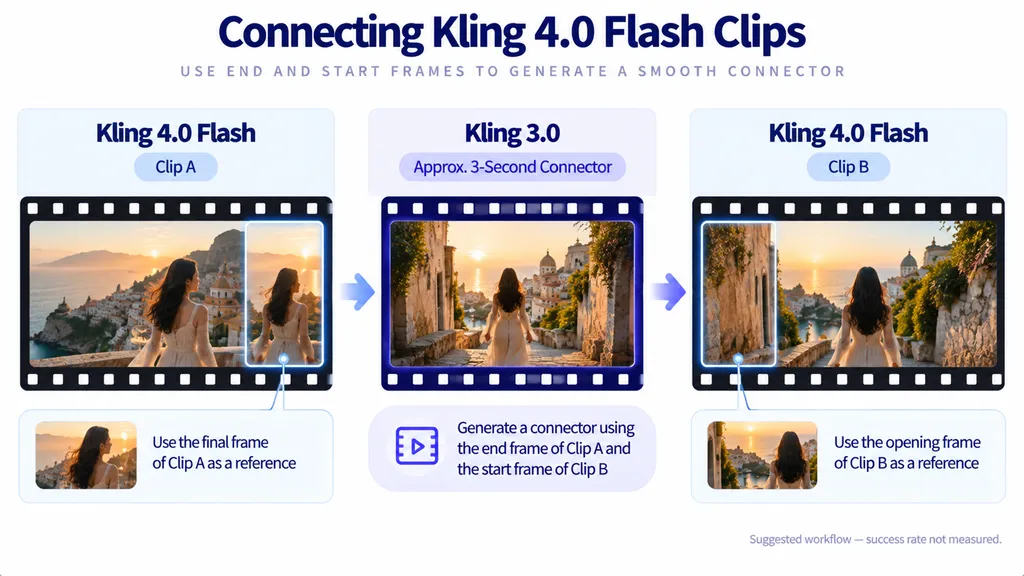
Our research identified a proposed hybrid workflow for connecting Kling 4.0 Flash sequences.
The process involves:
- Generating the primary clips with Kling 4.0 Flash.
- Extracting the ending frame of the first clip.
- Extracting the opening frame of the next clip.
- Using Kling 3.0 to create an approximately 3-second connecting shot.
- Combining the results during editing.
This approach has not been accompanied by a measured success rate.
However, it illustrates an important workflow principle:
Different models can serve different production tasks instead of forcing one model to handle every shot.
A primary model can generate the action, while another model handles difficult transitions.
Use Keyframes and References to Control Visual Consistency
Kling 4.0 supports up to 10 keyframe inputs.
For a fashion advertisement, these might establish the opening composition, an important garment-detail moment, and the final branded scene.
Reference images help communicate visual requirements that text alone may describe imprecisely.
However, keyframes are not guarantees. Character appearance, clothing, and object geometry may still change during interpolation.
A canvas-based workspace such as Virse can help teams organize approved references, generated alternatives, and revision decisions together, making multi-step creative production easier to manage.
How Much Does Kling 4.0 Really Cost?
Kling 4.0's real production cost depends on generation settings, failed attempts, and the number of videos accepted—not simply the advertised cost per generation.
The practical question is how many credits a creator must spend to obtain footage that satisfies the brief.
Kling 4.0 Credit Pricing and Generation Costs
Kling uses a credit-based generation system, with charges affected by selected settings and subscription conditions.
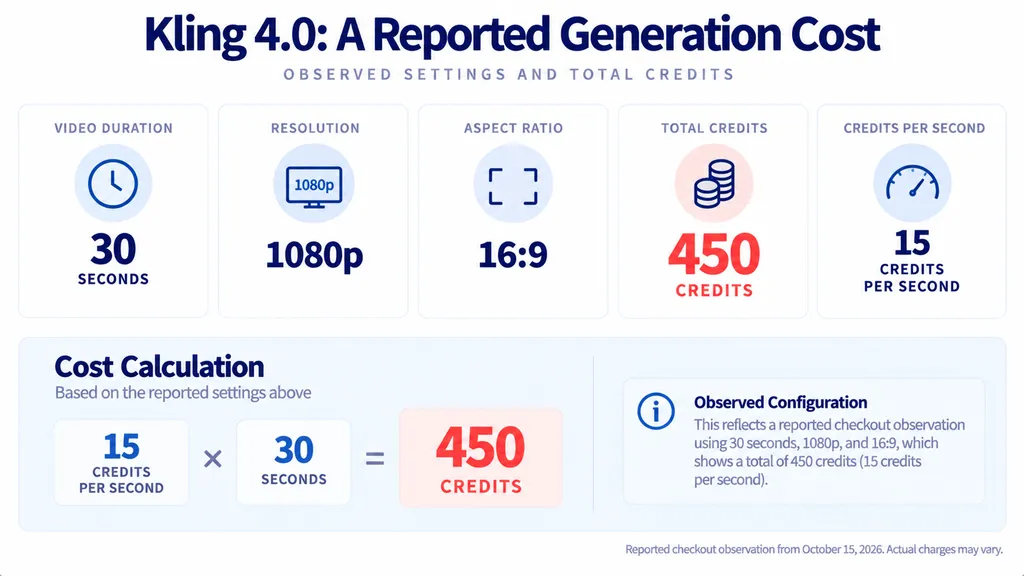
A dated third-party checkout observation from October 15, 2026 reported the following example:
Setting | Observed Value |
Model | Kling 4.0 |
Duration | 30 seconds |
Resolution | 1080p |
Aspect ratio | 16:09 |
Reported charge | 450 credits |
Equivalent rate | 15 credits/second |
This is a reported checkout observation, not a universal official price or a verified rate for every user.
Actual charges may differ by generation mode, subscription benefits, promotional discounts, or subsequent pricing changes.
Always check the credits displayed in the official generation interface before submitting a task.
Case Study: A $10,000 Commercial Production Decision
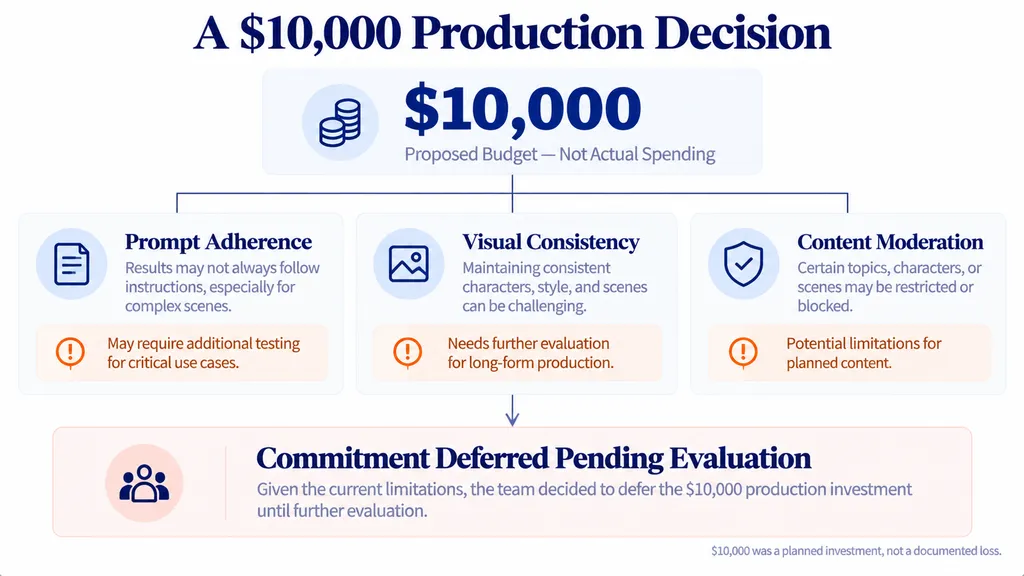
Our research identified a commercial creator considering approximately $10,000 in Kling-related production spending.
Concerns about prompt adherence, visual consistency, and content moderation contributed to hesitation before committing.
The $10,000 represented a proposed budget, not money already spent.
The case illustrates why professional teams need to evaluate the complete production process before purchasing substantial credit packages.
A small pilot should test representative scenes, typical reference assets, moderation compatibility, and required revision volume.
Cost per Usable Video: The Metric That Matters
The documented 300-credit failure demonstrates why generation prices alone are insufficient.
A more meaningful metric is:

This calculation includes credits consumed by rejected generations.
For commercial production, editing labor and other post-production costs should be evaluated separately.
Our research does not provide enough repeated-generation data to calculate a reliable average cost per usable Kling 4.0 video.
The cheapest individual generation is not necessarily the cheapest production workflow.
Hidden Costs: Revisions and Asset Management
Our review also identified complaints about Kling's redesigned creation interface.
Some workflows reportedly became less convenient when retrieving older generations or reusing previous prompts.
For occasional experiments, this may have little impact.
For agencies generating numerous variations, lost time searching for assets and reconstructing creative decisions can become a meaningful operational expense.
Reliable production requires efficient generation, organized assets, clear approvals, and manageable revisions.
Kling 4.0 vs 3.0 vs Seedance 2.5: Which Is Better?
Kling 4.0 provides greater documented creative control than Kling 3.0, but available research does not establish a universal visual-quality winner between Kling 4.0, Kling 3.0, and Seedance 2.5.
The best choice depends on the intended scene.
Kling 4.0 vs Kling 3.0
Category | Kling 3.0 | Kling 4.0 |
Maximum duration | 15 seconds | 30 seconds |
Keyframes | Earlier controls | Up to 10 |
4K | Supported | Supported |
HDR upgrade | Not established | 10-bit |
Motion realism | Preferred in some cases | Mixed results |
Main advantage | Shorter workflows | Complex sequences |
Kling 4.0 is the more advanced model according to official feature specifications.
However, our research found that some creative experiences favored Kling 3.0 for natural human movement.
For straightforward animation, an established Kling 3.0 workflow may remain practical.
Kling 4.0 vs Seedance 2.5
Seedance 2.5 appeared repeatedly in the model comparisons and creator questions reviewed.
Some experiences favored Seedance's visual realism, while others highlighted Kling's cinematic movement and camera control.
However, the available research does not establish a controlled, repeated comparison under identical generation conditions.
For a meaningful evaluation, compare:
- Natural human motion.
- Completion of required actions.
- Facial consistency.
- Camera continuity.
- Audio accuracy.
- Credits per accepted output.
Without these measurements, declaring a universal winner would be misleading.
Which Model Should You Choose?
Choose Kling 4.0 for evaluation when a project requires native 30-second sequences, expanded references, and detailed camera direction.
Kling 3.0 remains a reasonable option for shorter, established production workflows.
Seedance 2.5 deserves consideration for realism-sensitive projects, but its relative advantage should be verified using equivalent inputs.
The best AI video model is the one that consistently produces the required footage with the lowest total production cost.
FAQ
Is Kling 4.0 worth the credits?
Kling 4.0 can be worthwhile for complex, reference-driven video production. However, unsuccessful generations can increase costs significantly. Our research documented a 30-second attempt consuming 300 credits without completing its intended actions. Evaluate total credits per accepted video rather than relying exclusively on advertised generation prices.
Is Kling 4.0 better than Kling 3.0?
Kling 4.0 offers longer native generation, expanded keyframe controls, and richer multimodal references. However, some documented creative experiences favored Kling 3.0's natural human movement. Kling 4.0 is a functional upgrade, but its visual advantage depends on the scene and should be validated through matched comparisons.
Why does Kling 4.0 look CGI?
Artificial-looking results can involve unnatural body mechanics, excessive facial smoothing, unstable textures, or inconsistent geometry. These problems appeared in the production experiences reviewed. Clear visual references and specific motion instructions may improve creative direction, but they cannot guarantee photorealistic results.
Can Kling 4.0 generate 30-second videos without cuts or music?
Kling 4.0 supports native 30-second generation, but some Flash workflows have produced unwanted camera cuts or background music. Explicit camera and audio instructions can help clarify the intended result. Professional creators should still inspect the complete output and allow for post-production corrections when necessary.
Conclusion
Kling 4.0 is a meaningful technical upgrade, but its value ultimately depends on production reliability. Native 30-second generation, expanded references, and more detailed creative controls offer significant opportunities for filmmakers, designers, and commercial teams. However, our research highlights persistent challenges involving motion realism, incomplete actions, unexpected cuts, audio control, and credits consumed by unusable results. Rather than choosing Kling 4.0 solely for its specifications, creators should test representative scenes, document failed attempts, and evaluate the true cost of accepted footage. Combining clear references, structured prompts, systematic quality checks, and organized creative workflows provides a stronger foundation for producing commercially usable AI videos.