Kling 4.0 vs 3.0: Is the Upgrade Actually Better?
Vincent11 分钟阅读 ·
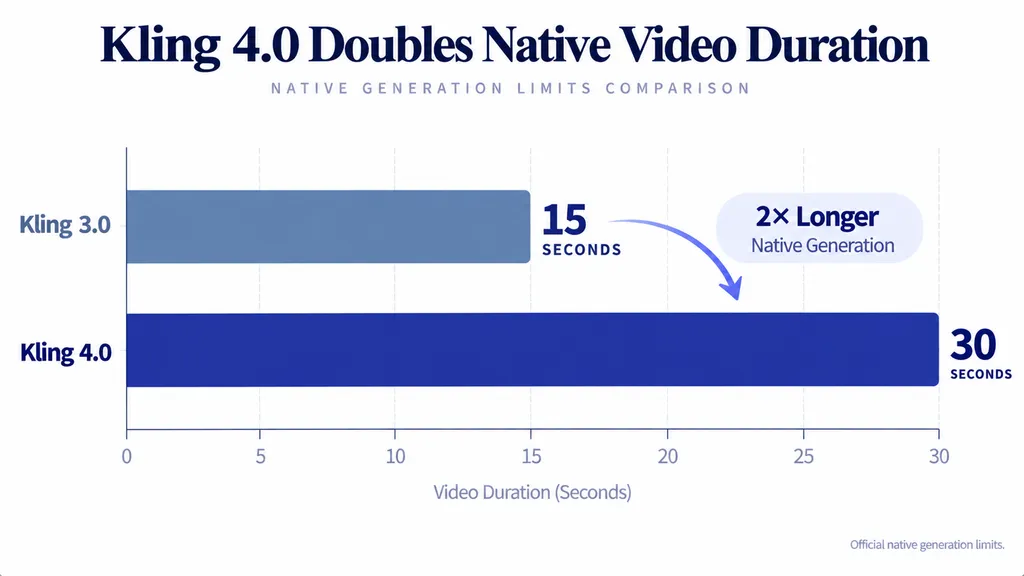
Kling 4.0 is a major upgrade over Kling 3.0 in creative control, but it isn't always better at producing realistic, usable videos. Kling 4.0 doubles native video length from 15 to 30 seconds, supports up to 10 keyframes and 15 reference assets, and expands complex motion capabilities. However, Kling 3.0 can still deliver more natural-looking movement in certain scenes. The better choice depends on video quality, prompt accuracy, and cost per usable clip.
The problem is that more advanced features don't guarantee better results. Kling 4.0 can still produce unnatural movements, unwanted camera cuts, and incorrect dialogue. One documented 30-second generation consumed 300 credits without completing the requested actions. If your goal is to create videos efficiently, paying for longer generations means little when repeated failures drain your credits.
That's why a flexible creative workflow matters. Virse brings a wide range of AI models into one creative workspace, so you can explore different visual styles, develop consistent assets, and choose the right tools for each project. Eligible paid plans offer unlimited use of many supported models and unlimited seats, making creative collaboration and experimentation easier. Sign up to receive free credits and start creating with Virse.

Kling 4.0 vs 3.0: What Are the Biggest Differences?
Kling 4.0's biggest improvements are longer native generation, more keyframe controls, richer references, HDR, and expanded video editing. Unlike a simple resolution upgrade, these features change how creators plan, direct, and revise complicated scenes.
Kling 4.0 vs 3.0 Feature Comparison
Feature | Kling 3.0 | Kling 4.0 |
Native duration | 3–15 seconds | 3–30 seconds |
Maximum resolution | 4K | 4K |
Dynamic range | 8-bit SDR | 10-bit HDR at 1080p/4K |
Keyframes | Start/end frames | Up to 10 |
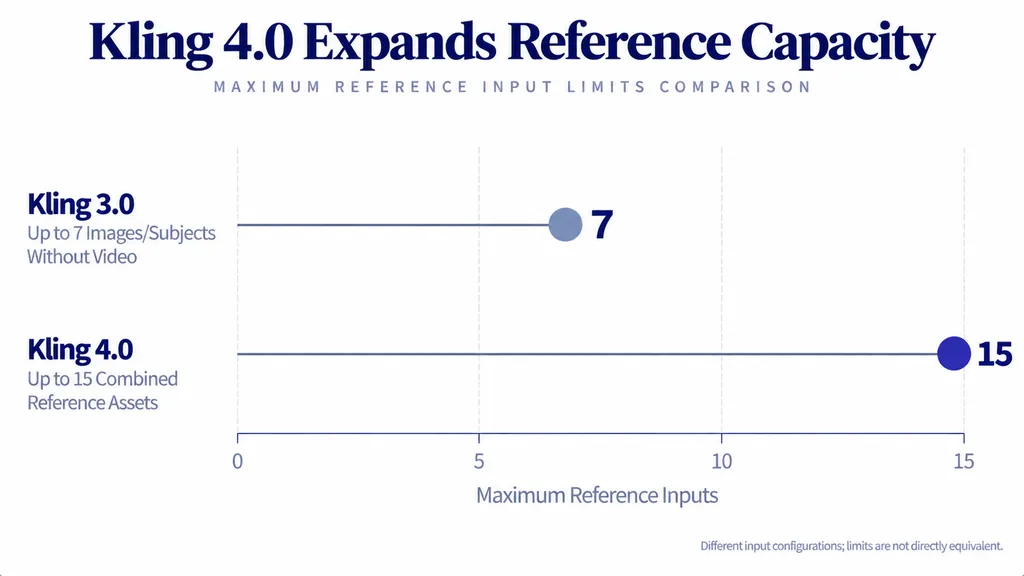
Combined references | Up to 7 without video | Up to 15 |
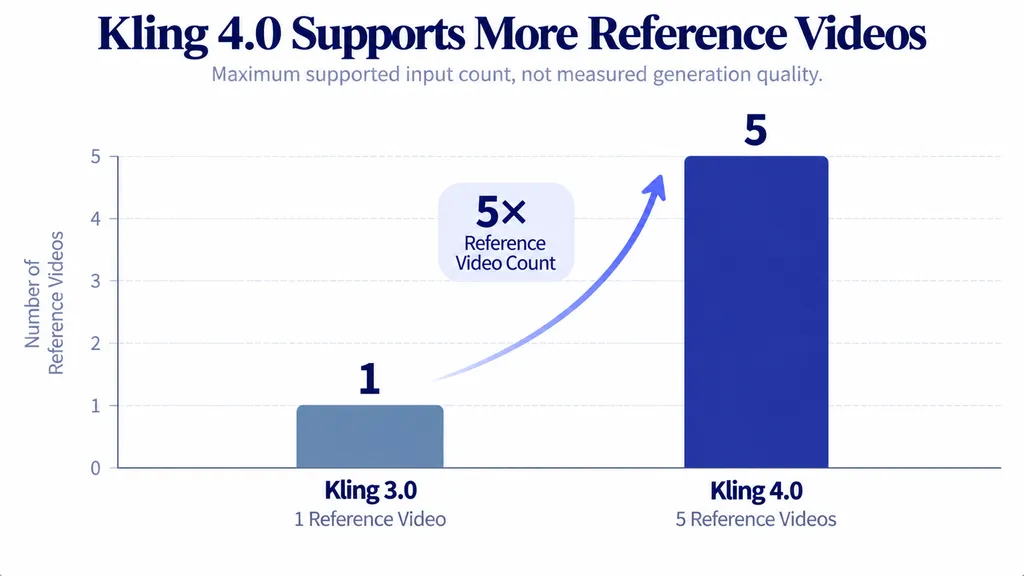
Reference videos | Up to 1 | Up to 5 |
Audio | Single-channel | Stereo |
Camera control | Multi-shot | Enhanced complex motion |
Editing | Omni workflows | Expanded multimodal editing |
These specifications reflect Kling's published capabilities. Availability can vary by model variant and interface.
Both generations support 4K, so resolution alone is not a reason to upgrade. Kling 4.0's 10-bit HDR support offers greater color depth for high-contrast scenes, such as night advertising, neon lighting, and backlit product shots. However, HDR support does not establish superior motion realism or guarantee better-looking footage in every project.
Does 30-Second Generation Improve Storytelling?
Kling 3.0's 15-second limit suits short advertisements, product rotations, and individual character actions.
Kling 4.0 supports 30-second native generation, allowing more connected events within one clip.
Consider a product advertisement:
- 0–6s: Introduce the product.
- 6–12s: Move the camera toward it.
- 12–20s: Show the product being used.
- 20–30s: Reveal the final campaign composition.
These timings illustrate a storyboard, not a measured generation result.
Kling 4.0 can accommodate this concept within one native generation. Kling 3.0 requires a different workflow for sequences exceeding 15 seconds.
However, longer scenes introduce more opportunities for missed actions, identity drift, and inconsistent object positions.
A 30-second generation is valuable only when its complete sequence remains usable.
What About Video Editing and Creative Recreation?
Kling 3.0 Omni already supports reference-driven workflows, so video editing is not entirely new to Kling 4.0.
The newer generation expands multimodal editing, allowing creators to direct changes involving characters, objects, backgrounds, movement, and camera behavior.
For example, a brand might need to replace a product in an existing advertisement while preserving its overall composition.
Kling 4.0's Creative Recreation workflow also allows creators to reference a video's pacing and shot structure while introducing different characters or products.
This is particularly relevant to social advertising, campaign variations, and commercial storytelling.
The practical advantage is greater flexibility when adapting existing footage rather than rebuilding every scene. However, targeted editing does not guarantee that unrelated details will remain unchanged.
Kling 4.0 vs 3.0 Video Quality: Which Looks More Realistic?
Kling 4.0 is designed for more demanding motion, but current independent evidence does not establish that it consistently looks more realistic than Kling 3.0.
Our review of user questions found an important difference between handling complicated movement and producing naturally believable movement.
Natural Human Motion and Anatomy
Some reported experiences favored Kling 3.0 for subtle movement, while others praised Kling 4.0 Flash for interpreting more complex actions.
Consider a character standing up, walking across a room, and picking up a glass.
A convincing result requires natural weight transfer, stable hands, consistent facial anatomy, and believable object interaction.
Even highly detailed footage can look artificial when a character's body accelerates unnaturally or an object changes shape.
For lifestyle advertising and dialogue scenes, natural movement often matters more than cinematic visual effects.
This is why Kling 3.0 remains worth evaluating despite Kling 4.0's expanded capabilities.
Complex Action and Camera Movement
Kling 4.0 has a stronger capability-based case for high-speed action, moving cameras, and interactions involving multiple subjects.
Its official development priorities include tracking shots, orbiting cameras, and large-scale motion stability.
These capabilities are valuable for sports, dance, action sequences, and dynamic product advertisements.
However, complex movement creates additional failure opportunities.
For example, a character catching a falling object must preserve correct timing, hand anatomy, and physical contact.
A visually impressive clip becomes unusable if the object passes through the character's hand.
The best motion comparison evaluates whether the requested action is physically believable and successfully completed—not simply whether the video looks cinematic.
Character Consistency and Reference Fidelity
Kling 4.0 supports up to 15 combined reference assets, including images, videos, and subjects.
For a fashion advertisement, creators can provide references covering a model's appearance, clothing, product details, and movement.
This expands the information available to guide generation.
However, accepting more references does not guarantee accurate reproduction.
Professional teams should inspect facial identity, accessories, clothing, and product details throughout the sequence.
Reference capacity describes what the model can receive; reference fidelity describes what it actually preserves.
Does Kling 4.0 Follow Prompts Better Than 3.0?
Kling 4.0 provides more directing controls, but prompt adherence remains imperfect. Unexpected camera cuts, missed actions, and incorrect audio can still make otherwise attractive footage unusable.
Unexpected Camera Cuts and Audio
Our review of early Kling 4.0 Flash experiences identified unwanted camera changes despite requests for continuous shots.
One reported experience also involved unexpected background music.
For a continuous-shot scene, a practical prompt is:
A woman walks through a quiet gallery while the camera tracks backward at a constant distance. Maintain one uninterrupted shot without cuts, transitions, camera-angle changes, or background music. Preserve her appearance and walking speed throughout.
This establishes clear positive and negative instructions.
However, the effectiveness of these restrictions has not been established through controlled testing.
Creators should verify the generated footage instead of assuming every written instruction was followed. For another example of structured instructions for AI video generation, see the Seedance 2.5 prompt guide.
Case Study: The 30-Second Cowboy Scene
One documented comparison used a complex western scene involving several connected actions:
- A horse becomes frightened.
- Its tether breaks.
- The horse escapes.
- A cowboy reacts and picks up a rifle.
- The cowboy retreats toward a pine tree.
- A mysterious sound emerges from the woods.
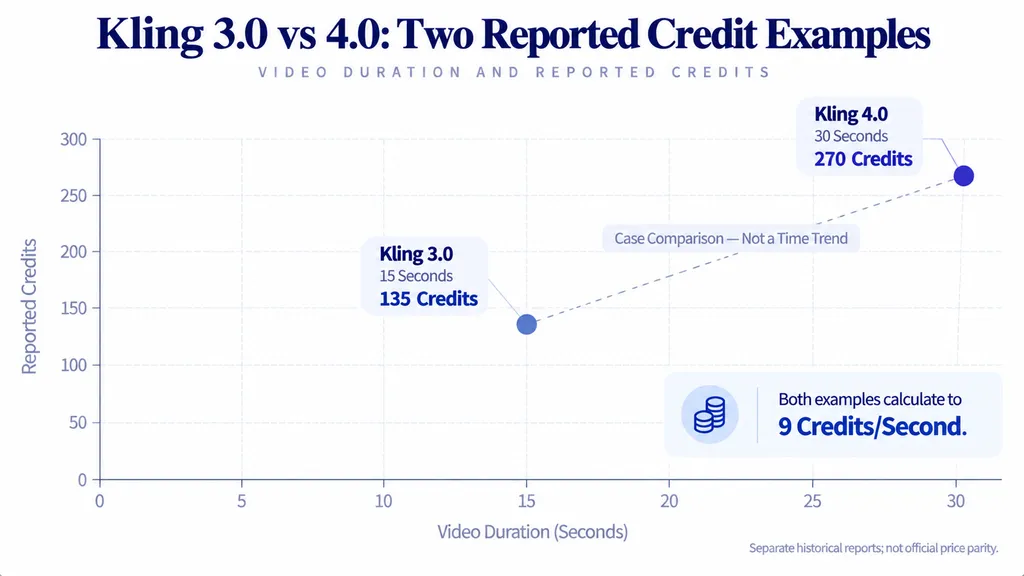
The reported Kling 4.0 generation used 30 seconds, 720p, and 270 credits.
This scenario is especially useful because each action depends on the previous event.
A model could generate convincing scenery while failing to show the horse breaking free or the cowboy responding correctly.
The available research documents the scenario and settings, but does not provide a verified action-completion score.
Long-video reliability should therefore be judged through event sequencing, physical interactions, and final-state accuracy.
An attractive scene that misses its central action may still require a complete regeneration.
Audio, Dialogue, and Lip Sync
Kling 4.0 expands multilingual capabilities and introduces stereo output.
Official documentation also describes improvements in audiovisual synchronization, while independent feedback remains mixed.
Our research identified concerns involving incorrect dialogue languages, unwanted music, and imperfect lip synchronization.
For dialogue-heavy production, evaluate:
- Correct spoken language
- Natural voice performance
- Accurate mouth synchronization
- Consistent character voice
- Appropriate sound effects
- Absence of unwanted music
A convincing voice does not automatically mean accurate lip synchronization.
For advertisements, both must meet the production requirements.
Kling 4.0 vs 3.0 Pricing: Which Costs Less?
Available research does not establish a universal price advantage for either model. The most meaningful comparison is the total cost of producing an accepted video, including failed attempts.
Real Generation Cost Examples
Our research identified these historical creator-reported examples:
Model | Duration | Resolution | Credits |
Kling 3.0 | 15s | 720p | 135 |
Kling 4.0 | 30s | 720p | 270 |
Both examples equal 9 credits per generated second.
However, they come from separate reports with different dates and settings.
These historical examples do not establish official price parity. Current charges, subscription access, and generation settings should be checked before purchasing credits.
Case Study: 300 Credits for an Unusable Video
One documented Kling 4.0 experience involved spending 300 credits on a 30-second generation.
Instead of completing the requested movements, the resulting character spoke Chinese and failed to perform the intended actions.
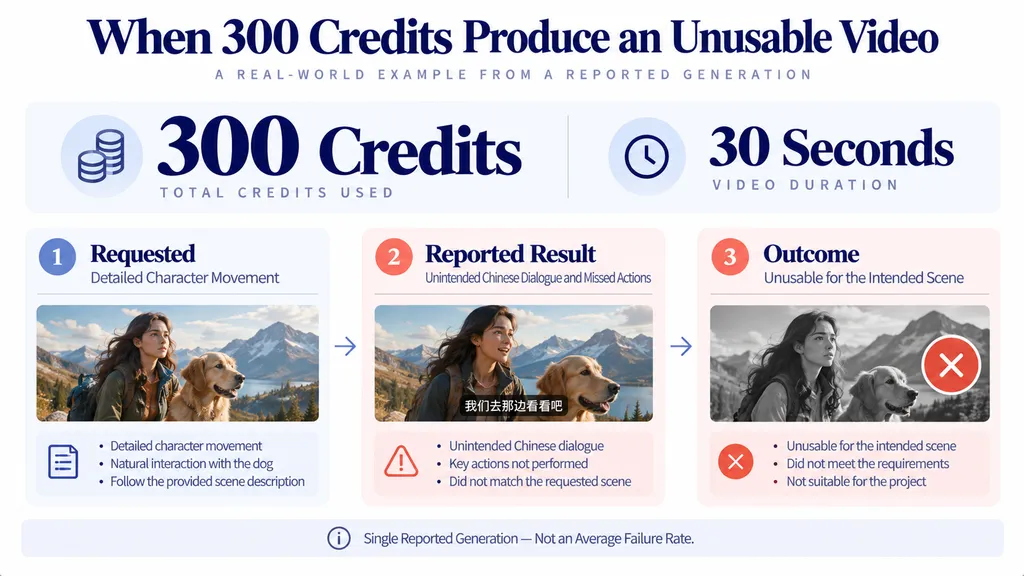
This is an individual case, not evidence of an average model failure rate.
However, it demonstrates why generation cost alone can be misleading.
Our research also identified Kling 3.0 experiences involving:
- 3–4 attempts per usable clip in one creator's workflow.
- 2–3 attempts in another reported workflow.
- An approximately 10% personal success estimate during one dissatisfied creator's subscription month.
These reports cover different creators and tasks, so they cannot establish a general success rate.
They do illustrate how retries can increase the cost of finished footage.
Why Cost per Usable Video Matters
Cost per usable video = Total credits spent ÷ Number of accepted videos
A cheaper generation can become more expensive when repeated failures require additional attempts.
For example, a hypothetical workflow costing 100 credits per attempt requires 400 credits after four attempts.
Another costing 150 credits per attempt requires only 300 credits after two attempts.
The second workflow delivers the accepted video at a lower total cost despite its higher initial price.
These are illustrative calculations, not measured Kling benchmark results.
For professional projects, track:
- Credits per attempt
- Number of retries
- Accepted outputs
- Generation time
- Additional revision work
This connects model quality directly to production economics.
The cheapest generated clip is not necessarily the cheapest finished video.
Kling 4.0 vs 3.0: Should You Upgrade?
Choose Kling 4.0 when longer scenes, multiple keyframes, or richer references solve a genuine production problem. Keep Kling 3.0 when it already delivers reliable short clips at an acceptable cost.
Best Model by Production Scenario
Production Scenario | Recommended Starting Point |
Simple human movement | Compare both |
Short lifestyle videos | Kling 3.0 |
Complex action | Kling 4.0 |
30-second storytelling | Kling 4.0 |
Multi-keyframe advertising | Kling 4.0 Full |
Reference-heavy production | Kling 4.0 Full |
Quick experimentation | Flash, if suitable |
Multilingual dialogue | Compare both |
These are capability-based recommendations, not independently measured rankings.
Kling 4.0 Flash should also be assessed separately from the full model because available controls and early reported behavior differ.
How to Test Whether the Upgrade Is Worth It
For a meaningful comparison, select three representative scenes:
- Simple human movement
- Complex multi-action movement
- Dialogue requiring accurate lip synchronization
Use matching prompts, references, resolution, aspect ratio, and duration wherever both models support equivalent configurations.
Generate multiple samples and record:
- Motion realism
- Completed actions
- Character consistency
- Camera compliance
- Audio accuracy
- Credits consumed
- Attempts until acceptance
Evaluate Kling 4.0's exclusive longer-duration and expanded-keyframe features separately.
This distinguishes the value of new capabilities from differences in output quality under comparable conditions.
The best upgrade is the model that completes your intended scene with fewer costly compromises.
FAQ
Is Kling 4.0 better than 3.0?
Kling 4.0 offers longer native generation, more keyframes, richer references, HDR, and expanded editing capabilities. However, independent feedback does not establish a consistent advantage in natural motion or generation reliability. Kling 3.0 remains competitive for shorter scenes, making the better choice dependent on production requirements.
Why does Kling 4.0 sometimes look less realistic?
Our review of creator questions identified concerns involving unnatural body movement, inconsistent anatomy, and overly polished visual textures. These are qualitative observations rather than measured failure rates. Compare both models on identical scenes, focusing on physical movement and character consistency rather than image sharpness alone.
Can Kling 4.0 generate 30-second videos reliably?
Kling 4.0 officially supports 30-second native generation, compared with Kling 3.0's 15-second limit. However, duration support does not guarantee that every action will be completed correctly. Long scenes should be evaluated for event sequencing, character identity, spatial continuity, and final-state accuracy.
Is Kling 4.0 worth the extra credits?
Kling 4.0 can offer better value when its longer videos and additional controls reduce separate generations or revisions. However, no universal price premium or success-rate advantage has been established. Compare total credits per accepted video rather than focusing only on the initial generation cost.
Conclusion
Kling 4.0 is a meaningful upgrade in creative control, but it does not make Kling 3.0 obsolete. Its 30-second generation, expanded references, HDR, and multiple keyframes make it more attractive for complex storytelling and commercial production. However, mixed assessments of natural movement, documented instruction failures, and expensive retries demonstrate why technical specifications alone cannot determine the winner. For creators prioritizing dependable results, motion realism, prompt compliance, and cost per usable video provide a more useful comparison. Upgrade when Kling 4.0's additional controls improve your production workflow; otherwise, Kling 3.0 remains a practical choice for shorter, focused scenes.