
Best AI Poster Design Tools: 2026 Features and Limitations
 Yifan Zhao22 分钟阅读 ·

The best AI poster design tool in 2026 depends on what must remain editable after the first draft. Canva is the most broadly suitable option for fast marketing and event posters, while Adobe Express is better suited to Adobe-based and print-oriented workflows. Ideogram stands out for text-led concepts, Kittl and Recraft for typography and vector assets, Midjourney for cinematic key art, and Piktochart, Visme, and Venngage for information-heavy layouts. For a broader category comparison, see the best AI design tools and this guide to using AI for graphic design.
The main challenge is that an attractive generated image is not always a usable poster. AI tools can still produce weak visual hierarchy, incorrect details, flattened files, awkward multilingual layouts, and exports that are not ready for professional printing. These problems become more costly when dates change, sponsors are added, designs need localization, or one campaign must be adapted across several formats. A structured AI design workflow and clearer art direction help reduce this production gap.
For professional teams, the hardest part is rarely generating one poster. It is keeping the approved direction consistent across every size, channel, market, and revision. Virse is designed for that workflow through an infinite canvas, shared project context, multiple collaborating Agents, style continuity, and batch variation. Instead of rebuilding the same brief in separate tools or losing design decisions between prompts, teams can keep references, assets, feedback, and campaign extensions connected while designers retain control over editing, review, and final delivery. This approach aligns with AI design agent creative workflows and stronger brand consistency across AI creative.
What Changed in AI Poster Design Tools in 2026?
AI poster tools are moving beyond one-shot image generation toward editable production workflows.
Canva’s Magic Layers can turn a flat image into an editable, multi-layered design. Ideogram can extract typography into separate text layers. Kittl and Recraft can generate editable SVG graphics, while Adobe Express offers CMYK PDF export, bleed controls, margins, and crop marks for print-oriented work.
This shift matters because real poster work rarely ends after one generation. A typical poster may need:
- A corrected date or price
- A longer venue name
- A replacement product image
- Additional sponsor logos
- A translated version
- Square, portrait, story, and banner adaptations
- A print-ready PDF
- Several rounds of stakeholder feedback
The quality of the first image still matters, but control after generation matters more. That is why modern AI design workflows increasingly emphasize editability, review, and controlled variation.
Best AI Poster Design Tools at a Glance
Tool | Best for | Key strengths | Main limitation |
Canva | General marketing, events, social media, and beginners | AI-assisted design, editable templates, resizing, drag-and-drop editing, and layered conversion | Template-led results may feel familiar without additional art direction |
Adobe Express | Adobe users, branded marketing, and print-oriented posters | Editable AI layouts, custom sizing, CMYK PDF export, bleed, crop marks, and version history | Complex typography and advanced prepress may still require other Adobe applications |
Ideogram | Short text-led posters and display typography | Text rendering, multilingual text, placement control, and editable text layers | Correct text does not automatically produce effective hierarchy |
Kittl | Decorative typography, merchandise, retro graphics, and vectors | Editable vector generation, type effects, SVG workflows, templates, and mockups | Less specialized for dense academic or data-heavy content |
Recraft | Original vectors, illustrations, icons, and scalable campaign assets | Native SVG generation, editable paths, mockups, and raster-to-vector workflows | Often more useful for creating poster assets than managing long copy |
Midjourney | Movie, music, gaming, and concept-poster key art | Strong visual exploration, references, local editing, pan, zoom, and variations | Not a complete production-layout or typography platform |
Piktochart | Educational, research, process, and information posters | Editable structured layouts, charts, templates, and AI-generated drafts | Less flexible for highly cinematic or experimental art direction |
Visme | Branded information posters and business communication | Data visualization, branded templates, multi-page projects, and printable PDFs | Advanced exports and branding features may depend on the plan |
Venngage | HR, training, schedules, and structured marketing | AI-assisted layouts, editable templates, charts, and Brand Kit workflows | Template-led output may need more customization to feel distinctive |
Why There Is No Universal Best AI Poster Maker
Different posters solve different communication problems.
An event poster needs an exact date, venue, ticket price, and call to action. A movie poster depends more heavily on atmosphere, symbolism, composition, and title treatment. A research poster must organize methods, evidence, charts, and conclusions. A product campaign may begin with one hero poster but eventually require versions for social media, e-commerce, outdoor advertising, email, different markets, and multiple products.
The cost of an error also changes.
An imperfect decorative shape in an early concept may be acceptable. An incorrect ticket price, product specification, event address, safety instruction, or research statistic can make a finished poster unusable.
The right category therefore depends on the job:
- Use an editable template platform when information will change frequently.
- Use a text-focused generator when the concept depends on a short headline.
- Use a vector tool when artwork must scale across posters, packaging, and merchandise.
- Use an image generator when cinematic visual development is the main bottleneck.
- Use a structured communication platform for research, data, education, and schedules.
- Use a context-aware professional workflow when one direction must extend across many campaign assets.
How Should You Evaluate the Best AI Poster Design Tools?
The best AI poster design tools should be evaluated across four core areas:
- Visual communication
- Text and typography
- Editability and revision control
- Final digital or print output
Image quality alone is not enough. A professional poster must communicate clearly, preserve accurate information, survive realistic revisions, and export correctly for its final destination.
This comparison uses official product documentation and published design research rather than a controlled hands-on benchmark of every platform.
Visual Quality, Prompt Adherence, and Information Hierarchy
A strong poster should communicate its main message before the viewer studies the supporting details.
Evaluate whether the tool:
- Includes the requested subject, audience, format, and mood
- Makes the headline the dominant element
- Groups related information clearly
- Leaves usable space for logos, dates, QR codes, and calls to action
- Uses imagery that supports rather than competes with the message
- Maintains a clear focal point
- Produces several usable directions instead of one isolated success
- Preserves the concept when the format changes
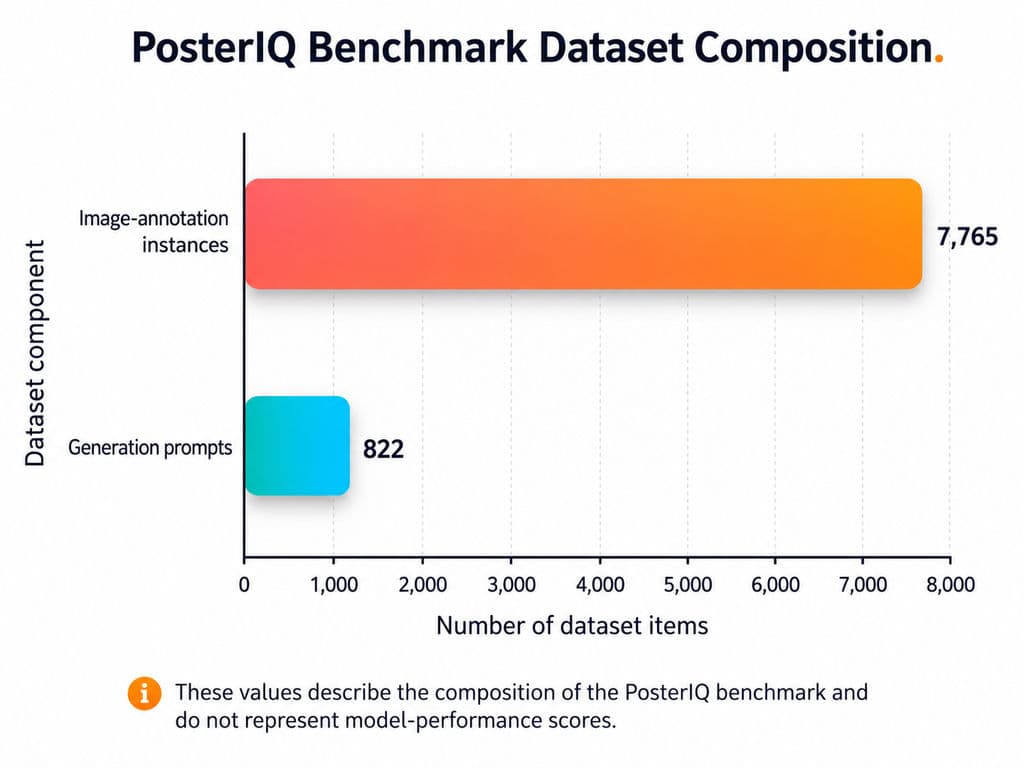
PosterIQ, a CVPR 2026 benchmark for poster understanding and generation, includes 7,765 image-annotation instances and 822 generation prompts. It evaluates composition structure, typographic hierarchy, semantic intent, readability, text-image relationships, saliency, and controllable generation. The benchmark found persistent weaknesses in visual hierarchy, typographic semantics, saliency control, and the communication of design intent.
This explains why a poster can look polished while failing as communication.
A concert poster with dramatic lighting but an unreadable date is ineffective. A conference poster that contains every requested section but provides no obvious reading order is equally unsuccessful.
PosterReward, another CVPR 2026 project, constructed a dataset of 70,000 poster preferences because general image-aesthetic models often overlook poster-specific qualities such as typography and layout.
The practical lesson is that a poster should not be evaluated like an ordinary AI image. It should be evaluated as a structured communication design.
Text Accuracy, Typography, and Multilingual Layout
Text accuracy and typography are separate capabilities.
Text accuracy asks:
- Are all words spelled correctly?
- Are names, dates, prices, addresses, and numbers accurate?
- Has any required information been omitted?
- Has the system invented or duplicated copy?
Typography asks:
- Is the headline visually dominant?
- Are line breaks natural?
- Is the text readable at the final size?
- Are alignment, spacing, and grouping coherent?
- Does the font match the audience and purpose?
- Can the text be edited without regenerating the complete design?
Ideogram is the most text-focused platform in this comparison. Its current Layerize Text capability can extract text from a flat design into separate editable components containing the wording, role, font, color, and position. This allows teams to rewrite, localize, reposition, or restyle text without rebuilding the artwork.
Correctly rendered words still do not guarantee professional typography.
A headline may be spelled correctly but fail because it is too small, poorly positioned, visually disconnected from the main image, or overwhelmed by secondary details.
Multilingual posters require additional testing. Strong English examples do not prove reliable performance with:
- Chinese characters
- Mixed Chinese-English layouts
- Long German headlines
- Right-to-left scripts
- Local punctuation
- Translated calls to action
- Regional date and price formats
A useful localization test should compare the original poster with a translated version. Check whether text expansion changes the hierarchy, overlaps other elements, creates awkward line breaks, or forces unsuitable font substitutions.
Editable Layers, Brand Assets, and Revision Stability
Editability is what separates an attractive AI image from a workable design file.
A useful AI poster tool should allow you to:
- Correct a date without replacing the full design
- Move the headline independently
- Replace a logo or product image
- Apply exact brand colors
- Change type size, line breaks, and spacing
- Remove one object without damaging nearby elements
- Resize the poster for another platform
- Create a translated version
- Return to an earlier version
- Preserve approved elements while changing one detail
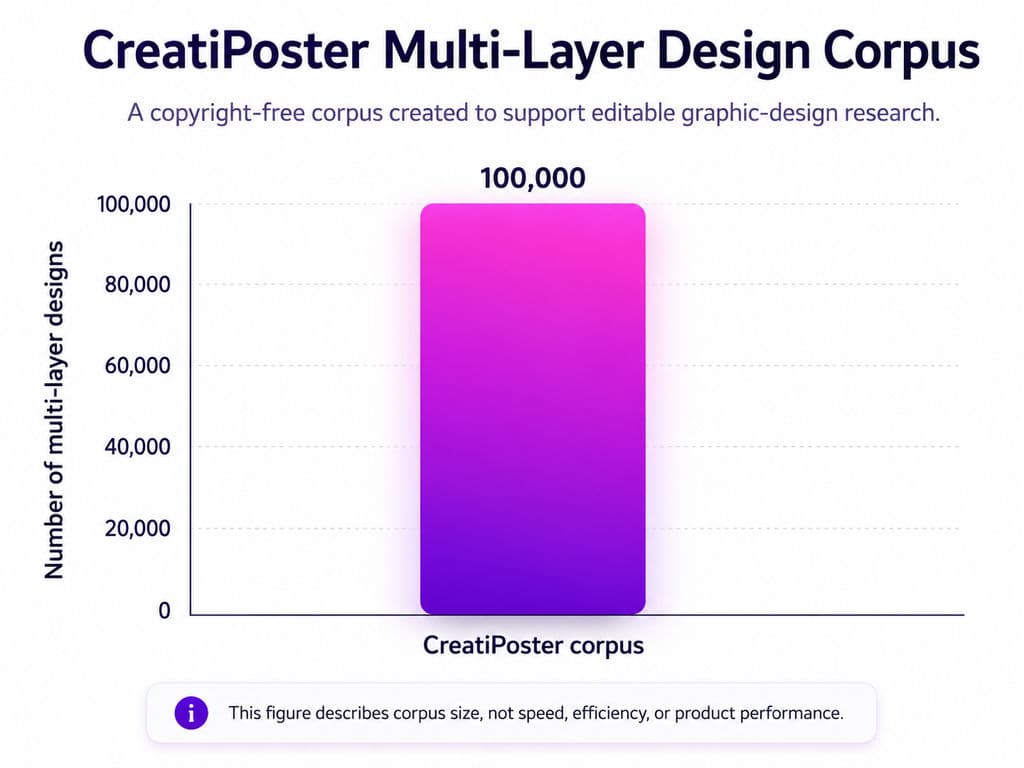
CreatiPoster was developed to address three persistent problems in AI graphic design: incorporating user-supplied assets, maintaining editability, and producing professional multi-layer compositions.
The project released a copyright-free corpus of 100,000 multi-layer designs and supports canvas editing, responsive resizing, multilingual adaptation, text overlays, and animated posters.
Commercial platforms are moving in the same direction.
Canva Magic Layers converts static images into editable components. Kittl’s AI Vector Generator creates true editable SVGs with adjustable paths, colors, borders, opacity, and shadows. Recraft’s vector tools create SVG output composed of paths, strokes, and fills rather than fixed pixels.
These features become most valuable during revision.
A tool may create a strong first image but become inefficient when every date, sponsor, price, or product change requires complete regeneration. For client work, localization, events, and campaigns, editable layers should be treated as a core requirement.
Export, Print Readiness, Licensing, Privacy, and Cost
An AI poster tool should be evaluated at the final export stage, not only inside its editor.
For digital posters, check:
- Pixel dimensions
- File size
- PNG or JPG quality
- Text readability on mobile
- Platform safe areas
- Compression artifacts
- QR-code performance
- Contrast
- Whether the platform crops essential information
For printed posters, check:
- Final physical dimensions
- Effective resolution at that size
- Bleed
- Trim and safe areas
- Crop marks when requested
- PDF export
- Color profile
- Font handling
- Transparency
- Printer-specific requirements
Adobe Express supports PDF Print export with CMYK profiles, crop marks, bleed controls, and custom margins. Visme supports printable PDF export with bleed marks. These features provide a clearer route toward production than exporting only a large PNG, although the final file must still meet the selected printer’s specifications.
Commercial use requires a separate review. Confirm:
- The platform’s current usage terms
- The rights associated with the selected plan
- Permission to use uploaded photography, logos, fonts, and illustrations
- Stock-asset licensing
- Trademark and publicity concerns
- Whether confidential assets remain private
- Whether generations are publicly visible by default
Cost should include more than the monthly subscription.
The true workflow cost may include:
- AI credits
- Failed generations
- Additional credit purchases
- Watermarks
- Export restrictions
- Brand Kit access
- Private generation
- Team seats
- Manual text rebuilding
- Localization
- Client revisions
- Print corrections
- Transferring files between platforms
A low-priced tool becomes expensive when every small correction requires a new generation.
Which AI Poster Tool Is Best for Your Use Case?
Choose the AI poster tool that addresses the most difficult part of your project.
Best for Fast, Editable Marketing Posters: Canva and Adobe Express
Canva is the most broadly suitable starting point for:
- Event announcements
- Social media posters
- Local business promotions
- School posters
- Fundraising campaigns
- Retail promotions
- Users without professional design-software experience
Canva’s advantage is workflow continuity. A user can generate a concept, choose a template, replace copy, add brand assets, adjust colors, and resize the composition inside one editor. Magic Layers also provides a way to turn flattened generated artwork into editable elements.
Consider this music-festival brief:
Create a vertical poster for an independent music festival. Use dark navy and fluorescent orange. Include the exact headline “NIGHT SIGNAL 2026,” the dates “October 17–18,” the venue “Riverside Warehouse,” and the call to action “Tickets from $35.”
The generated design is only a first draft. The user still needs to:
- Verify every word and number
- Resize the title
- Add a functional QR code
- Create room for sponsor logos
- Check thumbnail readability
- Produce square and story versions
- Export the final files
Canva is useful because these revisions can remain in one visual environment.
Adobe Express is a better fit when:
- The team already uses Adobe products
- The design may move into Photoshop or Illustrator
- Custom poster dimensions matter
- The final design needs CMYK PDF export
- Bleed, margins, or crop marks are required
- The team needs to return to earlier file versions
Adobe Express supports CMYK PDF Print export and current version-history controls.
Advanced prepress, complex vector illustration, exact font management, or detailed editorial layouts may still require Illustrator, InDesign, Acrobat, or another dedicated production application.
Best for Typography and Vector Posters: Ideogram, Kittl, and Recraft
Ideogram is a strong starting point when a poster concept depends on a short phrase integrated into the image.
Suitable use cases include:
- Concert titles
- Film titles
- Campaign slogans
- Album artwork
- Display lettering
- Short product headlines
Its main advantage is combining generated imagery with styled text and then making that text independently editable.
Its limitation is long-form information. Sponsor lists, schedules, legal text, addresses, and detailed product information should normally be rebuilt using conventional editable type.
Kittl is better suited to expressive typography and reusable decorative graphics. Its AI Vector Generator creates editable vectors for stickers, labels, merchandise, packaging elements, icons, product badges, and social graphics. Users can adjust colors, opacity, borders, shadows, and placement before exporting an SVG.
A practical Kittl use case is a festival identity that must work as:
- A poster
- A T-shirt
- A sticker
- A social avatar
- A merchandise badge
A vector-based design makes it easier to preserve the same graphic language across all five outputs.
Recraft is more specialized for original illustrations, icons, product graphics, and scalable SVG assets. Its current vector models generate editable files made from structured paths, strokes, and fills that can move into Figma, Illustrator, or other professional production tools.
Recraft is particularly useful when the team needs a reusable graphic system rather than one isolated poster. A designer can create an icon family, geometric pattern, illustration set, or campaign graphic in Recraft and assemble the final copy-heavy layout elsewhere.
Best for Movie, Music, and Concept Poster Art: Midjourney
Midjourney is best treated as a key-art and concept-generation tool, not a complete poster-production platform.
It is useful for:
- Film key art
- Fantasy and science-fiction visuals
- Experimental music posters
- Game-promotion concepts
- Editorial imagery
- Dramatic lighting and atmosphere
- Early art-direction exploration
A reliable movie-poster workflow is:
- Generate several visual compositions without depending on final embedded copy.
- Compare focal point, silhouette, color, and negative space.
- Refine the strongest direction using variations and local editing.
- Move the selected artwork into Canva, Adobe Express, Kittl, or a professional layout application.
- Add the title, credits, release date, logos, and legal copy as editable text.
- Test the poster at thumbnail, social, and printed sizes.
This workflow separates two different design problems:
- Creating compelling key art
- Producing accurate typography and final communication
Trying to solve both entirely inside an image generator often creates unnecessary revision work.
Privacy should also be considered for confidential projects. Midjourney’s Stealth Mode is limited to Pro and Mega plans, and full privacy depends on where the work is created and shared.
Best for Data-Heavy and Educational Posters: Piktochart, Visme, and Venngage
Piktochart, Visme, and Venngage are more suitable when a poster must organize structured information instead of relying on one hero image.
Piktochart is a strong starting point for:
- Research posters
- Educational posters
- Timelines
- Public-information graphics
- Process explanations
- Safety notices
- Internal announcements
Piktochart can generate a poster draft from a prompt and then open it in an editable design environment. Its current free plan provides 60 AI credits per month, with one basic poster generation costing one credit on the AI poster page.
A research poster may require:
- A title
- Research question
- Method
- Results
- Several charts
- Key findings
- References
- Contact information
An image-first generator may create an attractive surface while omitting, compressing, or inventing important content. A structured editor is safer because each section remains independently editable.
Visme is useful when a team needs:
- Charts and data visualization
- Branded colors and fonts
- Several poster pages
- Reusable business templates
- Printable PDF files with bleed marks
Visme’s poster maker supports editable templates and PDF export with bleed marks for professional printing.
Venngage is a practical option for:
- HR communication
- Training posters
- Internal campaigns
- Event schedules
- Workshop information
- Process and safety content
The shared limitation of structured template platforms is visual sameness. A clear layout may communicate efficiently but still need original photography, illustration, or typography to become distinctive.
Best for Campaign Poster Variations: Virse
Virse becomes relevant when the job changes from creating one poster to managing a connected professional campaign workflow.
It is positioned as an AI design operating system that collaborates with professional designers rather than replacing them through a single prompt. Its confirmed capabilities include an infinite canvas, canvas-level context, multiple Agents sharing project information, style continuation, batch output, asset organization, and multi-round modification.
This type of workflow is relevant when one approved hero poster must extend into:
- Social feed posts
- Vertical stories
- E-commerce banners
- Outdoor formats
- Email graphics
- Product or SKU versions
- Regional adaptations
- Language variations
The associated JTBD material identifies hero-visual extension, always-on content, localization, and brand consistency as recurring pressures for brand creative teams.
A practical Virse workflow could involve:
- Placing the brief, references, photography, brand guidance, and previous campaign assets on one canvas.
- Comparing several visual directions while keeping their reference relationships visible.
- Assigning different Agents to reference analysis, visual exploration, or campaign adaptation.
- Extending an approved direction across formats, markets, languages, and products.
- Keeping a designer responsible for final typography, correction, approval, and delivery.
Virse should not be treated as an automatic solution for brand approval, copyright clearance, accessibility review, color proofing, or print preflight.
How Can You Test an AI Poster Design Tool Before Choosing It?
A useful AI poster comparison should use the same brief, several outputs, realistic revisions, and a final export test.
A single handpicked gallery image cannot reveal failure rate, revision effort, or production suitability.
Use One Standardized Poster Brief
A strong test brief should include exact copy and realistic constraints.
For example:
Create a portrait poster for an independent music festival. Use dark navy and fluorescent orange. The exact headline is “NIGHT SIGNAL 2026.” Include “October 17–18,” “Riverside Warehouse,” “Doors 6 PM,” and “Tickets from $35.” Leave space for one sponsor logo and a QR code. The headline must remain readable at thumbnail size.
This brief tests:
- Exact spelling
- Dates and numbers
- Requested orientation
- Visual hierarchy
- Color direction
- Information density
- Logo space
- CTA visibility
- Mobile readability
Use the same wording, dimensions, aspect ratio, and uploaded assets with every tool whenever possible.
Generate Several Versions and Record Failure Rate
Do not judge only the best result.
Generate multiple outputs and record:
Test | What to measure |
Content completeness | How many required details are present |
Text accuracy | Misspellings, incorrect numbers, duplicated or omitted words |
Format adherence | Whether the requested aspect ratio is followed |
Visual hierarchy | Whether headline, details, and CTA have clear priority |
Brand adherence | Use of requested colors, references, and logo space |
Editability | Whether text and visual elements can be changed separately |
Consistency | How many outputs satisfy the brief |
Failure rate | Percentage of unusable or misleading results |
Revision effort | Steps required to correct the selected design |
Export suitability | Whether the final file meets digital or print needs |
Record the first output as well as the chosen output. This distinguishes consistent performance from one fortunate result.
Perform the Same Revision Tasks
After choosing one draft, test the following changes:
- Replace the venue with a longer name.
- Correct one date.
- Change the ticket price.
- Apply an exact brand color.
- Replace the main image.
- Add a real logo.
- Make the CTA more prominent.
- Resize the poster to a square post.
- Resize it to a vertical story.
- Create a translated version.
- Return to an earlier version.
Record whether each task requires:
- Direct editing
- Local image editing
- Regeneration
- Manual masking
- Rebuilding the layout
- Exporting to another application
This test often reveals more than first-image quality. A tool that creates impressive artwork but cannot change a date cleanly may be unsuitable for an active campaign.
Test Factual Accuracy and Design Quality Separately
Posters generated from reports, presentations, papers, websites, or source documents require a separate factual review.
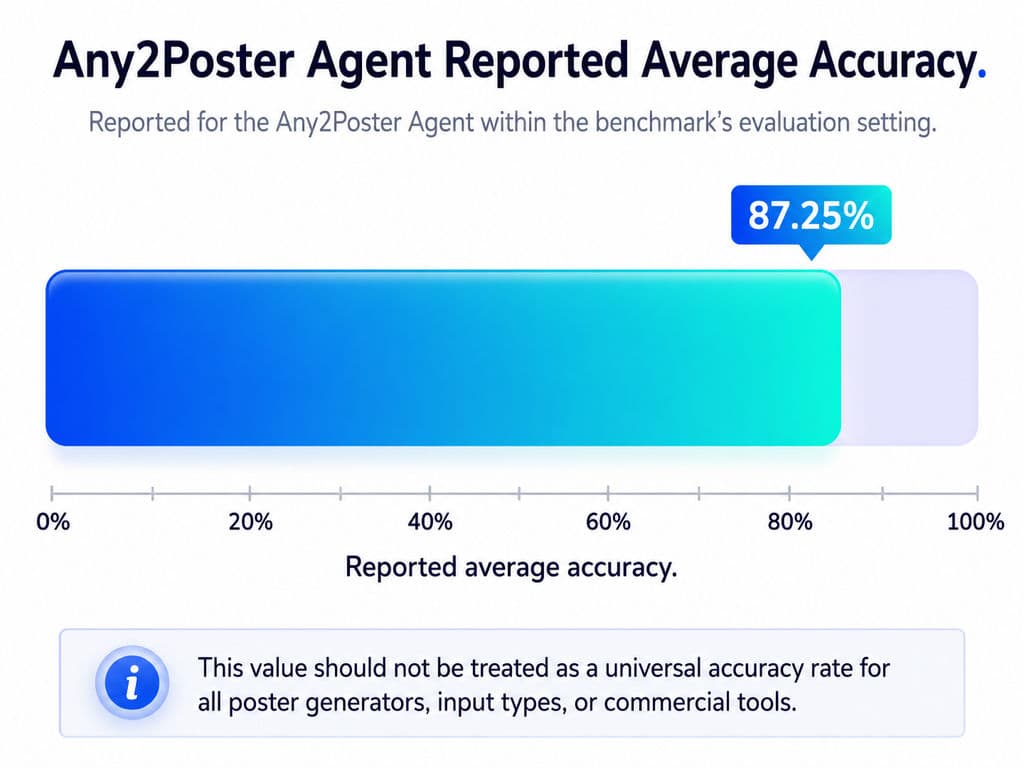
Any2Poster Bench evaluates poster generation across eight input modalities and five content domains. Its evaluation separates factual retention and interpretive understanding from visual quality, layout, readability, completeness, and logical flow. Within the benchmark’s reported setting, the Any2Poster Agent reference system achieved 87.25% average accuracy across input modalities.
That result still leaves room for factual errors.
Every statistic, quotation, chart label, date, and conclusion should be checked against the original source.
A visually successful poster can still be factually wrong.
What Are the Biggest Limitations of AI Poster Design Tools?
The main limitations are weak hierarchy, flattened output, unstable revisions, multilingual layout problems, print assumptions, and unresolved licensing or privacy risks.
Accurate Text Does Not Guarantee Effective Typography
A tool may spell every word correctly while still producing:
- A headline that is too small
- Uneven line breaks
- Poor contrast
- Decorative fonts used for essential information
- A date separated from the venue
- A CTA hidden behind imagery
- Several competing focal points
- Copy placed too close to the trim edge
PosterIQ’s findings show that text rendering and composition-aware design remain separate challenges.
Final copy should remain editable and should be reviewed at the actual display or print size.
Flat AI Posters Are Expensive to Revise
A flat PNG may appear finished until someone requests a small change.
Changing a sponsor, date, product, model, price, or language may require:
- Regenerating the full image
- Reconstructing the background
- Masking incorrect text
- Repairing new artifacts
- Rebuilding the layout elsewhere
For events, campaigns, client work, and localization, editable layers are a practical requirement.
High Resolution Is Not the Same as Print-Ready
A high-resolution image may still fail during printing because:
- The physical dimensions are wrong
- Effective resolution is too low at the final size
- The background does not extend into the bleed
- Important content sits outside the safe area
- The color profile is unsuitable
- Fonts or transparency are processed incorrectly
- The printer requires a specific PDF preset
“4K,” “high resolution,” and “print-ready” are not interchangeable.
Adobe’s print documentation treats bleed, crop marks, margins, color profiles, and PDF output as separate production controls.
Request the printer’s specifications before final export and review a proof for important projects.
Multilingual Posters Require Separate Testing
Translation changes layout.
A short English headline may become much longer in another language. Chinese characters may require different font choices and spacing. Mixed-language text can disrupt alignment, line breaks, and hierarchy.
A localization review should cover:
- Text expansion
- Character support
- Font licensing
- Local punctuation
- Reading direction
- Date and price formats
- Cultural appropriateness
- Image relevance
- CTA clarity
Generating translated words is not the same as producing a localized poster.
Licensing and Privacy Still Require Human Review
Commercial use depends on the platform’s current terms, the selected plan, uploaded assets, and third-party rights.
Check:
- Photography rights
- Logos and trademarks
- Font licenses
- Stock assets
- Reference images
- Privacy and publicity rights
- Public or private generation settings
- The intended commercial market
A platform allowing commercial use does not guarantee that every generated poster is free from legal risk.
Confidential product launches, unreleased campaigns, and client assets should not be uploaded until the team understands how generations are stored, displayed, and processed.
How Should You Choose the Right AI Poster Design Tool?
Choose according to poster type, revision requirements, output destination, production scale, and total workflow cost.
AI Poster Tool Decision Framework
Main requirement | Recommended starting point |
Fast event or marketing poster | Canva |
Adobe workflow and print-oriented export | Adobe Express |
Short text integrated into an AI visual | Ideogram |
Expressive typography and editable decorative vectors | Kittl |
Scalable original graphics and illustrations | Recraft |
Cinematic hero image or concept art | Midjourney plus a layout editor |
Research, data, or educational poster | Piktochart, Visme, or Venngage |
Campaign exploration and related branded variations | Virse plus a final production tool |
Detailed professional prepress | A dedicated layout or vector application |
Ask one question before choosing:
Which part of the poster is most likely to change after the first draft?
When the answer is the date, copy, sponsor list, or price, prioritize editable layouts.
When the answer is the hero visual, prioritize image-generation quality.
When the answer is the full campaign across platforms, products, or markets, prioritize shared project context and systematic variation.
Compare Total Cost, Not Only Subscription Price
The actual cost of an AI poster includes:
- Subscription fees
- AI credits
- Failed outputs
- Additional generations
- Manual text rebuilding
- Resizing
- Localization
- Asset cleanup
- Client feedback
- Print corrections
- Transferring files between tools
Piktochart currently provides 60 monthly AI credits on its free plan, although plan-level download and export conditions should be checked before starting a production project.
Pricing, usage limits, and feature access can change, so official plan pages should be checked immediately before purchase.
Use a Two-Tool Workflow When One Tool Is Not Enough
A two-tool workflow is often more reliable than expecting one platform to perform every stage equally well.
Midjourney plus Canva or Adobe Express
Generate the hero visual in Midjourney, then add exact copy, logos, spacing, and production exports in an editable layout tool.
Ideogram plus Kittl
Explore a text-integrated concept in Ideogram, then refine the final typography and supporting vector elements in Kittl.
Recraft plus Adobe Express
Create original SVG assets in Recraft, then assemble and export the final communication layout in Adobe Express.
Piktochart or Visme plus an image generator
Build the information hierarchy in the structured design platform, then add a custom hero image generated elsewhere.
A two-tool workflow can reduce total rework because visual generation and production layout are separate design problems.
Frequently Asked Questions
What Is the Best Free AI Poster Design Tool?
Canva is the most broadly useful free starting point for editable event, school, social media, and small-business posters.
Adobe Express is a strong alternative for users who prefer the Adobe ecosystem, while Piktochart is useful for structured educational and information posters.
The best free option depends on AI credits, premium assets, export formats, watermarks, Brand Kit access, commercial terms, and print requirements.
Which AI Poster Generator Is Best for Accurate Text?
Ideogram is the most text-focused option in this comparison because it emphasizes text rendering, multilingual typography, placement control, and editable text layers.
Every date, name, price, address, and legal statement should still be checked manually.
For long or critical copy, generate the visual direction first and add the final wording in a conventional design editor.
Is Canva or Adobe Express Better for AI Posters?
Canva is generally better for fast template-based creation, everyday collaboration, resizing, and accessible editing.
Adobe Express is generally a better fit for users already working in the Adobe ecosystem and for posters that require CMYK PDF export, bleed, crop marks, or a clearer route toward print production.
Choose Canva for general speed and flexibility. Choose Adobe Express when print delivery or Adobe compatibility matters more.
Can AI-Generated Posters Be Used Commercially?
Many AI-generated posters can be used commercially, but permission depends on the platform’s current terms, subscription plan, uploaded assets, and third-party rights.
Users must have permission to use uploaded logos, photographs, illustrations, fonts, and reference materials. Commercial-use permission does not guarantee that every output is free from copyright, trademark, privacy, or publicity risks.
Sensitive commercial campaigns should receive appropriate legal review.
Conclusion
The best AI poster design tool is the one that keeps the project’s most important elements accurate, editable, and suitable for final production. Choose a template editor when copy changes frequently, an image or vector generator when original visuals are the main bottleneck, and a structured workflow when information density or campaign scale becomes the dominant challenge. Whatever tool you select, test realistic revisions, multilingual layouts, factual accuracy, and final export requirements before committing to it.
更多 Virse 博客文章
工作流
What Is Human-Centered Design? HCD Process, Real Examples & Why Most Teams Get It Wrong
2026年9月21日 by Vincent
工作流
What Is Design Thinking? 5 Stages, Real Examples & Why Most Teams Get It Wrong
2026年9月21日 by Vincent
工作流
How to Turn a Design Into a Real Product: What to Do After the Prototype
2026年9月21日 by Vincent