
Seedance 2.5 Workflow: How to Make 30-Second Videos Without Wasting Credits
Vincent9 min de leitura ·
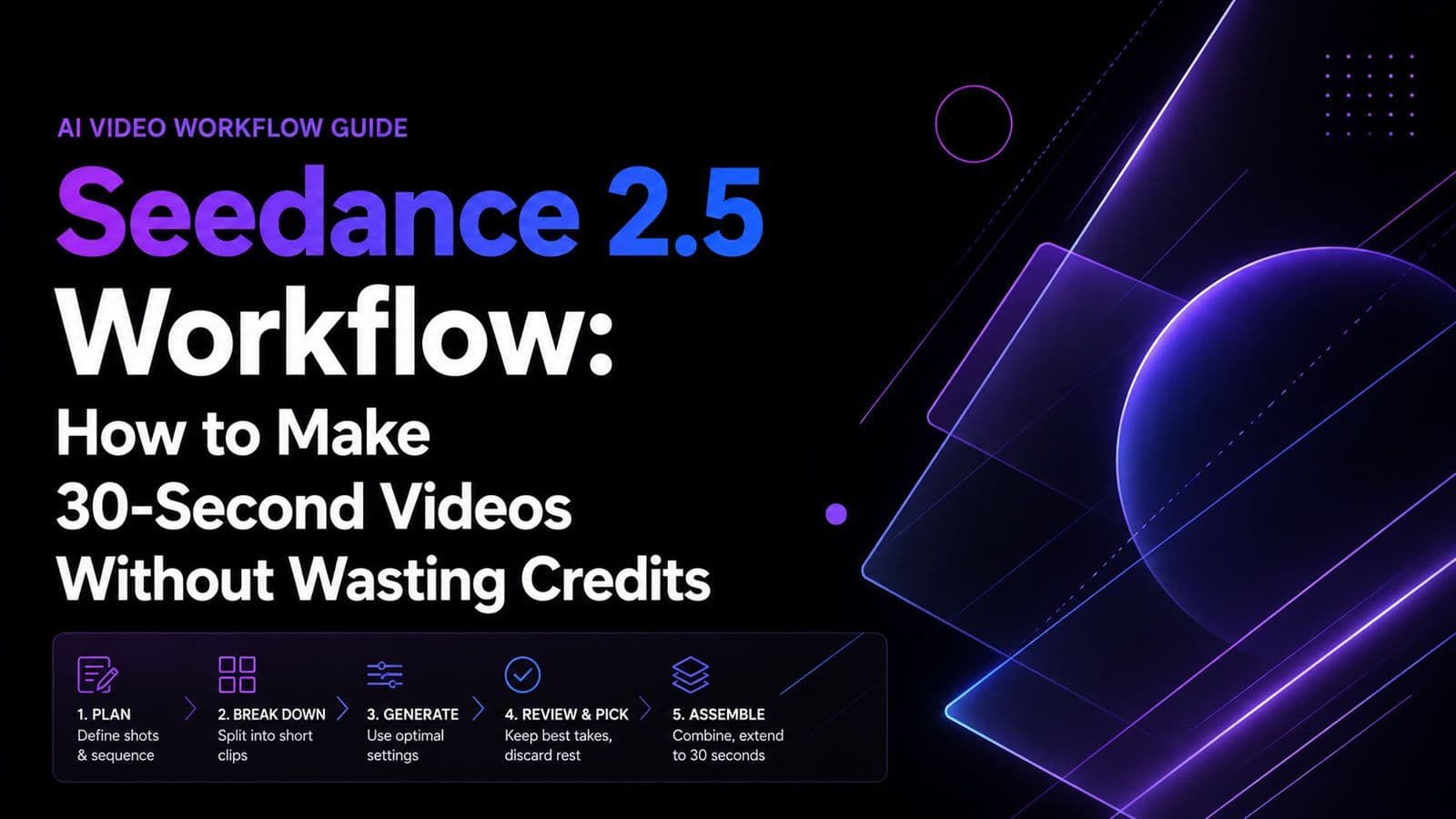
The best Seedance 2.5 workflow is Plan → Lock → Generate → Repair → Reuse. Instead of relying on repeated rerolls, lock character, product, environment, motion, camera, and timing first, then use Seedance 2.5’s 30-second generation, multimodal references, Edit, and Extend to produce more consistent video.
The main challenge is that longer generations make mistakes more expensive. A strong 30-second shot can still fail because of character drift, product inconsistency, conflicting references, or broken continuity. Our review of production workflows suggests that the biggest efficiency gains come from reducing errors before generation and repairing only what actually fails.
For this kind of workflow, Virse gives designers an infinite visual canvas instead of a chat-only interface. Teams can organize references, storyboards, assets, and tasks visually, while multiple Agents share project context and long-term memory for brand rules, aesthetic preferences, and past work. That makes Virse especially useful for consistent, repeatable AI design and video production across larger creative projects. Seedance 2.5, Seedance 2.0 and MiniMax H3 are now available on Virse, so teams can explore and compare multiple leading video models in the same creative workflow.

How Does a Seedance 2.5 Workflow Improve 30-Second AI Video Production?
Seedance 2.5 changes production by keeping more of a sequence inside one continuous generation. The practical advantage of 30 seconds is not simply longer output; it is fewer stitching boundaries where lighting, identity, product scale, camera direction, or motion can drift.
Why 30 Seconds Is More Valuable Than Two 15-Second Clips
In the workflows we reviewed, stitching shorter clips repeatedly created continuity problems even when both clips looked good individually. A native 30-second sequence can instead contain setup, action, transition, and resolution within one generative context.
This is especially useful for:
- dialogue scenes;
- UGC-style ads;
- product demonstrations;
- continuous camera movement;
- short narrative sequences.
However, 30 seconds should not be the default for every shot. Complex action, multiple interacting characters, or high-risk product details may still be cheaper to generate as shorter controlled segments.
How Reference, Keyframe, Edit, and Extend Work Together
The most effective workflow treats Seedance 2.5 modes as one production system.
Mode | Best For | Production Role |
Reference | Character, product, environment, motion, audio | Define what must stay consistent |
Keyframe | Controlled first and last states | Constrain shot transitions |
Edit | Mostly correct footage | Repair instead of reroll |
Extend | Content beyond the source | Continue longer sequences |
The goal is not Generate → Reroll. It is Reference → Generate → Diagnose → Edit → Reuse → Extend when necessary.
How Should You Use Seedance 2.5 References for Better Consistency?
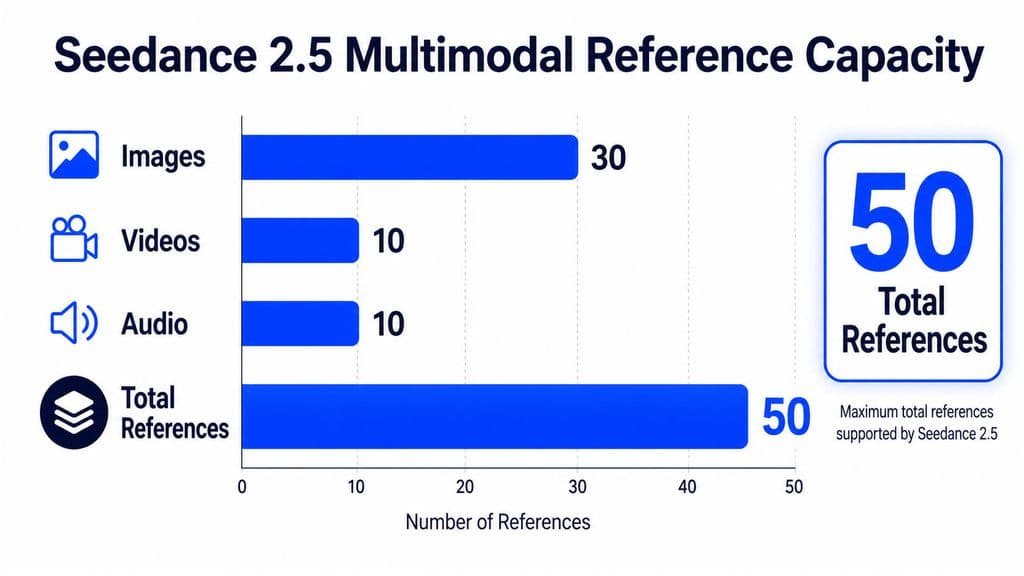
Seedance 2.5 supports up to 30 images, 10 videos, and 10 audio references, creating a theoretical maximum of 50 multimodal inputs. The more important production question is not how to use all 50, but how to give every reference a clear responsibility.
Use Reference Assignment Instead of Reference Accumulation
A practical reference architecture is:
- Character: identity, face, proportions, hair
- Wardrobe: clothing and accessories
- Product: geometry, materials, color, branding
- Environment: architecture, lighting, atmosphere
- Video: motion, blocking, camera path, timing
- Audio: dialogue, rhythm, voice, sound structure
Our review found that problems often increase when multiple references try to control the same variable differently. More references do not automatically mean more control.
Seedance 2.5 also appears more literal in reference-heavy workflows than earlier versions. That is valuable when inputs are clean, but greater reference fidelity can also preserve storyboard or asset mistakes more faithfully.
The best rule is simple: use the smallest set of references that fully defines what you cannot afford to lose.
How Do You Write a Seedance 2.5 Prompt and Storyboard for 30 Seconds?
A strong Seedance 2.5 prompt should behave more like a director’s shot plan than a long visual description. For longer generations, temporal structure matters more than adding more adjectives.
Build the Prompt Around Narrative Beats
One documented workflow in our research produced a 29-second dialogue scene using six prompt blocks, three direct references, a fourth reference for emotion progression, and 50mm/85mm framing.
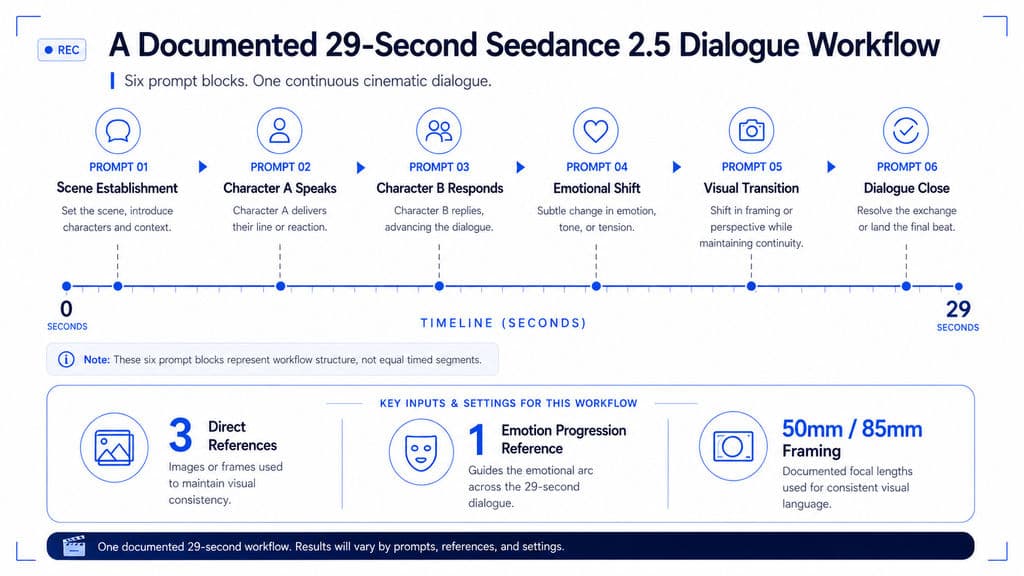
The important lesson is not that six blocks are universally optimal. It is that each section had a clear dramatic and visual purpose.
A practical 30-second structure is:
- 0–5s: establish subject and environment.
- 5–10s: begin the main action.
- 10–16s: develop interaction or camera movement.
- 16–22s: deliver the main narrative or product beat.
- 22–27s: resolve the action.
- 27–30s: land on a stable closing composition.
Use timestamps for pacing and sequence control, not frame-perfect editing. A useful rule is one dominant action per time block.
Treat Storyboard QA as Part of Prompt Engineering
Our research included a 16-panel storyboard workflow where inconsistencies carried into the generated video. After visual continuity was improved, most of the reported problems were reduced. Another animation workflow found 12 panels more effective than 16 for its specific 16:9 scene.
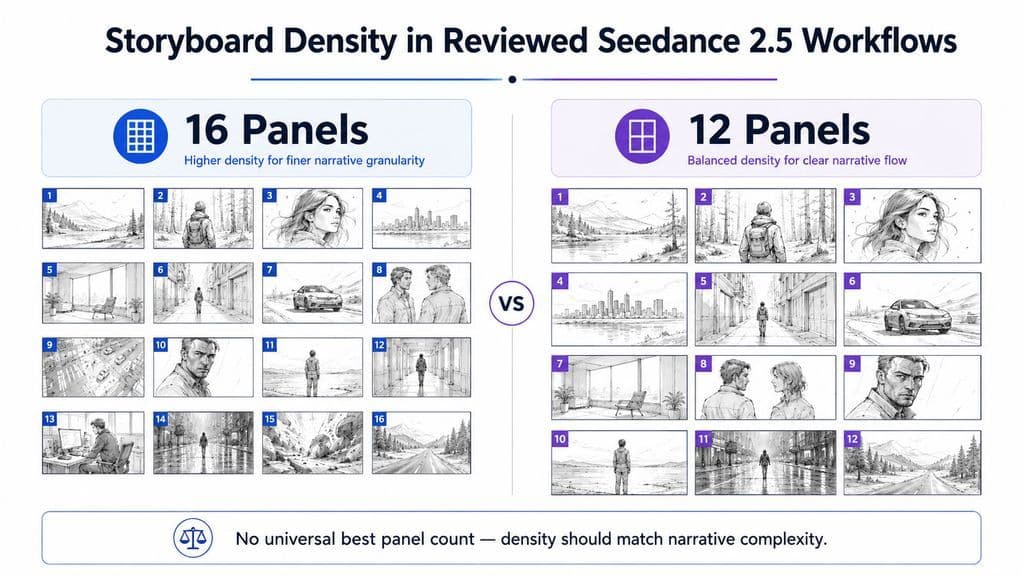
These numbers are not universal presets. They show that storyboard density should match narrative complexity.
Before generation, check:
- character proportions;
- product scale;
- wardrobe;
- props;
- screen direction;
- environment geometry;
- camera progression;
- unwanted text or labels.
How Can Seedance 2.5 Previs and Clay Render Improve Camera Control?
Previs is one of the most useful advanced Seedance 2.5 workflows because it removes expensive spatial decisions from the generative stage.
Lock Camera and Blocking Before Generating the Look
A strong AI design workflow is:
Storyboard → 3D or white-model previs → camera and blocking lock → visual references → Seedance generation → Edit
Previs can define geometry, camera position, camera movement, blocking, pose, motion path, and timing. Visual references can then control character design, materials, color, lighting, and atmosphere.
One workflow we reviewed used roughly 26 seconds of white-model previs, with the source video controlling camera, geometry, timing, and blocking while a separate image controlled materials, lighting, and final look.
From a product design perspective, this is a major shift: do not ask the model to solve spatial structure and visual styling at the same time when one of those decisions can be locked first.
How Can Seedance 2.5 Edit Reduce Rerolls and Production Cost?
Seedance 2.5 Edit addresses one of the most expensive AI-video failures: a shot that is 90% correct but must be discarded because one variable is wrong.
Repair the Failed Variable Instead of Regenerating Everything
If acting, camera, environment, and timing already work, changing one product detail should not require rebuilding the entire shot.
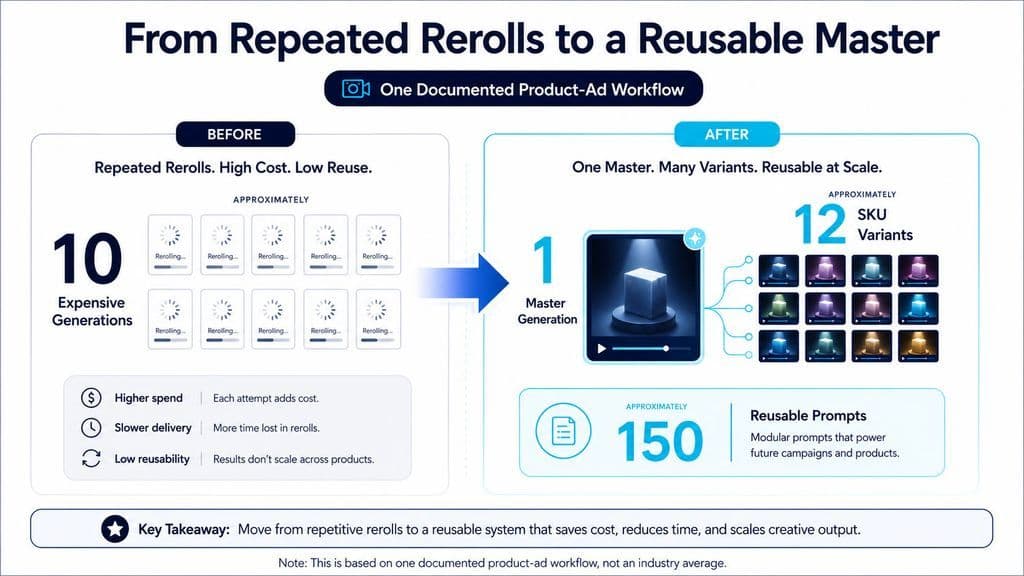
One documented product-ad workflow in our research reduced approximately 10 expensive generations to one master generation, then created about a dozen SKU variants through targeted edits. The same workflow maintained roughly 150 reusable prompts, showing how mature AI production shifts from isolated generations toward reusable creative workflows.
This suggests a better economic metric:
Cost per usable shot matters more than cost per generation.
For product content, the stronger Seedance 2.5 workflow is:
Product reference → presenter → environment → storyboard → master generation → targeted repair → variants
Is Seedance 2.5 Extend Reliable for Videos Longer Than 30 Seconds?
Seedance 2.5 Extend can continue a video, but native 30-second continuity and cross-generation continuity are different problems.
What Our Review of Seedance 2.5 Extension Workflows Found
In one reviewed test using two near-30-second videos, one continuation largely repeated existing material while the other diverged significantly. The workflow received a subjective 2/5 rating.
That sample is too small to establish a general failure rate, but it highlights a real risk: every additional generation introduces another chance for identity, environment, camera logic, and narrative direction to drift.
For videos longer than 30 seconds, use:
30-second master → continuation reference → Extend → continuity review → NLE assembly → local repair
Treat repeated Extend operations as a workflow requiring QA, not as guaranteed infinite continuity.
Seedance 2.5 vs 2.0: Which Model Fits Your Workflow?
Seedance 2.5 is the stronger choice for longer single-pass shots, reference-heavy production, storyboard control, and targeted repair. Seedance 2.0 can still make sense for shorter, cheaper exploration.
Decision Factor | Seedance 2.0 | Seedance 2.5 |
Native duration | Around 15s in reviewed workflows | Up to 30s |
Exploration | Strong fit | Higher-cost choice |
Reference-heavy work | Useful | Stronger fit |
Storyboard execution | More interpretive | More literal |
Targeted repair | More limited | Stronger Edit workflow |
Long narrative shots | More stitching | Fewer stitching boundaries |
A practical model-routing strategy is to explore cheaply, then move high-value shots into Seedance 2.5 once the concept is stable.
How Should You Calculate Seedance 2.5 Cost?
The better question is not “How much does one generation cost?” It is “How much does one usable shot cost after rerolls?”
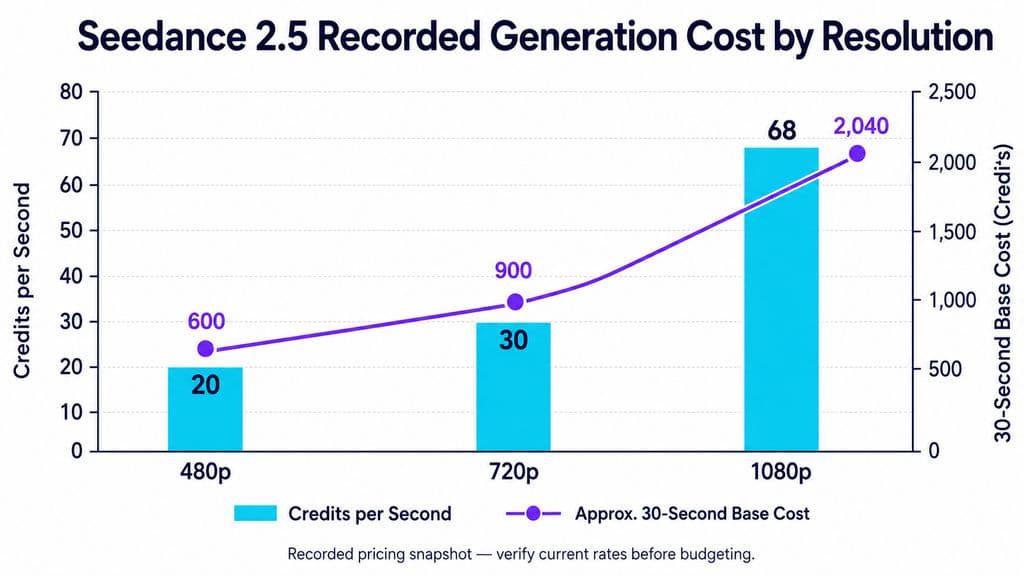
The Seedance 2.5 pricing captured in our research showed the following base rates:
Resolution | Recorded Rate | Approx. 30s Cost |
480p | 20 credits/sec | 600 credits |
720p | 30 credits/sec | 900 credits |
1080p | 68 credits/sec | 2,040 credits |
Because platform pricing and availability change, verify current rates before budgeting. The more durable workflow lesson is to solve expensive mistakes in cheaper stages first.
Validate identity, composition, products, and camera direction with images, storyboards, previs, and shorter tests before spending on a full 30-second hero shot.
FAQ
How many refs should I use in Seedance 2.5?
Use enough refs to clearly define character, product, environment, motion, camera, and audio without introducing contradictions. Seedance 2.5 can support up to 50 multimodal refs, but there is no evidence that using the maximum count produces better results. Reference clarity matters more than reference quantity.
How do I keep characters consistent for 30s?
Start with a clean character sheet, maintain consistent proportions and wardrobe across the storyboard, avoid conflicting refs, and reduce unnecessary transformations. Native 30s generation removes stitching boundaries, but multiple characters, fast action, and complex interaction can still create identity or scale drift.
How do I make Seedance 2.5 videos longer than 30s?
Create a strong 30s master, build a controlled continuation, use Extend, review identity and environment continuity, then assemble segments in an NLE. Repeated extension should be treated as a production workflow with QA, not as guaranteed multi-minute continuity.
How do I reduce Seedance 2.5 cost and rerolls?
Optimize for cost per usable shot. Validate concepts with images, references, storyboards, and previs first; reserve expensive generation for stable concepts; use Edit for local failures; and reuse successful masters for variants instead of rebuilding every asset from zero.
Conclusion
Seedance 2.5 is most effective when treated as a controlled production system rather than a prompt-to-video generator. Its 30-second window reduces stitching, multimodal references separate identity, product, environment, motion, camera, and audio, storyboards improve temporal consistency, previs locks expensive spatial decisions, and Edit protects successful work from unnecessary rerolls. Extend can push projects beyond 30 seconds but still requires continuity management. The strongest professional workflow is therefore Plan → Lock → Generate → Repair → Reuse: make cheap decisions early, make expensive decisions late, and turn every successful generation into a reusable production asset rather than a disposable clip.
Mais do blogue da Virse
Fluxo de trabalho
What Does a Graphic Designer Do? Real Tasks, Revisions, Tools & Workflow
23 de setembro de 2026 by Yifan Zhao
Fluxo de trabalho

How to Learn Graphic Design in 2026: A Step-by-Step Roadmap From Fundamentals to Portfolio
23 de setembro de 2026 by Yifan Zhao
Fluxo de trabalho

What Is Graphic Design? Definition, Real Examples, Process & Tools
23 de setembro de 2026 by Yifan Zhao