
MiniMax H3 Workflow: Fix OOM, Audio Gibberish & Slow Renders
Vincent10 menit baca ·
The best MiniMax H3 ComfyUI workflow is to use FL2VA for T2V, I2V, and first/last-frame generation, switch to Ref2VA when references must control identity, motion, camera, or voice, and separate fast previews from final rendering. Reliable H3 production depends on model routing, reference structure, RAM/VRAM management, and native audio quality rather than one “perfect” graph.
The difficulty appears when projects scale. Multiple images, motion references, audio, prompts, previews, and final renders quickly create fragmented workflows, making it harder to preserve identity, compare generations, control memory, and maintain continuity. Our review of H3 workflow cases found that reducing iteration cost without damaging audio is one of the most important production trade-offs.
Virse addresses this broader workflow gap by bringing AI Agents into an infinite canvas.Designers can organize assets, connect creative context, run multiple Agents in parallel, and on shared brand preferences and project knowledge. Rather than replacing designers with one-click generation, Virse helps professional creative teams make AI-assisted production more structured, repeatable, and scalable. MiniMax H3, Seedance 2.5 and Seedance 2.0, are now available on Virse, so teams can explore and compare multiple leading video models in the same creative workflow.

What Is the Best MiniMax H3 ComfyUI Workflow?
A production-ready MiniMax H3 workflow should separate exploration from final rendering. Rendering every seed at full resolution The research reviewed for this guide confirms that these are the core official workflow routes.wastes GPU time before you know whether the composition, motion, identity, or camera direction works.
Use a Preview-to-Final H3 Workflow
A practical sequence is:
- Define the shot — duration, aspect ratio, subject, camera, and non-negotiable visual constraints.
- Choose FL2VA or Ref2VA based on the type of control required.
- Assign a role to every reference before generation.
- Generate several lower-resolution previews to compare composition and movement.
- Select the strongest seed and direction.
- Restore final-quality settings for the approved shot.
- Upscale or regenerate only approved results.
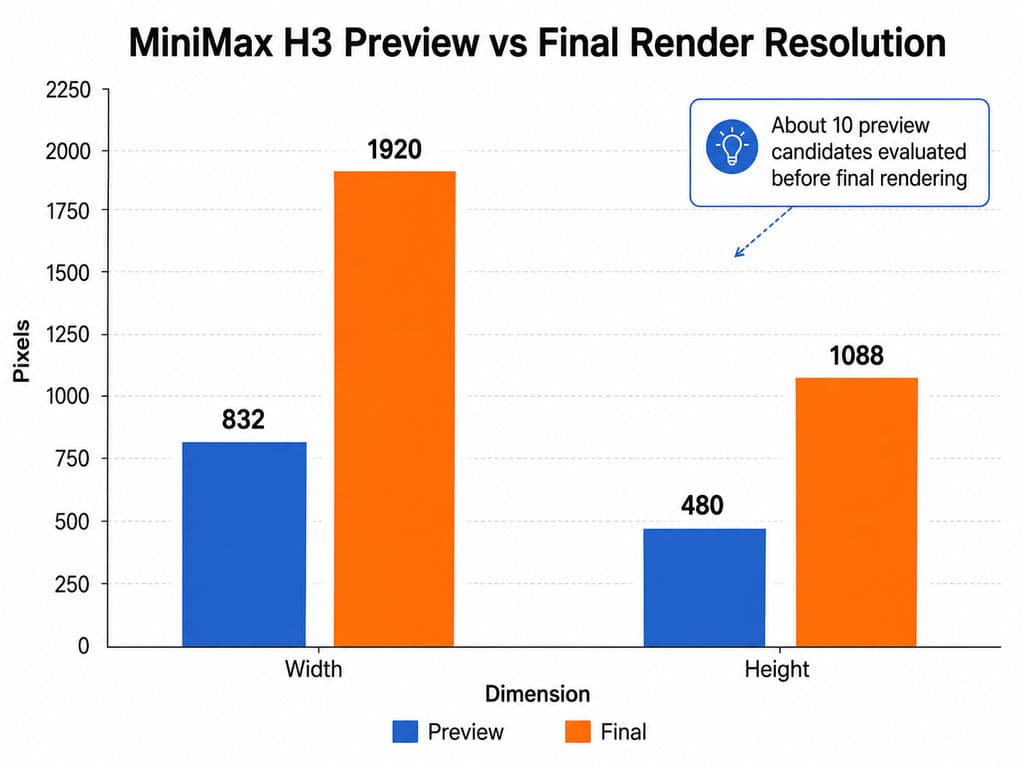
One documented workflow used previews around 832 × 480 before a 1920 × 1088 final render, allowing roughly ten rapid candidates to be evaluated first. In another case, reducing sampling from 20 steps to 10 produced relatively modest visual changes but noticeably worse native audio.
The practical lesson is to lower preview resolution before aggressively lowering steps, especially when dialogue or synchronized sound matters.
How to Set Up MiniMax H3 in ComfyUI
ComfyUI's official H3 workflow is organized around T2V, I2V, and R2V, with FL2VA and Ref2VA serving different generation needs. The research reviewed for this guide confirms that these are the core official workflow routes.
Which H3 Workflow Should You Start With?
Start with the simplest route that satisfies the shot:
- T2V: FL2VA
- Single-image I2V: FL2VA
- First + last frame: FL2VA
- Identity reference: Ref2VA
- Motion or camera reference: Ref2VA
- Audio or voice reference: Ref2VA
- Mixed image + video + audio control: Ref2VA
Avoid loading both large model branches simply because a hybrid graph makes it possible. Model simplicity reduces memory pressure and makes failures easier to diagnose.
MiniMax H3 FL2VA vs Ref2VA: Which Workflow Should You Use?
FL2VA is the efficient default; Ref2VA is the multimodal control workflow.
Need | FL2VA | Ref2VA |
T2V | Best choice | Usually unnecessary |
I2V | Best choice | Use only for added references |
First / last frame | Supported | Not the main use |
Identity reference | Limited | Stronger fit |
Motion / camera reference | No | Yes |
Audio reference | No | Yes |
The official model structure distinguishes FL2VA for T2V, I2V, and frame-conditioned generation from Ref2VA for richer image, video, and audio reference control.
Why Not Use Ref2VA for Every H3 Generation?
More references do not automatically produce more control. Each image, video, or audio input adds another relationship H3 must interpret.
From a design workflow perspective, use the smallest reference set that communicates the creative intent accurately. That reduces ambiguity, memory cost, and prompt complexity.
How to Write MiniMax H3 Ref2V Prompts for Better Reference Control
The most important H3 prompting rule is: give every reference one explicit responsibility.
Separate Identity, Motion, Camera, Voice, and Sound
A structured Ref2V instruction should clarify:
- Picture 1: character or product identity
- Picture 2: lighting, material, or visual style
- Video 1: body movement only
- Video 2: camera trajectory only
- Audio 1: voice characteristics or timing
- Soundscape: environmental audio
- Music: describe separately from dialogue and diegetic sound
This is more reliable than adding more adjectives to a prompt. Reference management is closer to art direction than conventional prompt writing.
Use a Prompt Compiler for Complex Ref2VA Projects
One experimental workflow reviewed for this guide used a multimodal LLM to classify assets, collect duration, aspect ratio, character, camera, and sound decisions, then compile those relationships into an H3-ready prompt.
For multi-character or multi-reference projects, this creates an important missing layer between creative direction and generation: structured context management.
How to Speed Up MiniMax H3 in ComfyUI Without Breaking Audio
The fastest useful H3 workflow is not necessarily the workflow with the fewest sampling steps. A preview must remain good enough to judge the properties that matter.
Lower Resolution Before Lowering H3 Steps
The documented 20-to-10-step case is particularly useful: visual degradation appeared relatively limited to the tester, while audio degraded much more noticeably.
For composition, motion direction, and camera evaluation, lower resolution is usually the safer preview variable. For dialogue, timing, facial detail, and final synchronization, use settings closer to the intended render.
Test SageAttention and Cache Optimizations Separately
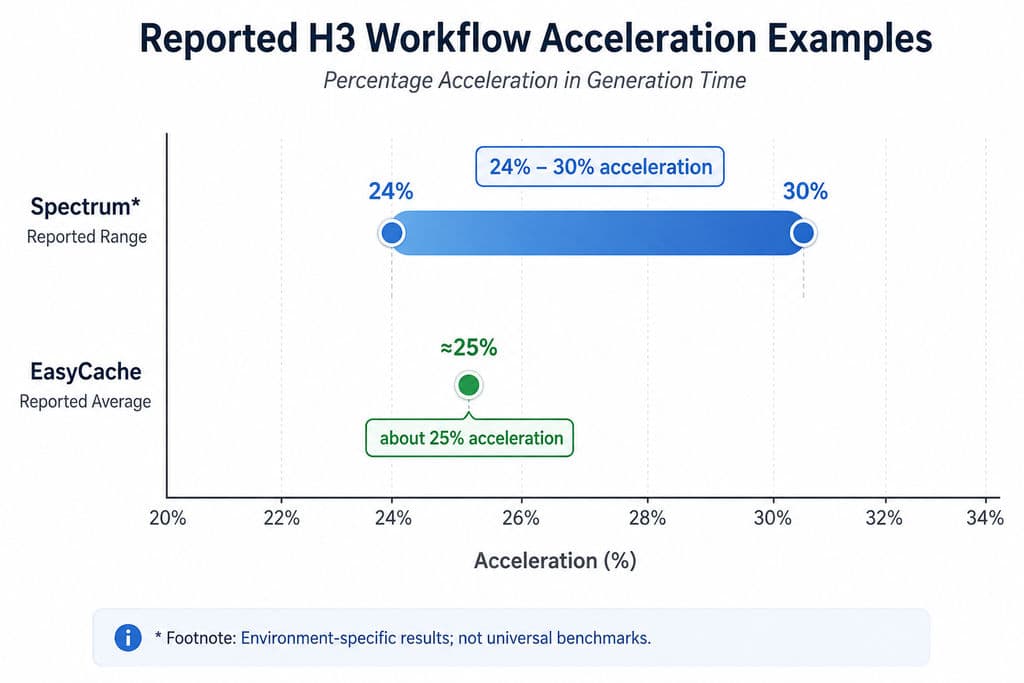
SageAttention is included in the official H3 optimization discussion, while community environments showvaried real-world gains. Spectrum has reported around 24–30% acceleration in one AMD environment, and one EasyCache case reported roughly 25%, but these are environment-specific observations rather than universal benchmarks.
EasyCache also appears alongside reports of weaker dialogue or coherence. Never change SageAttention, caching, sampler, and sampling steps simultaneously if you want to understand why quality changed.
MiniMax H3 VRAM and RAM Requirements: What Hardware Do You Need?
H3 memory planning cannot be based on VRAM alone. Large model components move between GPU and system memory, so RAM and model lifecycle management can become the actual bottleneck.
Why H3 Can OOM Even With Enough VRAM
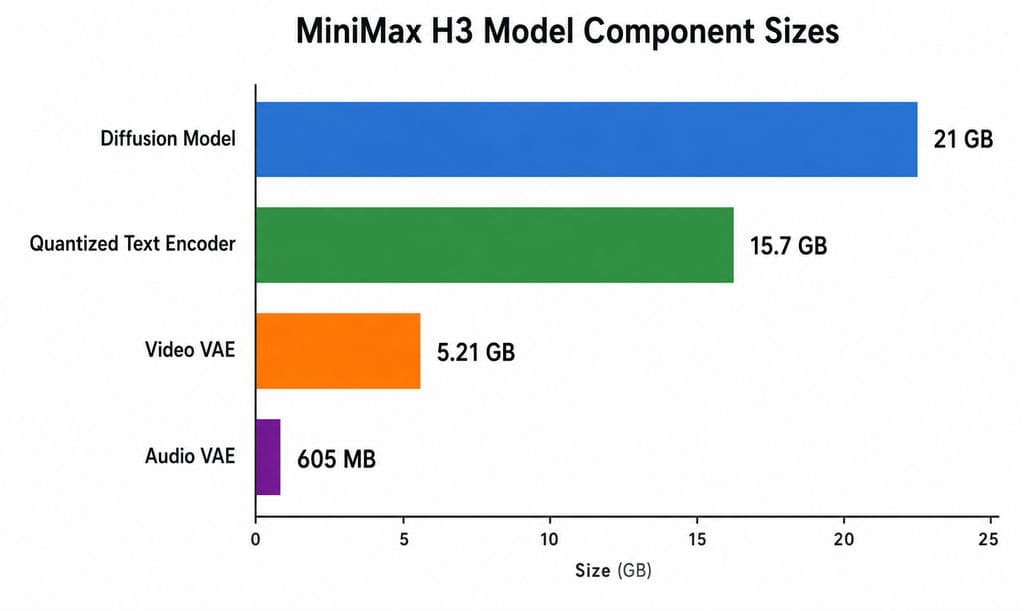
The research set records approximate package sizes around 21 GB for the diffusion model, 15.7 GB for one quantized text encoder, 5.21 GB for the video VAE, and 605 MB for the audio VAE.
That makes unloading and offloading part of the workflow rather than optional housekeeping.
What 12 GB and 16 GB H3 Cases Show
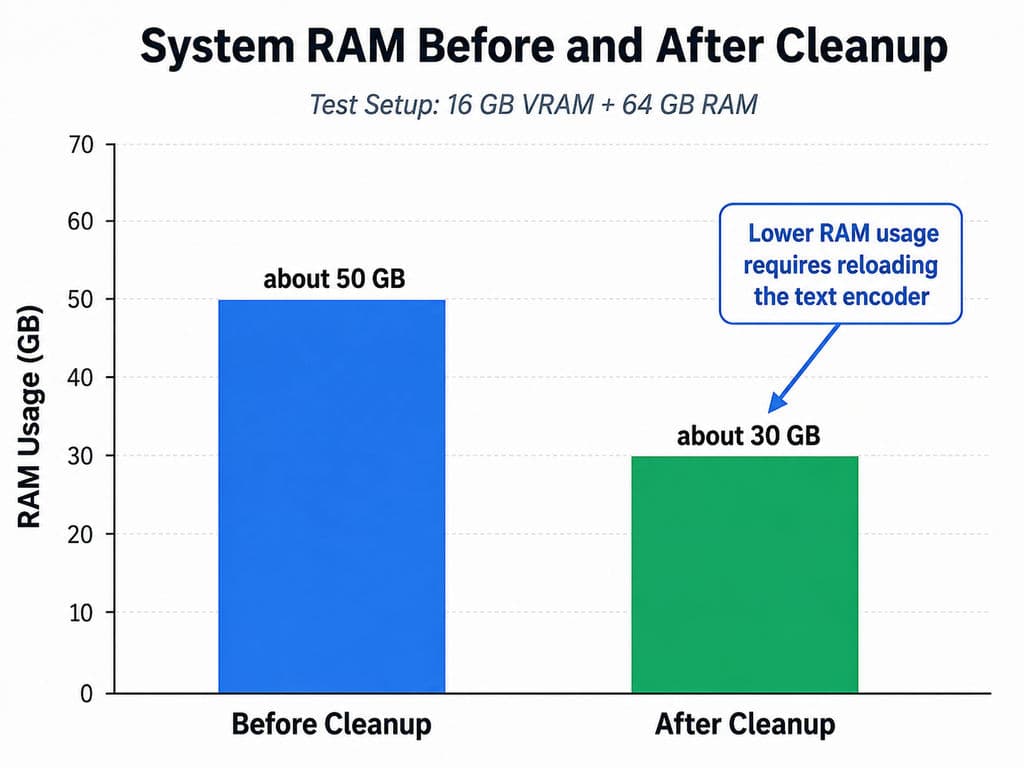
In one documented 16 GB VRAM + 64 GB RAM setup, system RAM reached about 50 GB before cleanup and fell to around 30 GB afterward, at the cost of reloading the text encoder.
Another RTX 3060 12 GB + 64 GB RAM Ref2V case approached full system RAM while generating a five-second clip at roughly 0.35 MP.
These are not universal benchmarks, but they show why “H3 can run” is different from “H3 is comfortable to iterate with.”
How to Fix MiniMax H3 Audio Gibberish and Face Consistency Problems
H3's native audiovisual generation is a major advantage, but audio and identity require separate quality-control checks.
How to Troubleshoot H3 Audio Gibberish
Our review of recurring workflow questions found no single verified cause of gibberish. Potential contributors include ambiguous dialogue timing, unwanted music instructions, aggressive caching, and very low sampling steps.
The safest diagnostic process is to return to the base workflow, define who speaks and when, separate music from environmental sound, restore normal sampling settings, and then re-enable performance optimizations one by one.
Why Higher Reference Resolution Does Not Guarantee Identity
One detailed identity-consistency case still observed facial softening or distortion during wider or moving shots despite Ref2VA, 1344 × 768 output, an extra high-resolution face reference, maximum reference-detail settings, and up to 20 steps.
Higher reference detail gives H3 more identity information, but it should not be presented as a guaranteed fix for face consistency.
How to Create MiniMax H3 Videos Longer Than 15 Seconds
H3's official single-clip workflow is limited to 15 seconds, so longer production is better treated as a continuity problem rather than simply increasing duration.
Use Motion and Audio Context Chaining
A promising approach is:
Clip A → preserve motion and audio state → Clip B → continue context → Clip C
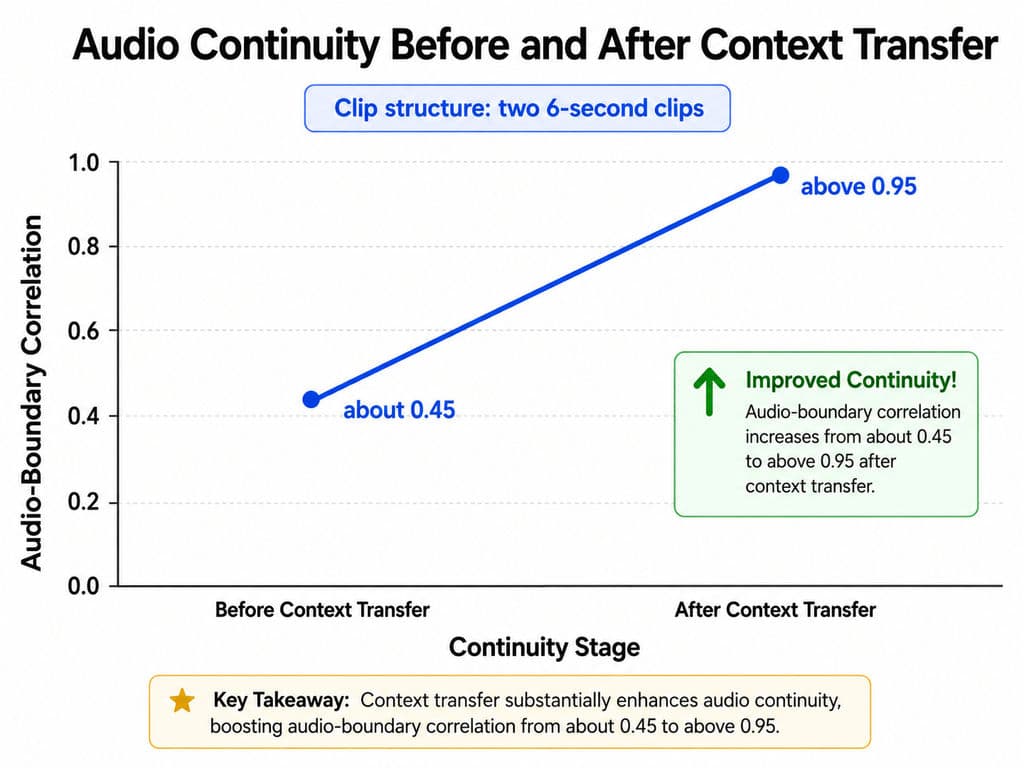
One experimental case joined two six-second clips without a crossfade and reported audio-boundary correlation improving from roughly 0.45 to above 0.95 after context transfer.
This is not an official benchmark, but it supports a useful production principle: preserve state between clips instead of asking each generation to rebuild continuity from zero.
MiniMax H3 1080p vs 2K: Upscaling or Regenerate-2K?
For local production, distinguish H3 Base generation from the complete H3 2K pipeline.
H3 Base is centered around a 768-pixel short-edge generation stage, while MiniMax's complete architecture includes a separate H3-Regenerate-2K stage that reuses the original context when reconstructing higher-resolution detail. Local open workflows primarily expose H3 Base, so conventional upscaling remains a practical delivery path.
When to Use an Upscaler
Choose conventional video upscaling when:
- the generated frames are already successful;
- you want predictable enlargement;
- delivery speed matters;
- you do not want another generative pass.
One documented RTX 3090 case generated a roughly 14-second, 1 MP clip in about 40 minutes before applying RTX-based super-resolution.
When Regenerate-2K Makes More Sense
Choose context-aware regeneration when reconstructing fine visual detail from the original multimodal intent matters more than deterministic preservation. It should not be confused with ordinary pixel enlargement, and current research does not provide a controlled local benchmark proving it is always superior.
FAQ
Can H3 run on 12 GB VRAM?
Yes, some 12 GB configurations can run H3 with quantization and offloading, but RAM may become the limiting factor. A documented RTX 3060 12 GB system with 64 GB RAM approached full RAM utilization during a short Ref2V generation. Hardware, quantization, resolution, and node configuration can significantly change results.
FL2VA or Ref2VA: which should I use?
Use FL2VA for T2V, I2V, and first/last-frame generation. Use Ref2VA when images, videos, or audio must control identity, motion, camera, style, or voice. If the shot does not require multimodal reference control, FL2VA is usually simpler and more memory-efficient.
Why does H3 audio become gibberish?
There is no single verified cause. Across the workflow cases reviewed for this guide, low sampling steps, ambiguous dialogue instructions, unwanted music, and aggressive caching have all appeared alongside audio failures. Start with the standard workflow, simplify audio instructions, and reintroduce optimization changes one at a time.
Regenerate-2K or an upscaler: which is better?
Use an upscaler for faster and more deterministic enlargement of a successful clip. Use Regenerate-2K when contextual detail reconstruction is the priority. They solve different problems: one enlarges an existing result, while the other is part of MiniMax's broader context-aware regeneration architecture.
Conclusion
The most reliable MiniMax H3 ComfyUI workflow is a production system, not a single graph: route simple jobs through FL2VA, use Ref2VA only when multimodal control is necessary, define reference roles before generation, preview at lower resolution before spending final-render compute, manage RAM alongside VRAM, validate native audio before adding aggressive acceleration, preserve context when extending clips, and choose upscaling or contextual 2K regeneration according to the delivery goal. This approach gives designers a more repeatable way to move H3 from experimentation into controlled AI video production.
Artikel lainnya dari Blog Virse
Alur kerja
What Does a Graphic Designer Do? Real Tasks, Revisions, Tools & Workflow
23 September 2026 by Yifan Zhao
Alur kerja

How to Learn Graphic Design in 2026: A Step-by-Step Roadmap From Fundamentals to Portfolio
23 September 2026 by Yifan Zhao
Alur kerja

What Is Graphic Design? Definition, Real Examples, Process & Tools
23 September 2026 by Yifan Zhao