FLUX 3 Image vs GPT Image 2.5: Quality, Editing & Real Tests
Vincent19 menit baca ·
FLUX 3 Image is the stronger starting point for precise editing and background preservation, while GPT Image 2.5 performs better in several creative generation categories. In a published 40-round editing benchmark, FLUX 3 recorded a mean background drift of 5.64 versus 48.44 for GPT Image 2.5 Sunburst. However, a separate 14-prompt generation comparison favored GPT Image 2.5 in four of seven categories, demonstrating that neither model is universally better.
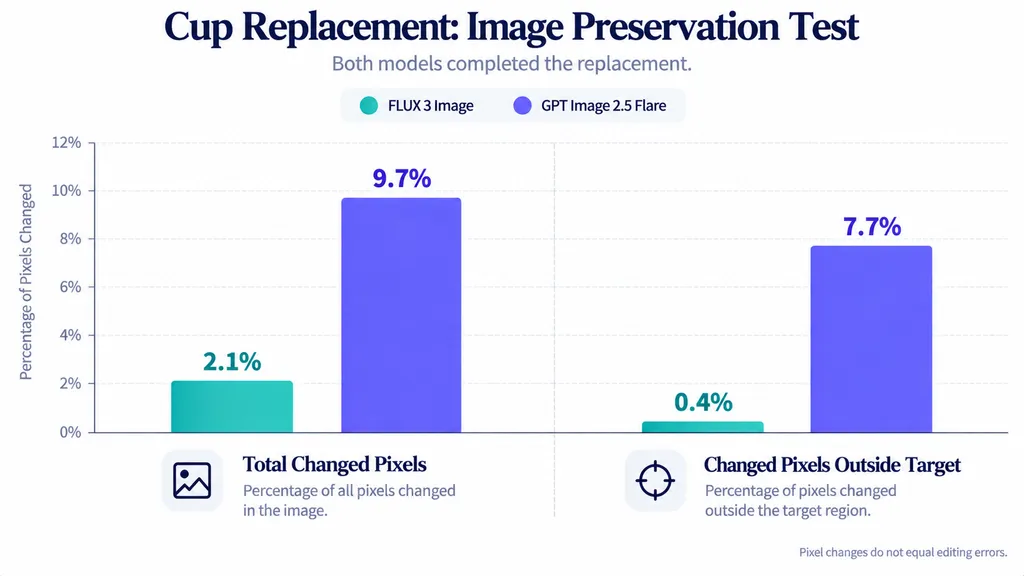
The real challenge begins when a promising image needs revisions. Replacing a product, correcting poster text, or adjusting an existing composition can unintentionally change approved details. In a documented cup-replacement experiment, FLUX 3 altered just 0.4% of pixels outside the target area, compared with 7.7% for GPT Image 2.5 Flare. These differences can influence editing drift, manual corrections, and the time required to deliver finished artwork.
With Virse, you can turn AI image generation into a connected creative workflow. Its infinite AI canvas brings reference images, generated assets, and design iterations into one visual workspace. Explore concepts with available AI models, compare variations, and refine images using inpainting, outpainting, and upscaling. Whether you're creating ecommerce product images, campaign visuals, or branded content, Virse helps keep your creative direction organized from initial concept to final refinement.

FLUX 3 vs GPT Image 2.5: What Are the Main Differences?
FLUX 3 Image, developed by Black Forest Labs, and GPT Image 2.5, developed by OpenAI, both support image generation and instruction-based image editing.
Their differences become more meaningful when generation quality, editing precision, and workflow reliability are evaluated separately.
Comparison | FLUX 3 Image | GPT Image 2.5 |
Image generation | Strong photorealistic textures and spatial coherence in selected tests | Strong complex scenes and artistic styles |
Local editing | Better preservation in documented tests | More incidental changes in some tests |
Cup replacement | 0.4% outside-target changes | 7.7% with Flare |
Poster correction | 12.9% whole-image changes | 25.0% with Flare |
Background drift after 40 edits | 5.64 mean RGB drift | 48.44 with Sunburst |
Text rendering | 583/583 characters | 583/583 with Flare |
Complex layouts | Spatial control through bounding-box instructions | Strong results with Sunburst |
Editing speed | 41.0 seconds median in one benchmark | 17.2 seconds with Sunburst |
Best starting point | Controlled revisions and background preservation | Creative exploration and complex generation |
FLUX 3's strongest advantage is preserving existing content during editing. GPT Image 2.5's strengths are more apparent in creative generation and some complex prompt-following tasks.
The numerical results come from different experiments, quality settings, and evaluation methods. They should not be combined into a single performance score.
Image Generation vs Image Editing
Image generation starts with a creative brief and produces a new visual. Success depends on visual quality, composition, prompt adherence, and realism.
Image editing introduces another requirement: preserving previously established content.
Consider a skincare advertisement featuring a product bottle, marble countertop, reflected highlights, and carefully positioned typography.
Generating a new campaign concept allows the model to reinterpret the scene.
Changing only the packaging color requires much tighter control. Any modifications to the bottle geometry, lighting, or background may create additional production work.
The model that generates the best initial image is not necessarily the model that performs the most reliable revisions.
What Do the Available Tests Actually Measure?
Our research review separates three categories of evidence.
Generation tests evaluate the quality of images created from matching prompts.
Localized editing tests measure whether a model completes a requested change without unnecessarily altering surrounding content.
Multi-round editing tests examine how image structure changes through repeated revisions.
These categories answer different questions. A model can perform well in one without leading the others.
FLUX 3 vs GPT Image 2.5: Which Produces Better Image Quality?
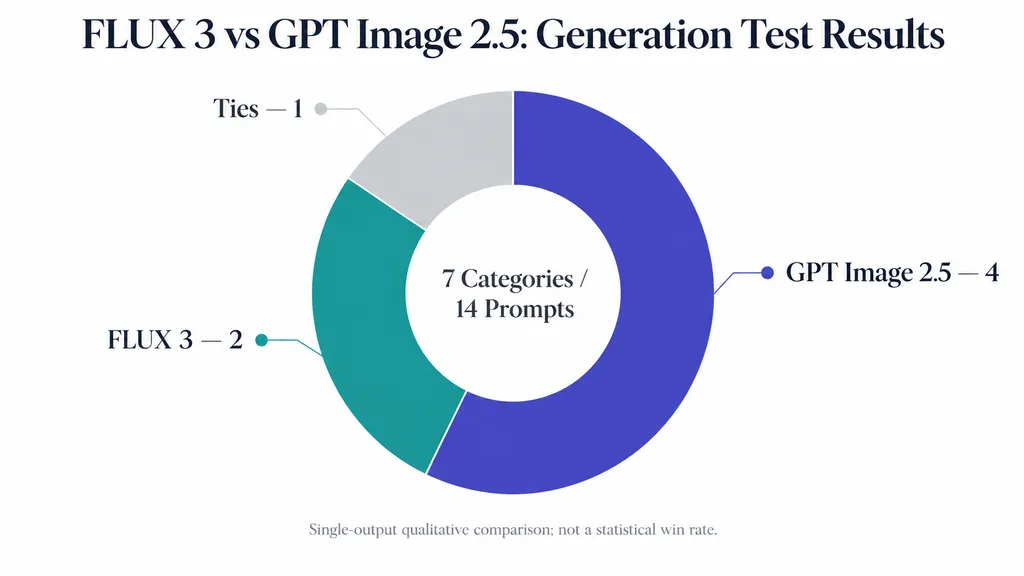
GPT Image 2.5 performed better in more categories in one published 14-prompt generation comparison, while FLUX 3 showed strengths in realistic skin texture and everyday spatial compositions.
The experiment tested both models using matching prompts across seven categories, with one output per prompt and no additional revisions.
Case Study 1: Four Categories Favored GPT Image 2.5
A published comparison used 14 prompts covering portraits, multi-character scenes, typography, artistic styles, anatomy, surreal concepts, and everyday environments.
The evaluator reported:
Result | Categories |
GPT Image 2.5 favored | 4 |
FLUX 3 favored | 2 |
Tie | 1 |
GPT Image 2.5 was favored for multi-character scenes, artistic styles, fine anatomy, and surreal concepts.
FLUX 3 was favored for photorealistic portraits and ordinary realistic environments.
Typography was judged a tie.
The test used GPT Image 2.5 Flare at High quality and FLUX 3 at 2K. FLUX 3's automatic prompt enhancer remained enabled.
These results represent qualitative evaluations of individual outputs, not statistically validated performance rankings.
Photorealistic Portraits and Everyday Scenes
FLUX 3 received favorable evaluations for natural skin texture and believable spatial arrangements.
One test involved a close-up portrait of an older fisherman. Another involved a nighttime portrait illuminated by neon lighting.
The evaluator preferred FLUX 3's skin rendering in the first example and found that GPT Image 2.5 introduced excessive grain and unwanted text in the second.
FLUX 3 was not flawless. Some outputs appeared overly polished, with synthetic-looking hair or exaggerated studio lighting.
In everyday-environment tests, FLUX 3 performed particularly well in a cluttered kitchen scene, where object placement and room geometry were easier to interpret.
These examples suggest that FLUX 3 deserves consideration for lifestyle imagery and realistic interiors, although a small sample cannot establish a universal photorealism advantage.
Complex Scenes, Artistic Styles, and Anatomy
GPT Image 2.5 received favorable evaluations in scenes involving multiple characters and intricate spatial relationships.
In a picnic scene, FLUX 3 produced an anatomical problem involving a hand holding a wineglass. GPT Image 2.5 handled the interaction more convincingly.
In a knitting scene, FLUX 3 rendered convincing aged skin but produced an implausible interaction between the knitting needles and yarn.
GPT Image 2.5 also received stronger evaluations for oil-painting textures and some abstract compositions.
These examples reveal an important distinction between visual appearance and physical plausibility.
A model may generate realistic-looking hands while failing to depict how those hands interact with objects.
For commercial imagery involving people using products, object interaction accuracy can matter more than surface realism alone.
FLUX 3 vs GPT Image 2.5: Which Handles Repeated Editing Better?
Repeated image editing is one of the clearest areas where FLUX 3 demonstrates a practical advantage.
Image editing drift is the unintended modification of previously established content across successive revisions.
It can affect object geometry, lighting, textures, color, typography, and background composition.
Case Study 2: The 480-Edit Benchmark
A documented October 2026 experiment evaluated four image models across three photographic scenes.
Each model completed one 40-edit sequence for each scene, creating 12 editing chains and 480 editing operations.
The scenes included a kitchen, café, and still-life arrangement.
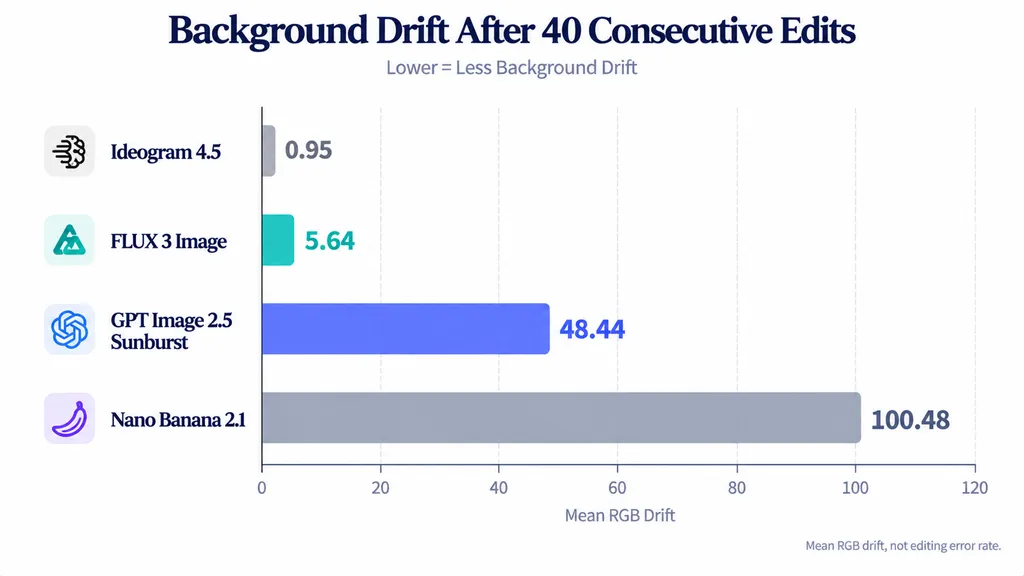
After 40 edits, the reported mean background RGB drift was:
Model | Mean RGB Drift |
Ideogram 4.5 | 0.95 |
FLUX 3 Image | 5.64 |
GPT Image 2.5 Sunburst | 48.44 |
Nano Banana 2.1 | 100.48 |
Lower values indicate less accumulated background deviation under the experiment's measurement method.
FLUX 3 recorded substantially less drift than GPT Image 2.5 Sunburst.
However, background preservation and instruction completion are not the same capability.
The research also identified approximately five to seven missed or weakly applied modifications across FLUX 3's editing chains, while Nano Banana 2.1 had no clearly identified missed instructions.
This creates a meaningful trade-off: a model may preserve the original composition well but occasionally fail to apply the requested change.
Each editing chain was run once, so the measurements should be treated as documented outcomes rather than universal model guarantees.
Case Study 3: Thirty Café Modifications
Another experiment started with an empty café and progressively introduced furniture, lighting, signage, equipment, and environmental changes.
The experiment contained 30 requested modifications grouped into six sequential generations.
Each generation incorporated five changes, and every model used its previous output as the next starting image.
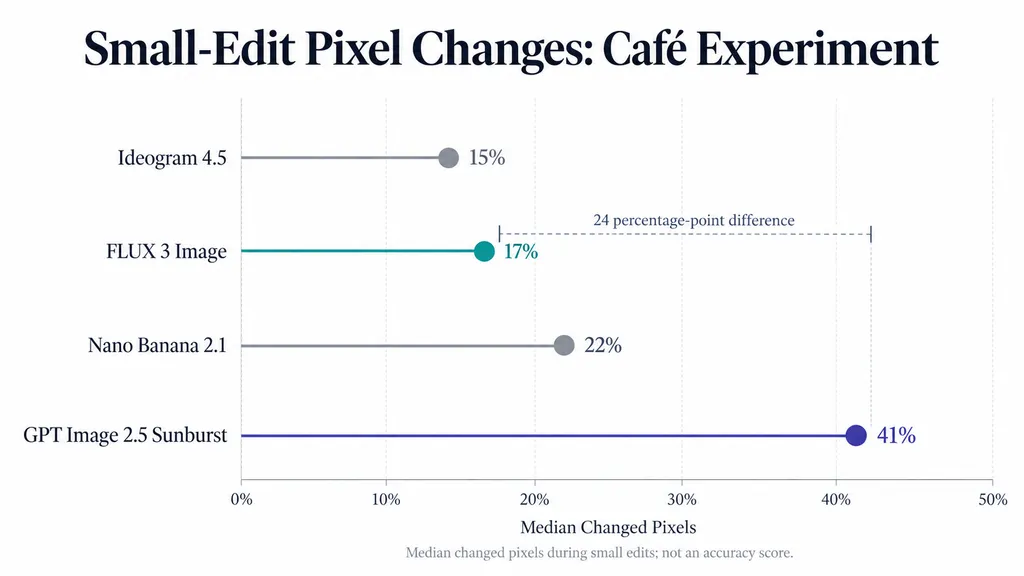
The median changed-pixel values for smaller editing operations were:
Model | Median Changed Pixels |
Ideogram 4.5 | 15% |
FLUX 3 Image | 17% |
Nano Banana 2.1 | 22% |
GPT Image 2.5 Sunburst | 41% |
FLUX 3 changed 24 percentage points less of the frame than GPT Image 2.5 Sunburst at the median.
The evaluator also observed that GPT Image 2.5 reconstructed more of the café during certain revisions, while FLUX 3 preserved more of the original spatial arrangement.
The percentage measures how much of the image changed, not how many pixels were edited incorrectly.
The experiment therefore supports a narrower conclusion: FLUX 3 produced less extensive image changes during the tested small-edit operations.
Case Study 4: Thirty-One Consecutive Edits
A separate published experiment compared FLUX 3 and GPT Image 2.5 across 31 consecutive editing operations.
The evaluator reported stronger structural preservation from FLUX 3, while GPT Image 2.5 showed visible composition changes earlier in the sequence.
However, the FLUX 3 workflow used bounding-box editing controls, and equivalent spatial constraints were not documented for GPT Image 2.5.
The comparison is useful evidence of workflow behavior, but it cannot isolate the underlying model as the sole cause of the result.
No complete round-by-round numerical drift series was published for this experiment.
How Should Designers Measure Editing Drift?
A useful editing evaluation must answer three separate questions.
- Did the model complete the requested modification?
- How much unrelated image content changed?
- Did those changes damage the approved composition?
Pixel differences alone cannot answer all three.
In the café experiment, images were resized to 1024 × 1024 pixels and lightly blurred before comparison.
Pixels were counted as changed when a color channel differed beyond the specified tolerance.
Major scene-wide edits were excluded from the small-edit median because extensive changes were intentional.
For professional workflows, pixel-difference measurements should be combined with visual inspection and instruction-completion checks.
FLUX 3 vs GPT Image 2.5: Which Is Better at Precise Image Editing?
FLUX 3 produced stronger preservation results in two documented localized editing experiments.
Both tests used the same source image and editing objective for each model.
Case Study 5: Replacing a Paper Cup
A Fuser comparison used a café photograph measuring 1392 × 752 pixels.
The task was to replace a takeaway paper cup with a white ceramic mug while preserving everything else.
FLUX 3 was tested at 1K, and GPT Image 2.5 Flare used High quality.
Neither model used an editing mask or bounding box.
Both completed the requested replacement.
Measurement | FLUX 3 Image | GPT Image 2.5 Flare |
Total changed pixels | 2.10% | 9.70% |
Outside-target changes | 0.40% | 7.70% |
Replacement completed | Yes | Yes |
The comparison used a 3.2% pixel-change tolerance.
FLUX 3 concentrated modifications around the cup and the hands holding it.
GPT Image 2.5 also modified surrounding details, including hair, clothing, facial texture, and background elements.
An additional FLUX 3 run using a full-size reference returned 96.4% of pixels bit-identical to the original.
For ecommerce photography, this difference is valuable because the original product framing and surrounding scene may already have been approved.
Case Study 6: Correcting a Date on a Poster
Another direct comparison evaluated a finished jazz poster.
The instruction was to correct one date while preserving typography, illustrations, and background textures.
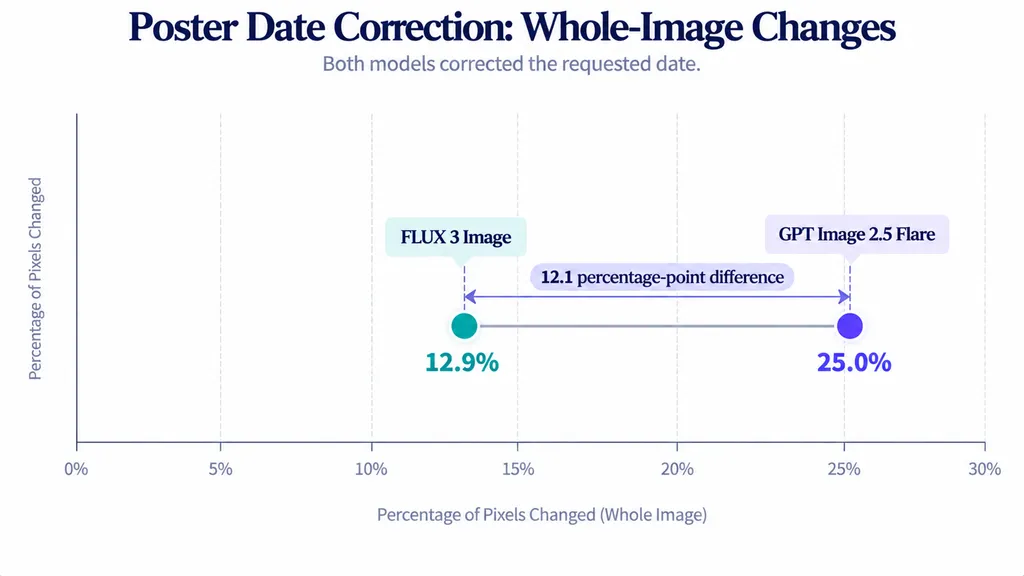
Both models completed the requested text change.
However, the measured whole-image differences were:
Model | Changed Pixels |
FLUX 3 Image | 12.90% |
GPT Image 2.5 Flare | 25.00% |
FLUX 3 changed approximately half as many pixels.
Neither model preserved the poster perfectly.
Both outputs modified some unrelated details, including text edges and decorative elements.
Additional FLUX 3 runs using full-size references and more explicit text positioning produced approximately 12.8% whole-image changes.
These results make FLUX 3 attractive for correcting flattened artwork, but they do not replace final quality inspection.
When editable typography layers are available, changing the original text directly remains preferable to regenerating the entire poster.
Bounding Boxes vs Masks: Why Editing Controls Matter
FLUX 3 supports spatial instructions using bounding boxes.
GPT Image 2.5 supports mask-guided editing workflows.
These controls help communicate which part of an image should change.
However, neither guarantees complete preservation outside the selected region.
Shadows, reflections, and neighboring textures may still be affected.
For accurate comparisons, models should receive equivalent editing objectives, and their spatial controls should be recorded.
A model using bounding boxes cannot be compared with an unconstrained model as though both received identical editing conditions.
FLUX 3 vs GPT Image 2.5: Which Handles Text Better?
Both models performed exceptionally well in a limited direct typography experiment.
Text generation remains important for posters, menus, packaging, advertisements, and product mockups.
Case Study 7: Typography Accuracy Across 583 Characters
Fuser evaluated both models using three text-heavy prompts.
The tasks included a jazz poster, café menu, and dense product back label.
Typography Task | FLUX 3 Image | GPT Image 2.5 Flare |
Jazz poster | 111/111 | 111/111 |
Café menu | 172/172 | 172/172 |
Product label | 300/300 | 300/300 |
Total | 583/583 | 583/583 |
Both models reproduced all counted characters correctly.
The evaluation excluded spaces and checked for missing characters, additions, punctuation mistakes, and capitalization problems.
However, the models used different output dimensions in some tests. FLUX 3's higher pixel count may have helped with small-text clarity.
Each task also used one generation per configuration.
The appropriate conclusion is that both models achieved complete text accuracy in the tested outputs, not that either guarantees perfect typography across all prompts.
GPT Image 2.5 Flare vs Sunburst
A separate six-task comparison evaluated GPT Image 2.5 Flare and Sunburst.
The reported outcomes were:
Outcome | Tasks |
Sunburst favored | 4 |
Flare favored | 1 |
Approximately tied | 1 |
Sunburst performed well in tasks requiring complex object positioning and layout control.
Flare performed better in one product-shot example because it followed the requested composition more closely.
This highlights an important limitation of visual quality judgments: extra details are not always improvements.
For commercial artwork, an unrequested logo, prop, or modified product shape can make an otherwise attractive output unusable.
The experiment compares two GPT Image 2.5 configurations and should not be interpreted as a direct FLUX 3 benchmark.
FLUX 3 vs GPT Image 2.5: Which Is Faster and More Cost-Effective?
The most useful speed comparison comes from the 480-edit experiment.
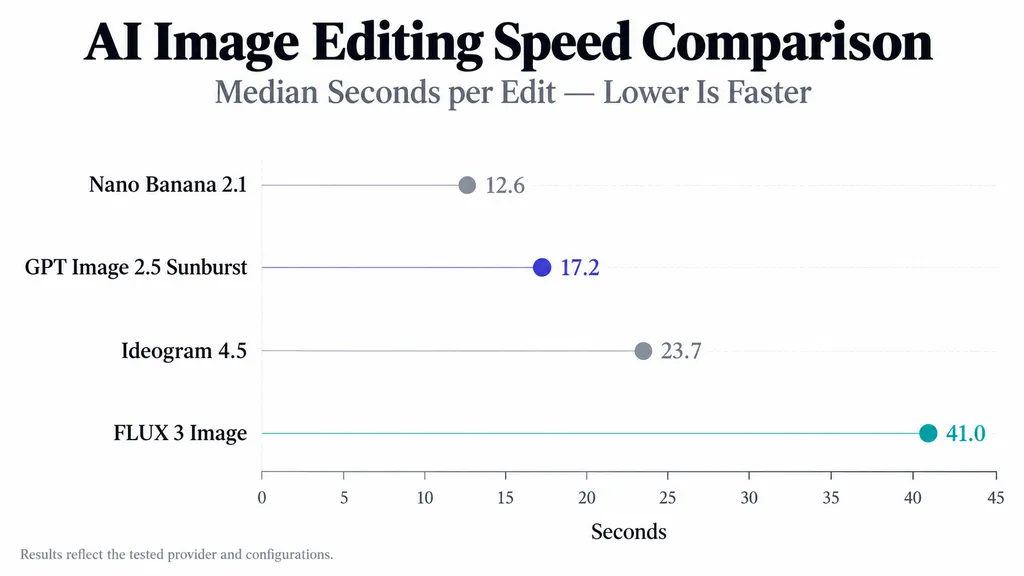
It measured median time per editing operation under the tested provider settings.
Model | Median Time per Edit |
Nano Banana 2.1 | 12.6 seconds |
GPT Image 2.5 Sunburst | 17.2 seconds |
Ideogram 4.5 | 23.7 seconds |
FLUX 3 Image | 41.0 seconds |
GPT Image 2.5 Sunburst completed editing operations faster than FLUX 3 in this experiment.
FLUX 3 also experienced 14 timeout or server-error events, which were resolved through retries.
These results reveal an important trade-off.
FLUX 3 preserved more background content, while GPT Image 2.5 completed the tested editing operations faster.
The measurements reflect the specific provider, workload, and model configurations. They should not be generalized to every environment.
Generation Price vs Editing Cost
Pricing varies by provider, image dimensions, quality settings, and model variant.
A published platform-specific comparison found that FLUX 3 at 1K cost approximately the same as GPT Image 2.5 Flare at High quality for generation.
Under that platform's tested editing settings, FLUX 3 at 1K cost approximately two-thirds as much as GPT Image 2.5 Flare editing at High quality with automatic size selection.
These relationships are not universal API prices.
A model that costs less per generation may still require more retries.
Similarly, a model that preserves more image content may reduce manual corrections but take longer to generate each result.
Why Cost per Usable Image Matters
For professional design, a better metric is:
Cost per Usable Image = Total Generation and Editing Cost ÷ Accepted Final Images
This calculation accounts for the number of outputs required to produce an acceptable deliverable.
A complete production comparison should also consider human review and correction time.
The existing evidence does not establish a verified overall cost winner between FLUX 3 and GPT Image 2.5.
The appropriate choice depends on whether the workflow prioritizes generation speed, editing precision, output quality, or fewer revisions.
FLUX 3 vs GPT Image 2.5: Which Is Better for Professional Design?
Professional image production involves more than generating a single image.
A complete workflow includes creative exploration, reference selection, revisions, quality review, and delivery.
Ecommerce Product Photography
Ecommerce teams frequently create multiple variations of the same product.
A cosmetics brand might need packaging color changes, different promotional labels, or updated props while preserving the original product geometry and lighting.
The cup-replacement experiment illustrates why targeted editing matters.
Both models completed the object replacement, but FLUX 3 preserved substantially more surrounding content.
For approved product photography, FLUX 3 is a strong candidate for controlled revisions.
For initial product concepts, both models should be evaluated for product fidelity and visual quality.
Marketing Posters and Campaign Creatives
Marketing design typically involves two stages.
The first is creative exploration, where alternative compositions and artistic styles are desirable.
GPT Image 2.5's favorable results in complex scenes and artistic generation make it a useful candidate at this stage.
The second stage involves refinement.
Once the layout is approved, the designer may need to update text, replace a product, or adjust specific visual elements.
FLUX 3's background-preservation results become more valuable here.
A hybrid workflow can therefore make more sense than using one model for every task.
Commercial Image Production at Scale
A documented enterprise marketing project began by evaluating approximately 70 candidate images and later expanded into hundreds of generated assets.
The workflow combined generation, selection, localized retouching, model-specific techniques, and upscaling.
The project also involved a traditional photography budget measured in six figures.
This case used earlier model generations and does not establish equivalent financial savings for FLUX 3 or GPT Image 2.5.
Its relevance is operational: commercial teams must produce consistent deliverables, not merely attractive individual samples.
Accepted-output rate, review effort, corrections, and consistency are often more meaningful than the appearance of the first result.
How Virse Supports Iterative Design Workflows
Virse provides an infinite canvas where designers can organize reference images, generated assets, text, and connected creative tasks.
Images can be placed on the canvas, reused as references, and refined through supported editing operations.
Its documented tools include:
- Inpaint: Regenerate selected image regions.
- Outpaint: Extend an image beyond its original boundaries.
- Upscale: Increase the resolution of selected images.
- Groups: Arrange multiple assets and perform supported batch operations.
Virse also lists FLUX 3 Image in its model library, with 1K, 2K, and 4K output options.
For professional designers, the practical advantage is maintaining context between generations and revisions.
Instead of losing track of approved references or rebuilding the workflow after each prompt, creative teams can keep related assets together and compare their development visually.
Model-specific editing controls and availability should still be checked for the selected generation workflow rather than assumed to be identical across models.
FLUX 3 or GPT Image 2.5: Which Should You Choose?
The available evidence supports a task-based decision.
Design Requirement | Preferred Starting Point | Supporting Evidence |
Precise object replacement | FLUX 3 Image | 0.4% outside-target changes |
Background preservation | FLUX 3 Image | Lower 40-edit RGB drift |
Repeated revisions | FLUX 3 Image | Favorable multi-round results |
Edit existing posters | FLUX 3 Image | 12.9% vs 25.0% image changes |
Complex creative scenes | GPT Image 2.5 | Favorable generation-category results |
Artistic styles | GPT Image 2.5 | Strong oil-painting and watercolor evaluations |
Realistic everyday scenes | Test FLUX 3 first | Favorable spatial-coherence results |
Text-heavy designs | Both | 583/583 character accuracy |
Faster repeated editing | GPT Image 2.5 Sunburst | 17.2 vs 41.0 seconds in one benchmark |
Lowest total production cost | Evaluate both | Depends on acceptance rate and retries |
Choose FLUX 3 for Editing Precision
FLUX 3 is the stronger starting point when the original image must remain largely unchanged.
Its favorable results across object replacement, poster correction, and repeated editing support its use in product photography, approved campaign assets, and interior visualization.
However, designers should verify instruction completion rather than assuming that preserving the image means every requested change was applied correctly.
Choose GPT Image 2.5 for Complex Generation and Speed
GPT Image 2.5 deserves particular consideration for generating new concepts involving complex visual arrangements, artistic styles, and multiple interacting subjects.
It also completed editing operations faster than FLUX 3 in the documented 480-edit benchmark.
For projects where rapid iteration and creative exploration outweigh strict background preservation, GPT Image 2.5 may provide a better starting point.
Use a Hybrid Workflow When Needed
The same model does not have to handle every stage of production.
A design team can explore multiple visual directions, select an approved concept, and then choose an editing workflow based on preservation requirements.
Keeping original references and previous versions accessible also reduces the risk of accumulated drift.
The deciding factor should be the quality and consistency of the accepted final asset, not which model produces the most impressive isolated result.
FAQ
Is FLUX 3 better than GPT Image 2.5?
FLUX 3 performed better in several published image-preservation and repeated-editing tests. However, a separate 14-prompt generation comparison favored GPT Image 2.5 in four of seven categories, with FLUX 3 leading two. FLUX 3 is a stronger starting point for controlled revisions, while GPT Image 2.5 deserves consideration for complex creative generation.
Does GPT Image 2.5 change unedited areas?
Yes. In a documented cup-replacement experiment, GPT Image 2.5 Flare changed 7.7% of pixels outside the target, compared with 0.4% for FLUX 3. A separate 40-round benchmark also reported greater accumulated background drift for GPT Image 2.5 Sunburst. These measurements depend on the tested settings and do not represent universal editing error rates.
Which model is better for text and posters?
Both models correctly reproduced 583 requested characters across three typography tasks. GPT Image 2.5 Sunburst also showed strong complex-layout performance in a separate internal comparison. For correcting existing posters, FLUX 3 preserved more of the original artwork in a documented date-editing test. The better choice depends on whether the task involves generating new artwork or making a controlled revision.
Is FLUX 3 cheaper and faster than GPT Image 2.5?
Not necessarily. In one 480-edit benchmark, GPT Image 2.5 Sunburst completed edits in a median of 17.2 seconds, compared with 41.0 seconds for FLUX 3. A separate platform-specific pricing comparison found lower FLUX 3 editing costs under certain settings. Overall value depends on provider pricing, image quality, retries, and the number of accepted final outputs.
Conclusion
FLUX 3 Image is the stronger starting point for precise image editing, background preservation, and revision-heavy design workflows, while GPT Image 2.5 remains highly competitive for creative generation, complex visual compositions, and faster editing. The most compelling evidence comes from controlled editing comparisons: FLUX 3 recorded only 0.4% outside-target changes versus 7.7% for GPT Image 2.5 in a cup replacement, 12.9% versus 25.0% whole-image changes during a poster correction, and substantially lower background drift in a 40-round experiment. However, GPT Image 2.5 led more categories in a separate 14-prompt generation comparison and completed editing operations faster in the tested environment. Both models also achieved complete character accuracy in a limited typography test. These findings support a workflow-based decision rather than a universal winner. Choose FLUX 3 when preserving approved artwork matters most, consider GPT Image 2.5 when creative range or faster iteration is the priority, and evaluate both against real production requirements before committing to either model.