FLUX 3 Image Review: Does It Finally Fix Editing Drift?
Vincent22 min de lecture ·
FLUX 3 Image significantly reduces editing drift, but doesn't eliminate it. In a 40-round editing test, it preserved unchanged regions better than Nano Banana 2.1 across three scenes. Another test found just 0.4% of pixels changed outside the target area, versus 7.7% for GPT Image 2.5.
However, precise editing doesn't guarantee accurate results. FLUX 3 can still miss instructions, alter backgrounds, or misapply reference details, leading to more revisions, inconsistent assets, and higher costs.
Virse helps designers maintain creative control with an infinite canvas, multiple AI agents, shared project context, and long-term design memory. Teams can organize references, coordinate revisions, and maintain visual consistency from concept to final design.

What Is FLUX 3 Image, and Is It Worth Using?
FLUX 3 Image is an AI image generation and editing model from Black Forest Labs, released on October 1, 2026. It combines text-to-image generation, targeted editing, multi-reference composition, and structured layout controls.
Its defining capability is the ability to specify where visual elements belong and which parts of an existing image should change.
For example, a designer creating a product advertisement may need to reposition a perfume bottle without changing the typography, lighting, or background.
With conventional prompt-based editing, a seemingly minor request can cause broader image changes. FLUX 3 introduces Bounding Box controls to make spatial instructions more explicit.
FLUX 3 Image Features and Technical Specifications
Feature | FLUX 3 Image |
Developer | Black Forest Labs |
Release date | October 1, 2026 |
Image generation | Text-to-image |
Image editing | Prompt-based targeted editing |
Maximum output | Native 4K tier |
Reference images | Up to 10 |
Bounding Box | Normalized 0–1000 coordinates |
Aspect ratios | Multiple presets and Auto |
Resolution tiers | 768px, 1K, 1.5K, 2K, 4K |
Access | API and hosted interfaces |
API pricing | $0.041–$0.607/image |
Commercial deployment | Subject to licensing |
Technical documentation describes support for multiple references and high-resolution output.
However, the published API information also indicates that large reference images may be downscaled before processing.
This matters for professional photography because uploading a detailed reference does not guarantee that every original detail survives generation.
Who Should Use FLUX 3 Image?
FLUX 3 is especially relevant to workflows where preserving approved visual elements matters.
Product photographers can modify backgrounds, props, and surrounding scenes while checking that product geometry and packaging remain accurate.
Advertising designers can control the intended placement of products, headlines, and supporting visual elements.
E-commerce teams can develop product variations while checking whether branding, colors, and materials remain consistent.
Creative developers can incorporate structured image generation into automated production systems.
For simple concept exploration, these controls may be less important.
For commercial campaigns involving repeated revisions, however, the ability to preserve approved details can be more valuable than generating an impressive first image.
How Good Is FLUX 3 Image Quality at 4K?
FLUX 3 supports native 4K image generation, making it suitable for detailed commercial visuals, but higher resolution does not automatically guarantee greater accuracy.
One published output example measures 5456 × 3072 pixels, approximately 16.76 megapixels.
This demonstrates that FLUX 3's 4K tier does not always correspond to the conventional 3840 × 2160 UHD format. Actual dimensions depend on the selected aspect ratio.
FLUX 3 Photorealism, Lighting, and Texture Quality
FLUX 3 can produce detailed portraits, product scenes, and photographic compositions.
However, professional image quality should be evaluated across several distinct dimensions.
Quality dimension | What to evaluate | Potential problem |
Photorealism | Lighting and shadows | Artificial highlights |
Material accuracy | Leather, glass, fabric, metal | Incorrect textures |
Product geometry | Shapes and proportions | Distorted components |
Fine details | Labels, seams, hardware | Missing details |
Composition | Object placement and framing | Layout deviations |
Consider a product photograph featuring a luxury handbag.
The image may reproduce realistic leather texture, natural lighting, and convincing shadows while subtly changing the shape of a zipper or the position of a brand emblem.
For concept art, those changes may be acceptable.
For a real product listing, they can make the image unsuitable for publication.
Photorealism and product fidelity are not the same thing.
Case Study: What Native 4K Reveals About Fine Details
A published high-resolution FLUX 3 evaluation examined image details such as clothing textures, skin characteristics, and surface materials.
One example involved a plain plaster wall.
Compared with a lower-resolution image, the 4K output contained finer surface grain that contributed to a photographic appearance.
However, this was a limited visual comparison rather than a repeated controlled benchmark.
The finding illustrates an important distinction.
Additional pixels can improve perceived realism without proving that the underlying details are accurate.
For a decorative background, extra texture may be desirable.
For product packaging, a model-generated detail that does not exist on the actual product could be a serious error.
Is FLUX 3 Native 4K Worth the Cost?
At standard API prices, a 4K image costs $0.607, compared with $0.100 for 2K.
That makes 4K generation approximately 6.07 times more expensive per request.
The additional cost may be justified for final advertising artwork, high-resolution product photography, and detailed visual assets.
However, early concept exploration rarely requires maximum resolution.
A more efficient design workflow is to validate composition and visual direction at lower resolutions before generating final high-resolution assets.
Designers should still inspect the resulting 4K image because a new generation can introduce differences from an approved draft.
How Accurate Is FLUX 3 Image Editing and Bounding Box Control?
FLUX 3's strongest documented advantage is its ability to preserve untouched image regions during targeted editing. However, independent experiments show that preservation varies by task and does not guarantee successful instruction completion.
How Does FLUX 3 Bounding Box Editing Work?
FLUX 3 uses normalized coordinates from 0 to 1000 to describe spatial regions.
Bounding Boxes provide explicit information about where visual elements should appear or which object is being edited.
Consider an advertising image containing a coffee cup, a wooden table, and a blurred background.
The designer wants to replace the cup while preserving the surrounding environment.
A suitable image editing instruction is:
"Replace the ceramic cup with a transparent glass mug. Preserve the table, background, camera angle, lighting, and surrounding objects. Do not introduce new text or accessories."
A Bounding Box can help identify the intended cup region.
However, Bounding Box editing does not guarantee that pixels outside the selected region remain identical.
Shadows, reflections, and nearby lighting may still change.
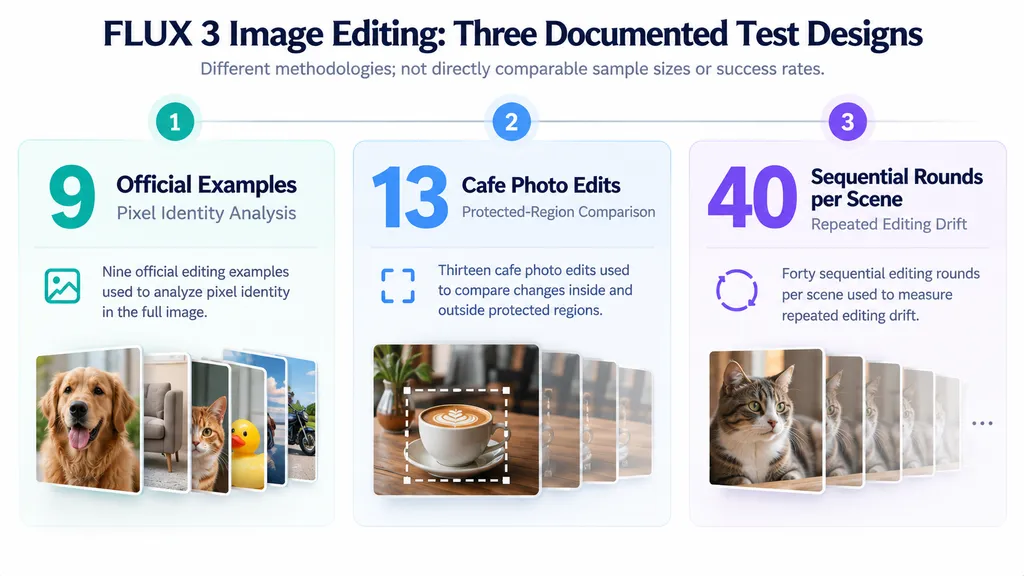
Case Study 1: Nine Official FLUX 3 Editing Examples
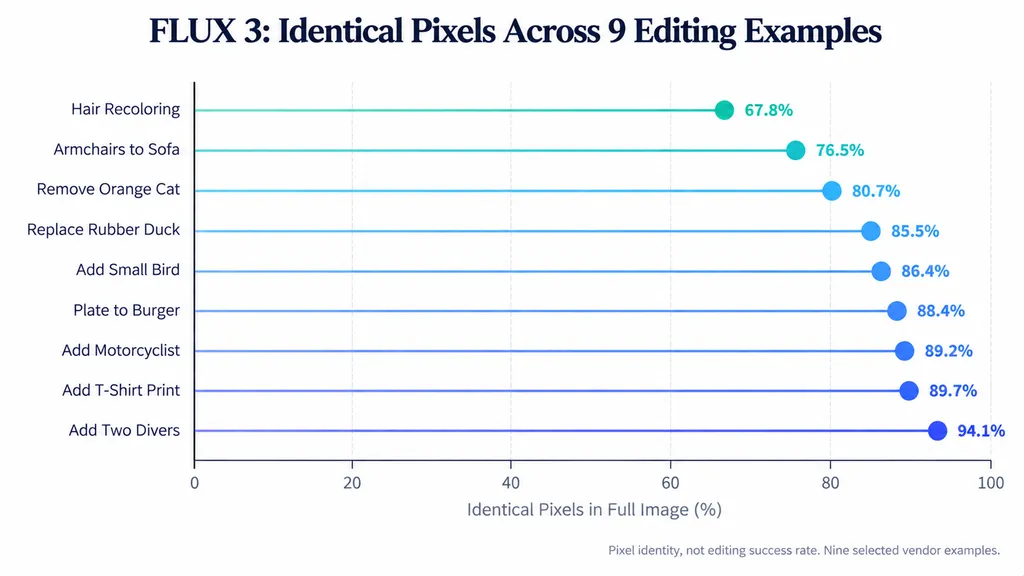
Creative AI News examined nine editing examples published by Black Forest Labs.
The analysis used the provided source images, results, and difference masks to examine which pixels changed.
Across these selected examples, 67.8%–94.1% of the complete image pixels remained identical.
Editing task | Identical pixels |
Hair recoloring | 67.80% |
Armchairs replaced with sofa | 76.50% |
Orange cat removed | 80.70% |
Rubber duck replaced | 85.50% |
Small bird added | 86.40% |
Plate replaced with burger | 88.40% |
Motorcyclist added | 89.20% |
T-shirt print added | 89.70% |
Two divers added | 94.10% |
These figures measure identical pixels across the complete image, not editing success rates or preservation accuracy outside the target region.
Large intended changes naturally affect more pixels than small modifications.
The evaluator also examined whether changed pixels remained concentrated around the edited object.
In the motorcyclist example, approximately 32% of changed pixels occurred in separate surrounding regions.
In the rubber duck example, approximately 25% of changed pixels occurred away from the main editing area.
The divers example contained multiple disconnected changes involving environmental details.
These results show that FLUX 3 can preserve large parts of an image while still introducing unexpected modifications.
Importantly, the experiment analyzed nine selected vendor examples rather than a representative benchmark of everyday editing performance.
The sample selection, unknown model-build differences, and limited task coverage prevent generalizing these percentages into a model-wide reliability score.
Case Study 2: FLUX 3 vs Nano Banana 2.1 Across 40 Editing Rounds
A separate published experiment compared FLUX 3 and Nano Banana 2.1 across repeated editing sequences.
The evaluator used three starting images and 40 consecutive editing rounds per image.
Each output became the input for the following edit.
The metric was mean absolute pixel error in protected regions, measured against the original image on a 0–255 scale.
Lower values indicate less unintended change.
Test scene | FLUX 3 | Nano Banana 2.1 |
Milk | 3.6 | 93.1 |
Mirror Selfie | 10.3 | 84.8 |
Gym | 11.3 | 53.7 |
FLUX 3 recorded lower protected-region pixel error in all three test scenes.
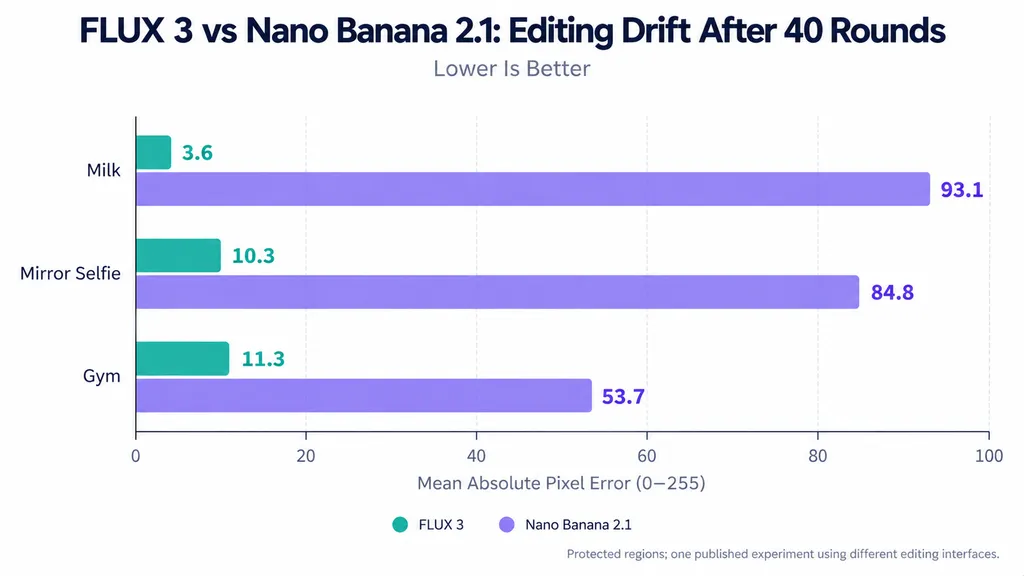
The largest separation appeared in the Milk example, where FLUX 3 recorded 3.6 compared with 93.1 for Nano Banana 2.1.
The Mirror Selfie and Gym tests followed the same general pattern.
These results are particularly relevant to commercial design because client revisions often involve multiple consecutive edits.
However, the models were tested through different editing interfaces.
FLUX 3 used Bounding Box and preservation instructions, while Nano Banana 2.1 used the controls available in its respective workflow.
The results therefore describe the tested editing workflows rather than a perfectly controlled model-only comparison.
The published material also does not provide a complete independently verified call log or per-round instruction-completion dataset.
Case Study 3: Two Missed Edits Reveal a Critical Limitation
The 40-round experiment reported two missed FLUX 3 instructions during later Gym revisions.
This creates an important distinction between preserving an image and successfully editing it.
Imagine asking a model to change a jacket from blue to red without modifying the background.
If the jacket remains blue while the background stays unchanged, the image may receive an excellent preservation score despite failing the actual task.
Conversely, another model might correctly recolor the jacket while introducing minor lighting changes.
Both results contain errors, but the errors are different.
Professional image editing should therefore evaluate:
- Instruction completion: Was the requested change executed?
- Protected-region preservation: Did unrelated areas remain stable?
- Reference accuracy: Were important visual attributes retained?
These three dimensions form a practical editorial evaluation framework, not a validated numerical accuracy score.
Case Study 4: Repeated Edits to a Cafe Photograph
Another published evaluation tested FLUX 3 using a cafe photograph containing a coffee cup, croissant, notebook, glasses, and surrounding objects.
For 10 of 13 single-image edits, the evaluator found that approximately 98.4%–99.3% of the protected region remained within its specified pixel-difference tolerance.
The remaining three edits produced larger changes.
One recoloring operation affected a nearby plate, while two typography edits caused broader image reconstruction.
The evaluator counted pixels as unchanged when no color channel moved beyond the stated tolerance after aligning the output with the source.
The results indicate that editing behavior depends on the type of requested change.
Simple object modifications may preserve nearby details effectively, while text replacements can trigger larger unwanted image changes.
The percentages should not be interpreted as universal accuracy rates or exact pixel identity.
Can FLUX 3 Maintain Character and Reference Consistency?
FLUX 3 supports up to 10 reference images, but accepting multiple references does not guarantee accurate attribute assignment or stable character identity.
Multi-reference composition is useful for fashion photography, product visualization, and branded creative campaigns.
However, reference handling introduces a different kind of error from background drift.
Case Study 5: Ten Reference Images and One Attribution Error
One documented experiment supplied 10 reference images representing different subjects, clothing items, materials, accessories, and environmental characteristics.
The evaluator reported that 9 of the 10 references contributed as intended.
However, a knitted texture appeared on the wrong jacket.
This is an example of reference attribution leakage.
The model recognized the referenced material but associated it with the wrong object.
The reported 9/10 observation describes one experiment. It is not evidence of a general 90% reference accuracy rate.
For a fashion advertisement containing multiple garments, one incorrect material assignment can make an otherwise realistic image commercially inaccurate.
How to Improve FLUX 3 Reference Accuracy
The most useful approach is to give every reference a clearly defined role.
For example:
- Reference A: Facial identity and hairstyle
- Reference B: Jacket construction and color
- Reference C: Fabric material
- Reference D: Environmental lighting
A precise instruction should state which features may transfer and which must remain unchanged.
For example:
"Use Reference A for facial identity. Apply the knitted fabric from Reference C only to the sweater. Preserve the leather jacket's existing material, color, and shape. Use Reference D for lighting."
This reduces ambiguity, although it does not eliminate attribution errors.
FLUX 3 Character Consistency vs Product Consistency
Character consistency involves facial identity, anatomy, hairstyle, and recognizable features.
Product consistency involves geometry, materials, packaging, color accuracy, and branding.
These requirements should be evaluated separately.
The available research does not provide a controlled multi-scene character identity benchmark for FLUX 3.
Therefore, support for multiple reference images should not be presented as proof of reliable character consistency across every scene.
For longer campaigns, teams should preserve approved source images and compare new generations against those references.
How Accurate Is FLUX 3 Text Rendering and Layout?
FLUX 3 demonstrated strong typography performance in a limited published comparison, but text accuracy and composition quality remain separate evaluation criteria.
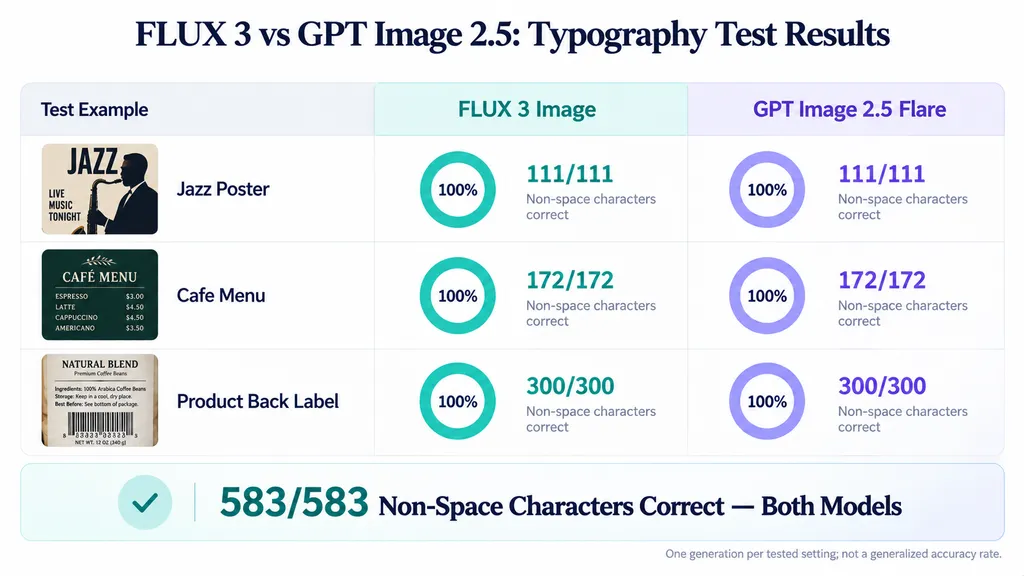
Case Study 6: FLUX 3 vs GPT Image 2.5 Across 583 Characters
Fuser compared FLUX 3 Image with GPT Image 2.5 Flare using three typography tasks:
- Jazz poster
- Cafe menu
- Dense product back label
Across these tasks, the evaluator counted 583 requested characters, excluding spaces.
Both models reproduced all the counted characters correctly in the reported outputs.
Typography test | FLUX 3 | GPT Image 2.5 |
Jazz poster | 111/111 | 111/111 |
Cafe menu | 172/172 | 172/172 |
Product back label | 300/300 | 300/300 |
Total | 583/583 | 583/583 |
The evaluator inspected the images at full resolution and checked character accuracy, punctuation, and unwanted additions.
However, each task used one generation per tested setting, and the models used different output sizes and quality settings.
FLUX 3 generated the portrait examples at a higher pixel count than GPT Image 2.5 Flare, which may have helped with small text.
The findings therefore support a tie in these specific typography tests, not a general claim of perfect text accuracy.
Case Study 7: Four-Prompt Text and Composition Comparison
A separate comparison evaluated FLUX 3 against Nano Banana 2 using four visual tasks.
Task | Main evaluation goal |
Holiday poster | Headline and decorative layout |
SaaS dashboard | UI text and composition |
Product label | Packaging typography |
Book cover | Title placement and hierarchy |
The models reportedly performed similarly in text correctness.
However, Nano Banana 2 was preferred for composition in two tasks.
This comparison involved Nano Banana 2, not Nano Banana 2.1.
It was also a small developer-produced evaluation rather than a large independent benchmark.
Its main value is demonstrating that visual composition and text correctness should be assessed separately.
Why Accurate Text Can Still Produce an Unusable Design
Consider a product advertisement containing a headline, price, product image, and disclaimer.
A model might reproduce every word correctly while positioning the headline too close to the product.
Another model might generate attractive composition but introduce an incorrect price.
Both outputs require correction.
For commercial use, designers should verify exact wording, punctuation, numbers, visual hierarchy, and spacing.
Readable typography is not necessarily publication-ready typography.
Bounding Boxes can help specify intended text placement, but every important text element still requires inspection.
FLUX 3 Image Pricing: How Much Does It Cost?
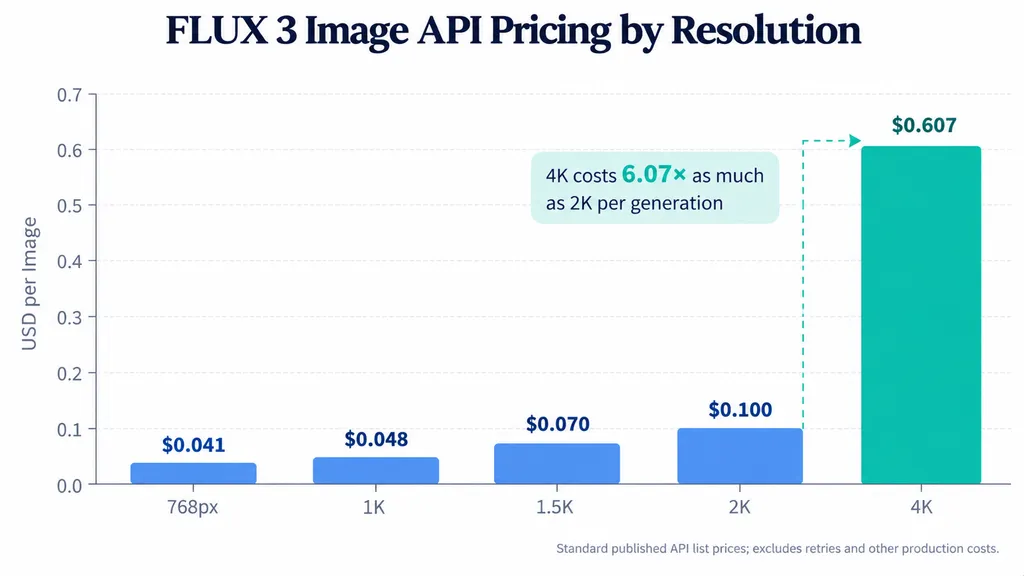
FLUX 3 Image's published standard API prices range from $0.041 at 768px to $0.607 at 4K per generation.
The model launched with a temporary 50% discount that ended on October 8, 2026.
The following figures represent standard API list prices rather than expired promotional rates.
FLUX 3 API Pricing by Resolution
Resolution | Price per image | Cost for 1,000 images |
768px | $0.04 | $41 |
1K | $0.05 | $48 |
1.5K | $0.07 | $70 |
2K | $0.10 | $100 |
4K | $0.61 | $607 |
The 4K tier costs approximately 6.07 times as much as 2K and 12.65 times as much as 1K.
These comparisons describe per-generation prices, not performance-adjusted cost or cost per pixel.
Third-party platform credits and hosted-provider charges may differ from direct API rates.
Case Study 8: Cafe Poster Editing Costs
A documented cafe-poster workflow used targeted editing to revise several elements.
The reported process included generating the initial poster, replacing a cup, removing a bin, moving a cat, adding a person, and refining the composition.
The project reportedly consumed approximately 50 platform credits, valued at around $0.50.
This figure describes one platform-specific workflow, not an average FLUX 3 API cost.
However, the example shows why targeted editing can be useful in commercial design.
Instead of rebuilding the entire composition after each client request, the designer can attempt to revise individual elements while preserving the approved layout.
Case Study 9: A $0.895 Production Scenario
A separate published pricing example describes a workflow involving six 1K generations followed by one final 4K output.
At standard FLUX 3 API rates:
Production step | Cost |
Six 1K images | $0.29 |
One 4K image | $0.61 |
Total | $0.90 |
This is a hypothetical calculation, not a measured average commercial workflow.
It illustrates how lower-resolution exploration can be combined with a higher-resolution final asset.
Why Cost per Accepted Image Matters More Than API Price
A low per-generation price does not necessarily produce a low-cost final asset.
Failed generations, additional edits, and manual corrections all contribute to production expenses.
The more useful metric is:
Cost per accepted image = total production cost ÷ number of approved images.
For example, a model with a low API price may become expensive if it repeatedly changes approved branding or product details.
A higher-priced model may be more economical if it produces acceptable assets with fewer revisions.
The available research does not establish a statistically reliable FLUX 3 acceptance rate.
Therefore, no universal cost-efficiency advantage over competing models can be concluded from the published prices alone.
FLUX 3 vs Nano Banana 2.1 vs GPT Image 2.5: Which Is Better?
FLUX 3 is particularly promising for controlled editing and protected-region preservation, but available evidence does not establish a universal winner across image quality, text rendering, character consistency, and production cost.
FLUX 3 vs Nano Banana 2.1: Repeated Editing
The 40-round experiment provides evidence favoring FLUX 3 for preserving untouched image regions.
Its protected-region pixel error was lower in all three tested scenes.
However, the experiment also documented missed instructions.
The results therefore support a narrower conclusion: FLUX 3 performed better at preservation in that particular workflow, while overall editing success remains less certain.
Nano Banana 2.1 remains an alternative for teams prioritizing prompt-driven creative exploration.
The better choice depends on whether the task emphasizes preservation, instruction completion, or visual interpretation.
FLUX 3 vs GPT Image 2.5: Pixel-Level Editing Accuracy
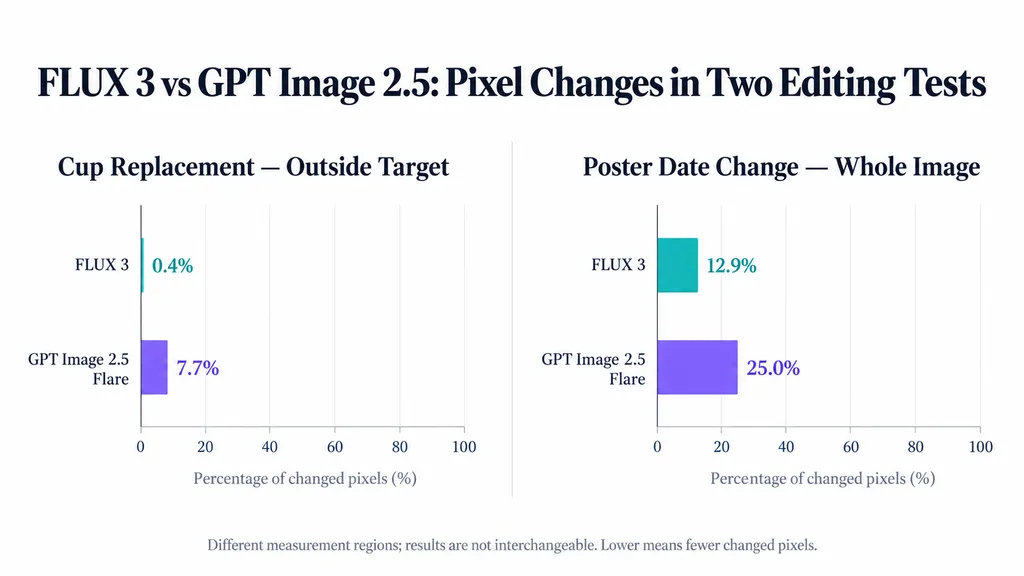
Fuser compared the two models in separate editing tasks using the same source images and instructions.
One task replaced a paper cup with a mug.
The evaluator measured the percentage of pixels outside the target area that changed beyond a 3.2% pixel-difference threshold.
Model | Changed pixels outside target |
FLUX 3 | 0.40% |
GPT Image 2.5 Flare | 7.70% |
The evaluator noted that FLUX 3's 0.4% result was comparable to the changes caused by resizing the source image itself.
The second task involved replacing a date on a finished poster.
Model | Changed pixels across image |
FLUX 3 | 12.90% |
GPT Image 2.5 Flare | 25.00% |
Both models completed the requested date change.
However, neither preserved the entire poster unchanged.
The first table measures changes outside a designated edit region; the second measures changes across the complete image. These metrics should not be combined or interpreted as directly interchangeable success rates.
Both experiments used one generation per setting, different model-specific quality settings, and resizing where necessary for pixel comparison.
The findings suggest an advantage for FLUX 3 in these editing tasks without establishing universal superiority over GPT Image 2.5.
Case Study 10: Thirty-One Consecutive Editing Operations
Another published comparison examined 31 consecutive image edits using FLUX 3 and GPT Image 2.5.
The evaluator reported stronger overall structural preservation with FLUX 3 during the sequence.
GPT Image 2.5 reportedly showed visible changes to the original image structure earlier in the editing process.
However, the report did not include equivalent numerical pixel-error metrics, instruction-completion rates, or independent repetitions.
It is therefore best treated as qualitative supporting evidence, rather than a separate quantitative benchmark.
What Do Independent AI Image Benchmarks Show?
An October 1, 2026 Artificial Analysis leaderboard snapshot reproduced in an industry review contained the following historical results.
Model | Generation Elo | Editing Elo |
GPT Image 2.5 Sunburst | 1197 ±9 | 1182 ±8 |
GPT Image 2.5 Flare | 1190 ±9 | 1162 ±8 |
Nano Banana 2 | 1125 ±8 | 1108 ±8 |
Seedream 5.0 Pro | 1081 ±8 | 1106 ±8 |
FLUX.2 Max | 1021 ±8 | 996 ±9 |
FLUX 3 Image | Not listed | Not listed |
These scores represent a historical snapshot, not current live rankings.
FLUX.2 Max cannot be used as a substitute for FLUX 3 Image, and Nano Banana 2 results should not be attributed to Nano Banana 2.1.
Because FLUX 3 was not listed in this snapshot, its overall standing cannot be inferred from these numbers.
For commercial decisions, controlled tests matching the intended design workflow are more useful than unsupported leaderboard claims.
What Are the Main Limitations of FLUX 3 Image?
FLUX 3 offers valuable editing controls, but several limitations remain relevant to professional adoption.
Unwanted Changes Outside the Edit Region
The nine-example analysis identified changes outside the intended object in several vendor demonstrations.
Separate cafe-photo experiments also found that some text replacements triggered broader reconstruction.
Bounding Boxes can improve targeting, but they do not guarantee pixel-identical backgrounds.
For strict preservation requirements, designers may need to composite an approved edited region onto the original image using a conventional editor.
Incomplete Editing Instructions
The 40-round comparison documented two missed FLUX 3 edits.
This highlights the need to check task completion independently from image preservation.
A visually stable output may still fail its editing brief.
Incorrect Reference Attribution
The multi-reference experiment documented knitted texture appearing on the wrong garment.
For fashion and product advertising, such errors can undermine product accuracy even when the generated scene appears realistic.
Reproducibility and Deployment Uncertainty
Published technical reviews indicate that FLUX 3's documented API does not expose conventional seed control for deterministic reproduction.
Designers should preserve approved outputs rather than assuming an identical request will regenerate the same image.
Commercial weights licensing and deployment options also depend on current vendor terms.
These should not be confused with unrestricted open-source access or verified compatibility with a particular consumer GPU.
High-Resolution Production Costs
At $0.607 per 4K image, repeated high-resolution generation can become expensive.
Teams should determine whether lower-resolution drafts are sufficient for early creative decisions and track rejected generations alongside successful outputs.
How to Use FLUX 3 Image in Professional Design Workflows
FLUX 3 works best when targeted editing is combined with structured references, clear revision instructions, and explicit approval checks.
Step 1: Establish the Creative Brief and Approved References
Define the intended subject, composition, lighting, visual style, and elements that must remain unchanged.
For product photography, identify product geometry , packaging, brand text, and material details before generation.
Use approved reference images as the baseline for future revisions.
Step 2: Explore Concepts at Lower Resolution
Generate initial concepts at 1K or 2K when the final delivery requirements allow it.
Evaluate composition, creative direction, and subject placement before committing to higher-resolution output.
This separates visual exploration from final production.
Step 3: Apply Targeted Editing Instructions
Use Bounding Box information when object placement matters.
Specify both the requested change and protected elements.
For example:
"Replace the ceramic cup with a transparent glass mug. Preserve the wooden table, camera perspective, background lighting, and surrounding objects. Do not add new text or accessories."
This makes the intended transformation more explicit without relying on vague descriptions.
Step 4: Validate Both Editing Accuracy and Preservation
Compare each output against the approved source.
Check whether the requested change occurred, whether protected areas remain acceptable, and whether important reference details are accurate.
If multiple revisions introduce accumulated editing errors, return to an approved earlier image rather than continuing from a degraded output.
Step 5: Finalize the Image and Maintain Creative Continuity
After approving the composition, generate the required final-resolution output.
Inspect typography, product geometry and materials, and delivery dimensions once more.
For collaborative design teams, keeping reference images, decisions, and revision history organized is equally important.
Virse supports this broader workflow with an infinite canvas, multiple collaborating AI agents, shared project context, and long-term design memory. Teams can keep visual references, creative decisions, and related design work together instead of coordinating disconnected prompts and assets.
The goal is not simply to generate more images, but to maintain creative direction and produce approved assets with fewer unnecessary revisions.
FAQ
Is FLUX 3 better than Nano Banana 2.1?
FLUX 3 demonstrated lower protected-region editing drift in a published 40-round experiment involving three scenes. However, the comparison used different editing interfaces and also documented two missed FLUX 3 instructions. The findings support a preservation advantage in that specific workflow, not an overall victory in image quality or editing accuracy.
Does FLUX 3 support native 4K?
Yes. FLUX 3 supports a native 4K output tier, with documented examples reaching approximately 16.76 megapixels. Actual image dimensions vary by aspect ratio. Higher resolution can benefit commercial artwork, but it does not guarantee accurate typography, product details, or reference attribution. The standard API price is $0.607 per 4K image.
Can FLUX 3 preserve characters and backgrounds during repeated edits?
FLUX 3 demonstrated strong background preservation in limited repeated-editing experiments, including a 40-round comparison and smaller pixel-level tests. However, multi-scene character identity remains less thoroughly measured, and one reference test documented incorrect texture attribution. Designers should independently verify identity, clothing, product geometry, and protected backgrounds.
Is FLUX 3 worth its API price?
FLUX 3 can be worth its API price when targeted editing reduces unnecessary revisions and manual corrections. Standard generation rates range from $0.041 at 768px to $0.607 at 4K. However, the most meaningful commercial metric is cost per accepted image, including unsuccessful generations and editing expenses, rather than the price of one API request.
Conclusion
FLUX 3 Image is a compelling option for designers who prioritize targeted editing, controlled layouts, reference-driven composition, and high-resolution commercial assets. Its strongest published evidence includes lower protected-region drift than Nano Banana 2.1 over 40 editing rounds, reduced unintended changes compared with GPT Image 2.5 in two controlled editing tasks, and accurate reproduction of 583 requested non-space characters in a limited typography comparison. However, independent evaluations also reveal missed instructions, reference attribution errors, and changes outside selected editing regions, while the $0.607 cost of 4K generation makes production efficiency important. FLUX 3 is therefore most valuable when precise revisions and image preservation matter more than unrestricted visual exploration. For professional workflows, the deciding factors should be instruction completion, reference accuracy, visual consistency, and total cost per approved asset—not isolated image quality or unsupported claims of overall model superiority.