Préserver la précision du design des maquettes IA sans corrections interminables
 Yifan Zhao10 min de lecture ·

Préserver la précision du design des maquettes IA consiste à réduire la part que l'IA est autorisée à inventer. L'approche la plus fiable consiste à lui fournir des écrans de référence, des composants approuvés, des tokens de design, des règles d'espacement et des contraintes d'interaction avant la génération, puis à comparer le résultat au design d'origine.
Le problème est qu'une maquette IA peut sembler convaincante tout en modifiant discrètement la hiérarchie, les espacements, le comportement des composants, la logique responsive ou les états d'interaction. Ces petites différences entraînent souvent beaucoup de corrections. Notre analyse de workflows de design avec l'IA publics montre que la précision s'améliore lorsque l'IA travaille dans des contraintes de design définies plutôt que de deviner à répétition à partir de prompts.
Virse s'organise autour de ce workflow créatif plus maîtrisé. Références, ressources et tâches IA peuvent rester réunies sur une toile infinie, tandis que les agents travaillent à partir de documents reliés entre eux plutôt que de prompts isolés. Les offres payantes incluent un usage illimité de plus de 40 modèles, dont Nano Banana 2 et GPT Image 2, avec un nombre illimité de sièges. Les nouveaux utilisateurs reçoivent des crédits pouvant couvrir jusqu'à 10 images Nano Banana 2 ou une vidéo Seedance 2.0 ; Seedance 2.5, Seedance 2.0 et MiniMax H3 sont également disponibles dans Virse.

Que signifie réellement la précision du design d'une maquette IA ?
La précision du design mesure à quel point une maquette générée par l'IA préserve l'apparence visuelle, la structure du système et les comportements d'interaction prévus dans le design d'origine.
Je l'évalue selon trois dimensions :
Dimension de précision | Éléments à préserver | Échec typique de l'IA |
|---|---|---|
Fidélité visuelle | Espacements, couleurs, typographie, proportions, hiérarchie | Style générique ou espacements incohérents |
Fidélité structurelle | Composants, variantes, tokens, règles de mise en page | Calques personnalisés remplaçant de vrais composants |
Fidélité comportementale | États, navigation, comportement responsive | Écrans à l'apparence correcte mais à la logique erronée |
Cette distinction compte, car la similarité des pixels n'est pas la précision du design. Dans les cas étudiés, certaines interfaces générées ressemblaient à leurs références sans utiliser les véritables composants du système de design. D'autres fichiers nécessitaient une reconstruction importante d'Auto Layout avant de devenir maintenables.
Un test utile est simple : une maquette précise doit le rester lorsqu'on la modifie, la redimensionne, la réutilise ou la fait passer dans un autre état du produit.
Pourquoi les maquettes IA perdent-elles en précision ?
La plupart des problèmes de précision commencent lorsque le modèle manque de contexte de design structuré.
Si l'IA sait qu'une page a besoin d'un bouton principal sans connaître le véritable composant, sa variante de taille, ses espacements, son rayon, sa typographie ou ses états, elle doit reconstruire ces décisions. Répéter cela dans les formulaires, cartes, navigations, tableaux et mises en page provoque une dérive du design.
Notre analyse des questions des utilisateurs a révélé qu'une préoccupation persistante n'était pas « Comment écrire un meilleur prompt ? », mais « Comment faire utiliser à l'IA le système de design que j'ai déjà ? »
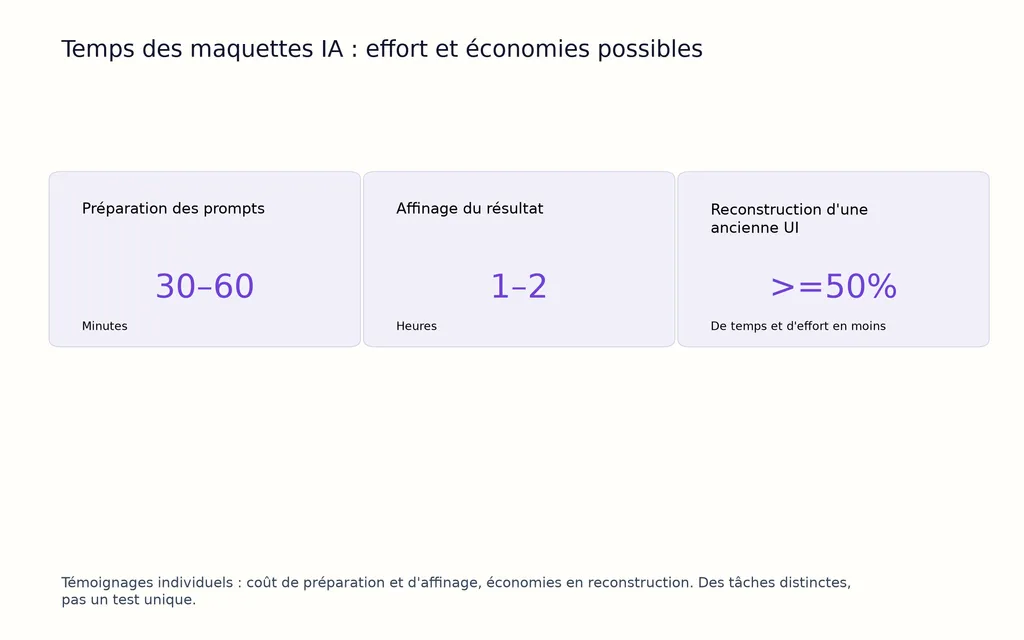
Les ajustements conversationnels répétés introduisent un autre problème : les régressions. Corriger une marge intérieure peut décaler un alignement ailleurs ; ajuster un composant peut modifier un autre point de rupture. Certains praticiens des workflows étudiés estimaient consacrer 30 à 60 minutes à préparer les prompts, puis 1 à 2 heures à affiner les résultats pour des tâches visuelles parfois beaucoup plus rapides à esquisser à la main. Ce sont des témoignages individuels, pas des références universelles, mais ils révèlent un coût réel : la vitesse de génération n'est pas la vitesse de production.
Comment systèmes de design et références préservent-ils la précision des maquettes IA ?
La meilleure façon de préserver cette précision consiste à convertir les décisions de design existantes en contraintes réutilisables par le modèle.
Avant de générer une UI destinée à la production, l'IA doit recevoir les composants, variantes, tokens sémantiques, typographies, échelles d'espacement, grilles, points de rupture et états clés approuvés. Si une décision existe déjà dans le système de design, elle doit la sélectionner plutôt que la recréer.
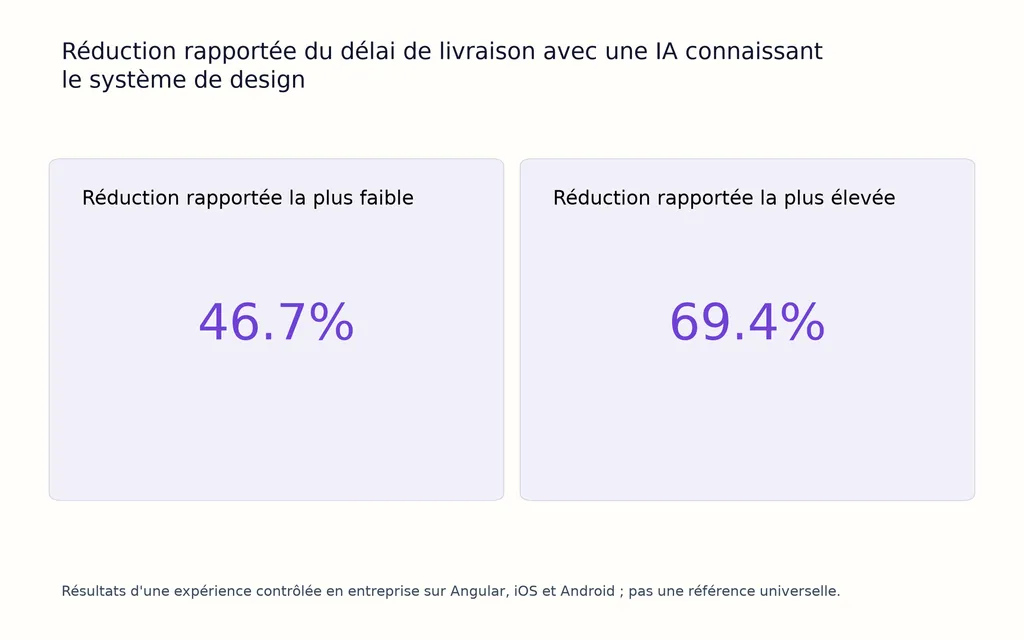
Les preuves empiriques en faveur de cette approche se multiplient. Une expérience contrôlée en entreprise menée en 2026 a comparé développement manuel, développement avec le seul système de design et développement avec une IA connaissant ce système. Elle a rapporté une réduction du délai de livraison de 46,7 % à 69,4 % avec l'IA, ainsi que des tâches plus complètes et des performances moins variables. L'étude portait sur des workflows Angular, iOS et Android : ce n'est donc pas une référence universelle, mais elle apporte des éléments utiles montrant que l'IA fonctionne mieux lorsqu'elle s'appuie sur un système de design établi.
Les références exigent également plus qu'une capture d'écran. Une entrée plus solide associe écran de référence + vrais composants + règles de design + exigences d'interaction + contraintes de contenu. La capture définit l'apparence ; le contexte structuré explique comment la reproduire.
Pour la production, séparez les décisions en deux groupes. Les décisions fixes comprennent les couleurs de marque, la typographie, les composants, les espacements, la navigation, le comportement responsive et les règles d'accessibilité. Les décisions flexibles peuvent inclure la composition, les images, le regroupement d'informations et les premières explorations visuelles. Plus la maquette approche de la production, plus cette catégorie doit se réduire.
Quel est le meilleur workflow pour des maquettes IA précises au pixel près ?
Un processus reproductible est plus fiable que la recherche d'un prompt parfait.
- Définissez une référence unique. Choisissez l'écran Figma, l'interface de production ou la référence du système de design approuvés.
- Fixez les éléments fondamentaux du design. Fournissez composants, tokens, styles de texte, espacements, grilles, points de rupture et états importants.
- Définissez ce que l'IA ne peut pas modifier. Protégez le choix des composants, les règles de marque, la hiérarchie et la logique d'interaction.
- Générez d'abord une section délimitée. Validez un formulaire, un schéma de navigation, un groupe de cartes ou un état avant de générer un parcours complet.
- Examinez séparément les trois dimensions de fidélité. Vérifiez l'apparence, la structure du système et le comportement, sans les regrouper en une approbation indistincte.
- Effectuez le rendu et comparez. Remplacez les consignes vagues comme « rapproche-toi du modèle » par les écarts visibles entre la référence approuvée et le résultat.
- Procédez à un contrôle qualité humain. Testez le responsive, l'accessibilité, les contenus extrêmes, les états vides, les erreurs et les interactions propres au produit.
Le principe est simple : intégrez la précision au système avant la génération plutôt que d'essayer de la réparer ensuite.
Que révèlent les cas réels de maquettes IA sur la précision ?
Un prototypage complexe avec l'IA a pris des jours, contre quelques heures à la main dans Figma
Un workflow public étudié concernait un designer produit réalisant un prototype à la logique d'interaction détaillée, notamment une sélection de sièges comparable à celle d'une compagnie aérienne. Plusieurs approches de prototypage IA ont été explorées pendant environ deux jours, mais le résultat nécessaire a finalement été reconstruit dans Figma classique en quelques heures. Un autre témoignage décrivait un écart similaire entre jours et heures.
La difficulté n'était pas de générer des écrans, mais de préserver les états, les règles spatiales, la navigation et le comportement propre au produit.
La leçon : la précision des interactions complexes doit être modélisée explicitement. Un premier écran visuellement impressionnant ne prouve pas que le parcours soit correct.
L'IA a réduit d'au moins 50 % l'effort de reconstruction d'une ancienne UI
Un meilleur résultat est apparu lorsque l'IA a servi à reconstruire une interface existante avant sa refonte. La cible et le contexte du système étaient déjà présents, ce qui réduisait fortement l'ambiguïté.
Un cas étudié rapportait une réduction d'au moins 50 % du temps et de l'effort par rapport à une reconstruction manuelle de l'interface.
La leçon : l'IA réussit généralement mieux la reconstruction, la migration, l'adaptation et les variations maîtrisées, car un résultat clair permet la comparaison.
Une correction de 4 px a fonctionné immédiatement ; ailleurs, Auto Layout représentait 90 % des retouches
Deux petits exemples rendent particulièrement nette la différence entre travail contraint et travail non contraint.
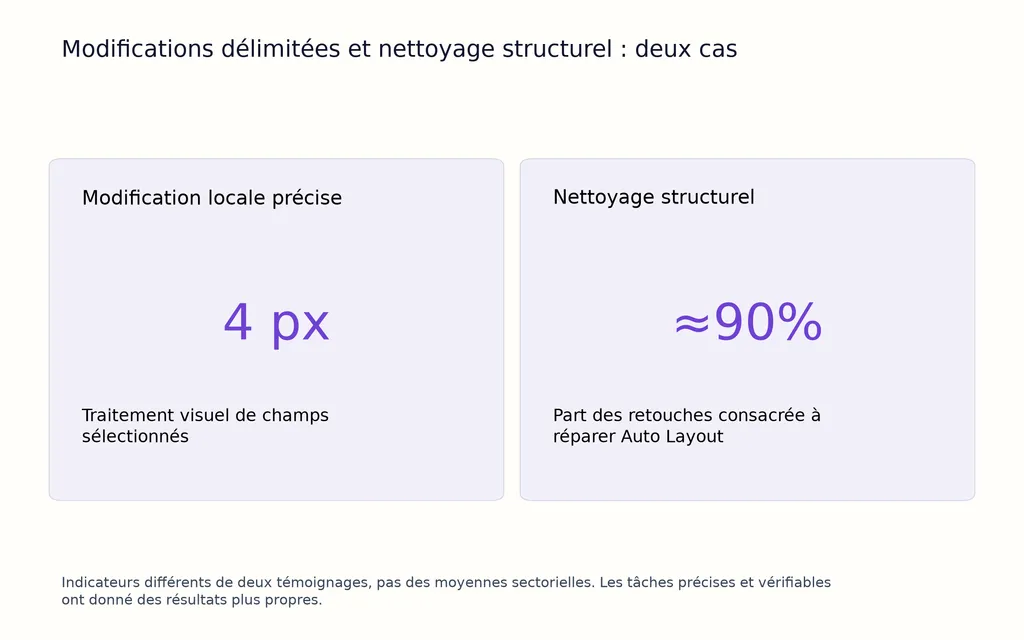
Dans un cas, on a demandé à l'IA d'appliquer le même traitement visuel de 4 px manquant à des champs de formulaire sélectionnés ; elle a correctement réalisé ce changement délimité. Dans un autre workflow Figma, un praticien déclarait consacrer environ 90 % de l'effort de retouche à réparer Auto Layout après la génération par IA.
Ces chiffres proviennent de témoignages individuels, pas de moyennes sectorielles. Leur valeur est diagnostique : la précision de l'IA augmente lorsque la cible est précise, contrainte et facile à vérifier.
Comment les tests de régression visuelle et le contrôle qualité améliorent-ils la précision ?
Dès qu'une maquette IA peut être rendue à l'écran, la fidélité visuelle devient un problème de vérification plutôt que de formulation de prompts.
La boucle utile est référence approuvée → implémentation générée → comparaison du rendu → correction ciblée → validation.
La recherche sur la génération de code à partir de maquettes soutient cette direction. L'étude DesignCoder de 2026 a évalué 300 maquettes haute fidélité et associé une génération tenant compte de la hiérarchie à une autocorrection guidée par la vision. Face à sa meilleure méthode de référence sur le jeu de données Figma, elle rapportait une réduction de l'erreur visuelle de 37,6 % et une amélioration de la similarité structurelle de 30,2 %.
Ce résultat renforce une distinction importante : comparaison visuelle et validation structurelle doivent aller de pair.
Pour un contrôle qualité concret, mesurez quatre éléments :
Indicateur | Question posée |
|---|---|
Fidélité visuelle | Le rendu correspond-il à la référence approuvée ? |
Conformité au système | Les bons composants, variantes et tokens sont-ils utilisés ? |
Coût de correction | Quelle quantité de reprise manuelle reste-t-il ? |
Taux de régression | Les modifications ultérieures dégradent-elles des UI déjà approuvées ? |
Un modèle utile de productivité est donc génération + correction + nettoyage structurel + validation. La meilleure maquette IA n'est pas forcément le premier jet le plus rapide, mais celle qui atteint un état approuvé et réutilisable avec le moins de reprises au total.
Conclusion : préserver la précision du design des maquettes IA
Préserver la précision du design des maquettes IA relève fondamentalement d'un problème de contexte, de contraintes et de vérification. Fournissez de vrais composants, tokens, références, règles de mise en page et exigences d'interaction ; séparez les décisions fixes des flexibles ; générez par étapes délimitées ; évaluez séparément les fidélités visuelle, structurelle et comportementale ; puis comparez le rendu à une base approuvée. Les travaux publiés et les cas étudiés convergent : l'IA devient plus fiable lorsque le résultat voulu est explicite, réutilisable et testable, au lieu d'être laissé à l'interprétation du modèle.
FAQ sur la précision du design des maquettes IA
Comment faire respecter mon système de design Figma par l'IA ?
Donnez-lui un accès structuré à vos vrais composants, variantes, tokens, typographies, espacements et règles de mise en page, plutôt que de décrire le système uniquement par prompts. L'objectif est de lui faire réutiliser les décisions existantes plutôt que générer des substituts visuellement similaires. Cela réduit directement la dérive des composants et des styles.
L'IA peut-elle reproduire une capture au pixel près ?
L'IA peut reproduire beaucoup de caractéristiques visibles d'une capture, mais celle-ci ne décrit pas complètement les composants, le responsive, les tokens, les états ni la logique d'interaction. Pour davantage de précision, associez la référence visuelle à un contexte de design structuré et validez le rendu par rapport à une base approuvée.
Pourquoi l'IA corrige-t-elle un problème d'UI tout en en créant un autre ?
La modification demandée peut manquer de limites claires, permettant au modèle de réinterpréter la mise en page, le style ou le comportement des composants voisins. Des modifications réduites, des fondamentaux figés, des états explicites et une comparaison visuelle après chaque changement facilitent la prévention des régressions.
Les composants Figma ou les composants de code doivent-ils servir de référence ?
Utilisez le système qui contrôle réellement l'expérience en production, puis reliez l'autre environnement aussi étroitement que possible. Le risque principal n'est pas de choisir Figma ou le code, mais de maintenir deux références déconnectées qui divergent progressivement.