
What Is an AI Design Agent for Creative Workflows?
 Yifan Zhao21 min de lecture ·
An AI design agent for creative workflows can understand a creative goal, use project context, coordinate multiple actions, and refine outputs through feedback while keeping designers in control. Unlike a one-shot generator, it supports several stages of a project, from brief interpretation to asset adaptation. This makes it especially relevant to a structured AI design workflow from brief to delivery and to teams building a broader AI design system.
The challenge is that many tools use the “agent” label without preserving decisions, applying brand rules correctly, or producing editable work. Creative teams should evaluate context awareness, continuity, review effort, and production readiness —— not just speed or autonomy. These qualities become particularly important when maintaining art direction or scaling AI ad creative while preserving brand consistency.
Virse supports this workflow with an infinite canvas and multiple context-sharing agents for tasks such as reference analysis, concept exploration, packaging, campaign adaptation, and batch variations, while designers retain control over direction, editing, review, and delivery. This approach can also complement the rules and reusable assets found in a design system.
What Makes an AI Design Agent Different From Other Creative Tools?
An AI design agent differs from other creative tools because it works at the workflow level. It does not only generate an isolated image or automate a predefined action. It interprets a goal, uses available context, coordinates several operations, and adjusts its approach as the project develops.
An AI design agent is not simply an image generator, a conversational interface, or a fixed automation sequence. It must retain enough context to revise work coherently without treating every instruction as an unrelated new request.
In this article, creative workflows include brand design, marketing production, e-commerce content, packaging visualization, product concept rendering, UI design, and prototyping.
The Capabilities That Make a Creative Tool Agentic
A credible AI design agent usually combines six capabilities:
- Goal understanding: It interprets a brief as an objective rather than a list of visual keywords.
- Context awareness: It uses references, existing assets, brand guidance, design-system elements, or canvas state.
- Multi-step execution: It carries out related actions without requiring a new instruction for every operation.
- Tool use: It selects and applies generation, editing, layout, retrieval, or transformation tools.
- Iterative refinement: It incorporates feedback while preserving approved parts of the work.
- Human control: A designer can inspect, interrupt, edit, compare, undo, or reject the result.
IMG.LY proposes a recent working definition based on autonomy, conversational interaction, and a refinement loop. That framework is useful, but a conversation interface should not be treated as mandatory. An agent may also receive direction through canvas selections, structured controls, reusable workflows, or connected tools.
The defining capability is not conversation itself. It is the ability to understand a broader objective, take coordinated actions, and preserve enough state to respond coherently to feedback.
Figma’s 2026 design agent illustrates a canvas-native approach. According to Figma, the agent can work from selected layers, use components and tokens as context, explore several directions, and return editable design layers to the canvas.
Canva describes AI 2.0 as a conversational and agentic design system that can create layered objects, coordinate actions across its design engine, and retain project context. At launch, these capabilities were introduced as a research preview, so they should be understood as product direction rather than universal evidence of production maturity.
Design Agents vs. Generators, Copilots, and Automation
The categories overlap, but they solve different problems.
Tool category | Typical behavior | Best suited to | Main limitation |
AI generator | Produces an image, video, layout, or text output from a prompt | Fast ideation and isolated asset generation | Usually weak at maintaining workflow state |
AI design feature | Accelerates one task inside existing software | Background removal, resizing, copy suggestions, auto-layout | Does not manage the broader objective |
Copilot or assistant | Helps the user complete tasks while the user plans the workflow | Guided editing, critique, drafting, recommendations | Often requires continuous human direction |
Rule-based automation | Applies predefined rules or templates at scale | Resizing, localization, templated variations | Struggles with ambiguity and novel decisions |
AI design agent | Interprets a goal and coordinates actions across a workflow | Exploration, iteration, adaptation, and structured production | Can introduce errors at scale when context or review is weak |
A generator may create an attractive visual without understanding its role in a campaign. Rule-based automation can produce hundreds of reliable variants but may not recognize that the source brief is strategically unclear.
A design agent should be able to interpret the objective, choose a sequence of actions, and adjust the work when the user changes direction.
The boundary is a spectrum. A product may behave like an agent during concept exploration but rely on fixed automation during export. Another may understand a design system but offer little autonomy. Capability-level comparison is therefore more reliable than accepting a product category at face value.
Why Human Direction and Direct Editing Still Matter
Creative work involves preference, strategy, cultural interpretation, audience judgment, brand meaning, and production constraints. These are not always reducible to objectively correct actions.
Higher autonomy does not automatically produce better design. A useful agent should help execute work while exposing important decisions for human review.
Figma positions AI generation and direct manipulation as complementary. Designers can use the agent to create or modify work, then continue manually when direct editing is faster or more precise.
Canva similarly describes layered outputs that allow users to change individual objects instead of regenerating the full composition.
This principle also shapes Virse’s positioning. Virse is intended to support professional design teams rather than replace designers with a one-prompt workflow. Its product materials describe an infinite canvas where designers can organize, connect, compare, and edit assets while retaining control over creative direction, revision, review, and delivery.
How Does an AI Design Agent Work From Brief to Deliverable?
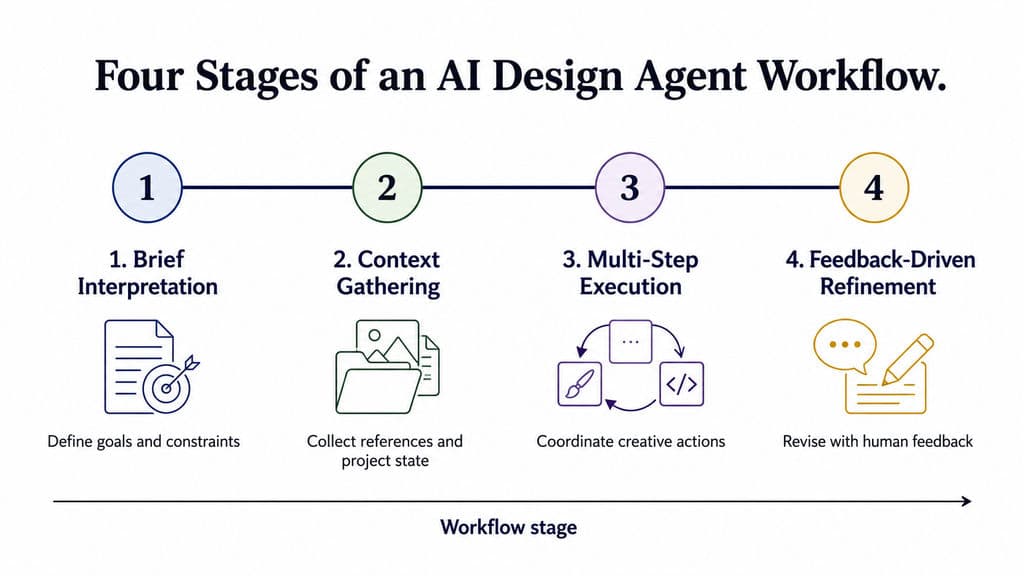
An AI design agent typically works in four stages: brief interpretation, context gathering, multi-step execution, and feedback-driven refinement.
The final output may be an image set, an editable layout, an interactive prototype, a campaign system, or runnable code. These deliverables should not be treated as equivalent because each requires a different level of review, validation, and production work.
Understanding Creative Intent, References, and Project Context
A basic prompt may describe appearance:
Create a minimal skincare campaign with warm neutral colors.
A usable creative brief contains more:
- Audience and market
- Product positioning
- Campaign objective
- Required deliverables
- Brand personality
- Approved references
- Prohibited directions
- Channel dimensions
- Copy hierarchy
- Review requirements
The agent must distinguish between surface preferences, strategic intent, and hard constraints.
“Warm neutral” is a visual preference. “Premium but clinically credible” is a positioning requirement. “Do not resemble wellness influencer content” is an exclusion rule.
Project context may come from:
- Files and reference images
- Existing canvas objects
- Brand templates
- UI components and tokens
- Previously approved versions
- Comments and revision history
- Connected project documents
- Explicit instructions
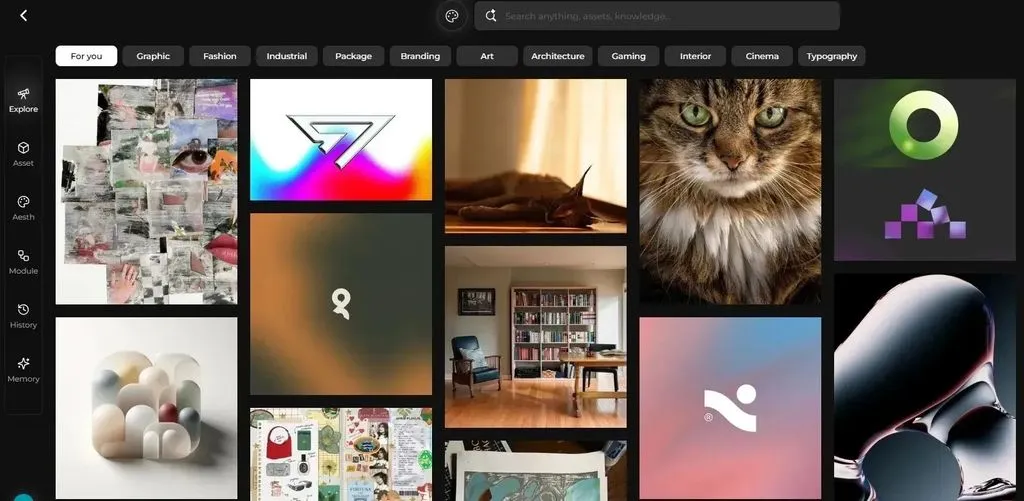
Canvas-native interaction has become a visible product pattern among several creative AI systems. Adobe positions Firefly Boards as an infinite visual workspace for organizing references, generating visual directions, and arranging concepts into moodboards and storyboards before final production.
The value of a canvas is not simply additional space. It makes relationships visible: which reference controls lighting, which image defines composition, which version was approved, and which assets belong to the same campaign.
Virse’s product materials describe agents working within a shared infinite canvas and using wider project context rather than relying only on the latest prompt. Multiple agents can work on related tasks while sharing the project state.
Planning and Executing Multi-Step Creative Tasks
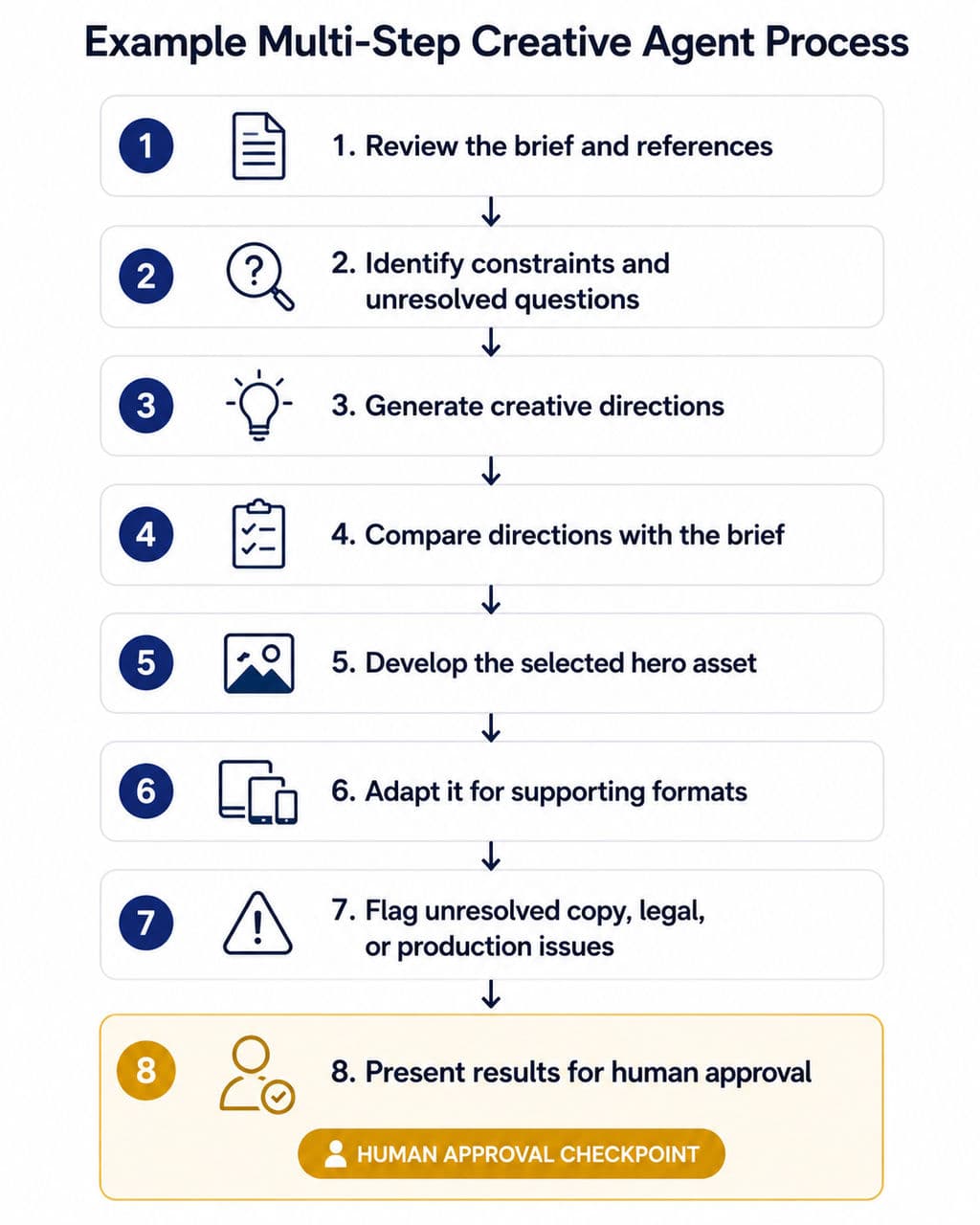
After interpreting the brief, an agent may plan a sequence such as:
- Review the brief and reference material.
- Identify visual constraints and unresolved questions.
- Generate several creative directions.
- Compare those directions against the brief.
- Develop the selected direction into a hero asset.
- Adapt the asset for supporting formats.
- Flag unresolved copy, legal, or production issues.
- Present the results for human approval.
A generator normally performs only the asset-generation step. An agent attempts to connect the full sequence.
Consider a product-launch campaign that requires:
- A hero visual
- Product-detail images
- Social posts
- Email headers
- Display ads
- Localized versions
The challenge is not producing six unrelated images. It is preserving the same approved concept, product appearance, hierarchy, and audience positioning across every deliverable.
A multi-agent system may divide the work further. One agent can analyze references, another can explore visual directions, and another can produce adaptations. This structure is valuable only when the agents share the same project context. Otherwise, the team simply creates several disconnected conversations and spends more time repeating the brief.
Producing Images, Editable Assets, Prototypes, or Runnable Outputs
The deliverable determines whether the agent fits the team’s workflow.
Images and videos are useful for moodboards, campaign concepts, storyboards, and product scenes. However, a convincing image may still contain incorrect text, distorted packaging, inconsistent product details, or unusable dimensions.
Editable design assets provide more control. Canva says AI 2.0 generates layered objects that can be modified independently. Figma says its design agent returns editable layers to the professional design canvas.
Interactive prototypes can help teams evaluate structure and behavior before engineering begins. They do not prove that the experience is usable, accessible, or technically feasible.
Runnable code may accelerate a proof of concept, but runnable code is not automatically production-ready code. A production release may still require:
- Security review
- Authentication and permission testing
- Accessibility validation
- Performance optimization
- Analytics and consent implementation
- Browser and device testing
- Error handling
- Database design
- Deployment controls
- Long-term maintenance
A better comparison question is:
What does the team receive, what remains editable, and what work is still required before delivery?
What Creative Tasks Are Best Suited to AI Design Agents?
AI design agents are best suited to tasks that combine repeatable execution with enough variation to make fixed templates inefficient.
They are less reliable when success depends on unresolved strategy, nuanced human research, legal accuracy, manufacturing feasibility, or other high-risk professional judgments.
Across the public workflow reports reviewed for this article, recurring use cases included research synthesis, early concept exploration, content preparation, design QA, prototyping, localization, and repetitive asset production. These reports are directional rather than representative because their tasks, product versions, and user experience levels were not standardized.
Research, Moodboards, Concept Exploration, and Early Drafts
Early-stage work is a strong fit because rejected outputs are relatively inexpensive and the value of seeing several directions is high.
Useful tasks include:
- Summarizing briefs and research material
- Grouping references by visual theme
- Creating initial moodboards
- Generating several directions for critique
- Exploring compositions and color systems
- Drafting placeholder copy
- Turning rough sketches into visual concepts
- Creating storyboards and pitch visuals
A recurring pattern in public workflow discussions is that teams use AI more effectively when it creates something concrete to challenge rather than making the final decision.
The first output becomes a discussion object. Designers can identify what feels generic, what conflicts with the brand, and what deserves further development.
Adobe positions Firefly Boards around this early-stage workflow, including moodboards, storyboards, mockups, and brand-direction exploration.
The limitation is that visual variety can be mistaken for strategic depth. Ten stylistic directions do not replace a clear positioning decision. An agent can expose options, but the creative team must decide which option communicates the right idea.
Campaign Adaptation, Asset Variations, and Batch Production
Repetitive creative production is one of the clearest use cases for an AI design agent.
Typical jobs include:
- Extending a hero visual into multiple channel formats
- Creating alternate product or message emphasis
- Producing seasonal and regional variations
- Generating social-media crops and layouts
- Creating e-commerce product scenes
- Extending packaging across flavors or SKUs
- Localizing creative elements for different markets
- Organizing and comparing large sets of outputs
These tasks are expensive when every version is rebuilt manually, but too variable for basic resize automation.
The primary risk is error multiplication. If the approved source contains an outdated logo, incorrect product color, weak hierarchy, or unsupported claim, a batch workflow may spread the problem across every output.
A safer production pattern is:
- Approve the source direction.
- Lock elements that must not change.
- Define what may vary.
- Generate a representative sample.
- Review the sample against a checklist.
- Scale only after approval.
- Perform final QA across all deliverables.
Virse is relevant to this class of work because its confirmed positioning includes batch generation, variations, campaign extension, multi-SKU adaptation, style continuation, asset organization, and multi-round revision. These capabilities should be treated as production support, not as automated brand approval.
E-Commerce, Packaging, and Product Visualization Workflows
Different creative disciplines require different definitions of a usable result.
In e-commerce, an agent may help create product scenes, background variations, platform-specific assets, campaign versions, and localized content. The team must still verify product accuracy, claims, dimensions, and platform requirements.
In packaging, agents may support concept exploration, mockup visualization, material-direction studies, and multi-SKU extensions. Final packaging still requires exact dielines, regulatory text, barcode placement, prepress checks, material decisions, and physical proofing.
In product and industrial design, sketch-to-render and CMF exploration can help teams compare early concepts. A render does not establish manufacturability. Dimensions, ergonomics, mechanical structure, safety, materials, and engineering feasibility require specialist validation.
The supplied Virse JTBD material identifies recurring user needs around e-commerce asset production, packaging mockups and series extensions, campaign adaptation, and sketch-to-render workflows. These needs help explain where design agents may be useful, but a documented user need is not proof that every requested capability is already available.
Are AI Design Agents Actually Faster for Creative Teams?
AI design agents can be faster, but first-output speed is an incomplete measure.
Real design-agent efficiency is the time from brief to approved, usable output—not the time required to generate the first draft.
The full calculation should include prompting, waiting, inspection, unintended changes, regeneration, manual correction, review, and final production work.
What Contrasting User Cases Reveal About Speed
Two non-standardized public workflow reports illustrate why task type matters more than headline generation speed.
In one public Figma report, an experienced user asked an agent to modify tokens across four frames. The user reported that the agent took more than four minutes and unintentionally changed additional elements, while the same manual task would have taken the user less than one minute.
This was not a controlled benchmark. The task, product version, account conditions, and user expertise were specific to one report. It nevertheless illustrates that an agent may be slower when an experienced designer already has an efficient direct-editing workflow.
In a separate uncontrolled report—not a benchmark—a user described reducing a marketing-asset process previously estimated at three to five hours to less than five minutes of manual revision while producing three ad variants.
The report did not disclose generation time, review criteria, final production use, credit cost, or campaign results. It should therefore be treated as an illustration of where multi-variant production may benefit, not as a universal performance claim.
The cases tested different kinds of work:
- A precise edit inside a mature professional tool
- A high-variation marketing-production task
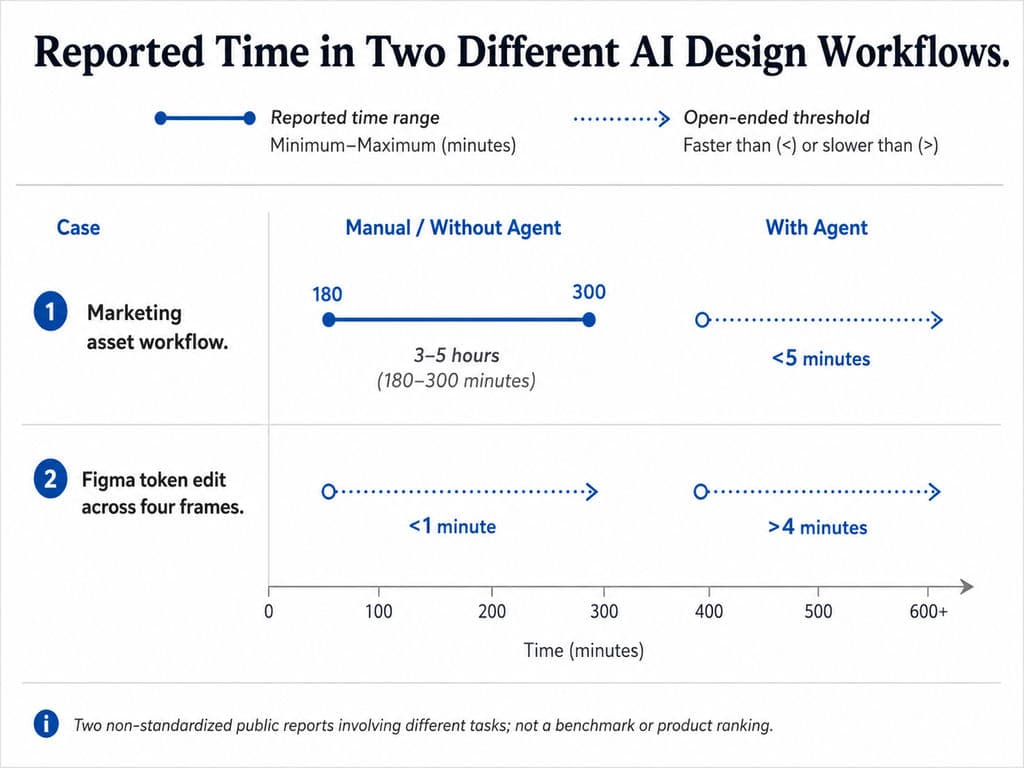
Their shared lesson is more valuable than either headline number:
Agents tend to offer more value when a task contains substantial repetitive production, while they may add overhead to a simple action that an experienced user can perform directly.
Why Repetitive Production Benefits More Than Simple Manual Edits
Agent value tends to increase with three variables:
- Repetition: How often must the action be performed?
- Variation: How much must change between outputs?
- Context: How much information must remain consistent?
The following is a directional framework rather than a universal rule.
Task | Likely fit | Reason |
Remove one background | AI feature | Isolated action |
Correct one spacing value | Manual edit or AI feature | Direct control may be faster |
Generate five moodboard directions | Design agent | High exploration value and low rejection cost |
Adapt a campaign to 20 formats | Design agent plus automation | Repetition with shared creative context |
Update 500 fixed templates | Rule-based automation | Stable process with limited ambiguity |
Approve final packaging copy | Human specialist | High legal and production risk |
Human control | Can designers lock, compare, interrupt, undo, and edit manually? | Specialist tools and expert approval |
Collaboration | Can people or agents share the same project state? | |
Deliverables | Does it produce images, source files, prototypes, pages, or code? | |
Governance | How are prompts, files, brand assets, and connected data handled? |
A more useful question is not whether agents are generally fast. It is whether an agent is the lowest-cost reliable method for a specific class of work.
Measuring Errors, Review Time, and Rework Alongside Generation Speed
A useful evaluation should track:
- Time to first output
- Time to first acceptable direction
- Number of prompts or interventions
- Number of unintended changes
- Manual correction time
- Review time
- Regeneration cost
- Final production work
- Defects discovered after handoff
A simple internal calculation is:
Net time saved = manual baseline − agent operation time − review time − rework time
Quality must be tracked separately. Saving two hours is not a gain if the workflow introduces a defect into paid media, packaging, or a production file.
Current public workflow discussions most often support starting with low-risk and reviewable tasks such as research synthesis, early exploration, localization, QA, and prototyping before granting an agent more control over final production decisions.
How Do Design Agents Maintain Creative Continuity—and Where Does It Break?
Creative continuity means preserving intent, constraints, and approved decisions while allowing the correct elements to change.
This is more demanding than visual similarity. Two assets may look related while using the wrong product, hierarchy, component, claim, audience assumption, or market requirement.
Carrying References, Brand Rules, and Approved Directions Forward
A design agent may need several kinds of context:
- Reference context: Which examples matter, and why?
- Brand context: Which colors, typography, image styles, tones, and exclusions apply?
- Project context: What is being produced, for whom, and at what stage?
- Decision context: Which direction was approved, rejected, or left unresolved?
- Production context: Which markets, dimensions, channels, and output formats are required?
A creative brand system is broader than a UI design system.
A UI design system may include components, tokens, variables, states, and interaction rules. A creative brand system may also include photography direction, campaign logic, product-accuracy rules, copy hierarchy, localization constraints, and asset relationships.
Context is useful only when it changes the agent’s behavior correctly. A tool may detect a brand kit or component library and still select the wrong rule.
Figma says its agent can use components, tokens, standards, and team context. In June 2026, Figma also expanded the system with custom tools and additional contextual mechanisms.
Canva describes AI 2.0 as using brand intelligence, editable objects, and persistent memory. Teams should still verify how memory scope, access controls, and brand application behave in their own environment.
Preserving Decisions Through Feedback and Revision Cycles
A common failure appears after the first promising result.
The team may request:
- Keep the layout.
- Change only the headline.
- Preserve the product angle.
- Use the approved type system.
- Replace the background.
- Create regional versions.
A weak system interprets the instruction as a new generation and changes the full composition. A stronger system distinguishes between locked decisions and permitted variation.
Decision state | Example | Agent instruction |
Locked | Product angle and logo placement | Must not change |
Approved | Composition and color direction | Preserve unless explicitly reopened |
Variable | Headline, crop, background scene | Generate controlled alternatives |
Unresolved | CTA hierarchy | Present options for review |
External review | Legal claim and regulatory copy | Do not finalize automatically |
An infinite canvas can support this process by keeping references, versions, approvals, and alternatives visible in the same project environment.
Virse’s product materials describe a system intended to carry team preferences, brand guidance, and project experience across the creative process. This should support continuity, but it should not be treated as a substitute for explicit approvals, access controls, or specialist review.
Preventing Small Errors From Scaling Across Assets, SKUs, Channels, and Markets
The most damaging agent errors may be small mistakes repeated many times:
- An outdated legal line across 30 ads
- The wrong product shade across several marketplaces
- A missing disclaimer in every localized version
- An incorrect component state across a product flow
- A rigid interpretation of a brand rule across an entire campaign
- A packaging detail altered during scene generation
A safer scaling workflow uses review gates.
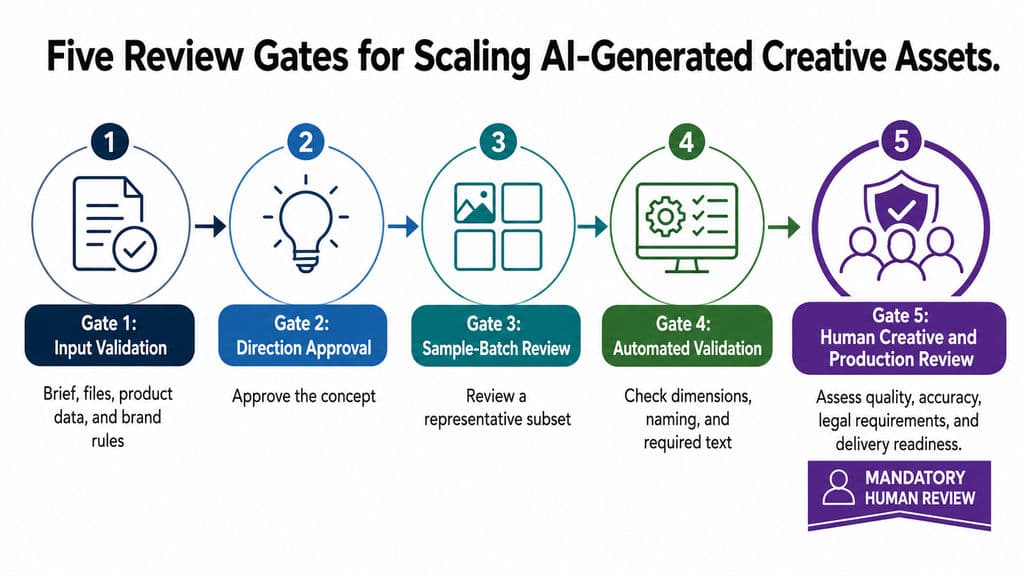
Gate 1: Input validation
Confirm the brief, source files, product data, references, and brand rules.
Gate 2: Direction approval
Approve the concept before producing variants.
Gate 3: Sample-batch review
Review a representative subset before scaling.
Gate 4: Automated validation
Check dimensions, naming, required text, and other testable rules.
Gate 5: Human creative and production review
Assess meaning, visual quality, brand fit, accuracy, legal requirements, and delivery readiness.
The central continuity problem is not whether the agent remembers everything. It is whether the system preserves the correct decisions while allowing the correct variables to change.
How Should Creative Teams Choose an AI Design Agent?
Creative teams should select an AI design agent by matching its deliverables, context depth, editability, autonomy, and review model to a specific workflow.
A universal “best design agent” ranking is rarely useful because tools that generate images, edit UI systems, build prototypes, and produce code solve different problems.
Compare Agent Categories Before Comparing Products
A category map helps prevent false comparisons.
Agent model | Typical focus | Typical deliverable |
Canvas-native design agent | UI, product design, structured editing | Editable design layers |
General creative agent | Marketing, branding, content production | Multi-format creative assets |
Visual ideation workspace | Moodboards, concepts, storyboards | Visual directions and draft assets |
Professional multi-agent design system | Context-linked creative production | Connected assets and workflow outputs |
Design-to-code or app agent | Prototyping and software construction | Runnable prototype or code |
Examples may overlap. Figma primarily represents a canvas-native UI and product-design workflow. Canva and Lovart emphasize broader creative production. Adobe Firefly Boards focuses heavily on visual ideation and development. Virse is positioned as a professional multi-agent design operating system. Design-to-code and app-building agents should be evaluated separately because their central deliverable is code rather than a finished design file.
Compare Context, Editability, Memory, Deliverables, and Human Control
Use a capability matrix rather than counting features.
Evaluation area | Questions to ask |
Brief understanding | Can it distinguish objectives, constraints, references, and exclusions? |
Context | Can it use the wider project, or only the latest prompt? |
Editability | Are outputs layered, structured, and directly editable? |
Memory | What does it retain across prompts, files, projects, and team members? |
Tool use | Can it select suitable generation, editing, layout, or retrieval actions? |
Design systems | Can it apply rules correctly, not merely detect them? |
Human control | Can designers lock, compare, interrupt, undo, and edit manually? |
Collaboration | Can people or agents share the same project state? |
Deliverables | Does it produce images, source files, prototypes, pages, or code? |
Governance | How are prompts, files, brand assets, and connected data handled? |
Teams should test products with representative internal tasks rather than relying only on demos. Real projects contain incomplete briefs, conflicting feedback, legacy assets, inconsistent naming, and last-minute changes.
Match Agent Autonomy to Task Clarity and Failure Cost
The correct level of autonomy depends on:
- How clearly the task can be specified
- How costly an undetected error would be
Task type | Suggested autonomy | Review requirement |
Moodboard exploration | High | Directional review |
Early concept variations | High | Designer selection |
Background and crop variations | Medium to high | Sample and final QA |
Campaign adaptation | Medium | Brand and production review |
UI design-system edits | Medium to low | Component and flow validation |
Final packaging layout | Low | Regulatory, prepress, and design review |
Engineering validation | Very low | Specialist tools and expert approval |
This avoids two common mistakes:
- Using an agent for a task that simple automation can perform more reliably
- Granting excessive autonomy to a task with a high failure cost
Verify Production Readiness and the Evidence Behind Product Claims
Before adoption, repeat the same representative task several times and record:
- Input materials
- Exact brief
- Output type
- Completion time
- Manual interventions
- Unintended changes
- Rework
- Usage cost
- Reviewer assessment
- Export and handoff quality
A credible product review should disclose its method. Rankings that compare a UI agent, image generator, website builder, and AI evaluation platform as direct alternatives are structurally misleading.
Teams should also separate four levels of completion:
- Concept: Communicates an idea
- Editable draft: Can be refined in the team’s tools
- Validated deliverable: Passes brand, content, and production checks
- Production-ready output: Meets publishing, printing, development, or manufacturing requirements
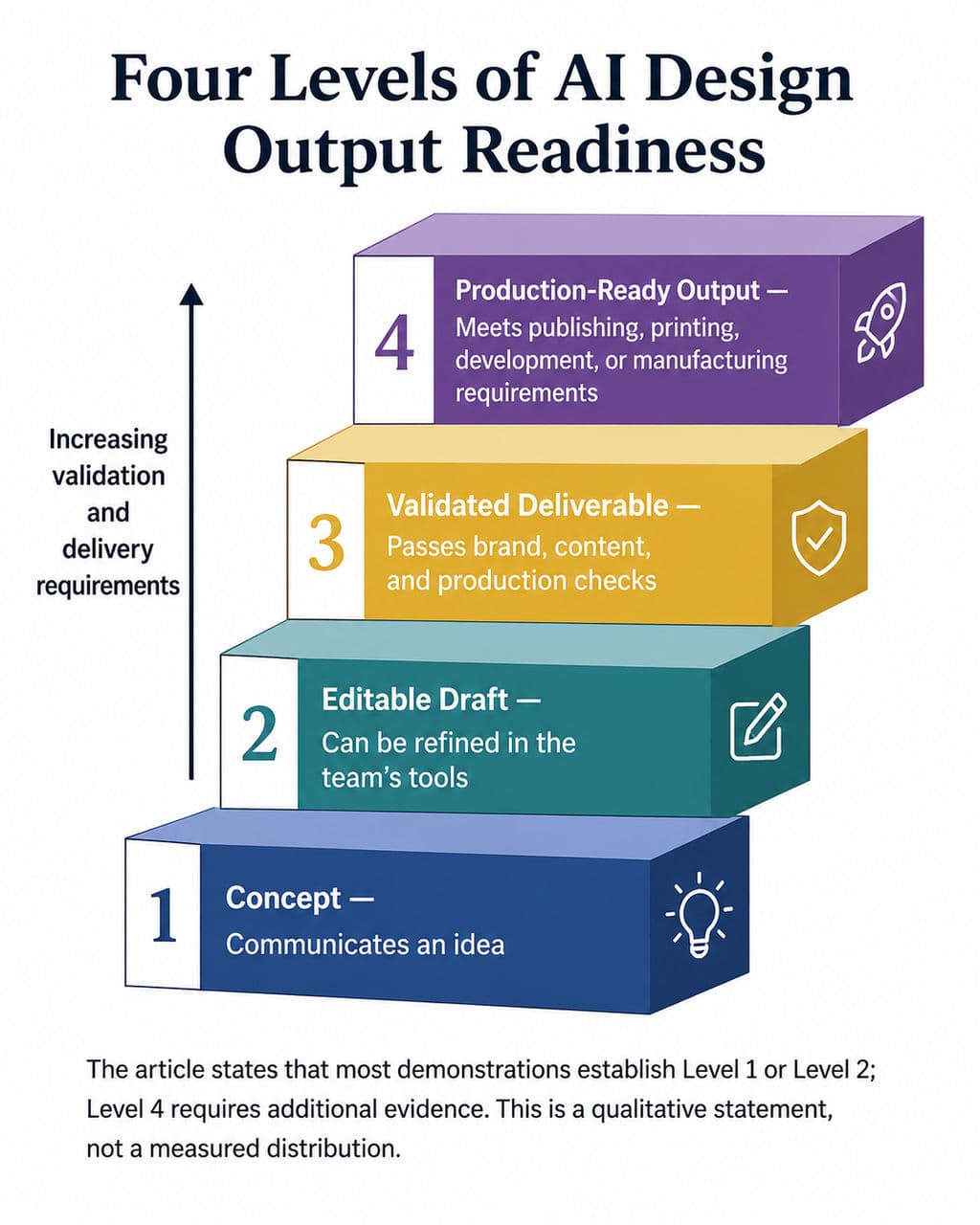
Most demonstrations establish level one or two. Level four requires additional evidence.
AI Design Agent FAQ
Can an AI design agent replace a professional designer?
No. An AI design agent can support research, exploration, repetitive production, adaptation, QA, and prototyping. It does not replace human responsibility for creative direction, user understanding, brand judgment, accessibility, legal review, engineering validation, or final approval.
Does an AI design agent need an infinite canvas?
No. An agent can work through chat, structured controls, plugins, or other interfaces. An infinite canvas is useful when references, assets, feedback, alternatives, and approvals need to remain visible in the same project context.
Can an AI design agent work with an existing brand system?
It can help when it has access to approved references, templates, visual rules, design tokens, copy constraints, and project history. However, detecting a brand system is not the same as applying it correctly. Teams still need locked elements, sample-batch review, and human approval.
What is the difference between an AI design agent and an AI design assistant?
An AI design assistant usually supports individual tasks while the human plans each step. An AI design agent can interpret a broader objective, coordinate several actions, maintain project state, and refine the work through feedback. Many products fall between the two categories, so buyers should compare capabilities rather than labels.
Conclusion
An AI design agent for creative workflows is valuable when it does more than generate an attractive asset: it should understand the brief, use project context, coordinate multiple actions, preserve approved decisions, and return work that designers can inspect and edit. Current product documentation and public workflow reports most consistently support early exploration, repetitive production, adaptation, QA, and prototyping, while high-risk decisions still require human judgment and specialist validation. Creative teams should begin with one low-risk, repeatable workflow, measure review and rework, and expand autonomy only when the evidence supports it.
Plus d’articles du blog Virse
Flux de travail
How to Preserve Design Accuracy in AI Mockups Without Endless Cleanup
17 septembre 2026 by Yifan Zhao
Flux de travail
How to Create AI T-Shirt Mockups That Actually Match Your Product
17 septembre 2026 by Yifan Zhao
Flux de travail
How to Create Clothing Mockups That Look Real: 5 Practical Methods
17 septembre 2026 by Yifan Zhao