
Cara Membuat Mockup: PSD, AI, dan Alur Kerja Realistis
Vincent11 menit baca ·
Untuk membuat mockup, tempatkan desain atau tangkapan layar dalam konteks produk, perangkat, atau antarmuka yang benar, lalu sesuaikan skala, perspektif, pencahayaan, bayangan, dan tekstur agar terlihat sebagai bagian dari produk akhir. Gunakan generator daring untuk kecepatan, mockup PSD untuk realisme dan kendali lebih besar, AI untuk pembuatan adegan dan variasi, atau alur massal yang dapat digunakan kembali saat menghasilkan banyak versi.
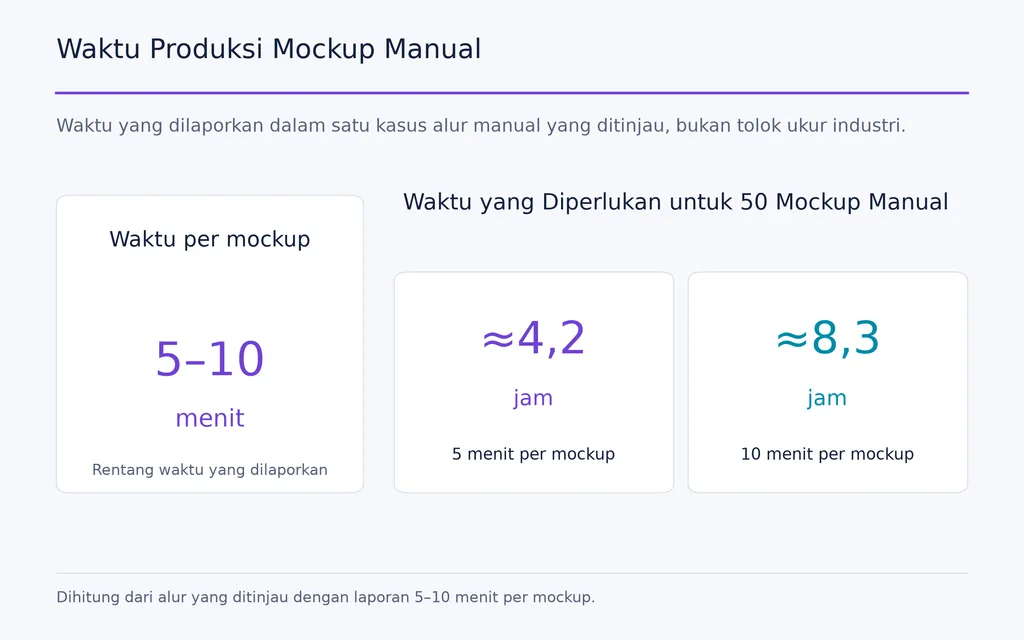
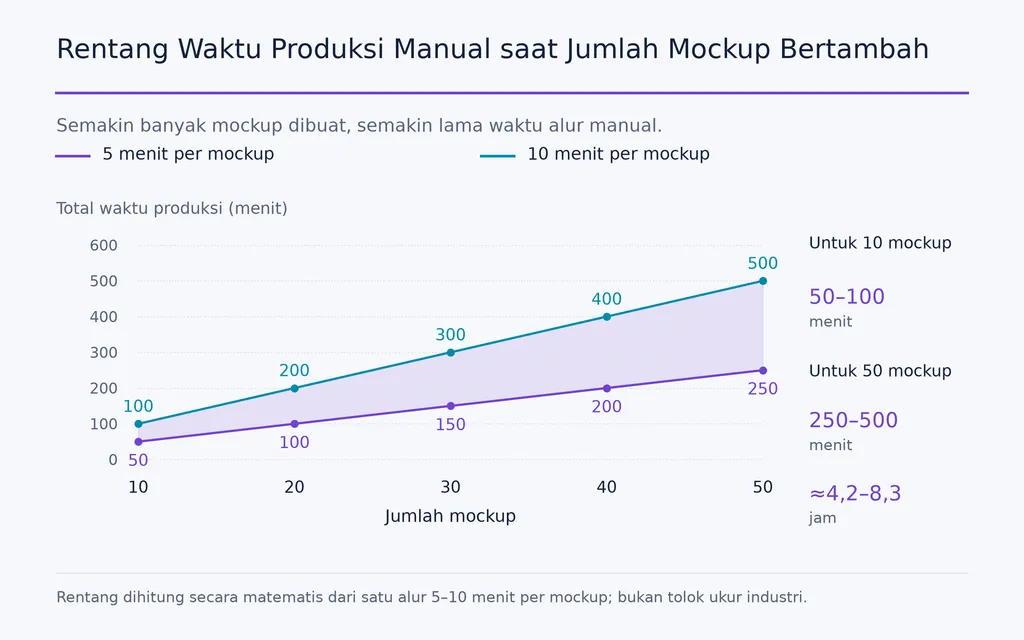
Masalahnya, banyak mockup masih terlihat datar, palsu, tidak akurat, atau generik. AI juga dapat menambahkan detail produk yang meyakinkan tetapi keliru, sementara produksi manual melambat pada skala besar. Alur kerja desain yang ditinjau melibatkan 10–50 variasi desain, dan satu proses manual membutuhkan sekitar 5–10 menit per mockup, sehingga 50 hasil bisa memerlukan sekitar 4,2–8,3 jam.
Pendekatan yang lebih baik adalah memperlakukan pembuatan mockup sebagai proses berulang dalam alur kerja desain, bukan efek sekali klik: utamakan akurasi produk, pilih metode PSD, AI, atau berbasis peramban yang tepat, lalu otomatisasi langkah berulang ketika volume meningkat. Virse mendukung alur ini melalui kanvas tanpa batas, menghubungkan referensi, aset, konteks merek, dan tugas kreatif terkait agar tim dapat membuat mockup yang realistis, akurat terhadap produk, dan konsisten tanpa mengorbankan kendali kreatif.

Apa Itu Mockup dan Apa Kegunaannya?
Sebuah mockup adalah representasi visual tentang bagaimana suatu desain akan tampil dalam konteks fisik atau digital yang dituju sebelum produk akhir selesai diproduksi.
Logo pada kemasan adalah mockup. Karya grafis pada kaus adalah mockup. Dasbor SaaS dalam bingkai peramban adalah mockup. Tujuannya bukan dekorasi, melainkan membantu orang mengevaluasi tampilan, konteks, dan penyajian sebelum berkomitmen pada produksi akhir.
Mockup vs Wireframe vs Prototipe
Format | Pertanyaan Utama | Kegunaan Terbaik |
Wireframe | Bagaimana strukturnya seharusnya? | Keputusan tata letak awal |
Mockup | Seperti apa tampilannya seharusnya? | Tinjauan visual dan presentasi |
Prototipe | Bagaimana perilakunya seharusnya? | Pengujian interaksi |
Mockup Produk | Bagaimana tampilannya pada barang nyata? | E-commerce dan pemasaran |
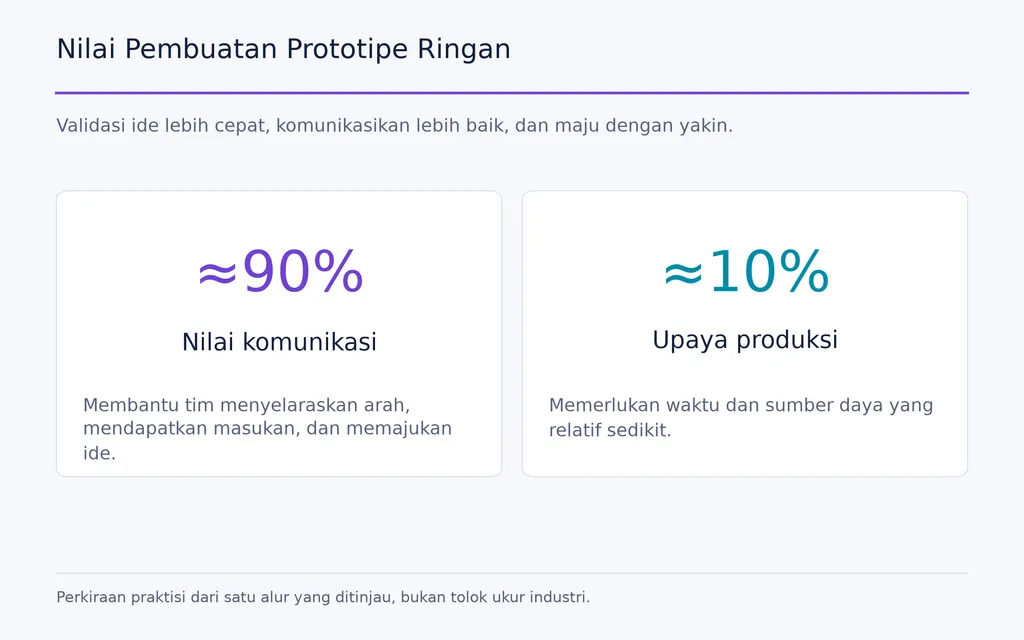
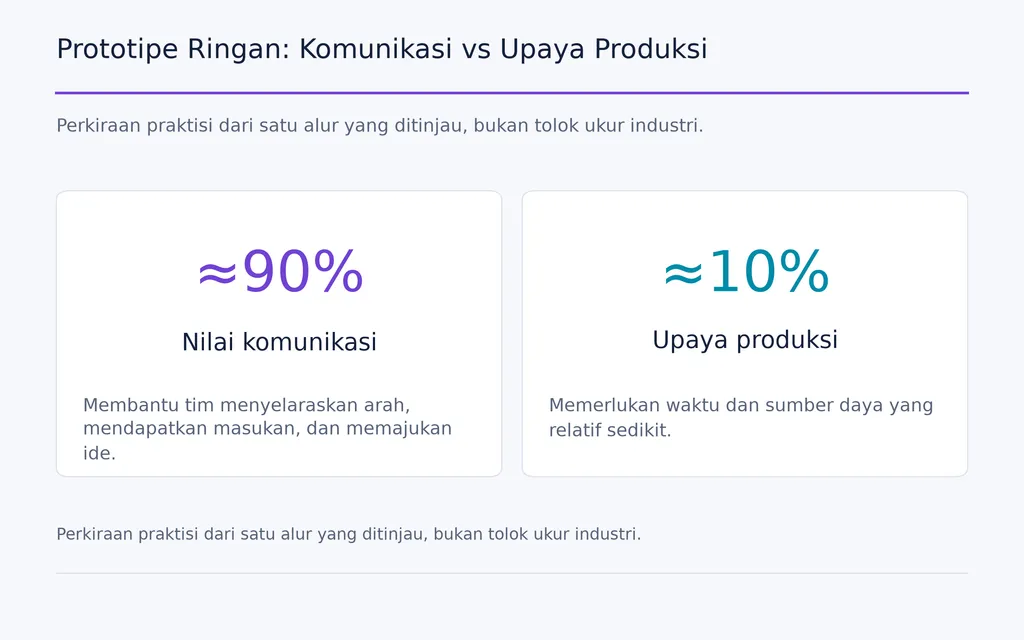
Untuk pekerjaan UI, tinjauan alur kerja kami menunjukkan pola efisiensi yang umum: jelajahi beberapa arah dengan detail rendah, pilih satu, lalu investasikan pada detail tinggi. Seorang praktisi memperkirakan prototipe ringan dapat menyampaikan sekitar 90% ide dengan sekitar 10% upaya produksi. Ini adalah perkiraan alur kerja individu, bukan tolok ukur industri, tetapi prinsipnya berguna: gunakan tingkat detail secukupnya untuk keputusan saat ini.
Cara Membuat Mockup: Tiga Metode Praktis
Sebagian besar mockup dibuat melalui salah satu dari tiga alur kerja. Pilih berdasarkan kecepatan, realisme, akurasi, dan skala.
Gunakan Generator Mockup Daring untuk Kecepatan
Alur tercepat adalah:
- Siapkan karya grafis atau tangkapan layar.
- Pilih adegan produk atau perangkat yang benar.
- Unggah dan posisikan desain.
- Sesuaikan skala dan latar belakang.
- Periksa realisme dan akurasi produk.
- Ekspor gambar akhir.
Cara ini efektif untuk aset media sosial, gambar e-commerce sederhana, tangkapan layar SaaS, dan presentasi awal, terutama ketika menggunakan alat desain AI untuk mempercepat produksi visual.
Keterbatasannya adalah kendali. Dalam alur yang kami tinjau, desainer sering menemukan produk yang tepat di lingkungan yang salah, atau adegan menarik yang tidak sesuai dengan SKU sebenarnya. Generator dapat mengurangi waktu pengeditan sekaligus menambah waktu pencarian templat.
Gunakan Mockup PSD untuk Kendali Lebih Besar
Templat PSD lebih sesuai ketika karya grafis harus berinteraksi dengan kain, kertas, kemasan, layar, atau permukaan lain.
Proses yang umum adalah:
Buka templat → ganti Smart Object → simpan → tinjau perspektif dan tekstur → sempurnakan → ekspor
Smart Object membuat penggantian berulang menjadi efisien, tetapi tidak menjamin realisme. Jika masking, transformasi perspektif, atau efek permukaan templat buruk, mengganti karya grafis dengan benar tetap dapat menghasilkan hasil yang buruk.
Templat yang baik mengotomatisasi kualitas. Templat yang buruk mengotomatisasi kesalahan.
Buat Mockup Khusus untuk Membedakan Merek
Templat publik menghemat waktu, tetapi dapat membuat visual seragam. Untuk kampanye yang mementingkan identitas merek, gunakan fotografi orisinal, adegan 3D khusus, lingkungan khusus merek, atau komposisi dengan arahan artistik yang disengaja.
Alur gabungan sering bekerja paling baik: gunakan templat untuk produksi rutin dan aset khusus untuk gambar utama atau kampanye bernilai tinggi.
Cara Membuat Mockup Produk yang Terlihat Nyata
Mockup produk realistis harus membuat karya grafis terasa menyatu secara fisik dengan objek.
Mulai dari Gambar Produk yang Benar
Pilih gambar dengan resolusi memadai, tekstur yang terlihat, pencahayaan meyakinkan, dan sudut pandang yang berguna.
Untuk e-commerce, akurasi sama pentingnya dengan estetika. Tinjauan kami berulang kali menemukan mockup yang meyakinkan tetapi menggunakan produk polos dasar, bentuk pakaian, tali, garis leher, proporsi, atau material yang salah.
Mockup bisa terlihat realistis tetapi tetap mewakili produk yang salah.
Sesuaikan Perspektif dan Bentuk Permukaan
Jangan sekadar mengubah ukuran karya grafis.
Jika permukaan miring, desain harus mengikuti perspektif tersebut. Jika kain berlipat, karya grafis harus mengikuti lipatan itu. Jika kemasan melengkung, desain harus mencerminkan kelengkungannya.
Grafis yang sepenuhnya datar di atas objek tiga dimensi adalah salah satu cara tercepat membuat mockup terlihat palsu.
Pertahankan Pencahayaan, Bayangan, dan Tekstur
Permukaan di bawah desain harus tetap terlihat.
Kain harus mempertahankan lipatan. Kertas harus mempertahankan serat. Kaca harus mempertahankan pantulan. Kemasan logam harus mempertahankan sorotan.
Dalam praktiknya, realisme sering berasal dari mempertahankan informasi fisik objek yang sudah ada, bukan menambahkan lebih banyak efek pada karya grafis.
Cara Membuat Mockup yang Akurat terhadap Produk
Akurasi produk sangat penting untuk cetak sesuai permintaan (POD) dan e-commerce karena pelanggan memakai mockup sebagai informasi produk.
Verifikasi SKU yang Tepat
Sebelum menerbitkan, periksa:
- siluet dan proporsi
- bentuk dan potongan
- garis leher atau tali
- jahitan dan konstruksi
- material dan tekstur
- warna
- area cetak
- komponen fisik terkait
Jika barang nyata berbeda dari mockup, bayangan yang lebih baik tidak akan menyelesaikan masalah.
Pisahkan Realisme Visual dari Kebenaran Produk
Realisme visual berkaitan dengan pencahayaan, kedalaman, tekstur, dan perspektif yang meyakinkan.
Akurasi produk berkaitan dengan apakah gambar mewakili barang yang benar-benar akan diterima pelanggan.
Tinjauan mockup profesional harus memperlakukan keduanya sebagai pemeriksaan kualitas terpisah.
Cara Menggunakan AI untuk Mockup Tanpa Menyesatkan tentang Produk
AI untuk desain grafis berguna bagi produksi mockup, tetapi dapat menciptakan ketidakakuratan yang sangat meyakinkan.
Gunakan AI Lebih Bebas di Sekitar Produk
AI efektif untuk latar belakang, lingkungan, arahan artistik, properti, konsep model, dan eksplorasi visual.
Untuk produk komersial nyata, terapkan kendali lebih ketat.
Prinsip praktisnya adalah:
pastikan kebenaran produk terlebih dahulu, lalu lakukan generasi di sekitarnya.
Mulai dari foto produk terverifikasi, render terkontrol, atau mockup dasar yang akurat, lalu gunakan AI untuk memperluas adegan sekitar.
Periksa Detail Produk yang Dikarang
AI dapat diam-diam mengubah:
- tali
- garis leher
- lengan
- jahitan
- kain
- proporsi
- dimensi produk
Perubahan ini bisa lebih sulit dideteksi daripada kesalahan pengeditan biasa karena masih dapat terlihat fotorealistis.
Realisme AI tidak boleh pernah dianggap sebagai bukti akurasi produk.
Cara Membuat Mockup Tanpa Photoshop
Photoshop berguna, tetapi tidak wajib untuk sebagian besar alur kerja mockup.
Gunakan Editor Peramban untuk Kendali seperti PSD
Editor berbasis peramban dapat menangani banyak mockup PSD dan alur kerja desain dasar. Namun, uji setiap templat dengan cermat.
Periksa apakah Smart Object dan alur kerja Photoshop, masking, efek, perspektif, dan ekspor tetap benar setelah impor.
Pertanyaan pentingnya bukan apakah PSD dapat dibuka, melainkan apakah logika visual PSD tetap terjaga.
Gunakan Generator untuk Aset Pemasaran Sederhana
Untuk gambar produk sederhana, grafis media sosial, dan presentasi perangkat, alat desain AI sering lebih cepat daripada pengeditan manual.
Konsekuensinya adalah kendali yang berkurang atas akurasi produk, komposisi, dan diferensiasi merek.
Gunakan Pengeditan Manual Hanya Selama Masih Sesuai dengan Skala
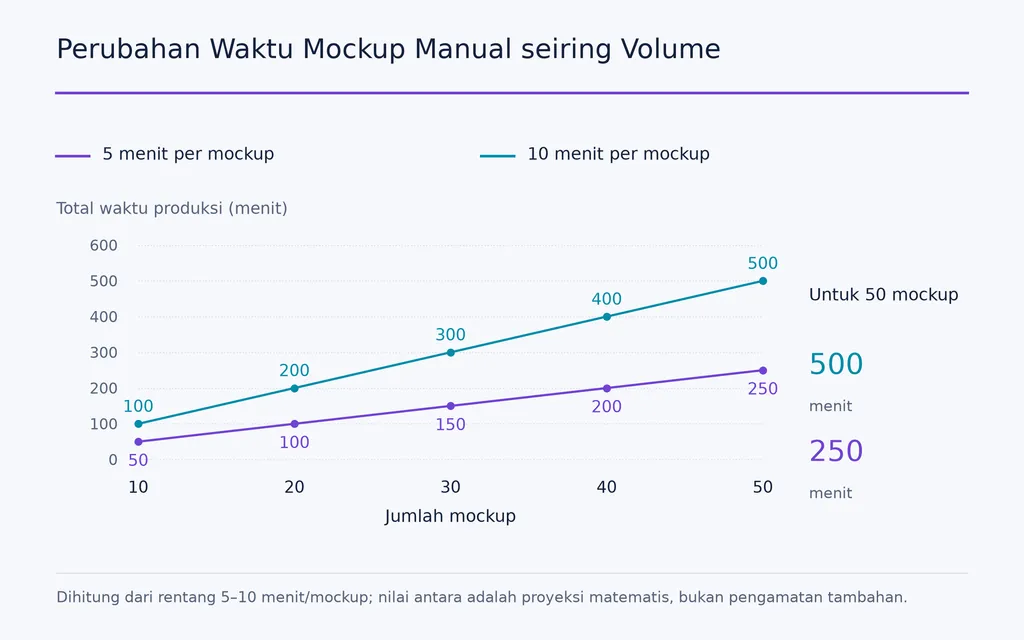
Salah satu alur yang kami tinjau membutuhkan sekitar 5–10 menit per mockup yang dibuat manual. Itu mungkin wajar untuk lima gambar. Untuk 50 gambar, prosesnya menjadi beberapa jam produksi berulang.
Pelajaran utamanya sederhana:
pada volume lebih tinggi, pembuatan mockup menjadi persoalan alur kerja, bukan persoalan pengeditan.
Cara Membuat Mockup Aplikasi atau SaaS
Mockup aplikasi dan SaaS biasanya dimulai dari tangkapan layar yang sudah ada. Tujuannya adalah menyajikan antarmuka dengan jelas tanpa membiarkan presentasinya menutupi antarmuka itu sendiri.
Gunakan Perangkat dan Rasio Aspek yang Benar
Sesuaikan bingkai dengan pengalaman:
- peramban untuk produk web
- laptop untuk SaaS yang mengutamakan desktop
- ponsel untuk aplikasi seluler
- beberapa perangkat hanya ketika perilaku responsif penting
Jangan memaksakan tangkapan layar yang sama ke setiap perangkat.
Jadikan Penyajian sebagai Unsur Pendukung
Alur yang bersih adalah:
Tangkapan layar → bingkai perangkat → latar belakang → jarak dalam → bayangan → rotasi → ekspor
Gunakan bayangan, gradasi, dan rotasi secukupnya. Jika perlakuan visual lebih menarik perhatian daripada antarmuka, sederhanakan.
Bingkai harus menjelaskan produk, bukan menjadi produk.
Cara Membuat Mockup Situs Web secara Efisien
Mockup situs web sebaiknya semakin detail hanya ketika ketidakpastian berkurang.
Jelajahi Arah dengan Detail Rendah Terlebih Dahulu
Jika tata letak dan hierarki belum pasti, sajikan alternatif kasar terlebih dahulu.
Urutan praktisnya adalah:
beberapa arah berfidelitas rendah → pilih satu → bangun komponen pakai ulang → buat satu arah berfidelitas tinggi
Ini mengurangi waktu untuk memoles konsep yang mungkin ditolak.
Buat Prototipe Hanya untuk Hal yang Perlu Divalidasi
Buat prototipe interaktif ketika navigasi, perubahan keadaan, atau pola interaksi belum pasti.
Untuk alur sederhana, layar yang saling ditautkan dan spesifikasi jelas mungkin sudah cukup menyampaikan maksud tanpa membangun interaksi yang tidak diperlukan.
Ini merupakan prinsip E-E-A-T penting dalam pekerjaan desain: efisiensi profesional berasal dari menyesuaikan upaya produksi dengan keputusan yang sedang dibuat.
Cara Membuat Mockup secara Massal
Alur yang benar untuk 50 mockup bukanlah alur satu mockup yang diulang 50 kali.
Pisahkan Elemen Tetap dan Berubah
Dalam kasus produksi yang melibatkan 10–50 variasi desain, pendekatan yang dapat diskalakan adalah memisahkan apa yang berubah dari apa yang tetap.
Variabel dapat mencakup:
- karya grafis
- warna
- SKU
- teks
- bahasa dan wilayah
Elemen tetap dapat mencakup:
- templat
- komposisi
- efek
- dimensi keluaran
- pengaturan ekspor
- aturan penamaan
Bangun Alur Penggantian Massal
Proses yang dapat diskalakan adalah:
Folder desain → templat pakai ulang → pemetaan Smart Object → penggantian massal → rendering → ekspor terorganisasi
Tinjauan kami juga mencakup alur untuk menghasilkan ratusan mockup melalui penggantian Smart Object otomatis. Angka itu berasal dari pembuat alur, bukan tolok ukur independen, tetapi menunjukkan perubahan produksi mockup ketika skala menjadi kendala utama.
Pada tahap itu, otomatisasi menjadi bagian dari sistem desain.
Cara Menghindari Mockup yang Terlihat Generik
Templat menciptakan efisiensi, tetapi juga dapat membuat merek terlihat dapat saling dipertukarkan.
Sesuaikan Lebih dari Sekadar Karya Grafis
Ubah variabel visual yang bermakna, seperti:
- palet latar belakang
- tipografi
- pemotongan gambar
- sudut kamera
- objek pendukung
- pencahayaan
- jarak
Tujuannya bukan membuat setiap aset berbeda, melainkan membuat setiap aset terasa berasal dari merek yang sama.
Ubah Mockup yang Berhasil Menjadi Sistem Pakai Ulang
Dokumentasikan preferensi untuk:
- sudut produk
- penyajian perangkat
- latar belakang
- jarak
- bayangan
- rasio ekspor
- konvensi penamaan
Inilah perbedaan antara membuat mockup dan membangun sistem desain.
Alur Kerja Mockup Mana yang Sebaiknya Dipilih?
Kasus Penggunaan | Alur Awal Terbaik | Kompromi Utama |
Satu mockup cepat | Generator daring | Kendali terbatas |
Tanpa Photoshop | Editor peramban atau generator | Efek lanjutan dapat bervariasi |
Pakaian realistis | PSD + Smart Object | Lebih banyak keterampilan manual |
SKU e-commerce yang tepat | Foto produk terverifikasi | Aset sumber lebih sulit diperoleh |
10–50+ desain | Alur massal | Penyiapan awal |
Pemasaran SaaS | Tangkapan layar + bingkai perangkat | Dapat terlihat generik |
Kampanye merek | Adegan khusus atau fotografi | Upaya produksi lebih tinggi |
Tinjauan awal situs web | Detail rendah → satu arah detail tinggi | Memerlukan persetujuan bertahap |
Tim kreatif | Sistem bersama + AI kontekstual | Penyiapan dan tata kelola |
Alur terbaik adalah opsi tercepat yang tidak mengorbankan kebenaran yang perlu disampaikan mockup.
Untuk aset media sosial, kecepatan mungkin paling penting. Untuk e-commerce, akurasi produk menjadi utama. Untuk 50 variasi, skalabilitas menjadi bagian dari kualitas. Untuk tim desain, konsistensi dan konteks bersama sama pentingnya dengan pembuatan gambar itu sendiri.
Pertanyaan Umum
Bisakah Saya Membuat Mockup Tanpa PS?
Bisa. Gunakan editor berbasis peramban, generator, alat seperti Canva, atau GIMP. Generator paling cepat untuk aset sederhana, sedangkan editor berbasis lapisan memberi kendali lebih besar atas masking, perspektif, tekstur, dan templat PSD pakai ulang.
Mengapa Mockup PSD Saya Terlihat Salah Setelah Smart Object Diganti?
Karya grafisnya mungkin bukan masalahnya. Periksa perspektif, masking, mode pencampuran, displacement, bayangan, dan lapisan tekstur templat. Smart Object hanya mengganti isi dalam sistem visual yang sudah ada; jika sistem itu dibangun dengan buruk, hasil akhir tetap dapat terlihat tidak realistis.
Haruskah Saya Menggunakan AI untuk Mockup POD?
Ya, tetapi secara selektif. AI berguna untuk latar belakang, adegan gaya hidup, eksplorasi visual dan arahan artistik, serta konten pendukung. Untuk daftar produk nyata, verifikasi SKU, bentuk pakaian, tali, garis leher, material, dan proporsi secara terpisah karena AI dapat menghasilkan detail produk yang meyakinkan tetapi tidak akurat.
Bagaimana Membuat 10–50 Mockup Lebih Cepat?
Gunakan satu templat pakai ulang, tata karya grafis yang berubah dalam folder sumber, petakan setiap desain ke lapisan yang dapat diganti, lalu otomatisasi rendering dan ekspor. Ketika produksi manual membutuhkan beberapa menit per gambar, penggantian massal dapat menghilangkan berjam-jam pekerjaan berulang dan mengurangi ketidakkonsistenan pelaksanaan.
Kesimpulan
Belajar membuat mockup pada akhirnya berarti membangun tingkat realisme, akurasi, konsistensi merek, dan efisiensi produksi yang tepat untuk pekerjaan tersebut. Generator daring unggul dalam kecepatan, alur PSD menawarkan kendali lebih besar, gambar produk terverifikasi menjaga akurasi e-commerce, dan otomatisasi massal menjadi penting ketika volume keluaran meningkat. AI dapat memperluas kemungkinan kreatif, tetapi harus mendukung, bukan mengaburkan, kebenaran produk. Jadi, alur mockup terkuat bukan yang paling banyak efeknya atau paling baru alatnya, melainkan yang mengubah desain menjadi aset visual tepercaya, dapat diulang, dan siap mendukung keputusan.
Artikel lainnya dari Blog Virse
Alur kerja
FLUX 3 Image Prompt Guide: 12 Prompts & Editing Fixes
22 Oktober 2026 by Vincent
Alur kerja
How to Use FLUX 3 Image: Edit Photos Without Unwanted Changes
21 Oktober 2026 by Vincent
Alur kerja
Wan 3.0 Prompt Guide: Fix Wrong Motion, Character Drift, and Ignored Instructions
20 Oktober 2026 by Yifan Zhao