Nano Banana 2.1 Prompt Guide: 10 Examples & Common Fixes
Vincent24분 읽기 ·
The best Nano Banana 2.1 prompts clearly define the subject, composition, lighting, and editing constraints. This guide provides 10 copy-ready prompts for realistic photos, product edits, and character consistency, plus practical fixes for common mistakes.
However, even detailed prompts can fail. Ignored instructions, altered faces, and editing drift can cause inconsistent visuals, wasted generations, and repeated revisions. Clear preservation instructions and reference images help reduce these problems.
Virse streamlines AI image creation with an infinite canvas, collaborative AI agents, shared project context, and long-term design memory. By keeping references, generated images, and revisions in one workspace, Virse helps designers maintain consistency, reduce repetitive work, and simplify creative workflows.

How to Write Effective Nano Banana 2.1 Prompts
An effective Nano Banana 2.1 prompt is a clear visual brief that defines what the image should contain and how success will be evaluated. Instead of relying on vague descriptions such as "beautiful" or "ultra-realistic," specify the subject, action, camera angle, materials, lighting, and composition.
Our review of published prompting guides and documented editing cases identifies two practical approaches: one for generating new images and another for editing existing ones.
What Is the Best Nano Banana 2.1 Prompt Formula?
For text-to-image generation, use:
Subject + Action + Setting + Composition + Materials + Lighting + Style
Example Prompt:
Create a premium commercial photograph of one matte-black wireless speaker standing on a limestone pedestal. Show the speaker from a three-quarter angle with realistic woven-fabric texture, brushed-metal controls, soft daylight from the left, subtle contact shadows, and a warm minimalist studio background. Keep the speaker fully visible with generous negative space on the right for advertising copy. Do not introduce extra products or unrelated objects.
This prompt translates creative direction into observable requirements.
Component | Instruction | Evaluation |
Subject | One wireless speaker | Correct object count |
Composition | Three-quarter angle | Perspective and framing |
Materials | Fabric and brushed metal | Surface consistency |
Lighting | Soft daylight from left | Shadow direction |
Layout | Space for advertising copy | Commercial usability |
Constraints | No additional objects | Unwanted content |
A useful prompt reduces ambiguity rather than simply increasing word count.
How to Write Nano Banana 2.1 Image Editing Prompts
Image editing requires a different formula:
Source Image + Target Area + Requested Change + Visual Details + Preservation Constraints
Weak Prompt: Make the bottle green.
Improved Prompt:
Edit the uploaded product photograph. Change only the bottle's blue glass body to translucent forest-green glass. Preserve the original cap, label wording, bottle silhouette, reflections, background, and camera perspective. Maintain realistic glass transparency and the existing lighting direction. Do not add objects or redesign the packaging.
The improved prompt separates the requested modification from the details that should remain unchanged.
However, preservation instructions cannot guarantee that every unrelated pixel stays identical.
A successful edit should satisfy two independent requirements: completing the requested change and preserving important non-target details.
Should Nano Banana 2.1 Prompts Be Long or Short?
Use short prompts for straightforward scenes and more detailed prompts when exact visual relationships matter.
A simple landscape may need only a setting, subject, and lighting direction. A product advertisement requires more information about geometry, branding, materials, and layout.
Overly detailed prompts can also introduce conflicting instructions. For example, requesting a tight facial close-up while requiring the subject's entire body to remain visible creates incompatible framing requirements.
For complex prompts, prioritize:
- Subject, quantity, and action.
- Composition and spatial relationships.
- Important materials and visual details.
- Reference-image responsibilities.
- Preservation requirements and exclusions.
Prompt completeness matters more than prompt length.
10 Best Nano Banana 2.1 Prompt Examples for Photography and Design
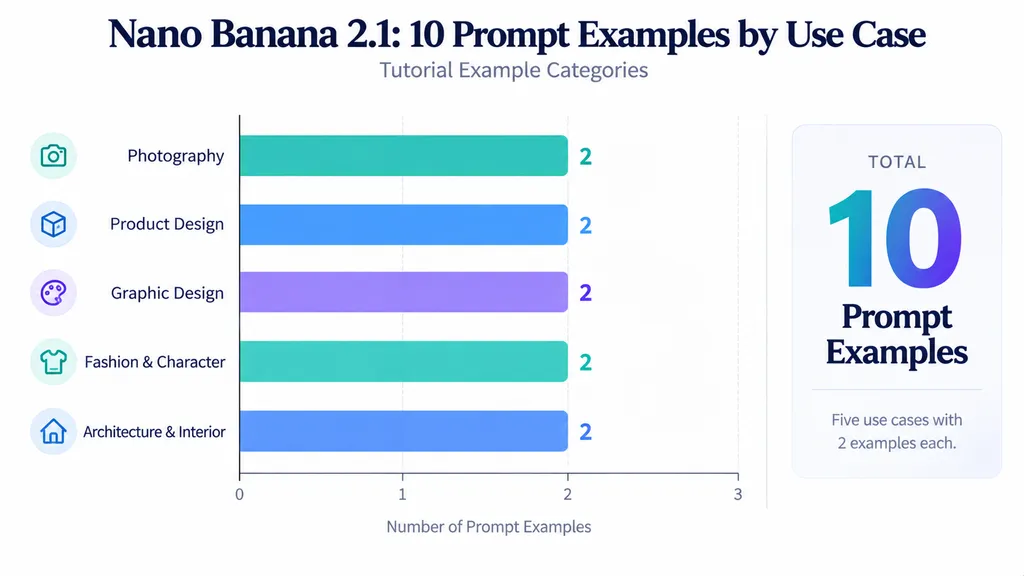
These 10 Nano Banana 2.1 prompt examples cover realistic photography, commercial imagery, typography, character consistency, architecture, and interior design.f
Each is a reusable teaching template based on documented AI design prompting methods, not an independently verified generation result.
The expected outcomes describe what the prompt is intended to produce. The evaluation notes identify what should be inspected before accepting an image.
Realistic Portrait Photography Prompt
Prompt:
Create a photorealistic candid editorial portrait of an adult woman standing beside an apartment window. Use natural afternoon sunlight, visible skin pores, subtle facial texture, loose hair strands, realistic shadows, and slightly imperfect framing. Photograph from eye level with a natural 50mm portrait perspective. Preserve believable anatomy and everyday interior details. Avoid plastic-looking skin, excessive retouching, artificial symmetry, and CGI textures.
Best for: Lifestyle photography, editorial portraits, personal branding.
Expected result: A natural-looking portrait with believable photographic details.
What to check: Skin texture, facial anatomy, hair edges, lighting, and unnatural smoothing.
Our review of photorealistic prompt examples identified natural light, visible texture, and imperfect framing as recurring methods for avoiding an overly polished appearance. However, no controlled evidence establishes that individual descriptive phrases guarantee better realism.
Natural Smartphone Photography Prompt
Prompt:
Create a candid smartphone photograph of two adult friends drinking coffee outside a neighborhood cafe. Use ordinary daylight, relaxed expressions, believable hand positions, mild camera noise, natural urban background details, and slightly imperfect framing. Make the photograph resemble an everyday mobile image rather than a professional fashion campaign. Avoid exaggerated background blur, dramatic studio lighting, artificial skin smoothing, and excessive sharpness.
Best for: Social media, lifestyle campaigns, authentic-looking marketing visuals.
Expected result: A casual photograph with natural composition and realistic environmental details.
What to check: Hands, facial expressions, camera perspective, background realism, and excessive image processing.
Practical insight: Describe the characteristics of casual photography rather than simply requesting a realistic smartphone image.
Commercial Product Photography Prompt
Prompt:
Create a premium commercial photograph of one amber-glass skincare serum bottle on a light limestone pedestal. Show the bottle from a three-quarter perspective with realistic glass transparency, natural reflections, a brushed-metal cap, and a minimalist cream-colored label. Use soft directional studio lighting, warm neutral colors, subtle contact shadows, and generous negative space for advertising copy. Keep the bottle fully visible. Do not add additional bottles, duplicated labels, or unnecessary decorative objects.
Best for: E-commerce, advertising, packaging concepts.
Expected result: A product photograph suitable for reviewing commercial composition and visual direction.
What to check: Bottle proportions, cap geometry, reflections, label placement, and duplicate objects.
Practical insight: Attractive product images are not necessarily commercially accurate. Product geometry and approved packaging details require separate verification.
Product Recoloring Prompt
Prompt:
Edit the uploaded sneaker photograph. Change only the main leather panels from white to dark forest green. Preserve the original shoe silhouette, sole geometry, stitching, laces, logo placement, fabric sections, camera angle, shadows, and background. Maintain realistic leather texture and material reflections. Do not modify the product's proportions or introduce additional design features.
Best for: Product variations, footwear design, merchandising concepts.
Expected result: A new colorway that retains the source product's design.
What to check: Logo position, sole shape, stitching, laces, material boundaries, and background preservation.
Practical insight: Recoloring should change the intended material appearance without becoming an unintended product redesign.
Marketing Poster Typography Prompt
Prompt:
Create a premium editorial poster for a contemporary design exhibition. Display the exact headline "DESIGN FUTURES 2026" prominently at the top. Place the subtitle "Exploring Creativity and Technology" directly beneath it. Use modern sans-serif typography, a warm cream background, black text, restrained orange geometric accents, consistent alignment, and generous whitespace. Establish a clear hierarchy. Do not add extra wording, alter spelling, or duplicate the headline.
Best for: Events, campaign posters, promotional graphics.
Expected result: A visually balanced poster with the intended wording.
What to check: Spelling, capitalization, typography, alignment, and unwanted text.
Practical insight: Text correctness and visual composition must be reviewed separately. An attractive poster can still contain unacceptable wording errors.
Scientific Infographic Prompt
Prompt:
Create a clean 16:9 educational infographic titled "The Water Cycle." Include exactly four labeled stages: "Evaporation," "Condensation," "Precipitation," and "Collection." Arrange the stages clockwise using clear directional arrows and simple scientific illustrations. Use a white background, readable modern typography, balanced spacing, and a professional editorial style. Preserve the exact spelling and sequence of every label. Do not introduce additional stages or unrelated information.
Best for: Educational graphics, presentations, science communication.
Expected result: A four-stage scientific infographic with readable labels.
What to check: Stage count, text spelling, arrow directions, and scientific relationships.
Practical insight: A scientifically incorrect diagram remains unsuitable even when every label is spelled correctly.
Fashion Editing and Character Consistency Prompt
Prompt:
Edit the uploaded fashion portrait. Replace only the subject's black leather jacket with a tailored beige trench coat. Preserve the person's facial identity, hairstyle, skin tone, expression, body proportions, pose, accessories, and camera framing. Make the garment follow the existing posture with realistic fabric folds, seams, and shadows. Keep the background and lighting unchanged. Do not modify facial features or introduce unrelated clothing details.
Best for: Fashion concepts, wardrobe variations, character campaigns.
Expected result: A clothing variation that retains the subject's recognizable identity.
What to check: Facial appearance, body proportions, accessories, garment fit, and background.
Practical insight: Successful clothing replacement does not automatically establish identity preservation.
Architecture Material Transfer Prompt
Prompt:
Edit the uploaded architectural photograph. Replace only the selected exterior concrete wall with vertically ribbed deep-purple glazed ceramic panels. Use the supplied material reference for rib direction, surface gloss, color, and narrow tile joints. Preserve the building geometry, windows, balcony dimensions, rooflines, surrounding landscape, camera perspective, and original daylight. Fit the new material naturally to the selected surface without redesigning the architecture.
Best for: Architectural visualization, facade studies, material exploration.
Expected result: A localized facade material variation.
What to check: Window boundaries, balcony proportions, material scale, perspective, and unintended structural changes.
Practical insight: A material reference should control surface appearance, while the original building image should define geometry.
Interior Lighting Transformation Prompt
Prompt:
Transform the uploaded living room photograph from daytime to blue hour. Introduce cool exterior illumination through the windows and warm lighting from the existing interior lamps. Preserve furniture placement, room geometry, decorative objects, wall materials, windows, and camera perspective. Update shadows and reflections to match the new lighting conditions. Do not move furniture, change the room layout, or introduce additional objects.
Best for: Interior visualization, real estate, lighting concepts.
Expected result: The same interior composition with a different lighting atmosphere.
What to check: Furniture arrangement, window geometry, reflected light, and realistic shadow direction.
Practical insight: Lighting changes should alter illumination and reflections while protecting unrelated structural details.
Multi-Reference Character Scene Prompt
Prompt:
Create a cinematic illustration using three supplied reference images. Use Image 1 exclusively for the main character's facial appearance, hairstyle, and clothing identity. Use Image 2 for the stone architecture and environmental composition. Use Image 3 only for warm sunset lighting and the color palette. Position the character beside a stone archway in a medium-wide composition. Preserve recognizable facial features, costume details, and believable body proportions. Do not transfer unrelated people or objects from the references.
Best for: Character storytelling, concept art, visual narratives.
Expected result: A new scene combining a recognizable character with separately referenced environmental and lighting details.
What to check: Facial consistency, costume preservation, framing, and unwanted reference transfer.
Practical insight: Explicit reference roles reduce ambiguity, although they do not guarantee perfect identity consistency.
How to Use Nano Banana 2.1 Reference Images for Consistent Results
The most useful Nano Banana 2.1 reference-image technique is assigning each image a defined responsibility. A base photograph can control composition, while other references specify character identity, materials, colors, or lighting.
This is particularly valuable when a project requires consistent commercial assets rather than unrelated creative variations.
How Many Reference Images Can Nano Banana 2.1 Use?
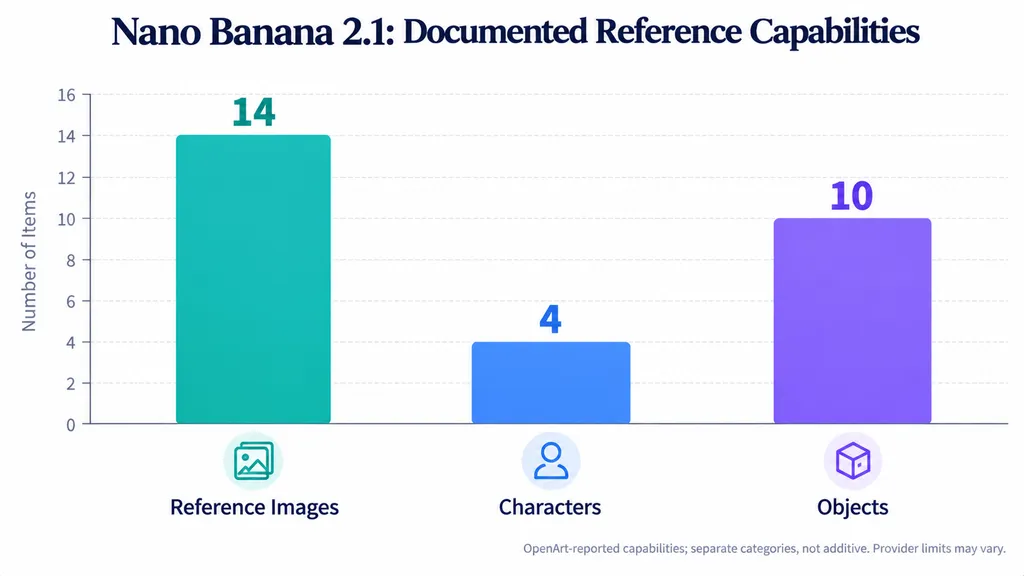
OpenArt's October 2026 documentation describes support for up to 14 reference images, including workflows involving up to 4 characters and 10 objects.
These numbers describe different capabilities and should not be added together. Provider interfaces and supported controls may vary.
More references do not automatically produce better results.
A practical reference hierarchy is:
Reference | Purpose | Example |
Base image | Scene geometry | Original product photo |
Identity reference | Character appearance | Approved portrait |
Material reference | Texture and finish | Ceramic close-up |
Color reference | Target palette | Product color sample |
Detail reference | Construction details | Packaging close-up |
Lighting reference | Atmosphere | Sunset photograph |
These are practical workflow categories, not official model settings.
Case Study: Architectural Material Editing With Multiple References
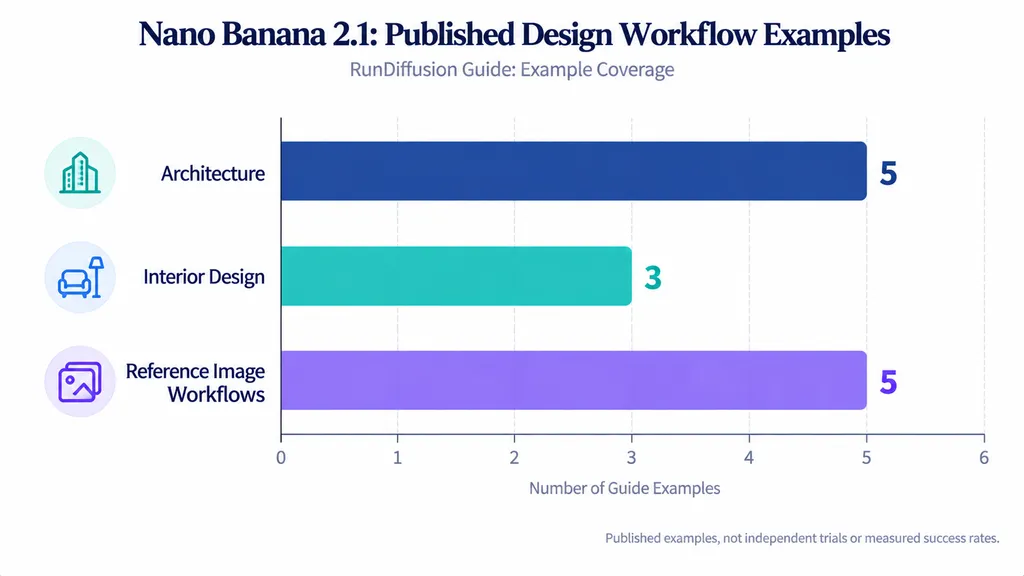
RunDiffusion's October 2026 guide presents 5 architectural examples, 3 interior examples, and 5 reference-image workflow examples.
These numbers describe published examples, not controlled experimental repetitions or measured success rates.
One documented workflow focuses on replacing an existing exterior finish with ribbed ceramic material.
The creative brief separates the responsibilities of the inputs:
- Base image: Preserve building geometry, windows, balconies, and camera perspective.
- Material reference: Transfer the ceramic texture, rib direction, surface gloss, and joints.
- Color reference: Apply the intended color without changing unrelated architecture.
The published example visually demonstrates a localized facade material change while retaining the broad architectural composition.
The key lesson is that material, color, and geometry should be treated as separate design requirements.
A ribbed ceramic reference should influence the facade finish without redefining window proportions or balcony positions.
However, the published demonstration does not provide pixel-level preservation measurements or construction-accuracy data. The result is evidence of a workflow, not proof that architectural dimensions remain exact.
What If Reference Images Conflict?
Conflicting references can make the intended result ambiguous.
For example, an identity reference may show a character wearing a black jacket, while a fashion reference shows a beige coat.
If the prompt simply asks the model to combine both images, it may transfer unintended clothing or appearance details.
A more precise instruction is:
Prompt: Use Image 1 only for the person's facial identity, hairstyle, and body proportions. Use Image 2 only for the beige coat's material, cut, and stitching. Replace the original jacket with the referenced coat while preserving the face, pose, background, and camera framing.
Expected result: A clothing modification using the second reference without intentionally changing the person's identity.
What to check: Face, hairstyle, garment design, body proportions, and background.
For important commercial edits, an approved reference should act as an evaluation standard rather than merely visual inspiration.
Nano Banana 2.1 Image Editing: What Do Real Tests Reveal?
Published Nano Banana 2.1 editing cases demonstrate that completing a requested change does not guarantee preservation of unrelated image details.
Our review includes a documented character-editing case, a 40-step recursive-editing benchmark, and a 90-generation editing-and-undo experiment.
These studies use different tasks and interfaces. Their results should be interpreted independently rather than combined into a universal model ranking.
Case Study 1: The Hector Helmet Editing Test
An October 2026 Astorie study examined a scene depicting Hector, Andromache, and their child.
The original generation involved two adults, one child, and one helmet, with specified character roles, actions, and spatial relationships.
The published test recorded the following settings:
Parameter | Recorded value |
Model label | Nano Banana 2.1 Premium |
Aspect ratio | 16:09 |
Resolution setting | 4K |
Delivered PNG | 2048 × 1143 |
Thinking setting | High |
Web setting | Off |
Displayed quote | 30 credits per node |
The 4K setting and delivered 2048 × 1143 dimensions are different recorded values. The displayed credit quote does not establish the actual account charge.
The editing task required Hector to remove his helmet, hold it in his right hand at waist height, and allow his left arm to hang naturally.
An earlier candidate showed Hector holding the helmet with both hands.
A revised prompt emphasized the correct hand arrangement and preservation of the surrounding composition.
The subsequent result better matched the requested pose, but character spacing and Andromache's supporting gestures also changed.
Both revisions were independently generated from the same approved source image, rather than forming a recursive editing chain.
The case demonstrates three important findings:
- Explicit action instructions can improve an individual requested change.
- Other composition elements can still change unintentionally.
- Instruction completion and preservation reliability require separate evaluations.
The study did not record enough repeated trials to establish a general success rate.
For character-based production, a result should not be approved solely because the requested object or gesture appears correct.
Case Study 2: A 40-Step Recursive Editing Benchmark
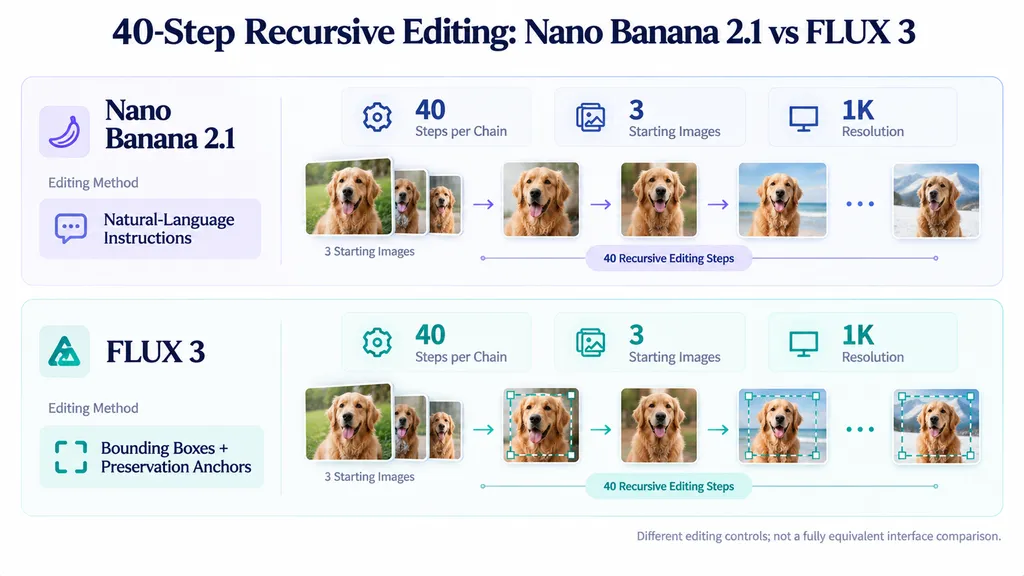
A third-party experiment published in October 2026 compared Nano Banana 2.1 and FLUX 3 through repeated image editing.
The researcher described 40 recursive steps on three starting images, where the output of one edit became the input to the next.
The published report also states 240 successful calls per model. However, the available description of the starting images and repetitions does not fully reconcile that total. It should therefore be treated as the researcher's reported call count rather than an independently reproduced calculation.
Test condition | Nano Banana 2.1 | FLUX 3 |
Workflow | Recursive editing | Recursive editing |
Step count | 40 per chain | 40 per chain |
Starting images | 3 | 3 |
Resolution setting | 1K | 1K |
Provider | fal | BFL API |
Edit guidance | Natural-language instructions | Bounding boxes and preservation anchors |
Iteration method | Previous PNG reused | Previous PNG reused |
The reported comparison found lower non-target-region drift for FLUX 3 under the tested conditions.
However, the editing interfaces were not equivalent.
FLUX 3 received explicit target bounding boxes and preservation anchors. Nano Banana 2.1 received natural-language descriptions of the intended change and instructions to preserve everything else.
The benchmark also used image alignment and selected non-target regions to evaluate changes outside requested edit areas.
The result therefore compares two model-and-workflow configurations, not just the underlying models in isolation.
It supports the importance of precise editing controls and long-chain evaluation, but it does not establish that FLUX 3 is universally superior or that Nano Banana 2.1 has a fixed editing failure rate.
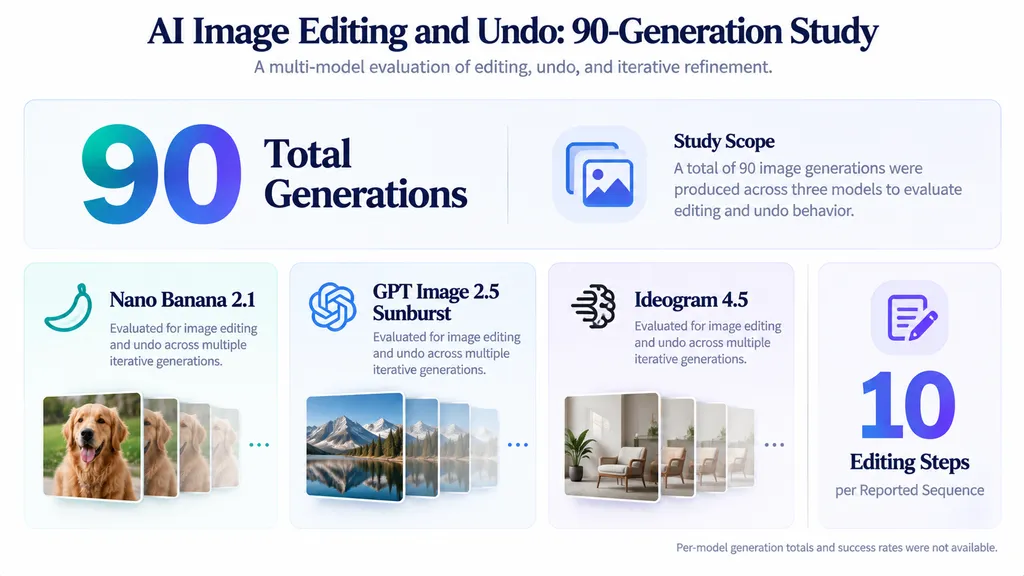
Case Study 3: A 90-Generation Editing and Undo Experiment
Another published comparison examined Nano Banana 2.1 and GPT Image 2.5 Sunburst, alongside Ideogram 4.5.
The research record describes 90 generations across three models, involving clothing modifications, accessory changes, and attempts to return images to earlier states.
The experimental sequences included 10 editing steps.
Unlike simple generation comparisons, this setup considers whether an AI image editor can reverse modifications.
For example, a model might successfully replace a jacket but fail to reconstruct the precise original garment after receiving an undo instruction.
It may also alter facial features, accessories, or background details during restoration.
The available research record does not retain complete per-generation scoring. Therefore, it cannot establish an independently verifiable ranking or undo success percentage.
The key production lesson is that editing accuracy and revision recoverability are separate capabilities.
For important design assets, saving approved source images is more reliable than assuming a conversational undo request will recreate an earlier image exactly.
How Should Designers Evaluate Editing Reliability?
The three cases reveal separate dimensions of editing quality.
Evaluation | Key question | Example |
Instruction completion | Was the requested edit performed? | Helmet held correctly |
Preservation reliability | Did unrelated details remain acceptable? | Character spacing unchanged |
Revision recoverability | Can an approved state be restored? | Original clothing recovered |
Resolution setting | 1K | 1K |
Provider | fal | BFL API |
Edit guidance | Natural-language instructions | Bounding boxes and preservation anchors |
Iteration method | Previous PNG reused | Previous PNG reused |
For production work, teams should also record:
- Number of accepted versus rejected outputs.
- Additional prompts required before approval.
- Unwanted changes outside the target region.
- Manual correction requirements.
- Time spent reaching an approved image.
These are recommended production metrics, not numerical results from the cited experiments.
Cost per approved image and time per approved image are often more useful operational measures than raw generation speed alone.
Nano Banana 2.1 JSON Prompts vs Natural Language Prompts
JSON prompts help organize complex requirements, but available research does not demonstrate that JSON consistently produces better Nano Banana 2.1 images than natural language.
The main distinction is how creative instructions are structured and maintained.
When Should You Use JSON Prompts?
JSON-style prompting is useful when a team repeatedly uses the same fields across different images.
A reusable product photography brief might include:
- Task: Generate premium product photography.
- Subject: Minimalist ceramic perfume bottle.
- Material: Matte ivory ceramic.
- Environment: Warm beige studio with limestone surface.
- Composition: Centered three-quarter view.
- Lighting: Soft directional illumination.
- Style: Premium editorial commercial photography.
- Must preserve: Product geometry and approved materials.
- Must avoid: Extra objects, distorted packaging, and unwanted text.
This is a readable representation of a structured prompt, not an official required JSON schema.
The same requirements can be communicated through ordinary sentences.
Does JSON Improve Image Quality?
Our review of structured portrait examples and user questions found differing preferences for JSON and natural-language prompts.
JSON can help ensure that reusable creative briefs contain consistent categories.
Natural language is usually easier when making quick changes or adjusting a single visual element.
However, there is no controlled A/B evidence in the reviewed material establishing a measurable image-quality advantage from JSON formatting alone.
Format | Best for | Advantage | Limitation |
Natural language | Quick generation | Easy to write | Complex details may be missed |
JSON | Reusable structured briefs | Consistent fields | More difficult to maintain |
Structured prose | Professional editing | Clear and flexible | Still requires verification |
Choose the structure that improves instruction clarity and workflow efficiency, not the format that merely appears more technical.
How to Generate Accurate Text and Infographics With Nano Banana 2.1
For Nano Banana 2.1 typography prompts, provide the exact wording, specify label counts and positions, and define the intended layout. Review spelling and composition independently before publication.
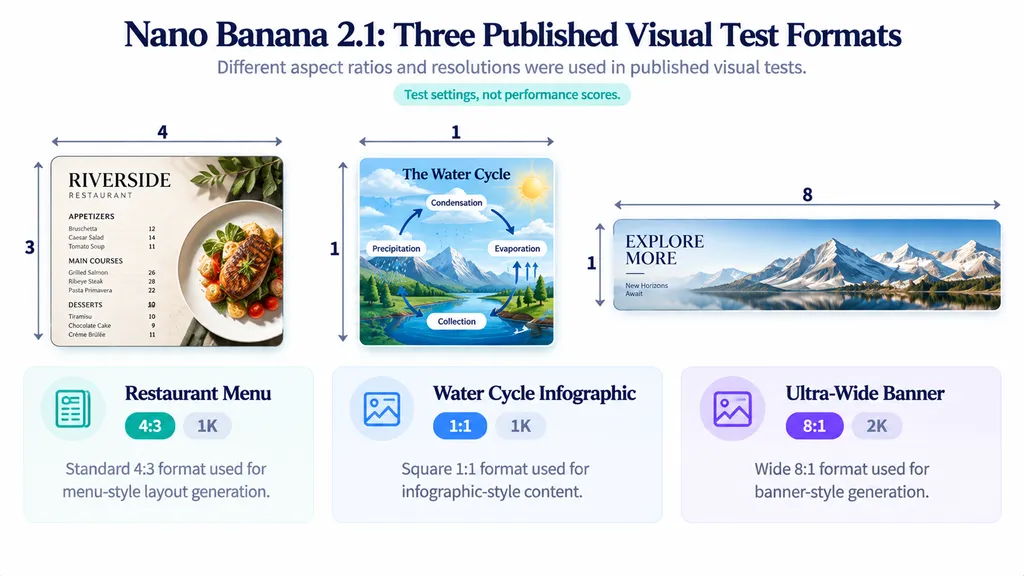
Our review identified a small published comparison involving menus, scientific infographics, and ultra-wide banners.
Case Study: Menu, Water Cycle, and Banner Tests
Visual task | Reported settings | Published observation | Limitation |
Restaurant menu | 4:3, 1K | Both compared models reproduced intended text and prices; 2.1 had cleaner layout | Complex details may be missed |
Water cycle infographic | 1:1, 1K | Four stage labels were reported as correct | More difficult to maintain |
Ultra-wide banner | 8:1, 2K | Neither compared model showed obvious seams in the demonstrated outputs | Still requires verification |
These were limited demonstrations associated with an API service. They are not evidence of a general text-accuracy percentage.
The menu example illustrates why accurate words do not necessarily produce a usable design.
A poster may contain the correct headline but poor visual hierarchy. An infographic may have readable labels but incorrect scientific relationships.
How to Write Better Typography Prompts
For text-heavy graphics:
- Provide exact wording in quotation marks.
- Define the number and order of text elements.
- Specify headline, subtitle, and label positions.
- Establish spacing and visual hierarchy.
- Proofread every important word, number, and symbol.
Example Prompt:
Create a minimalist cafe menu headed "WEEKEND SPECIALS." Include exactly three items: "Espresso — $4," "Cappuccino — $5," and "Matcha Latte — $6." Arrange the items in a clean vertical column beneath the heading. Use a warm cream background, dark modern typography, consistent alignment, and generous spacing. Do not add additional menu items, prices, or unrelated words.
Expected result: A clean menu containing the specified text and prices.
What to check: Spelling, currency symbols, item order, duplication, spacing, and alignment.
For commercial assets, manual proofreading remains essential even when the design appears publication-ready.
Why Do Nano Banana 2.1 Prompts Fail? Common Mistakes and Fixes
Nano Banana 2.1 prompts can fail when actions are ambiguous, reference roles conflict, preservation requirements are unclear, or repeated edits introduce unwanted changes.
Our review of published examples and user questions identifies several practical failure categories.
Why Does Nano Banana 2.1 Ignore Instructions?
A model may generate a visually coherent scene while missing an important relationship between subjects.
For example, "a warrior holding a helmet beside his family" does not specify which hand holds the helmet, where the helmet sits, or what the other arm should do.
A more precise instruction defines the action and position:
Prompt: The warrior holds the helmet in his right hand at waist height. His left arm hangs naturally at his side. Preserve the positions and gestures of the other characters.
If the action remains incorrect, isolate it in a focused revision instead of rewriting the entire scene description.
Why Do Faces and Backgrounds Change During Editing?
An instruction such as "replace the jacket" identifies the requested change but does not fully describe critical preservation requirements.
For identity-sensitive edits, specify the face, hairstyle, pose, camera perspective, and background.
However, these instructions cannot physically lock non-target content.
If a revision noticeably changes important details, return to an approved reference rather than continuing from the incorrect result.
How Can You Reduce Editing Drift?
Use a controlled approval process:
Step 1: Save the original source image.
Step 2: Define one principal edit.
Step 3: Specify protected elements.
Step 4: Generate and inspect the result.
Step 5: Compare the output against the source.
Step 6: Accept or reject the revision.
Step 7: Continue only from an approved version.
For independent creative variations, restart from the same original image.
For cumulative edits, retain intermediate approved versions so unwanted changes can be isolated.
Nano Banana 2.1 Troubleshooting Checklist
Problem | What to inspect | Recommended fix |
Wrong action | Subject and object relationship | Specify the exact gesture |
Facial identity drift | Face, hairstyle, proportions | Reuse an approved identity reference |
Product distortion | Shape, logo, geometry | Protect structural details |
Incorrect text | Spelling and order | Quote exact wording |
Changed background | Objects, framing, lighting | Specify protected details |
Material mismatch | Texture and scale | Add a dedicated material reference |
Repeated editing drift | Approved versus current image | Revert to a clean source |
Effective troubleshooting focuses on the failed requirement rather than adding more generic quality adjectives.
How to Use Nano Banana 2.1 in a Professional AI Design Workflow
A professional Nano Banana 2.1 workflow connects prompt creation, reference-image management, output evaluation, and version control.
For creative teams, the objective is not to maximize the number of generations. It is to produce approved visual assets while minimizing unnecessary revisions.
Step 1: Define the Creative Brief
Identify the desired image, audience, visual direction, and required output.
For commercial assets, record brand colors, packaging geometry, typography, and essential materials.
Separate mandatory details from optional creative preferences.
Step 2: Prepare Reference Images
Organize references according to their purpose.
Use an approved source for geometry and identity, then add supporting material, color, or lighting references as needed.
Avoid references containing unnecessary elements that might be transferred into the final image.
Step 3: Generate and Evaluate
Choose a text-to-image or editing prompt structure based on the task.
After generating, review subject accuracy, composition, material details, typography, and unwanted changes.
A successful generation is not automatically an approved production asset.
Step 4: Save Approved Versions
Keep the original and approved intermediate outputs.
When testing a new creative direction, return to the original reference. When developing a cumulative change, continue from the most recent approved version.
This reduces the risk of extending revisions from an already incorrect image.
Step 5: Connect AI Generation With Creative Collaboration
A single prompt does not address the broader challenges of managing references, creative alternatives, feedback, and consistent design direction.
Virse brings these activities into an AI-powered design workspace through its infinite canvas, collaborating AI agents, shared project context, and long-term design memory.
Instead of handling prompts and generated assets as disconnected tasks, creative teams can organize visual references, explore alternatives, and coordinate design work within a connected environment.
Virse does not guarantee that an image model will preserve every detail. Its value is in supporting a more organized and collaborative creative process.
The goal is to move from isolated image generation toward repeatable, reviewable, and production-oriented design workflows.
FAQ
Are Nano Banana 2.1 JSON prompts better than regular prompts?
Not necessarily. JSON organizes complex instructions into reusable fields covering subjects, composition, lighting, and preservation requirements. Natural-language prompts are easier for simple tasks and quick revisions. Our review found no controlled evidence that JSON consistently improves image quality. Clear requirements, well-assigned references, and careful output evaluation matter more than syntax alone.
How do I use multiple reference images in Nano Banana 2.1?
Assign each reference a clear role. Use the base image for composition, an identity reference for character appearance, and additional images for materials or lighting. OpenArt documents support for up to 14 reference images, although provider implementations may vary. Specify which properties should transfer and check the result for unwanted changes.
Why does Nano Banana 2.1 change faces or backgrounds when editing?
Image editing can modify details outside the requested region, even when preservation instructions are included. Published editing cases demonstrate changes to character spacing, gestures, and other non-target elements. Preserve the original image, identify protected details explicitly, and compare each result with an approved reference. Restart when unwanted changes accumulate.
Can Nano Banana 2.1 generate accurate text and consistent characters?
It can produce readable text and recognizable characters in selected tasks, but results vary with task complexity and revision history. Published menu and infographic demonstrations reported correct labels under limited conditions, while character-editing cases showed preservation problems. Verify spelling, numbers, facial identity, product geometry, and composition before approving commercial assets.
Conclusion
The best Nano Banana 2.1 prompts combine precise visual instructions, clearly assigned reference images, and explicit preservation requirements. Our review of documented examples, the Hector helmet-editing case, the 40-step recursive benchmark, and the 90-generation editing experiment demonstrates why instruction completion, preservation reliability, and revision recoverability must be evaluated separately. Start with the 10 practical templates, adapt them to your design task, and maintain approved references throughout the editing process. JSON can help organize complex requirements, but it cannot eliminate generation errors or editing drift. For professional creative teams, the real advantage comes from a repeatable workflow that connects visual exploration, evaluation, and collaboration. Virse supports this process by bringing references, AI-assisted creative work, and shared project context into one connected design workspace.