
MiniMax H3 Prompt Guide: How to Write Better H3 Prompts
 Yifan Zhao12분 읽기 ·
The best MiniMax H3 prompts work like compact production directions, not long lists of cinematic keywords. A strong prompt defines what each reference controls, what happens in sequence, how the camera moves, what should be heard, and which details must remain unchanged. If you're learning how to use MiniMax H3, better prompting is less about adding description and more about removing ambiguity.
Poorly structured prompts often lead to character drift, skipped actions, weak first-to-last-frame transitions, incorrect dialogue, or changing product geometry. Our review of public MiniMax H3 workflows and recurring user questions shows that these failures usually come from conflicting references, overloaded timelines, vague camera language, or unclear preservation rules. A broader MiniMax H3 review also helps clarify which generation tasks benefit most from stronger prompt structure.
Virse is designed to make this process more visual and collaborative by bringing AI into an infinite canvas instead of limiting creative work to a chat box. Designers can organize references, connect assets, run multiple AI Agents with shared project context, and preserve style preferences and team knowledge across iterations. That makes Virse especially useful when H3 prompting becomes part of a larger professional AI design workflow rather than a one-prompt experiment.
What Is the Best MiniMax H3 Prompt Structure?
A reliable MiniMax H3 prompt structure can be organized into seven layers: Reference Roles, Timeline, Look, Camera, Sound, Exact Text, and Limits. Not every prompt needs all seven, but this structure provides a practical checklist when generations become difficult to control.
Element | What It Controls | Best Practice |
|---|---|---|
Reference Roles | Identity, product, style, motion, voice | Give each input one clear job |
Timeline | Action order and state changes | Describe events in playback order |
Look | Lighting, materials, environment | Use observable visual details |
Camera | Framing and movement | Use one dominant camera idea per shot |
Sound | Dialogue, ambience, music | Separate each audio layer |
Exact Text | Labels, signs, UI, logos | Specify important wording exactly |
Limits | What must not change | Use narrow, task-specific constraints |
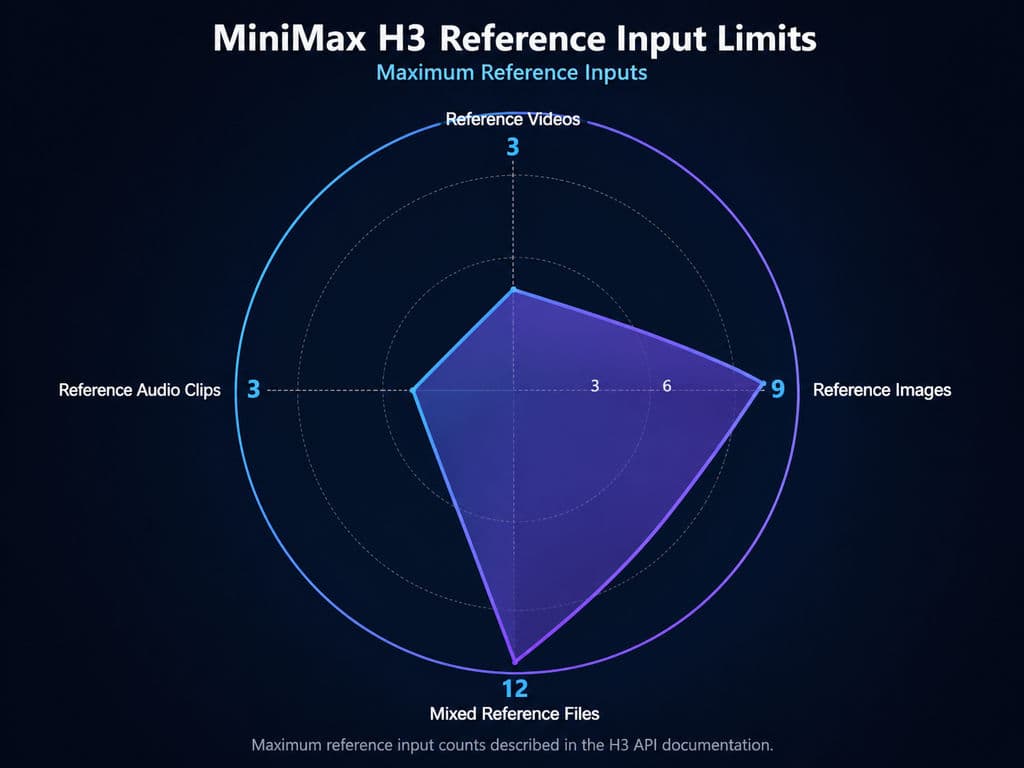
MiniMax's current H3 API supports 4–15 second video generation at 768P or 2K. Reference generation can use up to nine images, three video clips, and three audio clips, with up to 12 mixed reference files. That flexibility is powerful, but it also means more inputs can create more conflicts if their roles are not defined.
How Should You Assign Roles to H3 References?
Do not attach several references and simply ask H3 to “use them.” Tell the model what each source controls.
For a product campaign, the prompt might establish that Image 1 controls the model's identity, Image 2 controls wardrobe, Image 3 controls the studio environment, the product image controls exact geometry and materials, and the reference video controls motion pacing.
In professional design workflows, I treat reference routing as more important than reference quantity. An additional image is valuable only when it removes uncertainty instead of introducing another competing visual direction. This same principle becomes especially important in MiniMax H3 Motion Transfer, where identity, motion, camera, and other attributes may come from different references.
What Is the Difference Between Picture and Subject in H3?
In MiniMax's full-reference prompting system, a Picture acts more like a concrete visual or composition reference, while a Subject represents reusable content extracted from a reference, such as a character, object, environment, outfit, pose, or style.
This distinction matters when a single project contains both composition references and identity references. If a storyboard panel controls framing while a character sheet controls identity, those roles should remain separate. Otherwise, H3 may try to preserve the wrong characteristics from the wrong input.
How Do You Write a MiniMax H3 Timeline Prompt?
The core of a strong MiniMax H3 timeline prompt is:
Current state → observable action → camera response → final state.
MiniMax's official H3 prompting guidance describes video generation chronologically, which is useful because video quality depends on how well the model understands change over time.
Does an H3 Prompt Need Timestamps?
No. H3 needs clear temporal order more than it needs timestamps.
For a simple product shot, a prompt can say:
The perfume bottle remains centered on wet black stone. A hand enters from the right, lifts the bottle, rotates it slowly toward the warm key light, and stops when the gold label catches the highlight. The camera performs a slow, small push-in throughout.
Timestamps become more useful when you introduce several cuts, synchronized dialogue, transformations, or multiple important beats.
Our review of H3 workflow questions found a repeated pattern: when the model misses an action, creators often add even more instructions. That usually makes the timeline harder to execute. Reducing simultaneous actions and making the ending state explicit is often more effective.
How Many Actions Should an H3 Prompt Include?
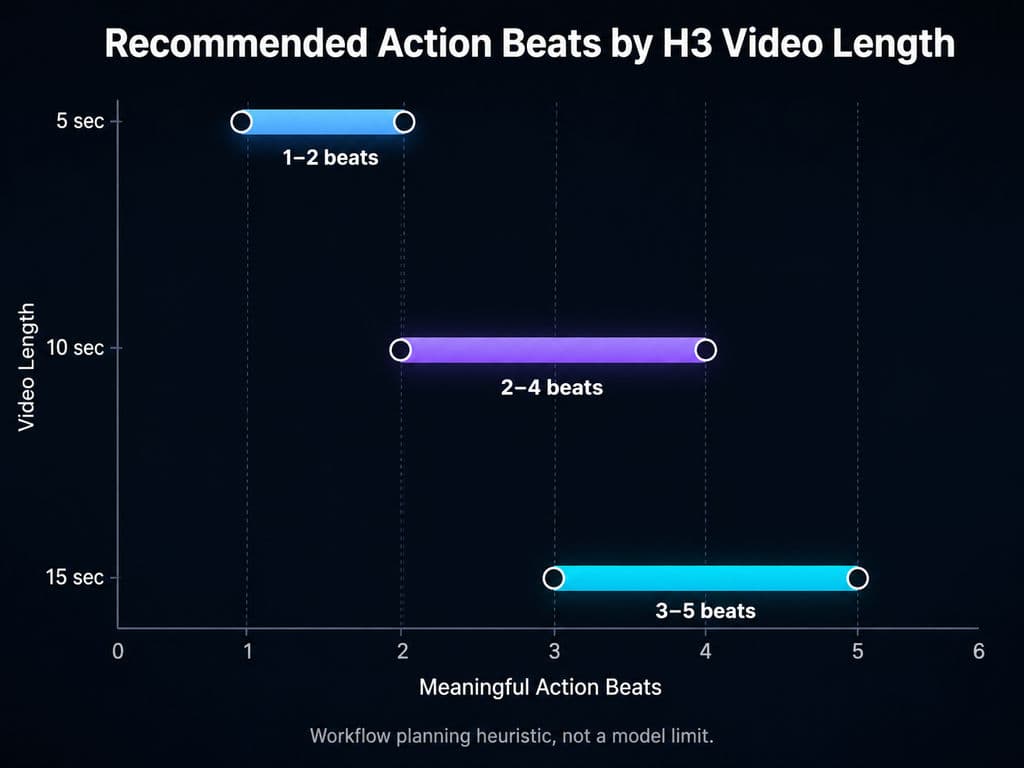
There is no official beat limit, but a practical planning range is:
- 5 seconds: one or two meaningful beats
- 10 seconds: two to four beats
- 15 seconds: three to five beats
These are workflow heuristics, not model limits. A beat should represent a meaningful visual change.
For example, a 10-second sneaker ad could show the athlete tightening the shoe, rising into a starting position, and accelerating past the camera. That is easier to control than combining six actions, several camera moves, a location transformation, and a logo reveal in the same short clip.
How Do You Use MiniMax H3 Reference Images, Character Sheets and Storyboards?
H3 reference prompting works best when identity, composition, motion, and style are treated as separate control problems. This is especially important for designers working with character sheets, product references, storyboards, or motion references.
Can Character Sheets Improve H3 Consistency?
Yes, particularly when the sheet clearly establishes face, hairstyle, proportions, clothing, accessories, and distinctive features.
In one public reference-to-video workflow we reviewed, a character sheet created with Flux was sufficient for the creator's target result without a separate character LoRA in that specific setup. This should not be interpreted as proof that character sheets always replace LoRA, but it shows why well-structured identity references can simplify a production pipeline.
The larger workflow lesson is to separate identity control from shot planning.
How Should You Use Storyboards With H3?
A storyboard should communicate shot sequence and composition, not act as a vague multi-purpose reference.
If one image contains several panels, explicitly map them:
Panel 1 guides Shot 1. Panel 2 guides Shot 2. Panel 3 guides Shot 3. Keep character identity from the character reference and use the storyboard only for framing and sequence.
Our review of user questions found storyboard skipping to be a recurring problem when H3 has to guess whether an image is a start frame, character sheet, moodboard, or sequence reference.
How Do You Control H3 Camera, Audio and First/Last Frames?
Camera, sound, and transitions are where many technically correct prompts still lose creative control.
How Should You Write H3 Camera Prompts?
Use physical camera language instead of decorative words such as cinematic.
MiniMax's H3 guidance supports movements such as push, pull, pan, tilt, truck, tracking, arc, pedestal, handheld, and static shots. A useful camera instruction describes movement type, speed, amplitude, and target.
For example:
Medium close-up. The camera slowly pushes toward the watch face with small amplitude as the second hand begins moving.
For more natural footage, observable imperfections can also help: mild handheld movement, delayed autofocus, exposure hunting, lens droplets, grain, halation, or chromatic fringing.
How Should You Prompt H3 First and Last Frames?
Do not describe only the beginning and ending images. Describe the physical transition between them.
For an umbrella opening:
The character raises the closed umbrella, pushes the runner upward, the ribs extend outward, the folded canopy progressively spreads, and the umbrella reaches the final fully open position before becoming still.
The most reliable pattern is:
Opening state → intermediate changes → progressive transition → exact ending state.
This is useful for packaging reveals, product rotations, UI transitions, pose changes, and motion-design sequences.
How Should You Prompt H3 Audio and Dialogue?
Treat sound as three separate layers:
Dialogue: who speaks and what they say.
Scene sound: footsteps, rain, object movement, room tone.
Music: instrumentation, tempo, rhythm, and intensity.
For recurring speakers, keep speaker identity consistent across shots. If you do not want music, state No music rather than leaving the audio direction unspecified.
For visible text, specify important wording exactly and use narrow constraints such as no additional text, no subtitles, or preserve the product label.
What Do Real H3 Workflow Tests Show About Iteration Cost?
Prompt quality is also a production-efficiency problem. Every failed interpretation adds another render cycle.
Why Should You Test H3 Prompts at Low Resolution First?
One public workflow we reviewed used 0.2MP at eight steps to validate composition and event flow. In another RTX 5080 workflow, a 10-second 720p render was reported at roughly 10 minutes, while a 0.2MP preview took about three minutes.
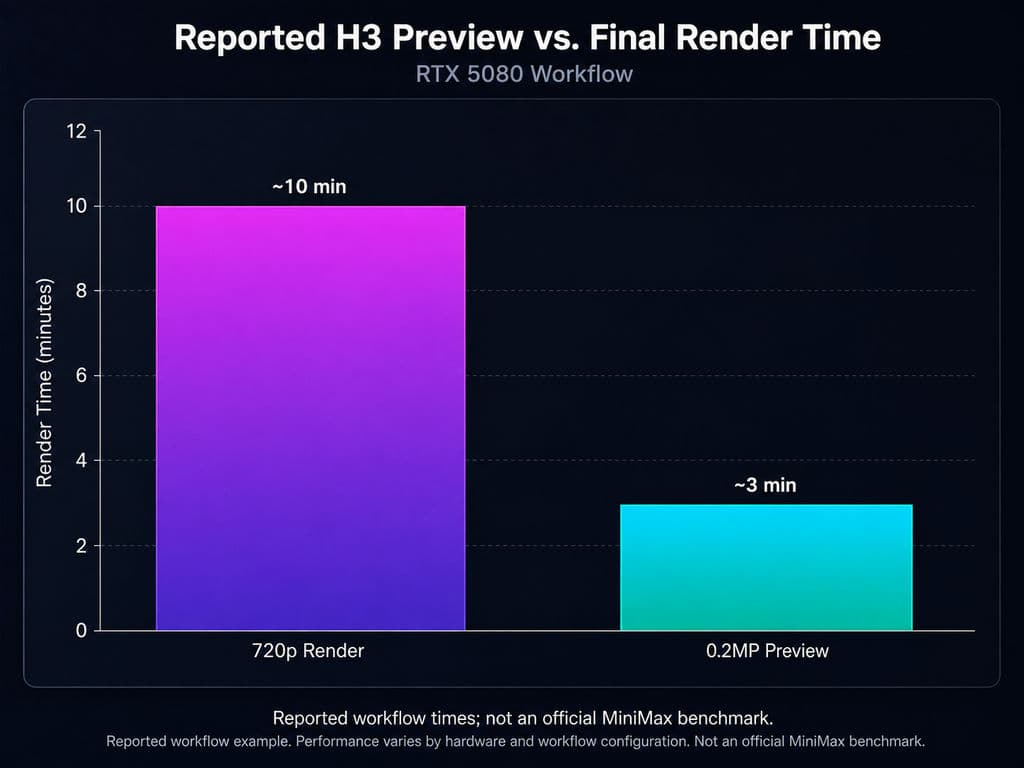
These figures are environment-specific workflow reports, not MiniMax benchmarks. Their value is practical: low-resolution previews can answer inexpensive questions before final rendering.
Does the character stay recognizable?
Does the sequence happen in the right order?
Does the camera move correctly?
Does the storyboard mapping work?
For ComfyUI users, this suggests a useful pattern: validate structure first, then increase steps and resolution only after prompt adherence is acceptable.
Do More Steps Always Improve H3 Results?
Not necessarily enough to justify the extra iteration cost.
One 768×1280 workflow reported roughly 2 minutes for five seconds, 6 minutes for 10 seconds, and 12 minutes for 15 seconds at 20 steps. Another workflow reported that reducing 20 steps to 10 saved about 40% of generation time in that environment.
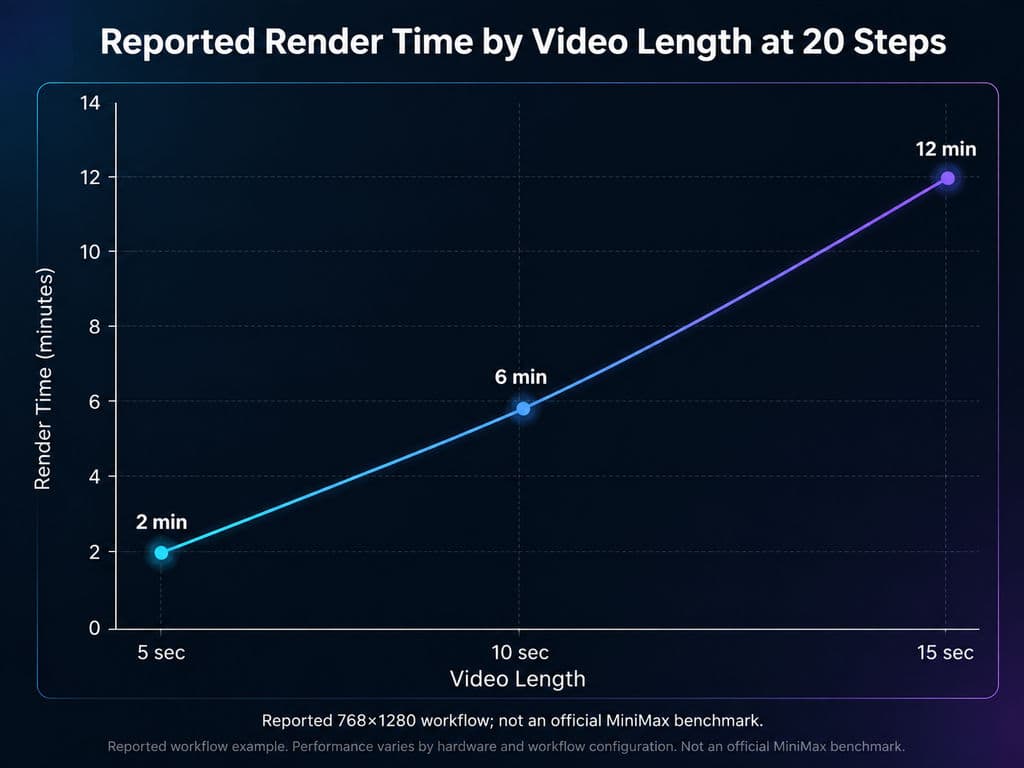
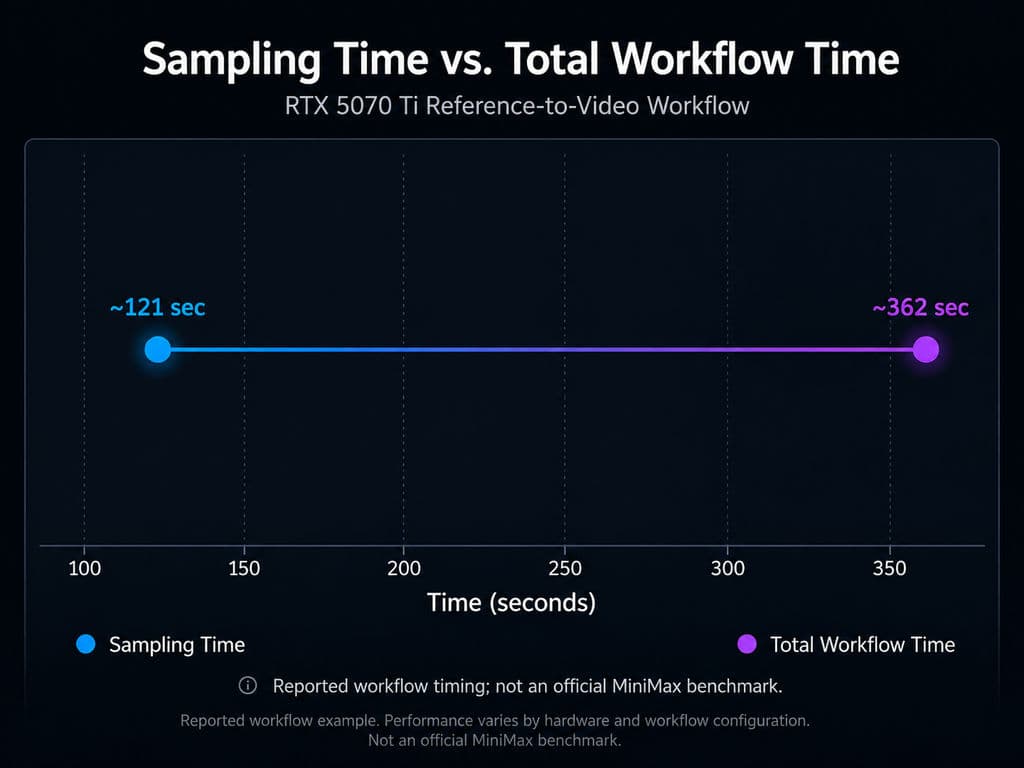
A separate RTX 5070 Ti reference-to-video case reported around 121 seconds of sampling but 362 seconds total, showing that sampling itself was not the only bottleneck.
The important takeaway is not the exact hardware speed. Prompt adherence can matter more than raw generation speed because unclear direction multiplies total production time.
Why Is MiniMax H3 Not Following My Prompt?
Most H3 failures can be traced to a specific ambiguity.
Why Does the Character or Product Keep Changing?
Likely cause: competing references or unclear preservation priorities.
Fix: choose one authoritative identity or product reference. State exactly what must remain unchanged, such as face, clothing, bottle geometry, label placement, material, or color.
Why Does H3 Skip Storyboard Shots or Actions?
Likely cause: overloaded timelines or unclear panel mapping.
Fix: reduce the number of beats, map each panel to one shot, and give each shot one dominant action and one dominant camera idea.
Why Does the Wrong Character Speak?
Likely cause: incomplete speaker mapping.
Fix: maintain stable speaker identities, associate voice references with the intended speaker, and separate dialogue instructions from environmental sound and music.
Why Is On-Screen Text Incorrect?
Likely cause: the text is not defined strongly enough or too many text elements compete.
Fix: provide the exact wording, identify where it appears, and prohibit unnecessary additional text. For brand-critical typography or logos, final output should still be manually reviewed before production use.
MiniMax H3 Prompt Template for Professional Design Workflows
For most H3 projects, use this sequence:
Visual direction → Reference roles → Timeline → Camera → Sound → Exact text → Limits
A product prompt could read:
Premium live-action product film. The product reference controls the exact bottle geometry, glass material, label placement, and cap color. The bottle stands on wet black stone under a narrow warm side light. A hand lifts it slowly and rotates it toward the light while the camera performs a small push-in. Water droplets move down the glass. Stop with the label facing the camera. Preserve the bottle proportions. No additional products, extra logos, subtitles, or cuts.
For complex multimodal projects, MiniMax also documents a fuller reference structure covering subject definitions, summary, retention analysis, detailed description, overall soundscape, and non-diegetic music. Its official guidance suggests roughly 350–500 English words for the detailed-description section of complex generation tasks. That level of detail is useful when several characters, references, voices, or preservation rules must interact—not for every ordinary H3 prompt.
FAQ
Does H3 need timestamps in every prompt?
No. Clear playback order is more important than timestamps. A continuous shot can simply describe actions chronologically. Timestamps become useful when a clip includes multiple cuts, synchronized dialogue, transformations, or several important beats that must happen at specific moments.
How long should an H3 prompt be?
There is no ideal universal length. A simple shot should contain only enough information to remove meaningful ambiguity. Complex full-reference workflows can justify much longer descriptions. Prompt length itself is not a quality metric; information hierarchy and clarity matter more.
Can a character sheet replace LoRA in H3?
Sometimes, but not universally. We reviewed a workflow where a character sheet produced acceptable reference-to-video consistency without a separate character LoRA. That does not establish a general benchmark. Test the character across different poses, framing, lighting, and camera angles before removing other identity controls.
Can I Find a Seed at Low Resolution and Reproduce It in HD?
Use low-resolution generations to test prompt interpretation, composition, motion, and event order, but do not assume the same seed will reproduce an identical result after changing resolution or workflow settings. Treat low-resolution previews as direction-validation tools, not guaranteed miniature versions of the final render.
Conclusion
The most reliable MiniMax H3 prompting strategy is to reduce what the model has to guess. Assign every reference a clear role, describe actions in playback order, use physical camera language, explain the motion between first and last frames, separate dialogue from scene sound and music, protect important text and design attributes with narrow constraints, and validate the sequence cheaply before final rendering. For designers and creative teams, this turns MiniMax H3 prompting from trial-and-error keyword writing into a repeatable creative-direction workflow built around identity, time, motion, sound, and preservation.
Virse 블로그의 다른 글
워크플로
What Is Human-Centered Design? HCD Process, Real Examples & Why Most Teams Get It Wrong
2026년 9월 21일 by Vincent
워크플로

What Is Design Thinking? 5 Stages, Real Examples & Why Most Teams Get It Wrong
2026년 9월 21일 by Vincent
워크플로
How to Turn a Design Into a Real Product: What to Do After the Prototype
2026년 9월 21일 by Vincent