MiniMax H3 Review: Real-World 2K, VRAM, Audio, Speed and Limitations
 Yifan Zhao11분 읽기 ·
MiniMax H3 is a strong AI video model for creators who need multimodal references, native audio, local open weights, and better control over existing creative assets. Its biggest limitations are slow reference-heavy inference, inconsistent faces, and the gap between H3-Base’s 768p output and the full 2K workflow.
For professional teams, the real challenge is not generating one impressive clip, but keeping products, characters, motion, audio, and visual direction consistent across iterations. As AI design workflows become more complex, context management matters as much as model quality, especially when teams also need stronger brand consistency across outputs.
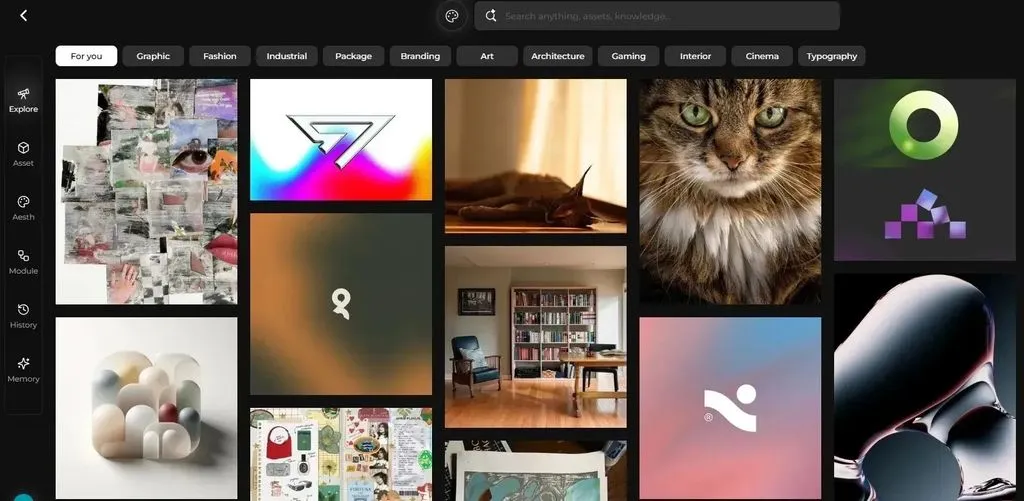
Virse helps organize that complexity on an infinite canvas, where assets, references, tasks, and multiple AI agents can share project context. Instead of rebuilding prompts and references in isolated chats, teams can keep creative decisions connected and focus more on direction, iteration, and consistency throughout a broader AI design workflow.
What Is MiniMax H3 and What Makes It Different?
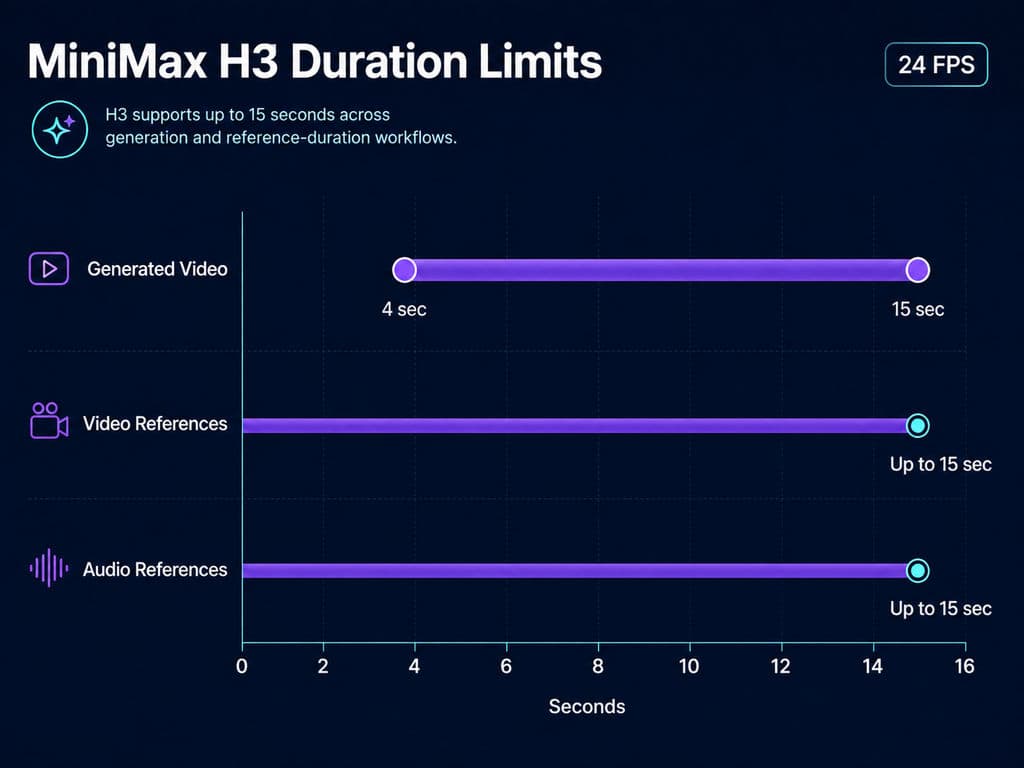
MiniMax H3 is a multimodal audiovisual generation system from MiniMax. It supports 4–15 second output at 24 FPS, native 32kHz stereo audio and workflows involving text, images, videos and audio references. For a broader overview of the model and its capabilities, see this MiniMax H3 review.
MiniMax H3 Is More Than Text-to-Video
The useful distinction is context.
A traditional text-to-video workflow asks the creator to describe almost everything through language. H3 can instead assign different creative information to different references.
An image can establish a product or character. A video can provide camera movement or physical motion. Audio can define voice or timing. Text explains how those references should interact.
For professional creative work, this resembles a design brief more than a one-shot prompt. That makes clear art direction especially important when multiple references contribute different parts of the final shot.
How Many References Can MiniMax H3 Use?
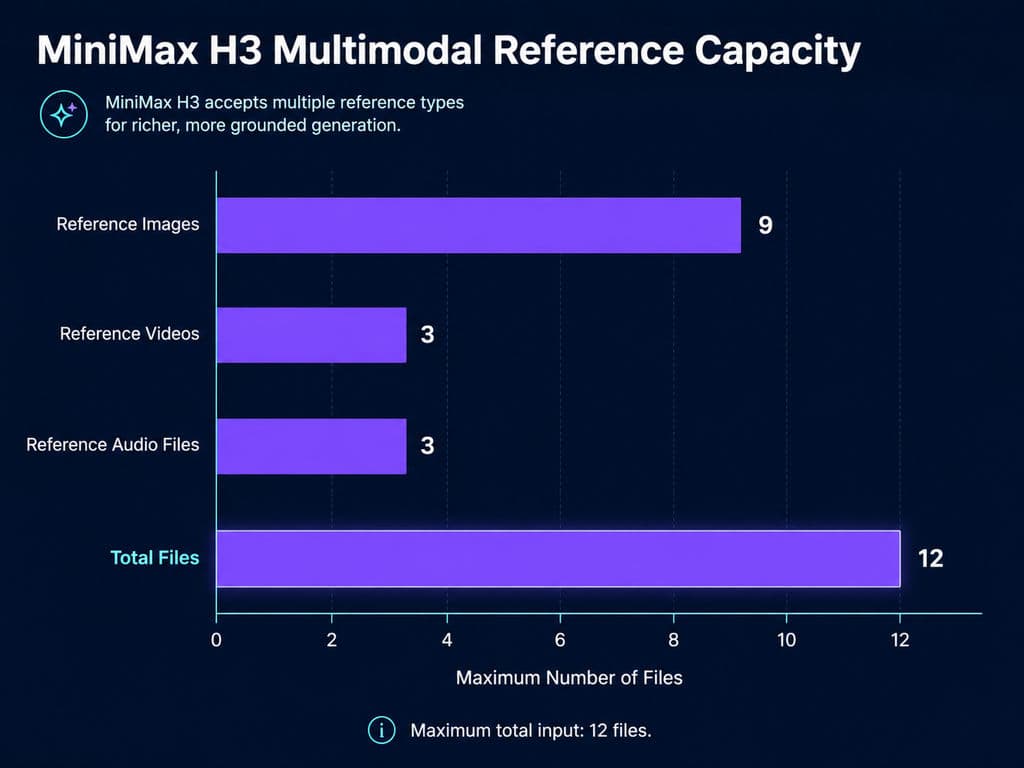
The documented Ref2VA workflow supports up to nine images, three videos and three audio references, with no more than 12 files in total. Total reference-video duration and total reference-audio duration can each reach 15 seconds. The MiniMax H3 reference guide covers this reference-driven workflow in more detail.
Our review of recurring user questions suggests that more references do not automatically produce better video. The most reliable workflow gives each asset one clear job: identity, environment, motion, camera direction, voice or timing. For motion-specific use cases, a dedicated MiniMax H3 motion transfer workflow can help clarify how video references should be used.
How Does the MiniMax H3 Architecture Work?
The full H3 experience should be understood as a system rather than a single downloadable checkpoint. This distinction is important when deciding how to use MiniMax H3 in a local or hosted workflow.
H3-Context-IR and the 33B H3-Omni-Transformer
The broader pipeline combines H3-Context-IR, a Qwen3-VL-32B encoder, visual and audio VAEs, and a 33B dense H3-Omni-Transformer.
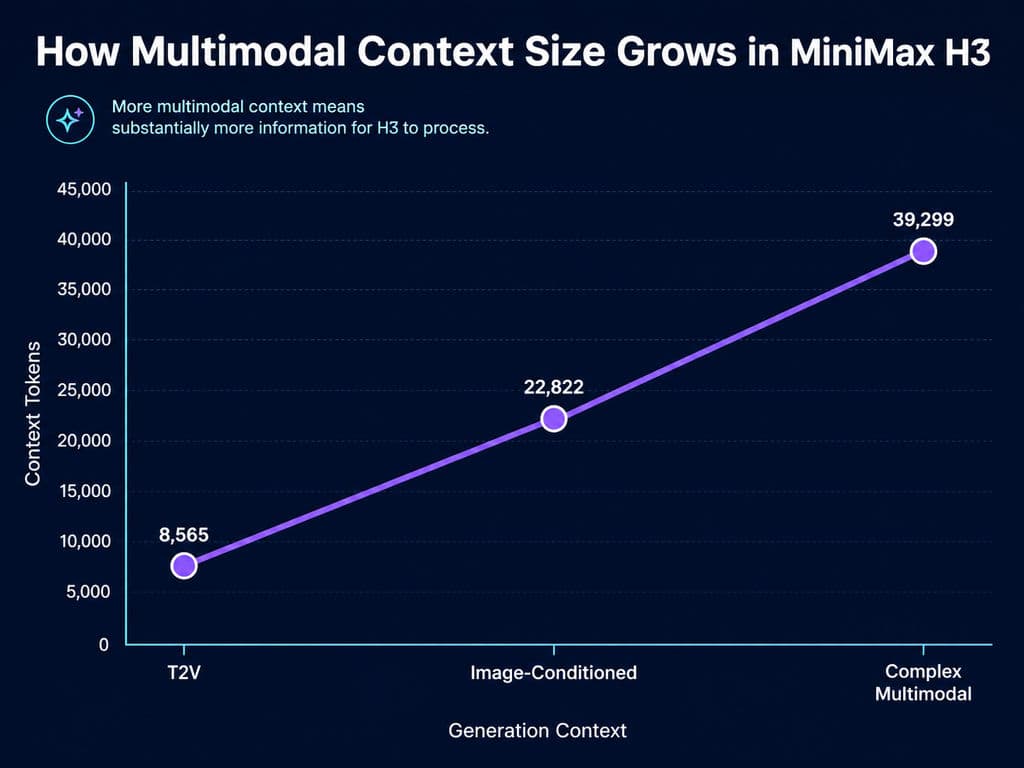
H3-Context-IR interprets free-form multimodal inputs before generation. Official examples in our research show context sizes increasing from approximately 8,565 tokens for T2V to 22,822 for an image-conditioned task and about 39,299 for a complex multimodal-reference example.
That provides a useful explanation for something we repeatedly found in field data: reference video is computationally much more expensive than a simple prompt or starting image.
MiniMax H3 Generates Video and Audio Together
H3 predicts video and audio representations within the same overall generation system rather than treating sound only as a later TTS step.
This matters for dialogue scenes, UGC concepts and short advertisements because the model can reason about audiovisual timing during generation. It does not guarantee perfect sound, but native audio is an architectural capability rather than a marketing label added to a silent video workflow.
Is MiniMax H3 Really Native 2K?
The complete MiniMax H3 system supports 2K output, but the open H3-Base primarily generates at 768p. The distinction is important because many early H3 descriptions compress these two stages into the phrase “native 2K.”
H3-Base 768p vs H3-Regenerate-2K
The complete workflow can be simplified as:
multimodal context → H3-Base 768p generation → H3-Regenerate-2K → 2K output
H3-Regenerate-2K is also conceptually different from a normal pixel-only upscaler because the regeneration stage can reuse the original semantic context.
For designers, that is potentially useful for product details, materials and other elements whose meaning matters at higher resolution.
However, the complete regeneration pipeline is not equivalent to simply downloading the open H3-Base weights. Local H3 and the complete hosted H3 experience should therefore not be described as identical.
How Good Is MiniMax H3 for Reference Video and Product Workflows?
Reference-driven generation is where H3 becomes more interesting than a standard prompt-to-video model.
Case Study: A Product Advertising Workflow
Consider a product campaign that already has an approved product render, visual direction and storyboard.
A practical H3 workflow would use:
- The product image for identity and material consistency.
- An environment image for art direction.
- A short video reference only when camera or subject motion matters.
- Audio when voice or timing needs to influence the scene.
- A chronological instruction describing actions and speakers.
The common failure pattern in our review was not simply “bad prompts.” Problems often appeared when references competed with each other: conflicting camera directions, undefined speaker roles or several assets trying to control the same visual attribute.
For commercial work, the goal should therefore be reference planning rather than reference accumulation.
Why Video References Can Become Expensive
The strongest performance case in our research makes this tradeoff visible. An RTX 5090 generating a 15-second 1280×736 clip from a 13-second reference video plus three images required approximately 57 minutes.
That is why H3 should not be evaluated only by whether it supports multiple references. Teams also need to ask whether each reference adds enough creative control to justify its inference cost.
MiniMax H3 VRAM Requirements and Real Local Speed
H3 can run on 6GB and 8GB GPUs with quantization and memory optimization, but low-VRAM support does not mean fast production.
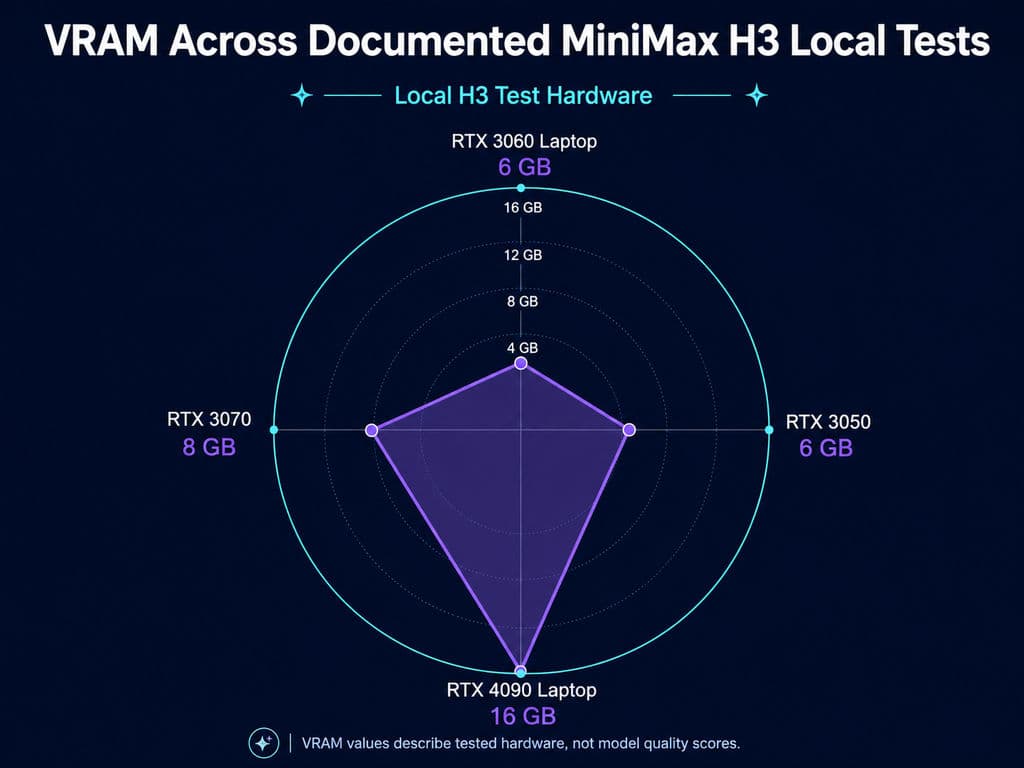
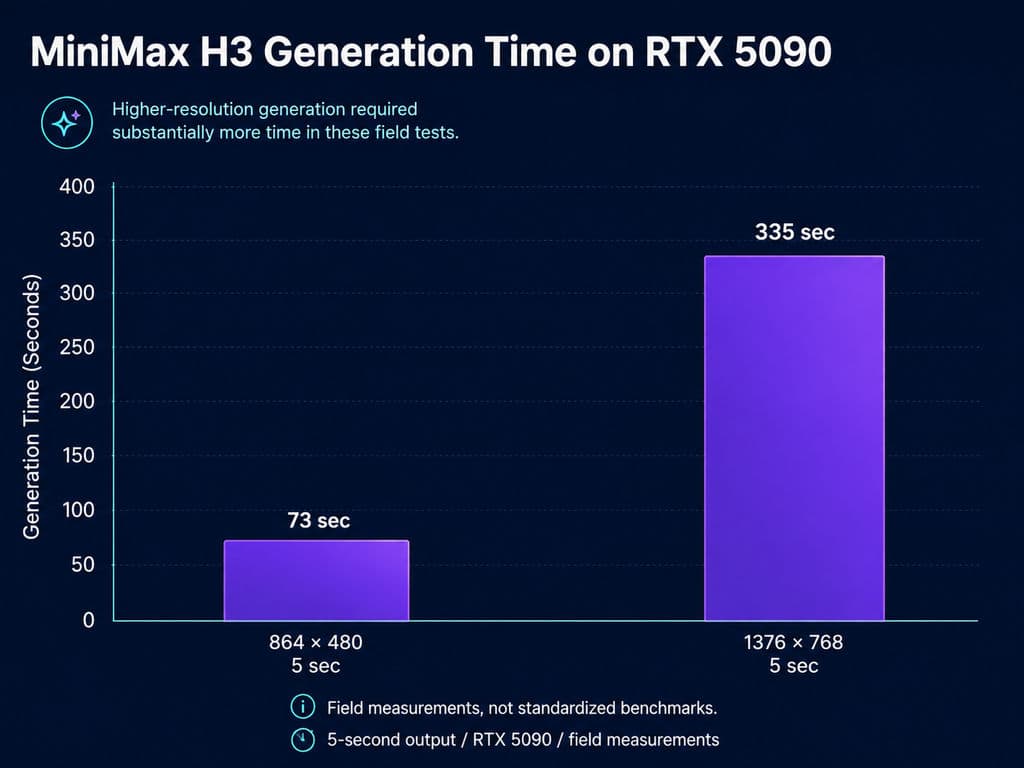
Our field-data review produced the following representative cases:
GPU | Test | Time |
|---|---|---|
RTX 3050 6GB | 480p, 5s | about 17 min |
RTX 3060 Laptop 6GB | 480p, 5s | about 11.7 min |
RTX 3070 8GB | 768p, 5s | under 4 min |
RTX 4090 Laptop 16GB | 960×540, 5s | 182 sec |
RTX 5090 | 864×480, 5s | 73 sec |
RTX 5090 | 1376×768, 5s | 335 sec |
These are field measurements rather than standardized benchmarks, so software configuration, quantization, offloading and system RAM all matter.
What 6GB, 8GB and 16GB VRAM Mean in Practice
A 6GB setup is best treated as an experimentation environment. Eight gigabytes can become genuinely useful for short, conservative generations, but longer clips and larger canvases increase OOM risk.
Sixteen gigabytes provides considerably more room for iteration, although H3 remains compute-heavy. Acceleration methods can help: one RTX 4060 Ti 8GB case fell from roughly 20 minutes to 12 minutes with EasyCache. Our research also found quality tradeoffs in some accelerated workflows, especially around anatomy and motion, so speed settings should be visually validated rather than enabled by default.
How Good Are MiniMax H3 Video Quality and Native Audio?
H3's quality advantage is more specific than “better video.”
Where MiniMax H3 Performs Well
Across the cases we reviewed, H3 was repeatedly strong in reference consistency, character continuity, material preservation, cloth interaction and complex instruction handling.
Those qualities matter in design production because a beautiful clip is not useful if the approved product, costume or character changes halfway through the shot.
Where MiniMax H3 Still Fails
Mid-distance faces remain a recurring problem. Soft facial features, distorted eyes and unstable anatomy appear often enough that I would review faces at delivery size before approving an asset.
Our research also includes a VAE encode-decode test where softness appeared before diffusion generation, suggesting that part of H3's perceived blur can originate in the video representation pipeline itself.
Native audio also needs review. H3 genuinely supports stereo audio generation, but observed workflows include environmental-sound artifacts, inconsistent effects and dialogue-assignment problems. Multi-character scenes benefit from explicit speaker instructions.
MiniMax H3 vs Seedance 2.5 and LTX 2.3
There is currently no credible basis for declaring one AI video model universally superior.
Model | Stronger Fit | Main Tradeoff |
|---|---|---|
H3 | References, local use, native AV | Speed, faces |
Seedance | Motion, action, choreography | Less local flexibility |
LTX 2.3 | Speed, some face workflows | Weaker reference control |
Our research tends to favor H3 when product identity, character consistency or multimodal control matters. Several comparative creator tests favor Seedance for physical interaction, cinematic motion and camera choreography. LTX 2.3 remains attractive when iteration speed or facial clarity matters more than complex reference control.
Veo and Kling are also relevant competitors, but our current research does not contain enough controlled same-prompt evidence to create a defensible universal ranking. Inventing one would add confidence without adding information.
Is MiniMax H3 Pricing Actually Competitive?
MiniMax positions H3 aggressively on generation cost, claiming that its 2K cost per second is less than one-third of mainstream alternatives and its 768p cost is roughly half that of mainstream 720p options.
For production teams, however, cost per generated second is the wrong metric by itself.
If a ten-second advertisement requires 15 attempts before one clip is approved, the production cost includes rejected generations, reference processing, regeneration, human review and post-production. H3's real economic advantage will therefore depend on whether stronger reference adherence reduces the number of failed iterations.
That is a more useful metric than comparing headline API prices alone.
Is MiniMax H3 Open Source?
H3 is more accurately described as open-weight than as a completely open-source production system.
H3-Base weights are available for local use, but the full system includes components such as H3-Context-IR and H3-Regenerate-2K that are not equivalent to the downloadable Base experience.
The license reviewed in our research also contains geographical and commercial conditions, including additional authorization requirements in specified territories and for organizations above the stated revenue threshold. Teams planning commercial deployment should review the current license directly before shipping a product rather than interpreting “open weights” as unrestricted commercial permission.
How MiniMax H3 Fits Into a Professional AI Design Workflow
The larger lesson from H3 is that professional AI creation is moving away from one perfect prompt and toward managed creative context.
This is also why canvas-based design systems are relevant. Virse, for example, is positioned as a collaborative AI design environment where designers organize assets and tasks on an infinite canvas, multiple agents can share project context, and longer-term knowledge can preserve team preferences and brand standards. Its goal is to assist professional designers with repetitive execution rather than replace the designer with a one-click result.
That workflow principle fits reference-heavy video generation well. A model such as H3 is most useful when product images, storyboards, motion references, generated variations and feedback remain connected to the broader creative process rather than disappearing into isolated chat sessions.
FAQ
Can H3 run on 8GB VRAM?
Yes. Our research includes successful RTX 3070 and RTX 4060 Ti 8GB configurations. A five-second 768p RTX 3070 case completed in under four minutes, while a 640p RTX 4060 Ti case took approximately 20 minutes before acceleration. Quantization, offloading, system RAM, resolution and clip duration can significantly change performance.
Is H3 really native 2K?
The complete H3 system supports 2K output, but H3-Base primarily generates at 768p. The full workflow uses H3-Regenerate-2K to recreate the result at higher resolution using the original context. It is therefore more precise to describe H3 as 768p base generation with contextual 2K regeneration.
Why is H3 slow with video references?
Video references add substantial temporal context. Our research shows context increasing from roughly 8,565 tokens in a T2V example to around 39,299 in a complex multimodal case. In one RTX 5090 case, a 15-second output using a 13-second reference video and three images required about 57 minutes.
H3 vs Seedance: which is better?
H3 is better suited to workflows prioritizing references, local weights, native AV and identity consistency. Seedance appears stronger in some motion, physics and camera-choreography tests. Neither model has enough controlled evidence to justify a universal winner, so the best choice depends on the shot and production requirement.
Conclusion
MiniMax H3 is most valuable when AI video needs to preserve creative context rather than simply generate an attractive clip from text. Its multimodal references, native audio, open H3-Base weights and strong instruction handling make it especially relevant to product advertising, character workflows, previs and design-led video production. The tradeoffs are equally important: H3-Base is primarily 768p, full 2K relies on contextual regeneration, low-VRAM hardware can be slow, complex references can make even an RTX 5090 wait tens of minutes, and faces, audio and motion still require human review. For professional creative teams, H3 is therefore best treated as a powerful generation component inside a controlled design workflow, not as a replacement for creative direction.