
Seedance 2.0 사용법: 캐릭터 변형, 참조 자료, 다중 샷 프롬프트 문제 해결
Vincent10분 읽기 ·
사용할 때 가장 어려운 점은 Seedance 2.0의 다중 샷 영상에서 캐릭터, 참조 자료, 샷의 일관성을 유지하는 것입니다. 샷마다 정체성 참조가 바뀌면 캐릭터 변형이 발생하기 쉽고, 이미지·영상·텍스트 지시가 충돌하면 동작, 카메라 움직임, 환경을 예측하기 어려워집니다. 프롬프트를 길게 쓰는 것만으로는 보통 해결되지 않습니다.
프로젝트 규모가 커지면 이러한 문제로 얼굴 변화, 불안정한 의상, 연속성 단절, 그리고 증가한 Seedance 2.0 생성 비용이 발생할 수 있습니다. 핵심은 어떤 참조가 정체성, 환경, 동작, 카메라, 오디오를 제어하는지 명확히 정하고 여러 입력이 같은 역할을 두고 경쟁하지 않게 하는 것입니다.
Seedance 2.0을 가장 안정적으로 사용하는 방법은 멀티모달 연출 작업 흐름으로 활용하는 것입니다. 이미지는 정체성에, 영상 참조는 동작과 카메라 제어에, 오디오는 타이밍에 활용하고 구조화된 다중 샷 프롬프트나 스토리보드로 연속성을 유지하세요. Virse는 하나의 무한 캔버스에서 참조, 스토리보드, 자산을 정리하도록 돕고, 공유 프로젝트 맥락은 긴 프로젝트에서도 미적 선호, 브랜드 기준, 창작 결정을 일관되게 유지합니다.
Seedance 2.5, Seedance 2.0 및 MiniMax H3를 이제 Virse에서 사용할 수 있어, 팀은 같은 창작 작업 흐름 안에서 여러 주요 영상 모델을 탐색하고 비교할 수 있습니다.

Seedance 2.0 단계별 사용법
안정적인 Seedance 2.0 작업 흐름은 하나의 프롬프트로 모든 것을 해결하는 대신 기획, 참조, 생성, 마무리를 구분합니다.
- 샷 정의: 피사체, 환경, 동작, 카메라, 길이, 스타일을 정합니다.
- 참조 역할 지정: 어떤 입력이 정체성, 환경, 동작, 카메라, 오디오를 제어할지 정합니다.
- 조율을 위한 프롬프트 작성: 참조에 이미 보이는 정보를 반복하는 대신 관계를 설명합니다.
- 타임라인 구성: 다중 샷 영상을 시간순 샷으로 나눕니다.
- 먼저 간단히 테스트: 복잡한 요소를 추가하기 전에 정체성과 동작을 검증합니다.
- 선별적으로 재생성: 전체 시퀀스를 다시 만드는 대신 실패한 샷을 재생성합니다.
- 마무리는 나중에: 동작이 승인된 뒤 업스케일과 편집을 진행합니다.
이 방식이 효과적인 이유는 Seedance 2.0이 텍스트에만 의존하지 않고 텍스트, 이미지, 영상, 오디오를 멀티모달 입력으로 공식 지원하기 때문입니다.
Seedance 2.0 참조 자료 사용법
참조 역할 지정이 참조 개수보다 중요합니다. 각 입력에는 명확한 주 역할이 하나씩 있어야 합니다.
입력 | 가장 적합한 역할 |
이미지 1 | 캐릭터 정체성 |
이미지 2 | 제품 또는 물체 |
이미지 3 | 환경 |
영상 1 | 신체 동작 |
영상 2 | 카메라 움직임 |
오디오 1 | 리듬 또는 연기 타이밍 |
프롬프트 | 매핑, 타임라인, 제약 |
Seedance 2.0은 참조 자료를 몇 개까지 사용할 수 있나요?
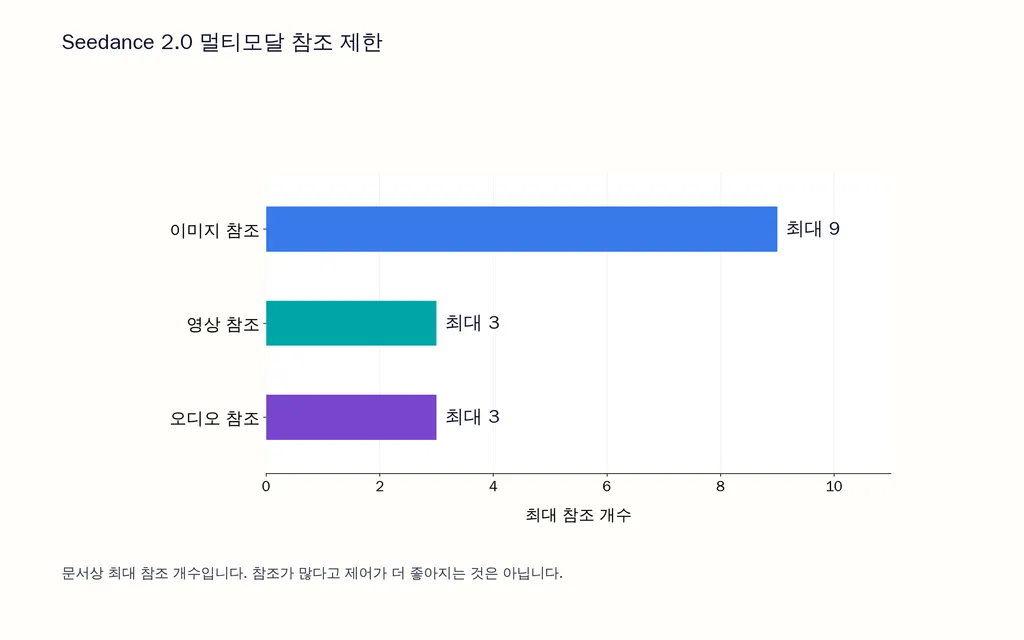
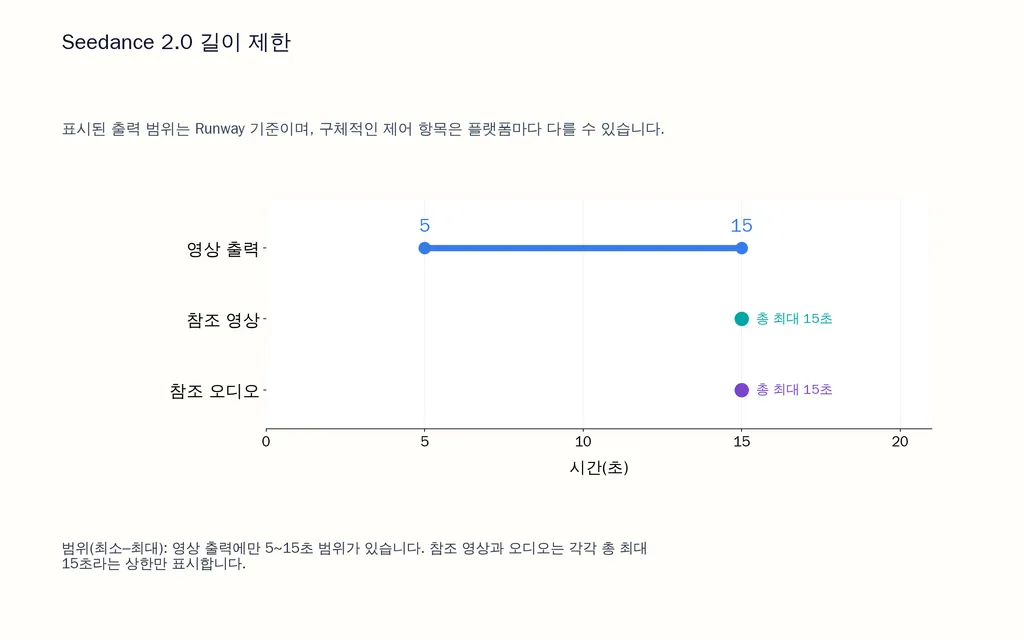
Seedance 2.0은 현재 멀티모달 작업 흐름에서 최대 이미지 참조 9개, 영상 참조 3개, 오디오 참조 3개를 지원합니다. 참조 영상의 총길이는 최대 15초이며, 오디오 참조도 총 15초까지 가능합니다. 오디오만 단독 참조 입력으로 사용할 수는 없습니다.
입력이 많다고 무조건 좋은 것은 아닙니다. 역할이 충돌하면 모호해집니다. 생성 전에 어떤 참조가 정체성, 환경, 동작, 카메라를 제어하는지 정확히 알아야 합니다.
유용한 원칙은 다음과 같습니다. 참조는 정보를 담고, 프롬프트는 역할을 지정합니다.
다중 샷 영상용 Seedance 2.0 프롬프트 작성법
좋은 Seedance 프롬프트는 무엇이 존재하고, 무엇이 언제 바뀌며, 무엇이 고정되어야 하는지 정의합니다.
단일 샷에서는 정보를 다음 항목 중심으로 구성하세요. 피사체, 환경, 동작, 카메라, 조명 또는 스타일, 그리고 제약입니다.
긴 덩어리 프롬프트보다 샷 목록이 나은 이유
공간과 시간 지시를 한 문단에 섞으면 다중 샷 프롬프트를 제어하기 어려워집니다.
대신 캐릭터와 환경을 한 번 정의한 뒤 동작을 시간순으로 구성하세요.
피사체: 동일한 캐릭터, 얼굴, 헤어스타일, 의상.
환경: 동일한 장소와 조명.
샷 1, 0–5초: 와이드 샷, 캐릭터가 등장, 천천히 전진하는 돌리 이동.
샷 2, 5–10초: 측면 미디엄 샷, 카메라가 옆에서 따라 이동.
샷 3, 10–15초: 클로즈 샷, 캐릭터가 멈추고 카메라는 미세하게 접근.
제약: 중복, 의상 변경, 장소 변경, 예상치 못한 컷 전환 없음.
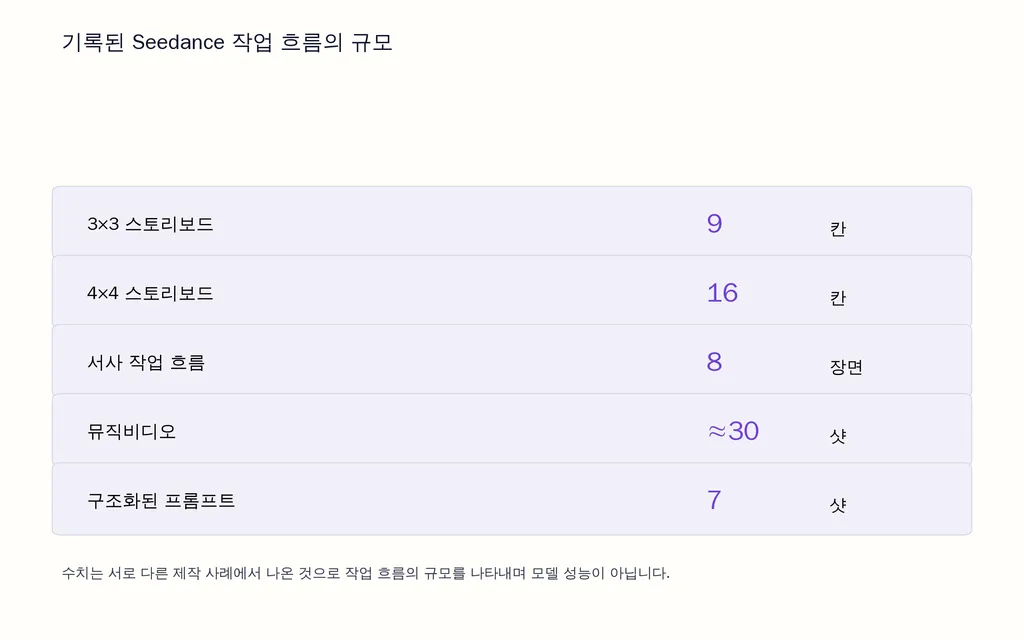
기록된 한 제작 사례에서는 하나의 구조화된 프롬프트로 7개 샷을 생성했습니다. 다른 실무자의 작업 흐름에서는 대략 6~8개 샷이 관리하기 더 쉬웠으며, 시퀀스가 촘촘해질수록 불안정성이 커졌습니다. 이는 실무 관찰이며 모델의 공식 제한이 아닙니다.
Seedance 2.0에서 스토리보드 사용하는 법
스토리보드를 먼저 만들면 구도 시험에만 쓰이는 비싼 영상 생성 횟수를 줄일 수 있습니다.
스토리보드는 동작 생성을 시작하기 전에 프레이밍, 캐릭터 배치, 샷 순서, 카메라 방향, 컷 밀도를 고정할 수 있습니다.
스토리보드 제작 사례가 보여 주는 점
한 작업 흐름에서는 GPT Image 2로 3×3 스토리보드를 만든 다음, 15초 16:9 시퀀스를 생성했습니다. 제작자는 이 특정 작업 흐름을 4분 미만에 마쳤으며 전체 결과물을 사용할 수 있다고 판단했다고 밝혔습니다.
다른 사례에서는 4×4, 16칸 스토리보드에 와이드, 미디엄, 클로즈, 익스트림 클로즈 샷과 카메라·동작 지시를 넣었습니다. 별도의 45초, 8개 장면 작업 흐름에서는 이야기와 미리보기 이미지를 만든 뒤 승인된 장면을 Seedance 2.0 Fast로 보냈습니다.
이는 개별 사례이지 벤치마크는 아니지만, 작업 흐름의 교훈은 분명합니다. 기본적인 구도 문제를 발견하는 데 영상 크레딧을 쓰지 마세요.
Seedance 2.0에서 캐릭터 일관성을 유지하는 법
캐릭터 일관성은 모든 클립이 동일하고 안정적인 정체성 참조에 기반할 때 향상됩니다.
같은 고품질 캐릭터 참조를 재사용하고 설명을 일관되게 유지하며, 얼굴·의상·비율을 의도치 않게 새로 정의하는 참조를 추가하지 마세요.
긴 프로젝트에서 캐릭터 변형이 심해지는 이유
실무자 테스트에서는 익스트림 클로즈업과 큰 프레이밍 변화가 미디엄 샷보다 더 많은 정체성 변화를 드러낼 수 있다고 봅니다. 이를 확정적인 모델 동작이 아니라 제작 과정의 관찰로 보세요.
한 3분 24초, 약 30개 샷의 뮤직비디오 프로젝트는 규모를 이해하는 데 유용한 사례입니다. 일부 어려운 카메라 샷은 6~8회 재생성이 필요했습니다. 한 클립에서 정체성을 유지하는 것과 30개 샷에서 유지하는 것은 근본적으로 다른 제작 문제라는 교훈을 줍니다.
긴 프로젝트에서는 마지막에 고치기보다 연속성을 지속적으로 점검하세요.
Seedance 2.0 오디오 참조와 립싱크 사용법
오디오 참조는 리듬, 연기, 분위기, 대사 타이밍을 안내할 수 있지만, 오디오를 그대로 통과시킨다고 가정해서는 안 됩니다.
이 가이드를 위해 검토한 한 작업 흐름에서는 완성된 ElevenLabs 트랙을 제공하고 음성, 단어, 타이밍이 그대로 유지되기를 기대했습니다. 하지만 결과의 일부는 여전히 재해석되었습니다.
대사가 프레임 단위로 정확해야 한다면 제작 규모를 늘리기 전에 작업 흐름을 검증하세요.
뮤직비디오 프롬프트 작성법
오디오에 이미 가사와 리듬이 있다면 시각적 프롬프트는 연기, 움직임, 카메라 방향에 집중하고 모든 가사를 다시 설명하지 마세요.
이는 같은 참조 원칙을 따릅니다. 텍스트, 오디오, 영상이 같은 정보를 제어하려고 경쟁하지 않게 하세요.
Seedance 2.0으로 영상 편집 및 연장하는 법
Seedance 2.0은 새 클립 생성에만 한정되지 않으며 공식 기능에 영상 편집과 연장도 포함됩니다.
따라서 기존 영상도 출발점이 될 수 있습니다. 참조 기반 편집은 시각적 콘텐츠를 바꾸면서 동작이나 구조를 유지할 수 있으며 Seedance 2.x 공식 기능에는 Edit Video와 Extend Video가 모두 포함됩니다.
이는 다음과 같은 작업 흐름에 유용합니다. 캐릭터나 제품 변경, 시각 요소 교체, 기존 장면 조정, 전체 시퀀스 재생성 대신 선택한 클립 연장입니다.
제작 관점에서 동작과 구도가 이미 잘 구현됐다면 처음부터 다시 만드는 것보다 편집하는 편이 더 효율적인 경우가 많습니다.
Seedance 2.0이 일부 실제 인물 참조를 거부하는 이유는 무엇인가요?
실제 인물 참조가 거부되는 것은 정책 문제일 수 있으며 프롬프트 문제가 아닐 수 있습니다.
BytePlus 문서에 따르면 Seedance 2.x는 실제 사람 얼굴이 담긴 일반 참조 이미지나 영상을 직접 지원하지 않습니다. 승인된 초상에 대해서는 허용 목록 기반 소재 라이브러리 작업 흐름을 제공하며, 여기서 승인된 참조 자산을 업로드한 뒤 해당 자산 ID로 참조합니다.
이는 UGC, 인플루언서, 대변인, 기업 광고 작업 흐름에서 중요합니다. 특정 인물을 중심으로 전체 스토리보드를 만들기 전에 초상 사용 승인 요건을 확인해 그 인물을 선택한 Seedance 파이프라인에서 사용할 수 있는지 확인하세요.
프롬프트를 반복해서 고쳐도 정책 수준의 제한은 해결되지 않습니다.
Runway에서 Seedance 2.0을 효율적으로 사용하는 법
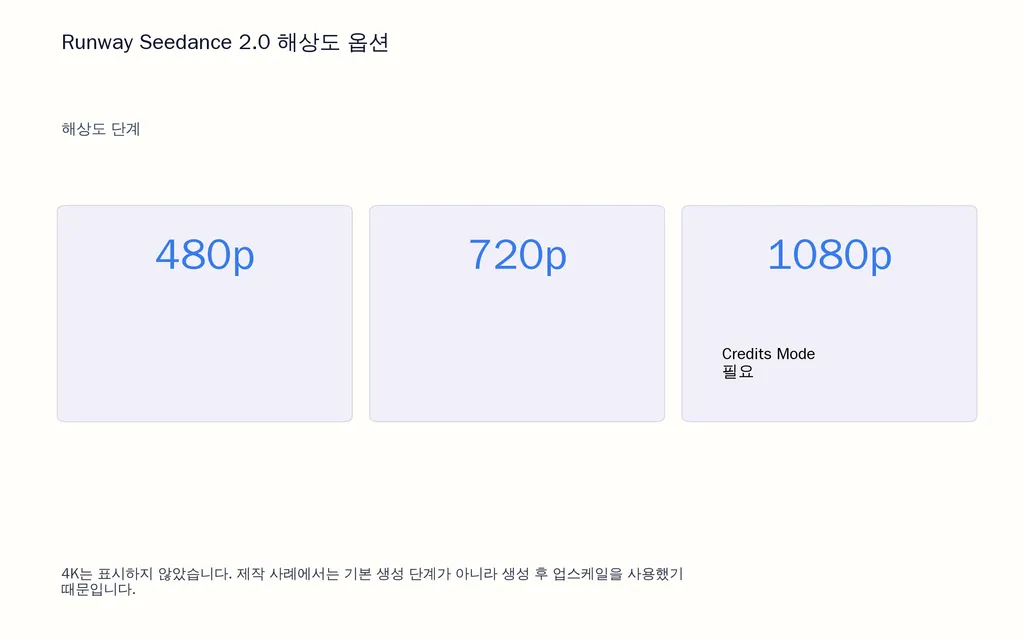
Runway는 현재 References, Start/End Frames, Text-to-Video를 통해 Seedance를 제공하며, 5~15초 출력과 480p, 720p, 1080p 옵션을 지원합니다. 현재 1080p에는 Credits Mode가 필요합니다.
최종 출력 전에 저비용으로 탐색하기
한 제작 흐름에서는 약 3시간 동안 720p로 반복 작업한 뒤 선택한 소재를 4K로 업스케일했습니다. 최종 결과물에 자원을 투입하기 전에 동작과 구도를 검증한다는 기본 전략은 유용합니다.
더 중요한 지표는 사용 가능한 클립당 비용이지 생성 1회당 가격이 아닙니다.
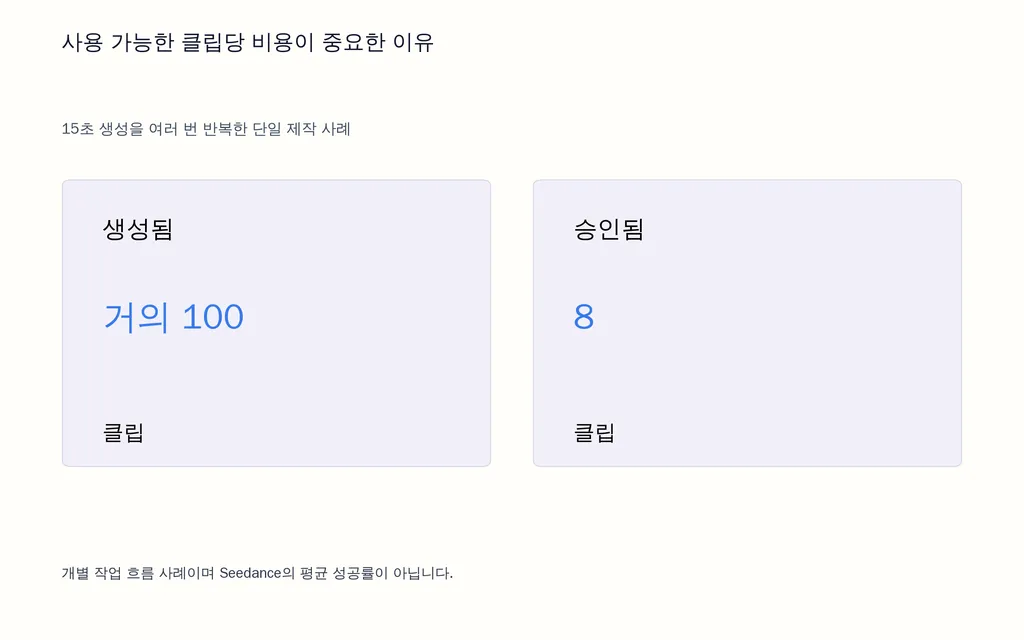
반복이 많았던 한 사례에서는 거의 100개의 15초 영상을 생성해 8개를 승인했습니다. 이는 해당 제작자의 품질 기준에 따른 결과입니다. 다른 실무자는 상업 프로젝트용 클립을 300개 이상 제작했다고 밝혔습니다. 이 사례들을 평균 성공률로 해석해서는 안 됩니다. 작업에 따라 사용 가능한 결과의 비율이 크게 달라짐을 보여 줍니다.
다른 기록된 사례로는 약 40분, 20달러 미만으로 제작한 전투 시퀀스, 약 1시간이 걸린 감정적 장면, 그리고 하루 안에 200달러 미만으로 완성한 시간 여행 시퀀스가 있습니다.
2026년 8월 24일 기준, 기존 Runway Unlimited 구독은 8월 31일까지 유지되고 9월 1일에 Max로 전환됩니다. Max에는 현재 월 9,500크레딧이 포함되며 대량 사용자를 위한 Unlimited의 Explore 중심 방식을 대체합니다.
Seedance 2.0용 BytePlus·Runway·OpenArt 비교
적합한 Seedance 플랫폼을 작업 흐름에 맞춰 선택하고, 모든 플랫폼이 같은 모델 기능을 제공한다고 가정하지 마세요.
플랫폼 | 가장 적합한 대상 | 주요 장점 |
BytePlus | API 및 기업 팀 | 공식 기능 및 입력 문서 |
Runway | 창작 제작 | 참조, 프레임 제어, 크리에이터 작업 흐름 |
OpenArt | 손쉬운 실험 | 간소화된 타사 인터페이스 |
문서 검토에서 일부 Seedance 길이와 해상도에 관한 타사 설명이 상충하는 것을 발견했습니다. 더 확실한 원칙은 다음과 같습니다. 모델 자체 기능은 BytePlus를, Runway 고유 동작은 Runway를 확인하고, 타사 문서는 해당 플랫폼 자체 구현에 대해서만 참조하세요.
모델과 플랫폼을 구분하면 UI 제한을 Seedance 자체의 제한으로 잘못 설명하는 일을 막을 수 있습니다.
결론
Seedance 2.0은 참조를 체계적으로 설계한 제작 시스템으로 사용할 때 단일 프롬프트 영상 생성기보다 효과적입니다. 이미지는 정체성을 고정하고, 영상 참조는 어려운 동작과 카메라 움직임을 전달하며, 오디오는 타이밍과 연기 맥락을 제공합니다. 샷 목록으로 시간 구조를 잡고 스토리보드로 비싼 생성 전에 구도 문제를 해결하세요. 긴 프로젝트에서는 캐릭터 연속성을 지속적으로 관리하고, 다시 만들 필요가 없다면 편집이나 연장을 활용하며, 생성 횟수가 아니라 사용 가능한 영상 기준으로 비용을 측정하세요. 진짜 기술은 프롬프트를 더 길게 쓰는 것이 아니라 Seedance에 더 명확한 정체성, 동작, 타이밍, 제약의 구조를 제공하는 것입니다.
자주 묻는 질문
Seedance 2.0은 참조 자료를 몇 개까지 사용할 수 있나요?
Seedance 2.0은 현재 문서화된 멀티모달 작업 흐름에서 최대 이미지 참조 9개, 영상 참조 3개, 오디오 참조 3개를 지원합니다. 영상 참조는 총 15초, 오디오 참조도 총 15초까지 가능합니다. 구체적인 제어 항목은 플랫폼마다 다를 수 있습니다.
Seedance 클립마다 캐릭터가 계속 바뀌는 이유는 무엇인가요?
가장 흔한 작업 흐름상의 원인은 일관되지 않은 정체성 참조, 경쟁하는 시각 입력, 반복적인 캐릭터 재설계, 큰 프레이밍 변화입니다. 프로젝트 전체에서 하나의 주 캐릭터 참조를 재사용하고 설명을 유지하며 최종 편집까지 기다리지 말고 샷 묶음마다 정체성을 확인하세요.
스토리보드와 다중 샷 프롬프트 중 무엇을 써야 하나요?
시퀀스가 단순하고 샷 순서가 명확하면 구조화된 다중 샷 프롬프트를 사용하세요. 구도, 배우 배치와 동선, 액션 안무, 연속성을 시각적으로 검증해야 한다면 스토리보드를 사용하세요. 복잡한 작업에서는 먼저 스토리보드를 만들고 그다음 시간순 샷 지시를 작성하는 결합 방식이 가장 효과적입니다.
Seedance가 일부 실제 인물 참조를 거부하는 이유는 무엇인가요?
실제 인물 참조는 기반 서비스나 이를 실행하는 플랫폼에서 제한할 수 있습니다. BytePlus는 현재 승인된 실제 인물 초상 자산을 위한 허가된 소재 라이브러리 작업 흐름을 문서화하고 있습니다. 제작이 특정 인물에 의존한다면 반복적인 심사 실패를 프롬프트 문제로 보기보다 작업 규모를 늘리기 전에 승인 요건을 확인하세요.
Virse 블로그의 다른 글
워크플로
GPT Image 2.5 Noise and Oversharpening: Why Some Images Still Look AI-Generated
2026년 10월 9일 by Yifan Zhao
워크플로
GPT Image 2.5 Keeps Changing My Image: How to Use a "Keep List" for Reliable Edits
2026년 10월 9일 by Yifan Zhao
워크플로
GPT Image 2.5 Editing Drift: Why Images Get Blurry, Cropped or Worse After Multiple Edits
2026년 10월 9일 by Yifan Zhao