
Seedance 2.5 Reddit Review: What Users Love, Hate and Still Struggle With
Vincent10 min de leitura ·
Seedance 2.5 stands out because it moves AI video beyond short clips into a more practical production workflow with 30-second generation, multimodal references, stronger continuity, and targeted editing. The real advantage is not simply longer output. It is the potential to reduce stitching, preserve more creative context, and handle complex reference-driven scenes with fewer disconnected generations.
That also raises the difficulty. Longer clips create more opportunities for identity drift, motion errors, changing proportions, reference conflicts, and expensive retries. Our review of public user questions and production cases found that creators care less about headline specifications than whether Seedance 2.5 can consistently produce footage they can actually use.
This is where Virse fits naturally into the workflow. Rather than positioning AI as a one-prompt replacement for professional designers, Virse works as a collaborative AI design assistant inside an infinite canvas, where teams can organize references visually, connect assets and tasks, run multiple agents in parallel, preserve project context, and build long-term memory around creative preferences and brand standards. For reference-heavy AI video production, that means less time rebuilding context and more time directing, comparing, refining, and scaling creative work. Seedance 2.5,
Seedance 2.0 and MiniMax H3 are now available on Virse, so teams can explore and compare multiple leading video models in the same creative workflow.

What Does Seedance 2.5 Actually Improve for AI Video Production?
Seedance 2.5 improves three parts of AI video production at the same time: duration, reference control, and editing. ByteDance's July 31 launch documentation confirms single-pass videos of up to 30 seconds, plus repeated extensions and more precise timestamp-level editing. The result is a model designed less around isolated clips and more around complete sequences.
30-second generation changes the production unit
Seedance 2.0 often pushed longer ideas into several independent clips. Seedance 2.5 gives creators enough duration to structure a scene around setup, development, transition, key action, and resolution.
ByteDance demonstrates this with a continuous backstage sequence that moves from a dressing room through a corridor and onto a concert stage. The value is not merely twice as many seconds. The model has to maintain subject identity, spatial logic, camera behavior, audio, and narrative progression across changing environments.
50 references turn prompts into creative direction
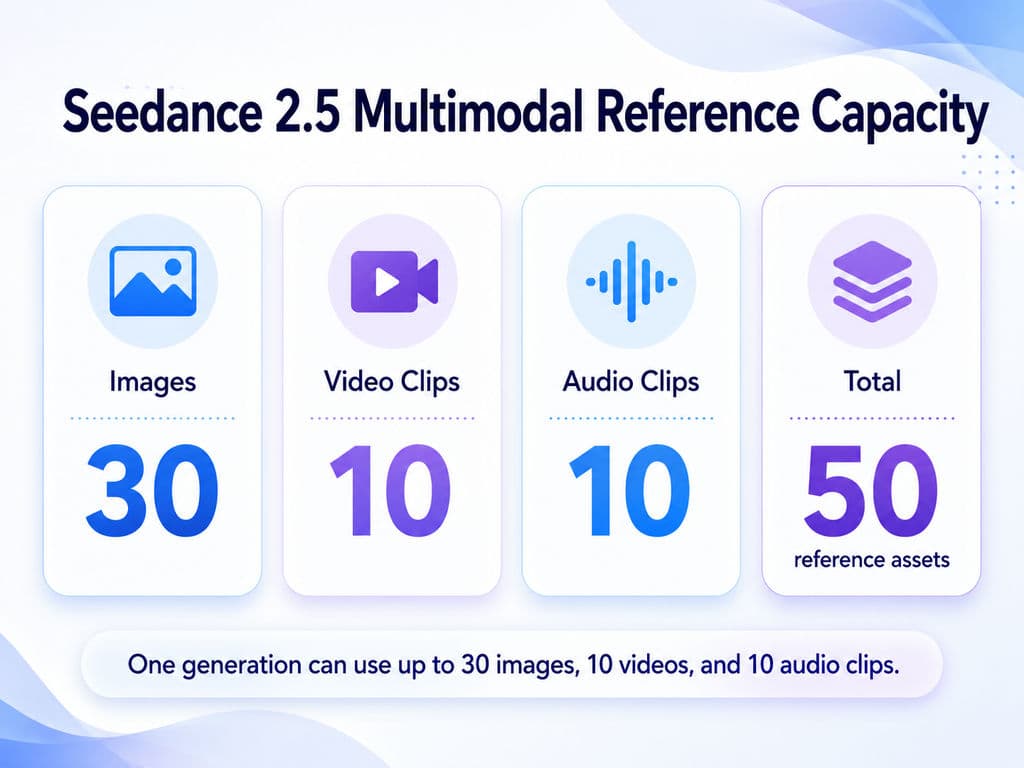
Seedance 2.5 can accept up to 30 images, 10 video clips, and 10 audio clips, or 50 reference assets in total. BytePlus documentation confirms the same 50-reference ceiling.
For designers, this changes what a prompt needs to do. Instead of describing every detail in text, references can define characters, products, locations, lighting, movement, camera language, voice, and music. The prompt increasingly explains which reference controls what, which is closer to creative direction than conventional prompt engineering.
Can Seedance 2.5 30-Second Video Reduce Stitching?
Yes, this is one of the strongest practical reasons to use Seedance 2.5. A longer single generation can eliminate some workflows that previously required two or three shorter clips followed by continuity repair.
Case study: the 15-second, 2–3 clip workflow
Across the production cases we reviewed, one Seedance 2.0 workflow kept usable continuous shots around 15 seconds. Longer sequences required 2–3 clips, then manual work to repair character identity, lighting, motion, and transition points.
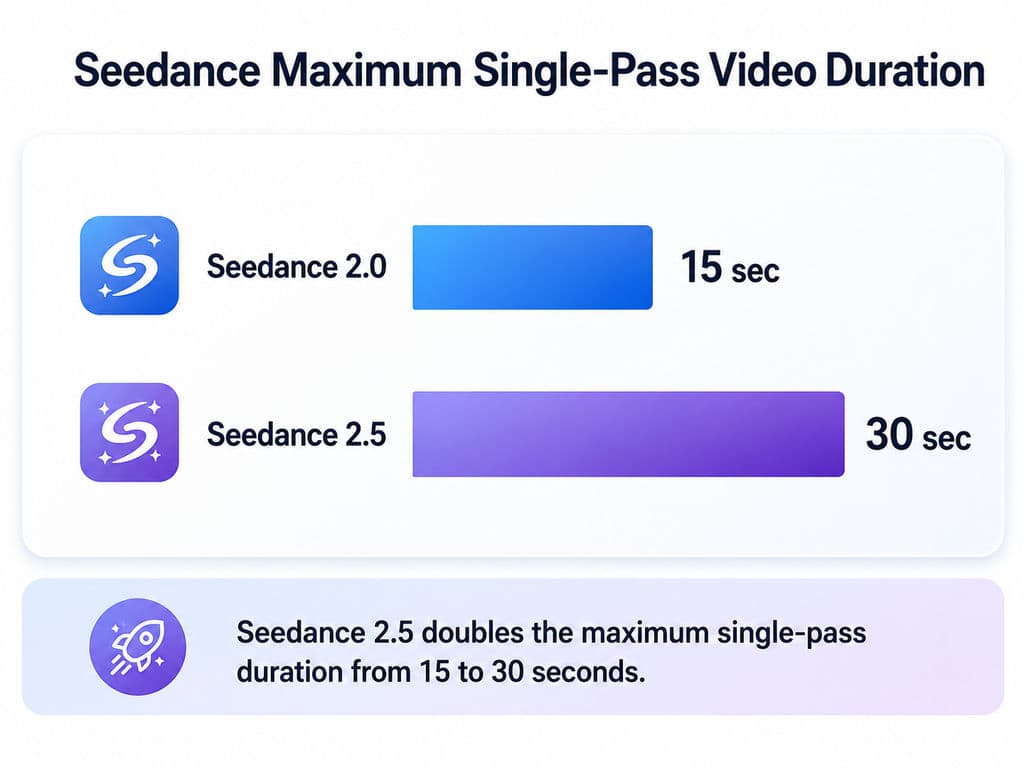
Seedance 2.5 doubles the official single-pass duration from 15 to 30 seconds. ByteDance also positions multi-round extension as a way to reduce repeated clip splitting, splicing, and transition repair.
The information gain is important: 30 seconds matters when it removes a production operation, not when it simply generates more frames.
30-second generation is not 30-second stability
A clip can technically reach 30 seconds and still become unusable halfway through. For professional review, I would check seven dimensions:
- Face
- Clothing
- Body scale
- Background
- Lighting
- Motion
- Camera continuity
Our source review found no standardized public benchmark measuring how much of a 30-second Seedance 2.5 output remains production-ready. ByteDance also acknowledges that complex physical motion and multi-subject interaction still have room for improvement.
What Are Seedance 2.5's 50 References Actually Useful For?
The real value of 50 references is project-level consistency, not upload capacity. Creators want the model to understand relationships between characters, products, environments, styles, actions, and shots without redefining the project in every prompt.
Case study: multi-reference narrative continuity
One multi-reference narrative case in our research showed better continuity across different character views and scenes, rather than references behaving only like simple first-frame and last-frame controls. However, the same discussion exposed a counterexample: character proportions still changed between shots.
That leads to a more useful metric:
Reference capacity = how many assets the model accepts.
Reference adherence = how accurately those assets influence the final video.
For professional work, reference adherence matters more.
How to structure a large Seedance 2.5 reference set
A practical reference system should assign each asset a clear responsibility:
Reference Group | Main Role |
Character | Face, clothing, proportions |
Environment | Space, atmosphere, lighting |
Product | Geometry, material, branding |
Motion | Acting and camera movement |
Audio | Voice, rhythm, ambience |
The next useful benchmark is not another “50 refs supported” demo. It is a controlled test of 10 vs 20 vs 30 vs 50 references, measuring ignored assets, conflicts, identity accuracy, and consistency. Our current research found no standardized public dataset answering that question.
How Good Is Seedance 2.5 Character Consistency?
Seedance 2.5 improves character consistency, but it does not completely solve character drift. More references make it easier to define a character from different angles, yet long scenes and multiple subjects still increase the number of relationships the model must preserve.
Consistency is more than facial similarity
Our review found improvements in identity and color continuity, alongside examples where body proportions still changed. This means character QA should include silhouette, height, clothing, accessories, and relative scale—not just the face.
For advertising, IP content, AI films, and recurring brand characters, that distinction matters. A recognizable face is not enough if the body, wardrobe, or product relationship changes between shots.
Multi-character interaction remains harder
Adding a second or third person introduces relative scale, eye line, contact, occlusion, body positioning, and physical interaction. ByteDance specifically identifies complex physical movement and multi-subject interaction as remaining areas for improvement.
A serious Seedance 2.5 evaluation therefore needs more than cinematic portrait shots. It should include walking, object interaction, multiple people, camera changes, and longer continuous actions.
Where Can You Use Seedance 2.5 and Is the API Available?
Seedance 2.5 is available through ByteDance's ecosystem, and BytePlus now documents API support. The more important buying question is where to use Seedance 2.5 and whether a specific platform exposes the model's full capabilities.
ByteDance initially announced rollout through Jimeng AI and Doubao Pro. Its launch post said BytePlus API support was coming, while BytePlus documentation published in August now provides Seedance 2.5 video-generation guidance.
Our review found that platform confusion is one of the strongest adoption pain points: users repeatedly wanted to know whether a provider offered the full model, a restricted implementation, or simply the Seedance 2.5 name.
What to check before choosing a Seedance 2.5 platform
Verify:
- 30-second duration
- image, video, and audio reference limits
- T2V
- I2V
- R2V
- extension
- editing
- concurrency
- moderation
- pricing
API availability and feature parity are different questions. A provider can offer Seedance 2.5 without exposing every capability available elsewhere.
How Much Does Seedance 2.5 Really Cost?
The best Seedance 2.5 pricing metric is cost per usable video, not cost per generation. A low generation price becomes expensive when a shot needs repeated retries, long queues, or manual repair.
High-volume production changes the calculation
One production scenario in our research involved a requirement for 10+ videos per day for about one month, alongside concerns about annual commitments and queues potentially reaching roughly 40 minutes.
That reveals the more useful cost model:
Generation spend + retries + waiting cost + post-production repair = cost per usable video.
For teams, I would also track attempts per accepted output and cost per usable second.
Artlist Unlimited shows why "unlimited" needs qualification
Artlist currently states that Seedance 2.5 Unlimited coverage applies to T2V and I2V, while R2V still consumes credits. Its help documentation also notes reasonable-use conditions and daily thresholds.
That means high-volume users should compare throughput, model restrictions, concurrency, and retry economics, not just whether a plan uses the word Unlimited.
What Should Creators Know About Seedance 2.5 Face Restrictions?
Human-reference moderation can directly affect UGC, spokesperson, advertising, and compositing workflows.
BytePlus documentation states that Seedance 2.5 does not support direct uploads of reference images or videos containing real human faces in its standard workflow. Platform-specific trusted-asset workflows may differ, so this should be treated as a platform and account-level production constraint rather than a blanket statement about every possible Seedance deployment.
Our review also found repeated concerns around rejected human references and changing moderation behavior. For commercial teams, the more useful procurement question is therefore moderation predictability, not simply which platform appears least strict.
Seedance 2.5 vs MiniMax H3: Which Model Should You Use?
There is no useful universal winner. Seedance 2.5 is better aligned with longer, reference-heavy, continuity-sensitive shots, while MiniMax H3 can be more economical for shorter tasks.
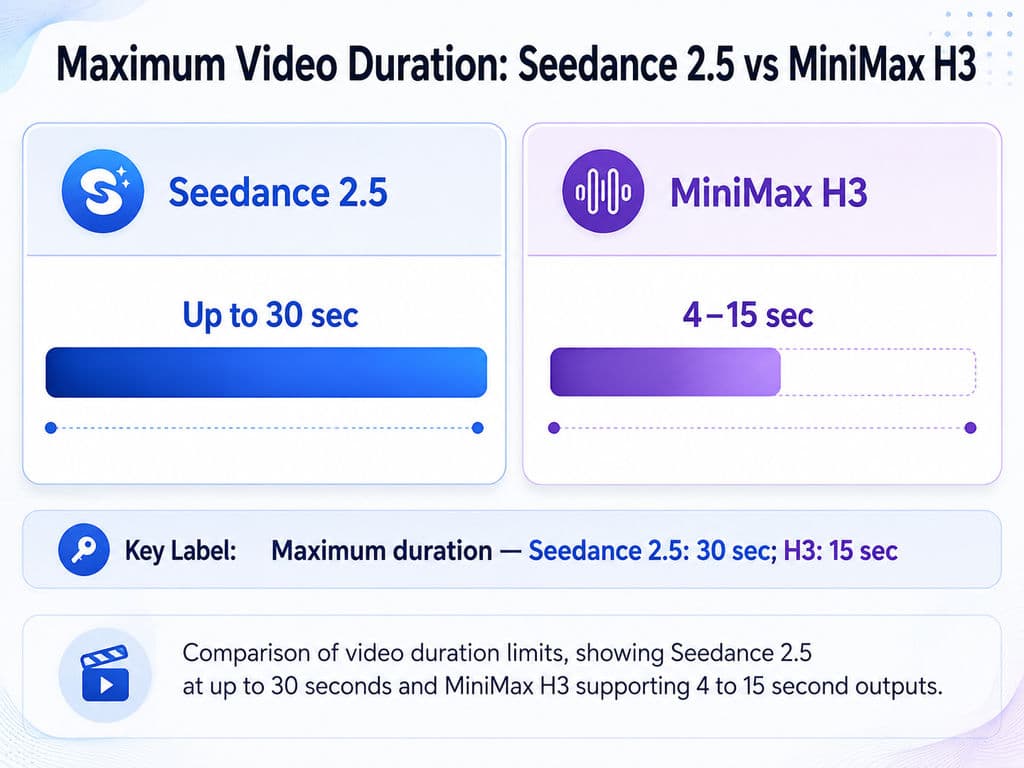
MiniMax's official API currently supports 4–15 second H3 outputs at 768p or 2K. Its pay-as-you-go pricing lists $0.08 per second at 768p and $0.13 per second at 2K.
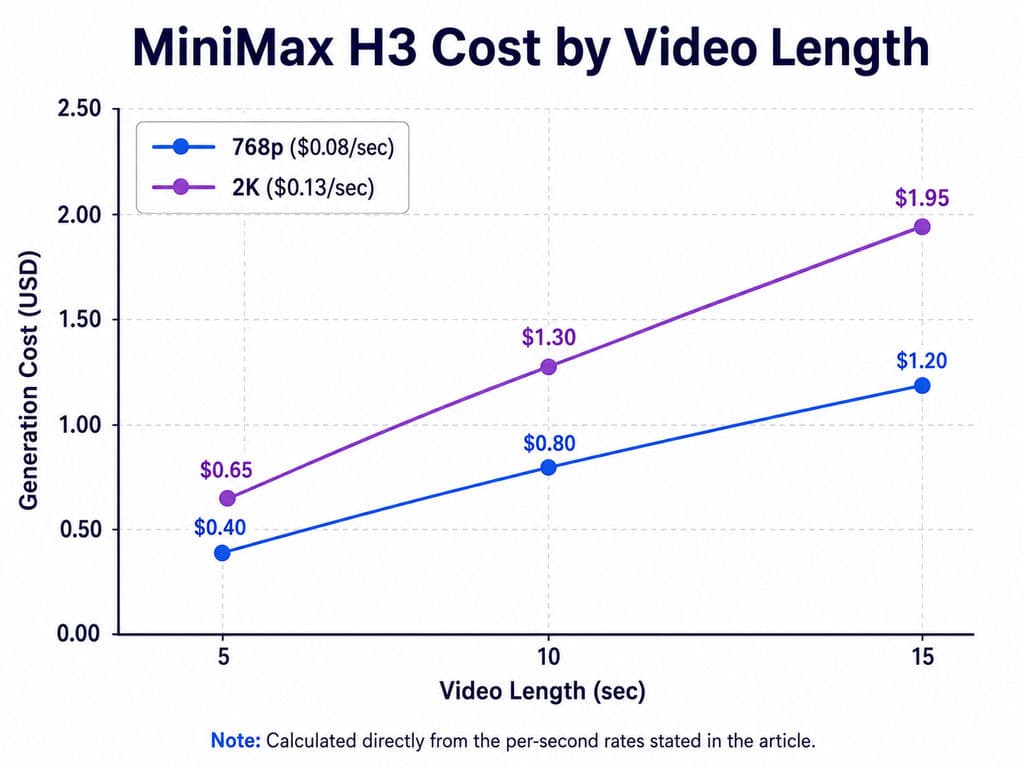
Our production-case review points toward shot routing rather than model loyalty
- Use Seedance 2.5 when long duration, multiple references, narrative continuity, or later editing are central to the brief.
- Use H3 when a shorter shot solves the problem and transparent per-second pricing matters.
- Consider Kling or another model when platform-specific moderation prevents a required human-reference workflow.
For a professional creative pipeline, the best model is often the cheapest model that reliably completes that specific shot, not the model with the strongest overall demo reel.
FAQ
Can Seedance 2.5 generate 30s without stitching?
Yes. Seedance 2.5 officially supports up to 30 seconds in one generation, plus repeated extensions. This can replace some workflows that previously needed 2–3 shorter clips. However, 30-second generation does not guarantee 30 seconds of stable identity, motion, lighting, or multi-character interaction.
Does Seedance 2.5 maintain character consistency with 50 refs?
It improves multi-reference continuity but does not guarantee perfect consistency. Cases in our review showed stronger character continuity alongside counterexamples involving changing body proportions. The important production metric is therefore reference adherence, not simply how many references can be uploaded.
How much does Seedance 2.5 cost, and is Unlimited really unlimited?
There is no single universal production price because platforms package Seedance differently. For real budgeting, calculate cost per usable video, including retries, queue time, and repair. On Artlist, Unlimited currently covers Seedance 2.5 T2V and I2V, while R2V still requires credits.
Is the Seedance 2.5 API available?
Yes. BytePlus now documents Seedance 2.5 video generation through ModelArk. Before selecting an API provider, verify 30-second duration, T2V, I2V, R2V, reference limits, editing, concurrency, and moderation, because platforms may expose different subsets of the model.
Conclusion: Is Seedance 2.5 Worth Using?
Seedance 2.5 is most valuable when the bottleneck is continuity, not simply visual quality. Its 30-second generation, 50-reference multimodal workflow, extensions, and editing controls can reduce stitching and keep more creative context inside a single production process. But character drift, multi-subject physics, moderation, retries, and platform differences still determine whether a result is commercially usable. For designers, filmmakers, advertisers, and creative teams, the strongest way to use Seedance 2.5 is therefore not as a universal replacement for every AI video model, but as a high-control option for longer, reference-heavy shots inside a broader model-routing workflow.
Mais do blogue da Virse
Produto
What Is Product Design in 2026? What Product Designers Actually Do
21 de setembro de 2026 by Vincent
Produto
GPT Image 2.5 Pricing: Flare vs Sunburst & the Real Cost per Image
14 de setembro de 2026 by Vincent
Produto
GPT Image 2.5 Review: Does It Finally Fix AI Image Editing Drift?
14 de setembro de 2026 by Vincent