
How to Use MiniMax H3 Motion Transfer: Video-to-Video Guide
 Yifan Zhao11 min de leitura ·

MiniMax H3 Motion Transfer lets a reference video control motion, timing, camera movement, or acting performance while separate image and audio references define character identity, appearance, and voice. If you're learning how to use MiniMax H3, the core challenge is not getting H3 to recognize movement. It is making sure each reference controls the right attribute.
A video reference also contains an actor, background, framing, expressions, camera behavior, and often audio. When those signals compete, the result can suffer from identity leakage, motion drift, background changes, or inconsistent faces. The most reliable MiniMax H3 workflows reduce this conflict by clearly defining what should stay, what should change, and which reference owns each decision. A structured MiniMax H3 prompt can make that ownership much easier to communicate.
For teams turning these workflows into repeatable production, Virse combines AI generation with an infinite-canvas workspace built for professional creative collaboration. Its multi-Agent creative workflow approach keeps references, outputs, and project context connected, while a broader AI design workflow from brief to delivery helps teams route work across multiple models. Paid plans include unlimited use of 40+ models, including Nano Banana 2 and GPT Image 2, plus unlimited seats. New users also receive free credits, enough for about 10 Nano Banana 2 image generations or one Seedance 2.0 video generation.

What Is MiniMax H3 Motion Transfer and Reference Generation?
MiniMax H3 Motion Transfer is best understood as one use of H3's broader Reference Generation system. Instead of treating the source video as the entire template, H3 can combine images, videos, audio, and text so different inputs influence different parts of the output.
MiniMax H3 Motion Transfer vs Traditional V2V
Traditional V2V workflows usually preserve much of the source video's structure while transforming its appearance. H3 can be more selective.
Reference | Best Role | Main Risk |
|---|---|---|
Image | Identity, face, clothing | Pose or background leakage |
Video | Motion, timing, camera, acting | Original actor or scene leakage |
Audio | Voice characteristics | Voice mismatch |
Prompt | Defines relationships | Conflicting instructions |
The useful shift is from “transform this video” to “decide what this video should contribute.”
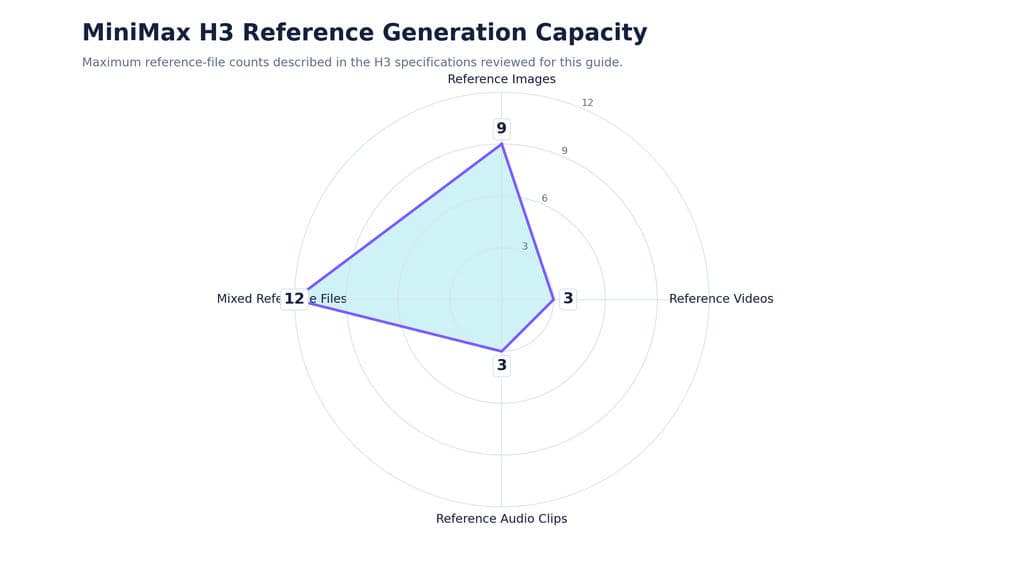
Current H3 Reference Generation specifications reviewed for this article support up to 9 reference images, 3 reference videos, 3 reference audio clips, and 12 mixed reference files. Reference videos can total up to 15 seconds, reference audio can total up to 15 seconds, and outputs can run from 4 to 15 seconds.
MiniMax H3 Motion Transfer vs Video Editing vs I2V
These workflows solve different problems. Motion Transfer uses a video to guide movement, timing, camera, or performance. Video Editing starts from an existing video and changes selected content while attempting to preserve the rest. I2V starts from a still image and generates new motion rather than reproducing motion from a video source.
For designers, the distinction matters because Motion Transfer is fundamentally about reference relationships, not just animation. Understanding where to use MiniMax H3 can help determine whether Ref2V, editing, or another generation approach is the better fit.
How MiniMax H3 Reference Attribute Routing Improves Motion Transfer
The most useful framework for analyzing H3 is Reference Attribute Routing: every input should have a clear responsibility.
Assign Motion, Identity, Camera, and Audio Separately
For a typical character replacement:
Video 1 provides motion and timing. Image 1 provides identity and appearance. The prompt defines what must remain and what must change.
For another shot, Video 1 might instead provide the camera path. A close-up video may provide facial performance. Audio may provide voice characteristics.
Problems begin when multiple sources compete for the same attribute. A character image may define a new face while the video strongly reinforces the original actor.
Reduce Reference Leakage Before Adding More Prompt Detail
Our review of documented workflows and recurring user questions shows that many apparent prompting failures are actually reference-leakage problems.
A practical sequence is:
- Define each source.
- Assign one primary role.
- State which attributes must remain.
- State which attributes must change.
- Describe only the new target content.
Clear ownership usually matters more than prompt length.
How to Write a MiniMax H3 Motion Transfer Prompt
A strong MiniMax H3 motion transfer prompt should make the relationships between references easy to interpret. The same principles covered in a broader MiniMax H3 prompt guide become especially important when several references need different roles.
Use Reference, Role, Retention, and Target
A practical prompt can simply say:
Video 1 is the motion reference. Image 1 is the character reference. The character from Image 1 performs the movement and timing from Video 1. Preserve the character's identity, hairstyle, body appearance, and clothing. Place the character in a softly lit photography studio.
This contains four useful layers: reference, role, retention, and target.
Do Not Re-Control What the Reference Already Controls
Detailed prompts can help when several characters or references are ambiguous. But longer is not automatically better.
Camera transfer is a good example. If Video 1 already contains the desired camera path, describing that same orbit, speed, distance, and direction again can introduce competing instructions.
Use text to resolve uncertainty rather than duplicate strong reference information.
How to Replace Characters with MiniMax H3 Ref2V
Character replacement is one of the clearest applications of H3 because motion and identity can come from different sources.
Single-Character Replacement and Reference Framing
Match the reference to the target performance. Use a full-body image for full-body movement and a close-up image for facial acting.
Then evaluate the output separately for:
- identity;
- clothing;
- motion timing;
- camera;
- environment.
A visually attractive result can still fail if the face changes or the original performer remains partially visible.
Two-Character Replacement Case Study
One documented workflow used a 10-second two-person dance video with two separate character images. The goal was to replace both performers while retaining the original movement and environment.
After refining the retention instructions, the workflow reported roughly 90% successful replacement in that specific setup, although seed changes still influenced the result.
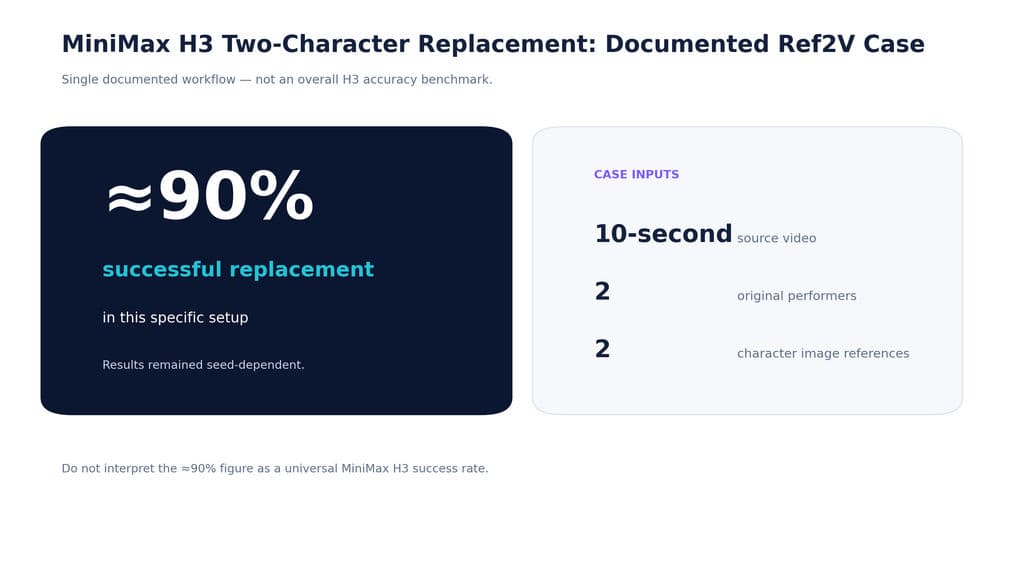
This is not a general H3 accuracy rate. It demonstrates something more useful: multi-character reference routing is practical, but still probabilistic rather than deterministic.
How to Change the Background Without Breaking MiniMax H3 Motion Transfer
Changing character, motion, and environment in the same generation creates more competing conditions.
When One-Pass Ref2V Becomes Unstable
Broad actions such as walking, turning, or simple gestures may survive a character and background change together.
Fine finger movement, facial acting, lip motion, and complex choreography are more sensitive. Our review found that these details were more likely to drift when environment replacement was added to the same pass.
Use Two Passes for Complex Motion and Background Changes
For difficult shots:
- Replace the character while preserving the source motion and environment.
- Confirm identity, hands, face, and timing.
- Use the successful output as the next video reference.
- Replace the background in the second generation.
When several transformations compete, separating them can improve control more than expanding the prompt.
How to Transfer Camera Movement and Facial Performance in MiniMax H3
Motion Transfer is not limited to body movement. Video references can also provide camera trajectories and acting performance.
MiniMax H3 Camera Transfer
When a reference already provides the camera move, let the video control that movement and use the prompt to define the new subject and environment.
This avoids having two sources independently controlling the same camera behavior.
For camera transfer, describe what is new in the shot rather than unnecessarily rewriting how the reference camera already moves.
MiniMax H3 Facial Expression and Performance Transfer
Facial performance works best when the reference makes subtle motion readable. Tight close-ups provide more useful information about eye movement, eyebrows, expression changes, and gesture timing than wide shots.
Body geometry also matters. Mapping human movement onto a character with very different proportions, especially a four-legged subject, introduces more interpretation and increases the chance of drift.
How to Improve MiniMax H3 Character Consistency
Character consistency depends on reference design as much as prompt design.
Match Reference Framing to the Target Shot
One documented consistency workflow used two 1024 × 1024 upper-body character references and generated at 1376 × 768 while combining character and voice references. Better facial consistency was observed when faces appeared closer to the camera.
The practical lesson is that identity preservation is partly a cinematography problem. H3 needs enough visible information to resolve defining features.
Reference Image Resolution Has Trade-Offs
Another workflow reported better likeness after increasing the effective reference-image size. References with a longest edge around 2,500 pixels or below remained practical in that setup, while 4K-plus images became much slower.
That does not prove every workflow should maximize resolution. The stronger evidence supports good framing and readable identity information, not strict pixel or aspect-ratio matching.
How Resolution and Compute Affect MiniMax H3 Ref2V
Higher resolution can change more than sharpness. It may also affect prompt adherence, identity consistency, and generation cost.
352p, 416p, and 768p Can Behave Differently
In one controlled Ref2VA workflow on 4× B300 hardware, the same prompt preserved shot structure, camera angle, and character placement more consistently at 352p and 416p than at 768p.
Increasing sampling steps improved visual coherence but did not fully restore structural control. Other documented workflows produced different results, so this should not be treated as a universal resolution rule.
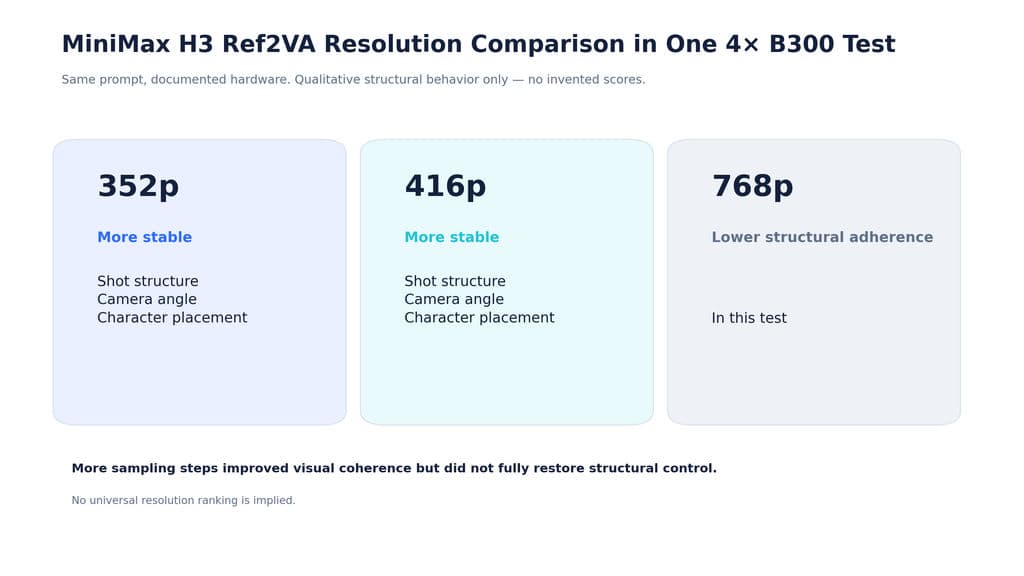
Higher resolution does not automatically mean stronger reference adherence.
Ref2V Can Remain Expensive on High-End Hardware
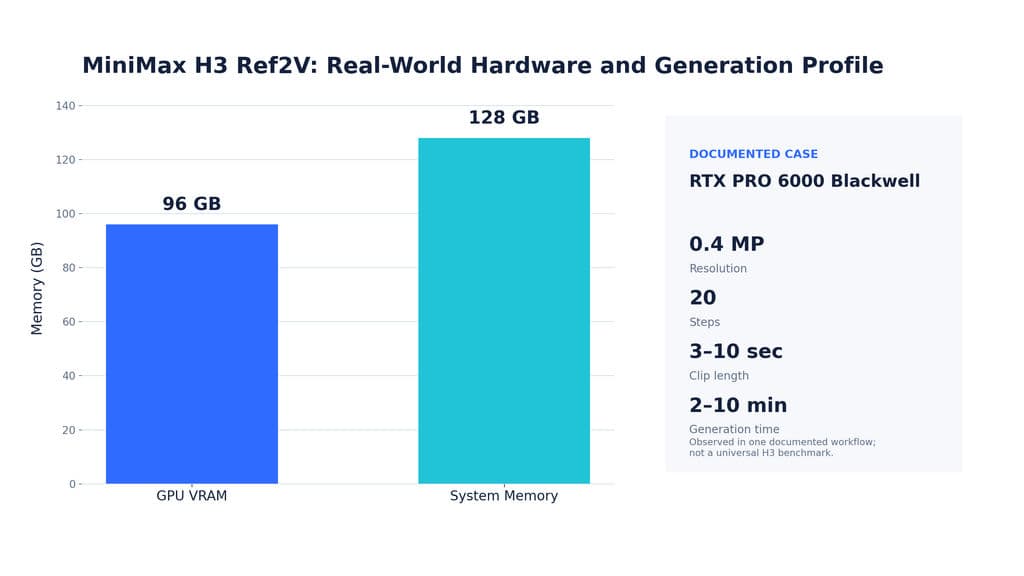
A complex V2V workflow using an RTX PRO 6000 Blackwell with 96GB VRAM and 128GB DDR5, at roughly 0.4 MP and 20 steps, reported approximately 2–10 minutes for 3–10 second takes.
For production teams, the efficient approach is to validate reference routing, identity, and motion at lower-cost settings before committing to final-resolution generation.
How H3 Handles Audio and Long-Video Continuation
Audio and continuity create two additional reference-control problems that are easy to overlook.
H3 Voice Reference Is Not Exact Speech Preservation
Our review found workflows where reference speech was re-synthesized rather than copied exactly. In one documented case, a timing difference of roughly 0.1 seconds between video and reference audio could contribute to omitted words or changes in intonation.
The important distinction is simple:
Voice reference is not the same as exact waveform preservation.
Dialogue-critical workflows should therefore treat original audio as a separate production asset.
H3 Long-Video Continuation Works Better as Chained Clips
One documented continuation workflow generated 10-second clips, then reused the final 2 seconds, or 48 frames at 24 fps, as context for the next generation while reintroducing character references.
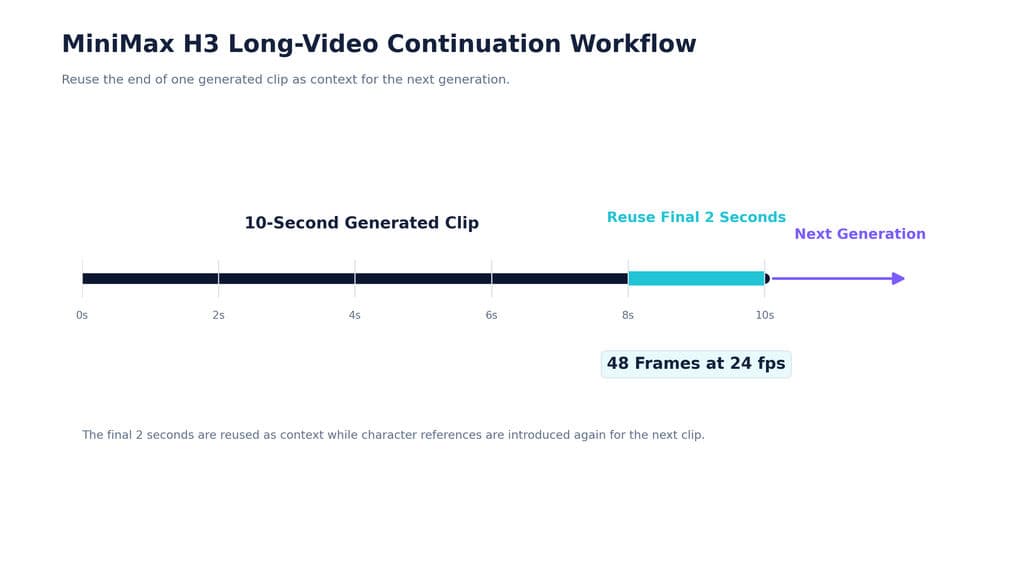
This improved motion continuity, although color drift and occasional state changes could still occur.
For longer sequences, short clips plus context carry-over are more practical than assuming one generation will preserve everything indefinitely.
MiniMax H3 Motion Transfer Best Practices
For production work, these decisions provide the clearest starting point:
Scenario | Recommended Approach | Why |
|---|---|---|
Simple character swap | One-pass Ref2V | Fewer competing changes |
Fine motion plus new background | Two passes | Protects subtle motion |
Camera transfer | Let video own camera | Reduces text conflict |
Facial acting | Close-up references | More readable performance |
Final high-resolution output | Test cheaper first | Saves compute |
Long sequences | Chain short clips | Better context control |
The broader principle is consistent: use clean references, match framing to the intended performance, assign each source a clear role, and split transformations when fidelity begins to fall.
FAQ
How do I make H3 copy only motion without copying the original person?
Use the video specifically as the motion source and give identity ownership to an image reference. Clearly state what must remain from the image and what should transfer from the video. If the original performer remains, simplify the source and reduce competing identity signals.
Why does H3 character swap sometimes keep the original character or change the background?
The video may be influencing identity or environment as well as motion. Cleaner references, compatible framing, explicit role assignment, and separating character replacement from background replacement can reduce this leakage.
Should I use one-pass or two-pass Ref2V?
Start with one pass for simple movement. Use two passes when fine hand motion, facial acting, lip movement, complex choreography, and background replacement must all remain accurate. First lock character and motion, then change the environment.
Can H3 preserve exact speech from a reference video?
Not reliably based on the workflows reviewed here. Speech may be re-synthesized, altered, or become inaccurate when timing changes. If exact dialogue matters, preserve the source audio separately rather than assuming Ref2V will reproduce it unchanged.
Conclusion
MiniMax H3 Motion Transfer becomes far more controllable when it is treated as a multimodal reference architecture rather than a simple V2V effect. The strongest workflows assign identity, motion, camera, performance, environment, and audio to explicit sources; minimize conflicting instructions; use references that match the intended shot; test efficiently before increasing resolution; and split complex transformations into multiple passes when necessary. The most useful question is no longer “How do I write a longer H3 prompt?” but “Which reference should control each part of this shot?”
Author: Yifan Zhao — AI design workflow strategist and creative technology advisor.
Mais do blogue da Virse
Fluxo de trabalho

What Does a Graphic Designer Do? Real Tasks, Revisions, Tools & Workflow
23 de setembro de 2026 by Yifan Zhao
Fluxo de trabalho

How to Learn Graphic Design in 2026: A Step-by-Step Roadmap From Fundamentals to Portfolio
23 de setembro de 2026 by Yifan Zhao
Fluxo de trabalho

What Is Graphic Design? Definition, Real Examples, Process & Tools
23 de setembro de 2026 by Yifan Zhao