Kling 4.0 Pricing: What Does a Usable Video Really Cost?
Vincent9분 읽기 ·
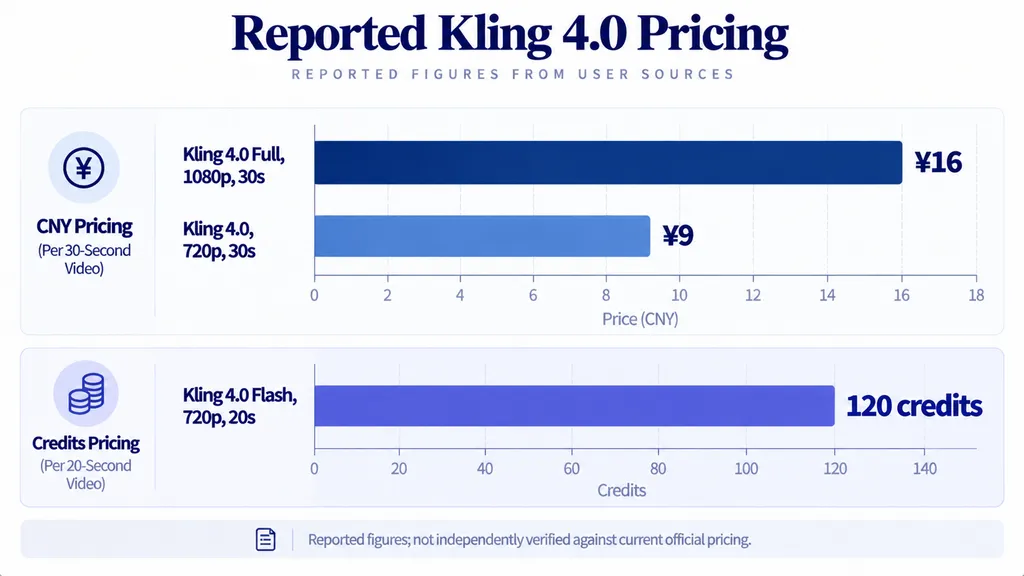
Kling 4.0 pricing depends on the model, resolution, video duration, and billing method. Our research identified reported costs of 450 credits, approximately ¥16, for a 30-second 1080p generation, and API rates of $0.2737 per second at 720p and $0.4097 per second at 1080p. These figures come from separate reports and have not been independently verified against current official pricing. For context on the broader upgrade, see our Kling 4.0 vs. 3.0 comparison. The most meaningful metric is not the price per generation, but the cost per usable video.
A low generation price means little if the result has unnatural motion, inconsistent characters, or unwanted camera cuts. For commercial creators, these problems can lead to repeated credit spending, additional editing, and missed deadlines. Our Kling 4.0 review examines related output-quality concerns. Without tracking actual charges and acceptable outputs, it is difficult to know whether Kling 4.0 fits a production budget.
Virse brings multiple AI models into one creative workspace, helping you explore visual directions, refine ideas, and develop assets without relying on a single model for every task. For example, you can also explore Seedance 2.5 as an alternative for video generation. Paid plans offer access to multiple models with unlimited usage and unlimited seats, while new users can receive free credits to get started. Try Virse to explore more creative options before committing your production workflow to one approach.

How Much Does Kling 4.0 Cost? Credits and API Pricing
Kling 4.0 has been associated with credit-based generation and API billing. The following figures come from the research collected for this article. They are reported prices, not a verified, universal price list.
Model or method | Reported cost | Conditions |
Kling 4.0 Full | 450 credits, approximately ¥16 | 1080p, 30 seconds |
Kling 4.0 | Approximately ¥9 | 720p, 30 seconds |
Kling 4.0 Flash | Approximately 120 credits | 720p, 20 seconds |
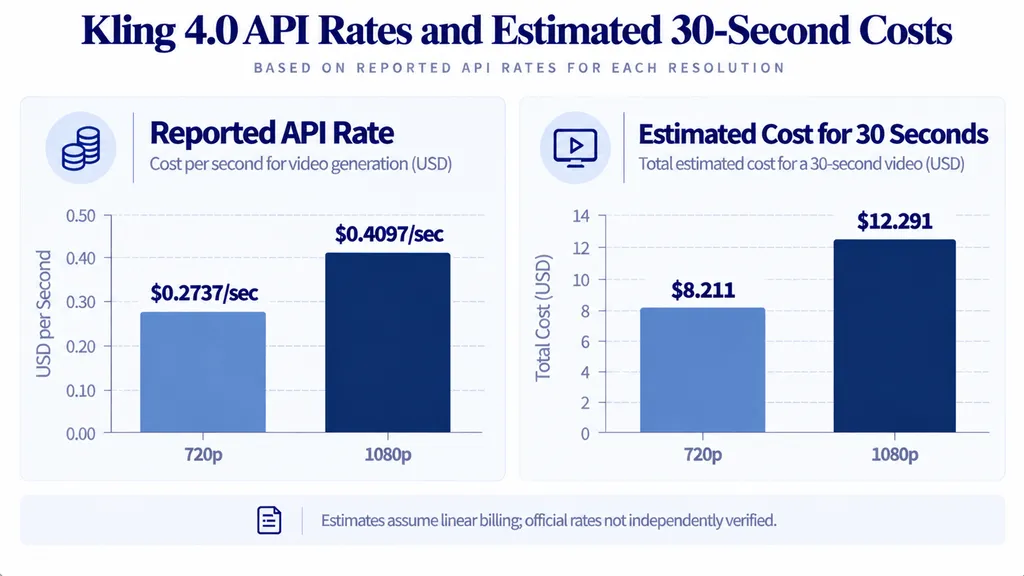
Kling 4.0 API | $0.2737/second | 720p, reported rate |
Kling 4.0 API | $0.4097/second | 1080p, reported rate |
The credit figures came from secondary reporting, while the API rates came from a separate report about API pricing. The available evidence does not establish whether these prices share the same release date, billing conditions, or access requirements. Confirm current prices and conditions before making a purchase decision.
How Much Does a 30-Second Kling 4.0 API Video Cost?
Using the reported API rates, the estimated cost of a 30-second generation is:
Resolution | Reported rate | Estimated cost |
720p | $0.2737/second | $8.21 |
1080p | $0.4097/second | $12.29 |
These are arithmetic estimates, not verified invoices. They assume linear per-second billing and exclude retries, editing, taxes, and other possible charges.
Do not compare these API estimates directly with the reported yuan or credit prices. A valid comparison requires the same model, duration, resolution, audio settings, billing conditions, and pricing date.
Is Kling 4.0 Flash Cheaper Than Full?
Kling 4.0 Flash has been discussed as a lower-cost option for experimentation. One reported example lists approximately 120 credits for a 20-second, 720p generation. However, the available evidence does not establish whether Flash delivers the same quality or a lower cost per usable video than Full.
A practical draft-first workflow is to use Flash, where available, to explore composition and movement, then reserve final-generation attempts for shots that must meet delivery standards.
Before committing to this workflow, compare both models on the same creative task. Record generation charges, visual quality, prompt adherence, and the number of additional attempts required. A cheaper first generation is not necessarily economical if the output needs substantial correction.
No verified savings percentage is available from the current research.
What Does a Usable Kling 4.0 Video Really Cost?
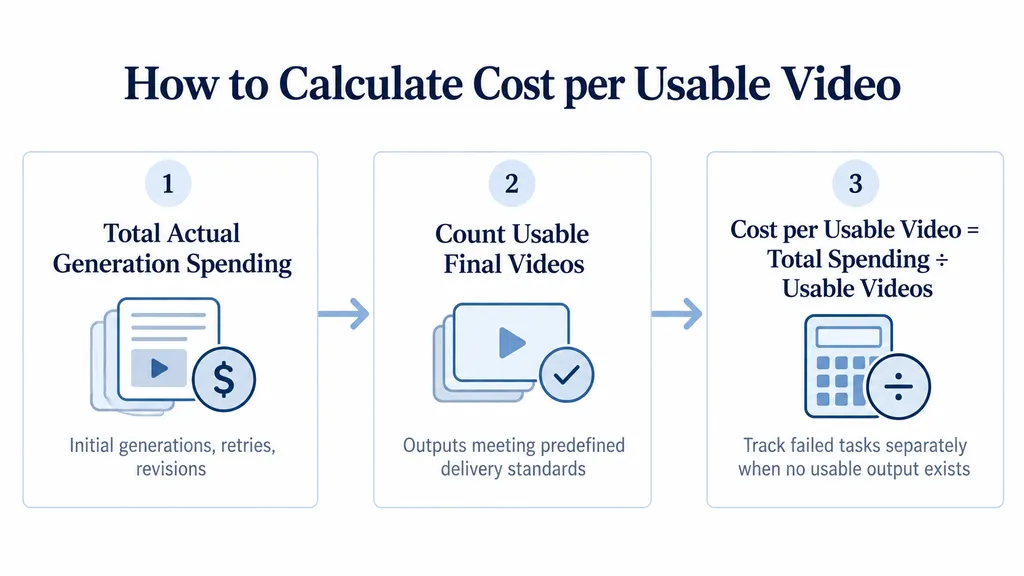
The real cost of a usable video is the total generation expenditure divided by the number of outputs that meet a predefined delivery standard.
Our review of reported production experiences highlights three practical risks: complex continuous action can be difficult to control, generated details may change unexpectedly, and an output that looks impressive may still fail the actual brief.
Case Study: Why a Short Test Can Mislead Your Budget
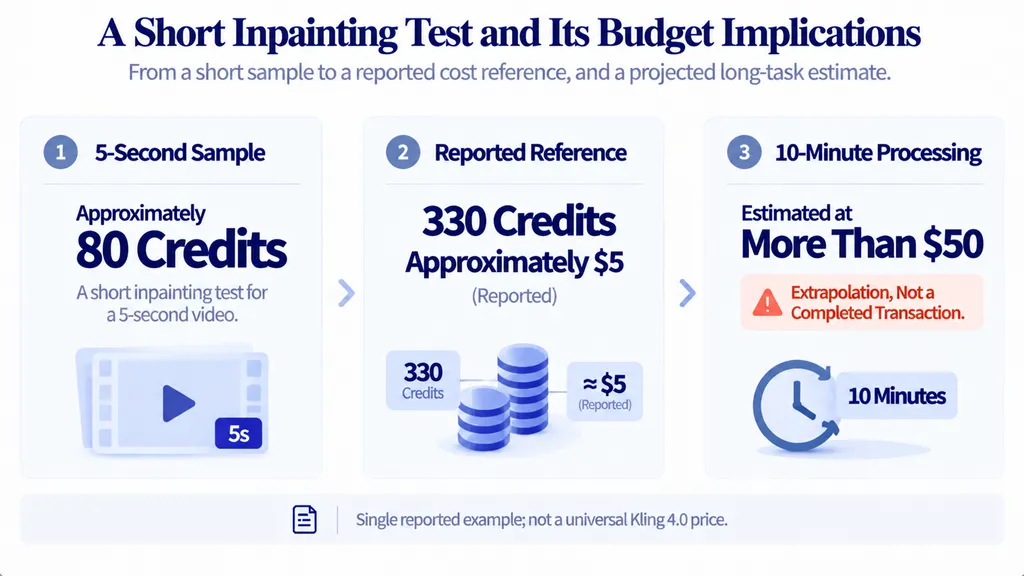
One reported inpainting example described a five-second sample costing approximately 80 credits. The same account associated 330 credits with approximately $5 and estimated that processing a ten-minute video could cost more than $50.
The ten-minute figure was an extrapolation, not a completed production transaction. It should therefore be treated as a warning about budget uncertainty, not a verified quote for ten minutes of Kling 4.0 processing.
The lesson for commercial projects is straightforward: do not multiply a small test result into a full-production estimate without checking the actual billing rules and workflow requirements. Processing settings, retries, and the scope of the task can all affect the final bill.
How to Calculate Cost Per Usable Video
Cost per usable video = Total actual generation spending ÷ Number of usable final videos
For every task, record the initial generation, additional attempts, revision charges, total expenditure, and approved outputs. Define usability before generating. A product advertisement, for example, may need to preserve packaging details, follow the requested action, and maintain a consistent appearance.
If a project produces no acceptable output, the cost per usable video is undefined because the denominator is zero. Record that outcome separately rather than excluding it from the budget analysis.
Does One 30-Second Clip Cost Less Than Several Shorter Shots?
A longer continuous shot may reduce the need to assemble multiple clips, but complex actions can become harder to control over time.
One reported Kling 4.0 production experience recommended dividing difficult continuous scenes into shorter sequences. This is a useful workflow hypothesis, not proof that shorter clips always cost less.
For a product advertisement, compare a continuous shot with shorter segments covering the same actions. Track generation charges, continuity problems, editing effort, and the number of outputs that pass review. Only then can you determine which approach is more economical for that task.
Which Kling 4.0 Plan Is Worth It for Your Budget?
The best billing method depends on how frequently you generate videos, how much experimentation your workflow requires, and whether you use the consumer interface or API. If you are also evaluating the previous generation, review our Kling 3.0 pricing guide to understand the historical comparison point.
Creator type | Main cost concern | What to evaluate |
Occasional creator | Unused credits | Minimum spend and expiration terms |
Frequent creator | Monthly usage | Actual consumption versus subscription cost |
Commercial studio | Revisions | Cost per approved deliverable |
API developer | Usage-based billing | Verified rates and request settings |
Seasonal production team | Idle balances | Credit expiration and rollover |
Do Kling Credits Expire?
Historical account reports describe subscription credits expiring, while purchased and promotional credits may follow different rules. The available research does not establish a universal current policy for Kling 4.0.
Before purchasing, verify the expiration date, rollover eligibility, credit consumption order, and refund conditions for each credit category. Keep transaction records and check your balance before renewal. Do not assume that subscription credits and purchased credits have identical terms.
What Hidden Costs Should You Check Before Buying Kling 4.0?
The advertised generation price may not capture every production risk. Our review of reported experiences identified concerns involving queue delays, unexpected credit consumption, missing outputs, and disputed refunds. These are individual reports, not proof that every account experiences the same problems.
Before a deadline-sensitive project, run a small test and record the model, resolution, duration, audio settings, displayed charge, and output identifier. If a generation fails or disappears, preserve the relevant records and contact support.
Also verify whether audio, advanced quality settings, or other features change the charge. The available research does not establish a complete, verified Kling 4.0 fee schedule for these options.
The safest budgeting approach is to use the charges displayed for your own account or API access, rather than assuming that a reported price applies to every configuration.
Is Kling 4.0 Worth the Cost Compared With Seedance 2.5?
Kling 4.0 and Seedance 2.5 should be compared using the same creative brief, comparable output settings, and a shared acceptance checklist. For a more focused model-to-model analysis, see our Kling 4.0 vs. Seedance 2.5 comparison.
Measure motion quality, prompt adherence, visual consistency, scene continuity, and total spending per usable output. A limited comparison report suggested differences in color, contrast, transitions, motion, and instruction following, but the available test details are insufficient to establish a general winner or a reliable price advantage.
For a meaningful comparison, record actual charges and retries for each model, then divide total spending by the number of videos that meet the same delivery requirements. The cheapest first generation is not necessarily the cheapest finished video.
FAQs
How much does Kling 4.0 cost for 30 seconds?
Reported examples include 450 credits, approximately ¥16, for a 30-second 1080p generation and API rates of $0.2737 per second at 720p and $0.4097 per second at 1080p. These figures have not been independently verified as current official rates and use different billing methods.
Is Kling 4.0 Flash cheaper than Full?
Flash has a reported lower-cost generation example, but comparable quality-adjusted costs have not been established. Test both models on the same task and include retries before deciding which option is more economical.
Do Kling credits expire, and are failed generations refunded?
Historical account reports describe subscription-credit expiration and individual refund disputes. They do not establish current universal rules. Verify the applicable terms for subscription, purchased, and promotional credits, along with the refund policy for failed generations.
How do you calculate the real cost of a Kling 4.0 video?
Add all actual generation charges for the task and divide them by the number of final videos that meet your delivery standard. Include retries and revisions, define usability before production, and record unsuccessful tasks separately.
Conclusion
Kling 4.0 pricing is best evaluated through verified account charges and the cost of usable final videos, not headline generation prices alone. Confirm current rates, test Flash and Full under comparable conditions, track retries and credit expiration, and compare alternatives using consistent delivery standards. Until reliable, comparable production data is available, no model or billing method can be considered universally the cheapest.